Page 216 of 524
2164-3. Operating the lights and wipers
4RUNNER (U)_(OM35B18U)
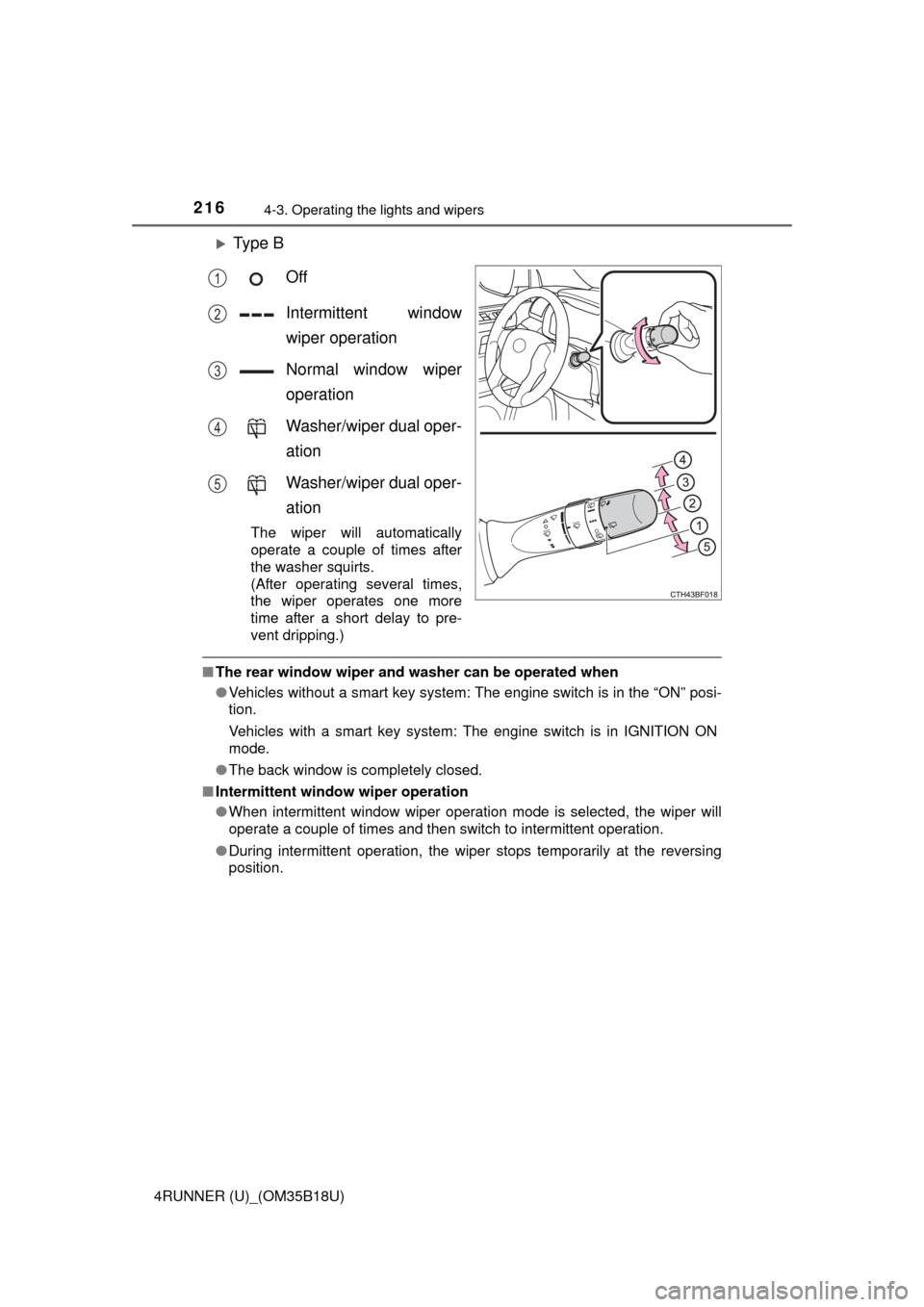
Ty p e BOff
Intermittent window
wiper operation
Normal window wiper
operation
Washer/wiper dual oper-
ation
Washer/wiper dual oper-
ation
The wiper will automatically
operate a couple of times after
the washer squirts.
(After operating several times,
the wiper operates one more
time after a short delay to pre-
vent dripping.)
■The rear window wiper and w asher can be operated when
● Vehicles without a smart key system: The engine switch is in the “ON” posi-
tion.
Vehicles with a smart key system: The engine switch is in IGNITION ON
mode.
● The back window is completely closed.
■ Intermittent window wiper operation
●When intermittent window wiper operation mode is selected, the wiper will
operate a couple of times and then switch to intermittent operation.
● During intermittent operation, the wiper stops temporarily at the reversing
position.
1
2
3
4
5
Page 217 of 524

2174-3. Operating the lights and wipers
4
Driving
4RUNNER (U)_(OM35B18U)■
When the rear window wiper and washer switch is turned off
The rear wiper will stop operation, and return to the retracted position after
approximately 3 seconds.
However, if the engine switch is turned to the “ACC” or “LOCK” position (vehi-
cles without a smart key system) or the engine switch is turned to ACCES-
SORY mode or turned off (vehicles with a smart key system) while the rear
wiper is operating, the rear wiper will stop at that position and will not return to
the retracted position.
■ If no washer fluid sprays
Check that the washer nozzle is not blocked if there is washer fluid in the
washer fluid reservoir.
■ Customization
Settings (e.g. drip prevention function) can be changed.
(Customizable features P. 481)
NOTICE
■When the rear window is dry
Do not use the wiper, as it may damage the rear window.
■ When the washer fluid tank is empty
Do not operate the switch continually as the washer fluid pump may over-
heat.
■ When a nozzle becomes blocked
In this case, contact your Toyota dealer.
Do not try to clear it with a pin or other object. The nozzle will be damaged\
.
Page 218 of 524
218
4RUNNER (U)_(OM35B18U)
4-4. Refueling
●Close all the doors and windows, and turn the engine switch off.
● Confirm the type of fuel.
■Fuel types
Use unleaded gasoline (Octane rating 87 [Research Octane Number 91] or
higher)
Opening the fuel tank cap
Perform the following steps to open the fuel tank cap:
Before refueling the vehicle
Page 227 of 524
2274-5. Using the driving support systems
4
Driving
4RUNNER (U)_(OM35B18U)
Approximately 2.0 ft. (60 cm)
Approximately 4.9 ft. (150 cm)
The diagram shows the detection
range of the sensors. Note that the
sensors cannot detect obstacles
that are extremely close to the
vehicle.
The range of the sensors may
change depending on the shape of
the object etc.
■Intuitive parking assist can be operated when
●Front corner sensors:
• The engine switch is in the “ON” position (without a smart key system) or
the engine switch is in IGNITION ON mode (with a smart key system).
• The shift lever is in a position other than P.
• The vehicle speed is less than approximately 6 mph (10 km/h).
● Rear corner and rear center sensors:
• The engine switch is in the “ON” position (without a smart key system) or
the engine switch is in IGNITION ON mode (with a smart key system).
• The shift lever is in R.
Detection range of the sensors
1
2
Page 228 of 524

2284-5. Using the driving support systems
4RUNNER (U)_(OM35B18U)■
Sensor detection information
●The sensor’s detection areas are limited to the areas around the vehicle’s
front corner and rear bumpers.
● Certain vehicle conditions and the surrounding environment may affect the
ability of the sensor to correctly detect obstacles. Particular instances where
this may occur are listed below.
• There is dirt, snow or ice on the sensor. (Wiping the sensors will resolve
this problem.)
• The sensor is frozen. (Thawing the area will resolve this problem.)
In especially cold weather, if a sensor is frozen the screen may show an
abnormal display, or obstacles may not be detected.
• The sensor is covered in any way.
• The vehicle is leaning considerably to one side.
• On an extremely bumpy road, on an incline, on gravel, or on grass.
• The vicinity of the vehicle is noisy due to vehicle horns, motorcycleengines, air brakes of large vehicles, or other loud noises producing ultra-
sonic waves.
• There is another vehicle equipped with parking assist sensors in the
vicinity.
• The sensor is coated with a sheet of spray or heavy rain.
• The vehicle is equipped with a fender pole or wireless antenna.
• Towing eyelet is installed.
• The bumper or sensor receives a strong impact.
• The vehicle is approaching a tall or curved curb.
• In harsh sunlight or intense cold weather.
• The area directly under the bumpers is not detected.
• If obstacles draw too close to the sensor.
• A non-genuine Toyota suspension (lowered suspension etc.) is installed.
• People may not be detected if they are wearing certain types of clothing.
In addition to the examples above, there are instances in which, because of
their shape, signs and other objects may be judged by the sensor to be closer
than they are.
● The shape of the obstacle may prevent the sensor from detecting it. Pay
particular attention to the following obstacles:
• Wires, fences, ropes, etc.
• Cotton, snow and other materials that absorb sound waves
• Sharply-angled objects
• Low obstacles
• Tall obstacles with upper sections projecting outwards in the direction of
your vehicle
Page 237 of 524
2374-5. Using the driving support systems
4
Driving
4RUNNER (U)_(OM35B18U)■
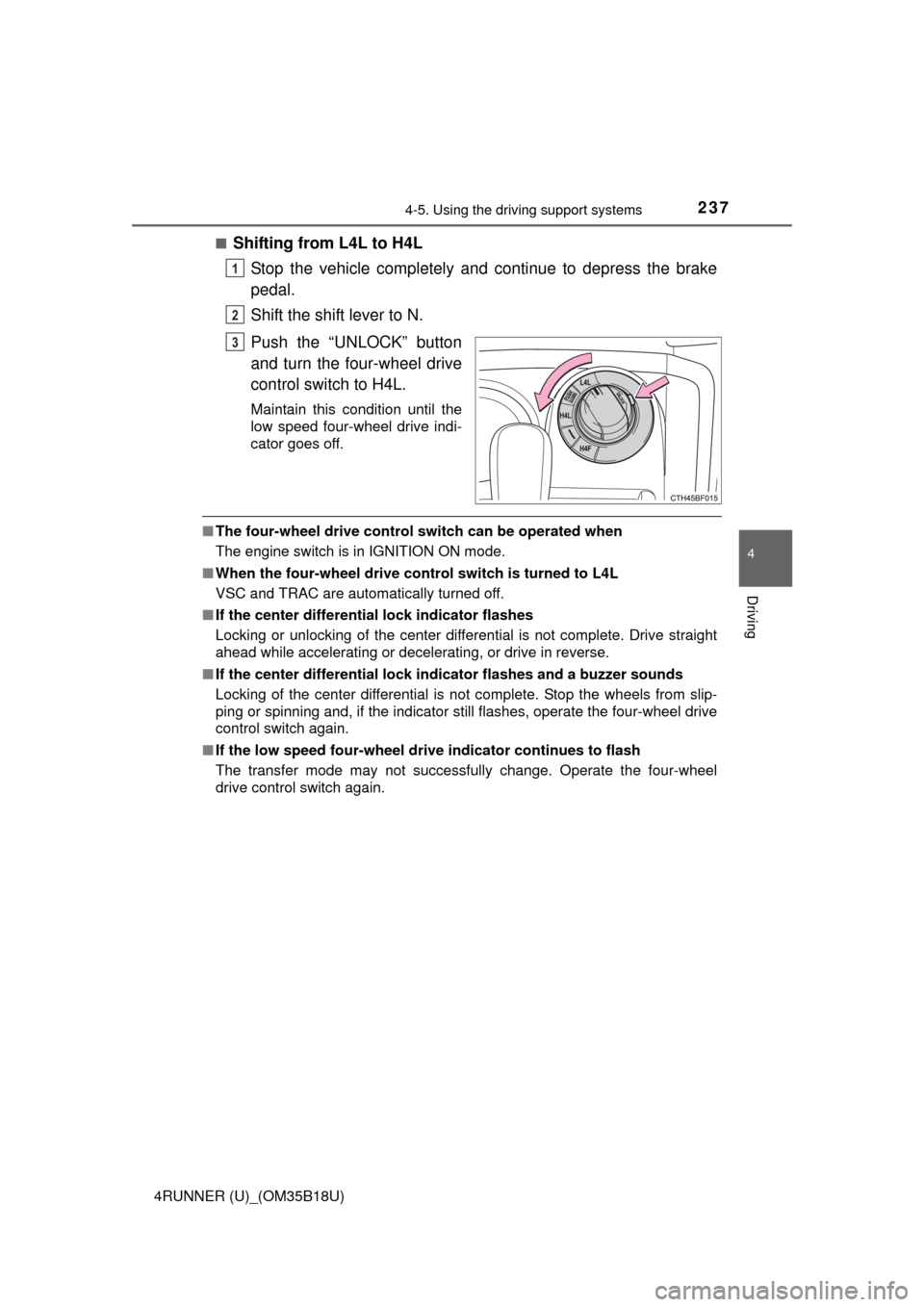
Shifting from L4L to H4L
Stop the vehicle completely and continue to depress the brake
pedal.
Shift the shift lever to N.
Push the “UNLOCK” button
and turn the four-wheel drive
control switch to H4L.
Maintain this condition until the
low speed four-wheel drive indi-
cator goes off.
■The four-wheel drive control switch can be operated when
The engine switch is in IGNITION ON mode.
■ When the four-wheel drive cont rol switch is turned to L4L
VSC and TRAC are automatically turned off.
■ If the center differential lock indicator flashes
Locking or unlocking of the center differential is not complete. Drive straight
ahead while accelerating or decelerating, or drive in reverse.
■ If the center differential lock in dicator flashes and a buzzer sounds
Locking of the center differential is not complete. Stop the wheels from slip-
ping or spinning and, if the indicator still flashes, operate the four-wheel drive
control switch again.
■ If the low speed four-wheel dr ive indicator continues to flash
The transfer mode may not successfully change. Operate the four-wheel
drive control switch again.
1
2
3
Page 240 of 524
2404-5. Using the driving support systems
4RUNNER (U)_(OM35B18U)
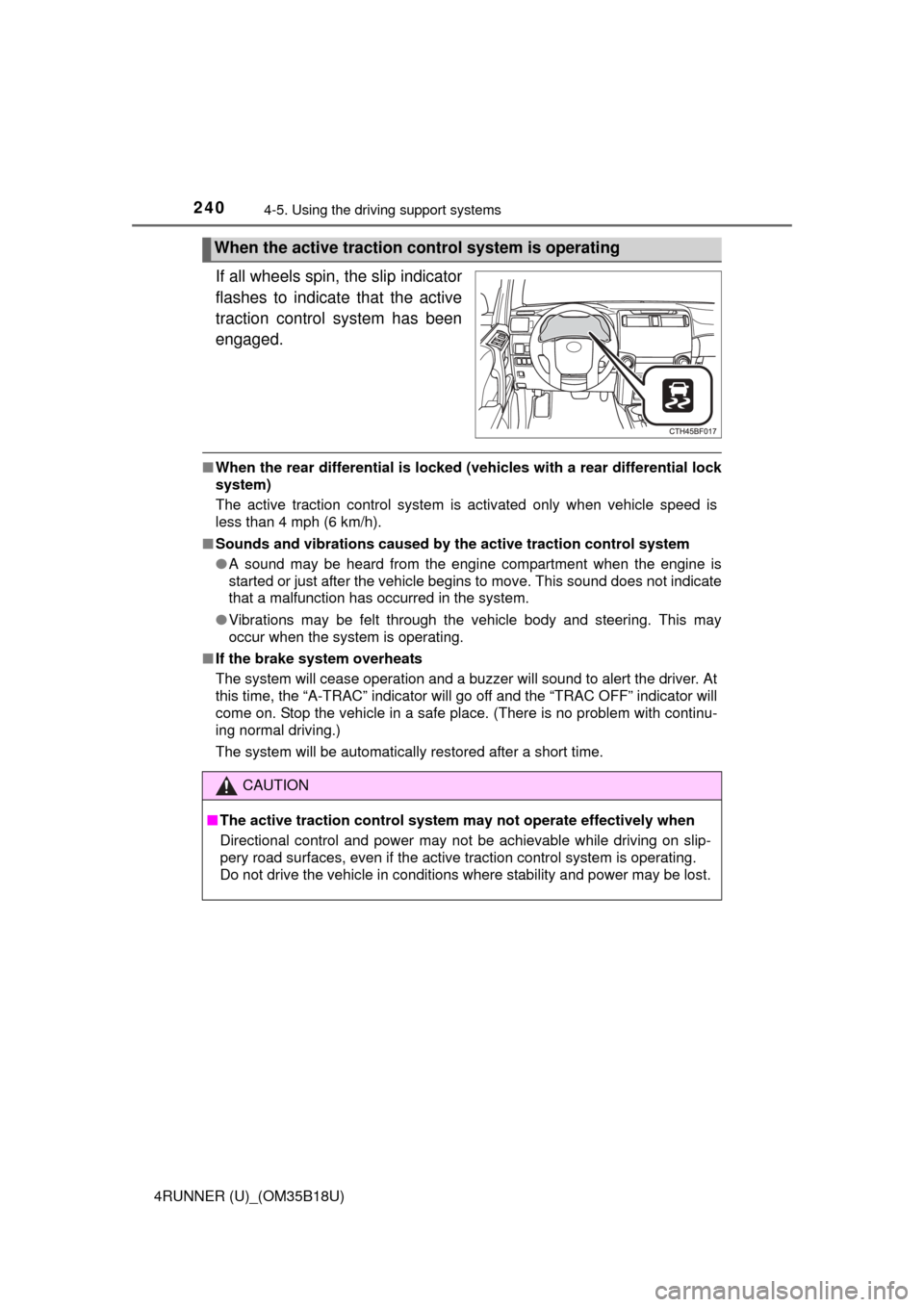
If all wheels spin, the slip indicator
flashes to indicate that the active
traction control system has been
engaged.
■ When the rear differential is locked (vehicles with a rear differential lock
system)
The active traction control system is activated only when vehicle speed is
less than 4 mph (6 km/h).
■ Sounds and vibrations caused by the active traction control system
● A sound may be heard from the engine compartment when the engine is
started or just after the vehicle begins to move. This sound does not indicate
that a malfunction has occurred in the system.
● Vibrations may be felt through the vehicle body and steering. This may
occur when the system is operating.
■ If the brake system overheats
The system will cease operation and a buzzer will sound to alert the driver. At
this time, the “A-TRAC” indicator will go off and the “TRAC OFF” indicator will
come on. Stop the vehicle in a safe place. (There is no problem with continu-
ing normal driving.)
The system will be automatically restored after a short time.
When the active traction control system is operating
CAUTION
■The active traction control system may not operate effectively when
Directional control and power may not be achievable while driving on slip-
pery road surfaces, even if the active traction control system is operat\
ing.
Do not drive the vehicle in conditions where stability and power may be lost.
Page 241 of 524
2414-5. Using the driving support systems
4
Driving
4RUNNER (U)_(OM35B18U)■
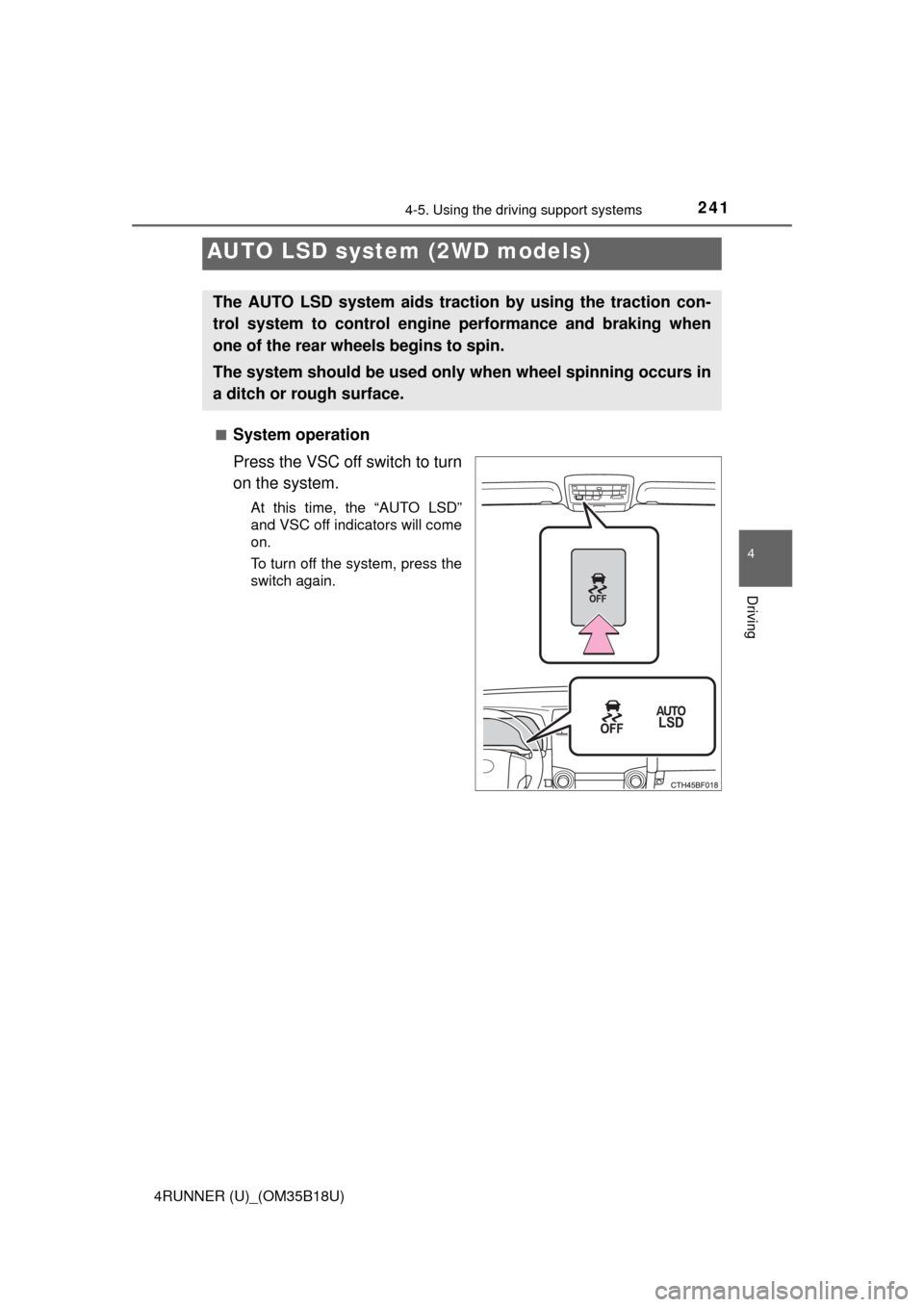
System operation
Press the VSC off switch to turn
on the system.
At this time, the “AUTO LSD”
and VSC off indicators will come
on.
To turn off the system, press the
switch again.
AUTO LSD system
(2WD models)
The AUTO LSD system aids tract ion by using the traction con-
trol system to control engine performance and braking when
one of the rear wheels begins to spin.
The system should be used only when wheel spinning occurs in
a ditch or rough surface.