2015 TATA SAFARI lock
[x] Cancel search: lockPage 30 of 161
30
D R I V I N G C O N T R O L S
ON ONON ON
ON
By turning key to this position all the remaining electrical systems
become operative. The glow plug indicator lights up. After a few seconds
depending on the ambient temperature it goes off. The engine is ready
for cranking.
ST STST ST
ST
AR ARAR AR
AR
T TT T
T
Turn the key further clockwise to the START position (spring loaded) to
start the engine. As soon as the engine starts release the ignition key to
ON position.
NOTICE NOTICENOTICE NOTICE
NOTICE
Do not crank the engine more than 10 secs. continuously. If the
engine does not start wait for 30 secs. before cranking it again.
Release the key immediately after starting the engine otherwise
starter motor/ flywheel ring may get damaged.
By turning the ignition key from ON position to ACC or LOCK position,
engine can be stopped.
STEERING L STEERING LSTEERING L STEERING L
STEERING L
OCK AND IGNITION SWIT OCK AND IGNITION SWITOCK AND IGNITION SWIT OCK AND IGNITION SWIT
OCK AND IGNITION SWIT
CH CHCH CH
CH
ProCarManuals.com
Page 31 of 161
31
D R I V I N G C O N T R O L SIMMOBILISER IMMOBILISERIMMOBILISER IMMOBILISER
IMMOBILISER
Anti-theft security system - Immobiliser (If fitted) Anti-theft security system - Immobiliser (If fitted)Anti-theft security system - Immobiliser (If fitted) Anti-theft security system - Immobiliser (If fitted)
Anti-theft security system - Immobiliser (If fitted)
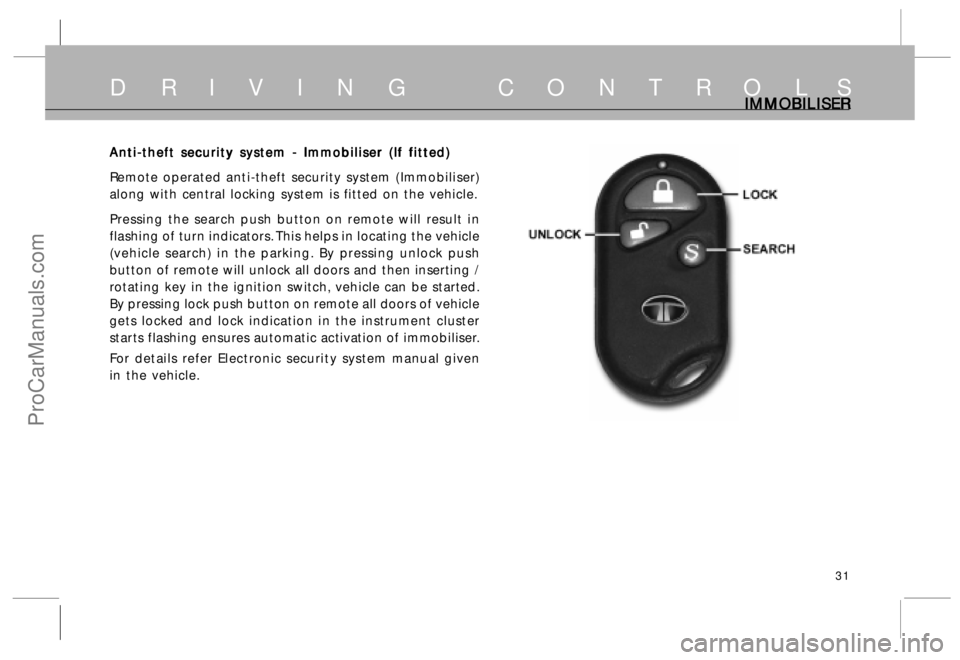
Remote operated anti-theft security system (Immobiliser)
along with central locking system is fitted on the vehicle.
Pressing the search push button on remote will result in
flashing of turn indicators. This helps in locating the vehicle
(vehicle search) in the parking. By pressing unlock push
button of remote will unlock all doors and then inserting /
rotating key in the ignition switch, vehicle can be started.
By pressing lock push button on remote all doors of vehicle
gets locked and lock indication in the instrument cluster
starts flashing ensures automatic activation of immobiliser.
For details refer Electronic security system manual given
in the vehicle.
ProCarManuals.com
Page 37 of 161
37
D R I V I N G C O N T R O L SSTEERING STEERING STEERING STEERING
STEERING
WHEEL POSITION ADJUST WHEEL POSITION ADJUSTWHEEL POSITION ADJUST WHEEL POSITION ADJUST
WHEEL POSITION ADJUST
MENT MENTMENT MENT
MENT
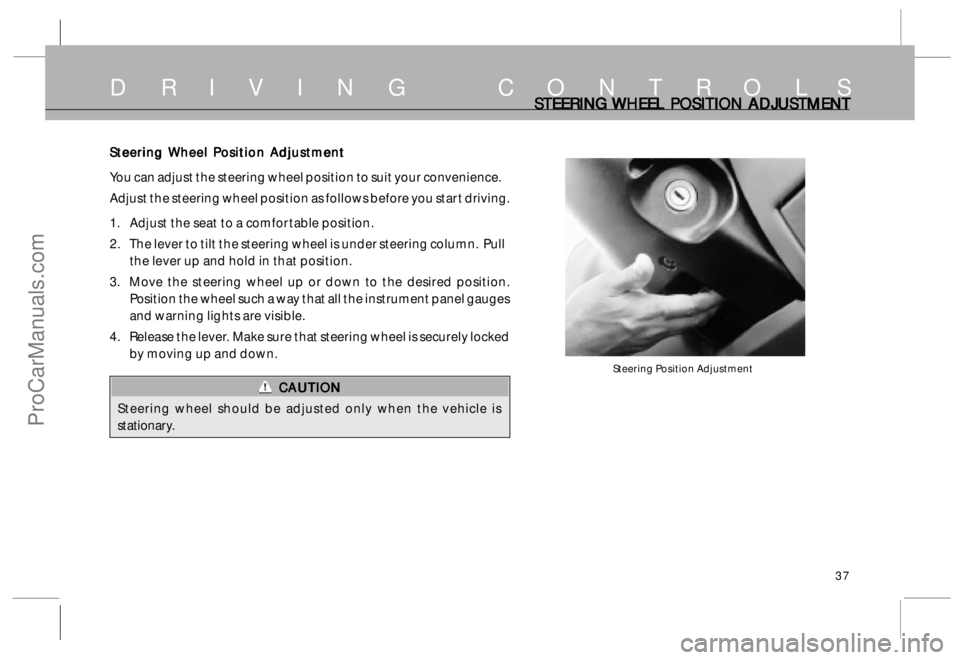
Steering Position Adjustment
Steering Wheel Position Adjustment Steering Wheel Position AdjustmentSteering Wheel Position Adjustment Steering Wheel Position Adjustment
Steering Wheel Position Adjustment
You can adjust the steering wheel position to suit your convenience.
Adjust the steering wheel position as follows before you start driving.
1. Adjust the seat to a comfortable position.
2. The lever to tilt the steering wheel is under steering column. Pull
the lever up and hold in that position.
3. Move the steering wheel up or down to the desired position.
Position the wheel such a way that all the instrument panel gauges
and warning lights are visible.
4. Release the lever. Make sure that steering wheel is securely locked
by moving up and down.
CAUTION CAUTIONCAUTION CAUTION
CAUTION
Steering wheel should be adjusted only when the vehicle is
stationary.
ProCarManuals.com
Page 38 of 161
38
D R I V I N G C O N T R O L SOPER OPEROPER OPER
OPER
A AA A
A
TING SWIT TING SWITTING SWIT TING SWIT
TING SWIT
CHES, CHES,CHES, CHES,
CHES,
FOG L FOG L FOG L FOG L
FOG L
AMPS AND FUEL AMPS AND FUEL AMPS AND FUEL AMPS AND FUEL
AMPS AND FUEL
T TT T
T
ANK FL ANK FLANK FL ANK FL
ANK FL
AP APAP AP
AP
Operating Switches Operating SwitchesOperating Switches Operating Switches
Operating Switches
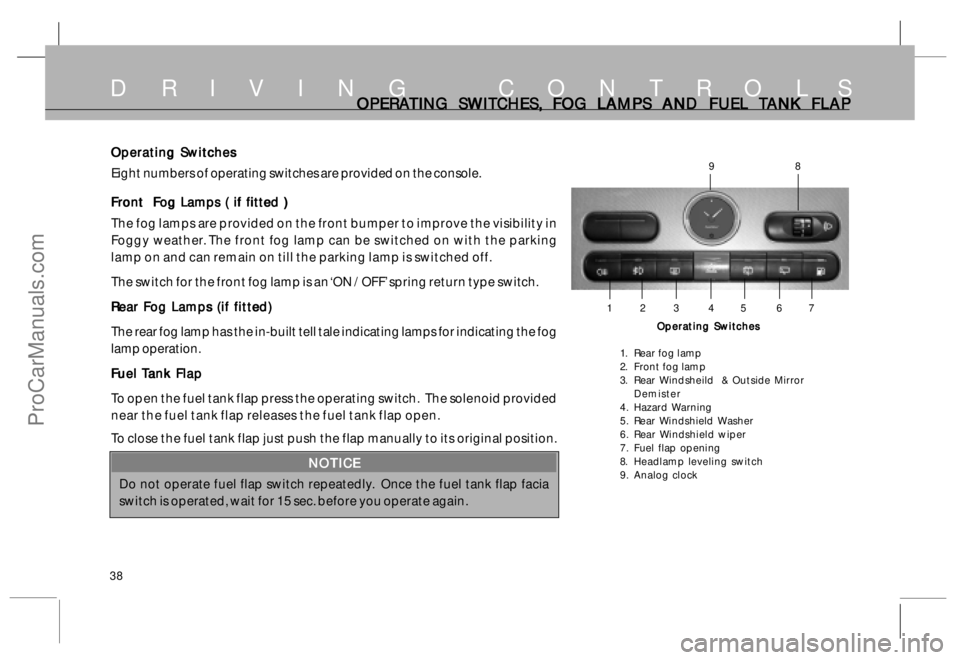
Eight numbers of operating switches are provided on the console.
Front Fog Lamps ( if fitted ) Front Fog Lamps ( if fitted )Front Fog Lamps ( if fitted ) Front Fog Lamps ( if fitted )
Front Fog Lamps ( if fitted )
The fog lamps are provided on the front bumper to improve the visibility in
Foggy weather. The front fog lamp can be switched on with the parking
lamp on and can remain on till the parking lamp is switched off.
The switch for the front fog lamp is an ‘ON / OFF’ spring return type switch.
Rear Fog Lamps (if fitted) Rear Fog Lamps (if fitted)Rear Fog Lamps (if fitted) Rear Fog Lamps (if fitted)
Rear Fog Lamps (if fitted)
The rear fog lamp has the in-built tell tale indicating lamps for indicating the fog
lamp operation.
F FF F
F
uel uel uel uel
uel
T TT T
T
ank F ank Fank F ank F
ank F
lap laplap lap
lap
To open the fuel tank flap press the operating switch. The solenoid provided
near the fuel tank flap releases the fuel tank flap open.
To close the fuel tank flap just push the flap manually to its original position.
NOTICE NOTICENOTICE NOTICE
NOTICE
Do not operate fuel flap switch repeatedly. Once the fuel tank flap facia
switch is operated, wait for 15 sec. before you operate again.
Operating Switches Operating SwitchesOperating Switches Operating Switches
Operating Switches
1. Rear fog lamp
2. Front fog lamp
3. Rear Windsheild & Outside Mirror
Demister
4. Hazard Warning
5. Rear Windshield Washer
6. Rear Windshield wiper
7. Fuel flap opening
8. Headlamp leveling switch
9. Analog clock
1 2 3 4 5 6 7
98
ProCarManuals.com
Page 44 of 161
44
INDICATORS AND INSTRUMENTSINDIC INDICINDIC INDIC
INDIC
A AA A
A
T TT T
T
ORS ORSORS ORS
ORS
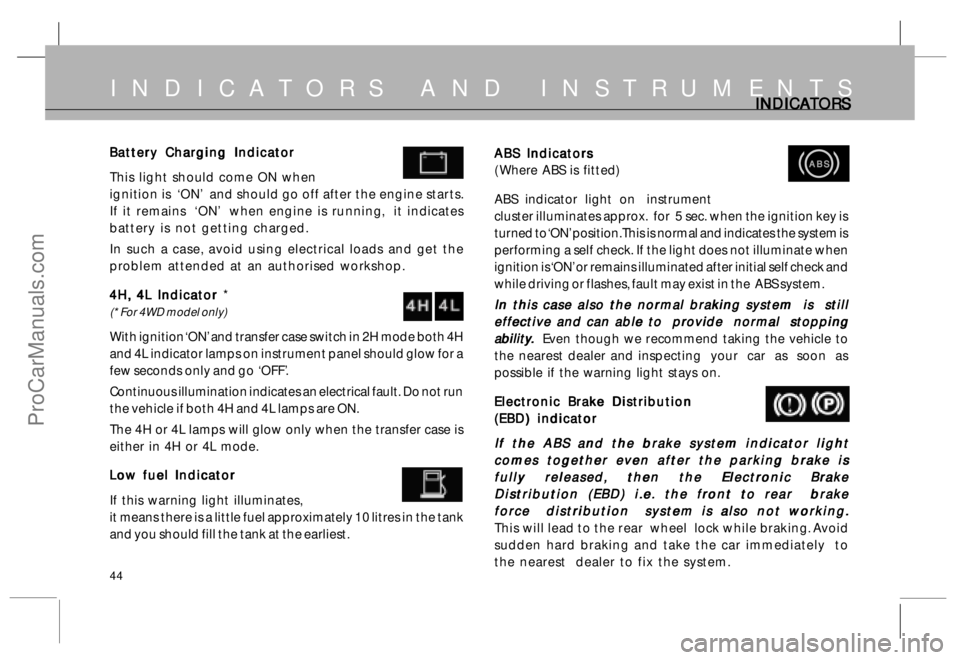
ABS Indicators ABS IndicatorsABS Indicators ABS Indicators
ABS Indicators
( Where ABS is fitted)
ABS indicator light on instrument
cluster illuminates approx. for 5 sec. when the ignition key is
turned to ‘ON’ position. This is normal and indicates the system is
performing a self check. If the light does not illuminate when
ignition is ‘ON’ or remains illuminated after initial self check and
while driving or flashes, fault may exist in the ABS system.
In this case also the normal braking system is still In this case also the normal braking system is stillIn this case also the normal braking system is still In this case also the normal braking system is still
In this case also the normal braking system is still
effective and can able to provide normal stopping effective and can able to provide normal stoppingeffective and can able to provide normal stopping effective and can able to provide normal stopping
effective and can able to provide normal stopping
abilit abilitabilit abilit
abilit
y yy y
y
.. ..
.
Even though we recommend taking the vehicle to
the nearest dealer and inspecting your car as soon as
possible if the warning light stays on.
Electronic Brake Distribution Electronic Brake DistributionElectronic Brake Distribution Electronic Brake Distribution
Electronic Brake Distribution
(EBD) indicator (EBD) indicator(EBD) indicator (EBD) indicator
(EBD) indicator
If the ABS and the brake system indicator light If the ABS and the brake system indicator lightIf the ABS and the brake system indicator light If the ABS and the brake system indicator light
If the ABS and the brake system indicator light
comes together even after the parking brake is comes together even after the parking brake iscomes together even after the parking brake is comes together even after the parking brake is
comes together even after the parking brake is
fully released, then the Electronic Brake fully released, then the Electronic Brakefully released, then the Electronic Brake fully released, then the Electronic Brake
fully released, then the Electronic Brake
Distribution (EBD) i.e. the front to rear brake Distribution (EBD) i.e. the front to rear brakeDistribution (EBD) i.e. the front to rear brake Distribution (EBD) i.e. the front to rear brake
Distribution (EBD) i.e. the front to rear brake
force distribution system is also not working. force distribution system is also not working.force distribution system is also not working. force distribution system is also not working.
force distribution system is also not working.
This will lead to the rear wheel lock while braking. Avoid
sudden hard braking and take the car immediately to
the nearest dealer to fix the system.
ABS ABSABS ABS
ABSBattery Charging Indicator Battery Charging IndicatorBattery Charging Indicator Battery Charging Indicator
Battery Charging Indicator
This light should come ON when
ignition is ‘ON’ and should go off after the engine starts.
If it remains ‘ON’ when engine is running, it indicates
battery is not getting charged.
In such a case, avoid using electrical loads and get the
problem attended at an authorised workshop.
4H, 4L Indicator 4H, 4L Indicator 4H, 4L Indicator 4H, 4L Indicator
4H, 4L Indicator *
(* For 4WD model only)
With ignition ‘ON’ and transfer case switch in 2H mode both 4H
and 4L indicator lamps on instrument panel should glow for a
few seconds only and go ‘OFF’.
Continuous illumination indicates an electrical fault. Do not run
the vehicle if both 4H and 4L lamps are ON.
The 4H or 4L lamps will glow only when the transfer case is
either in 4H or 4L mode.
Low fuel Indicator Low fuel IndicatorLow fuel Indicator Low fuel Indicator
Low fuel Indicator
If this warning light illuminates,
it means there is a little fuel approximately 10 litres in the tank
and you should fill the tank at the earliest.
ProCarManuals.com
Page 46 of 161
46
INDICATORS AND INSTRUMENTSINDIC INDICINDIC INDIC
INDIC
A AA A
A
T TT T
T
ORS ORSORS ORS
ORS
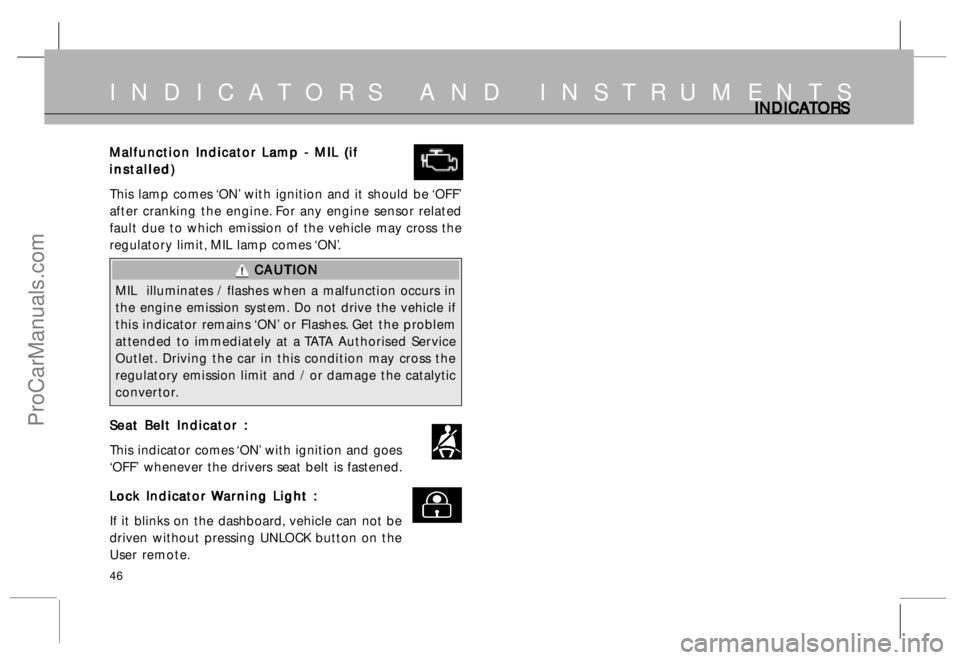
Malfunction Indicator Lamp - MIL (if Malfunction Indicator Lamp - MIL (ifMalfunction Indicator Lamp - MIL (if Malfunction Indicator Lamp - MIL (if
Malfunction Indicator Lamp - MIL (if
installed) installed)installed) installed)
installed)
This lamp comes ‘ON’ with ignition and it should be ‘OFF’
after cranking the engine. For any engine sensor related
fault due to which emission of the vehicle may cross the
regulatory limit, MIL lamp comes ‘ON’.
CAUTION CAUTIONCAUTION CAUTION
CAUTION
MIL illuminates / flashes when a malfunction occurs in
the engine emission system. Do not drive the vehicle if
this indicator remains ‘ON’ or Flashes. Get the problem
attended to immediately at a TATA Authorised Service
Outlet. Driving the car in this condition may cross the
regulatory emission limit and / or damage the catalytic
convertor.
Seat Belt Indicator : Seat Belt Indicator :Seat Belt Indicator : Seat Belt Indicator :
Seat Belt Indicator :
This indicator comes ‘ON’ with ignition and goes
‘OFF’ whenever the drivers seat belt is fastened.
L LL L
L
o oo o
o
ck Indic ck Indicck Indic ck Indic
ck Indic
a aa a
a
t tt t
t
or or or or
or
W WW W
W
ar arar ar
ar
ning Ligh ning Lighning Ligh ning Ligh
ning Ligh
t : t :t : t :
t :
If it blinks on the dashboard, vehicle can not be
driven without pressing UNLOCK button on the
User remote.
ProCarManuals.com
Page 47 of 161
47
INDICATORS AND INSTRUMENTSGA GAGA GA
GA
UGES UGESUGES UGES
UGES
Speedometer
Display for Trip - B
Mode Selector Mode SelectorMode Selector Mode Selector
Mode Selector
Knob KnobKnob Knob
Knob
Display for Trip - A
Odometer OdometerOdometer Odometer
Odometer
T TT T
T
r rr r
r
ipmet ipmetipmet ipmet
ipmet
er erer er
er
or Intensity level of or Intensity level ofor Intensity level of or Intensity level of
or Intensity level of
panel illumination panel illuminationpanel illumination panel illumination
panel illumination
Set SetSet Set
Set
Knob KnobKnob Knob
Knob
S SS S
S
p pp p
p
eedomet eedometeedomet eedomet
eedomet
er erer er
er
,, ,,
,
M M M M
M
ain O ain Oain O ain O
ain O
domet dometdomet domet
domet
er and er and er and er and
er and
T TT T
T
r rr r
r
ipmet ipmetipmet ipmet
ipmet
er (on L er (on Ler (on L er (on L
er (on L
CD) : CD) :CD) : CD) :
CD) :
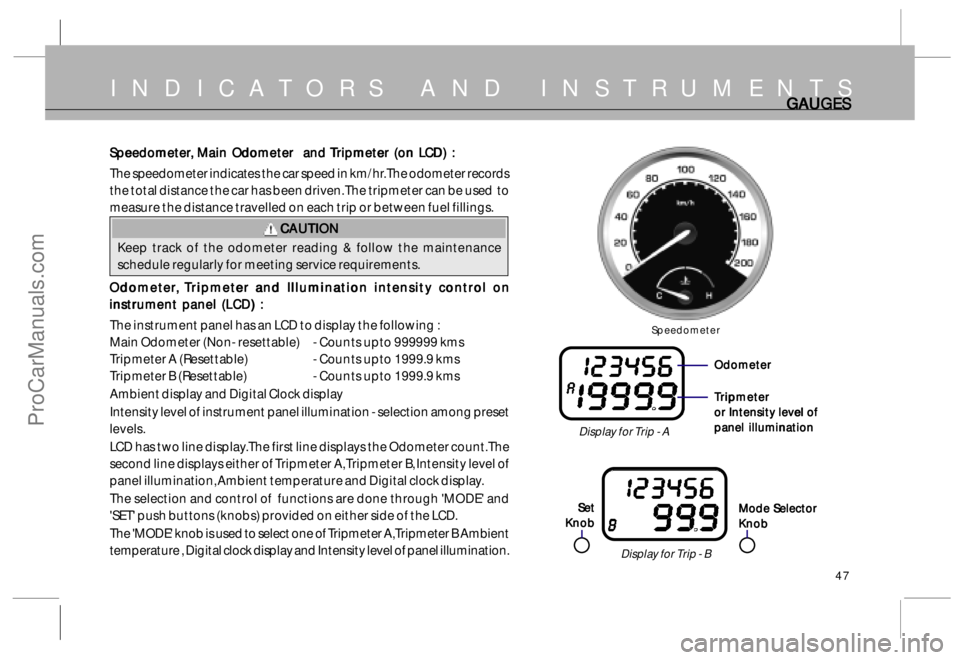
The speedometer indicates the car speed in km/hr. The odometer records
the total distance the car has been driven. The tripmeter can be used to
measure the distance travelled on each trip or between fuel fillings.
CAUTION CAUTIONCAUTION CAUTION
CAUTION
Keep track of the odometer reading & follow the maintenance
schedule regularly for meeting service requirements.
O OO O
O
domet dometdomet domet
domet
er erer er
er
,, ,,
,
T T
T T
T
r rr r
r
ipmet ipmetipmet ipmet
ipmet
er and I er and Ier and I er and I
er and I
llumina lluminallumina llumina
llumina
tion in tion intion in tion in
tion in
t tt t
t
ensit ensitensit ensit
ensit
y c y cy c y c
y c
on onon on
on
tr trtr tr
tr
ol on ol onol on ol on
ol on
instrument panel (LCD) : instrument panel (LCD) :instrument panel (LCD) : instrument panel (LCD) :
instrument panel (LCD) :
The instrument panel has an LCD to display the following :
Main Odometer (Non- resettable) - Counts upto 999999 kms
Tripmeter A (Resettable)- Counts upto 1999.9 kms
Tripmeter B (Resettable)- Counts upto 1999.9 kms
Ambient display and Digital Clock display
Intensity level of instrument panel illumination - selection among preset
levels.
LCD has two line display.The first line displays the Odometer count.The
second line displays either of Tripmeter A, Tripmeter B, Intensity level of
panel illumination, Ambient temperature and Digital clock display.
The selection and control of functions are done through 'MODE' and
'SET' push buttons (knobs) provided on either side of the LCD.
The 'MODE' knob is used to select one of Tripmeter A, Tripmeter B Ambient
temperature , Digital clock display and Intensity level of panel illumination.
ProCarManuals.com
Page 48 of 161
48
INDICATORS AND INSTRUMENTSGA GAGA GA
GA
UGES UGESUGES UGES
UGES
Intensity Level Indicator
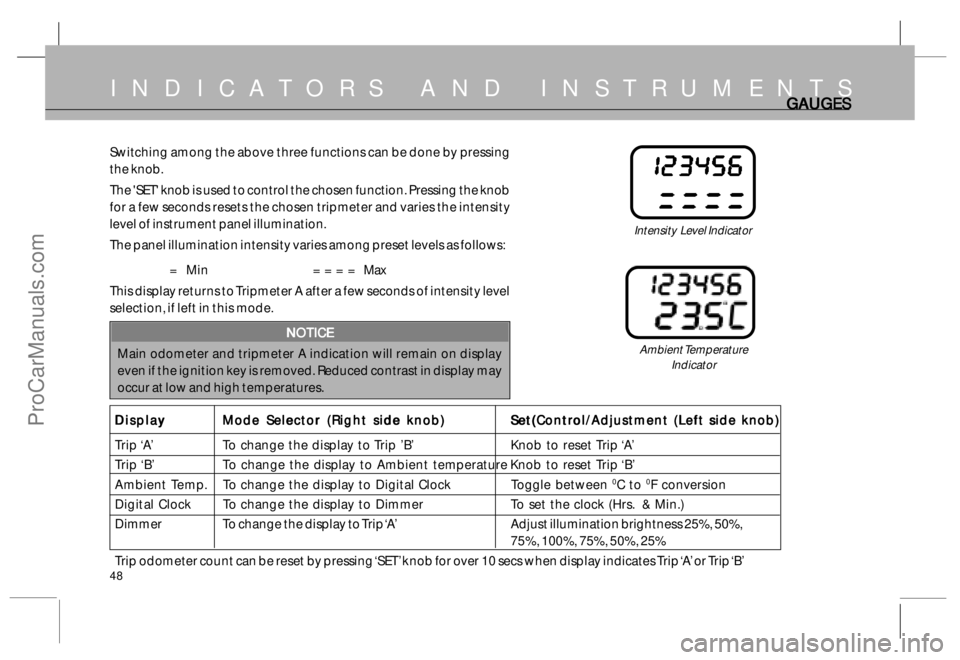
Switching among the above three functions can be done by pressing
the knob.
The 'SET' knob is used to control the chosen function. Pressing the knob
for a few seconds resets the chosen tripmeter and varies the intensity
level of instrument panel illumination.
The panel illumination intensity varies among preset levels as follows:
= Min = = = = Max
This display returns to Tripmeter A after a few seconds of intensity level
selection, if left in this mode.
NOTICE NOTICENOTICE NOTICE
NOTICE
Main odometer and tripmeter A indication will remain on display
even if the ignition key is removed. Reduced contrast in display may
occur at low and high temperatures.
Display DisplayDisplay Display
Display
Mode Selector (Right side knob) Mode Selector (Right side knob)Mode Selector (Right side knob) Mode Selector (Right side knob)
Mode Selector (Right side knob)
Set(Control/Adjustment (Left side knob) Set(Control/Adjustment (Left side knob)Set(Control/Adjustment (Left side knob) Set(Control/Adjustment (Left side knob)
Set(Control/Adjustment (Left side knob)
Trip ‘A’ To change the display to Trip ’B’ Knob to reset Trip ‘A’
Trip ‘B’ To change the display to Ambient temperature Knob to reset Trip ‘B’
Ambient Temp. To change the display to Digital Clock Toggle between
0C to 0F conversion
Digital Clock To change the display to Dimmer To set the clock (Hrs. & Min.)
Dimmer To change the display to Trip ‘A’ Adjust illumination brightness 25%, 50%,
75%, 100%, 75%, 50%, 25%
Trip odometer count can be reset by pressing ‘SET’ knob for over 10 secs when display indicates Trip ‘A’ or Trip ‘B’
Ambient Temperature
Indicator
ProCarManuals.com