2015 SUZUKI CELERIO Control
[x] Cancel search: ControlPage 49 of 201

2-27
BEFORE DRIVING
76MH1-74E
76MH1-74E
Note that even though your vehicle may be moderately damaged in a frontal collision,the collision may not have been severe enough to trigger the air bags to inflate. If your vehicle sustains ANY front-end dam-age, have the air bag system inspected by an authorized MARUTI SUZUKI dealer to ensure it is in proper working order.
Your vehicle is equipped with a diagnostic module which records information aboutthe air bag system if the air bags deploy ina crash. The module records informationabout overall system status, which sensorsactivated the deployment, and for a certain vehicle only, whether the driver’s seat belt was in use.
Servicing the air bag system If the air bags inflate, have the air bags andrelated components replaced by an autho- rized MARUTI SUZUKI dealer as soon as possible.
If your vehicle ever gets in deep water and the driver’s floor is submerged, the air bagcontroller could be damaged. If it does, have the air bag system inspected by theMARUTI SUZUKI dealer as soon as possi- ble.
Special procedures are required for servic- ing or replacing an air bag. For that reason, only an authorized MARUTI SUZUKI dealer should be allowed to service orreplace your air bags. Please remind any-
one who services your vehicle that it has air bags.
Service on or around air bag components or wiring must be performed only by an authorized MARUTI SUZUKI dealer.Improper service could result in unin- tended air bag deployment or could render the air bag inoperative. Either of these twoconditions may result in severe injury.
To prevent damage or unintended inflation of the air bag system, be sure the batteryis disconnected and the ignition switch hasbeen in the “LOCK” position for at least 90seconds before performing any electrical service work on your vehicle. Do not touch air bag system components or wires. Thewires are wrapped with yellow tape or yel- low tubing, and the couplers are yellow for easy identification.
Scrapping a vehicle that has an uninflated air bag can be hazardous. Ask your dealer,body repair shop or scrap yard for help with disposal.
38
Page 51 of 201

2-29
BEFORE DRIVING
76MH1-74E
76MH1-74E
Speedometer
The speedometer indicates vehicle speed.
Tachometer (if equipped)
The tachometer indicates engine speed in revolutions per minute.
Fuel Gauge
With tachometer
76MH0A037
Without tachometer
76MH0A038
When the ignition switch is in the “ON” position, this gauge gives an approximate indication of the amount of fuel in the fueltank. “F” stands for full and “E” stands for empty.
If the fuel meter indicator shows only one segment to “E”, refill the tank as soon aspossible.
NOTE: If the last segment blinks, it means that thefuel is almost empty.
If the low fuel warning light (1) comes on, fill the fuel tank immediately.
NOTE:The activation point of the low fuel warning light (1) varies depending on road condi- tions (for example, slope or curve) anddriving conditions because of fuel moving in the tank.
Refer to “Low Fuel Warning Light” in“Warning and Indicator Lights” in this sec- tion for details.
The mark (2) indicates that the fuel filler door is located on the left side of the vehi-cle.
Brightness Control
76MH0A039
When the ignition switch is turned to the“ON” position, the pointer lights come on.
Your vehicle has a system to automaticallydim the brightness of the instrument panellights when the position lights or headlights are on.
When the position lights and/or headlights are ON, you can control the meter illumina- tion intensity.
NOTICE
Never drive the vehicle with theengine revving in the red zone, orsevere engine damage can result. Keep the engine speed below the red zone even when downshifting to alower gear position. Refer to “Down- shifting maximum allowable speeds” in the “OPERATING YOUR VEHICLE”section.
(1)(2)
EXAMPLE
(1)
(2)
EXAMPLE(1)
EXAMPLE
40
Page 52 of 201

2-30
BEFORE DRIVING
76MH1-74E
76MH1-74E
To increase the brightness of the instru- ment panel lights, turn the brightness con- trol knob (1) clockwise.To reduce the brightness of the instrument panel lights, turn the brightness control knob (1) counterclockwise.
NOTE: • If you do not turn the brightness controlknob within about 5 seconds of activat-ing the brightness control display, thebrightness control display will be can- celed automatically.• When you reconnect the battery, thebrightness of the instrument panel lightswill be reinitialized. Readjust the bright- ness according to your preference.
Information Display
76MH0A032
with tachometer
76MH0A040
without tachometer
76MH0A041
(1) Trip meter selector knob (2) Indicator selector knob (3) Information display
When the ignition switch is in the “ON”position, the information display shows thefollowing information.
Display (A) Clock
Display (B) Fuel gauge
Display (C) Trip meter / Odometer / Fuel consumption / Driving range
Display (D) Gear position indicator (for Auto Gear Shift models)
Display (E) Thermometer (if equipped)
WA R N I N G
If you attempt to adjust the displaywhile driving, you could lose controlof the vehicle.
Do not attempt to adjust the displaywhile driving.
(2)
(1)EXAMPLE
(3)
(A) (E)
(B)
(C)
(D)
EXAMPLE
(3)
(A)
(B)(C)
EXAMPLE
41
Page 53 of 201
2-31
BEFORE DRIVING
76MH1-74E
76MH1-74E
ClockWhen the ignition switch is in the “ON” position, the display (A) shows the time.
To change the time indication: 1) Push the trip meter selector knob (1)and the indicator selector knob (2)together.2) To change the hour indication, turn theindicator selector knob (2) left or rightrepeatedly when the hour indicationblinks. To change the hour indication quickly, turn and hold the indicator selec- tor knob (2). To set the hour indication,push the indicator selector knob (2) and the minute indication will blink.3) To change the minute indication, turn theindicator selector knob (2) left or rightrepeatedly when the minute indication blinks. To change the minute indicationquickly, turn and hold the indicator selec- tor knob (2). To set the minute indication, push the indicator selector knob (2).
NOTE: When you reconnect the negative (–) ter-minal to the battery, the clock indication will be reinitialized. Change the indication again to your preference.
Fuel GaugeWhen the ignition switch is in the “ON”position, the display (B) shows the fuel gauge.
Refer to “Fuel Gauge” in this section.
Trip meter / Odometer / Fuel con-
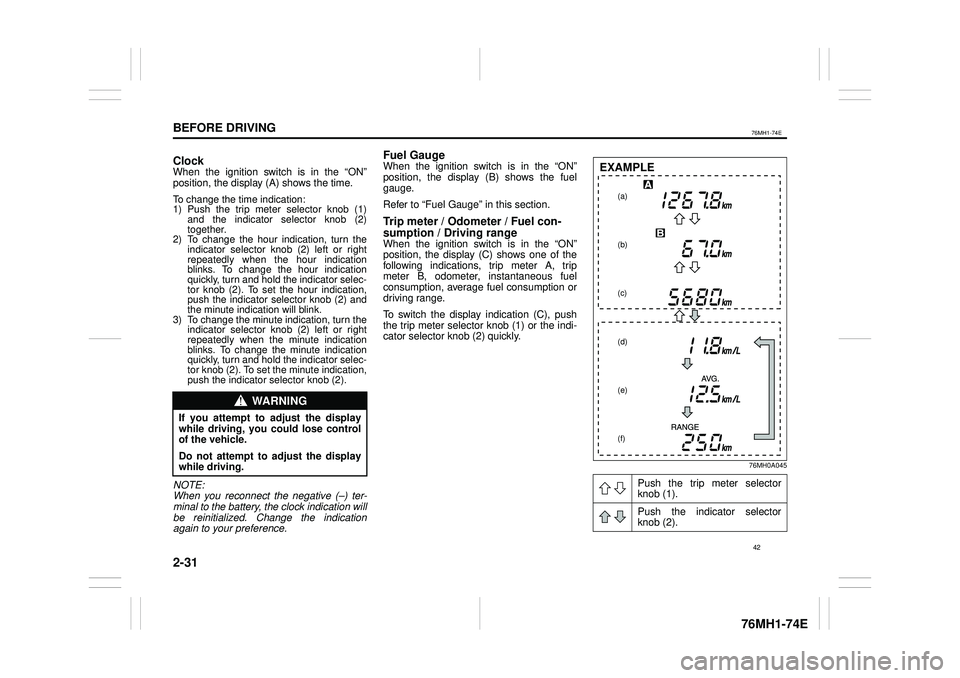
sumption / Driving rangeWhen the ignition switch is in the “ON” position, the display (C) shows one of the following indications, trip meter A, tripmeter B, odometer, instantaneous fuel consumption, average fuel consumption or driving range.
To switch the display indication (C), push the trip meter selector knob (1) or the indi-cator selector knob (2) quickly.
76MH0A045
WA R N I N G
If you attempt to adjust the display while driving, you could lose control of the vehicle.
Do not attempt to adjust the displaywhile driving.
Push the trip meter selector knob (1).
Push the indicator selector knob (2).
(a)
(b)
(c)
(d)
(e)
(f)
EXAMPLE
42
Page 54 of 201

2-32
BEFORE DRIVING
76MH1-74E
76MH1-74E
(a) Trip meter A (b) Trip meter B (c) Odometer(d) Instantaneous fuel consumption (e) Average fuel consumption (f) Driving range
NOTE:• Indications will change when you pushand release a knob.• The display shows estimated values.Indications may not be the same as actual values.Trip meter The trip meter can be used to measure the distance traveled on short trips or between fuel stops.You can use the trip meter A or trip meter B independently.
To reset the trip meter to zero, push and hold the trip meter selector knob (1) for a while when the display shows the tripmeter.
NOTE: The indicated maximum value of the trip meter is 9999.9. When you run past the
maximum value, the indicated value willreturn to 0.0.
Odometer The odometer records the total distance the vehicle has been driven.
Instantaneous Fuel ConsumptionThe display shows the value of instanta- neous fuel consumption only when the vehi- cle is moving.
NOTE:• The display does not show the valueunless the vehicle is moving.• The indicated maximum value of instanta-neous fuel consumption is 30. No more than 30 will be indicated on the displayeven if the actual instantaneous fuel con-sumption is higher.• The indication on the display may bedelayed if fuel consumption is greatly affected by driving conditions.• The display shows estimated values. Indi-cations may not be the same as actual values.• You can change the units that instanta-neous fuel consumption is displayed in.Refer to “Average fuel consumption” in this section.
Average fuel consumptionIf you selected average fuel consumptionthe last time you drove the vehicle, the dis- play shows the last value of average fuelconsumption from previous driving when the ignition switch is turned to the “ON”position. Unless you reset the value of aver- age fuel consumption, the display indicates the value of average fuel consumption which includes average fuel consumptionduring previous driving.
To reset the average fuel consumption to zero, push and hold the indicator selector knob (2) for a while when the display shows the average fuel consumption.
NOTE: When you reset the indication or reconnectthe negative (–) terminal to the battery, the value of average fuel consumption will be shown after driving for a while.
To change the unit of average fuel con- sumption, while pushing and holding thetrip meter selector knob (1), turn the indi- cator selector knob (2).
76MH0A046
WA R N I N G
If you attempt to adjust the display while driving, you could lose controlof the vehicle.
Do not attempt to adjust the displaywhile driving.
NOTICE
Keep track of your odometer reading and check the maintenance scheduleregularly for required services. Increased wear or damage to certain parts can result from failure to performrequired services at the proper mile-age intervals.
EXAMPLE
(Initial setting)
43
Page 59 of 201

2-37
BEFORE DRIVING
76MH1-74E
76MH1-74E
76MH0017
NOTE: • As shown in the above illustration,“ ” indicates on the display of cur- rently setting item.• To go back to the higher level displayduring operation, turn the indicatorselector knob (2) to display “bACK” or“-bAC” and then push the indicatorselector knob (2).• If the security system “S1” is in the dis-abled state, the shock sensor “S2”, pre-warning sensitivity “S3” and full blastwarning sensitivity “S4” cannot be setup.
5) To exit the setting mode, switch the dis-play to show “End” and then push theindicator selector knob (2).
Warning and Indicator Lights
Brake System Warning Light
65D477
Three different types of operations existdepending on the vehicle’s specification.
1) The light comes on briefly when theignition switch is turned to the “ON” position.2) The light comes on when the parkingbrake is engaged with the ignition switch in the “ON” position.3) The light comes on when under eitheror both of above two conditions.
The light also comes on when the fluid in the brake fluid reservoir falls below the specified level.The light should go out after starting the engine and fully releasing the parking brake, if the fluid level in the brake fluid res-ervoir is adequate. The light also comes on together with the ABS warning light when the rear brakeforce control function (proportioning valve function) of the ABS system fails. If the brake system warning light comes onwhile you are driving the vehicle, it may mean that there is something wrong with
the vehicle’s brake system. If this happens,you should:
1) Pull off the road and stop carefully.
2) Test the brakes by carefully starting andstopping at the side of the road.– If you determine that it is safe, drivecarefully at low speed to the nearest dealer for repairs, or– Have the vehicle towed to the nearestdealer for repairs.
EXAMPLE
WA R N I N G
Remember that stopping distancemay be longer, you may have to push harder on the pedal, and the pedal may go down farther than normal.
WA R N I N G
If any of the following conditions occur, you should immediately ask your MARUTI SUZUKI dealer toinspect the brake system. • If the brake system warning lightdoes not go out after the engine has been started and the parking brake has been fully released.• If the brake system warning lightdoes not come on when the igni-tion switch is turned to the “ON” position.• If the brake system warning lightcomes on at any time during vehi-cle operation.
48
Page 60 of 201

2-38
BEFORE DRIVING
76MH1-74E
76MH1-74E
NOTE: Because the disc brake system is self- adjusting, the fluid level will drop as thebrake pads become worn. Replenishing the brake fluid reservoir is considered nor- mal periodic maintenance.
NOTE: (Parking Brake Reminder Buzzer) (ifequipped) A buzzer sounds intermittently to remind you to release the parking brake if youstart the vehicle without releasing the park- ing brake. Make sure that the parking brake is fully released and the brake sys-tem warning light turns off.
Seat Belt Warning Light
(if equipped)
60G049
This light blinks as a reminder until the driver’s seat belt is buckled.
For details about the seat belt reminder, refer to “Seat Belts and Child Restraint Systems” in this section.
“AIR BAG” Light (if equipped)
63J030
This light blinks or comes on for severalseconds when the ignition switch is turned to the “ON” position so you can check if the light is working.
The light will come on and stay on if there is a problem in the air bag system (ifequipped).
Anti-Lock Brake System (ABS)
Warning Light (if equipped)
65D529
When the ignition switch is turned to the “ON” position, the light comes on briefly so you can check that the light is working. If the light stays on, or comes on whendriving, there may be something wrong with the ABS.
If this happens: 1) Pull off the road and stop carefully.2) Turn the ignition switch to “LOCK” andthen start the engine again.
If the warning light comes on briefly then turns off, the system is normal. If the warn- ing light still stays on, the system will besomething wrong.
If the light and the brake system warning light stay on, or come on simultaneously when driving, your ABS system is equipped with the rear brake force controlfunction (proportioning valve function) and there may be something wrong with both the rear brake force control function andanti-lock function of the ABS system.
WA R N I N G
If the “AIR BAG” light does not blinkor come on briefly when the ignition switch is turned to the “ON” position,stays on for more than 10 seconds, or comes on while driving, the air bag system (if equipped) may not workproperly. Have both systems inspected by an authorized MARUTI SUZUKI dealer.
49
Page 61 of 201

2-39
BEFORE DRIVING
76MH1-74E
76MH1-74E
If one of these happens, have the system inspected by your MARUTI SUZUKI dealer. If the ABS becomes inoperative, the brake system will function as an ordinary brake system that does not have this ABS sys-tem.
Malfunction Indicator Light
63J031
Your vehicle has a computer-controlledemission control system. A malfunctionindicator light is provided on the instrument panel to indicate when it is necessary to have the emission control system serviced.The malfunction indicator light comes on when the ignition switch is turned to “ON” position to let you know the light is workingand goes out when the engine is started.
If the malfunction indicator light comes on when the engine is running, there is a damage with the emission control system.Bring the vehicle to your MARUTI SUZUKI dealer to have the damage fixed.
Also, if the light comes on, there may be something wrong with the Auto Gear Shift system. Have the system inspected by an authorized MARUTI SUZUKI dealer.
Transaxle Warning Light
(if equipped)
80J219
This light comes on for several seconds when the ignition switch is turned to the “ON” position so you can check the light isworking. If this light comes on when the engine is running, there is a problem with the AutoGear Shift system. Ask your MARUTI SUZUKI dealer to have the system inspected.
NOTE: If the Auto Gear Shift system temperaturebecomes too high, this light will blink. Stop the vehicle in a safe place and let the sys- tem cool down.
Electric Power Steering Light
79J039
This light comes on when the ignitionswitch is turned to the “ON” position, and goes out when the engine is started.
If this light comes on while driving, the power steering system may not work prop- erly. Have the system inspected by yourMARUTI SUZUKI dealer.
NOTE: Following operations of the steering wheel while parking or driving at a very low- speed may have steering effort biggergradually. This is not a malfunction of the steering system, but the power steering control system limits the power assist inorder to prevent them from overheating. • The steering wheel is operated veryoften.• The steering wheel is kept in a fullyturned position for a long while. When the power steering control system cool down, the power steering system back to the original condition. However, repeating these operations couldcause the power steering system dam-aged.
NOTICE
Continuing to drive the vehicle whenthe malfunction indicator light is oncan cause permanent damage to the vehicle’s emission control system, and can affect fuel economy anddriveability.
50