2015 SMART FORTWO COUPE ignition
[x] Cancel search: ignitionPage 120 of 222

Observe the provider's instructions at the
charging station.
Charging station with charging commu-
nication („Plug&Charge“) You do not have to activate charging sta-
tions with charging communication before
the charging process. This is done by the
vehicle. This function is called "Plug &
Charge". Information is exchanged
between the vehicle and the charging sta-
tion via the charging cable for activation.
This is for:
R mutual authorization of the vehicle and
the charging station
R verification of contract data
R automatic billing of the energy costs
Electronic certificates are used here for
secure exchange of data.
If the verification of contract data is suc-
cessful, the charging process is initiated.
i A preliminary version of the
ISO/IEC 15118 standard is used for com-
munication between the vehicle and the
charging station. If it is necessary to
update your vehicle, consult an author-
ized electric drive smart center.
In order to use "Plug & Charge", you have to
configure the functions of your vehicle on
the "Vehicle Homepage" (Y page 120). For
this you require a "Plug & Charge" certif-
icate which you receive from your power
company after concluding a suitable con-
tract. Consult an authorized electric drive
smart center if you have problems with the
configuration or have no access to the
Internet.
The charging station offers information on the availability of electricity and costs.
This information is processed by the vehi-
cle and is used for an optimum charging of the high‑voltage battery (Y page 123). The
energy costs are automatically calculated
after the charging process is complete. With your existing electricity contract,
you and others who have access to your vehi-
cle can charge the costs to your electricity
bill. For this reason, cancel your existing electricity contract for this vehicle
before you sell it. Delete your "Plug &
Charge" certificate by all means.
i You can delete the certificate from the
vehicle's data on the "Vehicle Home-
page". Please consult an authorized
electric drive smart center if you do not have access to the Internet.
If the charging station allows the connec-
ted vehicle access to the Internet, you can
call up and change information pertaining to the vehicle on the "Vehicle Homepage"
(Y page 120).
Connecting the charging cable X
Engage the parking brake.
X Move the gear selector lever to park
position P.
X Switch off the ignition.
X Open the charge socket flap.
X Remove the cover from the charge socket.
X Insert plug of the charging cable into the
charge socket to the stop.
The high‑voltage battery is being
charged.
i The vehicle must not be moved during
charging.
The è indicator lamp in the multi-
function display comes on when the igni- tion is switched on and the charging
cable is connected.
i The drive system and battery cooling
systems may switch on audibly during the
charging process, depending on the tem- perature. 118
High-voltage battery>> Operation.
Page 124 of 222

ted values because, for example, they are
influenced by the following factors:
R outside temperature
R active electrical consumers, e.g. air
conditioning, lights
R personal driving style
R traffic conditions
Plan for a sufficient reserve accordingly.
Connecting the vehicle to the Internet Via mobile service module
i This function is only available if the
vehicle is equipped with a mobile ser-
vice module.
You can use the “Vehicle Homepage” when
the vehicle has connected to the Internet
via the mobile service module. The mobile
service module uses GSM (Global System for Mobile Communications) and transfers the
required data via radio transmission. The
vehicle automatically detects if a connec- tion to the Internet via the mobile service module is available or not. No pre-settings
need to be done.
In order to use data transfer via the mobile
service module you do not need a SIM card
and no contract.
i There may be service limitations if the
vehicle is located for example in a
underground garage. Service limita-
tions may also appear in areas with poor
mobile service coverage. In theses cases
you can launch the Internet connection
via powerline (Y page 122).
Via powerline
You can also access the “Vehicle Homepage”
if you do not have GSM reception. This is
possible for example via your DSL router.
This connection is built by the plugged in charging cable with the aid of the power-
line technology.
The vehicle supports powerline communi-
cation according to the "HomePlug AV" standard. Data is transmitted via phase L1
and the neutral conductor of the power line.
In order for the vehicle to access the Inter-net, you require a commercially available
adapter of the "HomePlug AV" standard.
This adapter must also have an encryption
button so that it can be configured to com-
municate with the vehicle. Connect the
adapter to the power supply as well as your Internet connection. If the adapter is con-
nected to different phase than L1, a phase
coupler must be additionally installed.
Only in this way can stable communication
be guaranteed. For questions, consult a
qualified electrician.
i If you already have a powerline network
installed, the vehicle can be integrated
into it.
To establish a connection between the
vehicle and a powerline adapter, carry out
the following:
X Connect the vehicle to a power socket or a
wallbox.
The right #indicator lamp on the
vehicle socket must flash green.
X Insert the powerline adapter into a
neighboring power socket. Observe that
the vehicle and the adapter are connec-
ted via phase L1.
X Switch on the ignition.
X Call up the Charge current
Charge current menu on the
control system (Y page 92).
Carry out the following steps within
30 seconds: X If the value of the charge current is not
set to 8 A:set the value to 8 A and confirm.
X Set the value of the charge current to 12 A
and confirm.
X Set the value of the charge current to 8 A
and confirm. 122
High-voltage battery>> Operation.
Page 125 of 222

X
Set the value of the charge current to 12 A
and confirm.
X Press the encryption button on the pow-
erline adapter within three minutes.
When the powerline adapter shows a con-
nection, the connection process was suc- cessful.
i Observe the separate operating
instructions of the powerline adapter.
i Contact an authorized electric drive
smart center if you have any questions.
X Next, set the value of the charge current
to the desired value once again.
As soon as the vehicle establishes an Inter- net connection, you can also use the "Vehi-
cle Homepage" at home during the charging process. Changes you have made via the
"Vehicle Homepage" are adopted after the
charging process is complete. This data
transmission ends after approximately
three days. Intelligent charging management
If you wish to charge economically and with
minimal damage to the battery, you must set a departure time (Y page 90). This option to
optimize the charging process depends on
your electricity contract and the local
power supplier. Your vehicle detects this
option automatically. Depending on the
departure time which is set, the charging
process of the high-voltage battery may not be started immediately or may be inter-
rupted during the process. Front compartment
Service flap
Remove the service flap to check the bat-
tery coolant level, windshield washer res- ervoir level, and brake fluid level. Insert the service flap on the front of the
vehicle so that it does not get damaged or
dirty.
i
The service flap has a strap on the rear
side that ties it to the vehicle body. G
WARNING
Always turn the key to starter switch posi-
tion 0and remove the key from the starter
switch before opening the service flap.
If the windshield wipers should inadver-
tently be switched on, you could be seri-
ously injured by the wiper washer drive,
which is located just below the service
flap. G
WARNING
Make sure the service flap is locked while
driving. Otherwise, the service flap could
become detached and pose a hazard to you or others.
! Check the fill levels at regular inter-
vals.
! Carefully remove ice, snow, and any
other deposits from the air intake
grilles above the service flap to ensure
air intake at all times.
X Park the vehicle on level ground.
X Switch off the ignition.
X Engage the parking brake. Front compartment
123>> Operation. Z
Page 150 of 222

keep in mind that a considerably higher
degree of effort is necessary to brake and
steer the vehicle. Adapt your driving
accordingly. Brakes
G
WARNING
Make sure not to endanger any other road
users when carrying out braking maneu-
vers.
Refer to the description of the hydraulic
brake assistant (Y page 47).
! Because the ESP ®
operates automati-
cally, the ignition must be switched off
when the parking brake is being tested
on a brake test dynamometer. Active
braking action through the ESP ®
may oth-
erwise seriously damage the brake sys-
tem which is not covered by the smart
Limited Warranty.
Brake pad wear or a leak in the brake system may be the reason for low brake fluid level
in the brake fluid reservoir.
The brake fluid level in the brake fluid
reservoir may be too low if the brake warn- ing lamp in the instrument cluster comes on
(Y page 23) although the parking brake is
released.
Have the brake system inspected immedi-
ately. Contact an authorized electric drive
smart center.
All checks and service work on the brake
system should be carried out by qualified
technicians only. Contact an authorized
electric drive smart center.
Only install brake pads and use brake fluid
recommended by smart. Inclines G
WARNING
Resting your foot on the brake pedal will
cause excessive and premature wear of the
brake pads.
It can also result in the brakes overheat-
ing, thereby significantly reducing their
effectiveness and your ability to stop the
vehicle in sufficient time to avoid an acci- dent.
Please observe the following guidelines to
avoid that the permitted maximum speed is
exceeded when driving on downhill grades:
R Do not move the gear selector lever to N.
R Recuperation is limited, if:
- the high-voltage battery is fully
charged or too cold
- the power electronics or the electric
motor is overheated.
When driving down long and steep grades, do not depress the brake pedal perma-
nently. Depress it in intervals instead to
reduce the vehicle speed.
High and low stresses After hard braking, it is advisable to drive
on for some time, rather than immediately
park, so that the air stream will cool down
the brakes faster.
If your brake system is normally only sub-
jected to moderate loads, you should occa- sionally test the effectiveness of the
brakes by applying above-normal braking
pressure at higher speeds. This will also
enhance the grip of the brake pads. G
WARNING
Make sure not to endanger any other road
users when carrying out these braking
maneuvers. 148
Driving instructions>> Operation.
Page 171 of 222

Problem Possible causes/consequences and
M
MSolutions 6
Scenario 1:
The SRS indica-
tor lamp illu-
minates when
the ignition is
switched on and goes out after a
maximum of
4 seconds. The subsequent self check of the safety systems detected no
malfunction. The supplemental restraint system is opera-
tional.
6
Scenario 2:
The SRS indica-
tor lamp illu-
minates when
the ignition is
switched on and goes out after a
maximum of
4 seconds for
approximately
1 second, then itcomes on again
and stays on. There is a malfunction in the supplemental restraint systems.
The air bags or Emergency Tensioning Devices could deploy
unexpectedly or fail to deploy in an accident.
X Do not sit on the passenger seat; this applies particularly to
children.
X Have the system checked at an authorized electric drive
smart center. G
WARNING
If the SRS indicator lamp does not come on when you switch on the ignition or does not go out again after a few seconds once the drive system is running or comes on again, the supple-
mental restraint systems are malfunctioning.
In the event that a malfunction of the SRS is indicated as described in scenario 2, the SRS may
not be operational. For your safety, we strongly recommend that you contact an authorized
electric drive smart center immediately to have the system checked; A malfunctioning SRS system may not deploy when needed in an accident resulting in serious or fatal injury, or it
might deploy unexpectedly and unnecessarily which could result in an accident and/or
injury to you or to others.
! If the SRS indicator lamp comes on while driving, have the system checked at an
authorized electric drive smart center immediately.
It is possible that the air bag and the emergency tensioning device could be activated
unintentionally or will not function in the event of an accident.
i Information on the operating principle of the air bags can be found in the “Safety”
section (Y page 33). What to do if ...
169>> Practical hints. Z
Page 174 of 222
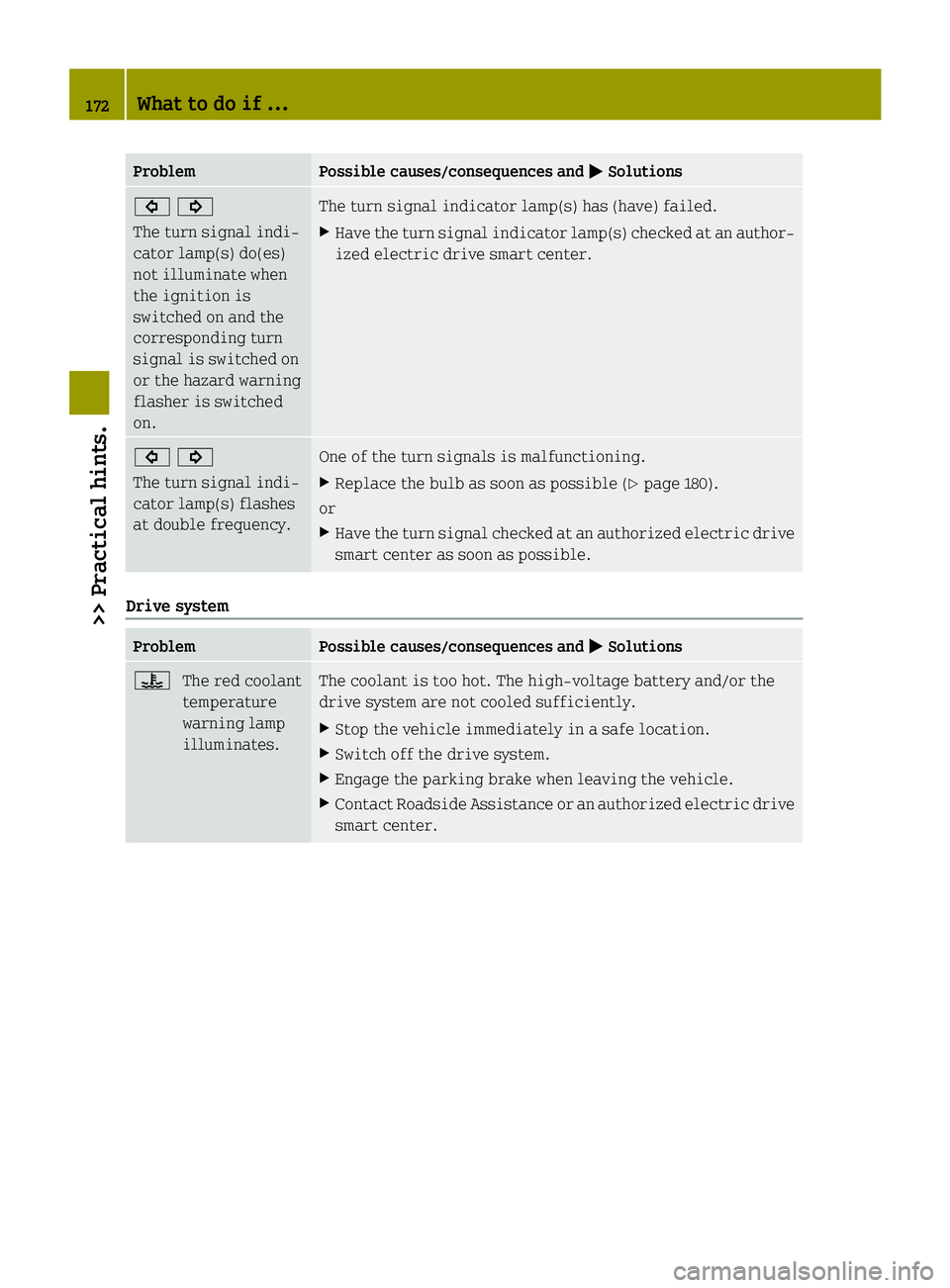
Problem Possible causes/consequences and
M
MSolutions #!
The turn signal indi-
cator lamp(s) do(es)
not illuminate when
the ignition is
switched on and the
corresponding turn
signal is switched on
or the hazard warning
flasher is switched
on. The turn signal indicator lamp(s) has (have) failed.
X Have the turn signal indicator lamp(s) checked at an author-
ized electric drive smart center. #!
The turn signal indi-
cator lamp(s) flashes
at double frequency. One of the turn signals is malfunctioning.
X Replace the bulb as soon as possible (Y page 180).
or
X Have the turn signal checked at an authorized electric drive
smart center as soon as possible. Drive system
Problem Possible causes/consequences and
M MSolutions ?
The red coolant
temperature
warning lamp
illuminates. The coolant is too hot. The high-voltage battery and/or the
drive system are not cooled sufficiently.
X Stop the vehicle immediately in a safe location.
X Switch off the drive system.
X Engage the parking brake when leaving the vehicle.
X Contact Roadside Assistance or an authorized electric drive
smart center. 172
What to do if ...>> Practical hints.
Page 179 of 222

Problem Possible causes/consequences and
M
MSolutions A warning signal
sounds when parking. You have not engaged the parking brake before releasing the
brake pedal and switching off the drive system.
X Switch on the ignition to deactivate the acoustic warning.
X Engage the parking brake.
X Make sure the gear selector lever is in park position P.
X Turn the key to starter switch position 0.
X Remove the key from the starter switch.
For safety, it is important that you perform the parking pro-
cedure as described (Y page 77).You can hear a contin-
uous noise from the
front axle when brak-
ing. The vehicle is equipped with a mechanical/acoustic brake pad
indicator.
X Have the brake pads checked at an authorized electric drive
smart center. Unlocking/locking manually
Unlocking the vehicle
You can unlock the driver’s door and the
charge socket flap by unlocking the
driver’s door using the key. The lock cyl-
inder is fitted with a cap. X Press button #on the key.
i For replacing the transmitter battery
(Y page 178). X
Remove cap :from lock cylinder ;.
X Unlock the driver’s door.
The driver’s door and the charge socket
flap are unlocked. i
To unlock the vehicle centrally press
the central unlocking switch in the upper center console (Y page 27). Locking the vehicle
If you can no longer lock the vehicle using the remote control and you do not have a
spare transmitter battery at hand, please
proceed as follows:
X Open the driver’s door.
X Press the central locking switch
(Y page 53).
The indicator lamp on the central lock-
ing switch comes on, when the starter
switch is in position 1.
The indicator lamp on the central lock-
ing switch flashes, when the starter
switch is in position 0.
X Remove the key from the starter switch,
take it with you, and close all doors.
The vehicle is now locked. Unlocking/locking manually
177>> Practical hints. Z
Page 184 of 222

Replacing bulbs for front lamps
Before you start to replace a bulb for a
front lamp, do the following first:
X Turn the exterior lamp switch to position
$ (Ypage 64).
X Switch off the ignition.
X Open the service flap (Y page 123).Left headlamp, (right headlamp in reverse)
Parking and side marker lamp bulb X
Removing:
Driver’s side: Turn bulb socket ?toward
the outside.
Passenger side: Turn bulb socket ?
toward the outside.
X Pull bulb socket ?out of the headlamp
housing.
X Pull the bulb out of bulb socket ?.
X Installing: Insert the new bulb into bulb
socket ?.
X Insert bulb socket ?into the headlamp
housing.
X Driver side: Turn bulb socket ?toward
the inside.
Passenger side: Turn bulb socket ?
toward the inside.
Low‑beam headlamp bulb X
Removing: Take off low‑beam headlamp
cover =.
X Detach the electrical connector. X
Bend the retainer spring end down and
forward until it unclips. Fold the
retainer spring back.
X Pull the bulb out of the headlamp hous-
ing.
X Installing: Insert the new bulb into the
headlamp housing.
X Fold the retainer spring forward.
X Bend the retainer spring end forward
then up and back to clip in.
X Attach the electrical connector.
X Reinstall low‑beam headlamp cover =.
High‑beam headlamp bulb X
Removing: Take off high‑beam headlamp
cover ;.
X Detach the electrical connector.
X Tilt the bulb socket down and pull it out.
X Pull the bulb out of the bulb socket.
X Installing: Insert the new bulb into the
bulb socket.
X Fit the bulb so that the retaining lug of
the base plate is pointing up.
X Press the bulb into the bulb socket until
it is fully engaged.
X Attach the electrical connector.
X Reinstall high‑beam headlamp cover ;.
Front turn signal lamp bulb X
Removing: Turn bulb socket :counter-
clockwise by a quarter of turn and pull it out of the headlamp housing.
X Press gently onto the bulb and turn it
counterclockwise.
X Pull the bulb out of bulb socket :.
X Installing: Insert the new bulb into bulb
socket :.
X Press gently onto the bulb and turn it
clockwise.
X Insert bulb socket :into the headlamp
housing. 182
Replacing bulbs>> Practical hints.