2015 SMART FORTWO COUPE light
[x] Cancel search: lightPage 60 of 222

Seats
Safety notes
G
WARNING
All seat adjustments, as well as fastening of seat belts, must be done before the vehicle
is operated. G
WARNING
When adjusting the seat, make sure no one
becomes trapped.
Do not adjust the driver’s seat while driv-
ing. Adjusting the seat while driving could cause the driver to lose control of the vehi-
cle.
Never ride in a moving vehicle with the seat backrest in an excessively reclined posi-
tion as this can be dangerous. You could
slide under the seat belt in a collision. If
you slide under the seat belt, it could apply force at the abdomen or neck, potentially
causing serious or fatal injuries. The seat
backrest and seat belts provide the best
restraint when the wearer is in a position
that is as upright as possible and seat belts are properly positioned on the body.
Your seat must be adjusted so that you can
correctly fasten your seat belt.
Observe the following points:
R Adjust the seat backrest until your arms
are slightly angled when holding the
steering wheel.
R Adjust the seat to a comfortable seating
position that still allows you to reach the
accelerator/brake pedal safely. The
position should be as far back as possi-
ble with the driver still able to operate
the controls properly.
R Never place hands under the seat or near
any moving parts while a seat is being
adjusted.
Failure to do so could result in an accident
and/or serious personal injury.
Observe the notes on the air bag system. G
WARNING
Children 12 years old and under must be
seated and properly secured in an appro-
priately sized infant restraint, toddler
restraint, or booster seat recommended for the size and weight of the child. For addi-
tional information, see “Children in the
vehicle”.
A child’s risk of serious or fatal injuries is
significantly increased if the child
restraints are not properly secured in the
vehicle and/or the child is not properly
secured in the child restraint. G
WARNING
Contact an authorized electric drive smart center if the seats have become damaged.
The seat is an integral part of the vehicle’s
safety system in the same way as seat belts
and air bags. Damage to the seats may
reduce their ability to protect the occu-
pants in an accident. Seat adjustment
:
Seat backrest tilt
; Seat fore and aft adjustment
Seat backrest tilt X
Adjusting: Sit down on the front seat.
X Pull adjustment lever :upwards and
adjust the seat backrest until your arms
are slightly angled when holding the
steering wheel. 58
Seats>> Controls.
Page 65 of 222
X
Push latch plate =into seat belt
buckle ?until it clicks.
X If necessary, tighten the lap portion of
the seat belt to a snug fit by pulling
shoulder portion up.
X Unfastening the seat belt: Press release
button A.
X Allow the retractor to completely rewind
the seat belt by guiding latch plate =.
Proper use of seat belts R
Do not twist the seat belt when fastening.
R Adjust the seat belt so that the shoulder
portion is located as close as possible to
the middle of the shoulder (it should not
touch the neck). Never pass the shoulder
portion of the seat belt under your arm.
R Position the lap belt as low as possible
on your hips (over hip joint) and not
across the abdomen.
R Place the seat backrest in a position that
is as upright as possible.
R Never use a seat belt for more than one
person at a time.
R Do not fasten a seat belt around a person
and another object at the same time. When using a seat belt to secure infant or tod-
dler restraints or children in booster
seats, always follow the child seat man-
ufacturer’s instructions.
R Check your seat belt during travel to
make sure it is properly positioned.
R Make sure the seat belt is always fitted
snugly. Take special care to maintain a
snug fit when wearing loose clothing. G
WARNING
Do not pass seat belts over sharp edges.
They could tear.
Do not allow the seat belt to get caught in
the door or in the seat adjustment mecha-
nism. This could damage the seat belt.
Never attempt to make modifications to
seat belts. This could impair the effec-
tiveness of the seat belts. Do not bleach or dye seat belts as this may
severely weaken them. In a crash they may
not be able to provide adequate protection.
Damaged seat belts or seat belts that were
highly stressed in an accident must be
replaced. Contact an authorized electric
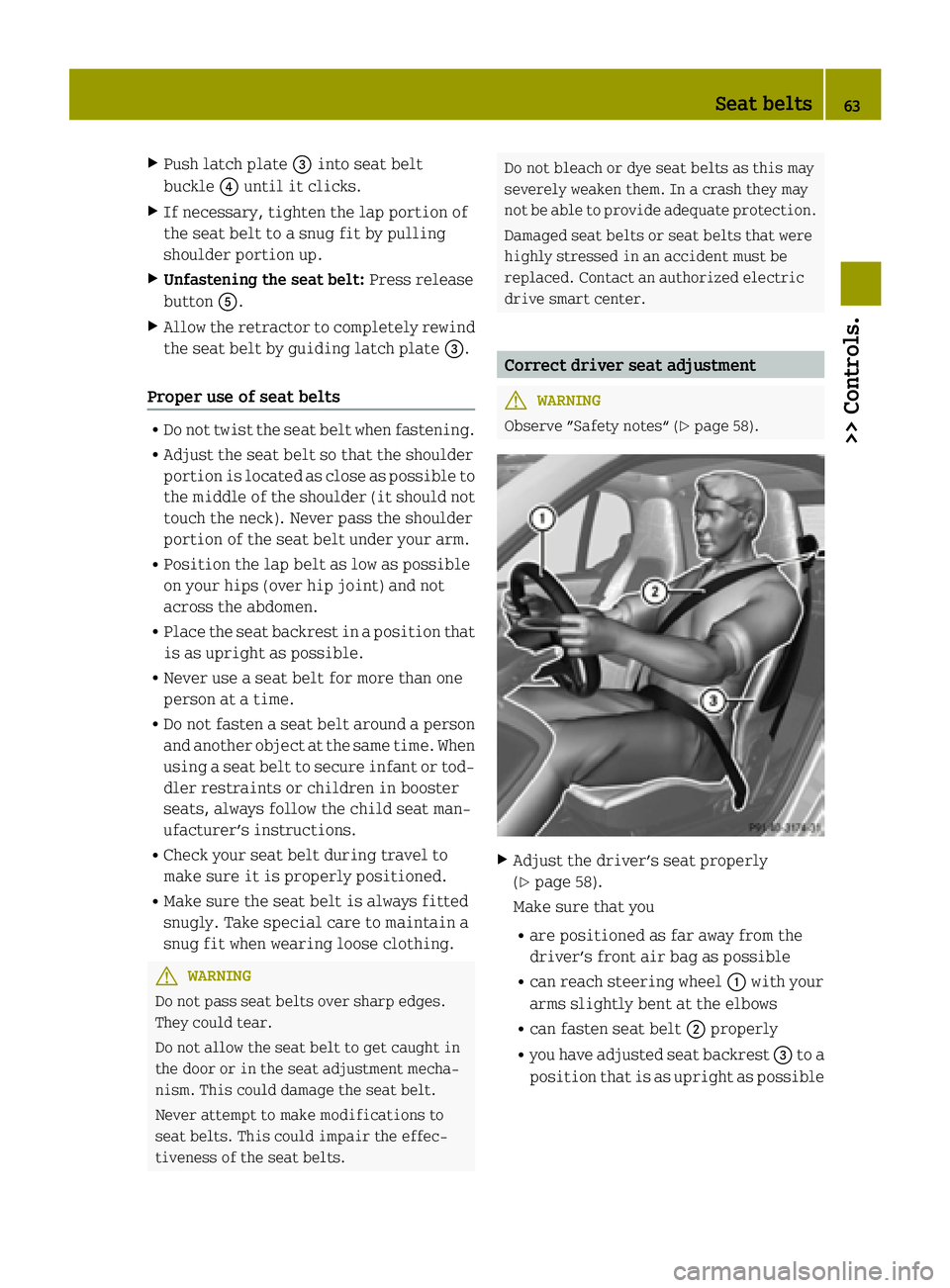
drive smart center. Correct driver seat adjustment
G
WARNING
Observe ”Safety notes“ (Y page 58). X
Adjust the driver’s seat properly
(Y page 58).
Make sure that you
R are positioned as far away from the
driver’s front air bag as possible
R can reach steering wheel :with your
arms slightly bent at the elbows
R can fasten seat belt ;properly
R you have adjusted seat backrest =to a
position that is as upright as possible Seat belts
63>> Controls. Z
Page 66 of 222

R
you can move your legs freely
R you can depress the brake and accel-
erator pedal safely.
X Make sure the seat belt is fastened prop-
erly (Y page 62). Lighting
Exterior lamp switch
For safety, smart recommends that you
drive with your low‑beam headlamps on
during the day. In certain countries, local laws dictate that low‑beam headlamps are
switched on automatically during opera-
tion of the vehicle.
i If you drive in countries where vehi-
cles drive on the other side of the road
than the country in which the vehicle is
registered, you must have the headlamps
modified for symmetrical low beams.
Relevant information can be obtained at any authorized electric drive smart cen-
ter. Exterior lamp switch
$
Lamps off
Daytime running lamp mode*
T Parking lamps
L Low‑beam headlamps or high‑beam
headlamps
à Automatic headlamp mode* Parking lamps You can switch on and off the parking lamps
with the exterior lamp switch using the
manual headlamp mode.
X Switching on: Turn the exterior lamp
switch to position T.
The parking lamps come on.
The following lamps also come on:
R Tail lamps
R License plate lamps
R Side marker lamps
Low‑beam headlamps You can switch on and off the low‑beam
headlamps with the exterior lamp switch
using the manual headlamp mode.
X Switching on: Turn the exterior lamp
switch to position L.
The low‑beam headlamps come on.
The low‑beam headlamp indicator lamp
M in the instrument cluster comes on.
The following lamps also come on: R Tail and parking lamps
R License plate lamps
R Side marker lamps
Automatic headlamp mode* This feature is only available on vehicles
with rain-light sensor*.
The following lamps come on and go out
automatically depending on the brightness
of the ambient light:
R Low‑beam headlamps
R Tail and parking lamps
R License plate lamps
R Side marker lamps G
WARNING
If the exterior lamp switch is set to posi-
tion Ã, the headlamps will not be auto-
matically switched on under foggy condi-
tions. 64
Lighting>> Controls.
* optional
Page 67 of 222

To minimize risk to you and to others, acti-
vate headlamps by turning exterior lamp
switch to position Lwhen driving or
when traffic and/or ambient lighting con-
ditions require you to do so.
In low ambient lighting conditions, only
switch from position ÃtoL with the
vehicle at a standstill in a safe location.
Switching from position ÃtoL will
briefly switch off the headlamps. Doing so
while driving in low ambient lighting con- ditions may result in an accident.
The automatic headlamp feature is only an
aid to the driver. The driver is responsible
for the operation of the vehicle’s lights at
all times.
X Turn the exterior lamp switch to position
Ã.
With the key in starter switch position 1,
the tail and parking lamps, the license
plate lamps, and the side marker lamps
will come on and go out automatically
depending on the brightness of the ambi-
ent light.
With the engine running, the low‑beam
headlamps, the tail and parking lamps,
the license plate lamps and the side
marker lamps will come on and go out
automatically depending on the bright-
ness of the ambient light.
Daytime running lamp mode* In USA, the daytime running lamp mode can
be deactivated.
In Canada, the daytime running lamp mode
is mandatory and therefore in a constant
mode.
Depending on the vehicle equipment, your
vehicle comes either with low-beam day-
time running lamps or with LED daytime
running lamps. Switching on:
X Start the drive system.
The daytime running lamps are switched
on.
On vehicles with low beam daytime run-
ning lamps the parking lamps also come
on.
Switching off - vehicles without rain-
light sensor*:
X Switch on the parking lamps Tor the
low‑beam headlamps M.
The daytime running lamps are switched
off.
Switching off - vehicles with rain-light
sensor*:
X Switch on the parking lamps Tor the
low‑beam headlamps M.
The daytime running lamps are switched
off.
or
X Turn the exterior lamp switch to position
Ã.
With the engine running, the low‑beam
headlamps, the tail and parking lamps,
the license plate lamps and the side
marker lamps will come on and go out
automatically depending on the bright-
ness of the ambient light.
Deactivating (USA only):
X Switch off the ignition.
X Remove the key from the starter switch.
X Switch on the high-beam flasher and
press button #on the key simultane-
ously.
An acoustic signal sounds.
The daytime running lamp mode is deac-
tivated. Lighting
65>> Controls.
* optional Z
Page 68 of 222

Reactivating (USA only):
X Switch off the ignition.
X Remove the key from the starter switch.
X Switch on the high-beam flasher and
press button #on the key simultane-
ously.
An acoustic signal sounds.
The daytime running lamp mode is reac-
tivated. Combination switch (high beam, high
beam flasher and turn signals)
X Make sure the key is in starter switch
position 1.
High‑beam headlamps and high-beam
flasher X
Make sure the low‑beam headlamps are
switched on (Y page 64).
X Switching on: Push the combination
switch to position 1.
The high‑beam headlamps come on.
The high‑beam headlamp indicator lamp
K in the instrument cluster comes on.
X Switching off: Pull the combination
switch in direction of arrow ;to its
original position.
The high‑beam headlamps go out.
The high‑beam headlamp indicator lamp
K in the instrument cluster goes out.
X High-beam flasher: Pull the combination
switch briefly in direction of arrow ;.Turn signals
:
Turn signals, right
; Turn signals, left
X Switching on: Push the combination
switch in direction of arrow :or;.
The corresponding turn signals flash.
The corresponding turn signal indicator lamp # or! in the instrument
cluster flashes.
The combination switch resets automat-
ically after major steering wheel move-
ment.
i To signal minor directional changes
such as changing lanes, push the combi-
nation switch only to the point of resist-
ance and release. The corresponding turn signals will flash three times. Coming home function
The interior lamps come on and then go out
again after 12 seconds every time when you lock or unlock the vehicle.
When leaving the vehicle X
Remove the key from the starter switch.
X Exit the vehicle.
X Press button *on the key.
The vehicle is locked.
The interior lamps come on and then go
out again after 12 seconds. 66
Lighting>> Controls.
Page 69 of 222

When returning to the vehicle
X
Press button #on the key either once or
twice.
The vehicle is either selectively or
globally unlocked.
The interior lamps come on and then go
out again after 12 seconds. Ambient lighting*
The ambient lighting illuminates the
vehicle interior with 6 LEDs when the low- beam headlamps are switched on. The LEDs
can be dimmed.
The LEDS are located
R in the overhead control panel
R in the door pockets, driver’s and
passenger side
R in the storage trays to the left and right
of the steering wheel
In addition to the ambient lighting, the
footwells on the driver’s and passenger
side are also illuminated by separate
lamps.
i When you open a door, the interior
lighting comes on and the brightness of
lamps in the footwells increases. X
Make sure the key is in starter switch
position 1.
X Switch on the parking lamps.
X To brighten or dim ambient lighting:
Press button :on the instrument cluster repeatedly until the desired setting is
reached.
The current setting is stored.
i When adjusting the ambient lighting,
the illumination level for instrument
cluster is also changed (Y page 82). Front fog lamps
G
WARNING
Vehicles with rain-light sensor*:
In low ambient lighting or foggy condi-
tions, only switch from position Ãto
L with the vehicle at a standstill in a
safe location. Switching from ÃtoL
will briefly switch off the headlamps.
Doing so while driving in low ambient
lighting conditions may result in an acci- dent.
i Fog lamps will operate with the parking
lamps and/or the low‑beam headlamps on.
Fog lamps should only be used in con-
junction with low‑beam headlamps. Con- sult your State or Province Motor Vehicle
Regulations regarding permissible
lamp operation.
i Vehicle with rain-light sensor*:
Fog lamps cannot be switched on manually
with the exterior lamp switch in posi-
tion Ã. To switch on the fog lamps,
turn the exterior lamp switch to position
L first. Lighting
67>> Controls.
* optional Z
Page 70 of 222

X
Make sure the parking lamps or the
low‑beam headlamps are switched on.
X Switching on: Press switch:.
The front fog lamps come on.
The indicator lamp in the switch comes
on.
X Switching off: Press switch:once
more.
The front fog lamps go out.
The indicator lamp in the switch goes
out. Hazard warning flasher
The hazard warning flasher can be switched on at all times, even with the key removed
from the starter switch. X
Switching on: Press hazard warning
flasher switch :.
All turn signal lamps are flashing.
X Switching off: Press hazard warning
flasher switch :once more. Interior lighting
The interior lamp comes on for a period of
time when you open the doors, or lock or
unlock the vehicle with the key.
It goes out
R immediately after switching off the
ignition with all doors closed
R after 30 seconds if the doors are not
opened R
after 15 seconds if all doors are closed
R after 10 minutes if at least one door is
open
The rocker switch can be set to three dif-
ferent positions. :
Interior lamp
; Off
= Switching on the automatic control
? Continuous operation
Automatic control X
Set the rocker switch to position =.
The interior lamp comes on for a period
of time.
Switching off X
Set the rocker switch to position ;.
The interior lamp is permanently
switched off.
Continuous operation X
Set the rocker switch to position ?.
The interior lamp is permanently
switched on.
! When leaving the vehicle, make sure the
interior lamp is not set to continuous
operation and none of the doors is left
open for a long period of time.
Doing otherwise could result in a dis-
charged battery. 68
Lighting>> Controls.
Page 71 of 222

Windshield wipers
Switching windshield wipers on and off
Example illustration coupé
X Make sure the key is in starter switch
position 1.
X Switching on: Turn the wiper switch to
position 2or3, depending on the
intensity of the rain.
! Do not operate the windshield wipers
when the windshield is dry. Dust that
accumulates on a windshield might
scratch the glass and/or damage the
wiper blades when wiping occurs on a dry
windshield. If it is necessary to operate the windshield wipers in dry weather
conditions, always operate the wind-
shield wipers with windshield washer
fluid.
! If anything blocks the windshield wip-
ers (leaves, snow, etc.), switch them off
immediately.
For safety reasons, stop the vehicle in a
safe location and
R -
remove the key from the starter
switch
- engage the parking brake
before attempting to remove any
blockage.
R Remove blockage.
R Turn the windshield wipers on again.
X Switching off: Turn the wiper switch to
position g. Intermittent wiping
Only switch on intermittent wiping under
wet weather conditions or in the presence
of precipitation.
Vehicles with rain-light sensor*: When you select intermittent wiping, the sensor is
activated. The sensor automatically sets a
suitable wiping interval depending on thewetness of the sensor surface.
! Vehicles with rain-light sensor*:
Do not leave windshield wipers in inter-
mittent setting when the vehicle is taken to an automatic car wash or during wind-
shield cleaning. Windshield wipers will operate in the presence of water sprayedon the windshield, and windshield wip-
ers may be damaged as a result.
! Vehicles with rain-light sensor*:
If you have set intermittent wiping, dirt
on the surface of the sensor or optical
effects may cause the windshield wipers
to wipe in an undesired fashion. This
could then damage the windshield wiper
blades or scratch the windshield. You
should therefore switch off the wind-
shield wipers when weather conditions
are dry.
X Make sure the key is in starter switch
position 1.
X Activating intermittent wiping: Turn the
wiper switch to position 1.
After the initial wipe, pauses between
wipes are automatically controlled
depending on the vehicle speed and by the
rain-light sensor*.
X Deactivating intermittent wiping: Turn
the wiper switch to position g. Windshield wipers
69>> Controls.
* optional Z