2015 SKODA SUPERB phone
[x] Cancel search: phonePage 52 of 276

These values are then continuously matched according to the actual operating
conditions of the vehicle.
SmartGate
Introduction
Fig. 36
ŠKODA websites
This chapter contains information on the following subjects:
Connection to SmartGate using Wi-Fi
50
Connection to SmartGate using Wi-Fi Direct
51
SmartGate web interface
51
Password/PIN code change
51
SmartGate is a system that transmits certain driving data (such as fuel con-
sumption, speed or similar) via Wi-Fi or Wi-Fi Direct.
The ŠKODA compatible communications device (e.g. phone, tablet, notebook)
offer the possibility to further transmit the received data.
More information on available applications, a list of compatible communication
devices and information about SmartGate can be found on the following
ŠKODA website » Fig. 36.
http://www.skoda-auto.com
WARNING■ The universally applicable country-specific laws on operating communica-
tion devices in the vehicle must be observed.■
Never leave a communication device in the deployment area of an airbag,
on a seat, on the dash panel or any another area, from which it could be
thrown during a sudden braking manoeuvre, an accident or a collision - risk
of injury!
■
Never connect or disconnect a communication device while driving - risk
of accident!
CAUTION
■ To increase access security for the vehicle data transmitted, when the
ŠKODA application starts up, there will be a prompt to change the pass-
word/PIN code if the default password/PIN code has not yet been changed
» page 51 , Password/PIN code change . It is not possible to start the ŠKODA
application without having made this change.■
ŠKODA accepts no responsibility for any problems caused by incompatibility
or improper functioning of the communication devices.
Note
The ŠKODA applications, support communications devices with the Android
operating system version 4.x.x and later and iOS 7.x.x and higher.
Connection to SmartGate using Wi-Fi
Read and observe
and on page 50 first.
Connecting to an Android communication device
›
Switch on the ignition.
›
Switch on the Wi-Fi on the communication device to be connected.
›
Start the SmartGate application using the communication device to be con-
nected.
›
Then follow the instructions which are included in the SmartGate application.
With SmartGate, a maximum of four communication devices can be connected
simultaneously using Wi-Fi, with as many ŠKODA applications running simulta-
neously as required.
Connecting to an iOS communication device
›
Switch on the ignition.
50Using the system
Page 94 of 276

Storage compartment in the front centre consoleFig. 92
Storage compartment: open/close
Fig. 93
Phone box
Read and observe on page 90 first.
The storage compartment contains an induction panel that is connected to theGSM antenna - the Phonebox » Fig. 93.
The storage compartment is equipped with an interior light which illuminates
when the parking or dipped head lights are on.
Opening
›
Press on the fuel filler flap in the direction of the arrow » Fig. 92 -
.
Closing
›
Press on the fuel filler flap in the direction of the arrow » Fig. 92 -
.
The lid closes automatically in the opposite direction of the arrow.
Phone box
When the telephone is inserted into the Phone box, the telephone signal in-
creases in strength by about 20%. This reduces the level of phone battery dis-
charge and the electromagnetic radiation inside the vehicle.›
Place the telephone in the storage compartment B with its back on the in-
duction panel » Fig. 93.
WARNING■
The storage compartment is not a substitute for the ashtray and must al-
so not be used for such purposes – risk of fire!■
The storage compartment must always be closed when driving for safety
reasons.
CAUTION
■ The Phone box cannot be used as an alternative to connecting the tele-
phone with the Infotainment.■
Protective cases or cases around the telephone placed in the storage com-
partment may interfere with the telephone signal strength.
■
Metallic objects such as coins or keys under the telephone can affect the tel-
ephone signal strength.
Cup holders
Fig. 94
Front centre console: Open cup holder / cup holder
92Using the system
Page 99 of 276
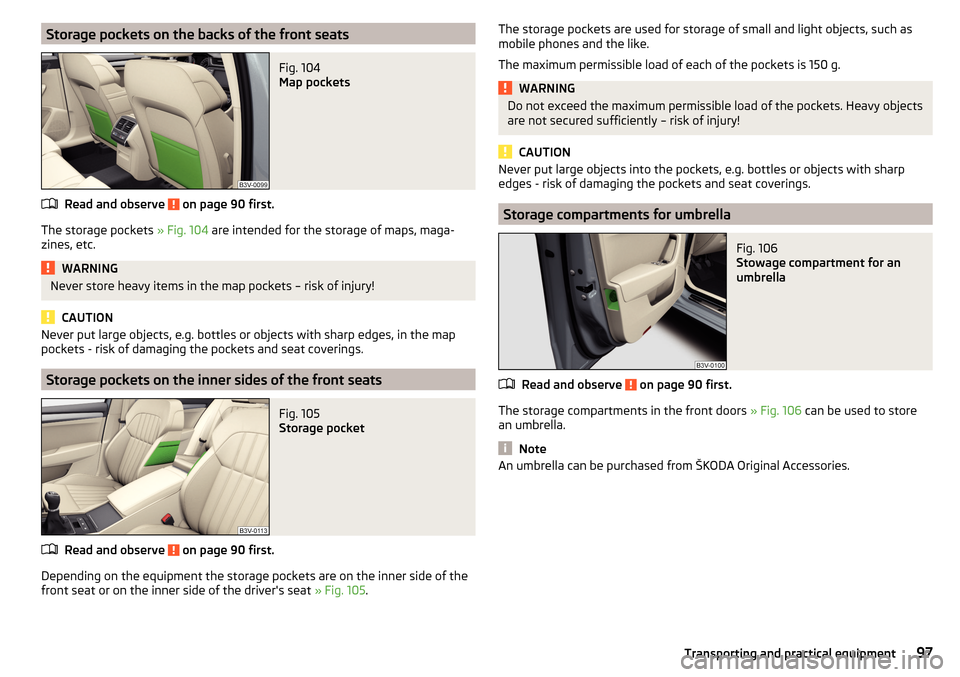
Storage pockets on the backs of the front seatsFig. 104
Map pockets
Read and observe on page 90 first.
The storage pockets » Fig. 104 are intended for the storage of maps, maga-
zines, etc.
WARNINGNever store heavy items in the map pockets – risk of injury!
CAUTION
Never put large objects, e.g. bottles or objects with sharp edges, in the map
pockets - risk of damaging the pockets and seat coverings.
Storage pockets on the inner sides of the front seats
Fig. 105
Storage pocket
Read and observe on page 90 first.
Depending on the equipment the storage pockets are on the inner side of the
front seat or on the inner side of the driver's seat » Fig. 105.
The storage pockets are used for storage of small and light objects, such as
mobile phones and the like.
The maximum permissible load of each of the pockets is 150 g.WARNINGDo not exceed the maximum permissible load of the pockets. Heavy objects
are not secured sufficiently – risk of injury!
CAUTION
Never put large objects into the pockets, e.g. bottles or objects with sharp
edges - risk of damaging the pockets and seat coverings.
Storage compartments for umbrella
Fig. 106
Stowage compartment for an
umbrella
Read and observe on page 90 first.
The storage compartments in the front doors » Fig. 106 can be used to store
an umbrella.
Note
An umbrella can be purchased from ŠKODA Original Accessories.97Transporting and practical equipment
Page 106 of 276

Removable ashtrayFig. 121
Removing ashtray
Read and observe on page 103 first.
Removing/inserting
›
When removing, do not hold the ashtray on the cover.
›
Pull out the ashtray in the direction of the arrow » Fig. 121.
Insertion takes place in reverse order.
Tablet holder
Introduction
This chapter contains information on the following subjects:
Attach behind the head restraint
104
Mount in the storage compartment in the rear armrest
105
Handling the holder
105
External devices (e.g. tablet, smartphone etc.) measuring min. 122 mm and
max. 195 mm can be secured in the holder.
The maximum permissible load of the compartment is 750 g.
CAUTION
Never exceed the maximum permissible load of the holder - there is a risk of
damage or functional impairment.Attach behind the head restraintFig. 122
Positioning the adapter/installing the holder
Fig. 123
Removing the holder/removing the adapter
Read and observe
on page 104 first.
Fitting
›
Attach the opened adapter to the guide rods of the front headrest » Fig. 122.
›
Clip in the adapter in the direction of arrow
1
» .
›
Clip in the holder in the direction of arrow
2
into the adapter.
Removing
›
Pull on the locking strap
A
in the direction of the arrow
3
» Fig. 123 .
›
Take out the holder out of the holder in the direction of arrow
4
.
›
Press the adapter and remove in the direction of the arrow
5
from the guide
rods of the headrest.
WARNINGClip in the adapter carefully - there is a risk of injuring your finger.104Using the system
Page 203 of 276

Inspecting and replenishing
Fuel
Introduction
This chapter contains information on the following subjects:
Petrol and diesel refuelling
201
Lead-free petrol
202
Diesel fuel
203
The correct fuel grades for your vehicle are specified on the inside of the fuel
filler flap » Fig. 224 on page 201 .
WARNING■
The operating instructions of the refuelling system must always be fol-
lowed.■
Do not smoke when refuelling and do not use a mobile phone.
■
Fuel vapours are explosive - can be fatal!
CAUTION
■ Never drive until the fuel tank is completely empty! The irregular supply of
fuel can cause misfiring, which can result in damage to parts of the engine and
the exhaust system.■
Immediately remove any fuel that has spilled onto the vehicle's paintwork –
risk of paint damage.
■
If the vehicle was not purchased in the country where it was intended to be
operated, you should check whether the fuel specified by the manufacturer is
offered in the country where the vehicle will be operated. You should also per-
haps check whether the manufacturer has recommended a different fuel for
operation of the vehicle in the corresponding country. If no prescribed fuel is
available, then you must check whether it is permitted by the manufacturer to
operate the vehicle with another fuel type.
Petrol and diesel refuellingFig. 224
Open fuel filler flap / unscrew tank cap / place the tank cap on
the fuel filler flap
Fig. 225
Fuel filler tube on vehicles with
diesel engines
Read and observe and on page 201 first.
Refuelling can be done if the following conditions are met.
The vehicle is unlocked.
The engine and the ignition are switched off.
The auxiliary heating and ventilation is switched off » page 124.
›
Press on the fuel filler flap in the direction of the arrow
1
accordingly
» Fig. 224 .
›
Open the cover in the direction of the arrow
2
.
›
Unscrew the tank cap in the direction of arrow
3
.
›
Remove the tank cap and place in the recess on top of the fuel filler flap in
the direction of arrow
4
.
›
Insert the pump nozzle into the fuel filler neck as far as it will go, and refuel.
The fuel tank is full just as soon as the pump nozzle switches off for the first
time »
.
201Inspecting and replenishing
Page 242 of 276
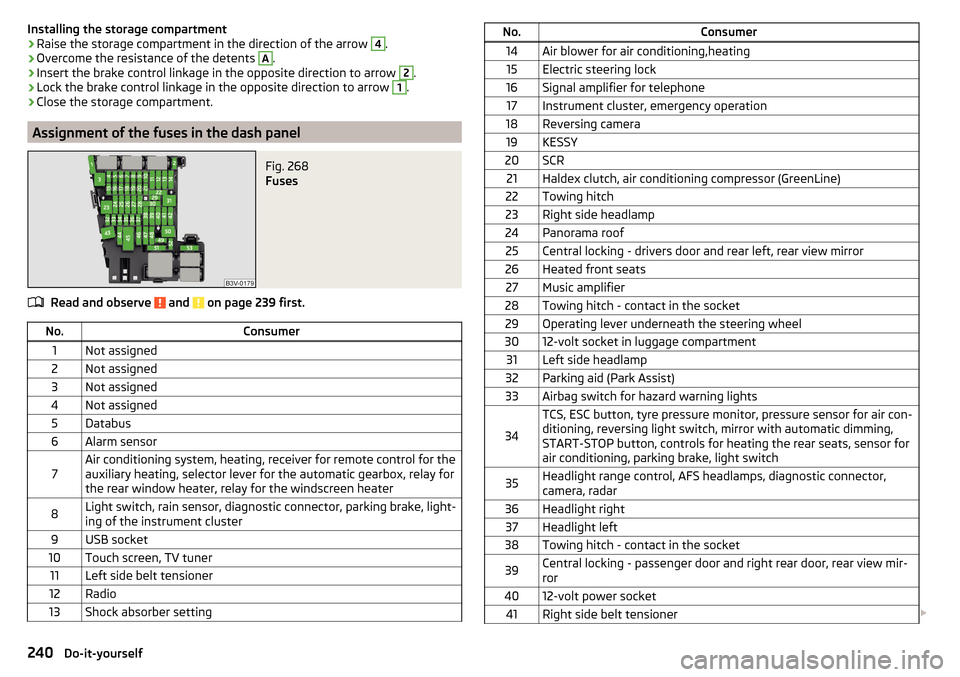
Installing the storage compartment›Raise the storage compartment in the direction of the arrow 4.›
Overcome the resistance of the detents
A
.
›
Insert the brake control linkage in the opposite direction to arrow
2
.
›
Lock the brake control linkage in the opposite direction to arrow
1
.
›
Close the storage compartment.
Assignment of the fuses in the dash panel
Fig. 268
Fuses
Read and observe and on page 239 first.
No.Consumer1Not assigned2Not assigned3Not assigned4Not assigned5Databus6Alarm sensor7Air conditioning system, heating, receiver for remote control for the
auxiliary heating, selector lever for the automatic gearbox, relay for
the rear window heater, relay for the windscreen heater8Light switch, rain sensor, diagnostic connector, parking brake, light-
ing of the instrument cluster9USB socket10Touch screen, TV tuner11Left side belt tensioner12Radio13Shock absorber settingNo.Consumer14Air blower for air conditioning,heating15Electric steering lock16Signal amplifier for telephone17Instrument cluster, emergency operation18Reversing camera19KESSY20SCR21Haldex clutch, air conditioning compressor (GreenLine)22Towing hitch23Right side headlamp24Panorama roof25Central locking - drivers door and rear left, rear view mirror26Heated front seats27Music amplifier28Towing hitch - contact in the socket29Operating lever underneath the steering wheel3012-volt socket in luggage compartment31Left side headlamp32Parking aid (Park Assist)33Airbag switch for hazard warning lights
34
TCS, ESC button, tyre pressure monitor, pressure sensor for air con-
ditioning, reversing light switch, mirror with automatic dimming,
START-STOP button, controls for heating the rear seats, sensor for
air conditioning, parking brake, light switch35Headlight range control, AFS headlamps, diagnostic connector,
camera, radar36Headlight right37Headlight left38Towing hitch - contact in the socket39Central locking - passenger door and right rear door, rear view mir-
ror4012-volt power socket41Right side belt tensioner 240Do-it-yourself
Page 264 of 276

Luggage compartment cover108
Roll-up cover109
Luggage compartment lid58
Luggage net108
Luggage storage Multi-function pocket
111
M
Main beam
68
Warning light37
Maintenance see vehicle care
195
Manual air conditioning Air distribution control
122
Controls119
Manual gear changing see gear changing
135
Manually adjusting seats82
MAXI DOT display45
Main menu45
Menu item assist systems48
Menu item Audio47
Menu item navigation47
Menu item telephone47
Operation46
MAXI DOT see MAXI DOT display
45
Maximum permissible weights
246
MCB145
Media AUX
99
see Infotainment4
USB99
Memory44
Memory Function for the seat83
Mirror Exterior mirrors80
Interior mirror79
Make-up76
MODE button see driving mode selection
171
Modifications190
Modifications and technical alterations Airbags
192
Service191
Spoiler192
Multi-function display operation
43
Multi-function pocket111
Multi collision brake (MCB)145
Multifunction display Functions
42
Information43
Memory44
Multifunction steering wheel Operation
46
Multimedia AUX
99
USB99
N
N1
114
Nameplate246
Navigation see Infotainment
4
Net partition116
behind the front seats116
behind the rarer seats116
Removing and refitting the housing117
Nets107
Non-contact boot lid opening61
Notes for driving with repaired tyres230
Notes on using wheels217
O
Oil See Engine oil
210
Warning messages38
Oil pressure Warning messages
38
On-board computer see multifunction display
42
Operating weight247
Operation in winter Diesel fuel
203
Vehicle battery214
Original accessories191
Overhang angle251
Overview Engine compartment
208
Warning lights31
P
Park assist Departing from a parallel parking space
159
Information messages159
Park Assist155
Automatic brake assist159
Operation156
Park forward158
Parking space search157
Reverse parking157
Switch to park mode157
Parking134
Park Assist155
Parking aid147
Rear Traffic Alert149
Rear View Camera151
Parking aid147
Automatic system activation when moving for- ward
149
Function147
262Index
Page 265 of 276

Parking assistanceActivation / deactivation149
Display in the Infotainment display148
Parking brake133
Warning light32
Parking brake - Auto Hold function Warning light
37
Parking lights67
ParkPilot147
Park the vehicle see Parking
134
Part replacement190
Passive safety Before setting off
8
Driving safety8
Passive Safety8
Pedals135
Footmats135
Petrol see fuel
202
Phone box92
Plastic parts196
Polishing vehicle paint work see vehicle care
195
Power limit sliding/tilting roof
65
Power steering Warning light
33
Practical equipment Reflective vest
223
Practical features 12 volt socket in luggage compartment
101
12 volt socket inside100
Pockets on the backs of the front seats97
Pockets on the inner sides of the front seats97
Seat backrest with long cargo channel86
Storage compartment for umbrella97
Storage compartment under passenger seat96
Waste container93
Proactive passenger protection173
Warning light35
ProActive passenger protection Function
174
Protective films195
Puncture repair kit228
R
Radiator blind
140
Radiator fan208
Radio see Infotainment
4
Radio remote control Auxiliary heating (heating and ventilation)
125
Raising the vehicle226
Rear Interior light
74
Rear-view mirror Exterior mirrors
80
Fold in passenger mirror80
Synchronous adjustment of the rear-view mir- ror
80
Rear fog light70
Warning light34
Rear mirror79
Rear Traffic Alert149
Activation / deactivation151
Information messages151
Operation150
Rear View Camera151
Activation / deactivation152
Function keys153
Guidelines and roadway153
Mode - driving up to a trailer / distance moni- toring
155
Mode - monitor the area behind the vehicle155
Mode - parallel parking154
Mode - traverse parking154
Operation152
Rear view mirror Interior mirror79
Rear window - heater75
Refuelling201
Fuel201
Remote control Locking
53
Replacing the battery234
Synchronisation process235
Unlocking53
Remote control key Replacing the battery
234
Removable lamp Change the lamp battery
235
Removable light Removing light
114
Removable through-loading bag98
Repairs and technical alterations190
Replace Bulb for dipped beam (Halogen-headlamp)
243
Bulb for main beam (Halogen-headlamp)243
the battery in the auxiliary heating (auxiliary heating) in the remote control
235
Replacing Bulb for the fog light
244
Bulb in rear light245
Bulbs242
Fuses238
Fuses – engine compartment241
Fuses – LHD239
Fuses – RHD239
Rear window wiper blade238
Vehicle battery215
windscreen wiper blades237
Replenishing Coolant
212
Engine oil210
Windscreen washer fluid208
Reversible seat belts14
263Index