2015 SKODA OCTAVIA wheel
[x] Cancel search: wheelPage 141 of 268

OperationFig. 156
Button for selecting the driving mode / function key in Infotain-
ment display
Read and observe
and on page 138 first.
We recommend that you activate the OFF ROAD mode for every trip on non-paved roads.
Activation
›
Press the symbol button
» Fig. 156 .
In the Infotainment display a running mode menu » Fig. 156 appears.
›
Press the function key
Off-road
in the Infotainment display.
Deactivation
›
Press the symbol button
» Fig. 156 .
›
In the Infotainment display select a driving mode other than
Off-road
.
So that an engagement of the OFF ROAD mode can take place, the following
conditions must be met.
The OFF ROAD mode is enabled.
The vehicle is moving at a speed of less than 30 km/h. The warning light illuminates in the instrument cluster.
The following functions are integrated in the OFF ROAD mode.
▶ Downhill Drive Support » page 139.
▶ ESC OFF ROAD » page 140.
▶ TCS OFF ROAD » page 140.
▶ EDL OFF ROAD » page 140.
▶ ABS OFF ROAD » page 140.
NoteIf the engine stalls while driving and is started again within 30 seconds, then
OFF ROAD mode will be automatically activated.
Hill Descent Assistant
Read and observe
and on page 138 first.
The hill descent assistant (hereinafter referred to as assist system), with its
automatic braking action on all wheels, ensures a constant speed is main-
tained on a steep slope when driving forwards and reversing.
During an intervention of the assistant, the warning light flashes in the in-
strument cluster.
The assistant is automatically engaged under the following conditions. The engine is running.
For vehicles with Manual transmission the shift lever is in the neutral po-
sition and or the 1st, 2nd, 3rd gear, or reverse gear is engaged.
On vehicles with an automatic transmission , the selector lever is in the R,
N, D/S position or in the Tiptronic position.
The downhill gradient is at least 10 % (when driving over sleepers, the lim-
it can briefly drop to 8 %).
Neither the accelerator nor the brake pedal is operated.
Driving speed
Initiate the downhill decent at a reasonable speed up to 30 km / h the hill de-
scent assist maintains this speed when driving downhill constant.
The assistant can maintain constant speed of about 2 - 30 km / h.
If a forwards or reverse gear is engaged for vehicles with Manual transmis-
sion , the speed must be high enough to avoid stalling the engine.
By pressing the accelerator or brake pedal, the speed can be increased or re-
duced. This is true even if the shift lever is in the neutral position and the se-
lector lever in the N position. The engagement of the assistant is resumed af-
ter the pedal is released.
WARNINGFor the correct operation of the assistant the road surface must be suffi-
ciently adherent. The assistant cannot properly fulfil its function on slushy
soil due to physical reasons (e.g. ice or mud). - there is a risk of an accident! 139Assist systems
Page 142 of 268

NoteDuring an active intervention of the assistant, the brake lights do not light up.
ESC OFF ROADRead and observe
and on page 138 first.
The ESC OFF ROAD makes driving on a dirt roads easier, as no ESC interven-
tions occur when the vehicle is over or under steered.
TCSOFF ROAD
Read and observe
and on page 138 first.
The TCS OFF ROAD makes starting and driving on an unpaved surface easier as
it partially allows wheel-spin.
Note
When disabled, the TCS » page 136 OFF ROAD mode works without the sup-
port of the TCS OFF ROAD.
EDS OFF ROAD
Read and observe
and on page 138 first.
The EDS supports OFF ROAD vehicle traction when driving on a surface with
different grip under the drive wheels or when driving over bumps.
A spinning wheel or wheels are braked earlier and with more force than with
the intervention of the standard EDS system.
ABS OFF ROAD
Read and observe
and on page 138 first.
The ABS OFF ROAD supports the driver when braking on an unpaved surface
such as gravel, snow, etc.
The system generated by a controlled locking of the wheels braked wheel be-
fore a “wedge” of piled material, which shortens the braking distance.
The system is only available, if the front wheels are in the straight-ahead posi-
tion.
The system operates at speeds of up to 50 km/h.
Parking aid (ParkPilot)
Introduction
This chapter contains information on the following subjects:
Function
141
Display in the Infotainment display
142
Activation / deactivation
142
Automatic system activation when moving forward
143
The parking aid (hereinafter referred to as system) draws attention via acous-
tic signals or the Infotainment display when manoeuvring around obstacles in
the vicinity of the vehicle.
WARNING■ The general information relating to the use of assistance systems must
be observed » page 135, in section Introduction .■
Moving persons or objects may not be recognized by the system sensors.
■
Under certain circumstances, surfaces of certain objects and types of
clothing cannot reflect the system signals. For this reason, such people or
objects may not be recognised by the system sensors.
■
External noise sources may affect the signals of the system sensors. Un-
der adverse conditions, this may cause objects or people not to be recog-
nised by the system.
■
You should satisfy yourself before reversing that there is no small obsta-
cle, such as a rock, thin post, trailer drawbar etc., in front or behind your ve-
hicle. Such obstacles may not be recognised by the system sensors.
CAUTION
■ Keep the system sensors » Fig. 157 on page 141 clean, and free from snow
and ice, and do not cover with any objects of any kind, otherwise the system
functioning may be limited.■
Under adverse weather conditions (heavy rain, water vapour, very low or
high temperatures, etc.), the system function may be limited - “incorrect recog-
nition of obstacle”.
■
Accessories additionally installed on the vehicle rear, such as bicycle carriers,
can impair the system function.
Note
The display of obstacles in the Infotainment black and white display is descri-
bed in the » Owner´s Manual Infotainment , chapter CAR - vehicle settings .140Driving
Page 144 of 268
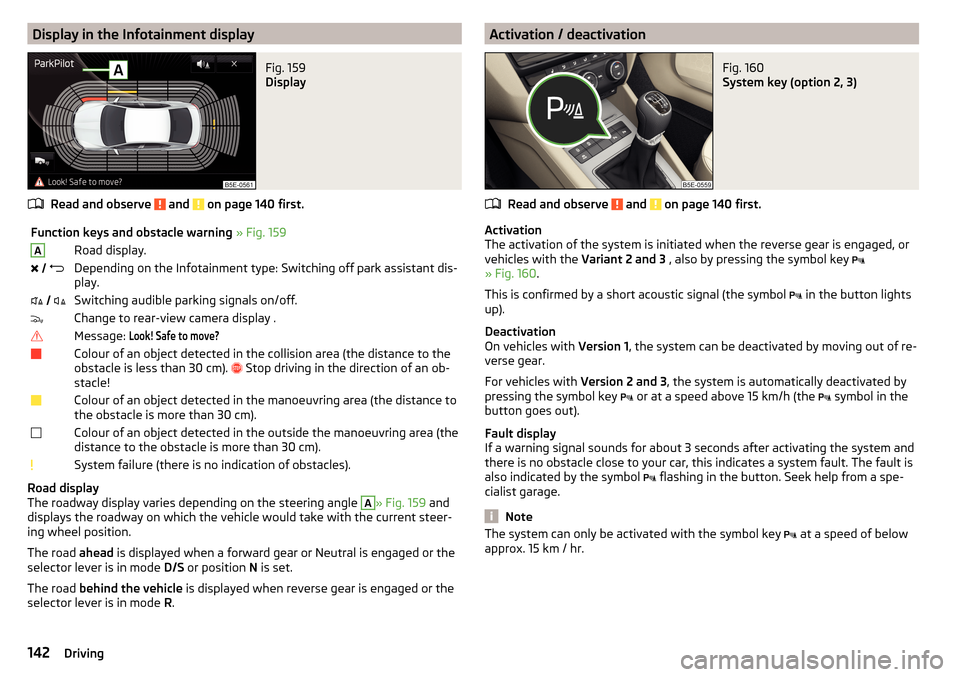
Display in the Infotainment displayFig. 159
Display
Read and observe and on page 140 first.
Function keys and obstacle warning » Fig. 159ARoad display. Depending on the Infotainment type: Switching off park assistant dis-
play. Switching audible parking signals on/off.Change to rear-view camera display .Message: Look! Safe to move?Colour of an object detected in the collision area (the distance to the
obstacle is less than 30 cm).
Stop driving in the direction of an ob-
stacle!Colour of an object detected in the manoeuvring area (the distance to
the obstacle is more than 30 cm).Colour of an object detected in the outside the manoeuvring area (the
distance to the obstacle is more than 30 cm).System failure (there is no indication of obstacles).
Road display
The roadway display varies depending on the steering angle
A
» Fig. 159 and
displays the roadway on which the vehicle would take with the current steer-
ing wheel position.
The road ahead is displayed when a forward gear or Neutral is engaged or the
selector lever is in mode D/S or position N is set.
The road behind the vehicle is displayed when reverse gear is engaged or the
selector lever is in mode R.
Activation / deactivationFig. 160
System key (option 2, 3)
Read and observe and on page 140 first.
Activation
The activation of the system is initiated when the reverse gear is engaged, or
vehicles with the Variant 2 and 3 , also by pressing the symbol key
» Fig. 160 .
This is confirmed by a short acoustic signal (the symbol in the button lights
up).
Deactivation
On vehicles with Version 1, the system can be deactivated by moving out of re-
verse gear.
For vehicles with Version 2 and 3, the system is automatically deactivated by
pressing the symbol key or at a speed above 15 km/h (the
symbol in the
button goes out).
Fault display
If a warning signal sounds for about 3 seconds after activating the system and
there is no obstacle close to your car, this indicates a system fault. The fault is
also indicated by the symbol flashing in the button. Seek help from a spe-
cialist garage.
Note
The system can only be activated with the symbol key at a speed of below
approx. 15 km / hr.142Driving
Page 147 of 268

The state in which the steering wheel is operated by the system, is referred to
as parking operation.
The Park Assist is an extension of the parking aid » page 140 and operates on
the basis of data collected by the ultrasonic sensors.
For this reason, the chapter on the parking aid is to be read carefully and the safety notes are to be observed.WARNING■ The general information relating to the use of assistance systems must
be observed » page 135, in section Introduction .■
During the parking process, the system automatically performs rapid
steering movements. While it is doing so, do not place your hands between
the steering wheel – risk of injury!
■
During a parking manoeuvre on loose or slippery surfaces (gravel, snow,
ice, etc.) you may stray from the calculated road. Therefore, do not use the
system in such situations.
CAUTION
The correct evaluation of the parking space and the parking procedure de-
pends on the circumference of the wheels on the vehicle.■
The system only works correctly if the vehicle is fitted with the wheel size
approved by the manufacturer.
■
Abstain from using the system when the vehicle is fitted with snow chains or
a temporary spare wheel.
■
If wheels other than those approved by the manufacturer are mounted, the
resulting position of the vehicle in the parking space can differ slightly. This
can be avoided by readjusting the system at a specialist garage.
CAUTION
If other vehicles are parked behind the kerb or on it, the system can also guide
your vehicle beyond the kerb or onto it. Ensure that the wheels or the wheel
rims of your vehicle are not damaged and if necessary intervene in time.
Note
■ We recommend performing the parking at a safe speed to about 5 km / h.■The driver can stop the parking process at any time by pressing the symbol
key
» Fig. 164 on page 146 or by a driver steering intervention.Functioning
Read and observe
and on page 145 first.
The system support is provided in the following manner.▶ While the parking space search is going on, a measurement and evaluation of
the parking space size is completed.
▶ Suitable parking spaces are shown in the display of the instrument cluster
(hereinafter only in the display).
▶ The display shows instructions and information before the start and during
the parking.
▶ The road way is calculated that the vehicle uses during the parking.
▶ The front wheels are automatically rotated during the parking.
Conditions for the system function
The system can look for a parking space only if the following basic conditions
are met.
The system is activated.
The vehicle speed is less than 40 km / h (parallel parking).
The vehicle speed is less than 20 km / h (transverse parking). The distance to a number of parked vehicles is approximately 0.5 - 1.5 m.
The TCS is activated » page 135, Braking and stabilisation systems .
The system can only carry out the parking if the following basic conditions are
met.
The vehicle is travelling less than about 7 km/h.
The parking procedure takes less than 6 minutes.
There is no driver intervention in the automatic steering operation.
Activation/deactivation
The system can be enabled or disabled by pressing the symbol key
» Fig. 164
on page 146 -
.
When the system is activated, the symbol illuminates.
145Assist systems
Page 148 of 268

Parking space searchFig. 164
System button / display
Read and observe
and on page 145 first.
The system is able to find a parking space in a number of parallel and trans- verse parked vehicles on the passenger's or driver's side.
Search for a parking space parallel to the roadway
›
Slowly drive past a row of parallel parked vehicles.
›
Press the symbol button once
» Fig. 164 -
.
The display shows the following » Fig. 164 -
.
Search for a parking space traverse to the roadway
›
Slowly drive past a row of traverse parked vehicles.
›
Press the symbol button twice
» Fig. 164 -
.
The display shows the following » Fig. 164 -
.
Change sides for the parking
The system will automatically search for a parking space on the passenger
side.
Activate the turn signal on the driver's side if you wish to look fro a parking
space on this side of the road. The display changes and the system searches
for a parking space on the driver's side.
Note
If the symbol (km / h) is shown in the display while you are looking for a
parking space, the vehicle speed should be reduced below 40 km/h (parallel
parking) or below 20 km/h (transverse parking).ParkingFig. 165
Display
Read and observe
and on page 145 first.
The system supports the driver when reverse parking in the parking space
found in a number of traverse and parallel parked vehicles.
Display » Fig. 165
Parking place recognised with the information to drive on.
Parking space recognised with the information to reverse.
Note to drive on to the parking space.
Note to reverse to the parking space.
Parking manoeuvre
If the system finds a parking space, then this parking space is displayed
» Fig. 165 -
.
›
Continue driving forwards until the display appears
» Fig. 165 -
.
›
Stop and ensure that the vehicle does not continue to move forward until
the parking procedure starts.
›
Select reverse gear or move the selector lever into position R.
›
As soon as the following message is shown in the display:
Steering int. active.Check area around veh.!
, let go of the steering wheel. The steering will be taken
over by the system.
›
Observe the direct vicinity of the vehicle and reverse carefully.
If necessary, the parking procedure can be continued with further steps.
›
If the arrow in the display is flashing to the front » Fig. 165
, engage
1st gear or move the selector lever into the position D.
The display shows the icon (brake pedal).
146Driving
Page 149 of 268

›Depress the brake pedal and wait until the steering wheel automatically ro-
tates into the required position, the symbol goes out.›
Carefully drive forwards.
›
If the backwards arrow is flashing in the display » Fig. 165 -
, select reverse
gear again or move the selector lever into position R .
The display shows the
icon (brake pedal).
›
Depress the brake pedal and wait until the steering wheel automatically ro-
tates into the required position, the symbol
goes out.
›
Carefully move backwards.
You can repeat these steps several times in succession.
As soon as the parking procedure is completed, an audible signal sounds and
the following message appears in the display:
Park Assist stopped. Take over steer-ing!
Departing from a parallel parking space
Read and observe
and on page 145 first.
The system supports the driver when leaving a parking space of a parallel
parking space.
Leaving a parking space process
›
Press the symbol button once
» Fig. 164 on page 146 .
The following message is displayed:
Park Assist: indicate and engage reverse!›
Activate the turn signal for side of the vehicle where the parking space is out
of which you wish to manoeuvre.
›
Select reverse gear or move the selector lever into position R.
The further procedure is analogous to that for reverse parking.
›
Follow the system instructions shown in the display.
As soon as the parking procedure is completed, an audible signal sounds and
the following message appears in the information display:
Please take over steer-ing and drive on.Automatic brake assist
Read and observe
and on page 145 first.
Automatic brake assist when speeding
If a velocity of 7 km / h is exceeded during the parking manoeuvre for the first
time, the speed will be automatically reduced by the system to less than 7 km /
h. This prevents the parking manoeuvre from aborting.
Automatic emergency braking
If the system detects a risk of collision during parking, automatic emergency
braking takes place to prevent a collision.
The parking is terminated by the emergency braking.
CAUTION
The automatic emergency braking is not triggered by the system when the
parking process stops due to the speed of 7 km/h being exceeded!
Information messages
Read and observe
and on page 145 first.
The information messages are shown in the instrument cluster display.
Park Assist stopped. Speed too high.
If a speed of 50 km / h is exceeded while searching for a parking space, the
system with the key symbol is must be reactivated.
Speed too high. Take over steering!
The parking is terminated if the speed exceeds 7 km / hr.
Park Assist stopped. Driver steer. intervent.
The parking procedure is terminated due to a driver steering intervention.
Park Assist stopped. ASR deactivated.
The parking procedure cannot be carried out because the TCS system is deac-
tivated » page 135 , Braking and stabilisation systems . Activate the TCS.
ASR deactivated. Take over steering!
The parking procedure was ended because TCS was deactivated during the
parking procedure.
Trailer: Park Assist stopped.
147Assist systems
Page 160 of 268

Engine / drive
The vehicle acceleration is more dynamic than in Normal
mode.
Front axle differential lock
The driving force distribution between the front wheels is adapted to the spor-
ty driving style.
Adaptive Cruise Control (ACC)
The acceleration is quicker than in
Normal
mode with distance control
» page 150 .
Xenon headlight
The headlamps adapt to the driving style more dynamically than in mode
Nor-mal
» page 70 .
ProActive passenger protection
The first level of protection is deactivated » page 160.
Engine noise
The engine noise is noticeable in the interior more intensely than in
Normal
mode.
Eco
mode
Read and observe
on page 157 first.
This mode is suitable for a relaxed style of driving and helps to save fuel.
Selecting this mode primarily affects the function of the following systems.
Engine / drive
Vehicle acceleration is more relaxed than in
Normal
mode.
The recommended gear is controlled such to achieve the lowest possible fuel
consumption » page 41.
When the START-STOP system was deactivated manually » page 124, it is au-
tomatically activated.
The automatic gearbox is set automatically to mode E » page 129 .
Adaptive Cruise Control (ACC)
Acceleration occurs more relaxed than in
Normal
» page 150 mode with distance
control.
Xenon headlight
The system is in economic mode » page 70. The headlamps are in basic setting
and do not adapt to the direction of travel.
Air conditioning (Climatronic)
The air conditioning is controlled so as to save energy. For this reason, for ex-
ample, it may take longer to reach the desired interior temperature in modeNormal
.
Note
■ The mode Eco is not available when towing a trailer or when another acces-
sory is connected to the trailer socket. If the vehicle is in drive mode Eco
and a
trailer is hitched up or another accessory is connected, the vehicle is automati-
cally set to the driving mode
Normal
.
■
The maximum vehicle acceleration (kick down function) is possible also in
driving mode
Eco
.
Individual
mode
Read and observe
on page 157 first.
In the mode
Individual
each system can be set independently » page 159,
Individ-ual
mode settings .
Off-road
mode
Read and observe
on page 157 first.
The mode
Off-road
is suitable for driving outside paved roads.
Further information » page 138, OFF ROAD-mode .
Note
The mode Off-road is deactivated after switching off and switching on the igni-
tion and the mode Normal
is set automatically.158Driving
Page 163 of 268

When the vehicle approaches a detected line between lanes, the system
makes a light movement of the steering wheel in the opposite direction to the
boundary line. This corrective steering intervention can be manually overrid-
den at any time.WARNING■ The general information relating to the use of assistance systems must
be observed » page 135, in section Introduction .■
Lane Assist can help you keep the vehicle within the lane. However, it
does not steer the vehicle for you. The driver retains full responsibility for
steering at all times.
■
Some objects on the road may be incorrectly detected as lines. As a re-
sult, an incorrect steering intervention may take place.
WARNINGThe detection capability of the camera may be limited by various external
influences. In such cases, the assistant may not detect the line between
two lanes at all or not properly. The detection capability of the camera may
be restricted in the following situations, for example.■
When visibility is poor, (e.g. fog, heavy rain, thick snowfall).
■
When driving around “sharp” bends.
■
The camera is blinded by the sun.
■
The camera is blinded by the oncoming traffic.
■
The viewing range of the camera is impeded by a vehicle travelling ahead.
■
The camera viewing range is obstructed by an obstacle.
CAUTION
Do not attach any stickers or similar objects to the windscreen to avoid impair-
ing the functions of the systems.
Note
■ The system is designed for driving on motorways and roads with adequate
longitudinal markings.■
The system can detect both continuous and broken lines.
OperationFig. 179
Monochromatic display of the instrument cluster: Examples of
system indications
Fig. 180
Colour display of the instrument cluster: Examples of system in-
dications
Read and observe
and on page 161 first.
System displays » Fig. 179 and » Fig. 180
The system is activated, but not ready to intervene.
The system is active and ready to intervene.
The system intervenes when approaching the right-hand boundary lane.
Adaptive lane assist ensues (boundary lines on both sides of the vehicle
detected).
The system can intervene when the following basic conditions are present. The system is activated.
The vehicle speed is no more than about 65 km/h.
161Assist systems