2015 SKODA OCTAVIA interior lights
[x] Cancel search: interior lightsPage 116 of 268

Information on the cooling system
The cooling system operates only if the following conditions are met
» page 112 .
The warning light below the button
» Fig. 136 illuminates after activation,
even if not all of the conditions for the function of the cooling system have
been met. The lighting up of the indicator light in the button signals the opera-
tional readiness of the cooling system.
When the air distribution control is turned to position
the cooling system is
activated.
Note
During operation of the manual air conditioning, an increase in engine idle
speed may occur under certain circumstances in order to ensure sufficient
heating comfort.
Climatronic (automatic air conditioning)
Fig. 137
Controls the Climatronic
Read and observe
and on page 113 first.
The Climatronic in automatic mode ensures the best-possible setting of the
temperature of the out-flowing air, the blower stage and air distribution.
Individual functions can be set or switched on by turning the dial or pressing
the corresponding key. When the function is switched on, a warning light
lights up within or below the button.
Some functions can also be operated in the infotainment » Owner´s Manual
Infotainment , chapter Adjustment of the heating and cooling system .
Functions of the individual controls » Fig. 137
Adjust the temperature for the left side (or for both sides) 1)
▶ Lower the temperature
▶ Increase the temperature
Interior temperature sensor
Adjust fan speed (the setting is indicated by the number of illuminated
control lamps shown in the knob) ▶ Turn to the left: Reduce speed up to turning off the Climatronic
▶ Turn to the right: Increase speed
Adjust the temperature for the right side (or for both sides) 2)
▶ Lower the temperature
▶ Increase the temperature
Display the temperature setting for the left side
Display the temperature setting for the right side
Depending on equipment fitted:
▶ Auxiliary heating and ventilation on / switch off
» page 118
▶ Switching Climatronic system off
»
Control the seat heater on the front left seat » page 85
Air flow to the windows
Air flow to the upper body
Air flow in the footwell
Switch recirculation on/off » page 115
Control the seat heater on the front right seat » page 85
Intensive de-icing or ventilation of the windscreen, switching on/off
Switch the rear window heater on/off » page 76
Switching the windscreen heater on/off » page 76
Climatronic set in the Infotainment » Owner´s Manual Infotainment
Synchronize the temperature inside the entire vehicle according to the
temperature setting on the driver's side
Switching automatic mode on » page 115
Switch the cooling system on/off
ABCDEFG1)
Applies to left-hand drive vehicles.
2)
Applies to right-hand drive vehicles.
114Using the system
Page 117 of 268

Setting temperature
The temperature can be adjusted on the Climatronic control unit or in the Info-
tainment » Owner´s Manual Infotainment , chapter Setting the heating and the
cooling system .
The temperature can be set between +16 °C and +29.5 °C. The temperature is
regulated automatically within this range.
Illuminates in the temperature display
then the Climatronic works with max-
imum cooling (temperature setting below +16 °C).
Illuminates in the temperature display
then the Climatronic works with maxi-
mum heating (temperature setting above +29.5 °C).
There is no automatic temperature control in the two end positions.WARNING■ Do not switch off the Climatronic system for longer than necessary.■Switch on the Climatronic system as soon as the windows mist up.
CAUTION
Do not cover the interior temperature sensor B » Fig. 137 as this could impair
the functioning of the Climatronic.
Note
■ During operation of the Climatronic, an increase in engine idle speed can oc-
cur under certain circumstances in order to ensure adequate heating comfort.■
When
is switched on, the air flow to the windows
is switched on. The
air flow to the windows will remain switched on after turning
off.
■
Holding the button
will turn on
automatically.
Climatronic - automatic operation
Read and observe
and on page 113 first.
The automatic mode is used in order to maintain a constant temperature and
to demist the windows in the interior of the car.
Automatic mode can be switched off by pressing one of the buttons for the air
distribution or by increasing/decreasing the blower speed. The temperature
regulation is continued.
Operating modes
Automatic mode works in three modes - moderate, medium, and intensive.
Setting the individual operating modes » Owner´s Manual Infotainment , chap-
ter Setting the heating and the cooling system .
After the automatic mode is switched on, Climatronic works in the last selec-
ted mode.
The currently selected mode is displayed in the Infotainment display.
Note
Climatronic is set to the medium setting at the factory.
Air distribution control
Read and observe
and on page 113 first.
The recirculation mode prevents contaminated outside air getting into the In-
terior of the vehicle.
In recirculated air mode air is sucked out of the interior of the vehicle and then
fed back into the interior.
Switching on/off
›
Press the button.
When the recirculation mode is activated, the warning light below the button
lights up.
Heating and manual air conditioning system
If the air distribution control is set to position when the recirculation modes
is switched on, the recirculated-air mode is switched off. Recirculated air mode
can be switched on again from this setting by repeatedly pressing the symbol
button .
When the is switched on and the temperature regulator is turned to the
left, the recirculated-air mode is switched on.
Climatronic
Climatronic may have an air quality sensor for the detection of the pollutant
concentration in the sucked-in air.
If a considerable increase in concentration of pollutants is recognised by the
air quality sensor, the recirculated air mode will be switched on automatically.
When the pollutant concentration decreases to the normal level, the recircula-
ted air mode is automatically switched off.
115Heating and ventilation
Page 120 of 268
Note■The auxiliary heating only switches the blower on, if it has achieved a coolant
temperature of approx. 50 °C.■
At low outside temperatures, this can result in a formation of water vapour in
the area of the engine compartment. This is quite normal and is not an operat-
ing problem.
■
So that warm air can flow into the vehicle interior after switching on the aux.
heating, you must maintain the comfort temperature normally selected by you,
leave the fan switched on and leave the air outlet vents in open. It is recom-
mended to put the air flow in the position
or
.
Switching on/off
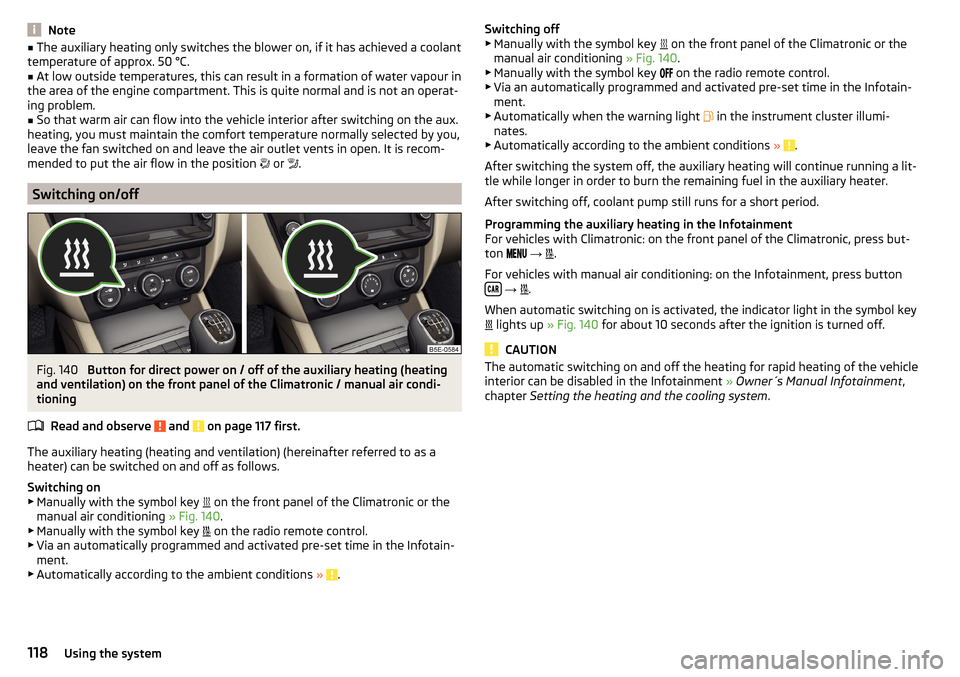
Fig. 140
Button for direct power on / off of the auxiliary heating (heating
and ventilation) on the front panel of the Climatronic / manual air condi-
tioning
Read and observe
and on page 117 first.
The auxiliary heating (heating and ventilation) (hereinafter referred to as a
heater) can be switched on and off as follows.
Switching on
▶ Manually with the symbol key on the front panel of the Climatronic or the
manual air conditioning » Fig. 140.
▶ Manually with the symbol key on the radio remote control.
▶ Via an automatically programmed and activated pre-set time in the Infotain-
ment.
▶ Automatically according to the ambient conditions »
.
Switching off
▶ Manually with the symbol key on the front panel of the Climatronic or the
manual air conditioning » Fig. 140.
▶ Manually with the symbol key
on the radio remote control.
▶ Via an automatically programmed and activated pre-set time in the Infotain-
ment.
▶ Automatically when the warning light
in the instrument cluster illumi-
nates.
▶ Automatically according to the ambient conditions »
.
After switching the system off, the auxiliary heating will continue running a lit-
tle while longer in order to burn the remaining fuel in the auxiliary heater.
After switching off, coolant pump still runs for a short period.
Programming the auxiliary heating in the Infotainment
For vehicles with Climatronic: on the front panel of the Climatronic, press but-
ton
→
.
For vehicles with manual air conditioning: on the Infotainment, press button
→
.
When automatic switching on is activated, the indicator light in the symbol key
lights up
» Fig. 140 for about 10 seconds after the ignition is turned off.
CAUTION
The automatic switching on and off the heating for rapid heating of the vehicle
interior can be disabled in the Infotainment » Owner´s Manual Infotainment ,
chapter Setting the heating and the cooling system .118Using the system
Page 230 of 268

›Insert a new fuse.›Replace the bracket at the original position.
Installing the storage compartment›
Move the stop buffer
B
of the storage compartment behind the brackets
C
» Fig. 239 .
›
Push in the storage compartment in the opposite direction of the arrow
5
.
›
Insert the brake rod and lock it against the arrow
4
with a screwdriver.
›
Push in the side cover against the direction of the arrow
2
.
›
Press the side cover fully against the direction of the arrow
1
.
›
Close the storage compartment.
Assignment of the fuses in the dash panel
Fig. 240
Fuses
Read and observe and on page 227 first.
No.Consumer1Not assigned2Not assigned3Not assigned4Not assigned5Databus6Alarm sensor7Air conditioning, heating, recipient of the wireless remote control
for auxiliary heating, selector lever of the automatic transmission8Light switch, rain sensor, diagnostic socket9Haldex clutch10Touchscreen11Heated rear seatsNo.Consumer12Radio13Belt tensioner - driver's side14Air blower for air conditioning,heating15Electric steering lock16Signal amplifier for telephone, telephone preinstallation17Instrument cluster18Not assigned19KESSY20Operating lever underneath the steering wheel21Not assigned22Towing hitch - contact in the socket23Light - right24Panorama roof25Central locking front door - left, power windows - left26Heated front seats27Music amplifier28Towing hitch - left light29CNG relay30Not assigned31Headlight - left32Parking aid (Park Assist)33Airbag switch for hazard warning lights
34
TCS, ESC button, tyre control display, pressure sensor for air-condi-
tioning, reverse light switch, interior mirror with automatic dim-
ming, START-STOP button, telephone preinstallation, control for
heating of rear seats, sensor for air-conditioning, 230 V power
socket, sport-sound generator35Headlight, headlamp beam adjustment, diagnostic connector, cam-
era, radar36Headlight right37Headlight left38Towing hitch - right light 228Do-it-yourself
Page 253 of 268

CleanAnodized parts184
Chrome parts184
Cleaning Alcantara
187
and maintaining belts188
artificial leather187
headlight glasses185
materials187
natural leather187
plastic parts184
seats covers of the electrically heated seats188
wheels185
Cleaning safety belt
188
Cleaning seat covers
188
Cleaning the interior artificial leather
187
Seat covers188
Cleaning the vehicle exterior Camera lens
185
Cavity protection185
Decorative films183
Door locking cylinder185
Headlight glasses185
Protective films183
Under-body protection186
wheels185
Windows and external mirrors184
Cleaning vehicle181
Cleaning vehicle exterior182
Anodized parts184
Chrome parts184
Plastic parts184
Rubber seals184
Vehicle paint work183
Wiper blades186
Clean interior Safety belt
188
Climatronic air distribution control115
Automatic operation115
Operating elements114
Clothes hook96
CNG193
Gas leak193
in a traffic accident193
Natural gas reserve display30
refuelling192
Refuelling192
Regular checks193
Sticker193
Warning light37
Cockpit 12-Volt power outlet
93
Ashtray92
Cigarette lighter92
General view27
Lighting74
storage compartments89
useful equipment89
COMING HOME73
compartments89
Component protection180
Components of the puncture repair kit217
Compressed natural gas see CNG
193
Computer see multifunction display
41
Convenience operation sliding / tilting roof
65
Window64
convenience turn signal69
Coolant198
Checking199
Replenishing200
Temperature gauge29
Warning light37
Warning messages37
CORNER see Headlights with CORNER function73
Correct routing of seat belt
12
Correct seated position8
Front passenger10
Rear seats10
Correct seat position Driver
9
Counter for distance driven30
Crew Protect Assist160
cruise control operation
148
operation Description149
Cruise control system Warning light
36
Cruise Control System148
Cup holders91
D
DAY LIGHT see Daylight running lights
68
Daylight running lights68
De-icing windows
184
De-icing the windscreen and rear window76
Deactivating an airbag19
Decorative films183
Delayed locking of the boot lid see boot lid
59
Departure angle243
Diesel refer to Fuel
191
Diesel fuel Operation in winter
191
Diesel particulate filter38
information messages38
Digital Clock31
Dipstick198
251Index
Page 256 of 268

Temperature gauge29
Warning lights31
Interior care186
Natural leather187
Interior light Front
74
Interior lights Rear
75
Interior monitor58
iPad holder Behind the headrests
99
Handling99
ISOFIX23
J
Jack
212
Maintenance185
Jump-starting219
K
KESSY Locking
55
Unlocking55
Key Locking
54
Starting the engine121
Stopping the engine121
Switching off the ignition121
Switching on the ignition121
Unlocking54
Key CAR see Infotainment
4
Knee airbag17
L
Lamp failure Warning light
38
Lamps Warning light
38
Lane Assistsee Lane Departure Warning160
Warning light36
Lane Departure Warning160
Activation / deactivation162
Information messages162
Operation161
Lap timer48
Leather Natural leather care
187
LEAVING HOME73
Lever Main beam
69
Turn signal69
Levers Windscreen wipers
78
Light Cockpit
74
COMING HOME / LEAVING HOME73
Fog lights72
Headlights with CORNER function73
High-beam assistant71
Rear fog light72
Replacing bulbs230
travel mode71
Xenon headlight70
Light Assist High-beam assistant
71
lighting entry space
75
Lighting Luggage compartment
100
Lights67
Automatic driving lamp control70
Daylight running68
Hazard warning light system73
Headlight beam range regulation68
Headlight flasher69
Low beam68
Main beam69
Parking lights68, 74
Switching on and off68
Turn signal69
Warning lights31
Load238
Locking Individual settings
56
KESSY55
Key54
Remote control54
Locking and unlocking the vehicle from the in- side
55
Locking the door without a locking cylinder Emergency
224
Long cargo channel88
Low beam68
Low tyre pressure warning See tyre pressure monitoring
165
Luggage compartment100
Compartment with cargo element106
Cover104
Fastening elements101
Fix floor covering103
Fixing nets102
floor covering on both sides103
foldable hook103
Folding double hooks103
Lighting100
Luggage net104
Net partition109
Roll-up cover105
Storage compartments under the floor cover- ing
106
Stowing the roof rack111
unlock manually224
Unlock the boot lid224
Variable loading floor107
Luggage compartment cover104
Roll-up cover105
254Index
Page 257 of 268
Luggage compartment lid59
Luggage net104
Luggage storage Multi-function pocket
107
M
Main beam
69
Warning light37
Maintenance see vehicle care
183
Manual air conditioning Air distribution control
115
Controls113
Manual gear changing see gear changing
128
Manually adjusting seats
82
Manually adjusting seats82
MAXI DOT display44
Lap timer48
Main menu45
Menu item assist systems48
Menu item Audio47
Menu item navigation46
Menu item telephone47
Operation45, 46
Stop watch48
MAXI DOT see MAXI DOT display
44
Maximum permissible weights
236
MCB138
Mechanical window lifter open and close
62
Mechanical window lifters61
Media AUX
99
see Infotainment4
USB99
Memory44
Memory Function for the seat84
Mirror Exterior mirrors
80
Interior mirror79
Make-up76
MODE button see driving mode selection
157
Modifications178
Modifications and technical alterations Airbags
180
Service179
Spoiler180
Multi-function display operation
42
Multi-function pocket107
Multi collision brake (MCB)138
Multifunction display Functions
41
Information42
Memory44
Multifunction steering wheel Operation
46
Multimedia AUX
99
USB99
Multimedia holder94
Handling99
N
N1
107
Nameplate236
Natural gas operation Warning light
37
Navigation see Infotainment
4
Net partition109
behind the front seats109
behind the rarer seats109
Removing and refitting the housing110
Nets102
NGVs see CNG
193
Notes for driving with a repaired tyre219
Notes on using wheels205
O
OFF ROAD
138
ABS140
EDS140
ESC140
hill descent assistant139
operation139
TCS140
OFF ROAD mode warning light
40
Oil See Engine oil
198
Warning messages38
Oil pressure Warning messages
38
On-board computer see multifunction display
41
Operating weight237
Operation in winter Diesel fuel
191
Vehicle battery202
Original accessories179
Overview Engine compartment
196
Warning lights31
255Index
Page 258 of 268

P
Park assist Departing from a parallel parking space
147
Information messages147
Parking146
Park Assist144
Automatic brake assist147
Operation145
Parking space search146
Parking128
Park Assist144
Parking aid140
Rear View Camera143
Parking aid140
Automatic system activation when moving for- ward
143
Function141
Parking assistance Activation / deactivation
142
Display in the Infotainment display142
Parking lights68
Park Pilot140
Park the vehicle see Parking
128
Part replacement178
Passive safety Before setting off
8
Driving safety8
Passive Safety8
Pedals128
Footmats128
Petrol see fuel
190
Phonebox91
Plastic parts184
Polishing vehicle paint work see vehicle care
183
Positioning the jack
215
Power limitsliding/tilting roof65
Power outlet 12 V
93
Power steering Warning light
33
Power windows61
Button in the front passenger door63
Button in the rear doors63
Practical equipment Reflective vest
211
Practical features 12-Volt power outlet
93
Pockets on the backs of the front seats96
Seat backrest with long cargo channel88
Waste container93
Proactive passenger protection160
Warning light35
ProActive passenger protection Function
160
Protective films183
Puncture repair kit217
R
Radiator fan
196
Radio see Infotainment
4
Radio remote control Auxiliary heating (heating and ventilation)
119
Raising the vehicle215
Rear-view mirror Exterior mirrors
80
Fold in passenger mirror80
Synchronous adjustment of the rear-view mir- ror
80
Rear fog light72
Warning light34
Rear mirror79
Rear View Camera143
Function keys144
Operation143
Orientation Lines144
Rear view mirror Interior mirror
79
Rear window - heater76
Refuelling189
Fuel189
Fuel - natural gas192
Remote control Locking
54
Replacing the battery223
Synchronisation process223
Unlocking54
Remote control key Replacing the battery
223
Removable through-loading bag98
Removing the bar ball, Step 1
170
bar ball, Step 2171
Repairs and technical alterations178
Replace the battery in the auxiliary heating (auxiliary heating) in the remote control
223
Replacing Bulb for the licence plate light
233
Bulbs230
Fuses226
Fuses – engine compartment229
Fuses – LHD227
Fuses – RHD227
Low beam bulb231
Rear window wiper blade226
Vehicle battery203
windscreen wiper blades225
Replenishing Coolant
200
Engine oil198
Windscreen washer fluid196
256Index