2015 SKODA OCTAVIA change time
[x] Cancel search: change timePage 132 of 268

D/S - mode for driving forward (Normal program) / mode for driving
forward (Sport program)
The system switches from one mode to the other by moving the selector lever
into the spring-loaded position
» Fig. 149 .
In mode D or S, the forward gears are shifted automatically depending on the
engine load, the operation of the accelerator pedal, the vehicle speed, and the
selected driving mode .
In mode S , the forward gears are shifted automatically up and down at high-
er engine speeds than in mode D.
If the Sport driving mode is selected with the engine running » page 157, Se-
lection of the driving mode (Driving Mode Selection) , the transmission is auto-
matically set in the S mode.
E – Economical driving mode
If the driving mode Eco or Individual (engine - Eco) » page 157 is selected and
the selection lever is in the setting D/S, the transmission is automatically set
to mode E. This mode cannot be selected with the selector lever.
In mode E , the forward gears are shifted automatically up and down at lower
engine speeds than in mode D.
Selector lever lock
Fig. 150
Shift lock button
Read and observe and on page 129 first.
The selector lever is locked in mode P and N to prevent that the forward driv-
ing is selected accidentally, thereby setting the vehicle in motion.
The selector lever is locked only when the vehicle is stationary and at speeds
up to 5 km/h.
The selector lever lock is indicated by the illumination of the warning light .
The selector lever is not locked when quickly moving across the position
N
(e.g. from R to D/S ). This, for example, helps to rock out a vehicle that is stuck,
e.g. in a bank of snow. The selector lever lock will engage if the lever is in posi-
tion N for more than approx. 2 seconds without the brake pedal being de-
pressed.
Releasing selector lever from mode P or N (selector lever lock)›
Press the brake pedal and the lock button at the same time in the direction
of
1
» Fig. 150 .
Just depress the brake pedal, if you would like to change from the mode N to
D/S .
Defective selector lever lock
If the selector lever lock is defective or its power supply is interrupted (e.g. dis-
charged vehicle battery, faulty fuse), the selector lever can no longer be moved
out of position P in the normal manner and the vehicle can no longer be driven.
The selector lever must be unlocked specially » page 225.
Note
If you want to move the selector lever from mode P to mode D/S or vice versa,
move the selector lever quickly. This prevents that you accidentally select
mode R or N.
Manual shifting of gears (Tiptronic)
Fig. 151
Selector lever/multi-function
steering wheel
Read and observe and on page 129 first.
Tiptronic mode makes it possible to manually shift gears with the selector lev-
er or multifunction steering wheel. This mode can be selected both while stop-
ping and while driving.
The currently selected gear is indicated in the display » Fig. 149 on page 129 .
130Driving
Page 155 of 268
Resume control›Start control » page 152.WARNINGControl may only be resumed if the stored speed is not too high for the cur-
rent traffic conditions.
Note
Regulation is also stopped when the clutch is held down for longer than 30 s.
Set/change the desired speed
Read and observe
on page 150 first.
The desired speed can be set or changed using the control lever » Fig. 171 on
page 152 .
The set speed is stored upon releasing the lever or the button on the button
on the lever.
Setting/changing the speed by 10 km/h at a time (
) - requirements
ACC is enabled.
Increasing the speed by 1 km/h at a time (
) - requirements
ACC is enabled.
Vehicle control is taking place.
Decreasing the speed by 1 km/h at a time (
) - requirements
ACC is enabled.
Vehicle control is taking place.
Changing the speed by adopting the current speed (
) - requirements
ACC is enabled.
The vehicle is moving at a speed other than that which is stored.
Note■
If during control the speed is increased by pressing the accelerator, control is
temporarily stopped. Upon releasing the accelerator, control is automatically
resumed.■
If during control the speed is reduced by applying the brake, control is stop-
ped. Control needs to be restarted in order to resume » page 152.
■
If the vehicle is controlled by a lower speed than the stored speed, then
the current speed is stored the first time the key is pressed. Press the key
again
and the speed is reduced in increments of 1 km/h.
Set the clearance level
Read and observe
on page 150 first.
The proximity to the vehicle ahead can be set with the lever » Fig. 171 on
page 152 or in the Infotainment » Owner´s Manual Infotainment , chapter CAR -
vehicle settings .
Setting by means of the lever
›
Set the switch Adjust in the spring-tensioned position or -» Fig. 171
on page 152 .
The display of the instrument cluster shows line
2
» Fig. 169 on page 150 ,
which indicates the proximity.
›
Using the switch Adjust the line
2
to the desired distance level on
the lever.
Note
■ If the proximity is changed in infotainment, the change will only come into
effect after a subsequent activation of the ACC.■
The proximity is dependent on the speed. The higher the speed, the greater
the proximity to the vehicle ahead.
■
On wet roads, a longer time interval to the vehicle ahead should always be
selected than on dry roads.
153Assist systems
Page 156 of 268

Special driving conditionsFig. 172
Special conditions: Cornering / narrow vehicles or vehicles travel-
ling side by side
Fig. 173
Special conditions: Lane changes of other vehicles / stationary
vehicles
Read and observe
on page 150 first.
The following and similar situations require special attention of the driver.
When cornering
When driving around long bends the ACC may respond to a vehicle in the adja-
cent lane » Fig. 172 -
. Your own vehicle is regulated with respect to this vehi-
cle and will no longer respond to the vehicle ahead.
In such cases, control should be disabled by accelerating, applying the brake or
pressing the button on the operating lever .
» Fig. 171 on page 152 .
Narrow vehicles or vehicles travelling side by side
Narrow vehicles or vehicles travelling side by side are not detected by the ra-
dar sensor until they are within the sensor's range » Fig. 172 -
.
If necessary, slow down the car by applying the brake.
Other vehicles changing lanes
Vehicles that change onto the lane with a small proximity » Fig. 173 -
do not
have to be detected by the radar sensor in time. The result may be a delayed
ACC response.
If necessary, slow down the car by applying the brake.
Stationary vehicles
The ACC does not detect stationary objects! When a vehicle detected by the
ACC turns or sheers off and there is a stationary vehicle in front of this vehicle,
» Fig. 173 -
the ACC does not respond to the stationary vehicle.
In such cases, take over the steering and stop the vehicle by applying the foot
brake.
When overtaking
When your vehicle is being controlled (the speed is lower than that which is
stored) and the indicator is activated, the ACC interprets this situation as
meaning that the driver intends to overtake. The ACC automatically acceler-
ates the vehicle, thereby reducing the proximity to a vehicle ahead.
If the vehicle changes to the fast lane and no vehicle is detected ahead, the
ACC accelerates until the set speed is reached and then keeps it constant.
Acceleration can be cancelled at any time by touch on the brake pedal or
pressing the button on the lever
» Fig. 171 on page 152 .
Vehicles with special load or special body parts
Other vehicles with a load or with body parts protruding from the sides, back
or top of the vehicle contour may not be detected by the ACC.
Control should therefore be disabled whenever you are driving behind or over-
taking such a vehicle.
Towing a trailer
When towing, or in when another accessory is connected to the trailer socket
the ACC control is set with a lower rate. The manner of driving should there-
fore be adapted to this limitation.154Driving
Page 169 of 268
Hitch and trailer
Hitch
Introduction
This chapter contains information on the following subjects:
Description
167
Adjusting the ready position
168
Correctly adjusted ready position
168
Assembling the bar ball – Step 1
169
Assembling the bar ball – Step 2
169
Check proper fitting
170
Removing the bar ball – Step 1
170
Removing the bar ball – Step 2
171
Mount accessories
171
The maximum trailer drawbar load is 75 kg.
For vehicles with all-wheel drive, the maximum trailer nose weight is 80 kg.
With G-TEC-vehicles, the maximum trailer drawbar load is 56 kg .
The draw bar load information on the type plate of the towing device is merely
a test value for the towing device. The vehicle-specific information is detailed
in the vehicle documents.
WARNING■ Before each time you make a journey when using the ball rod, check that
it is seated correctly and is secured in the mounting recess.■
Do not use the ball rod if it is not correctly inserted into the mounting re-
cess and secured.
■
Do not use the towing hitch if it is damaged or if there are parts missing.
■
Do not perform any modifications or changes to the towing device.
■
Keep the mounting recess of the towing device clean at all times. Such
dirt prevents the ball rod from being attached securely!
CAUTION
■ Take care when using the ball rod - there is a risk of paint damage to the
bumper.■
When the ball rod is removed always place the cover onto the mounting re-
cess - there is a danger of soiling the mounting recess.
Note■ Operation and maintenance of the tow hitch » page 186.■The towing vehicle by means of the detachable ball rod » page 222.■
If the towing device is removed completely, it must be replaced with the
original reinforcement of the rear bumper which is part of the mount for the
towing eye.
Description
Fig. 185
Support for the hitch equipment / ball bar / key (Version 1 and 2)
Read and observe
and on page 167 first.
The ball rod can be removed and is located in the spare wheel well or in a com-
partment for the spare wheel in the luggage compartment.
The hitch comes with two key versions. The handling of the hitch is identical
for the two key versions. The difference is only in the key version.
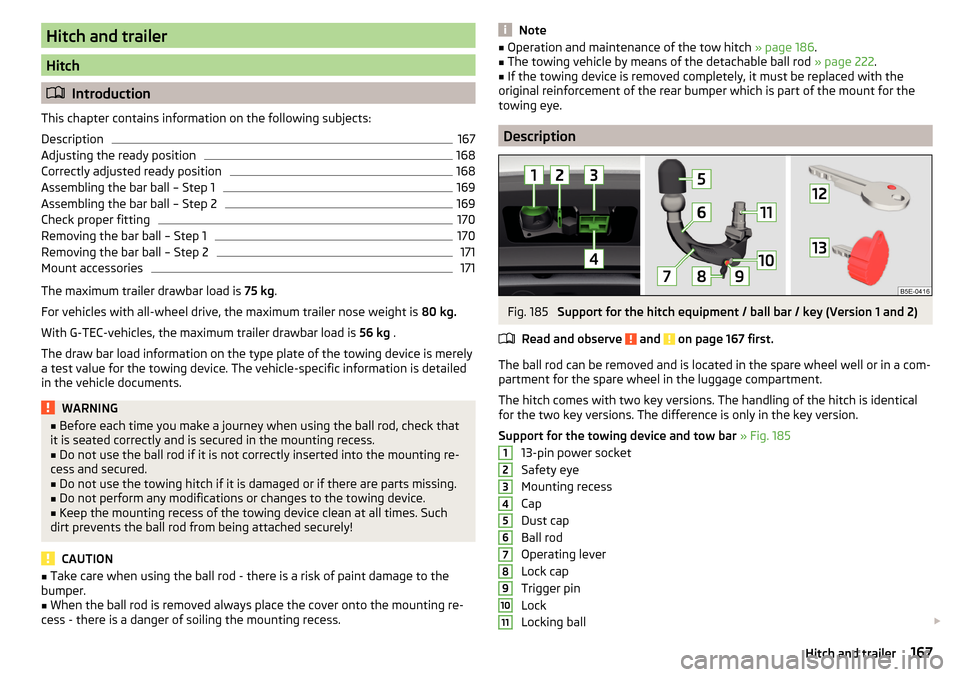
Support for the towing device and tow bar » Fig. 185
13-pin power socket
Safety eye
Mounting recess
Cap
Dust cap
Ball rod
Operating lever
Lock cap
Trigger pin
Lock
Locking ball
1234567891011167Hitch and trailer
Page 182 of 268

ŠKODA Service Partners are liable for any defects of ŠKODA Genuine Accesso-
ries for a period of 2 years after installation or delivery in accordance with the
materials defect liability, unless agreed otherwise in the purchase agreement
or any other agreements. You should keep the approved warranty certificate
and the invoices for these accessories for this period of time, so that the com-
mencement of the term can be verified.
ŠKODA Service Partners also stock a range of suitable car care products and all
parts that are subject to natural wear-and-tear, such as tyres, batteries, bulbs
and wiper blades.
Note
The accessories authorized by the company ŠKODA AUTO a.s. will be offered
by the ŠKODA Partners in all countries where the company ŠKODA AUTO a.s.
has a sales and after-sales service network. This will usually be in the form of a
printed catalogue of ŠKODA Genuine Accessories, in the form of separate prin-
ted brochures or in the form of ŠKODA Genuine Accessories on the ŠKODA
Partner websites.
Spoiler
Read and observe
on page 178 first.
If your new vehicle is fitted with a spoiler on the front bumper in combination
with the spoiler on the luggage compartment lid, the following instructions
must be adhered to. ▶ For safety reasons, the vehicle must only be fitted with a spoiler on the front
bumper in combination with the associated spoiler on the luggage compart-
ment lid.
▶ This kind of spoiler cannot be left on the front bumper either on its own, in
combination with another spoiler not on the luggage compartment lid or in
combination with an unsuitable spoiler on the luggage compartment lid.
▶ We recommend that you consult the ŠKODA Service Partner for any repairs
to or replacement, addition or removal of spoilers.
WARNING■ If work on your vehicle's spoilers is not carried out properly, this can lead
to operational faults - risk of accident and serious injuries.■
If a front spoiler, full wheel trim, etc. is mounted retrospectively, it must
be ensured that the air supply to the front wheel brakes is not reduced.
The front brakes may overheat which can have a negative impact on the
functioning of the braking system – risk of accident!
Component protection
Read and observe
on page 178 first.
Some electronic vehicle components (such as the instrument cluster) are fac-
tory-equipped with component protection.
Component protection has been developed as a protection mechanism for the
following situations. ▶ Impairment of factory- or garage-fitted electronic components after installa-
tion in another vehicle (for example, after a theft).
▶ Impairment of electronic components used outside the vehicle.
▶ The possibility of a legitimate installation or change of electronic compo-
nents for repairs at a specialist garage.
The activated component protection can be realized by functional limitations
of the specific electronic component. Seek help from a specialist garage.
Airbags
Read and observe
on page 178 first.
WARNING■Modifications, repairs and technical alterations that have been carried out
unprofessionally can cause damage and operational faults, and can also se-
riously impair the effectiveness of the airbag system – risk of accident and
fatal injury!■
A change to the vehicle's wheel suspension, including the use of non-ap-
proved wheels and tire combinations, can alter the functioning of the air-
bag system - risk of accident and fatal injury!
WARNINGInformation on the use of the airbag system■Never install any airbag parts into the vehicle that have been removed
from old cars or have been recycled.■
Never install damaged airbag parts in the vehicle. The airbags may then
not be triggered properly or not at all in the event of an accident.
180General Maintenance
Page 190 of 268

Fabric
Clean upholstery cover materials and cloth trims on doors, luggage compart-
ment cover, etc. using specific cleaning agents, e.g., dry foam.
Use a soft sponge, brush, or commercially available microfibre cloth.
Use a cloth and a cleaning agent specifically designed for this purpose to clean the roof trim.
Remove any lumps on the cover fabric and any fabric residue using a brush.
Remove stubborn hair using a “cleaning glove”.
Alcantara ®
Dust and dirt in pores, creases and seams may chafe and damage the surface.
Therefore, they must be removed regularly at short intervals with a cloth or
vacuum cleaner.
Minor changes in colour caused by use are normal.
CAUTION
■ For Alcantara ®
seat covers, do not use any solvents, floor wax, shoe cream,
stain remover, leather cleaners or similar agents.■
Avoid leaving the vehicle in bright sunlight for long periods of time in order
to stop the artificial leather, materials or Alcantara ®
from bleaching. During ex-
tended periods of standing outdoors, protect artificial leather, fabrics or Alcan-
tara ®
by covering.
■
Some clothing materials, e.g. dark denim, do not have sufficient colour fast-
ness. This can cause damage or clearly visible discolouration to seat covers,
even when used correctly. This applies particularly to light-coloured seat cov-
ers. This does not relate to a fault in the seat cover, but rather to poor colour
fastness of the clothing textiles.
Seat covers
Read and observe
and on page 187 first.
Electrically heated seats
Use a specific cleaning agent such as dry foam or similar to clean the covers. »
.
Seats without seat heating
Thoroughly vacuum the seat covers with a vacuum cleaner before cleaning.
Clean the seat covers with a damp cloth or cleaning products specially de-
signed for this purpose.
Indented points arising on the fabrics by everyday use, can be removed by
brushing against the direction of hair with a damp brush.
Always clean all parts of the covers, so that there are no visible edges. Then
allow the seat to dry completely.
CAUTION
■ Do not clean the covers of electrically heated seats either with water or with
other liquids - there is a risk of damaging the seat heating system.■
Regularly remove dust from the seat covers using a vacuum cleaner.
■
Electrically heated seats must not be dried after cleaning by switching on the
heater.
■
Do not sit on wet seats - risk of seat deformation.
■
Always clean the seats from “seam to seam”.
Safety belts
Read and observe
and on page 187 first.
Wash dirty seat belts with mild soapy water.
Remove coarse dirt with a soft brush.
WARNING■ The seat belts must not be removed for cleaning.■Never clean the seat belts chemically as chemical cleaning products could
destroy the fabric.■
The seat belts must not be allowed to come into contact with corrosive
liquids (e.g. acids).
■
The seat belts must be fully dried before being rolled up.
188General Maintenance
Page 199 of 268
CAUTION■Under no circumstances must radiator antifreeze or other additives be added
to the windscreen washer fluid.■
If the vehicle is fitted with a headlight cleaning system, only cleaning prod-
ucts which do not attack the polycarbonate coating of the headlights must be
added to the windscreen washer fluid.
■
Do not remove the filter from the windscreen washer fluid reservoir when re-
plenishing it with liquid otherwise the liquid transportation system can be con-
taminated, which can cause the windscreen washer system to malfunction.
Engine oil
Introduction
This chapter contains information on the following subjects:
Specification
197
Checking the oil level
198
Replenishing
198
The engine has been factory-filled with a high-grade oil that can be use
throughout the year - except in extreme climate zones.
The engine oils are undergoing continuous further development. Thus the in- formation stated in this Owner's Manual is only correct at the time of publica-
tion.
ŠKODA Service Partners are informed about the latest changes by the manu-
facturer. We therefore recommend that the oil change be completed by a
ŠKODA Service Partner.
The specifications (VW standards) stated in the following can be indicated sep-
arately or together with other specifications on the bottle.
The engine oil should be changed after specified service intervals » page 49.
WARNINGThe engine compartment of your car is a hazardous area. The following
warning instructions must be followed at all times when working in the en-
gine compartment » page 194.
CAUTION
Do not pour any additives into the engine oil – risk of serious damage to the
engine parts.Note■ Before a long drive we recommend that you purchase and carry with you en-
gine oil which complies with the specification for your vehicle.■
We recommend that you use oils from ŠKODA Original Accessories.
■
If your skin has come into contact with oil, it must be washed thoroughly.
Specification
Read and observe
and on page 197 first.
Vehicles with variable service intervals
Petrol enginesSpecification1.2 l/63, 81 kW TSI
VW 504 00
1.4 l/110 kW TSI1.8 l/132 kW TSI2.0 l/162, 169 kW TSIDiesel engines a)Specification1.6 l/66, 81 kW TDIVW 507 002.0 l/105, 110, 135 kW TDIa)
Engine oil VW 505 01 can optionally be used in diesel engines without a
DPF.
Vehicles with fixed service intervals
Petrol enginesSpecification1.2 l/63, 81 kW TSI
VW 502 00
1.4 l/81 kW TSI G-TEC1.4 l/110 kW TSI1.6 l./81 kW MPI1.8 l/132 kW TSI2.0 l/162, 169 kW TSIDiesel engines a)Specification1.6 l/66, 81 kW TDIVW 507 002.0 l/105, 110, 135 kW TDIa)
Engine oil VW 505 01 can optionally be used in diesel engines without a
DPF.
197Inspecting and replenishing
Page 202 of 268

Checking the level›Check the coolant level in the coolant expansion tank » Fig. 207.
If the engine is warm, the test result may be inaccurate. The level can also be
above the mark A
» Fig. 207 .
In the event of an insufficient coolant level, a warning light
is displayed in
the instrument cluster, as well as the relevant notification » page 37. We still
recommend inspecting the coolant level directly at the reservoir from time to
time.
Loss of coolant
A loss of coolant is first and foremost an indication of a leak in the cooling sys-
tem. Do not merely top up the coolant. Have the cooling system checked by a
specialist garage.
Replenishing
Read and observe
and on page 199 first.
The coolant expansion tank must always contain a small amount of coolant» page 199, in section Introduction .
›
Place a cloth over the cap of the coolant expansion reservoir and unscrew
the cap carefully .
›
Replenish the coolant.
›
Turn the cap until it clicks into place.
Do not use an alternative additive if the specified coolant is not available. In
this case, use just water and have the correct mixing ratio of water and cool-
ant additive restored by a specialist garage as soon as possible.
Only refill with new coolant.
Brake fluid
Introduction
This chapter contains information on the following subjects:
Checking the brake fluid level
200
Specification
201
The brake fluid reservoir is located in the engine compartment » Fig. 208 on
page 200 .
WARNING■
The engine compartment of your car is a hazardous area. The following
warning instructions must be followed at all times when working in the en-
gine compartment » page 194.■
Do not use used brake fluid - the function of the brake system may be im-
paired – risk of accident!
CAUTION
■ Do not continue your journey if the fluid level has dropped below the “MIN”
marking » Fig. 208 on page 200 , do not continue driving - there is a risk of
an accident! Seek help from a specialist garage.■
Brake fluid damages the paintwork of the vehicle.
Note
■ The brake fluid is changed as part of a prescribed inspection services.■We recommend using brake fluids from the ŠKODA Original Accessories
range.
Checking the brake fluid level
Fig. 208
Brake fluid reservoir
Read and observe and on page 200 first.
The fluid can be checked if the following conditions are met.
The vehicle is on a horizontal surface.
The engine is turned off.
The bonnet is open.
Checking the level
›
Check the level of brake fluid in the reservoir » Fig. 208.
The level must be between the “MIN” and “MAX” markings.
200General Maintenance