2015 Seat Altea tow
[x] Cancel search: towPage 83 of 236

Lights and visibility
correct use of lights in all situations. “Auto-
matic headlight control” is merely a system
to support the driver. Where necessary,
switch on the lights manually using the light
switch.
Fog lights with cornering function*
3 Applies to the model: ALTEA / ALTEA XL
When the t urn s
ignal is switched on to turn or
on very tight bends, the right or left fog light
automatically comes on to function as a cor-
nering light. The cornering light only oper-
at e
s if the dipped beam lights are on. WARNING
Read and observe the relevant warnings ››› in Adaptive headlights* (for driving round
bends) on page 80 Hazard warning lights
Fig. 63
Dash panel: switch for hazard warn-
ing lights. The hazard warning lights are used to draw
the attention of other road users to your vehi-
cle in emergencies.
If your vehicle breaks down:
1. Park your vehicle at a safe distance from
moving traffic.
2. Press the button to switch on the hazard warning lights ››› .
3. Switch the ignition off.
4. Apply the handbrake.
5. For a manual gearbox, engage 1st gear; for an automatic gearbox, move the gear
lever to P
.
6.
Use the warning triangle to draw the atten-
tion of other road users to your vehicle. 7. Always take the vehicle key with you when
you leave the vehicle.
Switch on the hazard warning lights to warn
other road users, for example:
● reaching the tail end of a traffic jam,
● there is an emergency
● your vehicle breaks down due to a techni-
cal fault,
● you are towing another vehicle or your vehi-
cle is being towed.
All turn signals flash simultaneously when
the hazard warning lights are switched on.
The two turn signal turn signal lamps
and the turn signal lamp in the switch will
flash at the same time. The hazard warning
lights also work when the ignition is switch-
ed off.
Emergency braking warning
If the vehicle brakes suddenly and continu-
ously at a speed of more than 80 km/h (50
mph), the brake light flashes several times
per second to warn the vehicles driving be-
hind. If you continue braking, the hazard
warning lights will come on automatically
when the vehicle comes to a standstill. They
switch off automatically when the vehicle
starts to move again. »
81
Technical specifications
Advice
Operation
Safety
Page 85 of 236

Lights and visibility
Rear interior lights and reading
lights* Fig. 66
Interior roof trim: rear interior lights
and reading lights. The switch
››› Fig. 66 C is used to select the
following positions:
Interior light switched off 0
In switch position ››› Fig. 66 1 , the interior
and reading lights are switched off.
Switching on the reading light
Turn the switch to position 2 (left reading
light) or to position 4 (right reading light).
Courtesy light position
Turn the control to position 3 . The interior
lighting is automatically switched on when
the vehicle is unlocked or the key removed
from the ignition. The light goes out approxi-
mately 20 seconds after the doors are closed. The interior lights are switched off
when the vehicle is locked or when the igni-
tion is switched on.
Interior lights or both reading lights
switched on
T urn the c
ontrol to position 5 .
Note
If not all the vehicle doors are closed, the in-
terior lights will be switched off after approx.
10 minutes, providing the ignition key has
been removed and the courtesy light position
selected. This prevents the battery from dis-
charging. Visibility
Sun visors Fig. 67
Sun visor on the driver side. The sun visors for the driver and the front
passenger can be pulled out of their mount-
ings in the centre of the vehicle and turned
towards the doors
››› Fig. 67 1 .
The vanity mirrors in the sun visors have cov-
ers. When you open the cover 2 , a lamp in
the roof lights up.
The light* in the roof lining will go out when
the vanity mirror cover is pushed back or the
sun visor is pushed back up. Note
The roof lighting will go out approximately
ten minutes after the ignition key has been
removed. This prevents the battery from dis-
charging. Sun blind*
3 Applies to the model: ALTEA XL/ALTEA FREETRACK
Fig. 68
Rear door blind.
» 83
Technical specifications
Advice
Operation
Safety
Page 86 of 236

Operation
Rear window sun blind* – Pull out the visor and hook it onto the
hooks at the top of the door frame
››› Fig. 68 .
W ind
screen wiper and rear
window wiper systems
Windscreen wipers Fig. 69
Windscreen wiper lever. Fig. 70
Rain sensor on the windscreen seen
from the interior. The windscreen wiper lever
››› Fig. 69 has the
f o
llowing positions:
Initial position 0 Rest, windscreen disconnected.
Intermittent wipe / automatic wipe with rain
sensor*
– Move the lever up to position 1 .
– With switch A adjust the wipe interval or
sensitivity of the rain sensor*.
Switch A has 4 positions.
The rain sensor* is part of the intermittent
wipe function. You will have to switch the rain
sensor back on if you switch off the ignition.
This is done by switching the wiper interval
wipe function off and back on. Slow wipe
–
Push the lever up to position 2 .
Continuous wipe – Push the lever up to position 3 .
Short wipe – Move the lever down to position 4 to give
the windscreen a short wipe. The wiper will
s t
art to move faster if you keep the lever
pressed down for longer than two seconds.
Automatic wash/wipe
– Pull the lever towards the steering wheel,
position 5 . The wash function will start
immediately and the wipers will start with a
slight delay. The wash and wiper systems
will function at the same time at speeds of
over 120 km/h (75 mph).
– Release the lever. The wipers will keep run-
ning for approximately 4 seconds.
Heated windscreen in the wiper blade area*
In some countries and in some versions, it is
possible to heat the windscreen in the area
of the windscreen wiper blades in order to
aid de-icing in this area. The function is
switched on by pressing the heated rear win-
dow key .
84
Page 87 of 236

Lights and visibility
WARNING
● Worn and dirty wiper blades reduce visibili-
ty and safety levels while driving.
● In cold conditions, you should not use the
wash/wipe system unless you have warmed
the windscreen with the heating and ventila-
tion system. The windscreen washer fluid
could otherwise freeze on the windscreen and
obscure your view of the road.
● The rain sensor may not detect enough rain
to switch on the wipers. If necessary, switch
on the wipers manually when water on the
windscreen impedes visibility.
● Always note the corresponding warnings
››› page 194. CAUTION
In icy conditions, always check that the wiper
blades are not frozen to the glass before us-
ing the wipers for the first time. If you switch
on the windscreen wipers when the wiper
blades are frozen to the windscreen, you
could damage both the wiper blades and the
wiper motor. Note
● The windscreen wipers will only work when
the ignition is switched on.
● In certain versions of vehicles with alarms,
the windscreen wiper will only work when the
ignition is on and the bonnet closed. ●
When in use, the wipers do not go as far as
the rest position. When the lever is moved to
position 0, they are totally hidden.
● If the vehicle stops when wiper speed 2 ›››
Fig. 69 or 3 is selected, the next speed
down will be selected automatically. The set
speed will be resumed when the vehicle pulls
away.
● The windscreen will be wiped again after
approximately five seconds once the “auto-
matic wash/wipe system” has been activa-
ted, provided the vehicle is moving (drip func-
tion). If you activate the wipers less than 3
seconds after the drip function, a new wash
sequence will begin without performing the
last wipe. For the “drip” function to work
again, you have to turn the ignition off and
then on again.
● When the “interval wipe function” is on,
the intervals are directly proportional to the
speed. This way, the higher the vehicle speed
the shorter the intervals.
● The wiper will try to wipe away any obsta-
cles that are on the windscreen. The wiper
will stop moving if the obstacle continues to
block its path. Remove the obstacle and
switch the wiper back on again.
● Before removing any objects that may be
trapped in the side areas of the windscreen,
always move the wiper arms to the service
position (horizontal).
● The heat output of the heated jets is con-
trolled automatically when the ignition is
switched on, depending upon the outside
temperature. ●
Do not put stickers on the windscreen in
front of the rain sensor*. This may cause sen-
sor disruption or faults. Rear window wiper
Fig. 71
Windscreen wiper lever: rear window
wiper. Switching on the interval wipe
– Press the lever forward to position 6 ›››
Fig. 71 . The wiper will wipe the window
ap pr
oximately every 6 seconds.
Switching off the interval wipe function
– Pull the lever back from position 6 toward
the steering wheel. The wiper will continue
to function for a short period if you switch
off whilst the wipers are in motion. »
85
Technical specifications
Advice
Operation
Safety
Page 91 of 236
Seats and head restraints
●
Never transport more than the permitted
amount of people in your vehicle.
● Every vehicle occupant must properly fas-
ten and wear the seat belt belonging to his or
her seat. Children must be protected with an
appropriate child restraint system ››› page 24,
Transporting children safety.
● The front seats and all head restraints must
always be adjusted to body size and the seat
belt must always be properly adjusted to pro-
vide you and your passengers with optimum
protection.
● Always keep your feet on the footwell when
the vehicle is moving; never rest them on the
dash panel, out of the window or on the seat.
This is also applied to passengers. An incor-
rect sitting position exposes you to an in-
creased risk of injury in case of a sudden
braking or an accident. If the airbag is trig-
gered, you could sustain severe injuries due
to an incorrect sitting position.
● It is important for the driver and front pas-
senger to keep a distance of at least 25 cm
from the steering wheel and dash panel. Fail-
ure to respect the minimum distance means
that the airbag will not protect you. Risk of
fatal injury. The distance between the driver
and the steering wheel or between the front
passenger and the dash panel should always
be as great as possible.
● Adjust the driver or front passenger seat
only when the vehicle is stationary. This also
applies to the forwards/backwards adjust-
ment of the rear seats. Otherwise, your seat
could move unexpectedly while the vehicle is moving. This could increase the risk of an ac-
cident and therefore, injury. In addition,
while adjusting your seat, you will assume an
incorrect sitting position. Risk of fatal acci-
dents.
●
Special guidelines apply to installing a
child seat on the front passenger seat. When
installing a child seat, please observe the
warnings described in ››› page 24, Transport-
ing children safety. Adjustment of the front seats
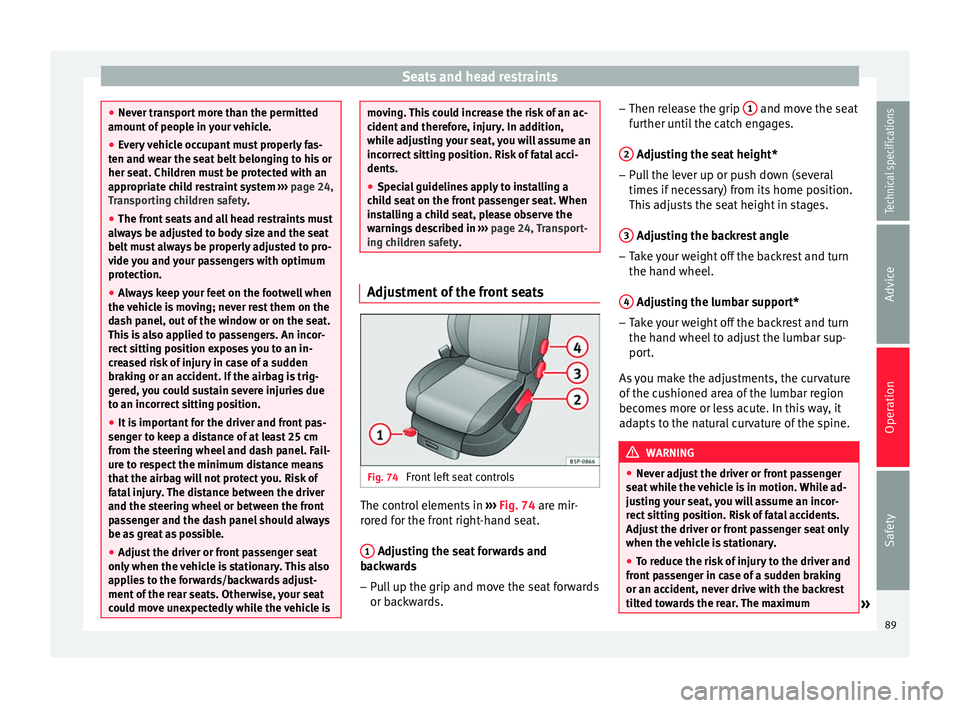
Fig. 74
Front left seat controls The control elements in
››› Fig. 74 are mir-
r or
ed for the front right-hand seat.
1 Adjusting the seat forwards and
backwards
– Pull up the grip and move the seat forwards
or backwards. –
Then release the grip 1 and move the seat
further until the catch engages.
2 Adjusting the seat height*
– Pull the lever up or push down (several
times if necessary) from its home position.
This adjusts the seat height in stages.
3 Adjusting the backrest angle
– Take your weight off the backrest and turn
the hand wheel.
4 Adjusting the lumbar support*
– Take your weight off the backrest and turn
the hand wheel to adjust the lumbar sup-
port.
As you make the adjustments, the curvature
of the cushioned area of the lumbar region
becomes more or less acute. In this way, it
adapts to the natural curvature of the spine. WARNING
● Never adjust the driver or front passenger
seat while the vehicle is in motion. While ad-
justing your seat, you will assume an incor-
rect sitting position. Risk of fatal accidents.
Adjust the driver or front passenger seat only
when the vehicle is stationary.
● To reduce the risk of injury to the driver and
front passenger in case of a sudden braking
or an accident, never drive with the backrest
tilted towards the rear. The maximum » 89
Technical specifications
Advice
Operation
Safety
Page 99 of 236

Transport and practical equipment
The tables have two positions for use and
cannot be interchanged. WARNING
● The mobile stowage compartment supports
a maximum load of 5 kg. Do not overload.
● Do not drive when the cover of the mobile
storage compartment is open.
● Do not drive when the tables are set up for
use.
● When the vehicle is moving and when the
tables are not in use, keep them stored inside
the mobile storage compartment with the
cover closed.
● Never place hot drinks in the cup holders.
The drink may spill and cause burns when the
vehicle is moving.
● Do not leave cans in the cup holders when
the vehicle is in motion, there is a danger
that the can may be flung around the vehicle
and cause injury.
● Make sure that the mounting plate is prop-
erly fixed onto the cushion frame.
● When the plate is not in use, store inside
the storage compartment.
● When the mobile storage compartment is
not in use, it should always be properly fas-
tened using the storage net in the boot. Note
● Check that the mobile storage compart-
ment is fitted correctly, pulling it forward by the front storage compartment and checking
that both safety clips are securely fastened to
both rings.
Mounting and removal
Fig. 93
Mobile storage compartment. Mount-
ing. Fig. 94
Mobile storage compartment mount-
ing plate. Mounting the mobile storage compartment
– Fold down the small section of the rear seat
backrest in order to access the back of the
large backrest.
– Fit the mobile storage compartment mount-
ing plate H
››› Fig. 94 from the inside of
the v
ehicle, through the rear part of the
seat. It should be fitted between the back-
rest and the seat, in the central seat area.
– Push the plate until it clips the cushion
frame. The rings of the mobile storage com-
partment mounting plate appear at the
front of the seat.
– If it is difficult to make the plate clip, tilt the
rear backrest of the large section forwards
slightly and then lean the backrest back-
wards to make the fitting of the mobile
storage compartment onto the mounting
plate easier.
– Place the mobile storage compartment on-
to the foam of the central seat.
– Set both mounting pieces together E ›››
Fig. 93 , with both mounting rings G ›››
Fig. 94 and press hard until both the
c lip
s completely connect with the rings.
Removing the mobile storage compartment – Pull each of the buttons ›››
Fig. 93 F on
the clips (red buttons) forwards, until they
snap out of place. »
97
Technical specifications
Advice
Operation
Safety
Page 102 of 236

Operation
MEDIA-IN* connector Fig. 101
Connection in central armrest com-
partment. For information concerning the use of this
equipment, please see the Radio handbook.
First-aid kit, warning triangle,
fire extinguisher
Warning triangle* and first-aid kit* Fig. 102
Altea: warning triangle storage un-
der the rear shelf. The warning triangle* can be stowed under
the rear shelf in a storage compartment
››› Fig. 102 or in the storage compartment lo-
c at
ed on the boot floor, under the carpet, de-
pending on the version.
The first aid kit can be stowed in the storage
compartment under the carpet on the boot
floor, or in the storage compartment in the
boot side lining, depending on the version. Note
● The warning triangle and the first aid kit do
not belong to the standard vehicle equip-
ment. ●
The first aid kit must comply with legal re-
quirements.
● Observe the expiry date of the contents of
the first aid kit. After it has expired you
should purchase a new one.
● Before purchasing accessories and spare
parts, see the instructions in ››› page 147. Fire extinguisher*
The fire extinguisher* can be attached to the
luggage compartment carpet with Velcro.
Note
● The fire extinguisher does not belong to
the standard vehicle equipment.
● The fire extinguisher must comply with le-
gal requirements.
● Make sure the fire extinguisher works.
They should therefore be checked. The stick-
er on the fire extinguisher will inform you of
the next date for checking.
● Before purchasing accessories and spare
parts, see the instructions in ››› page 147.100
Page 103 of 236

Transport and practical equipment
Luggage compartment Loading the luggage compartment All luggage and other loose objects must be
safely secured in the luggage compartment.
Unsecured objects which shift back and forth
could impair the driving safety or driving
characteristics of the vehicle by shifting the
centre of gravity.
– Distribute the load evenly in the luggage
compartment.
– Place heavy objects as far forward as possi-
ble in the luggage compartment.
– Place the heavy objects first.
– Secure heavy objects to the fitted fastening
rings ›››
page 103 . WARNING
● Loose luggage and other objects in the lug-
gage compartment could cause serious inju-
ries.
● Always stow objects in the luggage com-
partment and secure them on the fastening
rings.
● Use suitable straps to secure heavy ob-
jects.
● During sudden manoeuvres or accidents,
loose objects can be thrown forward, injuring
vehicle occupants or passers-by. This in-
creased risk of injury will be further increased if a loose object is struck by an inflating air-
bag. If this happens, objects can be trans-
formed into “missiles”. Risk of fatal injury.
●
Please note that the centre of gravity may
shift when transporting heavy objects; this
may affect vehicle handling and lead to an ac-
cident. Therefore, it is essential to adjust
your speed and driving style accordingly, to
avoid accidents.
● Never exceed the allowed axle weights or
allowed maximum weight. If said weights are
exceeded, the driving characteristics of the
vehicle may change, leading to accidents, in-
juries and damage to the vehicle.
● Never leave your vehicle unattended, espe-
cially when the rear lid is open. Children
could climb into the luggage compartment,
closing the door behind them; they will be
trapped and run the risk of death.
● Never allow children to play in or around
the vehicle. Close and lock all the doors and
rear lid when you leave the vehicle. Before
you lock the vehicle, make sure that there are
no adults or children in the vehicle. CAUTION
Hard objects on the boot cover could chafe
against the wires of the heating element in
the rear window and cause damage. Note
● Air circulation in the vehicle helps reduce
fogging of the windows. Used air escapes through ventilation slits in the side trim of
the luggage compartment. Ensure that these
ventilation slits are never covered.
● Straps for securing the load to the fasten-
ing rings are commercially available. Rear shelf
3 Applies to the model: ALTEA
Fig. 103
Rear shelf. Fig. 104
Removing the storage compartment.
» 101Technical specifications
Advice
Operation
Safety