2015 Seat Alhambra warning light
[x] Cancel search: warning lightPage 172 of 305

Operation
●
To avoid unexpected operation of the cruise
control system, turn it off every time you fin-
ish using it.
● It is dangerous to use a set speed which is
too high for the prevailing road, traffic or
weather conditions.
● When travelling down hills, the CCS cannot
maintain a constant speed. The vehicle tends
to accelerate under its own weight. Select a
lower gear or use the foot brake to slow the
vehicle. Warning and control lamp
Fig. 147
Instrument panel display: CCS status
indicationsIt
lights upPossible causeSolution
This cruise control system
maintains the set speed of
the vehicle.–
Several warning and control lamps light up
for a few seconds when the ignition is switch-
ed on, signalling that the function is being
verified. They will switch off after a few sec-
onds.
Indication on display
There are different versions of the cruise con-
trol system. In vehicles with the multifunction
display (MFI), the set speed is displayed on
the instrument panel screen.
Status
Fig. 147
:
CCS temporarily switched off. The set
speed is displayed in small figures.
System error. Contact a specialised work-
shop.
CCS switched on. The speed memory is
empty.
The CCS is switched on. The set speed is
displayed in large figures.
A B
C
D WARNING
Observe the safety warnings ››› in Control
and warning lamps on page 47. 170
Page 174 of 305

Operation
Travelling down hills with the CCS
When travelling down hills the CCS cannot
maintain a constant speed. Slow the vehicle
down using the brake pedal and reduce
gears if required.
Automatic off
The cruise control system (CCS) is switched
off automatically or temporarily:
● If the system detects a fault that could af-
fect the working order of the CCS.
● If you increase the stored speed by using
the accelerator for a certain time.
● if the brake or clutch pedal is depressed.
● If you change gears.
● If the airbag is triggered.
Lane Assist system* Introduction WARNING
The intelligent technology in the lane assist
system cannot change the limits imposed by
the laws of physics and by the system itself.
Careless or uncontrolled use of the Lane As-
sist system may cause accidents and injury.
The system is not a replacement for driver
awareness. ●
Always adapt your speed and the distance
to the vehicles ahead in line with visibility,
weather conditions, the condition of the road
and the traffic situation.
● Always keep your hands on the steering
wheel so you can turn it at any time.
● The lane assist system does not detect all
road markings. In some circumstances, the
poor state of the road, structures located on
it or certain objects may be mistakenly recog-
nised as road markings by the lane assist
system. In such situations, switch the lane
assist system off immediately.
● Pay attention to the instructions on the in-
strument panel display and act accordingly to
its requests.
● Always pay attention to the vehicle's sur-
roundings. Note
The lane assist system has been exclusively
developed for driving on asphalted roads. Note
If the lane assist system does not work as de-
scribed in this chapter, do not use it and con-
tact a specialised workshop. Note
If you observe any system malfunction, have
the system checked by a specialised work-
shop. Control lampsBlinks
or
lights up
Possible causeSolution
(yellow)
Lane assist system
connected but in-
active.
The system cannot
clearly detect the
lane. See
page 173,
The lane assist sys-
tem is inactive (con-
trol lamp lit in yel-
low).
(green)
Lane assist system
connected and ac-
tive.–
Several warning and control lamps light up
for a few seconds when the ignition is switch-
ed on, signalling that the function is being
verified. They will switch off after a few sec-
onds.
WARNING
Observe the safety warnings ››› in Control
and warning lamps on page 47. 172
Page 180 of 305

Operation
Elements of the tyre monitoring
indicatorTyre monitoring indicator with button.
See ››› page 179.
Control lamp on the instrument panel.
SET button on the centre console.
Monitoring the tread of all tyres using ABS sensors
(indirect measurement).
Adjustable medium and full-load tyre pressures.
Button to update the system when the tyre pressure is
changed. Control lamp
Lights
up or
flashesPossible causeSolution
The tyre pressure
of a wheel has
dropped consider-
ably in relation to
the pressure set
by the driver
››› page 179.
Stop the vehicle!
Reduce your speed im-
mediately! Stop the ve-
hicle safely as soon as
possible. Avoid sud-
den manoeuvres and
braking!
Check all tyres and
pressures. Replace any
damaged tyres.
Lights
up or
flashesPossible causeSolution
System malfunc-
tion.
Consult a specialised
workshop if the tyre
pressure is correct and
the lamp remains lit af-
ter switching the igni-
tion off and back on
again. Have the sys-
tem checked there.
Several warning and control lamps light up
for a few seconds when the ignition is switch-
ed on, signalling that the function is being
verified. They will switch off after a few sec-
onds.
WARNING
Observe the safety warnings ››› in Control
and warning lamps on page 47. WARNING
When the tyres are inflated at different pres-
sures or at a pressure that is too low then a
tyre may be damaged resulting in a loss of
control of the vehicle and a serious or fatal
accident.
● If the warning lamp lights up, stop im-
mediately and check the tyres.
● If the tyres are inflated at different pres-
sures or if a tyre pressure is too low, this will
increase tyre wear, negatively affecting vehi- cle stability and increasing braking distan-
ces.
●
If tyres are inflated at different pressures or
a tyre pressure is too low, a tyre may be dam-
aged and burst resulting in a loss of control
of the vehicle.
● The driver is responsible for ensuring that
all of the vehicle tyres are correctly inflated
to the right pressure. The recommended tyre
pressure is indicated on the label ››› Fig. 175.
● The ty r
e monitoring system can only oper-
ate correctly if all of the tyres are inflated to
the correct pressure when cold.
● Driving with tyres at the wrong pressure
can damage them and result in an accident.
Ensure that the tyre pressures of all the tyres
correspond to the vehicle load.
● Before starting a journey, always inflate
tyres to the correct pressure.
● If tyre pressure is too low then the tyre is
subject to greater forces and it may be heated
to such an extent that the tread can rupture
and the tyre will burst.
● With an overloaded vehicle at high speed,
the tyres can overheat and burst resulting in
a loss of vehicle control.
● Tyre pressures which are too high or too
low reduce the useful life of the tyre, affect-
ing vehicle performance.
● If a tyre has not been “punctured” and does
not have to be changed immediately, drive to
the nearest specialised workshop at a moder-
ate speed and have the tyre checked and in-
flated to the correct pressure. 178
Page 183 of 305
Towing bracket device
Bumper mounted tow hitch
Never fit a tow hitch or its attachments to the
bumper. A tow hitch should never interfere
with the bumper performance. Do not modify
the exhaust system and brake system. Regu-
larly check the tow hitch to ensure it is firmly
fitted.
Engine cooling system
Driving with a trailer increases the load on
the engine and cooling system. The cooling
system should always have sufficient coolant
and to be able to cope with the vehicle and
trailer.
Electric trailer brake
If the trailer has its own braking system,
please note the relevant legal requirements.
The trailer braking system should never be
connected to the vehicle braking system.
Trailer cable
Always use a cable between the vehicle and
the trailer ››› page 183 .
T r
ailer rear lights
The rear lights of a trailer must fulfil the cor-
responding standards ››› page 183.
Never connect the trailer's rear lights directly
to the vehicle electric system. In case of any
doubt about the electrical connection of the trailer, ask a specialised workshop. SEAT rec-
ommends visiting a technical service.
Wing mirrors
When the field of vision behind the trailer
cannot be seen using the standard wing mir-
rors of the towing vehicle, additional wing
mirrors are required according to the legal re-
quirements of each country. The wing mirrors
must be fitted before driving and must pro-
vide a sufficient field of vision behind.
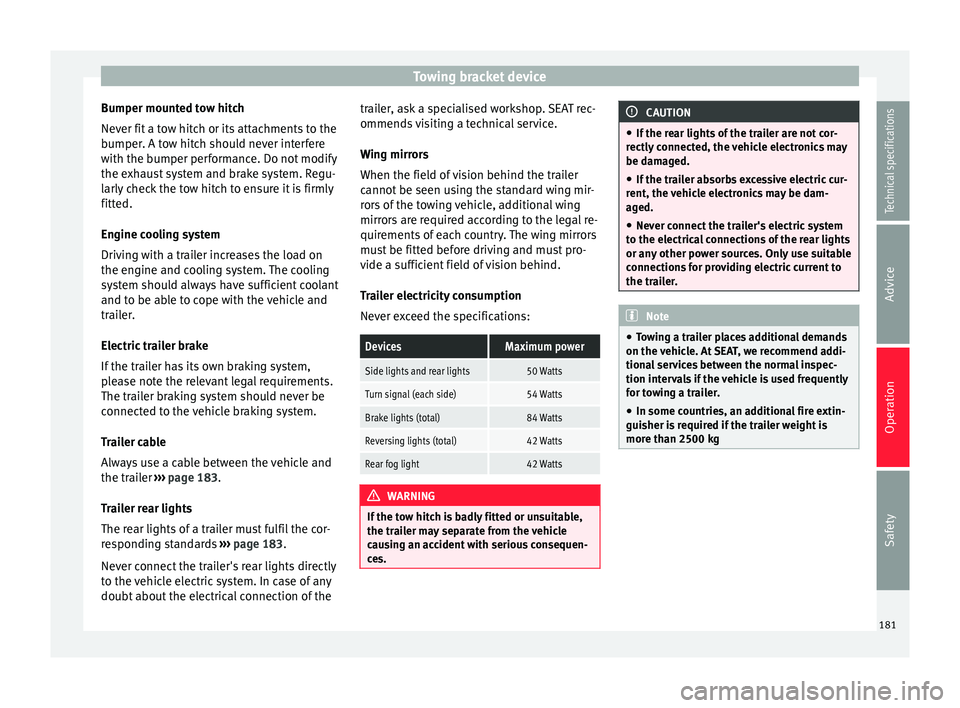
Trailer electricity consumption
Never exceed the specifications:
DevicesMaximum power
Side lights and rear lights50 Watts
Turn signal (each side)54 Watts
Brake lights (total)84 Watts
Reversing lights (total)42 Watts
Rear fog light42 Watts
WARNING
If the tow hitch is badly fitted or unsuitable,
the trailer may separate from the vehicle
causing an accident with serious consequen-
ces. CAUTION
● If the rear lights of the trailer are not cor-
rectly connected, the vehicle electronics may
be damaged.
● If the trailer absorbs excessive electric cur-
rent, the vehicle electronics may be dam-
aged.
● Never connect the trailer's electric system
to the electrical connections of the rear lights
or any other power sources. Only use suitable
connections for providing electric current to
the trailer. Note
● Towing a trailer places additional demands
on the vehicle. At SEAT, we recommend addi-
tional services between the normal inspec-
tion intervals if the vehicle is used frequently
for towing a trailer.
● In some countries, an additional fire extin-
guisher is required if the trailer weight is
more than 2500 kg 181
Technical specifications
Advice
Operation
Safety
Page 184 of 305

Operation
Electric tow hitch ball* Fig. 153
Right-hand side of the luggage com-
partment: button to electrically release the
tow hitch ball The rotation radius of the tow hitch ball
should be free of people, animals and ob-
jects
››› .
The towing bracket is located in the bumper.
The electric tow ball is fixed and cannot be
removed.
Releasing and unfolding the tow ball
● Stop the vehicle and apply the electric
parking brake.
● Switch the ignition off.
● Open the rear lid.
● Press the knob briefly ››› Fig. 153 . The tow
b al
l is released electronically and folds out
automatically; the button indicator will blink. ●
Move the ball joint until it inserts and the
button control lamp lights.
● Close the rear lid.
● Before hitching the trailer, remove the dust
guard from the ball.
● The indicator only lights when the boot
hatch is open and when a trailer is not hitch-
ed.
Restoring the tow ball to its originally
position
● Stop the vehicle and apply the electric
parking brake.
● Switch the ignition off.
● Remove the trailer and disconnect the ca-
ble between the vehicle and trailer. If neces-
sary, remove the power socket adapter.
● Place the dust guard over the ball.
● Open the rear lid.
● Press the knob briefly ››› Fig. 153
. The tow
ball is electronically released; the indicator
blinks.
● Push the tow ball into the bumper until it
locks in position and the button indicator
lights.
● Close the rear lid. The control lamp
●
When the control lamp flashes, the tow ball
is
not in its final position, has not engaged or
is damaged ››› .
● When the control lamp remains lit and the
rear lid is open, the tow ball has inserted cor-
rectly into the folded or deployed position.
● When the rear lid is closed, the indicator is
turned off. WARNING
The incorrect use of the tow hitch can cause
accidents and injury.
● Ensure that no person, animal or object
gets in the way of the tow ball.
● Never push the button when there is a tow
hitched or when any kind of carrier or acces-
sory is fitted to the tow hitch ball.
● While the ball is moving, do not interfere
with any tool.
● Do not drive with a trailer if the control
lamp does not light.
● If there is a fault in the electric system or
the trailer tow hitch, visit a specialised work-
shop to have it checked.
● If the diameter of the tow hitch is less than
49 mm, never use this for a trailer. 182
Page 185 of 305

Towing bracket device
CAUTION
● If anything is attached to the tow hitch ball,
do not, under any circumstances press the
button.
● Never direct a high-pressure or steam
cleaning system directly at the tow hitch ball
or trailer power socket. This could cause
damage to seals or remove lubricating
grease. Note
In extremely low temperatures, it is possible
that the tow hitch is not released. In this
case, place the vehicle in a warmer location
(e.g. a garage). Installing a bicycle carrier to the tow
hitch
The maximum load permitted for a bicycle
carrier on the tow hitch ball is
75 kg, with a
m ax
imum distance of 30 cm from the sup-
port. The distance between supports is the
distance between the bicycle carrier centre of
gravity (with the bicycles) and the centre of
point of the tow hitch ball. WARNING
The incorrect use of the tow hitch with a bicy-
cle carrier installed can cause accidents and
injury. ●
Never exceed the load and distances be-
tween supports indicated.
● Never fit the bicycle carrier to the tow hitch
ball neck, underneath the tow hitch given
that the bicycle carrier may be incorrectly fit-
ted due to the shape of the tow hitch and the
model of bicycle carrier.
● Always read and take the manufacturer as-
sembly instructions into account. CAUTION
Exceeding the maximum load and distance
between supports indicated can cause con-
siderable damage to the vehicle.
● Never exceed the specifications. Hitching and connecting the trailer
Fig. 154
Schematic diagram: assignment of
the pins of the trailer's electrical socket.
Key of the Schematic diagram ››› Fig. 154:
PinMeaning
1Left turn signal
2Rear fog light
3Earth, pins 1 to 8
4Right turn signal
5Tail light, right
6Brake lights
7Tail light, left
8Reverse lights
9Permanent live
10Live charge cable
11Unassigned
12Unassigned
13Earth, pins 9 to 13 Trailer power socket
The vehicle is fitted with a 13-pole power
socket for the electrical connection between
the trailer and the vehicle. With the engine
running, electrical devices on the trailer re-
ceive power from the electrical connection
(pin 9 and pin 10 on the trailer power plug).
»
183
Technical specifications
Advice
Operation
Safety
Page 186 of 305

Operation
If the system detects that a trailer has been
connected electrically, the electrical equip-
ment on the trailer will receive voltage
through this connection (pins 9 and 10). Pin
9 has a permanent live. This powers, for ex-
ample, the trailer's interior lighting. Electrical
devices such as a fridge in a caravan only re-
c eiv
e electrical power if the engine is running
(through pin 10).
The earth wires, pin 3 and pin 13, should not
be connected to each other to avoid over-
loading the electrical system.
If the trailer has a 7-contact connector , you
will need to use an adapter cable. In this case
the function corresponding to pin 10 will not
be available.
Trailer cable
Always secure the trailer cable to the towing
vehicle correctly. Leave a little bit of slack in
the cable for turning. However, ensure that
the cable does not rub off the ground while
driving.
Trailer rear lights
Check the trailer rear lights to ensure they
work correctly and remain legal. Ensure that
the trailer does not use more than the maxi-
mum power ›››
page 181. Tr
ailer connected to the anti-theft alarm:
● When a vehicle comes from the factory fit-
ted with an anti-theft alarm and tow hitch.
● When the trailer is connected to the vehicle
using the socket.
● When the vehicle and trailer electrical sys-
tems work correctly and are not damaged.
● When the vehicle is locked using the vehi-
cle key and the anti-theft alarm is turned on.
When the vehicle is locked, the alarm is trig-
gered when the electrical connection be-
tween the vehicle and the trailer is removed.
Always turn off the anti-theft alarm system
before connecting or disconnecting a trailer.
Otherwise, the tilt sensor may erroneously
activate the alarm.
Trailer with rear LED lights
For technical reasons, trailers fitted with rear
LED lights cannot be connected to the anti-
theft alarm system.
When the vehicle is locked, the alarm does
not trigger if the electrical connection with
the trailer is cut if it has rear light with light-
emitting diodes. WARNING
Erroneous or unsuitable connection of elec-
tric cables may supply energy to the trailer
causing an anomaly in the vehicle electronics that could result in an accident with serious
consequences.
●
All work on the electrical system must be
carried out only by a specialised workshop.
● Never connect the trailer's electric system
to the electrical connections of the rear lights
or any other power sources. CAUTION
Do not leave the trailer connected to the vehi-
cle when parked; places on its support wheel
or its supports. For example, when changing
the load or a puncture, the vehicle will be
pushed up or down. The force acting on the
tow hitch and the trailer could damage the
vehicle or the trailer. Note
● In the event of a fault in the vehicle or trail-
er electrical system or in the event of prob-
lems with the anti-theft alarm system, have
the system checked by a specialised work-
shop.
● If the trailer accessories use energy from
the power socket when the engine is stop-
ped, the battery will be discharged.
● For technical reasons, trailers fitted with
rear LED lights cannot be connected to the
anti-theft alarm system.
● If the vehicle battery is running low, the
electrical connection with the trailer is auto-
matically cut. 184
Page 187 of 305

Towing bracket device
●
With the engine running, the electrical
equipment on the trailer will be supplied with
power. Loading the trailer
Trailer weight / drawbar load
The trailer weight is the load that the vehicle
can pull
››› . The drawbar load is the vertical
weight of the tow hitch on the tow hitch ball
››› page 188.
The figur e
s for trailer weights and drawbar
load weights given on the data plate of the
tow hitch are for values of this model only.
The correct figures for your specific vehicle,
which may be lower than these figures for the
t o
w hitch, are given in the vehicle documen-
tation. The instructions in the official vehicle
documents take precedence.
For the sake of road safety, SEAT recom-
mends using the maximum allowed drawbar
load
. The handling of the combined vehicle
and trailer will be poor if the drawbar load is
too low.
The drawbar load increases the weight on the
rear axle, reducing the vehicle carrying ca-
pacity.
Gross combination weight
This figure refers to the combined weight of
the loaded vehicle and loaded trailer. Loading the trailer
The combined vehicle and trailer must be
balanced. Use the maximum drawbar load
authorised and do not overload the front or
the rear of the trailer:
●
Distribute loads in the trailer so that heavy
objects are as near to the axle as possible or
above it.
● Correctly secure the trailer load.
Tyre pressure
Inflate the trailer tyres according to the man-
ufacturer's instructions.
Inflate the towing vehicles tyres to the maxi-
mum ››› page 231. WARNING
Exceeding the maximum authorised axle
load, drawbar load or the gross combination
weight of the towing vehicle and trailer could
cause a serious accident with severe conse-
quences.
● Never exceed the specifications.
● With the actual load on the front and rear
axles, the maximum axle load should never
be exceeded. The weight on the front and rear
should never exceed the gross vehicle
weight. WARNING
If the load moves, the stability and safety of
the vehicle and trailer combination will be se-
riously affected and this could result in a seri-
ous accident.
● Always correctly load the trailer.
● Always secure loads correctly with suitable
and undamaged attachment rope or straps. Driving with a trailer
Adjusting the headlights
When towing a trailer, the front of the vehicle
may rise and so the dipped beam headlights
may blind other drivers. Use the headlight
range control to lower the cone of light. If you
do not have headlight range control, have
the headlights adjusted by a specialised
workshop. Vehicles with high-intensity dis-
charge lamps adapt automatically and do not
require adjustment.
Details of driving with a trailer
● If the trailer has an overrun brake, apply
the brakes gently at first and then, firmly.
This will prevent the jerking that can be
caused by the trailer wheels locking.
● As of the combined vehicle and trailer
mass, braking distances will be greater.
● Select a low gear before driving down a
steep hill to use the engine braking effect to »
185
Technical specifications
Advice
Operation
Safety