Page 63 of 298

1.57
WARNING LIGHTS (4/6)
ÉPreheating warning light
(diesel version)
This should come on when the igni-
tion is switched on. It indicates that the
heater plugs are in operation.
It goes out when preheating is com-
plete. The engine can be started.
2 Door(s) open warning light
A
The display of information shown below DEPENDS ON THE VEHICLE EQUIPMENT \
AND COUNTRY.
åAir bag warning light
This warning light will be dis-
played on the instrument panel when
the ignition is switched on or the engine
is started, and will then go out after a
few seconds.
If it does not come on when the igni-
tion is switched on, or comes on when
the engine is running, there is a fault in
the system.
Contact your approved Dealer as soon
as possible.
ÓBrake pedal warning light
This lights up when the brake
pedal should be depressed. Refer to
the information on the “Automatic gear-
box” in Section 2.
Please refer to the information on
“Driving advice, Eco-driving” in Section
2.
}Handbrake or electronic
parking brake warning light
Refer to the information on the “Assisted
parking brake” in Section 2.
Rear seat belt reminder
(depending
on vehicle)
Warning light
ß comes on, accom-
panied (depending on the vehicle) by
a message indicating the number of
fastened seat belts on the instrument
panel for approximately 30 seconds,
each time the vehicle is started, a door
is opened or a rear seat belt is fas-
tened/unfastened. Check that the rear
passengers are wearing seat belts and
that the number of seat belts shown as
fastened corresponds to the number of
rear seat places occupied.
Š ‰Gear change indicator
This lights up to advise you to
change to a higher gear (up arrow) or
lower gear (down arrow).
Please refer to the information on
“Driving advice, Eco-driving” in
Section 2.
Page 64 of 298
1.58
WARNING LIGHTS (5/6)
The display of information shown below DEPENDS ON THE VEHICLE EQUIPMENT \
AND COUNTRY.
�Assisted parking brake fault
light
Please refer to the information on the
“Assisted parking brake” in Section 2.
�Emergency active brake
assist
Refer to the information on “Driving cor-
rection devices and aids” in Section 2.A
ΦSpeed limiter and cruise
control indicator lights
See the information on the “Speed lim-
iter” and “Cruise control” in Section 2.
�Tyre pressure monitoring
system
Refer to the information on the “Tyre
pressure monitoring system” in Section
2.
\bECO mode warning light
This comes on when ECO
mode is activated.
Please refer to the information on “Eco-
driving” in Section 2.
Engine standby warning
light
Please see information in the para-
graph on “Stop and Start Function” in
Section 2.
Unavailability of engine
standby warning light
Please see information in the para-
graph on “Stop and Start Function” in
Section 2.
Page 68 of 298
1.62
1
Display selection keys 2
Scroll through the following information
by repeated short presses on the con-
trol 2 (the display depends on the vehi-
cle equipment and country):
a) total mileage and trip mileage re-
corder;
b) journey parameters: – fuel used;
– average fuel consumption;
– current fuel consumption;
– estimated range;
– distance travelled;
– average speed;
c) mileage before service;
d) tyre pressure reset;
e) trip log, operating faults and informa- tion message readout.
On-board computer 1
Depending on the vehicle, this includes
the following functions:
– distance travelled;
– journey parameters;
– information messages;
– operating fault messages (associ-
ated with the
© warning light);
– warning messages (associated with the
® warning light);
All these functions are described on the
following pages.
TRIP COMPUTER: general information (1/2)
2
Page 74 of 298
1.68
ON-BOARD COMPUTER: trip settings (5/5)
The display of information shown below DEPENDS ON THE VEHICLE EQUIPMENT \
AND COUNTRY.
Examples of selectionsInterpreting the display selected
d) Reset the tyre pressure.
Refer to the information on the “Tyre pressure monitor-
ing system” in Section 2.
+ Tyre pressure
No message memorised
e) Trip log.
Successive display:
– information messages (passenger airbag OFF etc.);
– operating fault messages (Check injection system,
etc.).
Page 76 of 298

1.70
TRIP COMPUTER AND WARNING SYSTEM: operating fault messages
These appear with the © warning light and mean that you should drive very carefully to an author\
ised dealer as
soon as possible. If you fail to follow this recommendation, you risk da\
maging your vehicle.
They disappear when the display selection key is pressed or after severa\
l seconds and are stored in the computer log. The
© warning light stays on. Examples of operating fault messages are given \
in the following pages.
Examples of messages Interpreting the display selected« Clean diesel filter » Indicates the presence of water in the diesel filter; contact an approve\
d Dealer
as soon as possible.
« Check lighting » Indicates a fault in the headlights.
« Check vehicle » Indicates a fault in one of the pedal sensors, battery management system\
or oil
level sensor.
« Check airbag » Indicates a fault in the restraint system in addition to the seat belts.\
In the event
of an accident, it is possible that they may not be triggered.
« Check anti-pollution system » Indicates a fault in the vehicle’s particle filter system.
Page 77 of 298

1.71
TRIP COMPUTER AND WARNING SYSTEM: warning message
These appear with the ® warning light and require you to stop immediately, for your own safety, as soon as traf-
fic conditions allow. Stop your engine and do not restart it. Contact an approved Dealer.
Some examples of warning messages are given below. Note: the messages appear on the display either individually or al-
ternately (when there are several messages to be displayed), and may b\
e accompanied by a warning light and/or a beep.
Examples of messages Interpreting the display selected
« Engine failure hazard » Indicates an injection fault, the vehicle’s engine has overheated or there is a
serious engine fault.
« Power steering fault » Indicates a fault in the steering or a problem with the four-wheel drive\
.
“Braking system fault” or ”Stop vehicle” Indicates a fault in the braking system. Apply the electronic parking brake ma-
nually and ensure that the vehicle is immobilised using a chock.
« Electric failure DANGER » Indicates a fault in the vehicle battery charging circuit (alternator e\
tc.).
« Puncture » Indicates a puncture on the tyre displayed on the instrument panel.
Page 80 of 298

1.74
Power-assisted steering
Variable power-assisted steering
The variable power assisted steering
system is equipped with an electronic
control system which alters the level of
assistance to suit the vehicle speed.
Steering is made easier during parking
manoeuvres (for added comfort) while
the force needed to steer increases
progressively as the speed rises (for
enhanced safety at high speeds).
STEERING WHEEL/POWER-ASSISTED STEERING
For safety reasons, only
adjust the steering wheel
when the vehicle is station-
ary.
Never leave the steering wheel at
full lock while stationary.
Do not switch off the engine
when driving downhill and,
as a general rule, when
driving (the power-assisted
steering and brake cannot operate
normally).
With the engine switched off, or if
there is a system fault, it is still pos-
sible to turn the steering wheel. The
force required will be greater.
1
Adjusting the steering wheel
height and depth
Lower the lever 1 and position the
steering wheel in the required position.
Then, raise the lever fully, beyond the
point of resistance to lock the steering
wheel.
Make sure that the steering wheel is
correctly locked.
Page 87 of 298
1.81
Operating faults
When the message “Check auto li-
ghting” appears on the instrument
panel, the system is deactivated.
Consult an approved dealer.
EXTERIOR LIGHTING AND SIGNALS (3/5)
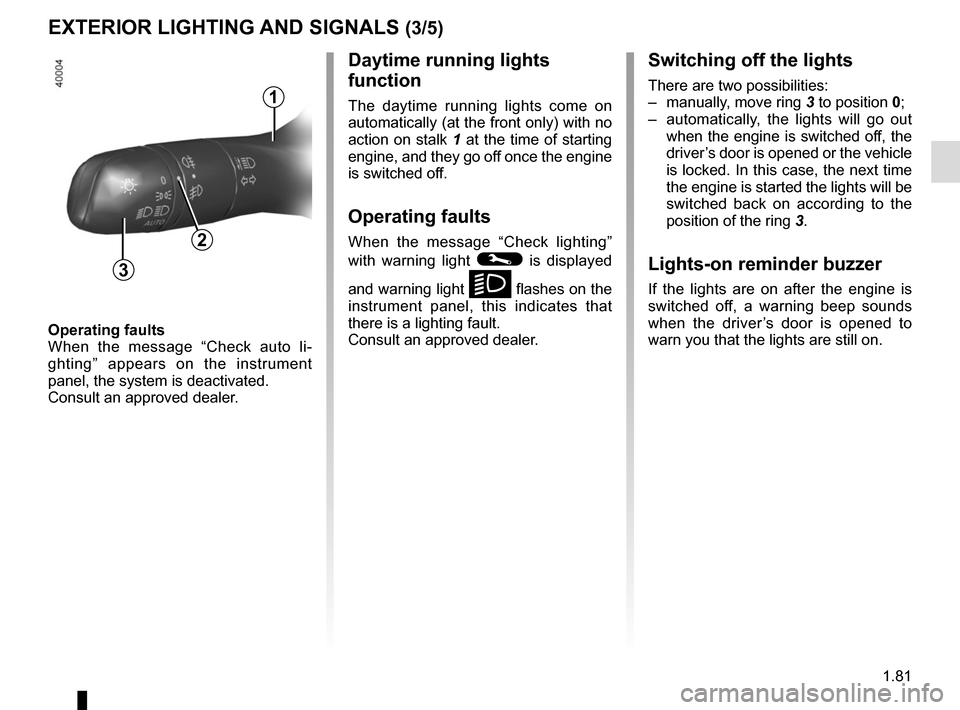
Switching off the lights
There are two possibilities:
– manually, move ring 3 to position 0;
– automatically, the lights will go out when the engine is switched off, the
driver’s door is opened or the vehicle
is locked. In this case, the next time
the engine is started the lights will be
switched back on according to the
position of the ring 3.
Lights-on reminder buzzer
If the lights are on after the engine is
switched off, a warning beep sounds
when the driver’s door is opened to
warn you that the lights are still on.
Daytime running lights
function
The daytime running lights come on
automatically (at the front only) with no
action on stalk 1 at the time of starting
engine, and they go off once the engine
is switched off.
Operating faults
When the message “Check lighting”
with warning light
© is displayed
and warning light
k flashes on the
instrument panel, this indicates that
there is a lighting fault.
Consult an approved dealer.
3
2
1


The display of information shown below DEPENDS ON THE VEHICLE EQUIPMENT \
AND COUNTRY.
Examples of selectionsInterpreting the display selected
d) Reset the")