Page 202 of 316

3.10
AUTOMATIC CLIMATE CONTROL (4/5)
Switching air conditioning on
or off
In automatic mode, the system switches
the air conditioning system on or off,
depending on the climate conditions.
Press button 17 to:
– activate the air conditioning (a warn- ing light in zone 14 comes on).
– deactivate the air conditioning (the warning light in zone 14 goes out)
4
17
19
14
Stopping the system
Press button 19 to activate or deacti-
vate the system (the operating warn-
ing light on button 19 notifies you of the
system status).
It is preferable to use one of the automatic programmes NORMAL, SOFT or
FAST.
In automatic mode (4 warning light is lit), all air conditioning functions are control-
led by the system.
You can still change the system selection. In this case, the warning ligh\
t on the
button 4 will go out and the changed function, which is no longer controlled by \
the
system, will be shown on the display.
To return to automatic mode, press one of programmes NORMAL, SOFT, or
FAST, or button 4.
Rear screen de-icing/
demisting
Press button 3 – the integrated indica-
tor light comes on. This function en-
ables rapid demisting or de-icing of the
rear screen and de-icing of the door
mirrors (on equipped vehicles).
To exit this function, press button 3
again. Demisting automatically stops.
3
Page 203 of 316

3.11
AUTOMATIC CLIMATE CONTROL (5/5)
Automatic usage
Press button 16 (a warning light comes
on in zone 14).
Manual use
Press button 5 to force air recirculation.
Prolonged use of this position may lead
to odours, caused by non-renewal of
air, and the formation of condensation
on the windows.
We advise you to return to automatic
mode as soon as air recirculation is no
longer needed, by pressing key 16 or
button 5 again.
To exit this function, press key 16 or
button 5 again.
Adjusting the distribution
of air in the passenger
compartment
Press buttons 12 to select the desired
distribution (a warning light is displayed
in zone 14):
ØThe air flow is mainly directed
to the demisting vents for the
windscreen and the side windows.
½The air flow is mainly directed
to the dashboard air vents.
¿The air flow is directed mainly
towards the footwells.
The demisting/de-icing will still take
priority over the air recirculation.
53
1216
14
Air recirculation
This function is managed automatically
but you can also activate it manually.
Note:
– during recirculation, air is taken from the passenger compartment and
is recycled, with no air being taken
from outside the vehicle;
– air recirculation allows the exter- nal atmosphere to be cut off (when
driving in polluted areas, etc.) and
to cool the passenger compartment
temperature more quickly.
Page 205 of 316
3.13
4
ADDITIONAL AIR CONDITIONING (2/2)
Switching on or off
From the multifunction screen, press
button 4.
Mode AUTO
Press button 6. The system uses the
most suitable amount of air to reach
and maintain the desired comfort level.
Mode OFF
Press button 5 to deactivate the func-
tion.
Note: For these two modes, the rear
control 2 is locked and the warning
light 9 is displayed for notification.
9
FAST:Turn the control to 10.
Enables the system to reach the de-
sired comfort level more quickly.
OFF: Turn the control to 12.
Enables the additional air-conditioning
to be deactivated.
Adjusting the ventilation
speed.
Turn the control 2 to move the marker 8
to zone A.
567
Mode MANUAL
Press button 7 to activate. The rear
control 2 is then operational and the
warning light 9 goes out.
From the rear control panel 2, move the
marker 8 to:
AUTO: Turn the control to 11 . Enables
the optimal comfort level.
2
11
10
12
A
8
Page 222 of 316
3.30
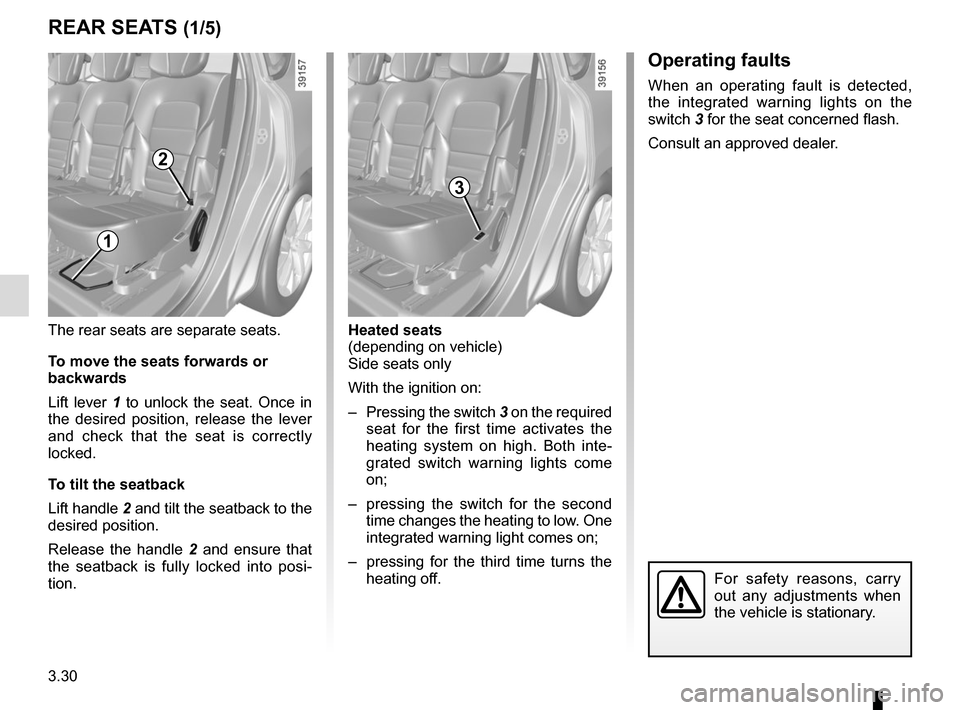
Heated seats
(depending on vehicle)
Side seats only
With the ignition on:
– Pressing the switch 3 on the required seat for the first time activates the
heating system on high. Both inte-
grated switch warning lights come
on;
– pressing the switch for the second time changes the heating to low. One
integrated warning light comes on;
– pressing for the third time turns the heating off.
For safety reasons, carry
out any adjustments when
the vehicle is stationary.
The rear seats are separate seats.
To move the seats forwards or
backwards
Lift lever 1 to unlock the seat. Once in
the desired position, release the lever
and check that the seat is correctly
locked.
To tilt the seatback
Lift handle 2 and tilt the seatback to the
desired position.
Release the handle 2 and ensure that
the seatback is fully locked into posi-
tion.
REAR SEATS (1/5)
1
2
3
Operating faults
When an operating fault is detected,
the integrated warning lights on the
switch 3 for the seat concerned flash.
Consult an approved dealer.
Page 244 of 316

4.8
LEVELS (2/3)
Brake fluid level
This should be checked frequently, and
any time you notice even the slightest
loss in braking efficiency.
The level should be read with the engine
switched off and on level ground.Level 2
It is normal for the level to drop as
the linings become worn, but it should
never drop below the “MINI” warning
line.
If you wish to check the disc and drum
wear yourself, you should obtain the
document explaining the checking pro-
cedure from our network or from the
manufacturer’s website. Topping up
After any operation on the hydraulic cir-
cuit, a specialist must replace the fluid.
Only use fluids approved by our
Technical Department (and taken from
a sealed container).
Replacement intervals
Refer to the Maintenance Document for
your vehicle.
The engine may be hot
when carrying out opera-
tions in close proximity. In
addition, the engine cooling
fan can come on at any moment.
Risk of injury.
2
Before performing any
action in the engine com-
partment, the ignition must
be switched off by pressing
the engine stop button (please see
the information on “Starting, stop-
ping the engine” in Section 2).
Page 248 of 316
4.12
TYRE PRESSURE (1/2)
A
Label A
Open the door to read it.
Tyre pressures should be checked
when the tyres are cold.
If the tyre pressures cannot be checked
when the tyres are cold, increase the
pressures from 0.2 to 0.3 bar (or 3 PSI).
Never deflate a hot tyre. Vehicle fitted with a tyre pressure
monitoring system
In cases of under-inflation (puncture,
low pressure, etc.), warning light
�
lights up on the instrument panel.
Please refer to the information on the
“Tyre pressure monitoring system” in
Section 2.
Vehicle used fully laden (Maximum
Permissible All-up Weight) and
towing a trailer
the maximum speed must be limited to
60 mph (100 km/h) and the tyre pres-
sure increased by 0.2 bar.
Please refer to the information on
“Weights” in Section 6.
A
B
EF
C
C
D
D
B : dimension of the tyres fitted to the
vehicle.
C: front tyre pressure.
D: rear tyre pressure.
E: emergency spare wheel dimensions.
F : tyre pressure for the emergency
spare wheel.
Page 260 of 316
5.6
TYRE PRESSURE KIT (2/3)
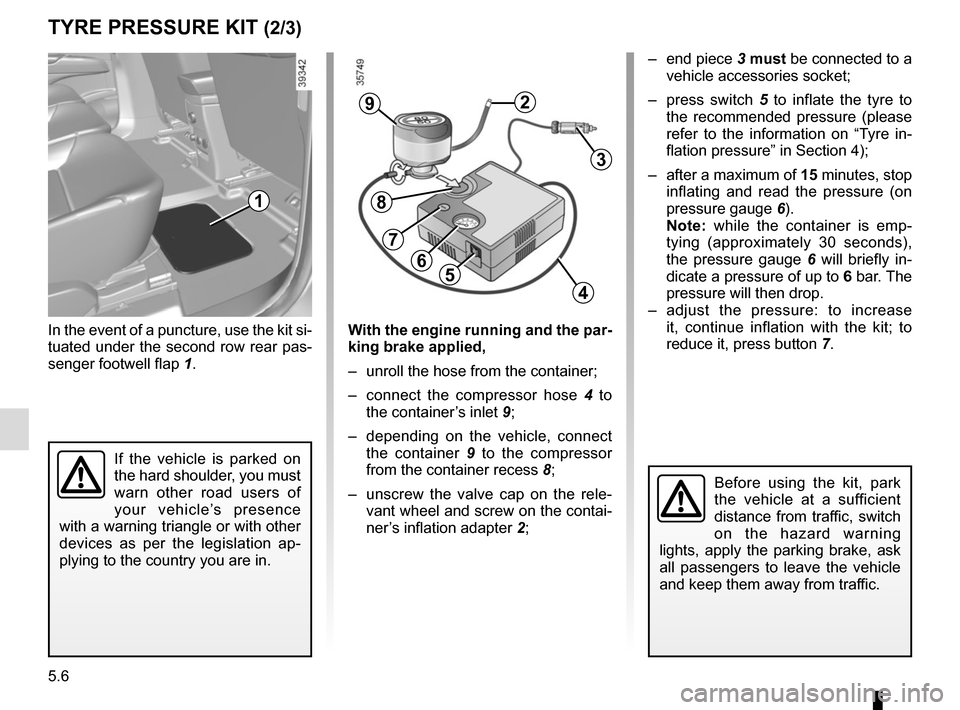
In the event of a puncture, use the kit si-
tuated under the second row rear pas-
senger footwell flap 1.
Before using the kit, park
the vehicle at a sufficient
distance from traffic, switch
on the hazard warning
lights, apply the parking brake, ask
all passengers to leave the vehicle
and keep them away from traffic.
56
29
3
4
8
7
– end piece 3 must be connected to a
vehicle accessories socket;
– press switch 5 to inflate the tyre to
the recommended pressure (please
refer to the information on “Tyre in-
flation pressure” in Section 4);
– after a maximum of 15 minutes, stop inflating and read the pressure (on
pressure gauge 6).
Note: while the container is emp-
tying (approximately 30 seconds),
the pressure gauge 6 will briefly in-
dicate a pressure of up to 6 bar. The
pressure will then drop.
– adjust the pressure: to increase it, continue inflation with the kit; to
reduce it, press button 7.
If the vehicle is parked on
the hard shoulder, you must
warn other road users of
your vehicle’s presence
with a warning triangle or with other
devices as per the legislation ap-
plying to the country you are in.
1
With the engine running and the par-
king brake applied,
– unroll the hose from the container;
– connect the compressor hose 4 to
the container’s inlet 9;
– depending on the vehicle, connect the container 9 to the compressor
from the container recess 8;
– unscrew the valve cap on the rele- vant wheel and screw on the contai-
ner’s inflation adapter 2;
Page 264 of 316

5.10
CHANGING A WHEEL (1/2)
4
Vehicles equipped with a jack
and wheelbrace
If necessary, remove the wheel trim.
Use the wheelbrace 2 to slacken off the
wheel bolts. Position it so as to be able
to push from above.
Open the door nearest the wheel
concerned to identify the arrow 1 indi-
cating the jacking point 3.
Switch on the hazard war-
ning lights.
Keep the vehicle away from
traffic and on a level surface
where it will not slip.
Apply the parking brake and engage
a gear (first or reverse, or P for auto-
matic transmissions).
Ask all the passengers to leave the
vehicle and keep them away from
traffic.
If the vehicle is parked on
the hard shoulder, you must
warn other road users of
your vehicle’s presence
with a warning triangle or with other
devices as per the legislation ap-
plying to the country you are in.
2
1
3
If the vehicle is not equipped with a
jack or wheelbrace, you can obtain
these from your approved dealer.
Position the jack 4 horizontally. It is es-
sential to position the jack head in the
jacking point 3.
Close the door.
Start cranking the jack up by hand to
align the base plate (which should be
pushed slightly under the vehicle).
3

