Page 24 of 316
1.18
AUTOMATIC TAILGATE (4/5)
Stopping the tailgate
manoeuvre
The automatic tailgate manoeuvre can
be stopped at any time by a short press
on one of the controls.
If the tailgate is stationary in the inter-
mediate position, your next press will
move the tailgate in the opposite direc-
tion to when you stopped it.
Manual mode
After stopping the tailgate, you can per-
form the manoeuvre manually if you
wish.
You can switch to automatic movement
at any time by pressing one of the con-
trols.
Automatic reversal of the
tailgate manoeuvre
If the tailgate encounters an obstacle
(presence of an object or a person)
during its manoeuvre, it will stop and
reverse its direction by a few degrees
in order to release the obstacle.
Press the tailgate opening/closing con-
trol to reperform the tailgate movement
in the same direction as before encoun-
tering the obstacle.
The automatic reverse
function is a system aid and
should under no circum-
stances be taken to replace
the driver’s care or responsibility
whilst closing the tailgate.
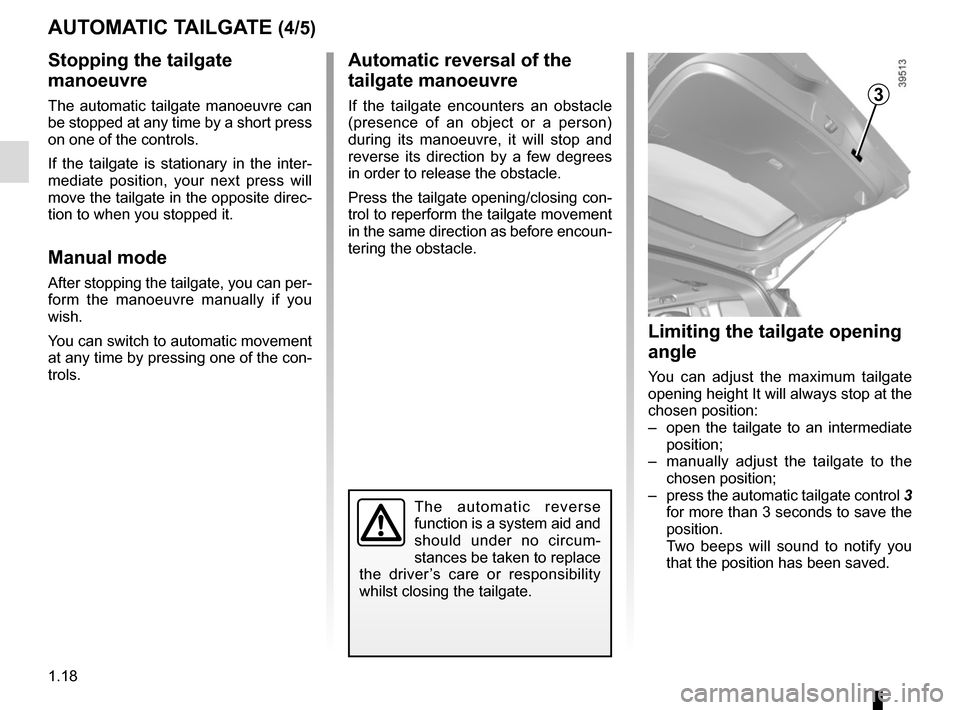
Limiting the tailgate opening
angle
You can adjust the maximum tailgate
opening height It will always stop at the
chosen position:
– open the tailgate to an intermediate position;
– manually adjust the tailgate to the chosen position;
– press the automatic tailgate control 3
for more than 3 seconds to save the
position.
Two beeps will sound to notify you
that the position has been saved.
3
Page 25 of 316

1.19
AUTOMATIC TAILGATE (5/5)Operating faults
If you activate the automatic tailgate
continuously for around a minute (se-
quence of opening and closing), it will
stop in order to avoid overheating. The
operation will return to normal after
about a minute.
The automatic tailgate will not operate
if the battery is on low charge. In this
case, operate the automatic tailgate
with the engine started.
In very cold weather conditions, the au-
tomatic opening or closing may not op-
erate if the tailgate joints are frozen.
Precautions during use
Before opening/closing the tailgate,
ensure that the surrounding space is
sufficient to allow the tailgate to oper-
ate. If not, stop the tailgate movement
before contact.
The installation of accessories such as
a bicycle carrier on the tailgate will lead
to more weight on the tailgate. The tail-
gate may operate slowly or not open
fully.
If the tailgate is moving and the engine
is started, the movement will stop for a
seconds before continuing.
Avoid multiple manual stops during the
automatic tailgate movement (risk of
damaging the tailgate system).
Driver’s responsibility
Never leave an animal,
child or adult who is not
self-sufficient alone in your
vehicle, even for a short time.
They may pose a risk to themselves
or to others by starting the engine,
activating equipment such as the
electric windows or locking the
doors, for example.
Also, in hot and/or sunny weather,
please remember that the tempera-
ture inside the passenger compart-
ment increases very quickly.
RISK OF DEATH OR SERIOUS
INJURY.
Page 69 of 316

1.63
DRIVING POSITION (2/2)
The equipment fitted, described below, DEPENDS ON THE VERSION AND COUNTRY.
1 Side air vent.
2 Side window demister outlet.
3 Stalk for:
– direction indicator lights;
– exterior lights;
– rear fog lights.
4 Driver Airbag and horn location.
5 Instrument panel.
6 Head-up display.
7 Controls for:
– on-board computer information
read-out and vehicle settings cus-
tomisation menu,
– remote radio and navigation
system.
8 Steering column stalk for wind-
screen and rear screen wash/
wiper.
9 Centre air vents.
10 Windscreen demister outlet.
11 Multimedia touchscreen.
12 Multifunction screen controls:
– screen activation/deactivation;
– volume;
– welcome menu;
– driving aids menu;
– settings.
13 Heating or air conditioning con-
trols.
14 Switches for:
– hazard warning lights,
– electric door locking.
15 Passenger Airbag location.
16 Storage drawer.
17 Controls for:
– heated front seats,
– activation/deactivation of ECO
mode,
– activation/deactivation of assisted
parking,
– activation/deactivation of the Stop
and Start function.
18 Storage compartment.
19 Assisted parking brake control.
20 Cruise control/speed limiter main
control.
21 Central multifunction and Multi-
Sense control.
22 Manual gearbox gear lever.
23 Automatic gearbox gear lever.
24 Engine start/stop button.
25
Control for adjusting steering wheel height and reach.
26 Cruise control/speed limiter and
adaptive cruise control controls.
27 Bonnet release control.
28 Automatic tailgate opening/closing
control.
Page 102 of 316

1.96
Special note
When driving the vehicle, the wiping
speed slows down whenever the vehi-
cle stops. For example, fast wiping
speed will slow to normal wiping speed.
As soon as the vehicle moves off,
wiping will return to the speed originally
selected.
If stalk 1 is operated, it overrides and
cancels the automatic function.Vehicle fitted with intermittent
windscreen wipers
A single sweep
A short push will trigger one sweep
of the wipers.
B stop
C intermittent wiping
The wipers will pause for seve-
ral seconds between sweeps. It
is possible to change the time
between sweeps by turning ring 2.
D slow continuous wiping
E fast continuous wiping
Positions A, C and D are accessible
with the ignition on. Position E is
accessible only when the engine is
running.
1
A
B
C
D
WINDSCREEN WASH/WIPE (1/6)
E
Check the condition of the wiper
blades. You are responsible for their
service life:
– they must remain clean: clean the blades, windscreen and
rear screen regularly with soapy
water;
– do not use them when the winds- creen or rear screen are dry;
– free them from the windscreen or rear screen when they have not
been used for a long time.
In all cases, replace them as soon
as they begin to lose efficiency: ap-
proximately once a year.
Before using the rear wiper, check
that no object obstructs the travel of
the blade.
Do not use the wiper arm to open or
close the tailgate.
1
2
Page 108 of 316

1.102
REAR SCREEN WASH/WIPE (1/2)
1
3
Check the condition of the wiper
blades. You are responsible for their
service life:
– they must remain clean: clean the blades, windscreen and
rear screen regularly with soapy
water;
– do not use them when the winds- creen or rear screen are dry;
– free them from the windscreen or rear screen when they have not
been used for a long time.
In all cases, replace them as soon
as they begin to lose efficiency: ap-
proximately once a year.
Before using the rear wiper, check
that no object obstructs the travel of
the blade.
Do not use the wiper arm to open or
close the tailgate.
YRear screen wiper
With the ignition on, turn ring 3
on stalk 1 to align the symbol with
mark 2.
– stop;
– intermittent wiping. The wipers will pause for several
seconds between sweeps. Wiping
frequency varies with vehicle
speed;
– slow continuous wiping. To stop the operation, pivot ring
3 again.
Note:
When washing using a roller type car
wash, return the ring 3 on the stalk 1
to the stop position to deactivate auto-
matic wiping.
Follow usage recommendations.
Before any action involving
the rear screen (washing
the vehicle, de-icing, clean-
ing, etc.) return stalk 1 to
the stop position.
Risk of injury and/or damage.
2
Page 115 of 316
2.3
STARTING/STOPPING THE ENGINE (1/3)
The RENAULT card must be inserted in
detection zone 1.
To start:
– vehicles with an automatic gearbox, place the lever in position P, depress
the brake pedal and press button 2;
– vehicles with a manual gearbox, depress the brake or clutch pedal
and press the button 2 . If a gear is
engaged, the vehicle may only be
started by depressing the clutch
pedal.
“Hands-free” starting with
the tailgate open
In this case, the RENAULT card should
not be located in the boot, to avoid any
risk of loss.
2
1
Special features
– If one of starting conditions is not ap- plied, the message “Press brake +
START” or “Press clutch + START”
or “Select P” is displayed on the in-
strument panel;
– in some cases, it will be necessary to move the steering wheel while press-
ing start button 1 to assist in unlock-
ing the steering column. A message
on the instrument panel “Turn steer-
ing wheel + START” warns of this.
Page 179 of 316
2.67
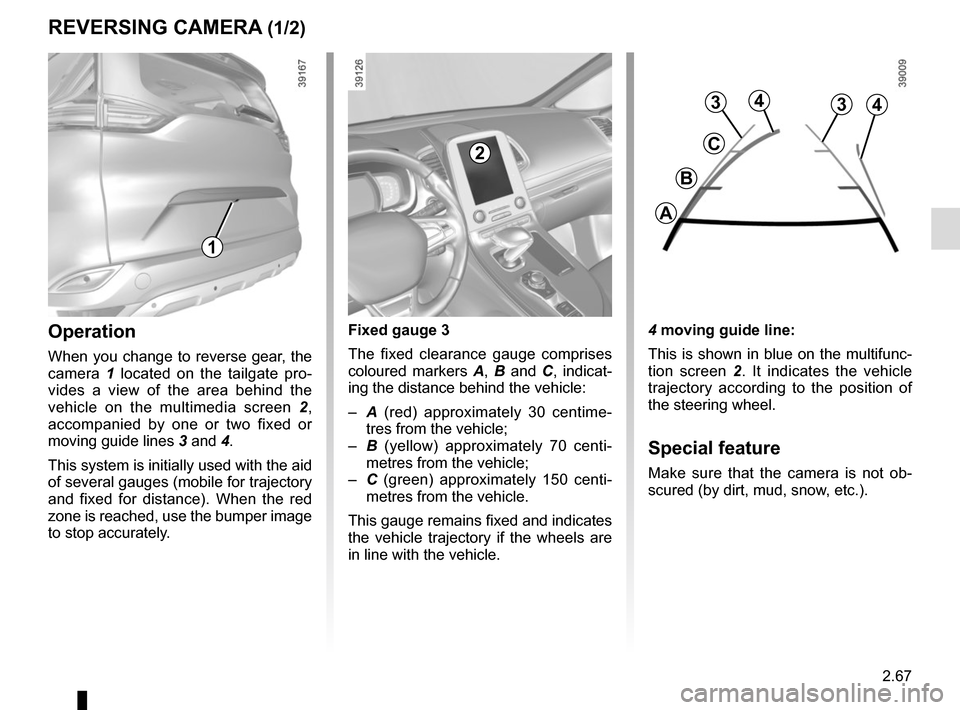
REVERSING CAMERA (1/2)
4 moving guide line:
This is shown in blue on the multifunc-
tion screen 2. It indicates the vehicle
trajectory according to the position of
the steering wheel.
Special feature
Make sure that the camera is not ob-
scured (by dirt, mud, snow, etc.).
Operation
When you change to reverse gear, the
camera 1 located on the tailgate pro-
vides a view of the area behind the
vehicle on the multimedia screen 2,
accompanied by one or two fixed or
moving guide lines 3 and 4.
This system is initially used with the aid
of several gauges (mobile for trajectory
and fixed for distance). When the red
zone is reached, use the bumper image
to stop accurately. Fixed gauge 3
The fixed clearance gauge comprises
coloured markers
A, B and C , indicat-
ing the distance behind the vehicle:
– A (red) approximately 30 centime-
tres from the vehicle;
– B (yellow) approximately 70 centi-
metres from the vehicle;
– C (green) approximately 150 centi-
metres from the vehicle.
This gauge remains fixed and indicates
the vehicle trajectory if the wheels are
in line with the vehicle.
1
2
4
C
B
A
334
Page 227 of 316
3.35
TAILGATE
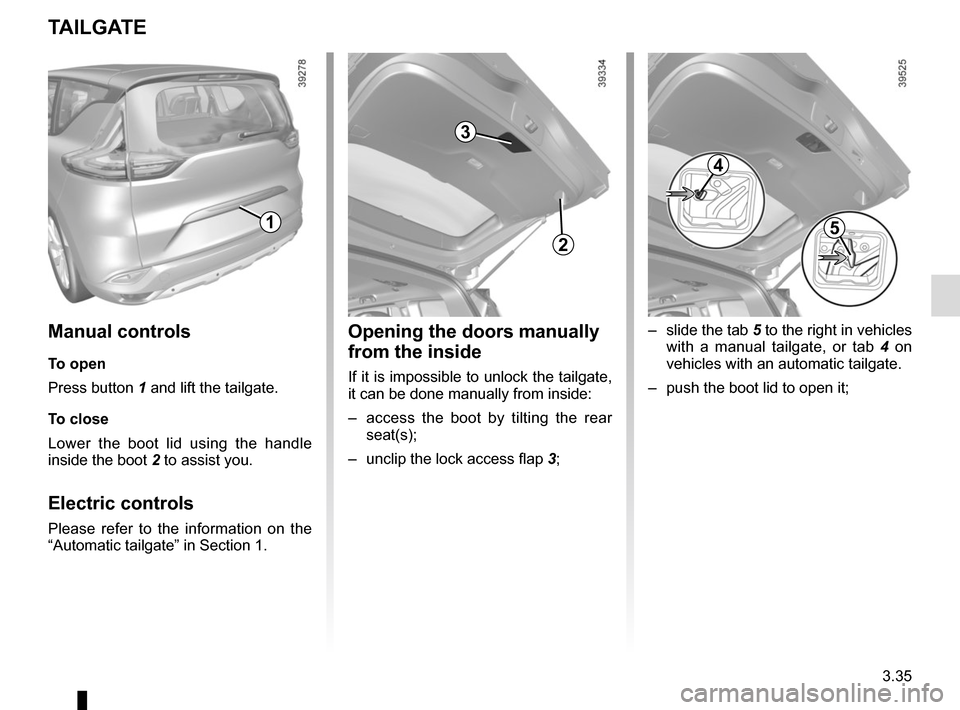
1
2
Manual controls
To open
Press button 1 and lift the tailgate.
To close
Lower the boot lid using the handle
inside the boot 2 to assist you.
Electric controls
Please refer to the information on the
“Automatic tailgate” in Section 1.
Opening the doors manually
from the inside
If it is impossible to unlock the tailgate,
it can be done manually from inside:
– access the boot by tilting the rear
seat(s);
– unclip the lock access flap 3;
3
– slide the tab 5 to the right in vehicles
with a manual tailgate, or tab 4 on
vehicles with an automatic tailgate.
– push the boot lid to open it;
4
5