2015 Ram 1500 Jack Mode
[x] Cancel search: Jack ModePage 329 of 871

Setting Names
Setting Names Ab-
breviated (Left Sub-
menu Layer)
Sub-Menus (Right Submenu Layer)
18 Passive EntryPassive EntryOn; Off
19 Remote Start Com-
fort System
Rmt Start ComfortOn; Off
20 Easy Exit Seat Easy Exit SeatOn; Off
21 Key-off Power Delay Power Off DelayOff; 45 seconds; 5 minutes; 10 minutes
22 Commercial Settings Commercial•Aux Switches
•Power Take-Off
•PIN Setup
23 Air Suspension Dis-
play Alerts
Air Susp. Alerts All; Warnings Only
24 Aero Ride Height
Mode
Aero Mode On; Off
25 Tire/Jack Mode Tire/Jack ModeOn; Off
4
UNDERSTANDING YOUR INSTRUMENT PANEL 327
Page 355 of 871
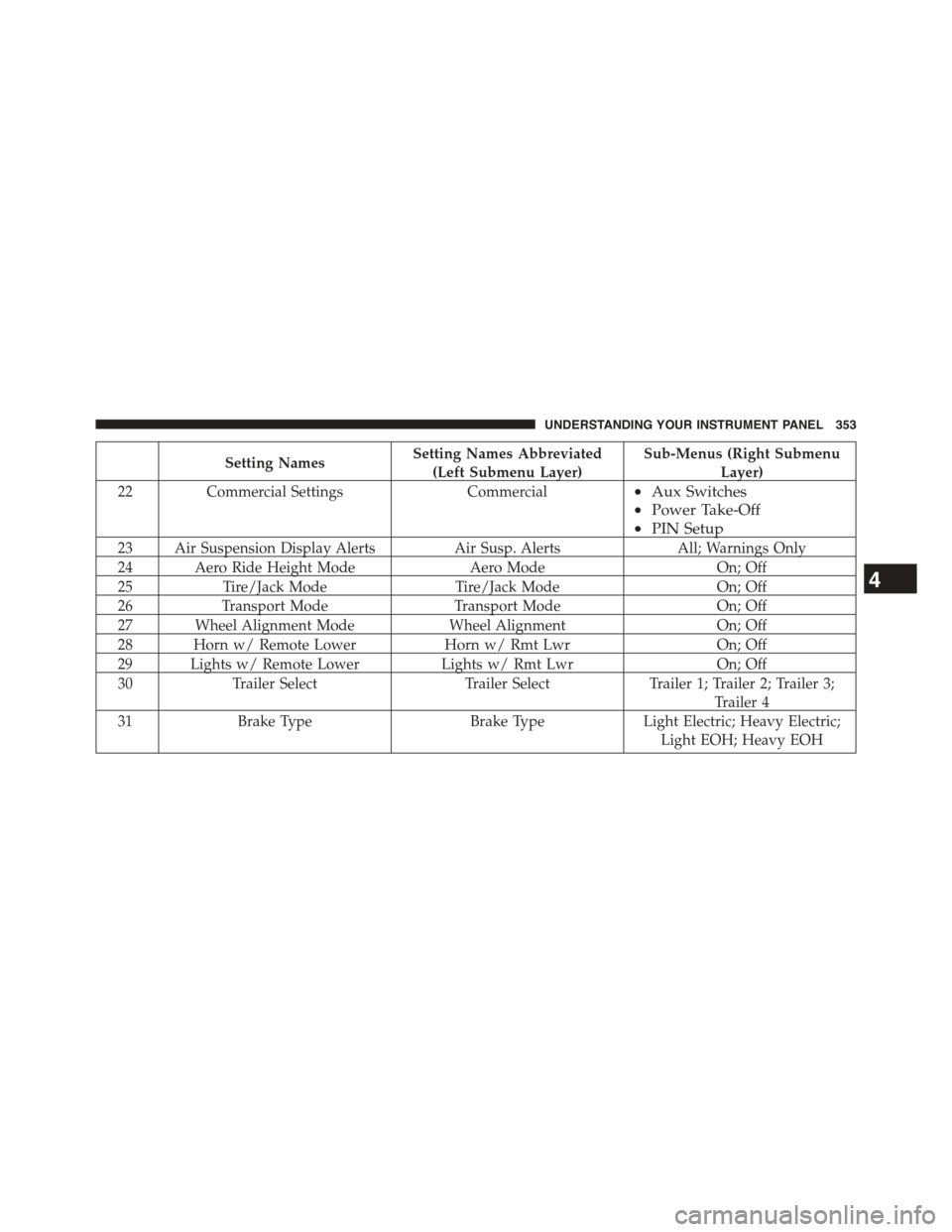
Setting NamesSetting Names Abbreviated
(Left Submenu Layer)
Sub-Menus (Right Submenu
Layer)
22Commercial SettingsCommercial•Aux Switches
•Power Take-Off
•PIN Setup
23 Air Suspension Display AlertsAir Susp. AlertsAll; Warnings Only
24 Aero Ride Height ModeAero ModeOn; Off
25Tire/Jack ModeTire/Jack ModeOn; Off
26Transport ModeTransport ModeOn; Off
27 Wheel Alignment ModeWheel AlignmentOn; Off
28 Horn w/ Remote LowerHorn w/ Rmt LwrOn; Off
29 Lights w/ Remote LowerLights w/ Rmt LwrOn; Off
30Trailer SelectTrailer SelectTrailer 1; Trailer 2; Trailer 3;
Trailer 4
31Brake TypeBrake TypeLight Electric; Heavy Electric;
Light EOH; Heavy EOH
4
UNDERSTANDING YOUR INSTRUMENT PANEL 353
Page 371 of 871

•Auto Entry/Exit Suspension
When this feature is selected, the vehicle automatically
lowers from ride height position when vehicle shifted to
park for easy entry/exit. To make your selection, press
the “Auto Entry/Exit” button on the touchscreen, select
“On” or “Off” followed by pressing the back arrow/
Done button on the touchscreen.
•Display Suspension Messages
When “All” is selected, all the Air Suspension Alerts will
be displayed. When “Warning Only” is selected only the
Air Suspension Warnings will be displayed.
•Automatic Aero Mode (1500 Model Only)
When this feature is selected the Ride Height will auto-
matically be adjusted depending on the vehicle speed. To
make your selection, press the “Aero Mode” button on
the touchscreen, select “On” or “Off” followed by press-
ing the back arrow/Done button on the touchscreen.
•Tire Jack Mode
When this feature is selected the air suspension system is
disabled to prevent auto leveling of the suspension, while
the vehicle is on a jack changing a tire. To make your
selection, press the “Tire Jack Mode” button on the
touchscreen, select “On” or “Off” followed by pressing
the back arrow/Done button on the touchscreen.
•Transport Mode
When this feature is selected the air suspension system is
disabled to assist with flat bed towing. To make your
selection, press the “Transport Mode” button on the
touchscreen, select “On” or “Off” followed by pressing
the back arrow/Done button on the touchscreen.
•Wheel Alignment Mode
This feature prevents auto leveling of the air suspension
while performing a wheel alignment service. Before per-
forming a wheel alignment this mode must be enabled.
Refer to your authorized dealer for further information.
4
UNDERSTANDING YOUR INSTRUMENT PANEL 369
Page 385 of 871

•Hill Start Assist — If Equipped
When this feature is selected, the Hill Start Assist (HSA)
system is active. Refer to “Electronic Brake Control
System” in “Starting And Operating” for system function
and operating information. To make your selection, press
the “Hill Start Assist” button on the touchscreen to select
from on or off. Press the back arrow button on the
touchscreen to return to the previous menu.
•Four Corner Air Suspension Modes — If Equipped
There are four air suspension modes designed to protect
the system in unique situations. Tire Jack Mode is selected
to assist in changing a spare tire. Transport Mode is
selected to assist when the vehicle is being flat bed towed.
Wheel Alignment Mode is selected before performing a
wheel alignment, refer to your authorized dealer for infor-
mation. Protection Mode will automatically be selected to
“protect” the air suspension system when the payload has
been exceeded or load leveling cannot be achieved.
Lights
After pressing the “Lights” button on the touchscreen the
following settings will be available.
•Headlight Off Delay
When this feature is selected, the driver can choose to
have the headlights remain on for 0, 30, 60, or 90 seconds
when exiting the vehicle. To make your selection, press
the “+” or “–” buttons on the touchscreen to adjust the
seconds up or down. Press the back arrow button on the
touchscreen to return to the previous menu.
•Headlight Illumination On Approach
When this feature is selected, the headlights will activate
and remain on for 0, 30, 60, or 90 seconds when the doors
are unlocked with the Remote Keyless Entry (RKE) trans-
mitter. To make your selection, To make your selection,
press the “+” or “–” buttons on the touchscreen to adjust
the seconds up or down. Press the back arrow button on
the touchscreen to return to the previous menu.
4
UNDERSTANDING YOUR INSTRUMENT PANEL 383
Page 391 of 871

Air Suspension — If Equipped
After pressing the “Suspension” button on the touch-
screen the following settings will be available.
•Sound Horn With Lower
When this feature is selected, a short horn sound will
occur when the RKE transmitter REMOTE LOWER but-
ton is pressed. Press the box next to your selection and a
check-mark appears next to the feature showing the
system has been activated or the check-mark is removed
showing the system has been deactivated.
•Flash Lights With Lower
When this feature is selected, the front and rear turn
signals will flash when the RKE transmitter REMOTE
LOWER button is pressed twice. This feature may be
selected with or without the Sound Horn on Lower
feature selected. Press the box next to your selection and
a check-mark appears next to the feature showing the
system has been activated or the check-mark is removed
showing the system has been deactivated.
•Suspension Display Messages
When “All” is selected, all the Air Suspension Alerts will
be displayed. When “Warning” is selected only the Air
Suspension Warnings will be displayed.
•Automatic Aero Mode (1500 Model Only)
When this feature is selected the Ride Height will auto-
matically be adjusted depending on the vehicle speed.
Press the box next to your selection and a check-mark
appears next to the feature showing the system has been
activated or the check-mark is removed showing the
system has been deactivated.
•Tire Jack Mode
When this feature is selected the air suspension system is
disabled to assist with changing a spare tire. Press the box
next to your selection and a check-mark appears next to
4
UNDERSTANDING YOUR INSTRUMENT PANEL 389
Page 522 of 871

to be disabled. Refer to “Electronic Vehicle Information
Center (EVIC) or Driver Information Display (DID)” in
“Understanding Your Instrument Panel” for further in-
formation.
NOTE:If equipped with a touch screen radio all
enabling/disabling of air suspension features must be
done through the radio. Refer to “Uconnect® Settings” in
“Understanding Your Instrument Panel” for further in-
formation.
WARNING!
The air suspension system uses a high pressure
volume of air to operate the system. To avoid per-
sonal injury or damage to the system, see your
authorized dealer for service.
Air Suspension Modes
The Air Suspension system has multiple modes to protect
the system in unique situations:
Tire/Jack Mode
To assist with changing a spare tire, the air suspension
system has a feature which allows the automatic leveling
to be disabled. Refer to “Electronic Vehicle Information
Center (EVIC) or Driver Information Display (DID)” in
“Understanding Your Instrument Panel” or “Uconnect®
Settings” in “Understanding Your Instrument Panel” if
equipped with a touch screen radio for further informa-
tion.
NOTE:This mode is intended to be enabled with engine
running.
520 STARTING AND OPERATING
Page 526 of 871

•Entry/Exit Mode – Indicator lamp 3 will be illumi-
nated when the vehicle is in Entry Exit Mode. Entry/
Exit mode can be requested up to 33 mph (53 km/h).
If vehicle speed is reduced to, and kept below, 15 mph
(24 km/h) indicator lamp 4 will flash and indicator
lamp 3 will remain solid until Entry/Exit Mode is
achieved at which point indicator lamp 4 will turn off.
•Transport Mode – No indicator lamps will be illumi-
nated. Transport Mode is disabled by driving the
vehicle.
•Tire/Jack Mode – Indicator lamps 3 and 6 will be
illuminated. Tire/Jack Mode is disabled by driving the
vehicle.
•Wheel Alignment Mode – Indicator lamps 3 and 4 will
be illuminated. Wheel Alignment Mode is disabled by
driving the vehicle.
AIR SUSPENSION SYSTEM (2500/3500 MODELS) —
IF EQUIPPED
Description
The air suspension system is a rear leveling ride height
system. The main purpose of this system is to maintain
the truck’s rear ride height level.
524 STARTING AND OPERATING
Page 528 of 871

WARNING!
The air suspension system uses a high pressure
volume of air to operate the system. To avoid per-
sonal injury or damage to the system, see your
authorized dealer for service.
Air Suspension Modes
The Air Suspension system has multiple modes to protect
the system in unique situations:
Tire/Jack Mode
To assist with changing a spare tire, the air suspension
system has a feature which allows the automatic leveling to
be disabled. This mode is intended to be used with engine
running. Refer to “Electronic Vehicle Information Center
(EVIC) or Driver Information Display (DID)” in “Under-
standing Your Instrument Panel” or “Uconnect® Settings”
in “Understanding Your Instrument Panel” if equipped
with a touch screen radio for further information.
NOTE:This mode is intended to be enabled with engine
running.
Transport Mode
To assist with flat bed towing, the air suspension system
has a feature which will put the vehicle below Normal
Ride Height (NRH) and disable the automatic load
leveling system. This mode is intended to be used with
engine running. Refer to “Electronic Vehicle Information
Center (EVIC) or Driver Information Display (DID)” in
“Understanding Your Instrument Panel” or “Uconnect®
Settings” in “Understanding Your Instrument Panel” if
equipped with a touch screen radio for further informa-
tion.
NOTE:This mode is intended to be enabled with engine
running.
526 STARTING AND OPERATING