Page 298 of 871

CAUTION!
The TPMS has been optimized for the original
equipment tires and wheels. TPMS pressures and
warning have been established for the tire size
equipped on your vehicle. Undesirable system opera-
tion or sensor damage may result when using re-
placement equipment that is not of the same size,
type, and/or style. Aftermarket wheels can cause
sensor damage. Do not use tire sealant from a can or
balance beads if your vehicle is equipped with a
TPMS, as damage to the sensors may result.
NOTE:The TPMS telltale is also accompanied by a “Low
Tire” message in the odometer (Base Cluster), or in the
Electronic Vehicle Information Center (EVIC) screen in-
dicating “Low Tire” for EVIC enabled clusters.
17. Front Fog Light Indicator — If Equipped
This indicator will illuminate when the front
fog lights are on.
18. Electronic Vehicle Information Center (EVIC)/Driver
Information Display (DID)
The EVIC/DID features a driver-interactive display that
is located in the instrument cluster. For further informa-
tion, refer to “Electronic Vehicle Information Center
(EVIC” OR “/Driver Information Display (DID)” in
“Understanding Your Instrument Panel.”
19. Shift Lever Indicator
The Shift Lever Indicator is self-contained within the
instrument cluster. It displays the gear position of the
automatic transmission.
296 UNDERSTANDING YOUR INSTRUMENT PANEL
Page 311 of 871
•Turn Signal On
•Sound Horn with Remote Lock: Off; 1st Press; 2nd
Press
•Vehicle Not in Park
•Key in Ignition
•Key in Ignition Lights On
•Remote Start Active Key to Run
•Remote Start Active Push Start Button
•Remote Start Aborted Fuel Low
•Remote Start Aborted Too Cold
•Remote Start Aborted Door Open
•Remote Start Aborted Hood Open
•Remote Start Aborted Trunk Open
•Remote Start Aborted Time Expired
•Remote Start Disabled Start to Reset
•Service Airbag System
•Service Airbag Warning Light
•Driver Seatbelt Unbuckled
•Passenger Seatbelt Unbuckled
•Front Seatbelts Unbuckled
•Door Open
•Doors Open
•Gear Not Available
•Shift Not Allowed
•Shift to Neutral then Drive or Reverse
•Autostick Unavailable Service Required
4
UNDERSTANDING YOUR INSTRUMENT PANEL 309
Page 340 of 871
•Sound Horn with Remote Lock: Off; 1st Press; 2nd
Press
•Vehicle Not in Park
•Key in Ignition
•Key in Ignition Lights On
•Remote Start Active Key to Run
•Remote Start Active Push Start Button
•Remote Start Aborted Fuel Low
•Remote Start Aborted Too Cold
•Remote Start Aborted Door Open
•Remote Start Aborted Hood Open
•Remote Start Aborted Trunk Open
•Remote Start Aborted Time Expired
•Remote Start Disabled Start to Reset
•Service Airbag System
•Service Airbag Warning Light
•Driver Seatbelt Unbuckled
•Passenger Seatbelt Unbuckled
•Front Seatbelts Unbuckled
•Door Open
•Doors Open
•Gear Not Available
•Shift Not Allowed
•Shift to Neutral then Drive or Reverse
•Autostick Unavailable Service Required
•Automatic Unavailable Use Autostick Service Req.
338 UNDERSTANDING YOUR INSTRUMENT PANEL
Page 355 of 871
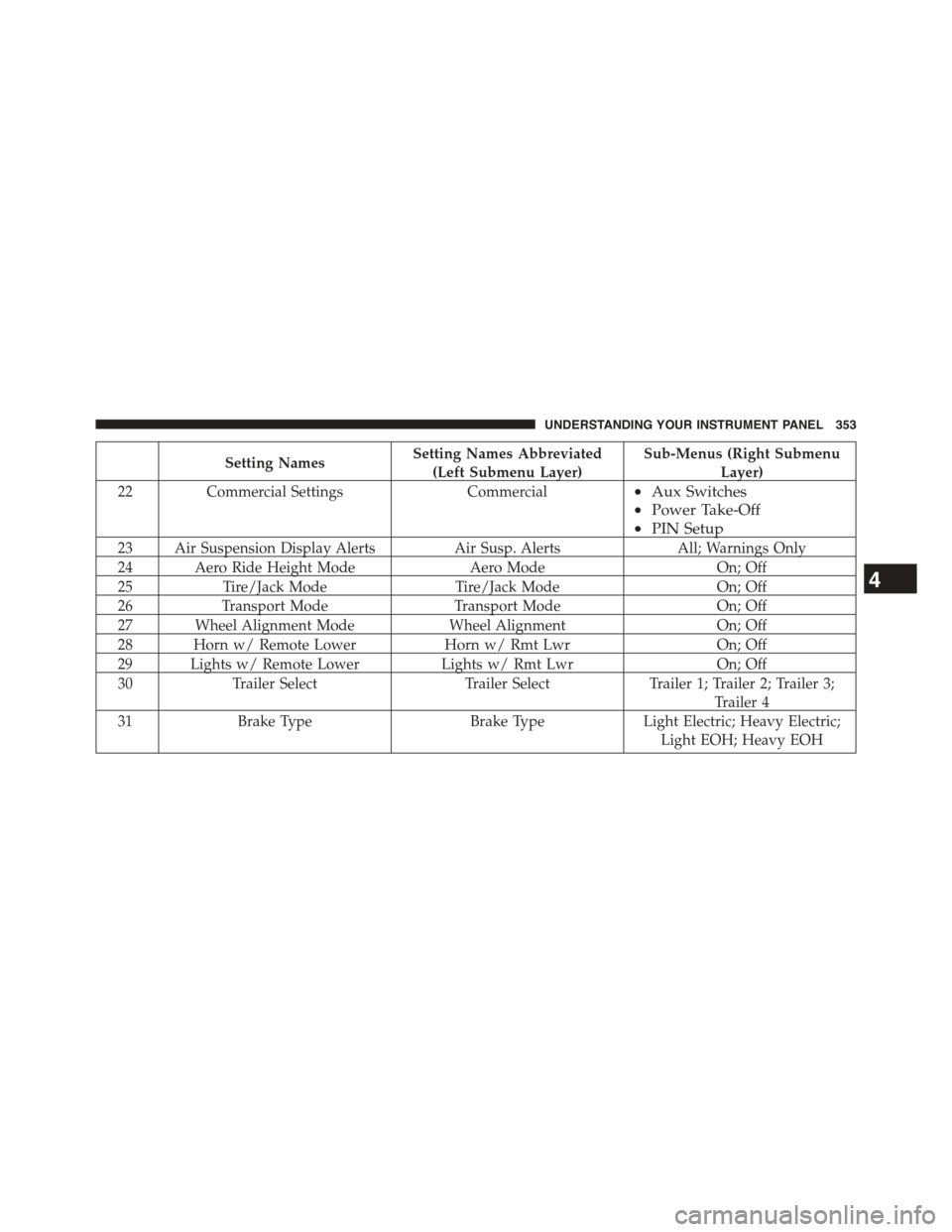
Setting NamesSetting Names Abbreviated
(Left Submenu Layer)
Sub-Menus (Right Submenu
Layer)
22Commercial SettingsCommercial•Aux Switches
•Power Take-Off
•PIN Setup
23 Air Suspension Display AlertsAir Susp. AlertsAll; Warnings Only
24 Aero Ride Height ModeAero ModeOn; Off
25Tire/Jack ModeTire/Jack ModeOn; Off
26Transport ModeTransport ModeOn; Off
27 Wheel Alignment ModeWheel AlignmentOn; Off
28 Horn w/ Remote LowerHorn w/ Rmt LwrOn; Off
29 Lights w/ Remote LowerLights w/ Rmt LwrOn; Off
30Trailer SelectTrailer SelectTrailer 1; Trailer 2; Trailer 3;
Trailer 4
31Brake TypeBrake TypeLight Electric; Heavy Electric;
Light EOH; Heavy EOH
4
UNDERSTANDING YOUR INSTRUMENT PANEL 353
Page 391 of 871

Air Suspension — If Equipped
After pressing the “Suspension” button on the touch-
screen the following settings will be available.
•Sound Horn With Lower
When this feature is selected, a short horn sound will
occur when the RKE transmitter REMOTE LOWER but-
ton is pressed. Press the box next to your selection and a
check-mark appears next to the feature showing the
system has been activated or the check-mark is removed
showing the system has been deactivated.
•Flash Lights With Lower
When this feature is selected, the front and rear turn
signals will flash when the RKE transmitter REMOTE
LOWER button is pressed twice. This feature may be
selected with or without the Sound Horn on Lower
feature selected. Press the box next to your selection and
a check-mark appears next to the feature showing the
system has been activated or the check-mark is removed
showing the system has been deactivated.
•Suspension Display Messages
When “All” is selected, all the Air Suspension Alerts will
be displayed. When “Warning” is selected only the Air
Suspension Warnings will be displayed.
•Automatic Aero Mode (1500 Model Only)
When this feature is selected the Ride Height will auto-
matically be adjusted depending on the vehicle speed.
Press the box next to your selection and a check-mark
appears next to the feature showing the system has been
activated or the check-mark is removed showing the
system has been deactivated.
•Tire Jack Mode
When this feature is selected the air suspension system is
disabled to assist with changing a spare tire. Press the box
next to your selection and a check-mark appears next to
4
UNDERSTANDING YOUR INSTRUMENT PANEL 389
Page 508 of 871

Transfer Case Position Indicator Lights
The Transfer Case Position Indicator Lights (4WD,
4LOW, and 4WD AUTO) are located in the instrument
cluster and indicate the current and desired transfer case
selection. When you select a different transfer case posi-
tion, the indicator lights will do the following:
If All Shift Conditions Are Met:
1. The current position indicator light will turn OFF.
2. The selected position indicator light will flash until the
transfer case completes the shift.
3. When the shift is complete, the indicator light for the
selected position will stop flashing and remain ON.
If One Or More Shift Conditions Are Not Met:
1. The indicator light for the current position will remain
ON.
2. The newly selected position indicator light will con-
tinue to flash.
3. The transfer casewill notshift.
NOTE:Before retrying a selection, make certain that all
the necessary requirements for selecting a new transfer
case position have been met. To retry the selection, turn
the control knob back to the current position, wait five
seconds, and retry selection. To find the shift require-
ments, refer to the#Shifting Procedure#for your transfer
case, located in this section.
The “SVC 4WD Warning Light” monitors the electronic
shift four-wheel drive system. If this light remains on
after engine start up or illuminates during driving, it
means that the four-wheel drive system is not function-
ing properly and that service is required.
506 STARTING AND OPERATING
Page 513 of 871

NOTE:The transfer case NEUTRAL position is selected
by depressing the recessed button (with a ballpoint pen
or similar object) located in the center of the 4WD Control
Switch. The transfer case NEUTRAL position is to be
used for recreational towing only. Refer to “Recreational
Towing” in “Starting and Operating” for further infor-
mation.
Transfer Case Position Indicator Lights
The Transfer Case Position Indicator Lights (4WD,
4LOW, and 4WD AUTO) are located in the instrument
cluster and indicate the current and desired transfer case
selection. When you select a different transfer case posi-
tion, the indicator lights will do the following:
If All Shift Conditions Are Met:
1. The current position indicator light will turn OFF.
2. The selected position indicator light will flash until the
transfer case completes the shift.
3. When the shift is complete, the indicator light for the
selected position will stop flashing and remain ON.
If One Or More Shift Conditions Are Not Met:
1. The indicator light for the current position will remain
ON.
2. The newly selected position indicator light will con-
tinue to flash.
3. The transfer casewill notshift.
NOTE:Before retrying a selection, make certain that all
the necessary requirements for selecting a new transfer
case position have been met. To retry the selection, turn
the control knob back to the current position, wait five
seconds, and retry selection. To find the shift require-
ments, refer to the#Shifting Procedure#for your transfer
case, located in this section.
The “SVC 4WD Warning Light” monitors the electronic
shift four-wheel drive system. If this light remains on
5
STARTING AND OPERATING 511
Page 537 of 871

accelerations, turns or braking. In most cases there are no
road signs, posted speed limits or signal lights. Therefore
you will need to use your own good judgment on what is
safe and what isn’t. When on a trail you should always be
looking ahead for surface obstacles and changes in
terrain. The key is to plan your future driving route while
remembering what you are currently driving over.
CAUTION!
Never park your vehicle over dry grass or other
combustible materials. The heat from your vehicle
exhaust system could cause a fire.
WARNING!
Always wear your seat belt and firmly tie down
cargo. Unsecured cargo can become projectiles in an
off-road situation.
When To Use Low Range
When driving off-road, shift into 4L (Low Range) for
additional traction or to improve handling and control on
slippery or difficult terrain. Due to the lower gearing, low
range will allow the engine to operate in a higher power
range. This will allow you to idle over obstacles and
down hills, with improved control and less effort. Also,
use 4L (Low Range) in rain, ice, snow, mud, sand, to get
heavy loads rolling, improve traction, or whenever 4H
(High Range) traction will not do the job.
Driving In Snow, Mud And Sand
There is a drastic reduction in traction when driving in
snow, mud or sand. The vehicle will be less responsive to
steering, acceleration and braking inputs. Therefore you
should accelerate slowly, leave greater stopping distances
and avoid abrupt vehicle maneuvers. You want to keep a
slow constant steady pace. The key is to maintain the
vehicle’s momentum.
5
STARTING AND OPERATING 535