Page 156 of 276
154
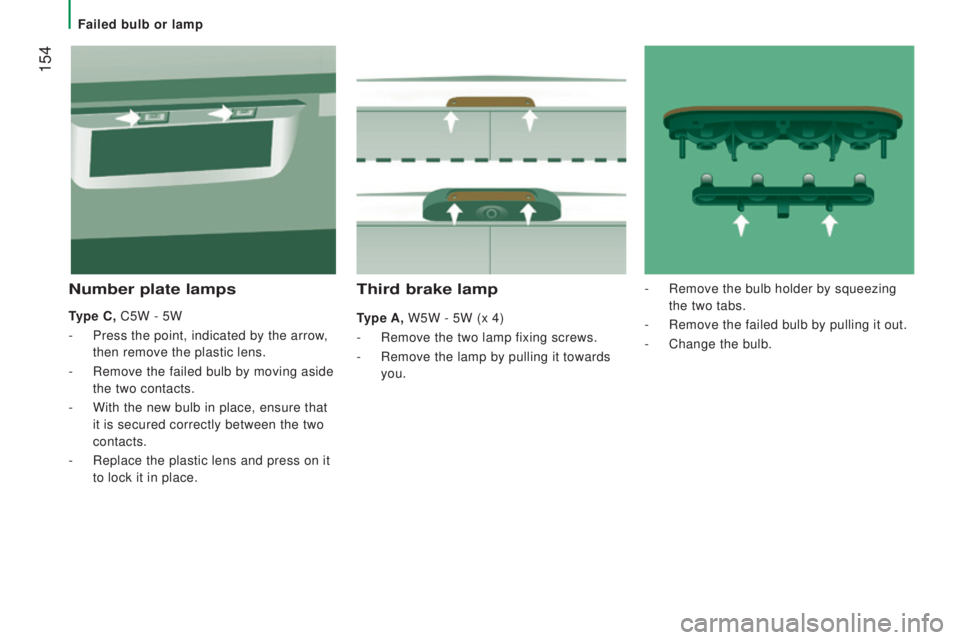
third brake lamp
type A, W5W - 5W (x 4)
-
Remove the two lamp fixing screws.
-
Remove the lamp by pulling it towards
you.
number plate lamps
type c, C5W - 5W
-
Press the point, indicated by the arrow,
then remove the plastic lens.
-
Remove the failed bulb by moving aside
the two contacts.
-
With the new bulb in place, ensure that
it is secured correctly between the two
contacts.
-
Replace the plastic lens and press on it
to lock it in place. -
Remove the bulb holder by squeezing
the two tabs.
-
Remove the failed bulb by pulling it out.
-
Change the bulb.
Failed bulb or lamp
Page 166 of 276

164
toWBAr WItH QuIcKLY
d
EtAcHABLE t
o
WBALL
Presentation
this towball can be fitted and removed
quickly and easily without the use of tools. For information on the maximum
trailer weight and the recommended
nose weight, refer to the "
technical data -
W
eights" section.
For information on safely towing a trailer,
refer to the "Accessories -
towing a trailer"
section.
1.
Carrier
.
2.
Connector socket.
3.
Safety eye.
4.
Detachable towball.
5.
Locking / unlocking wheel.
6.
Key lock.
7.
Key reference label. A.
Locked position; the locking wheel is in
contact with towball (no gap).
B.
unlocked
position; the locking wheel
and towball are no longer in contact
(gap of about 5 mm). Before each use
Check that the towball is correctly
locked and verify the following points:
- the green mark on the locking wheel
is in line with the green mark on the
towball,
-
the locking wheel is in contact with the
towball,
-
the key lock is on and the key removed;
the locking wheel can no longer be
operated,
-
the towball must no longer move at all in
its carrier; try to shake it by hand.
during use
Never unlock the device when a trailer or
load carrier is fitted to the towball.
Never exceed the maximum authorised
weight for the vehicle (the
gross V
ehicle
Weight -
gVW), the trailer
, or the sum of the
two (the
gross train Weight - gtW).
Observe the legislation in force in the
country in which you are driving. After use
For journeys made without a trailer or load
carrier, the towball must be removed and
the blanking plug inserted in the carrier.
this
measure applies particularly if the towball
could hinder visibility of the number plate or
lighting.
transport solutions
Page 184 of 276
182
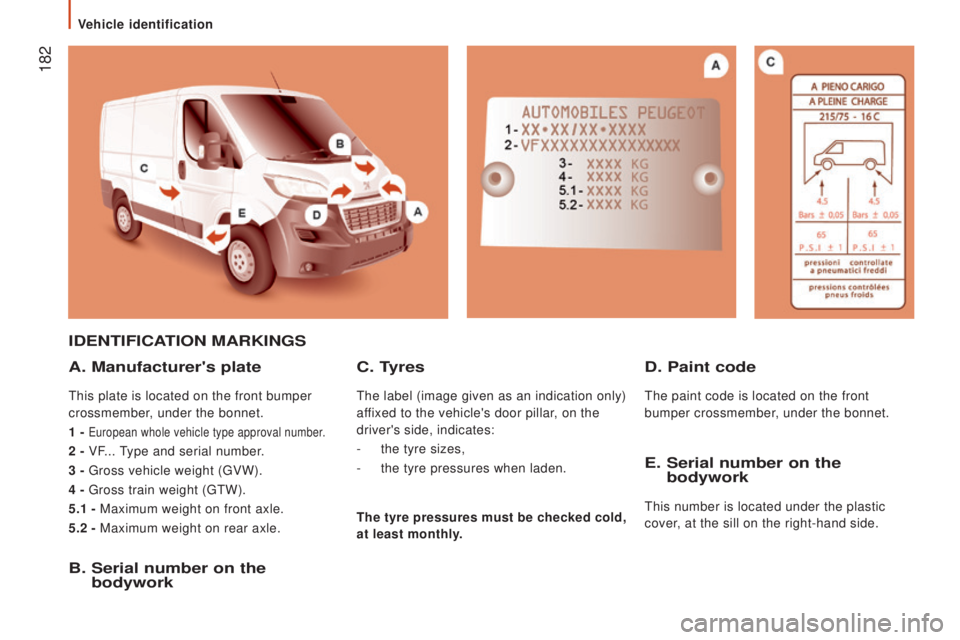
IdEntIFIcAtIon MArKInGS
A. Manufacturer's plate
this plate is located on the front bumper
crossmember, under the bonnet.
1 -
european whole vehicle type approval number.
2 - VF... type and serial number.
3 -
gross vehicle weight (gVW).
4 -
gross train weight (gtW).
5.1 -
Maximum weight on front axle.
5.2 - Maximum weight on rear axle.
B. Serial number on the
bodywork E.
Serial number on the
bodywork
this number is located under the plastic
cover, at the sill on the right-hand side.
c. tyres
the label (image given as an indication only)
affixed to the vehicle's door pillar , on the
driver's side, indicates:
-
the tyre sizes,
-
the tyre pressures when laden.
d. Paint code
the paint code is located on the front
bumper crossmember, under the bonnet.
the tyre pressures must be checked cold,
at least monthly.
Vehicle identification
Page 191 of 276
189Level 1Level 2 Level 3com ment
rAdIoBr
iefly press the buttons for an automatic search.
Press and hold the buttons for a quick search.
rAdIo
Pre
set Make a long press on the button to present the
current radio station.
the c
urrent station is highlighted.
Press the "All" button to display all of the preset
radio stations in the waveband selected.
rAdIo
n
a
vigate List of stations
Selection a station with a press.
upd
ate the list according to reception.
Press these buttons to scroll through the radio
stations received.
go di
rectly to the desired letter in the list.
rAdIo
AM/F
M/
dA
B
choo
se the waveband Choose the waveband.
rAdIo
Ad
justment
dire
ct adjustment
the s
creen virtual keypad can used to enter a
single number corresponding to a station.
the s
ymbols allow precise adjustment of the
frequency.
rAdIo
In
fo Information
Display information on the current radio station.
touch Screen Audio - telematic System
AuDIO and teLeMAtICS
10
Page 194 of 276
192
If the "DAB" radio station being listened
to is not available, the "AF" alternative
frequency option is crossed out.
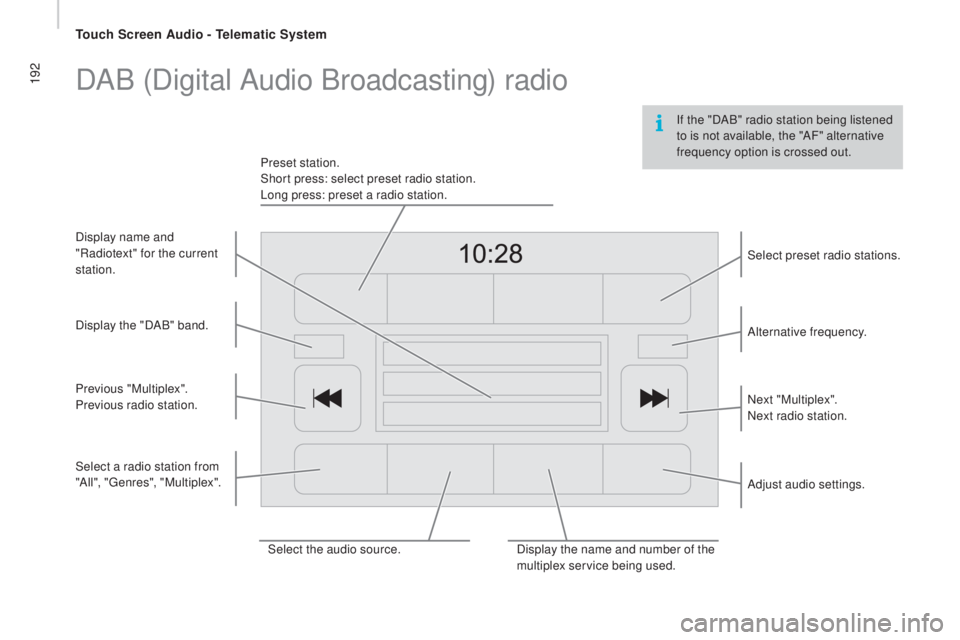
DAB (Digital Audio Broadcasting) radio
Select the audio source.Display the name and number of the
multiplex service being used.Alternative frequency.
Adjust audio settings. Select preset radio stations.
Next "Multiplex".
Next radio station.
Display the "DAB" band.
Select a radio station from
"All", "
genr
es", "Multiplex".
Previous "Multiplex".
Previous radio station. Display name and
"Radiotext" for the current
station. Preset station.
Short press: select preset radio station.
Long press: preset a radio station.
touch Screen Audio - telematic System
Page 200 of 276

198
uSB player
the system builds playlists (in temporary
m emory), an operation which can take from
a few seconds to several minutes at the first
connection.
Reduce the number of non-music files and the
number of folders to reduce the waiting time.
the p
laylists are updated every time the
ignition is switched off or connection of a
uSB
m
emory stick. However, the audio system
memorises these lists and if they are not
modified, the loading time will be shorter. Insert a
uSB m
emory stick or connect a
peripheral device to the
uSB p
ort in the central
storage space, provided for transferring data to
the system, using a suitable cable
(not supplied).
Auxiliary socket (Aux)
Connect the portable device (MP3 player…) to
the auxiliary Jack socket using an audio cable
(not supplied).
Located on the centre console, this port is used
only for powering and recharging the portable
device connected.
uSB port
First adjust the volume on your portable device
(to a high level). the
n adjust the volume of your
audio system.
Control is via the portable device.
the f
unctions of the device connected to the
"A
uX" s
ocket are controlled directly from the
device itself: changing track / folder / playlist or
starting/ending/pausing play using the audio
system control panel or steering mounted
controls is therefore not possible.
Do not leave the cable of your portable device
connected to the A
uX so
cket when not in use,
to avoid possible noises from the speakers.
touch Screen Audio - telematic System
Page 202 of 276
200
Bluetooth® audio streaming
Streaming allows audio files on your telephone
to be played via the vehicle's speakers.Press "ME
dIA".
I
f there is an active media source,
press the " Source" button.
Select the " Bluetooth" media source
then press the " Add device" button.
Switch on Bluetooth on the device.
Some Bluetooth devices do not allow
scanning of tracks and information on
the telephone against the categories
present in the system.
If the procedure fails, deactivate Bluetooth and
then activate it again on your device.
Select for the name of the device and when
requested by the audio system, enter the PIN
number displayed in the screen of the system
or confirm in the device the PIN displayed. When the pairing procedure has completed, a
screen page appears:
-
re
ply "Yes" to the question, the Bluetooth
audio device will be saved as favourite
(the device will have priority over other
devices paired subsequently).
-
re
ply "No", priority will be determined
according to the order of connection. the
last device connected will have the highest
priority.
During pairing, a screen page is displayed
showing the progress in the operation.
If no peripheral device has yet been paired with
the system, a special page is displayed in the
screen.
Select "Yes" to start the pairing procedure, and
so search for the name of the system in the
device.
touch Screen Audio - telematic System
Page 209 of 276

207Level 1Level 2 Level 3com ment
PH
o
n
E Mob
ile phone
Display and call contacts present in the mobile
phone.
Press these buttons to scroll through the list of
contact names.
go di
rectly to the desired letter in the list.
PHonE
rec
ent calls All callsDisplay and call contacts from the recent calls log.In
out
M
issed
PH
o
n
E
the system memory contains predefined text
m essages, which can be sent to reply to a message
received or as a new message.
On receipt of a text message (depending on the
telephone), the system also allows the message in
question to be sent.
PHonE
Se ttingstel. connected DisconnectAssociate up to 10 telephones/audio devices to
simplify and speed up access and connection.
Delete device
Save favourites
te
x t s O n
Download
Add device
Audio connect.
PH
o
n
Eca
ll
Dial the telephone number using the vir tual keypad
in the screen.
PHonE
tr a
n s f .tr a n s f .transfer calls from the system to the mobile phone
a nd vice versa.
MuteSwitches of the system microphone for private
conversations.
touch Screen Audio - telematic System
AuDIO and teLeMAtICS
10