Page 244 of 389
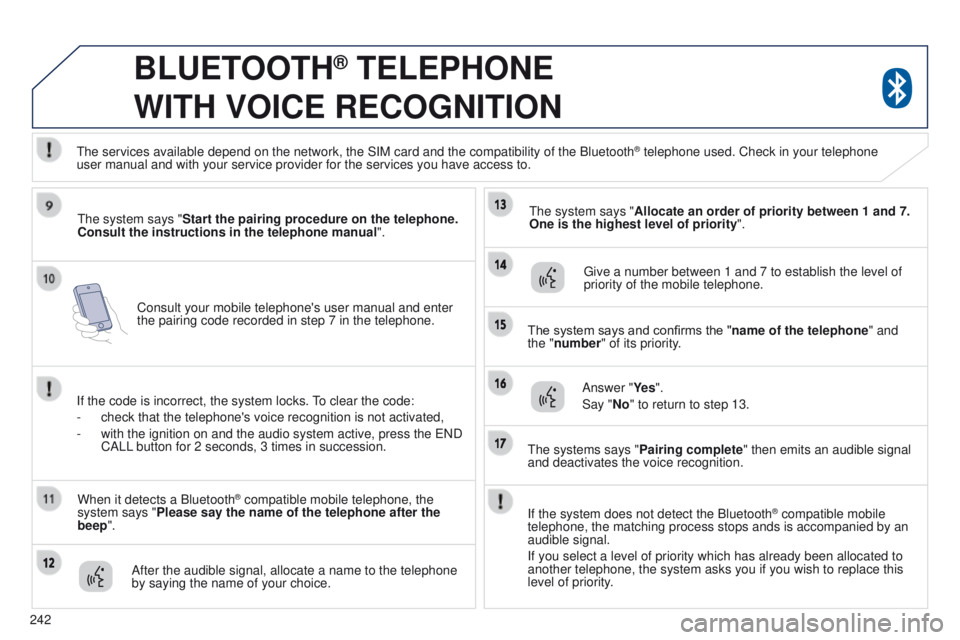
242Consult your mobile telephone's user manual and enter
the pairing code recorded in step 7 in the telephone.
BLUETOOTH® TELEPHONE
WITH
VOICE
RECOGNITION
the system says "Start the pairing procedure on the telephone.
Consult the instructions in the telephone manual ".
If the code is incorrect, the system locks.
to clear the code:
-
check that the telephone's voice recognition is not activated,
-
with the ignition on and the audio system active, press the
e ND
CALL button for 2 seconds, 3 times in succession.
When it detects a Bluetooth
® compatible mobile telephone, the
system says "Please say the name of the telephone after the
beep".
After the audible signal, allocate a name to the telephone
by saying the name of your choice.
t
he system says "Allocate an order of priority between 1 and 7.
One is the highest level of priority ".
g
ive a number between 1 and 7 to establish the level of
priority of the mobile telephone.
The system says and confirms the "name of the telephone " and
the "number" of its priority.
Answer "Ye s ".
Say "No" to return to step 13.
t
he systems says "Pairing complete" then emits an audible signal
and deactivates the voice recognition.
t
he services available depend on the network, the SIM card and the compat\
ibility of the Bluetooth
® telephone used. Check in your telephone
user
manual and with your service provider for the services you have access t\
o.
If the system does not detect the Bluetooth
® compatible mobile
telephone, the matching process stops ands is accompanied by an
audible signal.
If you select a level of priority which has already been allocated to
another telephone, the system asks you if you wish to replace this
level of priority.
Page 245 of 389
243
BLUETOOTH® TELEPHONE
WITH
VOICE
RECOGNITION
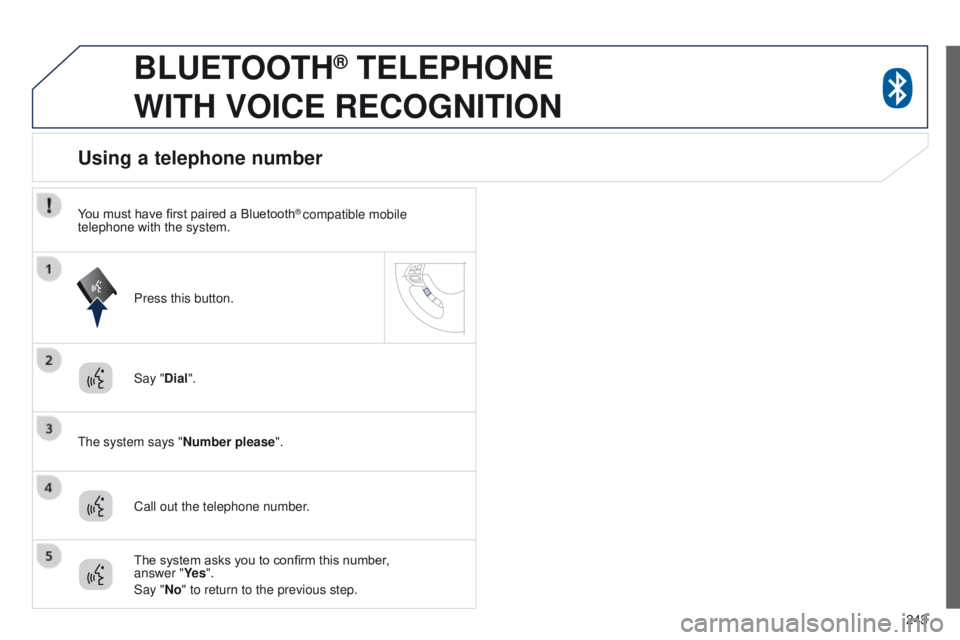
Say "Dial".
t
he system says "Number please".
Using a telephone number
Call out the telephone number. Press this button.
The system asks you to confirm this number,
answer "Ye s ".
Say "No" to return to the previous step.
You must have first paired a Bluetooth
® compatible mobile
telephone with the system.
Page 246 of 389
244
BLUETOOTH® TELEPHONE
WITH
VOICE
RECOGNITION
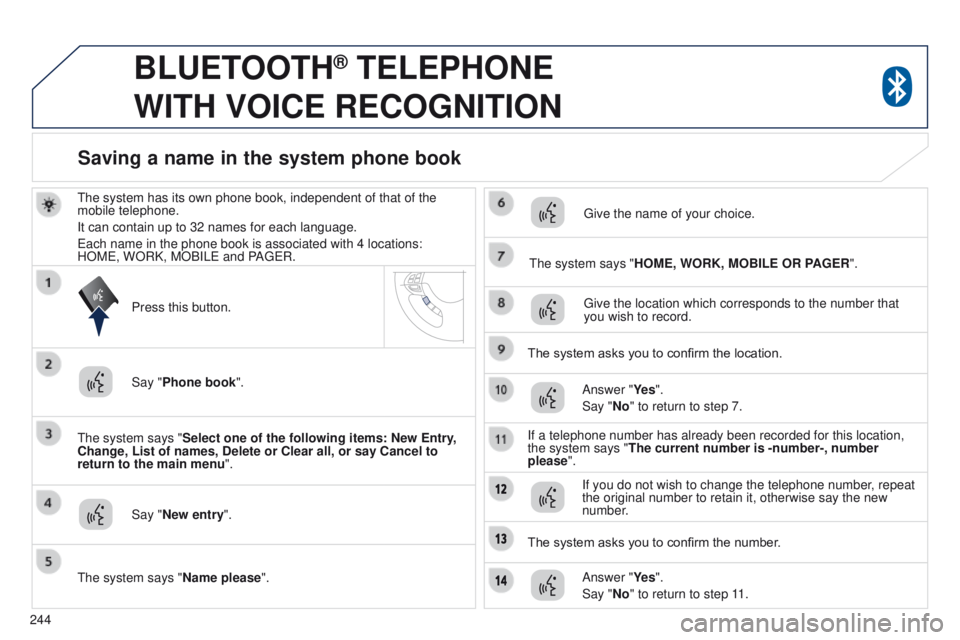
the system has its own phone book, independent of that of the
mobile telephone.
It can contain up to 32 names for each language.
e
ach name in the phone book is associated with 4 locations:
HOM
e , WORK, MOBIL e and PA ge R.
t
he system says "Select one of the following items: New Entry,
Change, List of names, Delete or Clear all, or say Cancel to
return to the main menu ".
Say "New entry".
t
he system says "HOME, WORK, MOBILE OR PAGER".
g
ive the location which corresponds to the number that
you wish to record.
The system asks you to confirm the location. Answer "Ye s ".
Say "No" to return to step 7.
If a telephone number has already been recorded for this location,
the system says "The current number is -number-, number
please".
Saving a name in the system phone book
Press this button.
Say "Phone book ".
t
he system says "Name please ".
g
ive the name of your choice.
If you do not wish to change the telephone number, repeat
the original number to retain it, otherwise say the new
number.
Answer "Ye s ".
Say "No" to return to step 11.
The system asks you to confirm the number.
Page 247 of 389
245
BLUETOOTH® TELEPHONE
WITH
VOICE
RECOGNITION
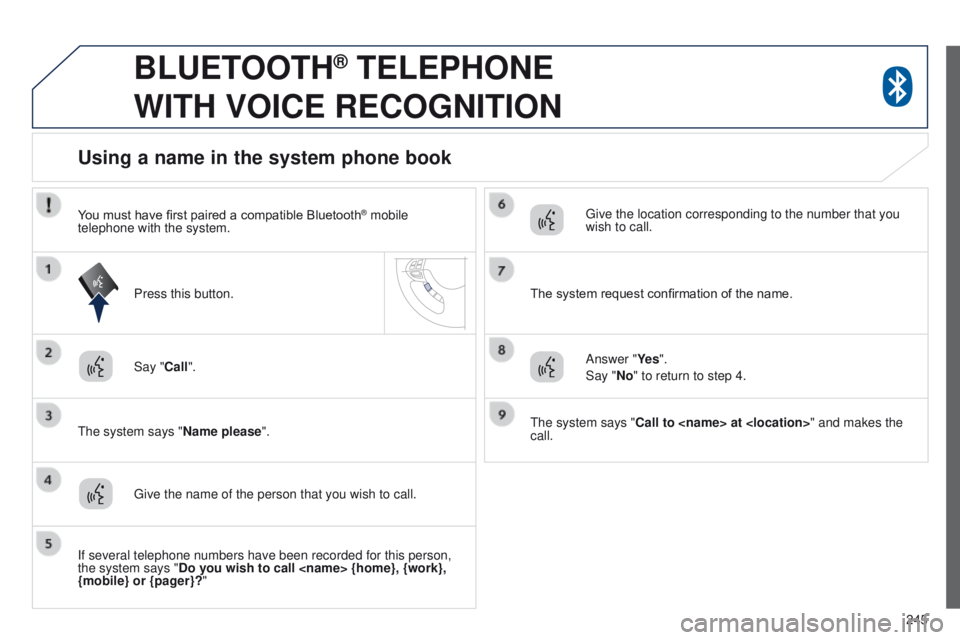
Say "Call".
t
he system says "Name please ".
Using a name in the system phone book
give the name of the person that you wish to call.
Press this button.
g
ive the location corresponding to the number that you
wish to call.
You must have first paired a compatible Bluetooth
® mobile
telephone with the system.
If several telephone numbers have been recorded for this person,
the system says "Do you wish to call {home}, {work},
{mobile} or {pager}?" The system request confirmation of the name.
Answer "Ye s ".
Say "No" to return to step 4.
t
he system says "Call to at " and makes the
call.
Page 248 of 389
246
BLUETOOTH® TELEPHONE
WITH
VOICE
RECOGNITION
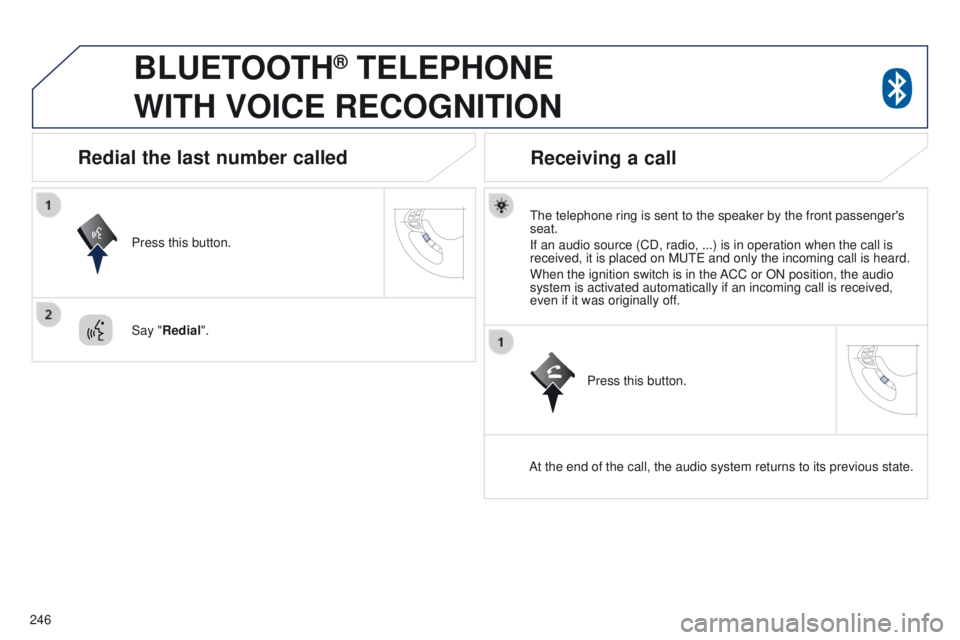
the telephone ring is sent to the speaker by the front passenger's
seat.
If an audio source (CD, radio, ...) is in operation when the call is
received, it is placed on M
ute and only the incoming call is heard.
When the ignition switch is in the ACC or ON position, the audio
system is activated automatically if an incoming call is received,
even if it was originally off.
At the end of the call, the audio system returns to its previous state.
Redial the last number called
Press this button.
Say "Redial".
Receiving a call
Press this button.
Page 249 of 389
247
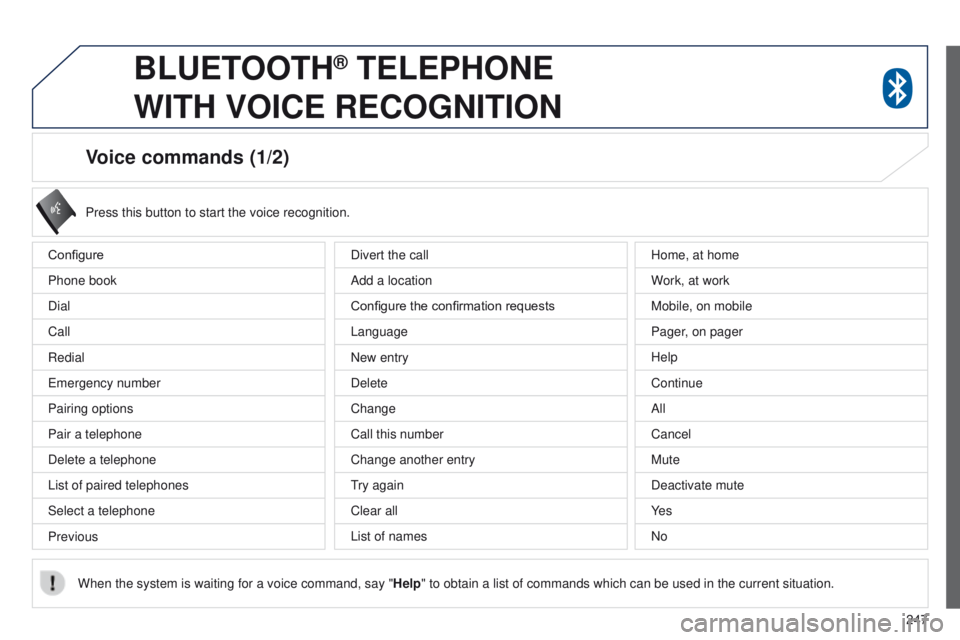
Voice commands (1/2)
Configure
Phone book
Dial
Call
Redial
e
mergency number
Pairing options
Pair a telephone
Delete a telephone
List of paired telephones
Select a telephone
Previous Press this button to start the voice recognition.
When the system is waiting for a voice command, say " Help" to obtain a list of commands which can be used in the current situatio\
n.
Divert the call
Add a location
Configure the confirmation requests
Language
New entry
Delete
Change
Call this number
Change another entry
try again
Clear all
List of names Home, at home
W
ork, at work
Mobile, on mobile
Pager, on pager
Help
Continue
All
Cancel
Mute
Deactivate mute
Ye s
No
BLUETOOTH® TELEPHONE
WITH
VOICE
RECOGNITION
Page 250 of 389
248
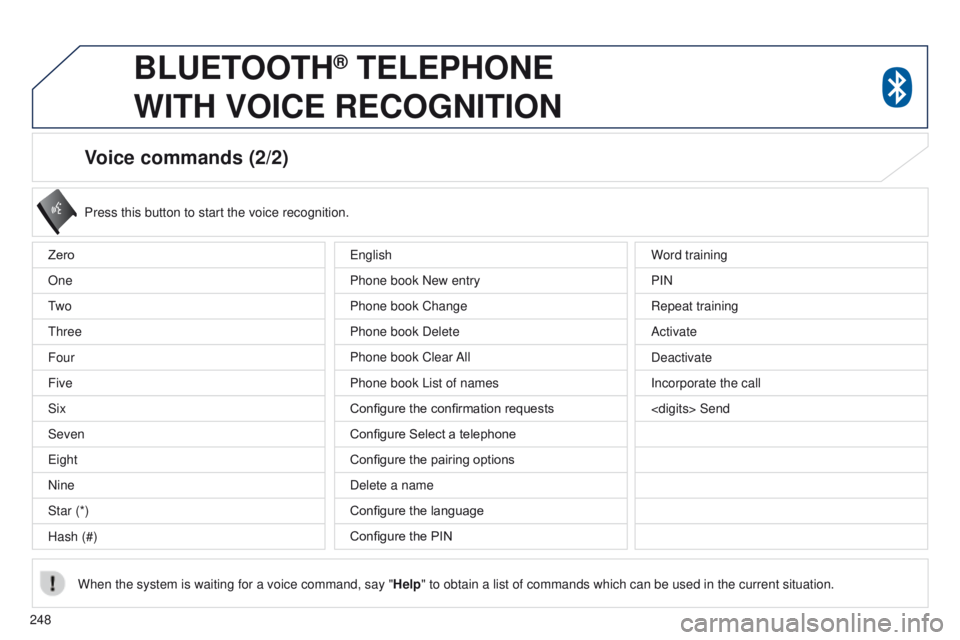
Voice commands (2/2)
Press this button to start the voice recognition.
When the system is waiting for a voice command, say " Help" to obtain a list of commands which can be used in the current situatio\
n.
Zero
One
t
w o
t
hree
Four
Five
Six
Seven
e
ight
Nine
Star (*)
Hash (#) Word training
PIN
Repeat training
Activate
Deactivate
Incorporate the call
Send
e
nglish
Phone book New entry
Phone book Change
Phone book Delete
Phone book Clear All
Phone book List of names
Configure the confirmation requests
Configure Select a telephone
Configure the pairing options
Delete a name
Configure the language
Configure the PIN
BLUETOOTH® TELEPHONE
WITH
VOICE
RECOGNITION
Page 251 of 389
249
4008_en_Chap10b_Mitsu6_ed01-2014
TOUCH SCREEN AUDIO-TELEMATIC
system
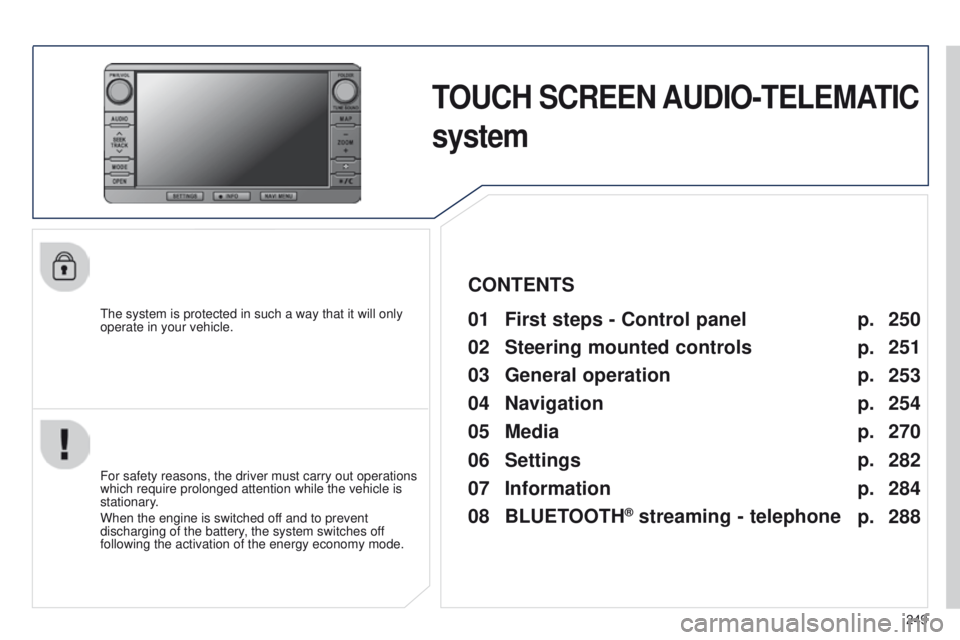
the system is protected in such a way that it will only
operate in your vehicle.01 First steps - Control panel
For safety reasons, the driver must carry out operations
which require prolonged attention while the vehicle is
stationary.
When the engine is switched off and to prevent
discharging of the battery, the system switches off
following the activation of the energy economy mode.
CONTENTS
03
General
operation
04
Navigation
05
Media
06
Settings
07
Information p.
p.
p.
p.
p.
p.
p. 250
251
253
254
270
282
284
02
Steering mounted
controls p.
288
08
BLUETOOTH
® streaming - telephone