04
SRC
BAND
LIST
MENU
377
AUDIO
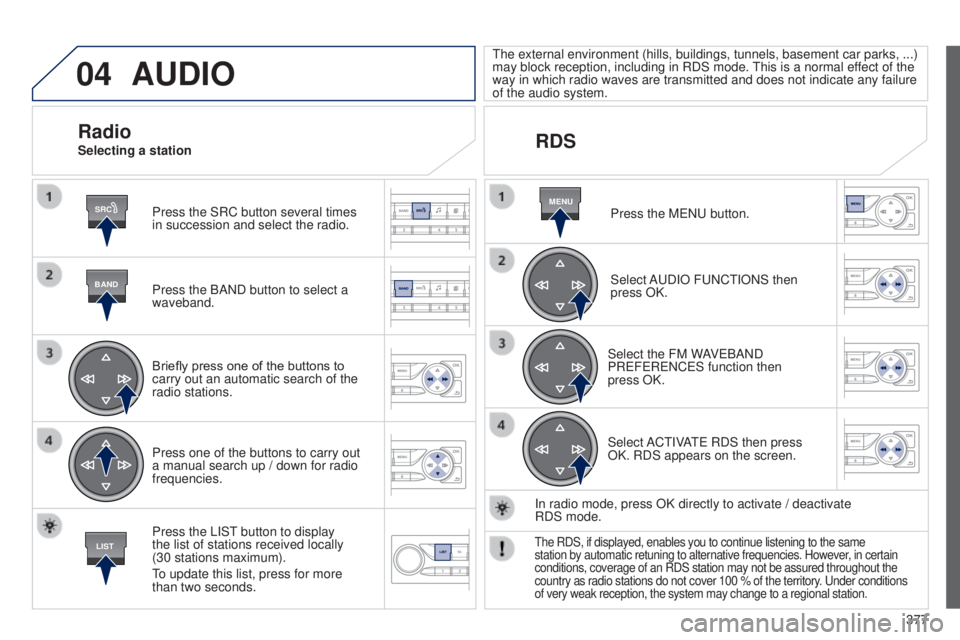
Press the SRC button several times
in succession and select the radio.
Press the BAND button to select a
waveband.
Briefly press one of the buttons to
carry out an automatic search of the
radio stations.
Press one of the buttons to carry out
a manual search up / down for radio
frequencies.
Press the LISt
button to display
the list of stations received locally
(30
stations maximum).
to update this list, press for more
than two seconds.
t
he external environment (hills, buildings, tunnels, basement car parks,
...)
may block reception, including in RDS mode. t
his is a normal effect of the
way in which radio waves are transmitted and does not indicate any failu\
re
of the audio system.
RDS
RadioSelecting a station
Press the M e N u button.
Select A
u DIO F u NC t IONS then
press OK.
Select the FM WAV
e BAND
PR
e F e R e NC e S function then
press
OK.
Select AC
t IVA
te
RDS then press
OK. RDS appears on the screen.
In radio mode, press OK directly to activate
/ deactivate
RDS
mode.
the RDS, if displayed, enables you to continue listening to the same
station by automatic retuning to alternative frequencies. However , in certain
conditions, coverage of an RDS station may not be assured throughout the\
country as radio stations do not cover 100 % of the territory.
u nder conditions
of very weak reception, the system may change to a regional station.
04
BANDMENU
TA
381
AUDIO
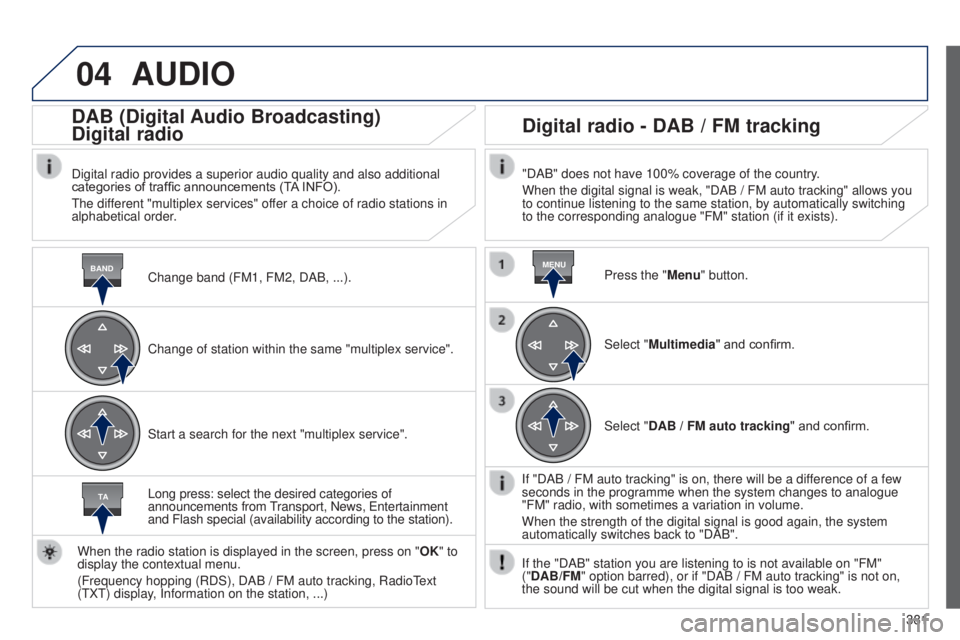
Change band (FM1, FM2, DAB, ...).
DAB (Digital Audio Broadcasting)
Digital radio
Digital radio provides a superior audio quality and also additional
categories of traffic announcements (TA INFO).
t
he different "multiplex services" offer a choice of radio stations in
alphabetical order.
Change of station within the same "multiplex service".
Start a search for the next "multiplex service".
Digital radio - DAB / FM tracking
"DAB" does not have 100% coverage of the country.
When the digital signal is weak, "DAB / FM auto tracking" allows you
to continue listening to the same station, by automatically switching
to the corresponding analogue "FM" station (if it exists).
Long press: select the desired categories of
announcements from
transport, News,
e
ntertainment
and Flash special (availability according to the station).
When the radio station is displayed in the screen, press on " OK" to
display the contextual menu.
(Frequency hopping (RDS), DAB
/
FM auto tracking, Radio
t
ext
(
t
X
t
) display, Information on the station,
...) Press the "Menu" button.
Select "Multimedia" and confirm.
Select "DAB
/ FM auto tracking" and confirm.
If "DAB
/ FM auto tracking" is on, there will be a difference of a few
seconds in the programme when the system changes to analogue
"FM" radio, with sometimes a variation in volume.
When the strength of the digital signal is good again, the system
automatically switches back to "DAB".
If the "DAB" station you are listening to is not available on "FM"
("DAB/FM" option barred), or if "DAB
/ FM auto tracking" is not on,
the sound will be cut when the digital signal is too weak.