Page 264 of 285

21
10
Checks
301-add_en_Chap10_verifi cations_ed01-2014
Obtain a bottle of AdBlue ® . After first checking the use-by date, read carefully the instructions on use on the label before pouring the contents of the bottle into your vehicle's AdBlue ® tank. ® tank. ®
After emptying the bottle, wipe away any spillage around the tank filler using a damp cloth.
Refit the blue cap to the tank and turn it a 6 th of a turn clockwise, to its stop. Refit the black cap and turn it a quarter of a turn clockwise without pressing. Ensure that the indicator on the cap lines up with the indicator on the support. Depending on equipment, return the spare wheel and/or the storage box to the bottom of the boot. Refit the boot carpet and close the tailgate.
Important : if your vehicle's AdBlue ® tank is completely empty - ® tank is completely empty - ®
which is confirmed by the alert messages and the impossibility of starting the engine, you must add at least 3.8 litres (so two 1.89 litre bottles).
If any additive is split or splashed, wash immediately with cold water or wipe with a damp cloth. If the additive has crystallised, clean it off using a sponge and hot water.
Important: in the event of a top-up after a breakdown because of a lack of additive , you must wait around 5 minutes before switching on the ignition, without opening the driver's door, locking the vehicle or introducing the key into the ignition switch . Switch on the ignition, then, after 10 seconds, start the engine.
Never dispose of AdBlue ® additive ® additive ®
bottles in the household waste. Place them in a special container provided this purpose or take them to your dealer.
Page 265 of 285

23
11
Technical data
301-add_en_Chap11_caracteristiques-techniques_ed01-2014
EnginePureTech 72V T i 115PureTech 82PureTech 82 S&S
Gearbox Manual (5-speed)
ETG electronic (5-speed)
Manual (5-speed) Automatic (4-speed) Manual (5-speed)
ETG electronic (5-speed)
Model code: DD... HMY0 HMY0/P NFP0 NFP6 NFP9 HMZ6 HMZ6/PS
- Unladen weight 980 1 090 980 980
- Kerb weight * 1 055 1 165 1 055 1 055
- Gross vehicle weight (GV W) 1 459 1 467 1 524 1 559 1 470 1 490
- Gross train weight (GTW) on a 12 % gradient 1 909 1 917 2 274 2 309 1 920 1 990
- Braked trailer (within GTW limit) on a 10 % or 12 % gradient 450 750 450 450
- Braked trailer ** (with load transfer within the GTW limit) 720 1 010 720 720
- Unbraked trailer 450 580 600 450 450
- Recommended nose weight 55 55 55 55
* The kerb weight is equal to the unladen weight + driver (75 kg). ** The weight of the braked trailer can be increased, within the GTW limit, if the GV W of the towing vehicle is reduced by an equal amount; warning, towing using a lightly loaded towing vehicle may have an adverse effect on its road holding.
The GTW and towed load values indicated are valid up to a maximum altitude of 1 000 metres; the towed load mentioned must be reduced by 10 % for each additional 1 000 metres of altitude. The speed of a towing vehicle must not exceed 60 mph (100 km/h) (comply with the legislation in force in your country). High ambient temperatures may result in a reduction in the per formance of the vehicle to protect the engine; if the ambient temperature is above 37 °C,
limit the towed load.
Petrol weights (in kg)
Page 267 of 285
Audio and Telematics
4
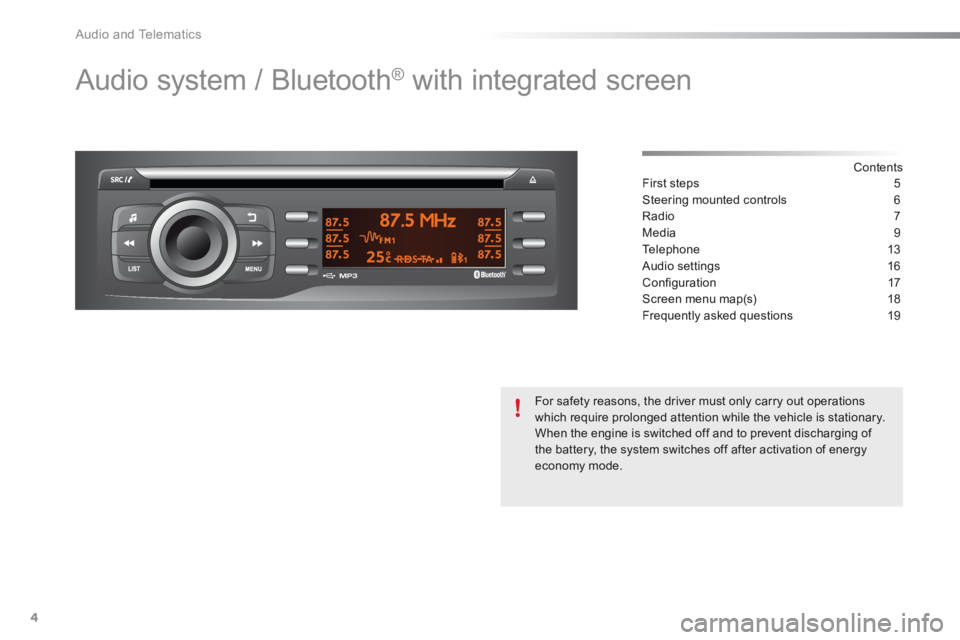
Audio system / Bluetooth® with integrated screen
Contents First steps 5
Steering mounted controls 6
Radio 7
Media 9
Telephone 13
Audio settings 16
Confi guration 17
Screen menu map(s) 18
Frequently asked questions 19
For safety reasons, the driver must only carry out operations which require prolonged attention while the vehicle is stationary. When the engine is switched off and to prevent discharging of the battery, the system switches off after activation of energy economy mode.
Page 285 of 285

Audio and Telematics
22
QUESTIONANSWERSOLUTION
An iPod is not recognised when connecting to the USB port.
The iPod is of a generation that is not compatible with the USB connection.
The hard disk or device is not recognised when connecting to the USB port.
Some hard disks and devices need a power supply greater than is provided by the audio system. Connect the device to the 230 V socket, the 12 V socket or an external power supply. Caution : ensure that the device does not transmit a voltage greater than 5 V (risk of destruction of the system).
When streaming, the sound cuts momentarily. Some telephones prioritise connection of the "hands-free" profile. Delete the "hands-free" connection profile to improve streaming.
In "Random all" play, not all of the tracks are played. In "Random all" play, the system can only take into account up to 999 tracks.
With the engine off, the audio system switches off after a few minutes of use.
When the engine is switched off, the audio system operating time depends on the battery charge. The switch-off is normal: the audio system switches to economy mode and switches off to prevent discharging the vehicle's battery.
Start the vehicle's engine to increase the battery charge.
The message "the audio system is overheated" appears on the display.
In order to protect the installation if the surrounding temperature is too high, the audio system switches to an automatic thermal protection mode leading to a reduction of the volume or stopping of
the playing of the CD.
Switch the audio system off for a few minutes to allow the system to cool.