Page 33 of 340

31
2008_en_Chap01_controle-de-marche_ed01-2015
Engine oil level
indicator*
Oil level incorrect
This is indicated by the flashing of "OIL" or
by the display of a dedicated message in the
instrument panel.
If the low oil level is confirmed by a check using
the dipstick, the level must be topped up to
avoid damage to the engine.
Oil level indicator fault
This is indicated by the flashing of " OIL_ _" or
by the display of a dedicated message in the
instrument panel. Contact a PEUGEOT dealer
or a qualified workshop.
Dipstick
Refer to the "Checks" section to locate the
dipstick and the oil filler cap on your engine.
There are 2 marks on the dipstick:
System which informs the driver whether the
engine oil level is correct or not.
This information is indicated for a few seconds
when the ignition is switched on, after the
service information.
The level read will only be correct if
the vehicle is on level ground and the
engine has been off for more than
30 minutes.
-
A= m
ax; never exceed this
level,
-
B= m
in; top up the level via
the oil filler cap, using the
grade of oil suited to your
engine.
Oil level correct
* Depending on version.
1
Monitoring
Page 39 of 340
37
2008_en_Chap01_controle-de-marche_ed01-2015
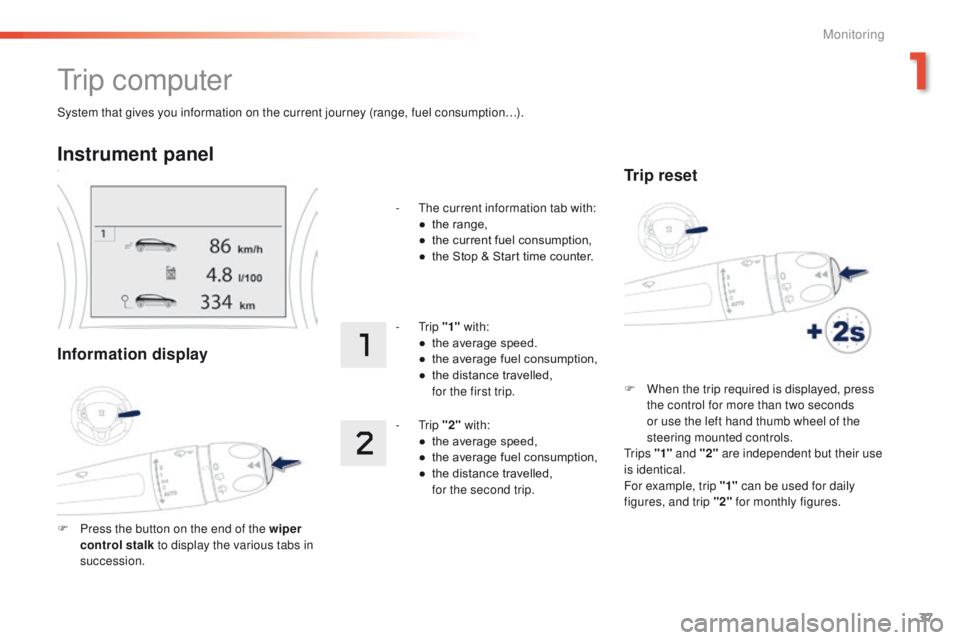
System that gives you information on the current journey (range, fuel consumption…).
Tr i p c o m p u t e r
Instrument panel
Information display
F Press the button on the end of the wiper control stalk to display the various tabs in
succession. -
T
he current information tab with:
●
t
he range,
●
t
he current fuel consumption,
●
t
he Stop & Start time counter.
- Trip
"1" with:
●
t
he average speed.
●
t
he average fuel consumption,
●
t
he distance travelled,
f
or the first trip.
- Trip
"2" with:
●
t
he average speed,
●
t
he average fuel consumption,
●
t
he distance travelled,
f
or the second trip.
Trip reset
F When the trip required is displayed, press
the control for more than two seconds
or use the left hand thumb wheel of the
steering mounted controls.
Tr i p s "1" and "2" are independent but their use
is identical.
For example, trip "1" can be used for daily
figures, and trip "2" for monthly figures.
1
Monitoring
Page 42 of 340
40
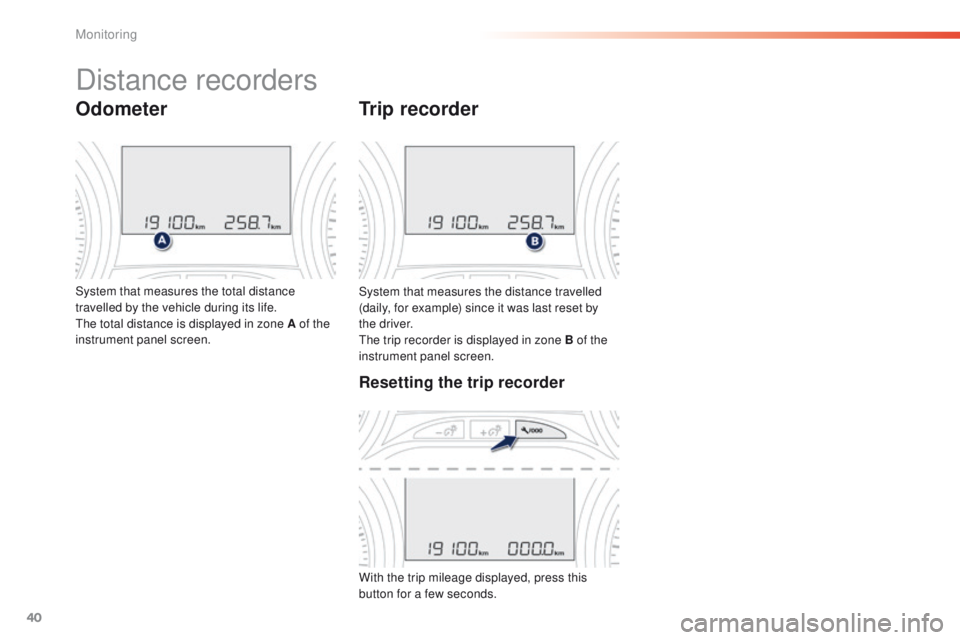
System that measures the distance travelled
(daily, for example) since it was last reset by
the driver.
The trip recorder is displayed in zone B of the
instrument panel screen.
Trip recorder
System that measures the total distance
travelled by the vehicle during its life.
The total distance is displayed in zone A of the
instrument panel screen.
Distance recorders
Odometer
Resetting the trip recorder
With the trip mileage displayed, press this
button for a few seconds.
Monitoring
Page 43 of 340
41
2008_en_Chap01_controle-de-marche_ed01-2015
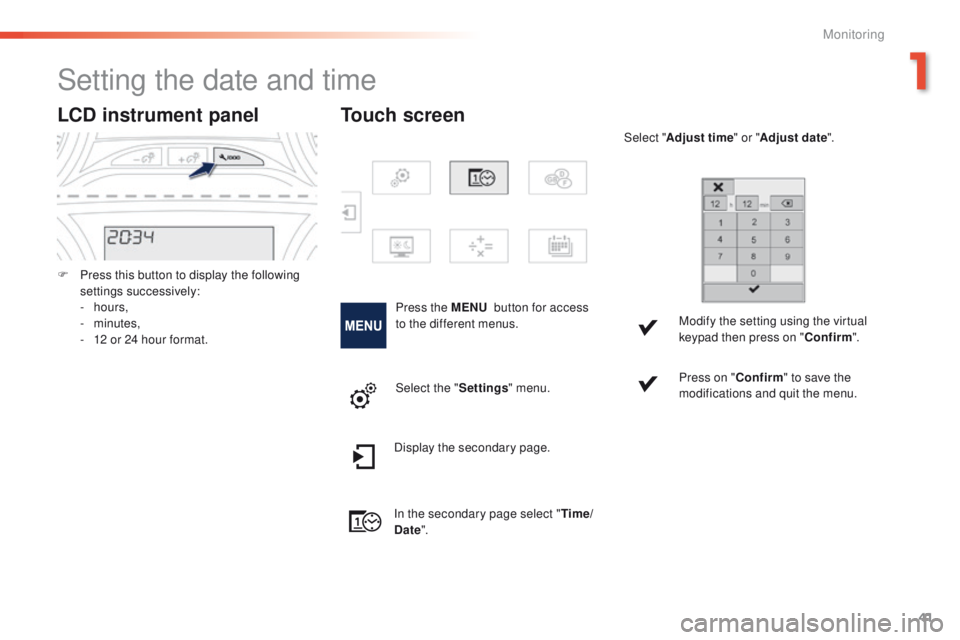
LCD instrument panel
F Press this button to display the following settings successively:
-
hours,
-
minutes,
-
1
2 or 24 hour format.
Setting the date and time
Press the MENU button for access
to the different menus. Select "
Adjust time " or "Adjust date".
Modify the setting using the virtual
keypad then press on " Confirm".
Touch screen
Select the " Settings" menu. Press on "
Confirm" to save the
modifications and quit the menu.
Display the secondary page.
In the secondary page select " Time/
Date ".
1
Monitoring
Page 47 of 340
45
2008_en_Chap02_ouvertures_ed01-2015
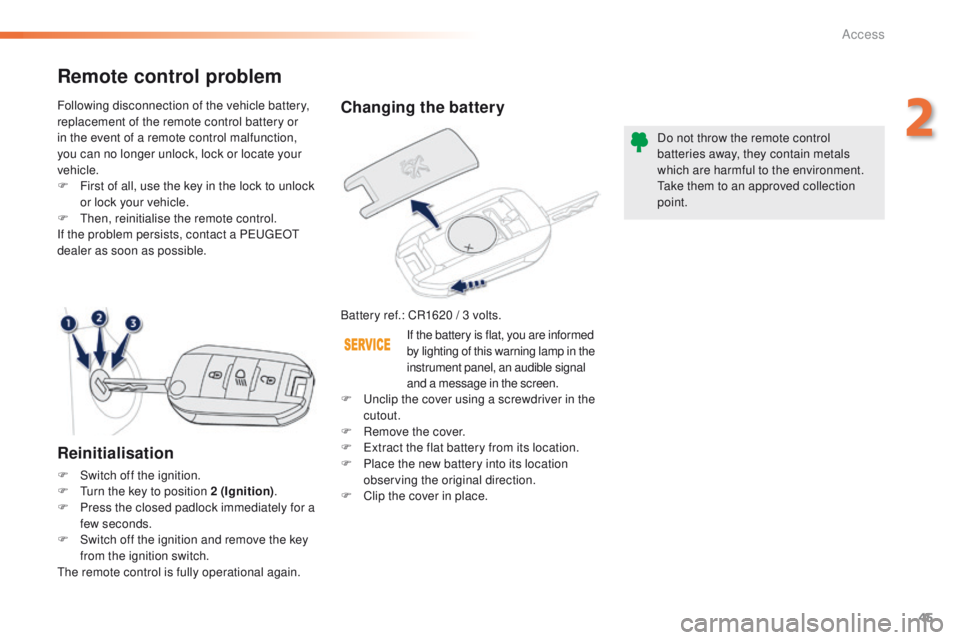
Changing the battery
Battery ref.: CR1620 / 3 volts.Do not throw the remote control
batteries away, they contain metals
which are harmful to the environment.
Take them to an approved collection
point.
Remote control problem
Reinitialisation
F Switch off the ignition.
F
T urn the key to position 2 (Ignition) .
F
P
ress the closed padlock immediately for a
few seconds.
F
S
witch off the ignition and remove the key
from the ignition switch.
The remote control is fully operational again. Following disconnection of the vehicle battery,
replacement of the remote control battery or
in the event of a remote control malfunction,
you can no longer unlock, lock or locate your
vehicle.
F
F
irst of all, use the key in the lock to unlock
or lock your vehicle.
F
T
hen, reinitialise the remote control.
If the problem persists, contact a PEUGEOT
dealer as soon as possible.
If the battery is flat, you are informed
by lighting of this warning lamp in the
instrument panel, an audible signal
and a message in the screen.
F
U
nclip the cover using a screwdriver in the
cutout.
F
R
emove the cover.
F
E
xtract the flat battery from its location.
F P lace the new battery into its location
observing the original direction.
F
C
lip the cover in place.
2
Access
Page 60 of 340
58
2008_en_Chap03_confort_ed01-2015
Steering wheel adjustment
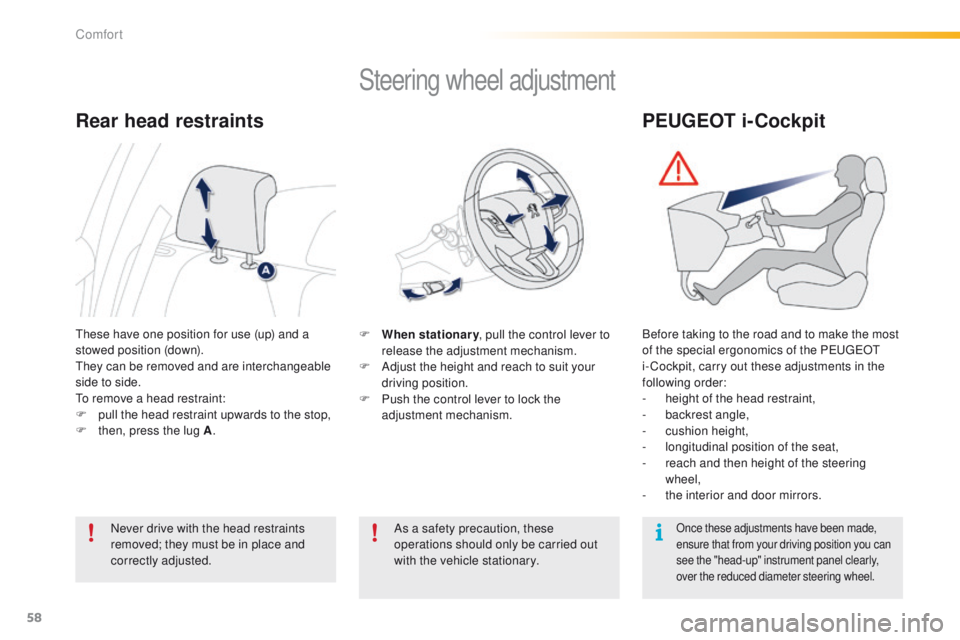
F When stationary, pull the control lever to
release the adjustment mechanism.
F
A
djust the height and reach to suit your
driving position.
F
P
ush the control lever to lock the
adjustment mechanism.
As a safety precaution, these
operations should only be carried out
with the vehicle stationary.
These have one position for use (up) and a
stowed position (down).
They can be removed and are interchangeable
side to side.
To remove a head restraint:
F
p
ull the head restraint upwards to the stop,
F
t
hen, press the lug A .
Rear head restraints
Never drive with the head restraints
removed; they must be in place and
correctly adjusted.
PEUGEOT i-Cockpit
Before taking to the road and to make the most
of the special ergonomics of the PEUGEOT
i- Cockpit, carry out these adjustments in the
following order:
-
h
eight of the head restraint,
-
b
ackrest angle,
-
c
ushion height,
-
l
ongitudinal position of the seat,
-
r
each and then height of the steering
wheel,
-
t
he interior and door mirrors.
Once these adjustments have been made,
ensure that from your driving position you can
see the "head-up" instrument panel clearly,
over the reduced diameter steering wheel.
Comfort
Page 74 of 340
72
2008_en_Chap04_amenagements_ed01-2015
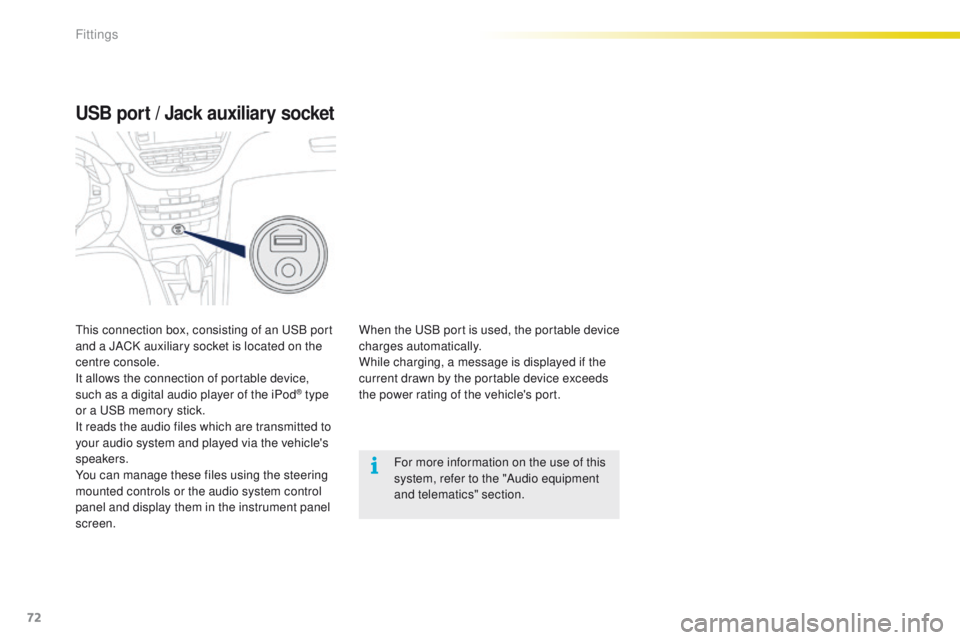
USB port / Jack auxiliary socket
When the USB port is used, the portable device
charges automatically.
While charging, a message is displayed if the
current drawn by the portable device exceeds
the power rating of the vehicle's port.For more information on the use of this
system, refer to the "Audio equipment
and telematics" section.
This connection box, consisting of an USB port
and a JACK auxiliary socket is located on the
centre console.
It allows the connection of portable device,
such as a digital audio player of the iPod
® type
or a USB memory stick.
It reads the audio files which are transmitted to
your audio system and played via the vehicle's
speakers.
You can manage these files using the steering
mounted controls or the audio system control
panel and display them in the instrument panel
screen.
Fittings
Page 86 of 340
84
2008_en_Chap05_conduite_ed01-2015
Display in the instrument panel
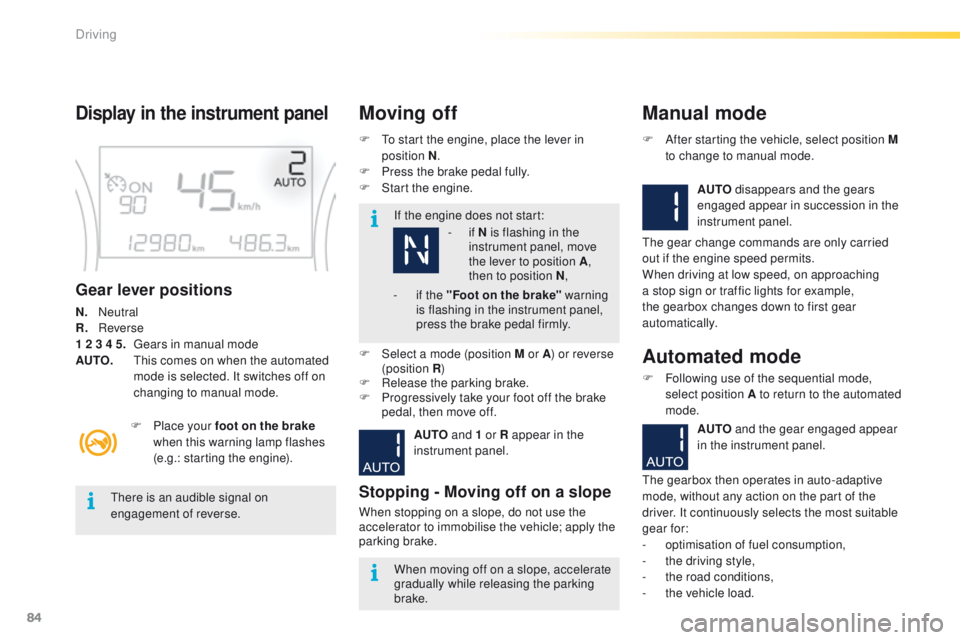
Gear lever positions
N. Neutral
R.
R everse
1 2 3 4 5.
G
ears in manual mode
AUTO.
T
his comes on when the automated
mode is selected. It switches off on
changing to manual mode. F
T
o start the engine, place the lever in
position N .
F
P
ress the brake pedal fully.
F
S
tart the engine.
Moving off
If the engine does not start:
F
P
lace your foot on the brake
when this warning lamp flashes
(e.g.: starting the engine).
There is an audible signal on
engagement of reverse.
When moving off on a slope, accelerate
gradually while releasing the parking
brake.
F
Sel
ect a mode (position M or A ) or reverse
(position R )
F
R
elease the parking brake.
F
P
rogressively take your foot off the brake
pedal, then move off.
AUTO and 1 or R appear in the
instrument panel.
Stopping - Moving off on a slope
When stopping on a slope, do not use the
accelerator to immobilise the vehicle; apply the
parking brake.
Manual mode
AUTO disappears and the gears
engaged appear in succession in the
instrument panel.
F
A
fter starting the vehicle, select position M
to change to manual mode.
The gear change commands are only carried
out if the engine speed permits.
When driving at low speed, on approaching
a stop sign or traffic lights for example,
the gearbox changes down to first gear
automatically.
Automated mode
F Following use of the sequential mode, select position A to return to the automated
mode.
AUTO and the gear engaged appear
in the instrument panel.
The gearbox then operates in auto-adaptive
mode, without any action on the part of the
driver. It continuously selects the most suitable
gear for:
-
o
ptimisation of fuel consumption,
-
t
he driving style,
-
t
he road conditions,
-
t
he vehicle load.
-
i
f N is flashing in the
instrument panel, move
the lever to position A ,
then to position N ,
-
i
f the "Foot on the brake" warning
is flashing in the instrument panel,
press the brake pedal firmly.
Driving