Page 4 of 271

.
.
108_en_Chap00a_sommaire_ed01-2015
exterior lighting control stalk 93
A utomatic illumination of headlamps
9
6
Headlamp adjustment
9
8
Courtesy lamp
9
8
Boot lamp
9
8
Wiper control stalk
9
9
Visibility
Instrument panels 1 0
Display screens
1
2
Indicator and warning lamps
1
4
Indicators
25
tr
ip computer
2
6
Setting the time
2
8
MonitoringOver view
Keys
30
"Keyless e
n
try and Starting" system
3
3
Doors
37
Boo
t
38
Front electric windows
4
0
Rear quarter windows
4
0
ele
ctric fabric roof
4
1
Access
Front seats 4 5
Rear seats
4
7
Mirrors
4
9
Steering wheel adjustment
5
0
Ventilation
5
1
Heating
53
Manual air conditioning
5
4
Automatic air conditioning
5
6
Front demist - defrost
5
9
Rear screen demist - defrost
6
0
Comfort
Interior fittings 61
Rear parcel shelf
6
5
Boot fittings
6
6
Fittings
Driving recommendations 68
Starting - switching off the engine with the key 69
Starting - switching off the engine with the
Keyless
e
n
try and Starting system
7
0
Manual parking brake
7
4
5-speed manual gearbox
7
4
e
tg
el
ectronic gearbox
7
5
ge
ar shift indicator
7
9
Hill start assist
8
0
Stop & Start
8
1
Speed limiter
8
4
Reversing camera
9
0
Lane departure warning system
9
1
Driving
e
co-driving
Contents
Page 6 of 271
4
108_en_Chap00b_vue-ensemble_ed01-2015
exterior
102
81 91
33
Electronic key: Keyless
Entry and Starting
this system allows the locking, unlocking and
starting the vehicle by keeping the key on your
person and in the recognition zone.
Stop & Start
this system puts the engine temporarily
into standby during stops in the traffic (red
lights, traffic jams, etc...). t
h
e engine restarts
automatically as soon as you want to move
off.
t
h
e Stop & Start system reduces fuel
consumption, exhaust emissions and the noise
level when stationary.
Under-inflation detection
this system automatically checks the tyre
pressures when driving and alerts you in the
event of an under-inflated tyre.
Active City Brake
the aim of this system is to avoid a frontal
collision or reduce the speed of impact if the
driver fails to react or reacts too late.
Lane departure warning
system
this system gives a warning if you inadvertently
cross a longitudinal road marking.
108
Over view
Page 9 of 271
7
108_en_Chap00b_vue-ensemble_ed01-2015
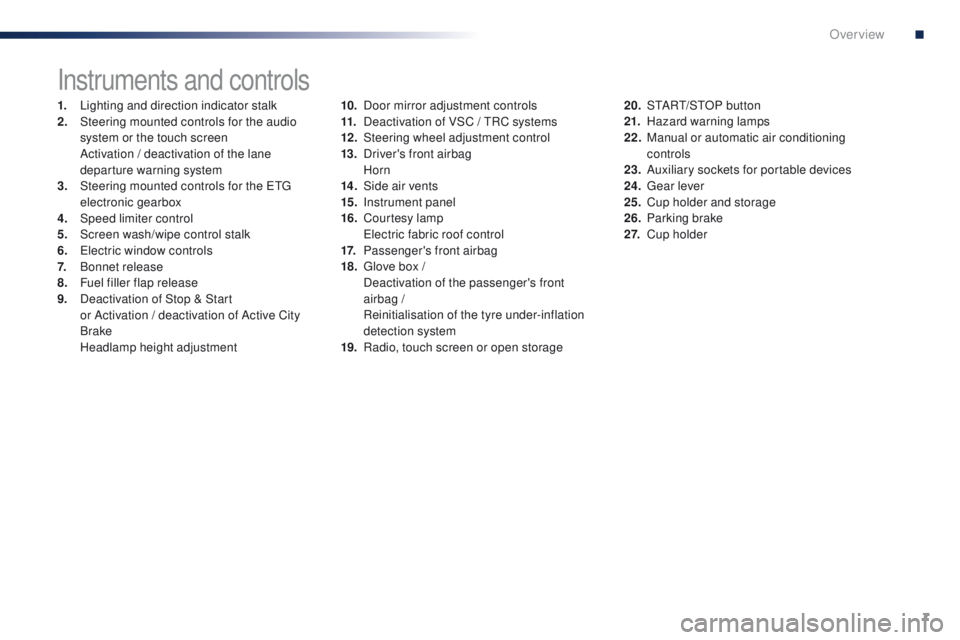
Instruments and controls
1. Lighting and direction indicator stalk
2. Steering mounted controls for the audio
system or the touch screen
A
ctivation / deactivation of the lane
departure warning system
3.
S
teering mounted controls for the etg
electronic gearbox
4.
Spe
ed limiter control
5.
S
creen wash/wipe control stalk
6.
e
le
ctric window controls
7.
B
onnet release
8.
F
uel filler flap release
9.
D
eactivation of Stop & Start
or
Activation / deactivation of Active City
Brake
H
eadlamp height adjustment 10. D
oor mirror adjustment controls
11. D eactivation of VSC / tR C systems
12 .
S
teering wheel adjustment control
13.
D
river's front airbag
Horn
14 .
S
ide air vents
15.
I
nstrument panel
16.
C
ourtesy lamp
e
le
ctric fabric roof control
17.
P
assenger's front airbag
18.
g
l
ove box /
D
eactivation of the passenger's front
airbag /
R
einitialisation of the tyre under-inflation
detection system
19.
R
adio, touch screen or open storage20. S
tA Rt/ S tO P button
21. H azard warning lamps
22.
M
anual or automatic air conditioning
controls
23.
A
uxiliary sockets for portable devices
24.
g
ea
r lever
25.
C
up holder and storage
26.
P
arking brake
2 7.
C
up holder
.
Over view
Page 20 of 271
18
Stop & Star t
(VTi 68 S&S
engine)flashing.th
e Stop & Start system has a fault. Have the system checked by a Pe ugeOt dealer or a
qualified workshop.
Speed limiter fixed.
th
e speed limiter has a fault.Have it checked by a P
e
uge
Ot
dealer or a qualified
workshop.
Door(s) open /
Boot open fixed, accompanied by
an audible signal. A door or the boot is still open. Close the door or boot.
Warning / indicator lamp
StateCause Action / Observations
Under-inflation fixed.
th
e pressure in one or more wheels
is too low. Check the pressure of the tyres as soon as possible.
th
is check should preferably be carried out when the
tyres are cold.
You must reinitialise the system after the adjustment
of one or more tyre pressures and after changing one
or more wheels.
For more information, refer to the "
un
der-inflation
detection" section.
Monitoring
Page 23 of 271

21
108_en_Chap01_controle-de-marche_ed01-2015
Parking brakefixed, accompanied by
an audible signal.th e parking brake is applied or not
properly released. Release the parking brake to switch off the warning
lamp, keeping your foot on the brake pedal.
Observe the safety recommendations.
For more information on the parking brake, refer to the
corresponding section.
Warning / indicator lamp
StateCause Action / Observations
Passenger's
front airbag fixed in the seat belt
and passenger's front
airbag warning lamps
display.
th
e control switch, located in the
glove box, has been placed in the
"ON" position.
the
passenger's front airbag is activated.
In this case, do not install a rear ward facing child seat.
Stop & Star t
(VTi 68 S&S
engine) fixed.
When the vehicle stops (red lights,
traffic jams...) the Stop & Start system
has put the engine into S
tO
P mode.
th
e indicator lamp goes off and the engine restarts
automatically in S
tA
R
t
mode, as soon as you want to
move off.
Keyless Entr y
and Starting
system fixed.
th
e conditions for starting are met. For more information, refer to the "Starting - switching off the engine with the Keyless
e
n
try and Starting
system" section.
flashing slowly.
th
e vehicle is in "ACC" mode.
th
e accessories (audio system,
12V socket...) can be used.
1
Monitoring
Page 26 of 271
24
Warning / indicator lampStateCause Action / Observations
Stop & Star t
( VTi 68 S&S
engine) fixed.
th
e Stop & Start system has been
deactivated. Reactivate the system by pressing the button again.
For more information, refer to the corresponding
section.
Active City
Brake fixed.
th
e Active City Brake system has
been deactivated. Reactivate the system by pressing the button again.
For more information, refer to the corresponding
section.
Monitoring
Page 28 of 271
26
tr i p c o m p u t e r
System that gives you information on the journey in progress (range, fuel consumption…).
Information display
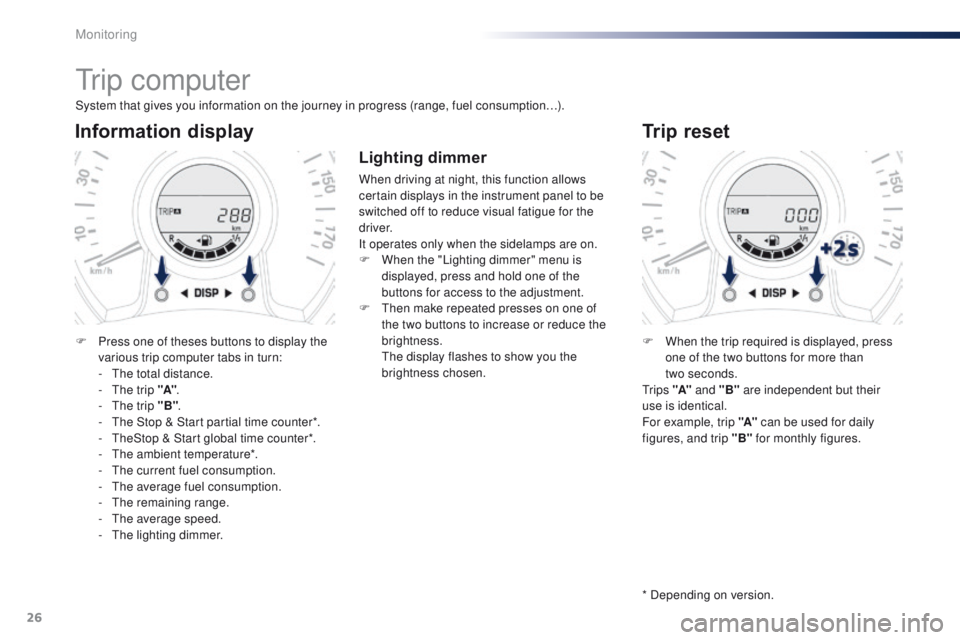
F Press one of theses buttons to display the various trip computer tabs in turn:
-
t
h
e total distance.
-
t
h
e trip "A".
-
t
h
e trip "B" .
-
t
h
e Stop & Start partial time counter*.
-
t
h
eStop & Start global time counter*.
-
t
h
e ambient temperature*.
-
t
h
e current fuel consumption.
-
t
h
e average fuel consumption.
-
t
he
remaining range.
-
t
h
e average speed.
-
t
h
e lighting dimmer.
Trip reset
F When the trip required is displayed, press one of the two buttons for more than
two
seconds.
t
r i p s "A" and "B" are independent but their
use is identical.
For example, trip "A" can be used for daily
figures, and trip "B" for monthly figures.
* Depending on version.
Lighting dimmer
When driving at night, this function allows
certain displays in the instrument panel to be
switched off to reduce visual fatigue for the
driver.
It operates only when the sidelamps are on.
F
W
hen the "Lighting dimmer" menu is
displayed, press and hold one of the
buttons for access to the adjustment.
F
t
h
en make repeated presses on one of
the two buttons to increase or reduce the
brightness.
t
h
e display flashes to show you the
brightness chosen.
Monitoring
Page 29 of 271
27
108_en_Chap01_controle-de-marche_ed01-2015
With the touch screen
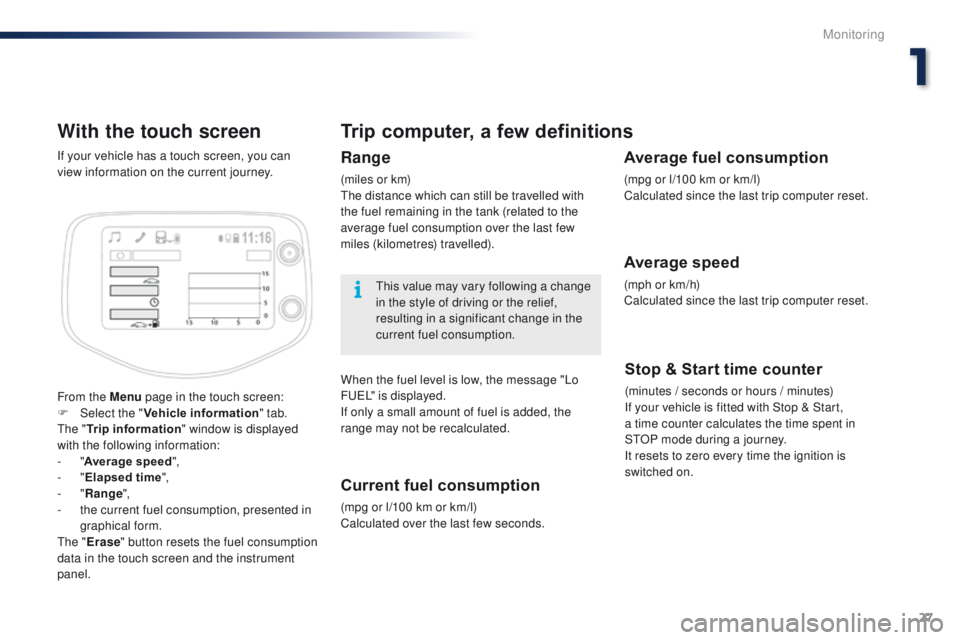
From the Menu page in the touch screen:
F Sel ect the " Vehicle information " tab.
th
e " Trip information " window is displayed
with the following information:
-
"Average speed ",
-
"Elapsed time ",
-
"Range ",
-
t
he current fuel consumption, presented in
graphical form.
th
e " Erase " button resets the fuel consumption
data in the touch screen and the instrument
panel. If your vehicle has a touch screen, you can
view information on the current journey.
Trip computer, a few definitions
Range
(miles or km)th e distance which can still be travelled with
the fuel remaining in the tank (related to the
average fuel consumption over the last few
miles (kilometres) travelled).
th
is value may vary following a change
in the style of driving or the relief,
resulting in a significant change in the
current fuel consumption.
When the fuel level is low, the message "Lo
F
u
e
L
" is displayed.
If only a small amount of fuel is added, the
range may not be recalculated.
Current fuel consumption
(mpg or l/100 km or km/l)
Calculated over the last few seconds.
Stop & Start time counter
(minutes / seconds or hours / minutes)
If your vehicle is fitted with Stop & Start,
a
time counter calculates the time spent in
S
tO
P mode during a journey.
It resets to zero every time the ignition is
switched on.
Average fuel consumption
(mpg or l/100 km or km/l)
Calculated since the last trip computer reset.
Average speed
(mph or km/h)
Calculated since the last trip computer reset.
1
Monitoring