2015 PEUGEOT 108 ignition
[x] Cancel search: ignitionPage 76 of 271
74
108_en_Chap05_conduite_ed01-2015
Manual parking brake
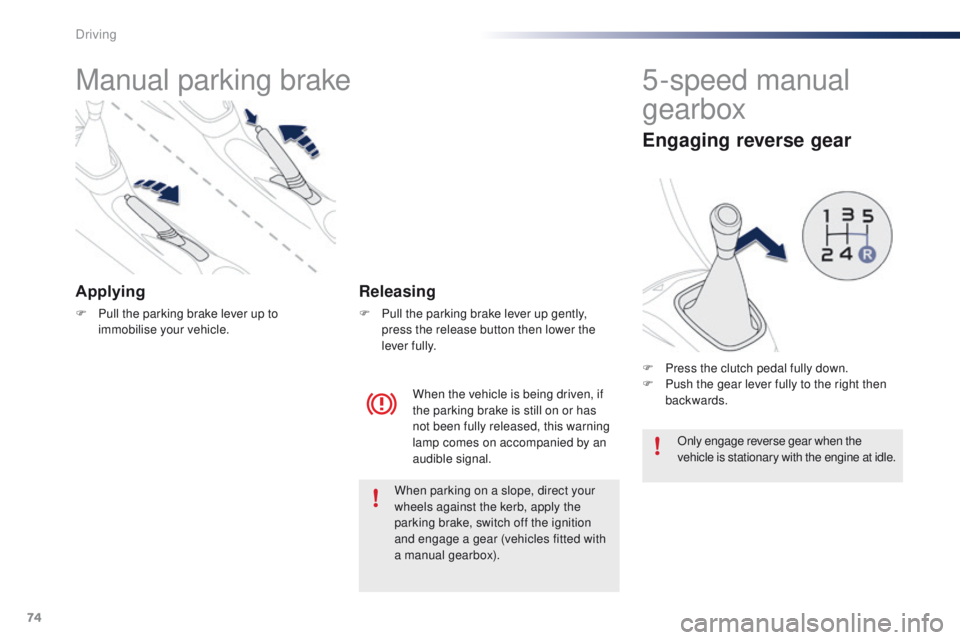
Applying
F Pull the parking brake lever up to immobilise your vehicle.
When the vehicle is being driven, if
the parking brake is still on or has
not been fully released, this warning
lamp comes on accompanied by an
audible signal.
Releasing
F Pull the parking brake lever up gently, press the release button then lower the
lever fully.
5-speed manual
gearbox
Engaging reverse gear
F Press the clutch pedal fully down.
F P ush the gear lever fully to the right then
backwards.
Only engage reverse gear when the
vehicle is stationary with the engine at idle.
When parking on a slope, direct your
wheels against the kerb, apply the
parking brake, switch off the ignition
and engage a gear (vehicles fitted with
a manual gearbox).
Driving
Page 80 of 271
78
108_en_Chap05_conduite_ed01-2015
to engage reverse, the vehicle must be
stationary with your foot on the brake pedal.
F
Sel
ect position R .
Reverse
there is an audible signal on engaging reverse.
th
e vehicle can be stopped whatever the
position of the gear selector ( N, E or R ).
However, there is an audible signal on opening
the driver's door if the gear selector is not at
position N .
Switching off
When the vehicle is stopped with the
engine running, always put the gear
selector to neutral N .
th
ere is a continuous audible signal
if you turn the ignition switch to " OFF"
with the vehicle in 2
nd, 3rd, 4th or 5th g e a r.
In this case return the ignition switch
to " ON ", move the gear selector to
position
N , then to position E , M or R,
then turn the ignition switch to " OFF". On a slope, use the brakes to
immobilise the vehicle and place the
gear selector in position N
, E or R.
With the ignition on, illumination
of this warning lamp indicates a
gearbox fault.
Contact a P
e
uge
Ot
dealer or a
qualified workshop.
If N
i
s flashing in the instrument panel
accompanied by an audible signal for
a long time:
Operating faults
In all cases, it is essential that you
apply the parking brake to immobilise
the vehicle.
Before doing anything under the
bonnet, check that the gear selector is
in neutral N and the parking brake is
applied.
Limits of operation
On a gradient, or when hill start assist is
activated, never hold the vehicle using the
accelerator : you could damage the clutch.
In these situations there is an audible signal.
F
M
ove the gear selector to position N .
F
W
ait 15 minutes to allow the clutch to cool
down before setting off. -
c
heck that the ignition switch is at the "
ON"
position,
-
p
lace the gear selector at N
, then move it
to E , M or R .
If 1 is flashing in the instrument panel:
-
p
lace the gear selector at E or M
, then
move it to N .
If R is flashing in the instrument panel:
-
p
lace the gear selector at R, then move it
to N .
Driving
Page 83 of 271
81
108_en_Chap05_conduite_ed01-2015
Stop & Start (Vti 68 S&S engine)
Operation
Going into engine STOP mode
this indicator lamp comes on in the
instrument panel and the engine
goes into standby automatically:
-
w
hen stationary, in neutral, and you
release the clutch pedal.
Never refuel with the engine in S
tO
P
mode; you must switch off the ignition
with the button. For smoother operation, during
parking manoeuvres S
tO
P mode is
not available for a few seconds after
coming out of reverse gear.
S
tO
P mode does not affect the
vehicle's systems, such as for example,
braking, power steering...
Special cases: STOP mode not
available
StOP mode is not invoked principally when:
- t he driver's door is open,
-
t
he driver's seat belt is not fastened,
-
t
he engine is needed to maintain a
comfortable temperature in the passenger
compartment,
-
d
emisting is active,
-
s
ome special conditions (battery charge,
engine temperature, braking assistance,
vehicle stopped on a steep gradient, high
altitude...) where the engine is needed to
assure control of a system.
th
e Stop & Start
system puts the engine temporarily into standby - S
tO
P mode - during stops in the traffic (red lights, traffic jams, or other...). t
h
e
engine restarts automatically - S
tA
R
t
mode - as soon as you want to move off.
t
h
e restart takes place instantly, quickly and silently.
Per fect for urban use, the Stop & Start system reduces fuel consumption and exhaust emissions as well as the noise level when stationary.
Stop & Start time counters
A partial time counter counts the periods in
StO P mode during a journey.
It is displayed in the trip computer once the
Stop & Start acts.
Press one of the screen management buttons
to return to the previous display.
A global time counter counts the periods in
S
tO
P mode since the last reset.
When it is displayed, press one of the screen
management buttons to reset the counter.
5
Driving
Page 86 of 271
84
108_en_Chap05_conduite_ed01-2015
the speed limiter cannot, in any
circumstances, replace the need to
observe speed limits, nor can it replace the
need for vigilance on the part of the driver.
Speed limiter (Puretech 82 engine)
the speed limiter is switched on manually:
this can be done whatever the speed of the
vehicle. However, if you are driving at less than
20 mph (30 km/h), the programmed speed will
be fixed at 20 mph (30 km/h).
th
e speed limiter is paused by operation of the
control.
th
e programmed speed can be exceeded
temporarily by pressing the accelerator firmly
beyond the point of resistance.
to r
eturn to the programmed speed, simply
release the accelerator pedal until the vehicle
returns to the programmed speed limit. System which prevents the vehicle from exceeding the speed programmed by the driver.Steering mounted controls
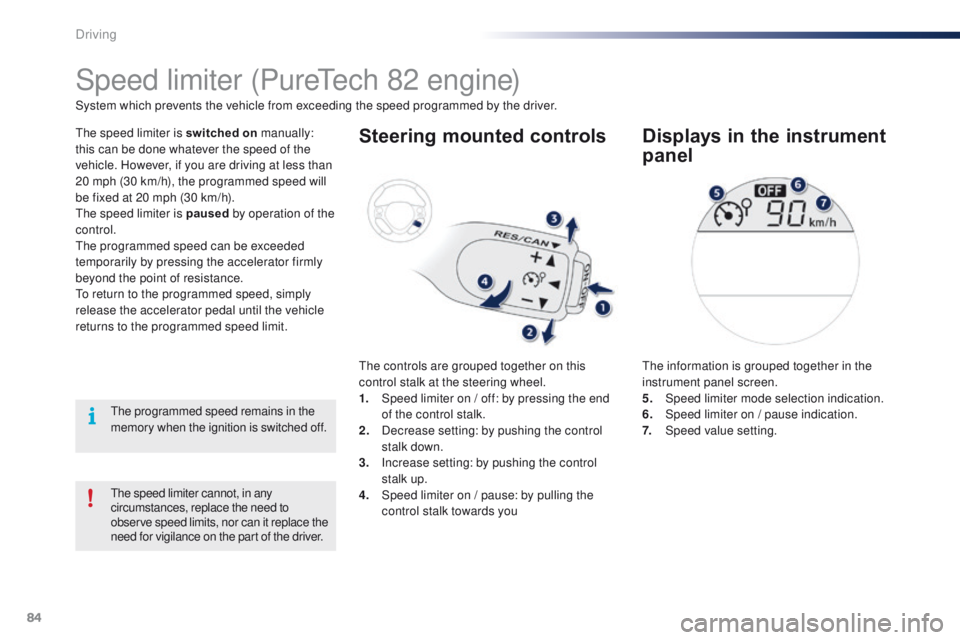
the controls are grouped together on this
control stalk at the steering wheel.
1.
S
peed limiter on / off: by pressing the end
of the control stalk.
2.
D
ecrease setting: by pushing the control
stalk down.
3.
I
ncrease setting: by pushing the control
stalk up.
4.
S
peed limiter on / pause: by pulling the
control stalk towards you
Displays in the instrument
panel
the information is grouped together in the
instrument panel screen.
5.
Spe
ed limiter mode selection indication.
6.
S
peed limiter on / pause indication.
7.
Spe
ed value setting.
th
e programmed speed remains in the
memory when the ignition is switched off.
Driving
Page 89 of 271
87
108_en_Chap05_conduite_ed01-2015
Speed limiter (Vti 68 engine)
System which prevents the vehicle from exceeding the speed programmed by the driver.
th
e speed limiter is switched on manually:
this can be done whatever the speed of the
vehicle. However, if you are driving at less than
20 mph (30 km/h), the programmed speed will
be fixed at 20 mph (30 km/h).
th
e speed limiter is paused by operation of the
control.
th
e programmed speed can be exceeded
temporarily by pressing the accelerator firmly
beyond the point of resistance.
to r
eturn to the programmed speed, simply
release the accelerator pedal until the vehicle
returns to the programmed speed limit.
th
e programmed limit speed is erased
when switching off the ignition.
Steering mounted controls
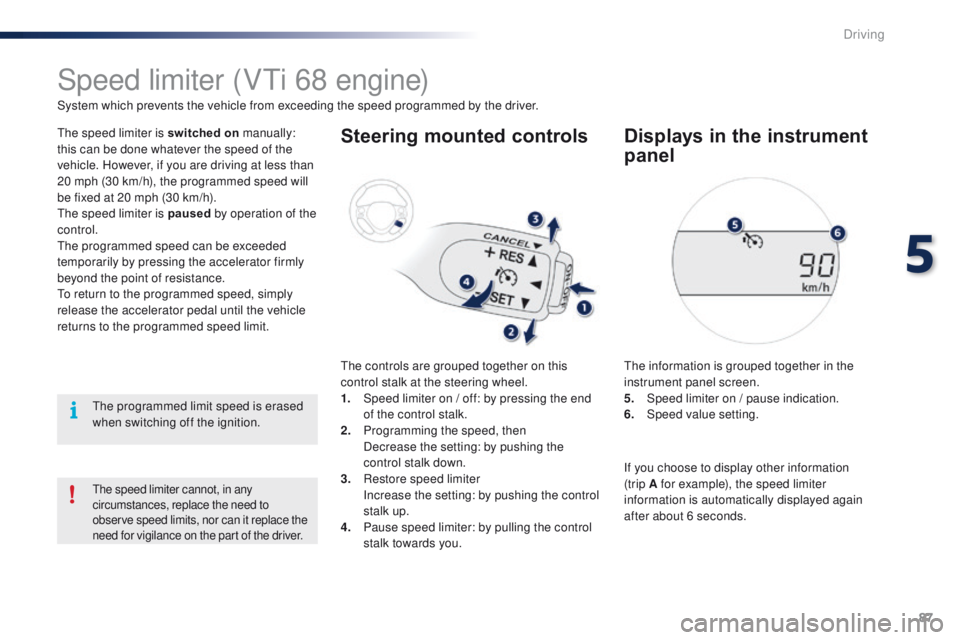
the controls are grouped together on this
control stalk at the steering wheel.
1.
S
peed limiter on / off: by pressing the end
of the control stalk.
2.
P
rogramming the speed, then
D
ecrease the setting: by pushing the
control stalk down.
3.
R
estore speed limiter
I
ncrease the setting: by pushing the control
stalk up.
4.
P
ause speed limiter: by pulling the control
stalk towards you.
Displays in the instrument
panel
the information is grouped together in the
instrument panel screen.
5.
S
peed limiter on / pause indication.
6.
Spe
ed value setting.
the speed limiter cannot, in any
circumstances, replace the need to
observe speed limits, nor can it replace the
need for vigilance on the part of the driver.
If you choose to display other information
(trip A for example), the speed limiter
information is automatically displayed again
after about 6 seconds.
5
Driving
Page 94 of 271
92
108_en_Chap05_conduite_ed01-2015
Deactivation
Operating faultDisplays in the instrument panel
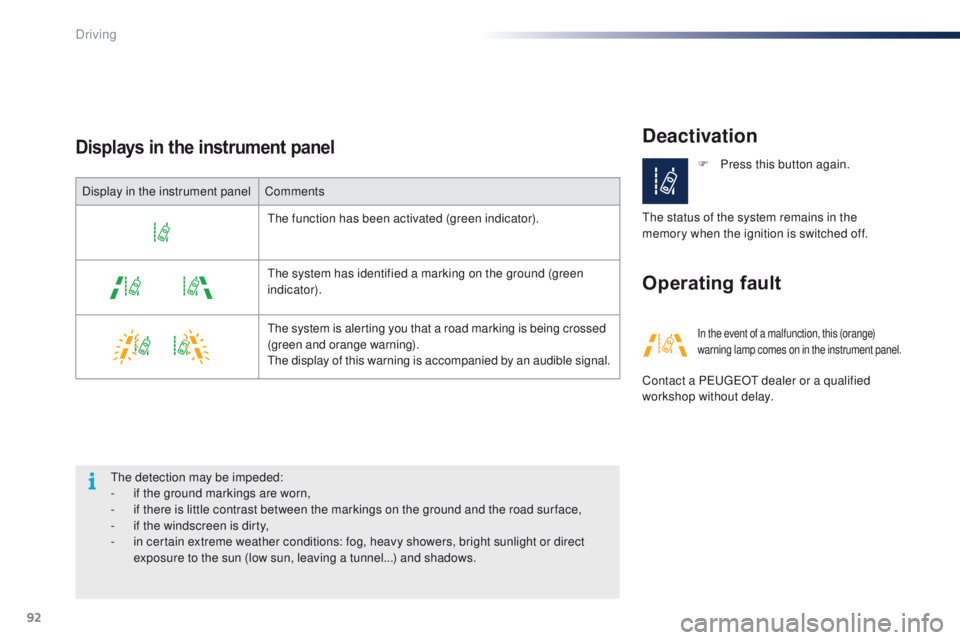
Display in the instrument panelComments
th
e function has been activated (green indicator).
th
e system has identified a marking on the ground (green
indicator).
the
system is alerting you that a road marking is being crossed
(green and orange warning).
th
e display of this warning is accompanied by an audible signal.
th
e detection may be impeded:
-
i
f the ground markings are worn,
-
i
f there is little contrast between the markings on the ground and the road sur face,
-
i
f the windscreen is dirty,
-
i
n certain extreme weather conditions: fog, heavy showers, bright sunlight or direct
exposure to the sun (low sun, leaving a tunnel...) and shadows. F
P
ress this button again.
th
e status of the system remains in the
memory when the ignition is switched off.
In the event of a malfunction, this (orange)
warning lamp comes on in the instrument panel.
Contact a Pe ugeOt dealer or a qualified
workshop without delay.
Driving
Page 97 of 271

95
108_en_Chap06_visibilite_ed01-2015
Foglamp selection ring
the front foglamps operate with dipped and
main beam headlamps.
Rotate and release the ring:
F
fo
rward once to switch on the rear foglamp,
F
f
or ward again to switch on the front
foglamps,
F
r
ear ward once to switch off the front
foglamps,
F
r
ear ward again to switch of the rear
foglamp. Front foglamps and rear
foglamp In good or rainy weather, both day
and night, the front foglamps and the
rear foglamp are prohibited. In these
situations, the power of their beams
may dazzle other drivers.
t
he
y should
only be used in fog or snow.
In these weather conditions, it is your
responsibility to switch on the foglamps
and dipped beam headlamps manually
as the sunshine sensor may detect
sufficient light.
Do not forget to switch off the front
foglamps and the rear foglamp when
they are no longer necessary.
Switching off the lamps when
the ignition is switched off
On switching off the ignition, all of the
lamps turn off immediately, except for
dipped beam if guide-me-home lighting
is activated.
Switching on the lamps
after the ignition is
switched off
to reactivate the lighting control, rotate
the ring to the "0" position - lamps off,
then to the desired position.
On opening the driver's door a
temporary audible signal warns the
driver that the lighting is on.
When the headlamps switch off with automatic
illumination of headlamps (A
u
t
O m
odel)
or when the dipped beam headlamps are
switched off manually, the foglamps and
sidelamps remain on.
F
t
u
rn the ring rear ward to switch off all the
lamps.
6
Visibility
Page 99 of 271
97
108_en_Chap06_visibilite_ed01-2015
Manual guide-me-home
lighting*
temporarily keeping the dipped beam
headlamps on after the vehicle's ignition has
been switched off makes the exit of the vehicle's
occupants easier when the light is poor.
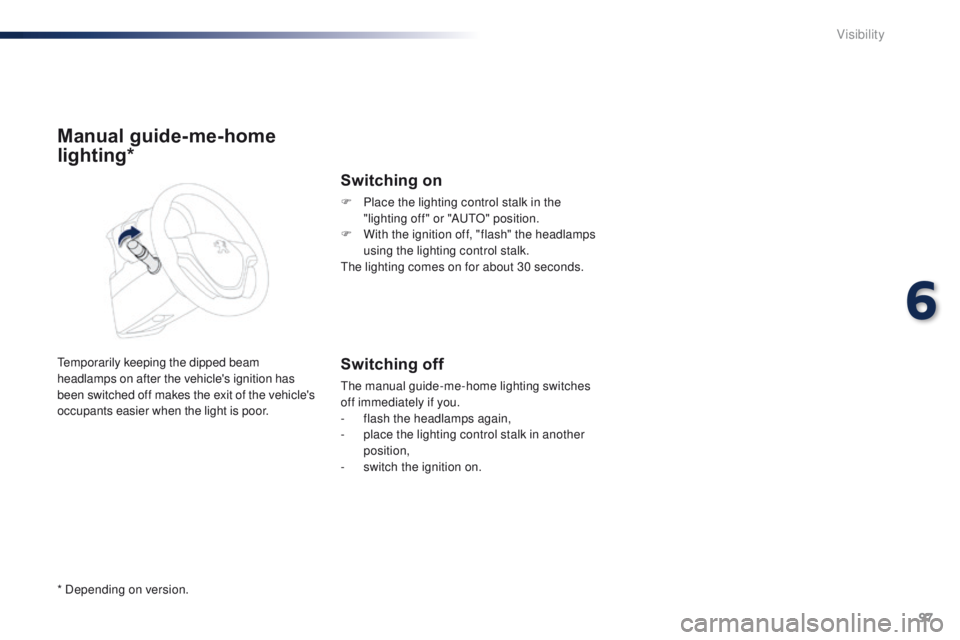
Switching on
F Place the lighting control stalk in the "lighting off" or "Au tO " position.
F
W
ith the ignition off, "flash" the headlamps
using the lighting control stalk.
th
e lighting comes on for about 30 seconds.
Switching off
the manual guide-me-home lighting switches
off immediately if you.
-
f
lash the headlamps again,
-
p
lace the lighting control stalk in another
position,
-
s
witch the ignition on.
* Depending on version.
6
Visibility