Page 124 of 343

122Instruments and controls
Trip/Fuel Information Menu
Press the MENU button to select the
Trip/Fuel Information Menu , or select
W on Uplevel-Combi-Display.
Turn the adjuster wheel to select a
submenu. Press the SET/CLR button
to confirm.
■ Trip odometer 1
■ Trip odometer 2
■ Digital speed
Trip odometer 2 and digital speed are
only available on vehicles with
Uplevel-Combi-Display.
Reset trip odometer by pressing the
SET/CLR button on the turn signal
lever for a few seconds or by pressing the reset knob between speedometer
and Driver Information Centre with
the ignition on.
On vehicles with trip computer more
submenus are available.
Selection and indication can be
different between Midlevel-Display
and Uplevel-Combi-Display.
Trip/Fuel Information Menu, Trip
Computer 3 129.
ECO Information Menu
Press the MENU button to select
s in the top line of the Uplevel-
Combi-Display.
Turn the adjuster wheel to select a
submenu. Press the SET/CLR button
to confirm.Submenus are:
■ Shift indication : Current gear is
indicated inside an arrow. The
figure above recommends
upshifting for fuel saving reasons.
Eco index display : The current fuel
consumption is indicated on a segment display. For economical
driving, adapt your driving
characteristic to keep the filled
segments within the Eco area. The
more segments are filled, the
higher the fuel consumption.
Simultaneously the current
consumption value is indicated.
Page 125 of 343

Instruments and controls123
■Top Consumers : List of top comfort
consumers currently switched on is displayed in descending order. Fuel
saving potential is indicated. A
switched off consumer disappears
from the list and the consumption
value will be updated.
During sporadic driving conditions,
the engine will activate the heated
rear window automatically to
increase the engine load. In this
event, the heated rear window is
indicated as one of the top
consumers, without activation by
the driver.■ Economy Trend : Displays the
average consumption development
over a distance of 50 km. Filled
segments display the consumption
in 5 km steps and shows the effect
of topography or driving behaviour
on fuel consumption.
Performance Menu
Press the MENU button to select the
Performance Menu , or select C on
Uplevel-Combi-Display.
Turn the adjuster wheel to select a
submenu. Press the SET/CLR button
to confirm.
Submenus are: ■ Acceleration : Display of current
acceleration in all directions.
■ Lap Timer : Display of lap times, top
speed, average speed and average
time. Follow the instructions given
in the submenu.
Page 129 of 343

Instruments and controls127
No.Vehicle message26Left rear turn signal failure27Right front turn signal failure28Right rear turn signal failure29Check trailer brake light30Check trailer reversing light31Check left trailer turn signal32Check right trailer turn signal33Check trailer rear fog light34Check trailer rear light35Replace battery in radio remote
control48Clean side blind zone alert
system49Lane departure warning
unavailable53Tighten gas cap54Water in diesel fuel filterNo.Vehicle message55Diesel particle filter is full
3 16656Tyre pressure imbalance on
front axle57Tyre pressure imbalance on
rear axle58Tyres without TPMS sensors
detected59Open and then close driver
window60Open and then close front
passenger window61Open and then close rear left
window62Open and then close rear right
window65Theft attempted66Service theft alarm system67Service steering wheel lock68Service power steeringNo.Vehicle message69Service suspension system70Service level control system71Service rear axle74Service AFL75Service air conditioning76Service side blind zone alert
system77Service lane departure warning79Top up engine oil81Service transmission82Change engine oil soon83Service adaptive cruise control84Engine power is reduced89Service vehicle soon94Shift to park before exiting95Service airbag128Bonnet open
Page 131 of 343

Instruments and controls129
■ If a warning message or a warningcode appears in the Driver
Information Centre.
■ If the parking assist detects an object.
■ If unintended lane change occurs.
■ If the reverse gear is engaged and the rear end carrier extended.
■ If the diesel particle filter has reached the maximum filling level.
When the vehicle is parked and/ or the driver's door is opened ■ When the key is in the ignition switch.
■ With exterior lights on.
During an Autostop ■ If the driver's door is opened.
Battery voltage When the vehicle battery voltage is
running low, a warning message or
warning code 174 will appear in the
Driver Information Centre.1. Switch off immediately any electric consumers which are not
required for a safe ride, e.g. seat
heating, heated rear window or
other main consumers.
2. Charge the vehicle battery by driving continuously for a while or
by using a charging device.
The warning message or warning
code will disappear after the engine
has been started twice consecutively
without a voltage drop.
If the vehicle battery cannot be
recharged, have the cause of the fault
remedied by a workshop.Trip computer
The menus and functions can beselected via the buttons on the turnsignal lever 3 119.
Press the MENU button to select the
Trip/Fuel Information Menu , or select
W on the Uplevel-Combi-Display.
Page 132 of 343
130Instruments and controls
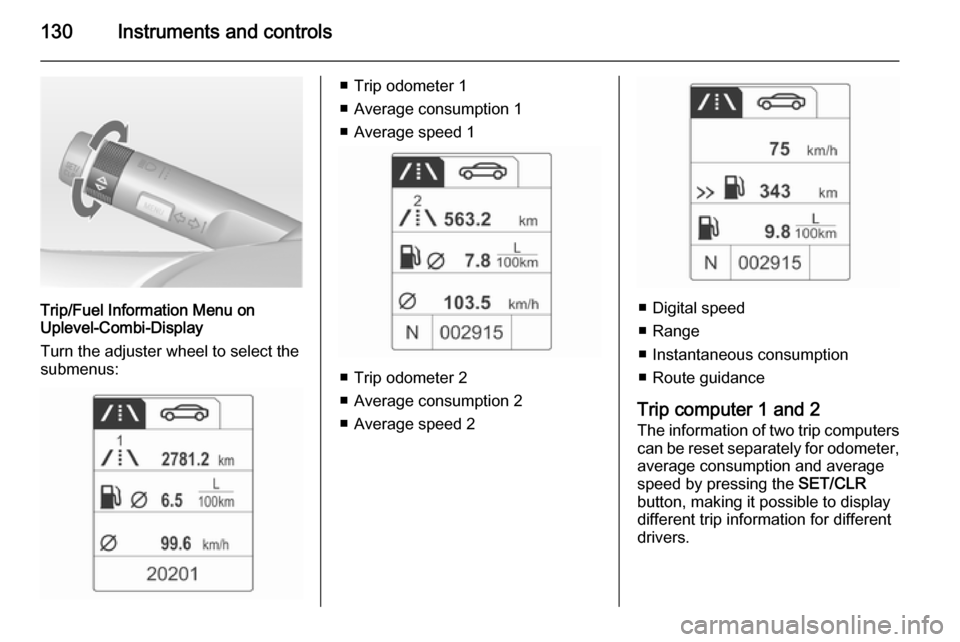
Trip/Fuel Information Menu on
Uplevel-Combi-Display
Turn the adjuster wheel to select the
submenus:
■ Trip odometer 1
■ Average consumption 1
■ Average speed 1
■ Trip odometer 2
■ Average consumption 2
■ Average speed 2
■ Digital speed
■ Range
■ Instantaneous consumption
■ Route guidance
Trip computer 1 and 2
The information of two trip computers can be reset separately for odometer,
average consumption and average
speed by pressing the SET/CLR
button, making it possible to display different trip information for different
drivers.
Page 133 of 343

Instruments and controls131
Trip odometerTrip odometer displays the recordeddistance since a certain reset.
Trip odometer counts up to a distance
of 2,000 km and then restarts at 0.
To reset, press the SET/CLR button
for a few seconds.
Range
Range is calculated from current fuel tank content and current
consumption. The display shows average values.
After refuelling, the range is updated
automatically after a brief delay.
When the fuel level in the tank is low,
a message appears on vehicles with
Uplevel-Combi-Display.
When the tank needs to be refuelled
immediately, a warning code or
warning message is displayed on
vehicles with Midlevel-Display or
Uplevel-Combi-Display.
Additionally the control indicator i in
the fuel gauge illuminates or flashes
3 118.
Average consumption
Display of average consumption. The measurement can be reset at any
time and starts with a default value.
To reset, press the SET/CLR button
for a few seconds.
Instantaneous consumption Display of the instantaneous
consumption.
Average speed
Display of average speed. The
measurement can be reset at any
time.To reset, press the SET/CLR button
for a few seconds.
Digital speed Digital display of the instantaneous
speed.
Traffic sign assistant
Indicates detected traffic signs for the
current route section 3 206.
Route guidance
In addition to the navigation
information in the Color-Info-Display,
route guidance is displayed in the
Driver Information Centre.
Page 154 of 343
152Climate control
If no cooling or drying is required,
switch off the cooling system for fuel
saving reasons. Activated cooling
may inhibit Autostops.
Air recirculation system 4
Press button
4 to activate air
recirculation mode. Activation is
indicated by the LED in the button.
Press button 4 again to deactivate
air recirculation mode.
9 Warning
The exchange of fresh air is
reduced in air recirculation mode.
In operation without cooling the air humidity increases, so the
windows may mist up from inside.
The quality of the passenger
compartment air deteriorates,
which may cause the vehicle
occupants to feel drowsy.
In warm and very humid ambient air conditions, the windscreen may mist
up from outside, when cold air is
directed to it. If windscreen mists up
from outside, activate windscreen
wiper and deactivate s.
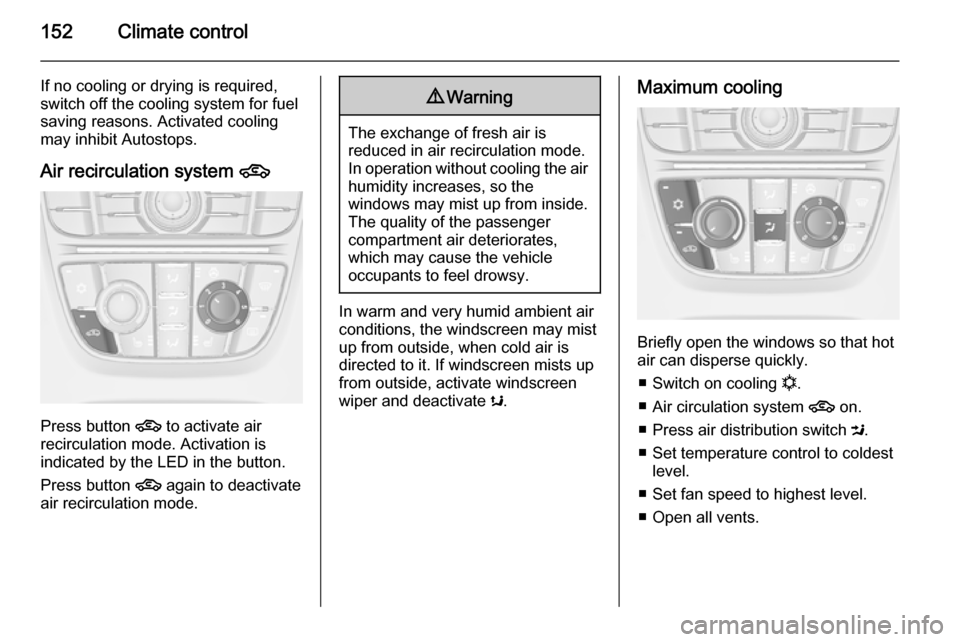
Maximum cooling
Briefly open the windows so that hot
air can disperse quickly.
■ Switch on cooling n.
■ Air circulation system 4 on.
■ Press air distribution switch M.
■ Set temperature control to coldest level.
■ Set fan speed to highest level.
■ Open all vents.
Page 159 of 343

Climate control157
Press button n to switch on cooling.
Activation is indicated by illumination
of the LED in the button. Cooling is
only functional when the engine is
running and climate control fan is switched on.
Press button n again to switch off
cooling.
The air conditioning system cools and
dehumidifies (dries) when outside
temperature is above a specific level. Therefore condensation may form
and drip from under the vehicle.
If no cooling or drying is required,
switch off the cooling system for fuel
saving reasons. When the cooling
system is switched off, no engine restart will be requested by the
climate control system during an
Autostop. Exception: defrost system
is activated and outside temperature
above 0° C requests a restart.
The display will indicate ACON when
cooling is activated or ACOFF when
the cooling is deactivated.Activation or deactivation of cooling
operation after engine start can be
changed in the Settings menu in the
Info-Display. Vehicle personalisation
3 132.
Air recirculation mode 4
Press button 4 to activate the air
recirculation mode. Activation is
indicated by illumination of the LED in
the button.
Press button 4 again to deactivate
recirculation mode.
9 Warning
The exchange of fresh air is
reduced in air recirculation mode.
In operation without cooling the air humidity increases, so the
windows may mist up from inside.
The quality of the passenger
compartment air deteriorates,
which may cause the vehicle
occupants to feel drowsy.
In warm and very humid ambient air conditions, the windscreen may mist
up from outside, when cold air is
directed towards it. If windscreen
mists up from outside, activate
windscreen wiper and deactivate s.
Basic settings Some settings can be changed in the Settings menu in the Info-Display.
Vehicle personalisation 3 132.