Page 75 of 402
2 Instruments and controls
Instrument panel...................................2-2
Meters and gauges ................................2-3
Speedometer and odometer .....................2-4
Tachometer ....................................2-6
Engine coolant temperature gauge ...............2-6
Fuel gauge ....................................2-7
Trip computer ..................................2-8
Outside temperature display ....................2-10
Compass display (if so equipped) ..................2-10
Compass display .............................. 2-11
Warning/indicator lights and audible reminders ......2-14
Checking bulbs ............................... 2-15
Warning lights ................................ 2-15
Indicator lights ................................ 2-19
Audible reminders ............................. 2-22
Security systems ................................. 2-23
Vehicle security system (if so equipped) ..........2-23
NISSAN vehicle immobilizer system .............2-24
Windshield wiper and washer switch ...............2-26
Switch operation .............................. 2-26
Rear window and outside mirror (if so equipped)
defroster switch .................................. 2-27
Headlight and turn signal switch ....................2-27Headlight control switch
........................ 2-27
Daytime running light system (Canada only) ......2-29
Instrument brightness control ...................2-29
Turn signal switch ............................. 2-30
Fog light switch (if so equipped) ................2-30
Horn ............................................ 2-31
Heated seats (if so equipped) ......................2-31
Vehicle Dynamic Control (VDC) off switch ...........2-32
Power outlet ..................................... 2-33
Storage ......................................... 2-34
Map pockets .................................. 2-34
Storage trays ................................. 2-35
Storage pouch ................................ 2-35
Seatback pockets (if so equipped) ..............2-36
Sunglasses
holder ............................. 2-36
Cup holders .................................. 2-37
Glove box .................................... 2-38
Console box .................................. 2-38
Slide front armrest (if so equipped) ..............2-39
Cargo net (if so equipped) ......................2-40
Windows ........................................ 2-40
Power windows ............................... 2-40
Moonroof (if so equipped) ......................... 2-43
Page 78 of 402
17. Hood release (P. 3-23)
18. Fuel filler door release (P. 3-25)
19. ECO mode switch (P. 5-23); SPORTmode switch (P. 5-23); Vehicle
Dynamic Control (VDC) OFF switch
(P. 2-32)
20. Instrument brightness control (P. 2-29);
Power mirror switch (P. 3-31); Trunk
release (P. 3-24)
* Refer to the separate Navigation System Own-
er’s Manual (if so equipped) .
Refer to the page number indicated in pa-
rentheses for operating details.
1. Engine coolant temperature gauge
2. Fuel gauge
3. Speedometer 4. Odometer/Ill control/twin trip odometer/
trip computer/fuel economy/Eco Pedal
Indicator/Temperature/Accel guide/GSI
indication
5. Tachometer
LIC2658
METERS AND GAUGES
Instruments and controls2-3
Page 85 of 402
NOTE:
When driving uphill or rounding curves, the
fuel in the tank shifts, which may momen-
tarily change the display.
Trip computer reset
To reset Trip A, Trip B, AVG/mpg, or AVG/mph,
go to the desired mode on the trip computer and
hold the
button on the steering wheel for
more than 3 seconds.
OUTSIDE TEMPERATURE DISPLAY
The outside temperature function provides a dis-
play of the outside temperature when the ignition
switch is placed in the ON position.
The display of positive temperatures is unsigned
(blank) , negative temperatures are prefixed with a
minus sign.
The outside temperature will always be visible on
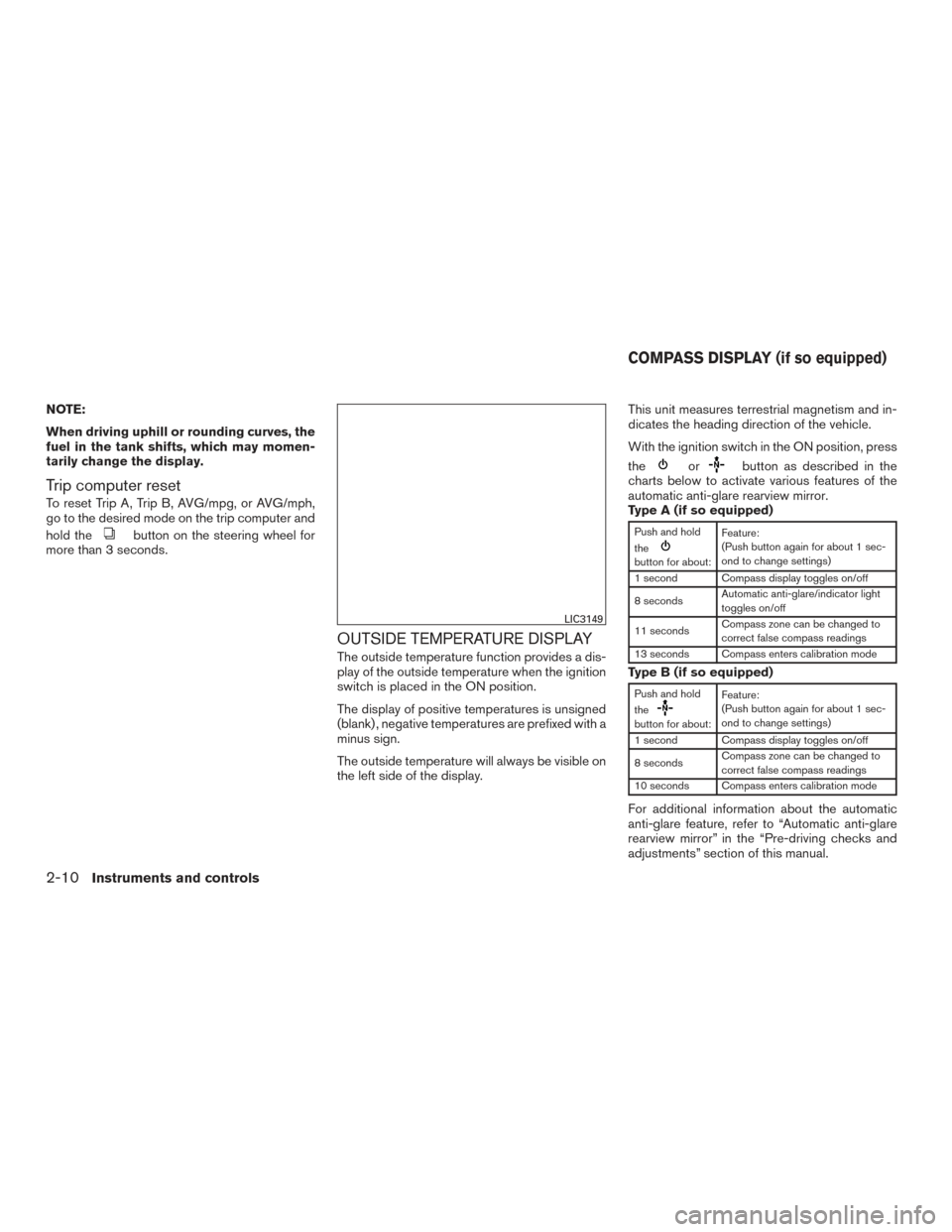
the left side of the display. This unit measures terrestrial magnetism and in-
dicates the heading direction of the vehicle.
With the ignition switch in the ON position, press
the
orbutton as described in the
charts below to activate various features of the
automatic anti-glare rearview mirror.
Type A (if so equipped)
Push and hold
the
button for about: Feature:
(Push button again for about 1 sec-
ond to change settings)
1 second Compass display toggles on/off
8 seconds Automatic anti-glare/indicator light
toggles on/off
11 seconds Compass zone can be changed to
correct false compass readings
13 seconds Compass enters calibration mode
Type B (if so equipped)
Push and hold
the
button for about: Feature:
(Push button again for about 1 sec-
ond to change settings)
1 second Compass display toggles on/off
8 seconds Compass zone can be changed to
correct false compass readings
10 seconds Compass enters calibration mode
For additional information about the automatic
anti-glare feature, refer to “Automatic anti-glare
rearview mirror” in the “Pre-driving checks and
adjustments” section of this manual.
LIC3149
COMPASS DISPLAY (if so equipped)
2-10Instruments and controls
Page 88 of 402
2. Calibrate the compass by driving the vehiclein three complete circles at a maximum
speed of 5 mph (8 km/h).
3. After completing the circles, the display should return to normal.
CAUTION
●Do not install a ski rack, antenna, etc.,
which are attached to the vehicle by
means of a magnet. They affect the op-
eration of the compass.
● When cleaning the mirror, use a paper
towel or similar material dampened
with glass cleaner. Do not spray glass
cleaner directly on the mirror as it may
cause the liquid cleaner to enter the
mirror housing.
Instruments and controls2-13
Page 102 of 402
To defrost the rear window glass and outside
mirror (if so equipped) , start the engine and push
the rear window defroster switch on. The rear
window defroster indicator light on the switch
comes on. Push the switch again to turn the
defroster off.
The rear window defroster automatically turns off
after approximately 15 minutes.
CAUTION
When cleaning the inner side of the rear
window, be careful not to scratch or dam-
age the rear window defroster.
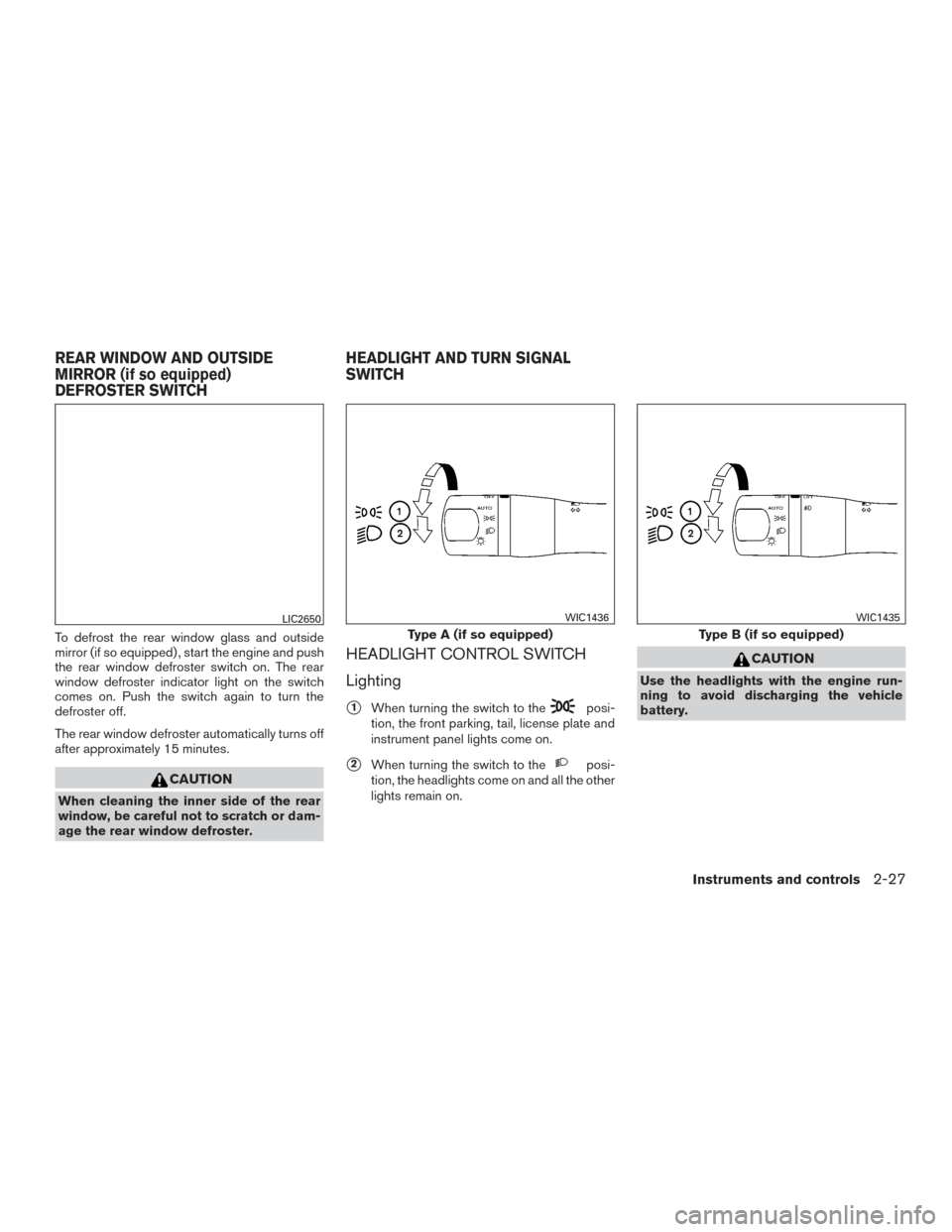
HEADLIGHT CONTROL SWITCH
Lighting
�1When turning the switch to theposi-
tion, the front parking, tail, license plate and
instrument panel lights come on.
�2When turning the switch to theposi-
tion, the headlights come on and all the other
lights remain on.
CAUTION
Use the headlights with the engine run-
ning to avoid discharging the vehicle
battery.
LIC2650
Type A (if so equipped)
WIC1436
Type B (if so equipped)
WIC1435
REAR WINDOW AND OUTSIDE
MIRROR (if so equipped)
DEFROSTER SWITCH HEADLIGHT AND TURN SIGNAL
SWITCH
Instruments and controls2-27
Page 158 of 402
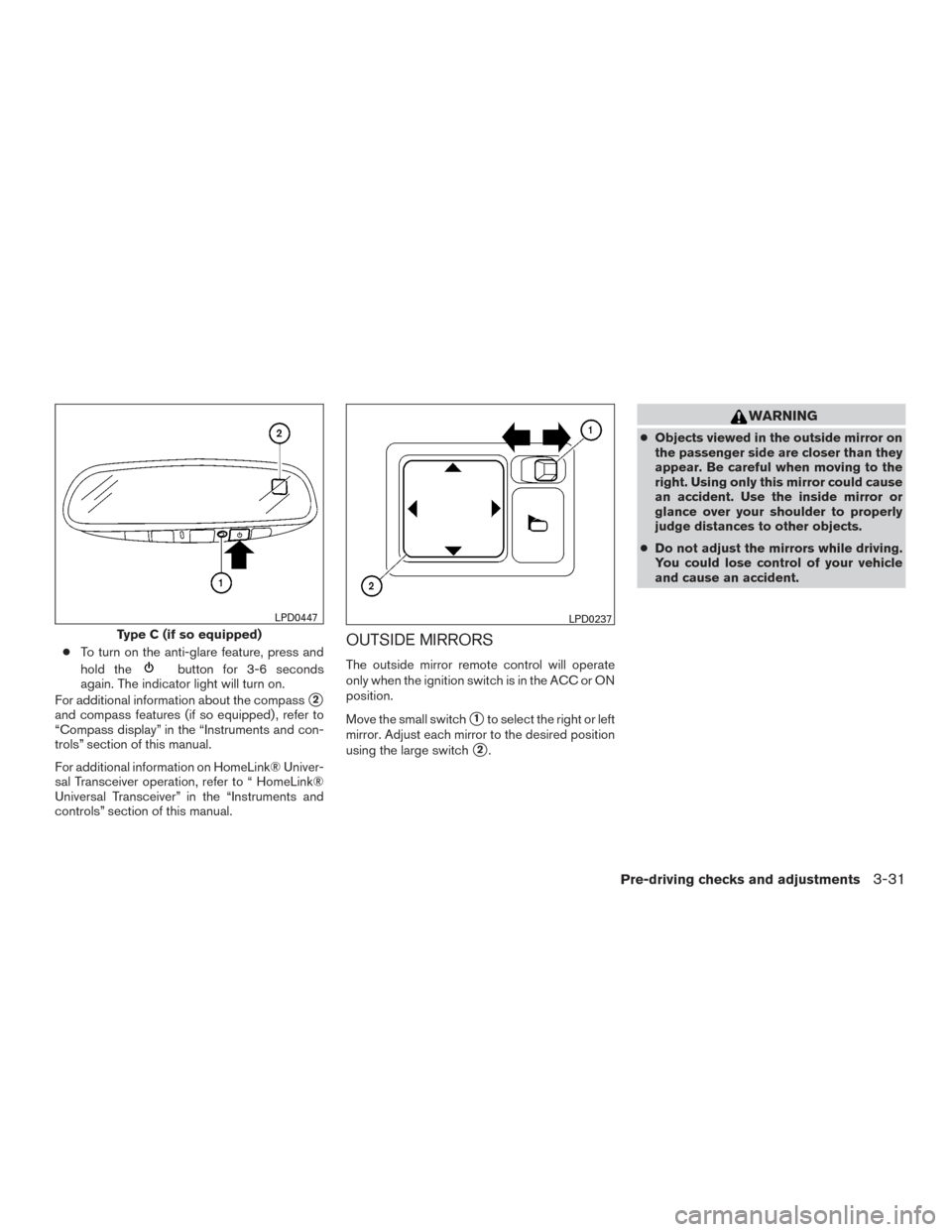
●To turn on the anti-glare feature, press and
hold the
button for 3-6 seconds
again. The indicator light will turn on.
For additional information about the compass
�2
and compass features (if so equipped) , refer to
“Compass display” in the “Instruments and con-
trols” section of this manual.
For additional information on HomeLink® Univer-
sal Transceiver operation, refer to “ HomeLink®
Universal Transceiver” in the “Instruments and
controls” section of this manual.
OUTSIDE MIRRORS
The outside mirror remote control will operate
only when the ignition switch is in the ACC or ON
position.
Move the small switch
�1to select the right or left
mirror. Adjust each mirror to the desired position
using the large switch
�2.
WARNING
● Objects viewed in the outside mirror on
the passenger side are closer than they
appear. Be careful when moving to the
right. Using only this mirror could cause
an accident. Use the inside mirror or
glance over your shoulder to properly
judge distances to other objects.
● Do not adjust the mirrors while driving.
You could lose control of your vehicle
and cause an accident.
Type C (if so equipped)
LPD0447LPD0237
Pre-driving checks and adjustments3-31
Page 159 of 402
Manual folding outside mirrors
Pull the outside mirror toward the door to fold it.
Heated mirrors (if so equipped)
Some outside mirrors can be heated to defrost,
defog, or de-ice for improved visibility. For addi-
tional information, refer to “Rear window and
outside mirror (if so equipped) defroster switch”
in the “Instruments and controls” section of this
manual.
LPD2112
3-32Pre-driving checks and adjustments
Page 176 of 402
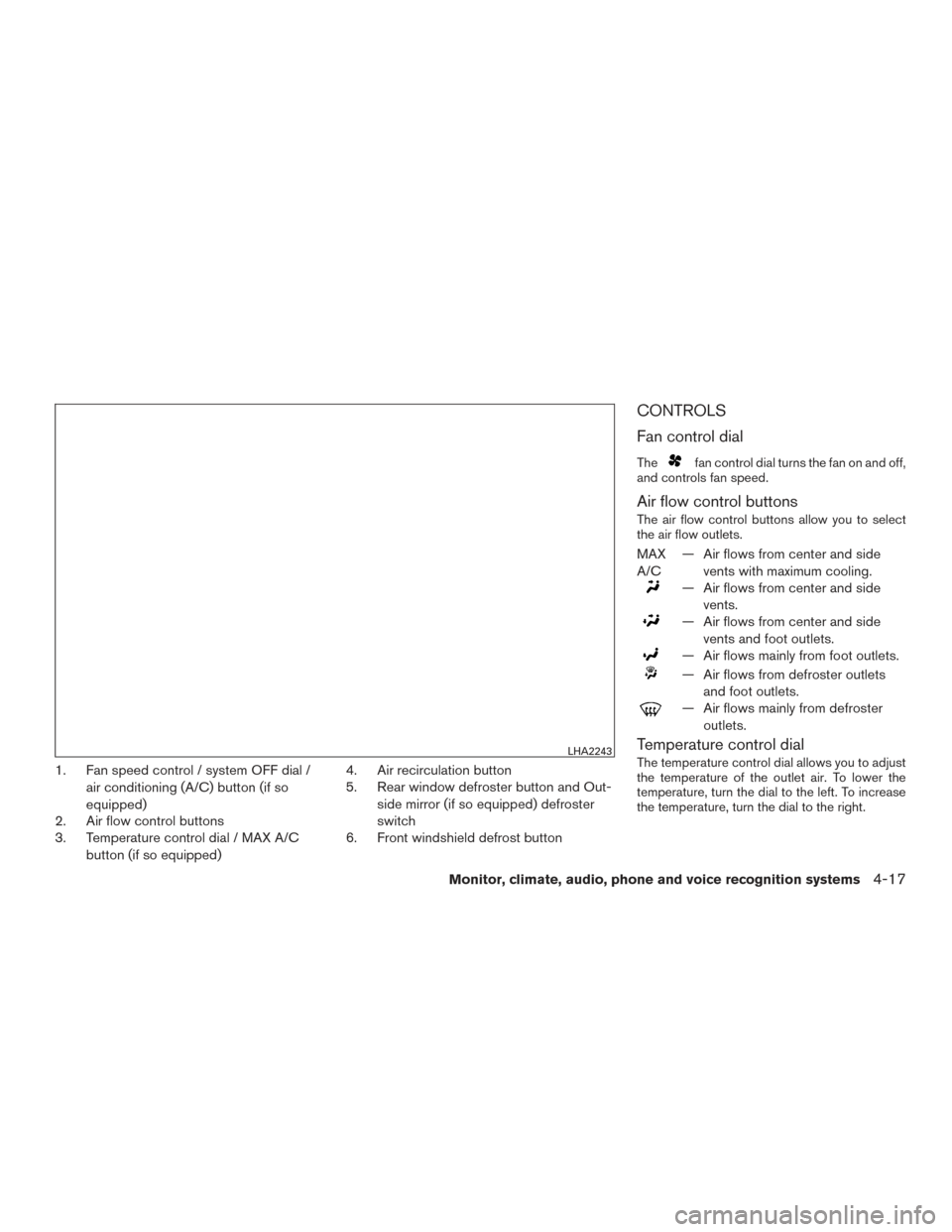
1. Fan speed control / system OFF dial /air conditioning (A/C) button (if so
equipped)
2. Air flow control buttons
3. Temperature control dial / MAX A/C
button (if so equipped) 4. Air recirculation button
5. Rear window defroster button and Out-
side mirror (if so equipped) defroster
switch
6. Front windshield defrost button
CONTROLS
Fan control dial
Thefan control dial turns the fan on and off,
and controls fan speed.
Air flow control buttons
The air flow control buttons allow you to select
the air flow outlets.
MAX
A/C — Air flows from center and side
vents with maximum cooling.
— Air flows from center and sidevents.
— Air flows from center and sidevents and foot outlets.
— Air flows mainly from foot outlets.
— Air flows from defroster outletsand foot outlets.
— Air flows mainly from defrosteroutlets.
Temperature control dial
The temperature control dial allows you to adjust
the temperature of the outlet air. To lower the
temperature, turn the dial to the left. To increase
the temperature, turn the dial to the right.LHA2243
Monitor, climate, audio, phone and voice recognition systems4-17