2015 NISSAN PATHFINDER light
[x] Cancel search: lightPage 85 of 506
Repair and replacement procedure
The front air bags, side air bags, curtain air bags
and pretensioners are designed to inflate on a
one-time-only basis. As a reminder, unless it is
damaged, the supplemental air bag warning light
remains illuminated after inflation has occurred.
Repair and replacement of these supplemental
air bag systems should be done only by a
NISSAN dealer.
When maintenance work is required on the ve-
hicle, the front air bags, side air bags, curtain air
bags, pretensioners and related parts should be
pointed out to the person performing the mainte-
nance. The ignition switch should always be in
the LOCK position when working under the hood
or inside the vehicle.
WARNING
●Once a front air bag, side air bag, or
curtain air bag has inflated, the air bag
module will not function again and
must be replaced. Additionally, the acti-
vated pretensioners must also be re-
placed. The air bag module and preten-
sioner should be replaced by a NISSAN
dealer. The air bag module and preten-
sioner cannot be repaired. ●
The front air bag, side air bag, curtain
air bag systems and the pretensioner
system should be inspected by a
NISSAN dealer if there is any damage to
the front end or side portion of the
vehicle.
● If you need to dispose of a supplemen-
tal air bag or pretensioner or scrap the
vehicle, contact a NISSAN dealer. Incor-
rect disposal procedures could cause
personal injury.
1-66Safety—Seats, seat belts and supplemental restraint system
Page 87 of 506
2 Instruments and controls
Instrument panel...................................2-2
Meter and gauges .................................2-3
Speedometer and odometer .....................2-4
Tachometer ....................................2-5
Engine coolant temperature gauge ...............2-5
Fuel gauge ....................................2-6
Compass display (if so equipped) ...................2-6
Compass display ...............................2-7
Warning/indicator lights and audible reminders ......2-10
Checking bulbs ............................... 2-11
Warning lights ................................ 2-11
Indicator lights ................................ 2-15
Audible reminders ............................. 2-17
Vehicle Information Display ........................2-18
How to use the vehicle information display .......2-18
Startup display ................................ 2-19
Settings ...................................... 2-19
Vehicle information display warnings and
indicators ..................................... 2-25
Security systems ................................. 2-28
Vehicle security system ......................... 2-28
NISSAN vehicle immobilizer system .............2-29
Windshield wiper and washer switch ...............2-30Switch operation
.............................. 2-31
Rear window wiper and washer switch ..............2-32
Rear window and outside mirror (if so equipped)
defroster switch .................................. 2-33
Headlight and turn signal switch ....................2-33
Headlight control switch ........................ 2-34
Daytime running light system (Canada only) ......2-36
Instrument brightness control ...................2-36
Turn signal switch ............................. 2-36
Fog light switch (if so equipped) ................2-37
Horn ............................................ 2-38
Heated seats (if so equipped) ......................2-38
Heated 2nd row seats (if so equipped) ..............2-39
Climate controlled seat switch (if so equipped) ......2-40
Heated steering wheel (if so equipped) .............2-41
V
ehicle Dynamic Control (VDC) off switch ...........2-42
Power inverter switch (if so equipped) ..............2-42
Tow mode switch ................................. 2-43
Power outlets .................................... 2-43
12v outlets ................................... 2-43
120v outlet (if so equipped) ....................2-45
Storage ......................................... 2-45
Map pockets .................................. 2-45
Page 88 of 506
Seatback pockets............................. 2-46
Glove box .................................... 2-46
Console box .................................. 2-46
Sunglasses holder ............................. 2-47
Cup holders .................................. 2-48
Storage tray .................................. 2-50
Luggage hooks ................................ 2-50
Cargo area storage bin ......................... 2-51
Roof rack (if so equipped) ......................2-51
Windows ........................................ 2-52
Power windows ............................... 2-52
Moonroof (if so equipped) ......................... 2-54
Power moonroof ............................... 2-54
Panoramic sunshade (if so equipped) ............2-56
Interior light ...................................... 2-58Console light
.................................. 2-58
Personal lights ................................... 2-59
Map lights ....................................... 2-59
Cargo light ...................................... 2-59
HomeLink® universal transceiver (if so equipped) ....2-60
Programming HomeLink® ......................2-61
Programming HomeLink® for Canadian
customers and gate openers ....................2-62
Operating the HomeLink® universal
transceiver .................................... 2-62
Programming trouble-diagnosis .................2-63
Clearing the programmed information ............2-63
Reprogramming a single HomeLink® button ......2-63
If your vehicle is stolen ......................... 2-63
Page 89 of 506
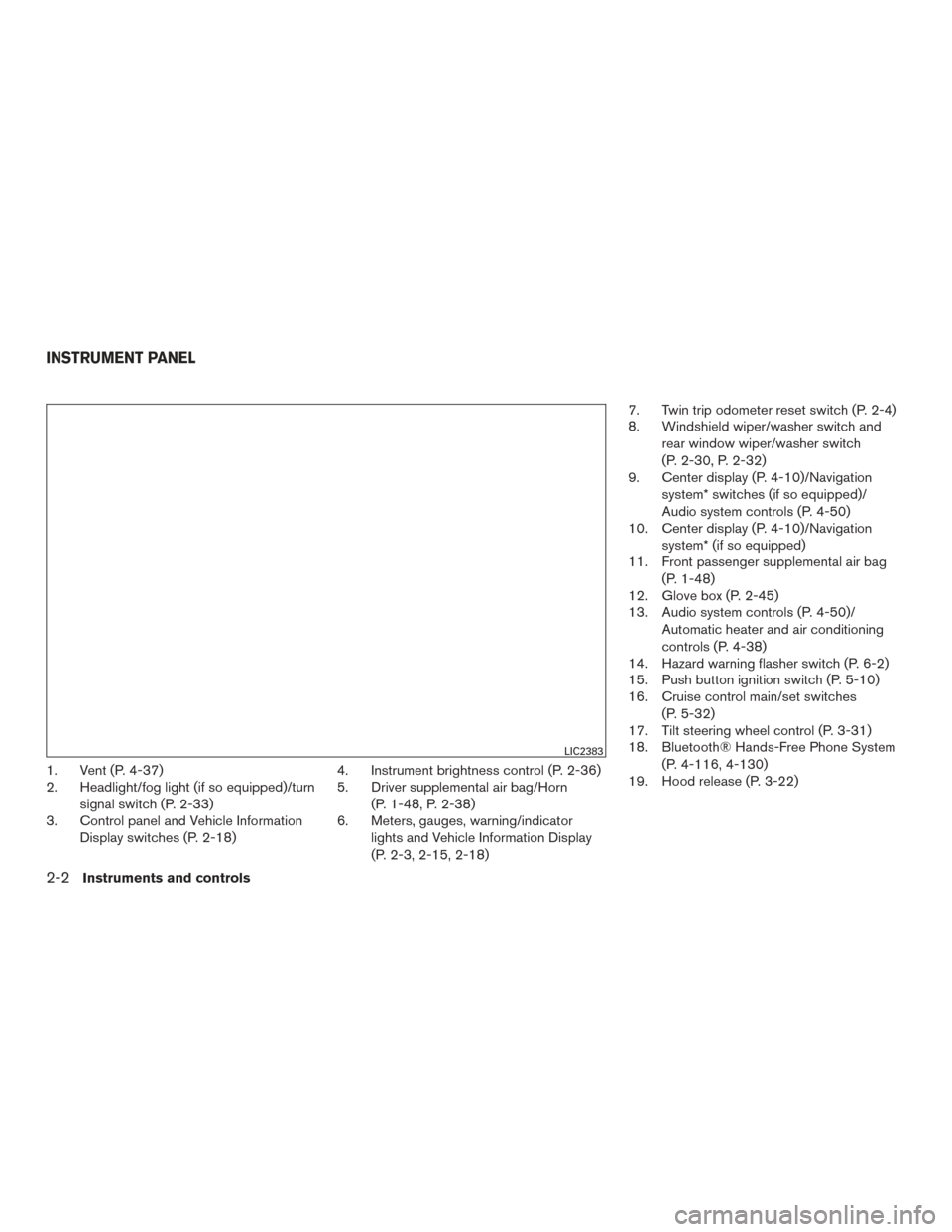
1. Vent (P. 4-37)
2. Headlight/fog light (if so equipped)/turnsignal switch (P. 2-33)
3. Control panel and Vehicle Information
Display switches (P. 2-18) 4. Instrument brightness control (P. 2-36)
5. Driver supplemental air bag/Horn
(P. 1-48, P. 2-38)
6. Meters, gauges, warning/indicator
lights and Vehicle Information Display
(P. 2-3, 2-15, 2-18) 7. Twin trip odometer reset switch (P. 2-4)
8. Windshield wiper/washer switch and
rear window wiper/washer switch
(P. 2-30, P. 2-32)
9. Center display (P. 4-10)/Navigation
system* switches (if so equipped)/
Audio system controls (P. 4-50)
10. Center display (P. 4-10)/Navigation
system* (if so equipped)
11. Front passenger supplemental air bag
(P. 1-48)
12. Glove box (P. 2-45)
13. Audio system controls (P. 4-50)/
Automatic heater and air conditioning
controls (P. 4-38)
14. Hazard warning flasher switch (P. 6-2)
15. Push button ignition switch (P. 5-10)
16. Cruise control main/set switches
(P. 5-32)
17. Tilt steering wheel control (P. 3-31)
18. Bluetooth® Hands-Free Phone System
(P. 4-116, 4-130)
19. Hood release (P. 3-22)
LIC2383
INSTRUMENT PANEL
2-2Instruments and controls
Page 90 of 506
20. Vehicle Dynamic Control (VDC) OFFswitch (P. 2-42)
Tow mode switch (P. 2-43)
Liftgate release switch (if so equipped)
(P. 3-23)
Heated steering wheel switch
(if so equipped) (P. 2-41)
Power inverter switch (if so equipped)
(P. 2-42)
Power liftgate main switch
(if so equipped) (P. 3-23)
Blind Spot Warning switch
(if so equipped) (P. 5-19)
Rear Cross Traffic Alert switch
(if so equipped) (P. 5-27)
*: Refer to the separate Navigation System Own-
er’s Manual (if so equipped) .
Refer to the page number indicated in pa-
rentheses for operating details.
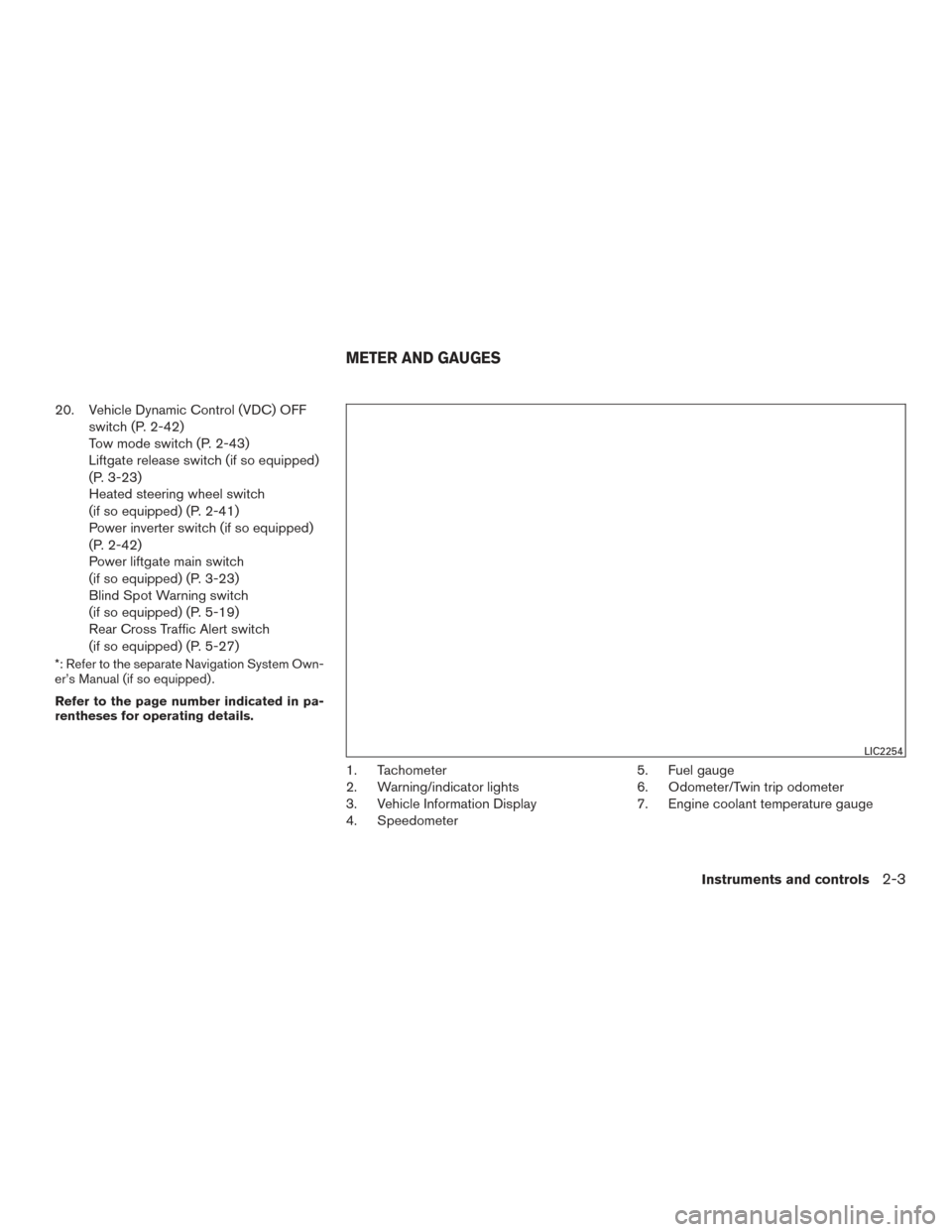
1. Tachometer
2. Warning/indicator lights
3. Vehicle Information Display
4. Speedometer 5. Fuel gauge
6. Odometer/Twin trip odometer
7. Engine coolant temperature gauge
LIC2254
METER AND GAUGES
Instruments and controls2-3
Page 93 of 506
FUEL GAUGE
The gauge indicates theapproximatefuel level
in the tank.
The gauge may move slightly during braking,
turning, acceleration, or going up or down hills.
The gauge needle returns to 0 (Empty) after the
ignition switch is placed in the OFF position.
The low fuel warning light comes on when the
amount of fuel in the tank is getting low.
Refill the fuel tank before the gauge regis-
ters 0 (Empty) . The
indicates that the fuel-filler door is
located on the driver’s side of the vehicle.
CAUTION
● If the vehicle runs out of fuel, theMalfunction Indicator Light (MIL) may
come on. Refuel as soon as possible.
After a few driving trips. the
light
should turn off. If the light remains on
after a few driving trips, have the vehicle
inspected by a NISSAN dealer.
● For additional information, refer to
“Malfunction Indicator Light (MIL)” in
this section. This unit measures terrestrial magnetism and in-
dicates the heading direction of the vehicle.
With the ignition switch in the ON position, press
the
orbutton as described in the
charts below to activate various features of the
automatic anti-glare rearview mirror.
Type A (if so equipped)
Push and hold
the
button for about: Feature:
(Push button again for about 1 sec-
ond to change settings)
1 second Compass display toggles on/off
8 seconds Automatic anti-glare/indicator light
toggles on/off
11 seconds Compass zone can be changed to
correct false compass readings
13 seconds Compass enters calibration mode
Type B (if so equipped)
Push and hold
the
button for about: Feature:
(Push button again for about 1 sec-
ond to change settings)
1 second Compass display toggles on/off
8 seconds Compass zone can be changed to
correct false compass readings
10 seconds Compass enters calibration mode
For additional information about the automatic
anti-glare feature, refer to “Automatic anti-glare
rearview mirror” in the “Pre-driving checks and
adjustments” section of this manual.
LIC2222
COMPASS DISPLAY (if so equipped)
2-6Instruments and controls
Page 97 of 506
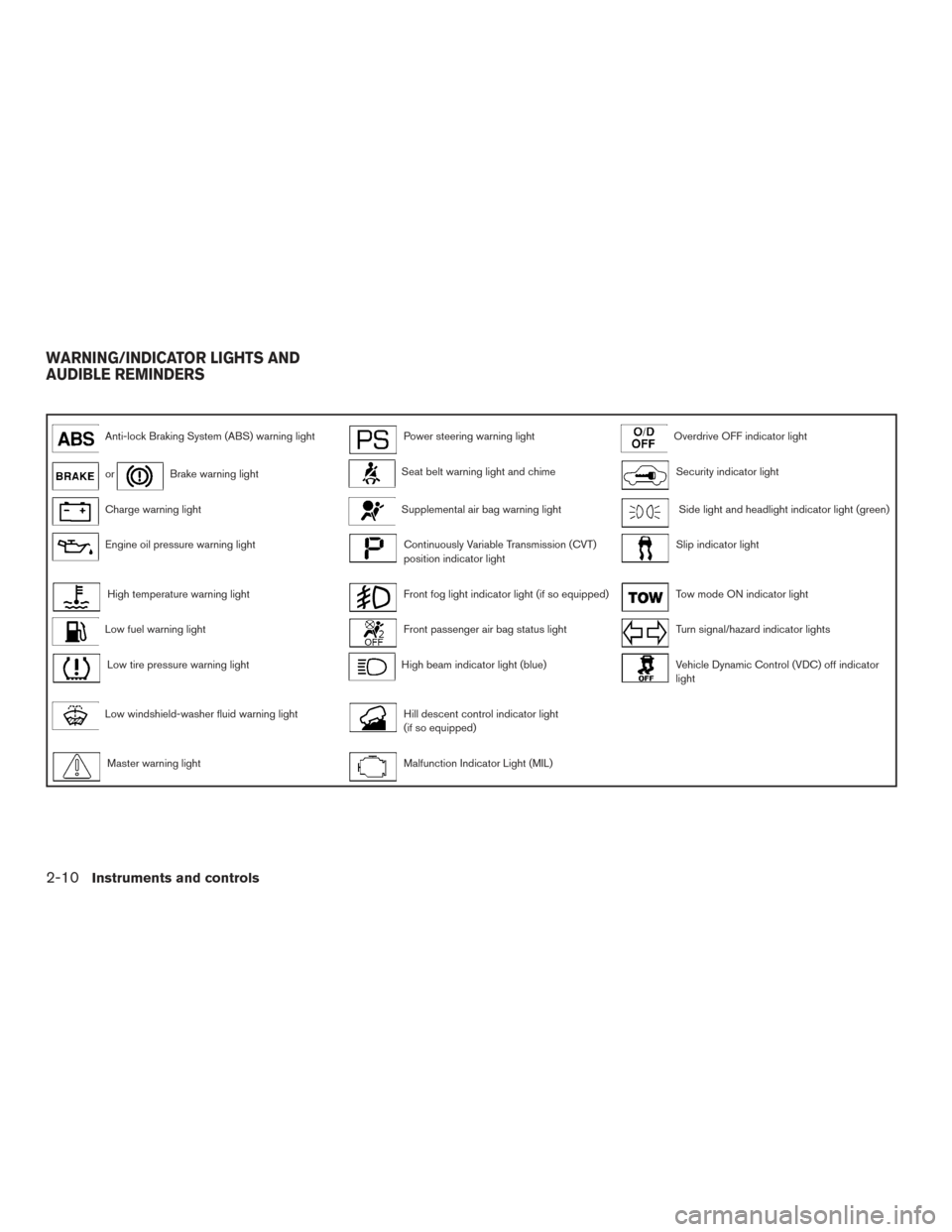
Anti-lock Braking System (ABS) warning lightPower steering warning lightOverdrive OFF indicator light
orBrake warning lightSeat belt warning light and chimeSecurity indicator light
Charge warning lightSupplemental air bag warning lightSide light and headlight indicator light (green)
Engine oil pressure warning lightContinuously Variable Transmission (CVT)
position indicator lightSlip indicator light
High temperature warning lightFront fog light indicator light (if so equipped)Tow mode ON indicator light
Low fuel warning lightFront passenger air bag status lightTurn signal/hazard indicator lights
Low tire pressure warning lightHigh beam indicator light (blue)Vehicle Dynamic Control (VDC) off indicator
light
Low windshield-washer fluid warning lightHill descent control indicator light
(if so equipped)
Master warning lightMalfunction Indicator Light (MIL)
WARNING/INDICATOR LIGHTS AND
AUDIBLE REMINDERS
2-10Instruments and controls
Page 98 of 506
CHECKING BULBS
With all doors closed, apply the parking brake
and place the ignition switch to the ON position
without starting the engine. The following lights
will come on:
,or,,,
The following lights come on briefly and then go
off:
,,,,,
If any light fails to come on, it may indicate
a burned-out bulb or an open circuit in the
electrical system. Have the system repaired
promptly.
WARNING LIGHTS
For additional information, refer to “Vehicle infor-
mation display” in this section.
Anti-lock Braking System(ABS) warning light
When the ignition switch is placed in the ON
position, the ABS warning light illuminates and
then turns off. This indicates the ABS is opera-
tional.
If the ABS light comes on while the engine is
running, it may indicate the anti-lock braking sys- tem is not functioning properly. Have the system
checked by a NISSAN dealer.
If an ABS malfunction occurs, the anti-lock func-
tion is turned off. The brake system then operates
normally, but without anti-lock assistance. For
additional information, refer to “Brake system” in
the “Starting and driving” section of this manual.
orBrake warning light
This light functions for both the parking brake and
the foot brake systems.
Parking brake indicator
When the ignition switch is placed in the ON
position, the light comes on when the parking
brake is applied.
Low brake fluid warning light
When the ignition switch is placed in the ON
position, the light warns of a low brake fluid level.
If the light comes on while the engine is running
with the parking brake not applied, stop the ve-
hicle and perform the following:
1. Check the brake fluid level. Add brake fluid as necessary. For additional information, re-
fer to “Brake fluid” in the “Maintenance and
do-it-yourself” section of this manual. 2. If the brake fluid level is correct, have the
warning system checked by a NISSAN
dealer.
WARNING
●Your brake system may not be working
properly if the warning light is on. Driv-
ing could be dangerous. If you judge it
to be safe, drive carefully to the nearest
service station for repairs. Otherwise,
have your vehicle towed.
● Pressing the brake pedal with the en-
gine stopped and/or a low brake fluid
level may increase your stopping dis-
tance and braking will require greater
pedal effort as well as pedal travel.
● If the brake fluid level is below the
MINIMUM or MIN mark on the brake
fluid reservoir, do not drive until the
brake system has been checked at a
NISSAN dealer.
Anti-lock Braking System (ABS) warning
indicator
When the parking brake is released and the
brake fluid level is sufficient, if both the brake
warning light and the ABS warning light illumi-
nates, it may indicate the ABS is not functioning
properly. Have the brake system checked and, if
Instruments and controls2-11