Page 436 of 506
CHANGING ENGINE OIL FILTER
1. Park the vehicle on a level surface and applythe parking brake.
2. Turn the engine off.
3. Place a large drain pan under the oil filter
�B. 4. Remove pins
�Afrom the right engine pro-
tector located inside right wheel well, re-
move protector. Remove oil filter
�Bwith an
oil filter wrench by turning it counterclock-
wise. Then remove the oil filter by turning it
by hand.
CAUTION
Be careful not to burn yourself. The engine
oil may be hot.
5. Wipe the engine oil filter sealing surface with a clean rag.
CAUTION
●Be sure to remove any old gasket
material remaining on the sealing
surface of the engine. Failure to do
so could lead to an oil leak and en-
gine damage.
● The dipstick must be inserted in
place to prevent oil spillage from the
dipstick hole when filling the engine
with oil.
6. Coat the gasket on the new filter with clean engine oil.
7. Screw on the oil filter until a slight resistance is felt, then tighten an additional 2/3 turn. 8. Start the engine and check for leakage
around the oil filter. Correct as required.
9. Turn the engine off and wait more than 10 minutes. Check the oil level. Add engine
oil if necessary.
LDI2517
Maintenance and do-it-yourself8-11
Page 438 of 506
WARNING
●Use only new fluid from a sealed con-
tainer. Old, inferior or contaminated
fluid may damage the brake system.
The use of improper fluids can damage
the brake system and affect the vehi-
cle’s stopping ability.
● Clean the filler cap before removing.
● Brake fluid is poisonous and should be
stored carefully in marked containers
out of reach of children.
CAUTION
Do not spill the fluid on any painted sur-
faces. This will damage the paint. If fluid is
spilled, immediately wash the surface with
water. Check the fluid level in the reservoir. If the brake
fluid is below the MIN line
�B, the brake warning
light will illuminate. Add brake fluid up to the MAX
line
�A. For additional information, refer to “Rec-
ommended fluids/lubricants and capacities” in
the “Technical and consumer information” sec-
tion of this manual for the recommended type of
brake fluid.
If the brake fluid must be added frequently, the
brake system should be thoroughly checked by a
NISSAN dealer.
WINDSHIELD-WASHER FLUID
RESERVOIR
Fill the windshield-washer fluid reservoir periodi-
cally. Add windshield-washer fluid when the low
windshield-washer fluid warning light comes on.
To fill the windshield-washer fluid reservoir, lift
the cap off the reservoir and pour the windshield-
washer fluid into the reservoir opening.
Add a washer solvent to the washer for better
cleaning. In the winter season, add a windshield-
washer antifreeze. Follow the manufacturer’s in-
structions for the mixture ratio.
LDI2147LDI2521
BRAKE FLUID WINDSHIELD-WASHER FLUID
Maintenance and do-it-yourself8-13
Page 445 of 506
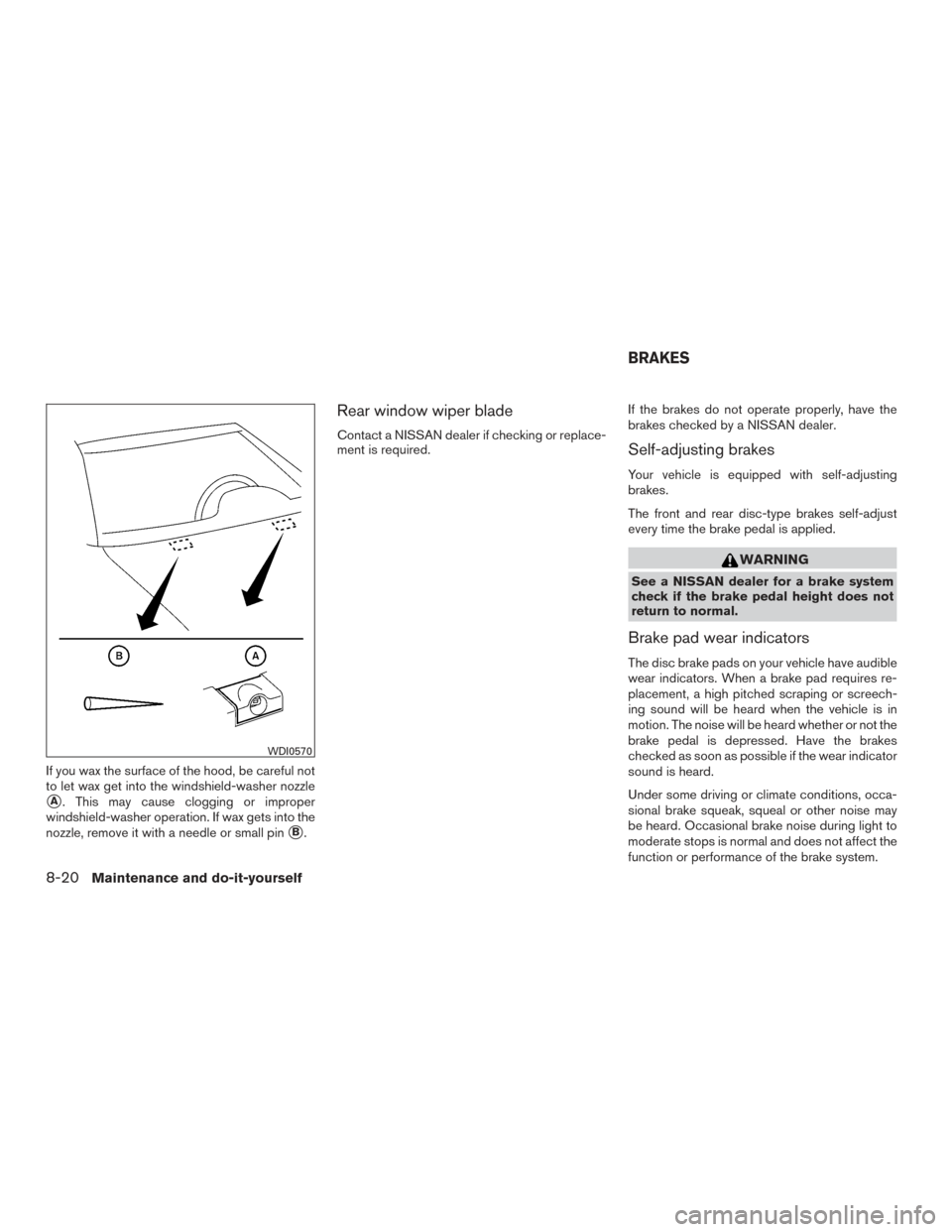
If you wax the surface of the hood, be careful not
to let wax get into the windshield-washer nozzle
�A. This may cause clogging or improper
windshield-washer operation. If wax gets into the
nozzle, remove it with a needle or small pin
�B.
Rear window wiper blade
Contact a NISSAN dealer if checking or replace-
ment is required. If the brakes do not operate properly, have the
brakes checked by a NISSAN dealer.Self-adjusting brakes
Your vehicle is equipped with self-adjusting
brakes.
The front and rear disc-type brakes self-adjust
every time the brake pedal is applied.
WARNING
See a NISSAN dealer for a brake system
check if the brake pedal height does not
return to normal.
Brake pad wear indicators
The disc brake pads on your vehicle have audible
wear indicators. When a brake pad requires re-
placement, a high pitched scraping or screech-
ing sound will be heard when the vehicle is in
motion. The noise will be heard whether or not the
brake pedal is depressed. Have the brakes
checked as soon as possible if the wear indicator
sound is heard.
Under some driving or climate conditions, occa-
sional brake squeak, squeal or other noise may
be heard. Occasional brake noise during light to
moderate stops is normal and does not affect the
function or performance of the brake system.
WDI0570
BRAKES
8-20Maintenance and do-it-yourself
Page 446 of 506
Proper brake inspection intervals should
be followed.For additional information regard-
ing brake inspections, refer to the appropriate
maintenance schedule information in the
“NISSAN Service and Maintenance Guide”.
ENGINE COMPARTMENT
CAUTION
Never use a fuse of a higher or lower
amperage rating than specified on the
fuse box cover. This could damage the
electrical system or cause a fire.
If any electrical equipment does not come on,
check for an open fuse. 1. Be sure the ignition switch and the headlight switch are OFF.
2. Open the engine hood. 3. Remove the fuse box cover by pushing the
tab and lifting the cover up.
4. Remove the fuse with the fuse puller. The fuse puller is located in the fuse block in the
passenger compartment.
LDI2464
FUSES
Maintenance and do-it-yourself8-21
Page 447 of 506
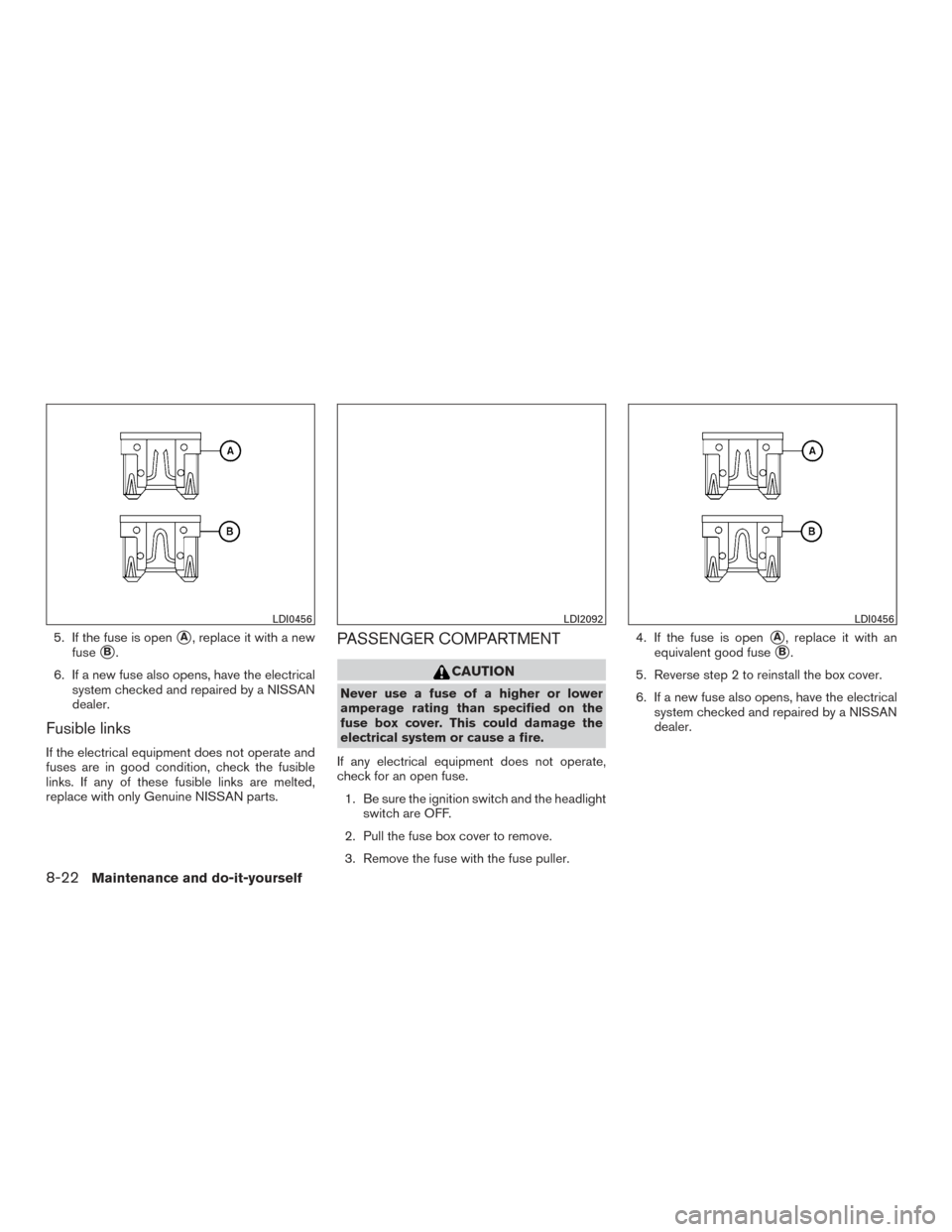
5. If the fuse is open�A, replace it with a new
fuse
�B.
6. If a new fuse also opens, have the electrical system checked and repaired by a NISSAN
dealer.
Fusible links
If the electrical equipment does not operate and
fuses are in good condition, check the fusible
links. If any of these fusible links are melted,
replace with only Genuine NISSAN parts.
PASSENGER COMPARTMENT
CAUTION
Never use a fuse of a higher or lower
amperage rating than specified on the
fuse box cover. This could damage the
electrical system or cause a fire.
If any electrical equipment does not operate,
check for an open fuse. 1. Be sure the ignition switch and the headlight switch are OFF.
2. Pull the fuse box cover to remove.
3. Remove the fuse with the fuse puller. 4. If the fuse is open
�A, replace it with an
equivalent good fuse
�B.
5. Reverse step 2 to reinstall the box cover.
6. If a new fuse also opens, have the electrical system checked and repaired by a NISSAN
dealer.
LDI0456LDI2092LDI0456
8-22Maintenance and do-it-yourself
Page 448 of 506
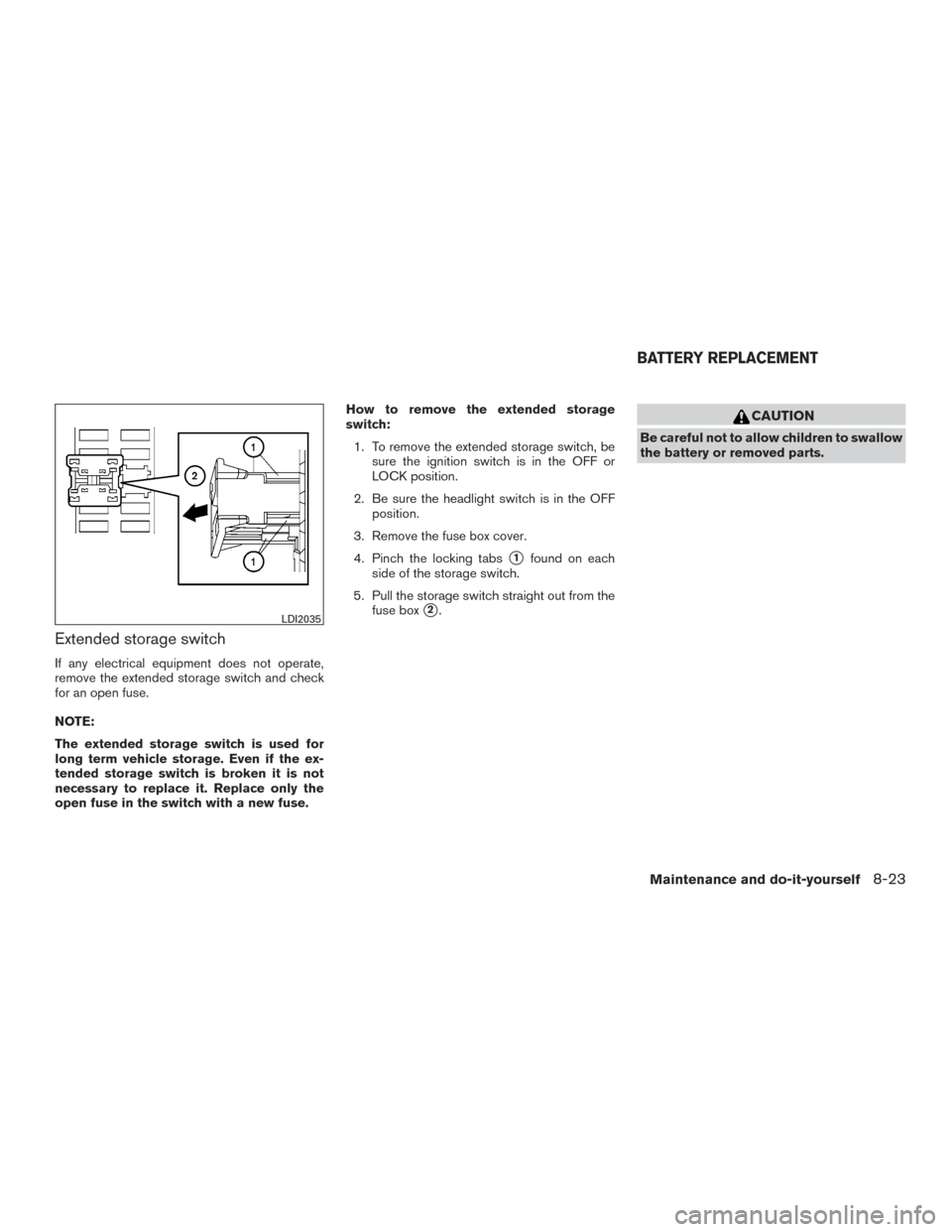
Extended storage switch
If any electrical equipment does not operate,
remove the extended storage switch and check
for an open fuse.
NOTE:
The extended storage switch is used for
long term vehicle storage. Even if the ex-
tended storage switch is broken it is not
necessary to replace it. Replace only the
open fuse in the switch with a new fuse.How to remove the extended storage
switch:
1. To remove the extended storage switch, be sure the ignition switch is in the OFF or
LOCK position.
2. Be sure the headlight switch is in the OFF position.
3. Remove the fuse box cover.
4. Pinch the locking tabs
�1found on each
side of the storage switch.
5. Pull the storage switch straight out from the fuse box
�2.
CAUTION
Be careful not to allow children to swallow
the battery or removed parts.
LDI2035
BATTERY REPLACEMENT
Maintenance and do-it-yourself8-23
Page 450 of 506
ceived, including interference that may
cause undesired operation.
Note: Changes or modifications not ex-
pressly approved by the party responsible
for compliance could void the user’s au-
thority to operate the equipment.
For Canada:
This device complies with Industry Canada
licence-exempt RSS standard(s) . Opera-
tion is subject to the following two condi-
tions: (1) this device may not cause inter-
ference, and (2) this device must accept any
interference, including interference that
may cause undesired operation of the de-
vice.HEADLIGHTS
Replacing the halogen headlight bulb
If bulb replacement is required, see a NISSAN
dealer.
CAUTION
●Aiming is not necessary after replacing
the bulb. When aiming adjustment is
necessary, contact a NISSAN dealer.
● Do not leave the headlight assembly
open without a bulb installed for a long
period of time. Dust, moisture, smoke,
etc. entering the headlight body may
affect bulb performance. Remove the
bulb from the headlight assembly just
before a replacement bulb is installed.
● Only touch the base when handling the
bulb. Never touch the glass envelope.
Touching the glass could significantly
affect bulb life and/or headlight
performance.
● High pressure halogen gas is sealed
inside the halogen bulb. The bulb may
break if the glass envelope is scratched
or the bulb is dropped.
● Use the same number and wattage as
shown in the chart. Fog may temporarily form inside the lenses of the
exterior lights in the rain or in a car wash. A
temperature difference between the inside and
the outside of the lens causes the fog. This is not
a malfunction. If large drops of water collect
inside the lens, contact a NISSAN dealer.FOG LIGHTS (if so equipped)
Replacing the fog light bulb
If bulb replacement is required, see a NISSAN
dealer.
CAUTION
●
High pressure halogen gas is sealed
inside the halogen bulb. The bulb may
break if the glass envelope is scratched
or the bulb is dropped.
● When handling the bulb, do not touch
the glass envelope.
● Use the same number and wattage as
originally installed as shown in the
chart.
● Do not leave the bulb out of the fog light
for a long period of time as dust, mois-
ture and smoke may enter the fog light
body and affect the performance of the
fog light.
LIGHTS
Maintenance and do-it-yourself8-25
Page 451 of 506
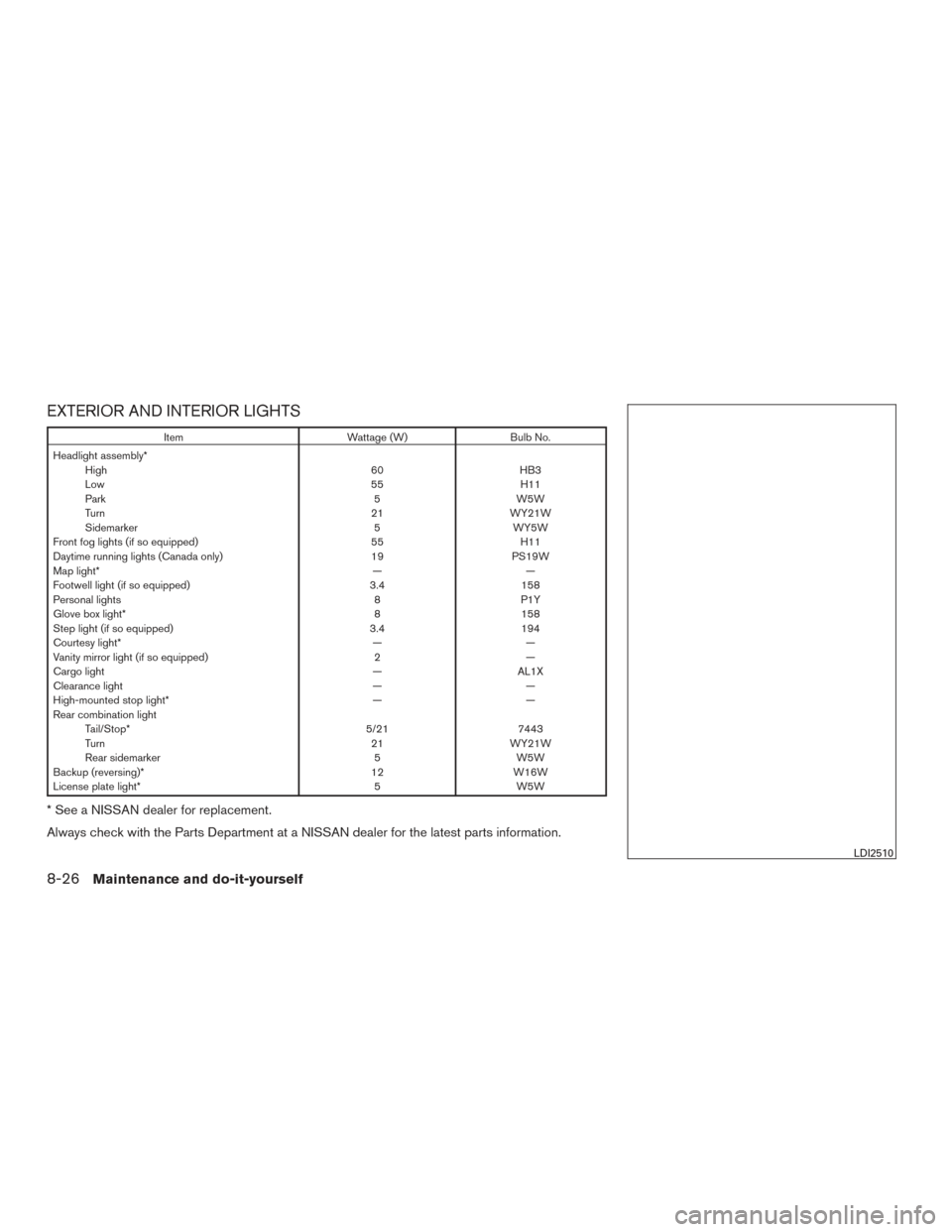
EXTERIOR AND INTERIOR LIGHTS
ItemWattage (W)Bulb No.
Headlight assembly* High 60HB3
Low 55H11
Park 5W5W
Turn 21WY21W
Sidemarker 5WY5W
Front fog lights (if so equipped) 55H11
Daytime running lights (Canada only) 19PS19W
Map light* ——
Footwell light (if so equipped) 3.4158
Personal lights 8P1Y
Glove box light* 8158
Step light (if so equipped) 3.4194
Courtesy light* ——
Vanity mirror light (if so equipped) 2—
Cargo light —AL1X
Clearance light ——
High-mounted stop light* ——
Rear combination light Tail/Stop* 5/217443
Turn 21WY21W
Rear sidemarker 5W5W
Backup (reversing)* 12W16W
License plate light* 5W5W
* See a NISSAN dealer for replacement.
Always check with the Parts Department at a NISSAN dealer for the latest parts information.
LDI2510
8-26Maintenance and do-it-yourself