Page 277 of 510
Interface
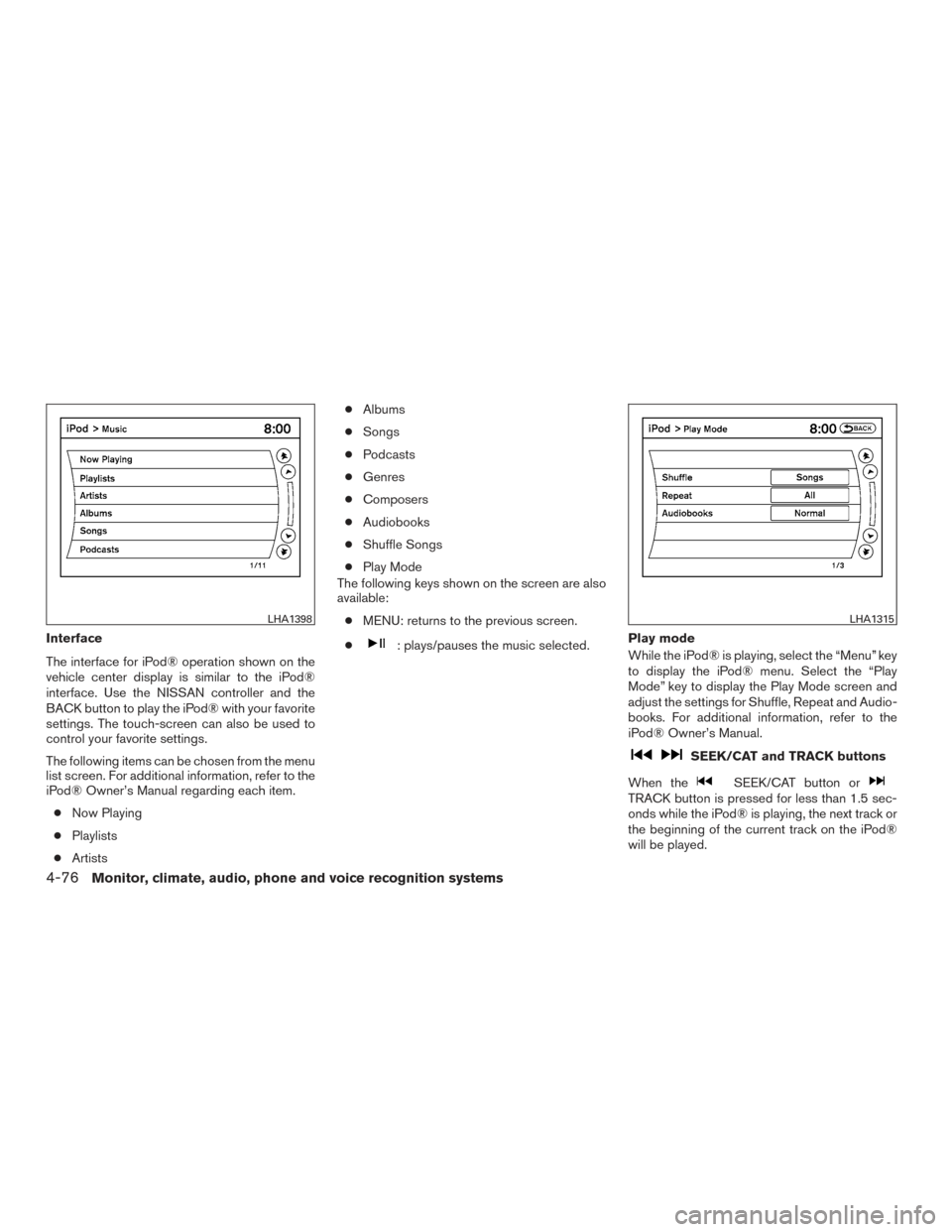
The interface for iPod® operation shown on the
vehicle center display is similar to the iPod®
interface. Use the NISSAN controller and the
BACK button to play the iPod® with your favorite
settings. The touch-screen can also be used to
control your favorite settings.
The following items can be chosen from the menu
list screen. For additional information, refer to the
iPod® Owner’s Manual regarding each item.● Now Playing
● Playlists
● Artists ●
Albums
● Songs
● Podcasts
● Genres
● Composers
● Audiobooks
● Shuffle Songs
● Play Mode
The following keys shown on the screen are also
available:
● MENU: returns to the previous screen.
●: plays/pauses the music selected. Play mode
While the iPod® is playing, select the “Menu” key
to display the iPod® menu. Select the “Play
Mode” key to display the Play Mode screen and
adjust the settings for Shuffle, Repeat and Audio-
books. For additional information, refer to the
iPod® Owner’s Manual.
SEEK/CAT and TRACK buttons
When the
SEEK/CAT button orTRACK button is pressed for less than 1.5 sec-
onds while the iPod® is playing, the next track or
the beginning of the current track on the iPod®
will be played.
LHA1398LHA1315
4-76Monitor, climate, audio, phone and voice recognition systems
Page 280 of 510
Audio main operation
To switch to the Bluetooth® audio mode, press
the DISC/AUX button repeatedly until the
Bluetooth® audio mode is displayed on the
screen.
The controls for the Bluetooth® audio are dis-
played on the screen.
Bluetooth® audio settings
To adjust the Bluetooth® audio settings, follow
the procedure below:1. Press the SETTING button on the control panel.
2. Select the “Bluetooth” key.
3. Select the “Connected Devices” key. 4. Select the “Audio Player” key.
SAA2510LHA1316LHA1296
Monitor, climate, audio, phone and voice recognition systems4-79
Page 294 of 510
HOW TO USE THE DVD OSD MENU
This section describes how to set and adjust
settings using On-Screen Display (OSD) Menu.
You can use the OSD menu to adjust all the
settings. Follow the steps outlined below to se-
lect the desired function.
General Setup Page
Press the SETUP button on the remote control.
Use the
orand the
orbuttons to navigate the Setup Page.
Press ENTER to select and then
to
return to the sub–menu. To cancel the Setup
Display, press the SETUP button on the remote.
OSD Language
The OSD Lang sub-menu allows the user to
select the language for the on-screen display.
When the OSD Lang option is highlighted, press
the
button once and then use
the
orbuttons on the re-
mote control to select the desired language. The
user can select English, Simplified/Traditional
Chinese, French, German, Italian, Spanish, Por-
tuguese, or Korean for the OSD language. Press
ENTER to select and then the
button
to return the sub-menu.
LHA3851LHA3852
Monitor, climate, audio, phone and voice recognition systems4-93
Page 295 of 510
Angle Mark
The angle mark is an option for different viewing
angles on the DVD. When the Angle Mark option
is highlighted, press the
button once
and then use the
orbuttons
on the remote control to turn the angle mark
setting on or off. Press ENTER to select and then
the
button to return to the sub-menu.
Speaker Setup Page
Downmix— When the Downmix option is high-
lighted, press the
button once and
then use the
orbuttons on
the remote control to select between Stereo or
LT/RT. Press ENTER to select and then
the
button to return to the sub-menu.
Video Setup Page
Video Quality — When the Quality option is high-
lighted, press ENTER and then use the
orand theorbut-
tons on the remote control to select between the
various video quality settings. Press ENTER to
select and then the
button to return to
the sub-menu.
LHA3853LHA3854LHA3855
4-94Monitor, climate, audio, phone and voice recognition systems
Page 298 of 510
Default
This section of the Setup Menu allows the user to
restore all controls and values to the default
levels. When the Default option is highlighted,
press the
button once and then press
ENTER to perform the reset. This will not affect
parental control setting.
Parental
This section of the Setup Menu allows the user to
select the level of movie content playback from
KID SAFE to ADULT. The parental control func-
tion allows you to limit viewing to your preference.
The rating levels range from 1 to 8 and are
country dependent. The lower rating number, the
stricter the playback limitation is. When the Pa-
rental option is highlighted, press the
button once and then use the
orbuttons on the remote control to
select the desired parental control setting and
press ENTER. A password is required to change
the Parental settings. Using the remote control, enter the password (0000) and press ENTER to
confirm the setting and return to the sub-menu.
LHA3861LHA3862
Monitor, climate, audio, phone and voice recognition systems4-97
Page 299 of 510
HOW TO USE THE MONITOR OSD
MENU
This section describes how to set and adjust the
following monitor settings using the monitor on-
screen display (OSD) Menu:● Press the PIX button on the remote control
to select between the options in the table
below.
● After selecting the desired option, use
the
orbuttons on the re-
mote control to adjust the setting.
Option Descrip-
tion Range Default
Brightness Adjust to
brighten or darken the picture. 0 — 100 50
Contrast Adjust to
increase or de-
crease
picture
contrast. 0 — 100 50
Saturation Adjust to
increase or de-
crease color
intensity. 0 — 100 50
Hue Adjust to
increase or de-
crease the color hue. 0 — 100 50Option
Descrip-
tion Range Default
Sharpness Adjust to
soften or sharpen the
picture. 0 — 100 50
IR Head- phone Select on
or off to
turn the IR head-
phone
audio out- putonor off. ON or
OFF ON
Language Set lan-
guage of
the moni- tor OSD menu. English,
French,
Spanish, Portu-guese English
Reset Resets the
monitorOSD
menu set- tings todefault
values. Press Up
or Down; “OK” will be
displayed.
LHA3863
4-98Monitor, climate, audio, phone and voice recognition systems
Page 326 of 510
CONNECTING PROCEDURE
Press the SETTING button on the control panel,
then select the “Bluetooth” key on the display.
Menu ItemResult
Bluetooth ON/OFF Allows user to switch Bluetooth® on and off. Bluetooth® must be on in order to connect device.
ON Turns Bluetooth® on.
OFF Turns Bluetooth® off.
Connect Bluetooth Upon pressing this button, a popup box will appear on the screen, prompting you to confirm that the connection is for the phone system. Select the
�Ye s �key.
Yes Confirms that you are connecting a Bluetooth® device. Upon pressing this button, the following message will appear on screen: �The system is
searching for your phone. Using your handset, look for a Bluetooth® device called MY-CAR. When requested by the handset, enter the PIN 1234.
Exiting screen cancels search. �The connecting procedure varies by phone. For additional information, refer to the phone’s Owner’s Manual. When
the connecting is complete, the screen will return to the Bluetooth® settings screen.
Cancel Cancels operation.
No Indicates to the system that you are connecting a Bluetooth® enabled audio device.
Cancel Cancels operation.
LHA1236
Monitor, climate, audio, phone and voice recognition systems4-125
Page 333 of 510
PHONE SETTINGS
To set up the Bluetooth® Hands-Free Phone
System to your preferred settings, press the SET-
TING button on the control panel and select the
�Phone�key on the display.
Menu Item Result
Edit Vehicle Phonebook For additional information on adding, editing, and deleting contacts in the vehicle phonebook, refer to �Vehicle Phonebook�in this section.
Delete Phonebook Delete a phonebook stored on the system.
Download Handset Phonebook For additional information on adding, editing, and deleting contacts in the handset phonebook, refer to �Handset Phonebook�in this
section.
Volume and Ringtone Adjust the volume level of the ringtone, incoming call sound and outgoing call sound.
Automatic Hold When this option is turned on, an incoming call will be placed on hold automatically after several rings.
Vehicle Ringtone When this option is turned on, a specific ringtone that is different than the cellular phone’s will sound when receiving a call.
Auto Downloaded For additional information, refer to “Handset Phonebook” in this section.
4-132Monitor, climate, audio, phone and voice recognition systems