Page 273 of 510
CAUTION
●Do not force the USB device into the
USB port. Inserting the USB device
tilted or up-side-down into the port may
damage the port. Make sure that the
USB device is connected correctly into
the USB port.
● Do not grab the USB port cover (if so
equipped) when pulling the USB device
out of the port. This could damage the
port and the cover.
● Do not leave the USB cable in a place
where it can be pulled unintentionally.
Pulling the cable may damage the port.
For additional information, refer to your device
manufacturer’s owner information regarding the
proper use and care of the device.
To connect an iPod® to the vehicle so that the
iPod® can be controlled with the audio system
controls and display screen, use the USB port
located in the center console. Connect the
iPod®-specific end of the cable to the iPod®
and the USB end of the cable to the USB port on
the vehicle. If your iPod® supports charging via a
USB connection, its battery will be charged while
connected to the vehicle with the ignition switch
in the ACC or ON position. While connected to the vehicle, the iPod® can
only be operated by the vehicle audio controls.
To disconnect the iPod® from the vehicle, re-
move the USB end of the cable from the USB
port on the vehicle, then remove the cable from
the iPod®.
* iPod® is a trademark of Apple Inc., registered in
the U.S. and other countries.
Compatibility
The following models are compatible:
● iPod® 5th Generation - version 1.2.1
● iPod® Classic - version 1.1
● iPod® Touch - version 2.1.0
● iPod® Nano - 1st generation version 1.3.1
● iPod® Nano - 2nd generation version 1.1.3
● iPod® Nano - 3rd generation version 1.0.2
Make sure that your iPod® firmware is updated to
the version indicated above.
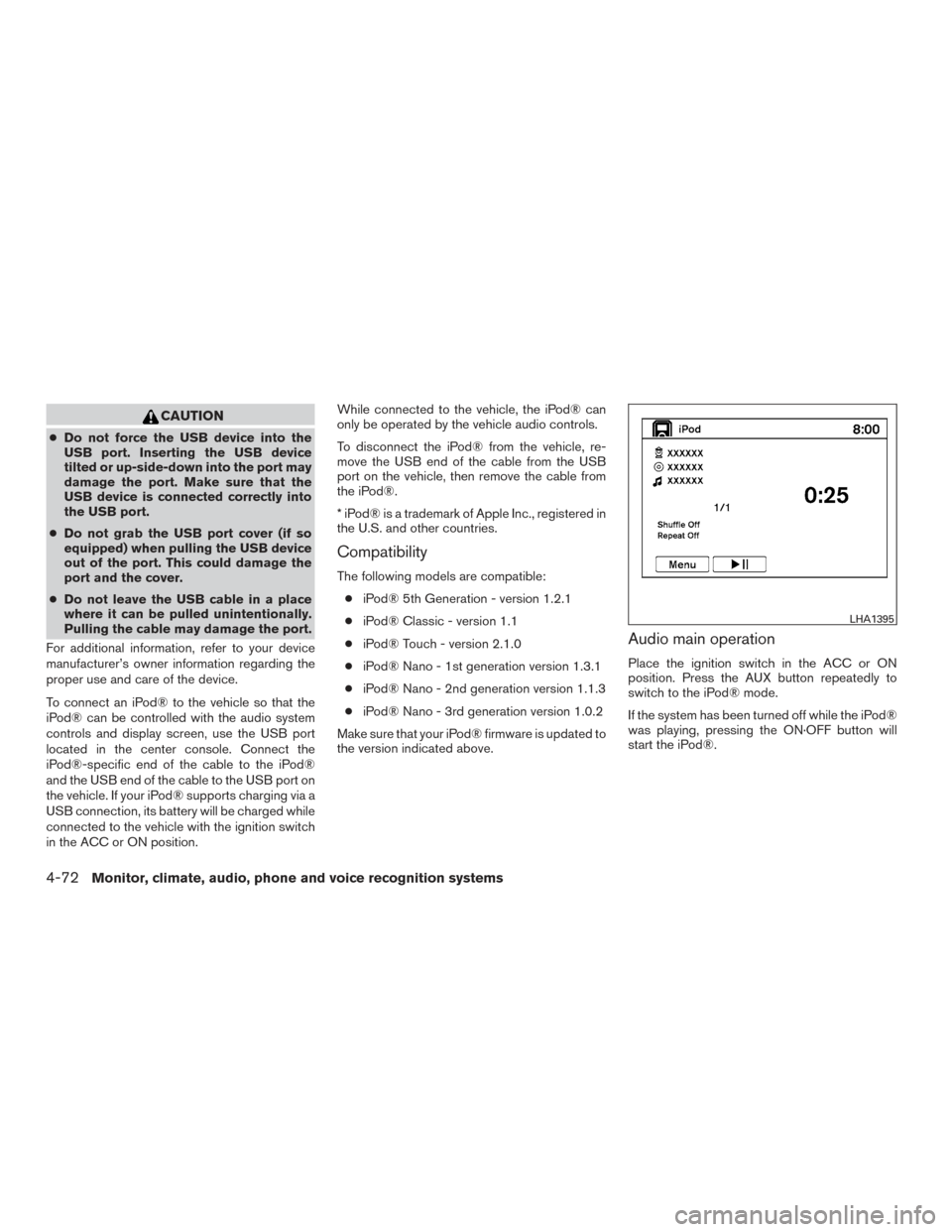
Audio main operation
Place the ignition switch in the ACC or ON
position. Press the AUX button repeatedly to
switch to the iPod® mode.
If the system has been turned off while the iPod®
was playing, pressing the ON·OFF button will
start the iPod®.
LHA1395
4-72Monitor, climate, audio, phone and voice recognition systems
Page 275 of 510
iPod®* PLAYER OPERATION WITH
NAVIGATION SYSTEM
Connecting iPod®
WARNING
Do not connect, disconnect or operate the
USB device while driving. Doing so can be
a distraction. If distracted you could lose
control of your vehicle and cause an acci-
dent or serious injury.
CAUTION
●Do not force the USB device into the
USB port. Inserting the USB device
tilted or up-side-down into the port may
damage the port. Make sure that the
USB device is connected correctly into
the USB port.
● Do not grab the USB port cover (if so
equipped) when pulling the USB device
out of the port. This could damage the
port and the cover.
● Do not leave the USB cable in a place
where it can be pulled unintentionally.
Pulling the cable may damage the port.
For additional information, refer to your device
manufacturer’s owner information regarding the
proper use and care of the device.
To connect an iPod® to the vehicle so that the
iPod® can be controlled with the audio system
controls and display screen, use the USB port
located in the center console. Connect the
iPod®-specific end of the cable to the iPod®
and the USB end of the cable to the USB port on
the vehicle. If your iPod® supports charging via a
USB connection, its battery will be charged while
connected to the vehicle with the ignition switch
in the ACC or ON position. While connected to the vehicle, the iPod® can
only be operated by the vehicle audio controls.
To disconnect the iPod® from the vehicle, re-
move the USB end of the cable from the USB
port on the vehicle, then remove the cable from
the iPod®.
* iPod® is a trademark of Apple Inc., registered in
the U.S. and other countries.
Compatibility
The following models are compatible:
● iPod® 5th Generation (firmware version
1.2.3 or later)
● iPod® Classic (firmware version 1.1.1 or
later)
● iPod® Touch (firmware version 2.0.0 or
later)*
● iPod® nano - 1st generation (firmware ver-
sion 1.3.1 or later)
● iPod® nano - 2nd generation (firmware ver-
sion 1.1.3 or later)
● iPod® nano - 3rd generation (firmware ver-
sion 1.1.3 or later)
LHA2455
4-74Monitor, climate, audio, phone and voice recognition systems
Page 504 of 510

N
NISSAN Intelligent Key® .........3-2,3-12
NISSAN mobile entertainment system
(MES) .......................4-83
NISSAN Vehicle Immobilizer
System ................2-30,3-4,5-12
NISSAN voice recognition system ......4-135
O
Octanerating(Seefueloctanerating)......9-5
Odometer .....................2-4
Oil Capacities and recommended
fuel/lubricants .................9-2
Changing engine oil .............8-10
Changing engine oil filter ..........8-11
Checking engine oil level ...........8-9
Engine oil ...................8-9
Engine oil and oil filter recommendation . . .9-7
Engine oil pressure low/engine coolant
temperature high warning light .......2-15
Engine oil viscosity ..............9-8
Oneshotcall..............4- 112, 4-124
Outside mirror control ..............3-34
Outside mirrors .................3-34
Overhead console ................2-48
Overheat Ifyourvehicleoverheats...........6-12
Owner’s manual order form ...........9-35
Owner’s manual/service manual order
information ....................9-35 P
Parking Parking brake operation ...........5-19
Parking/parking on hills ...........5-31
Parking brake ...................5-19
Pedal position adjustment ............3-31
Personallights..................2-63
Phone, Bluetooth® hands-free
system .................4- 108, 4-122
Power Power door locks ...............3-6
Power outlet .................2-44
Power rear windows .............2-58
Power steering fluid .............8-13
Power steering system ...........5-31
Power vent windows .............2-59
Rear power windows ............2-58
Power outlet ...................2-44
Power steering ..................5-31
Power steering fluid ...............8-13
Precautions Maintenance precautions ...........8-5
On-pavement and off-road driving
precautions ..................5-5
Precautions on booster
seats...........1-32,1-40,1-46,1-52
Precautions on child
restraints .........1-32,1-40,1-46,1-52
Precautions on seat belt usage .......1-20
Precautions on supplemental restraint
system ....................1-55
Precautions when starting and driving ....5-2
Push starting ...................6-12 R
Radio CarphoneorCBradio...........4-108
FM/AM/SAT radio with compact disc (CD)
player .................4-49,4-55
Steering wheel audio control switch . . . .4-81
Readiness for inspection maintenance (I/M)
test ........................9-34
Rear center seat belt ..............1-26
Rear power windows ..............
2-58
Rear seat air conditioner ............4-31
Rear sonar system ................5-35
Rear sonar system off switch ..........2-42
Rearview mirror .................3-33
RearView Monitor .............4-21,4-24
Rear window and outside mirror defroster
switch.......................2-34
Rear window wiper and washer switches . . .2-33
Recorders EventData..................9-34
Refrigerant recommendation ...........9-8
Registering a vehicle in another country ....9-11
Remote keyless entry system ........3-7,3-8
Reporting safety defects (US only) .......9-33
Roof rack .....................2-55
S
Safety Child safety rear door lock ..........3-7
Child seat belts .....1-32,1-40,1-46,1-52
Reporting safety defects (US only) .....9-33
10-5
Page:
< prev 1-8 9-16 17-24