2015 NISSAN ALTIMA SEDAN ECU
[x] Cancel search: ECUPage 60 of 441
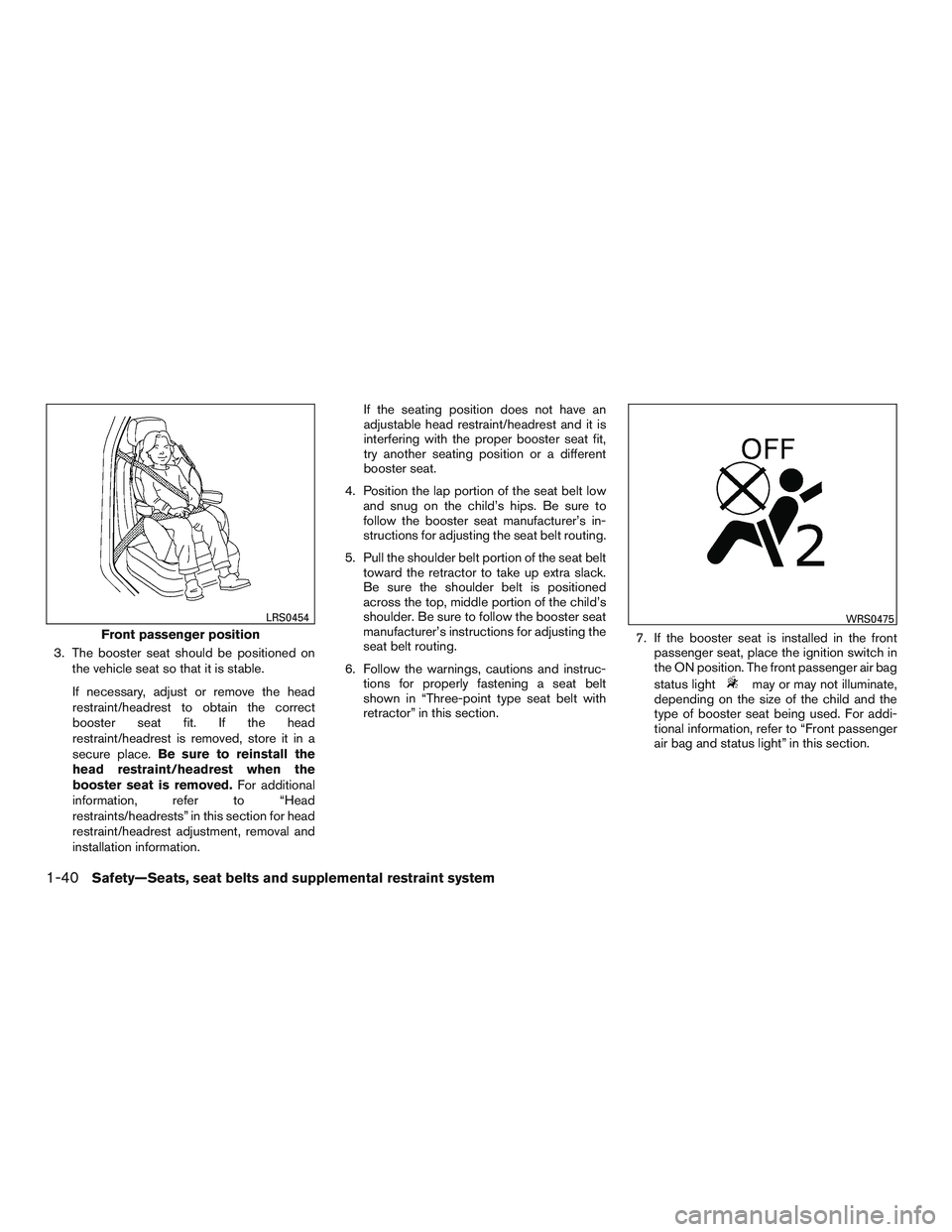
3. The booster seat should be positioned onthe vehicle seat so that it is stable.
If necessary, adjust or remove the head
restraint/headrest to obtain the correct
booster seat fit. If the head
restraint/headrest is removed, store it in a
secure place. Be sure to reinstall the
head restraint/headrest when the
booster seat is removed. For additional
information, refer to “Head
restraints/headrests” in this section for head
restraint/headrest adjustment, removal and
installation information. If the seating position does not have an
adjustable head restraint/headrest and it is
interfering with the proper booster seat fit,
try another seating position or a different
booster seat.
4. Position the lap portion of the seat belt low and snug on the child’s hips. Be sure to
follow the booster seat manufacturer’s in-
structions for adjusting the seat belt routing.
5. Pull the shoulder belt portion of the seat belt toward the retractor to take up extra slack.
Be sure the shoulder belt is positioned
across the top, middle portion of the child’s
shoulder. Be sure to follow the booster seat
manufacturer’s instructions for adjusting the
seat belt routing.
6. Follow the warnings, cautions and instruc- tions for properly fastening a seat belt
shown in “Three-point type seat belt with
retractor” in this section. 7. If the booster seat is installed in the front
passenger seat, place the ignition switch in
the ON position. The front passenger air bag
status light
may or may not illuminate,
depending on the size of the child and the
type of booster seat being used. For addi-
tional information, refer to “Front passenger
air bag and status light” in this section.
Front passenger position
LRS0454WRS0475
1-40Safety—Seats, seat belts and supplemental restraint system
Page 72 of 441
by the regulations. Failing to properly secure
child restraints and to use the ALR mode may
allow the restraint to tip or move in a collision or
sudden stop. This can also result in the passen-
ger air bag inflating in a crash instead of being
OFF. For additional information, refer to “Child
restraints” in this section for proper use and in-
stallation.
If the front passenger seat is not occupied, the
passenger air bag is designed not to inflate in a
crash. However, heavy objects placed on the
seat could result in air bag inflation, because of
the object’s weight detected by the Occupant
Classification Sensor. Other conditions could
also result in air bag inflation, such as if a child is
standing on the seat, or if two children are on the
seat, contrary to the instructions in this manual.
Always be sure that you and all vehicle occupants
are seated and restrained properly.
Using the passenger air bag status light, you can
monitor when the front passenger air bag is au-
tomatically turned OFF with the seat occupied.
The light will not illuminate when the front pas-
senger seat is unoccupied.
If an adult occupant is in the seat but the passen-
ger air bag status light is illuminated (indicating
that the air bag is OFF) , it could be that the
person is a small adult, or is not sitting on the seat
properly or not using the seat belt properly.If a child restraint must be used in the front seat,
the passenger air bag status light may or may not
be illuminated, depending on the size of the child
and the type of child restraint being used. If the air
bag status light is not illuminated (indicating that
the air bag might inflate in a crash) , it could be
that the child restraint or seat belt is not being
used properly. Make sure that the child restraint is
installed properly, the seat belt is used properly
and the occupant is positioned properly. If the air
bag status light is not illuminated, reposition the
occupant or child restraint in a rear seat.
If the passenger air bag status light will not illu-
minate even though you believe that the child
restraint, the seat belts and the occupant are
properly positioned, the system may be sensing
an unoccupied seat (in which case the air bag is
OFF) . Your NISSAN dealer can check that the
system is OFF by using a special tool. However,
until you have confirmed with your dealer that
your air bag is working properly, reposition the
occupant or child restraint in a rear seat.
The NISSAN Advanced Air Bag System and
passenger air bag status light will take a few
seconds to register a change in the passenger
seat status. For example, if a large adult who is
sitting in the front passenger seat exits the ve-
hicle, the passenger air bag status light will go
from OFF to ON for a few seconds and then toOFF. This is normal system operation and does
not indicate a malfunction.
If a malfunction occurs in the front passenger air
bag system, the supplemental air bag warning
light
, located in the meter and gauges area
of the instrument panel, will blink. Have the sys-
tem checked by a NISSAN dealer.
Normal operation
In order for the occupant classification system to
classify the right front passenger based on
weight, please follow the precautions and steps
outlined below:
Precautions
● Make sure there are no objects weighing
over 2.2 lbs (1 kg) hanging on the seat or
placed in the seatback pocket.
●
Make sure that a child seat or other object is
not pressing against the rear of the seatback.
● Make sure that a rear passenger is not push-
ing or pulling on the back of the front pas-
senger’s seat.
● Make sure that the front seat or seatback is
not forced back against an object on the
seat or floor behind it.
● Make sure that there is no object placed
under the front passenger’s seat.
1-52Safety—Seats, seat belts and supplemental restraint system
Page 82 of 441
2 Instruments and controls
Instrument panel...................................2-2
Meter and gauges .................................2-3
Speedometer and odometer .....................2-4
Tachometer ....................................2-5
Engine coolant temperature gauge ...............2-5
Fuel gauge ....................................2-6
Compass display (if so equipped) ...................2-6
Compass display ...............................2-7
Warning/indicator lights and audible reminders ......2-10
Checking bulbs ............................... 2-10
Warning lights ................................ 2-10
Indicator lights ................................ 2-14
Audible reminders ............................. 2-17
Vehicle Information Display ........................2-17
How to use the vehicle information display .......2-18
Startup display ................................ 2-18
Resetting the trip computer .....................2-18
Settings ...................................... 2-18
Vehicle information display warnings and
indicators ..................................... 2-24
Security systems ................................. 2-27
Vehicle security system ......................... 2-27
NISSAN vehicle immobilizer system .............2-28Windshield wiper and washer switch
...............2-29
Switch operation .............................. 2-30
Rear window and outside mirror (if so equipped)
defroster switch .................................. 2-31
Headlight and turn signal switch ....................2-31
Xenon headlights (if so equipped) . . .............2-31
Headlight control switch ........................ 2-33
Daytime running light system (Canada only) ......2-35
Instrument brightness control ...................2-35
Turn signal switch ............................. 2-35
Fog light switch (if so equipped) ................2-36
Horn ............................................ 2-36
Heated seats (if so equipped) ......................2-37
Heated steering wheel (if so equipped) .............2-38
Warning systems switch (if so equipped) ............2-38
V ehicle Dynamic
Control (VDC) off switch ...........2-39
Power Outlet ..................................... 2-40
Storage ......................................... 2-41
Map pockets .................................. 2-41
Seatback pockets (if so equipped) ..............2-41
Sunglasses holder ............................. 2-41
Cup holders .................................. 2-42
Glove box .................................... 2-43
Page 92 of 441
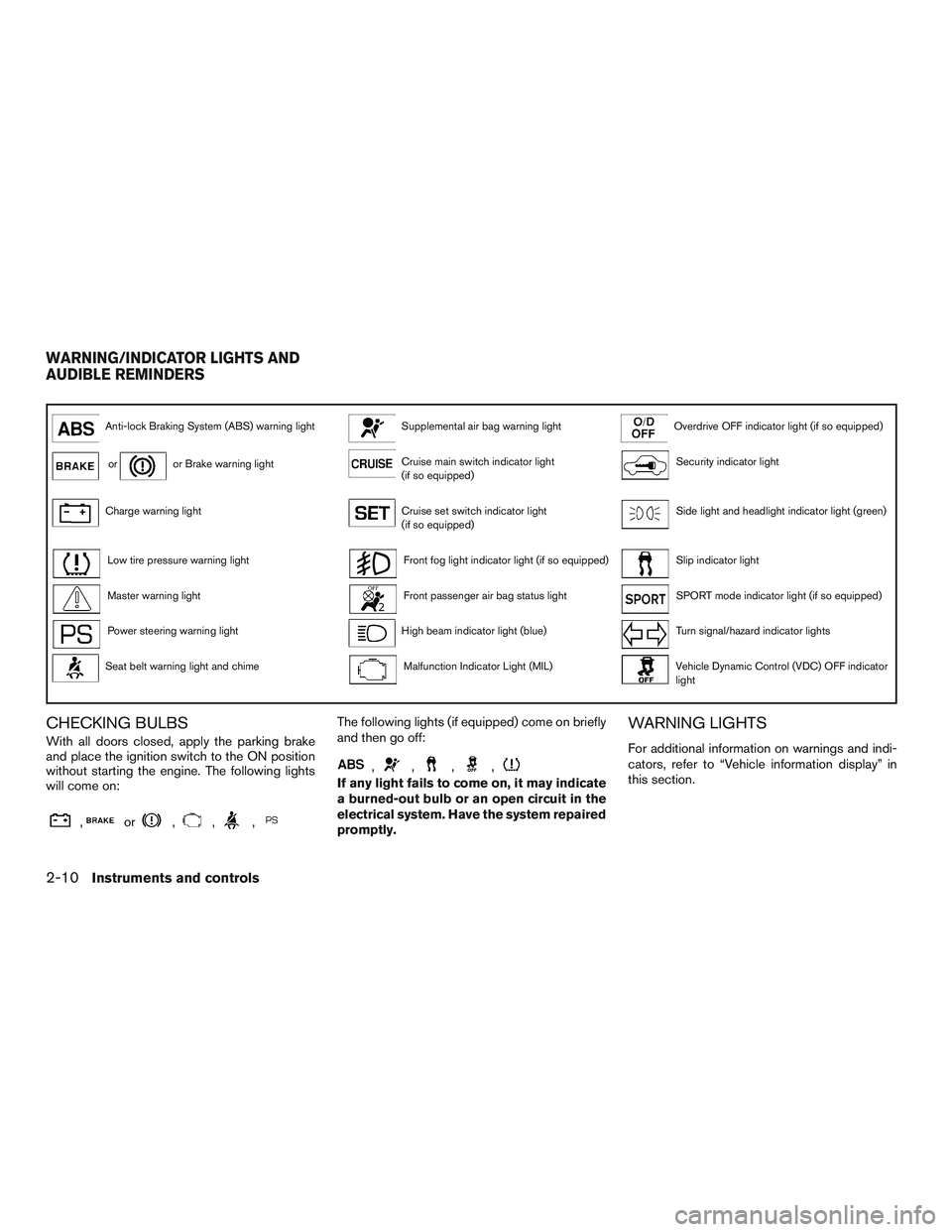
Anti-lock Braking System (ABS) warning lightSupplemental air bag warning lightOverdrive OFF indicator light (if so equipped)
oror Brake warning lightCruise main switch indicator light
(if so equipped)Security indicator light
Charge warning lightCruise set switch indicator light
(if so equipped)Side light and headlight indicator light (green)
Low tire pressure warning lightFront fog light indicator light (if so equipped)Slip indicator light
Master warning lightFront passenger air bag status lightSPORT mode indicator light (if so equipped)
Power steering warning lightHigh beam indicator light (blue)Turn signal/hazard indicator lights
Seat belt warning light and chimeMalfunction Indicator Light (MIL)Vehicle Dynamic Control (VDC) OFF indicator
light
CHECKING BULBS
With all doors closed, apply the parking brake
and place the ignition switch to the ON position
without starting the engine. The following lights
will come on:
,or,,,
The following lights (if equipped) come on briefly
and then go off:
,,,,
If any light fails to come on, it may indicate
a burned-out bulb or an open circuit in the
electrical system. Have the system repaired
promptly.
WARNING LIGHTS
For additional information on warnings and indi-
cators, refer to “Vehicle information display” in
this section.
WARNING/INDICATOR LIGHTS AND
AUDIBLE REMINDERS
2-10Instruments and controls
Page 96 of 441
Seat belt warning light andchime
The light and chime remind you to fasten your
seat belts. The light illuminates whenever the
ignition switch is placed in the ON or START
position and remains illuminated until the driver’s
seat belt is fastened. At the same time, the chime
sounds for about 6 seconds unless the driver’s
seat belt is securely fastened.
The seat belt warning light may also illuminate if
the front passenger’s seat belt is not fastened
when the front passenger’s seat is occupied. For
7 seconds after the ignition switch is placed in
the ON position, the system does not activate the
warning light for the front passenger.
Refer to “Seat belts” in the “Safety—Seats, seat
belts and supplemental restraint system” section
for precautions on seat belt usage.
Supplemental air bag warninglight
When the ignition switch is placed in the ON or
START position, the supplemental air bag warn-
ing light illuminates for about 7 seconds and then
turns off. This means the system is operational. If any of the following conditions occur, the front
air bag, side air bag, curtain air bag, and preten-
sioner systems need servicing and your vehicle
must be taken to a NISSAN dealer:
● The supplemental air bag warning light re-
mains on after approximately 7 seconds.
● The supplemental air bag warning light
flashes intermittently.
● The supplemental air bag warning light does
not come on at all.
Unless checked and repaired, the supplemental
restraint system (air bag system) and/or the pre-
tensioners may not function properly. For addi-
tional details, refer to “Supplemental restraint
system (SRS)” in the “Safety—Seats, seat belts
and supplemental restraint system” section of
this manual.
WARNING
If the supplemental air bag warning light
is on, it could mean that the front air bag,
side air bag, curtain air bag systems
and/or pretensioner systems will not op-
erate in an accident. To help avoid injury to
yourself or others, have your vehicle
checked by a NISSAN dealer as soon as
possible.
INDICATOR LIGHTS
For additional information, refer to “Vehicle infor-
mation display” in this section.
Cruise main switch indicator light (if so equipped)
The light comes on when the cruise control main
switch is pushed. The light goes out when the
main switch is pushed again. When the cruise
main switch indicator light comes on, the cruise
control system is operational.
Cruise set switch indicatorlight (if so equipped)
The light comes on while the vehicle speed is
controlled by the cruise control system. If the light
blinks while the engine is running, it may indicate
the cruise control system is not functioning prop-
erly. Have the system checked by a NISSAN
dealer.
Front fog light indicator light (ifso equipped)
The front fog light indicator light illuminates when
the front fog lights are ON. For additional infor-
mation, refer to “Fog light switch” in this section.
2-14Instruments and controls
Page 98 of 441
Overdrive OFF indicator light(if so equipped)
QR25DE:
The overdrive off indicator light illuminates when
the overdrive off mode is selected.
VQ35DE:
This light illuminates and then turns off when the
ignition switch is placed to the ON position.
QR25DE and VQ35DE:
For additional information, refer to “Continuously
Variable Transmission (CVT)” in the “Starting and
driving” section of this manual.
Security indicator light
This light blinks when the ignition switch is
placed in the OFF, LOCK or ACC position.
The blinking security indicator light indicates that
the security systems equipped on the vehicle are
operational.
For additional information, refer to “Security sys-
tems” in this section.
Side light and headlightindicator light (green)
The side light and headlight indicator light illumi-
nates when the side light or headlight position is
selected. For additional information, refer to
“Headlight and turn signal switch” in this section.
Slip indicator light
This indicator will blink when the Vehicle Dynamic
Control (VDC) system is operating, thus alerting
that the vehicle is nearing its traction limits. The
road surface may be slippery.
SPORT mode indicator light (ifso equipped)
QR25DE:
This light illuminates and then turns off when the
ignition switch is placed to the ON position, and
when the SPORT mode off is selected.
For additional information, refer to “Continuously
Variable Transmission (CVT)” in the “Starting and
driving” section of this manual.
Turn signal/hazard indicatorlights
The appropriate light flashes when the turn signal
switch is activated. Both lights flash when the hazard switch is turned
on.
Vehicle Dynamic Control
(VDC) OFF indicator light
This indicator light comes on when the Vehicle
Dynamic Control off switch is pushed to OFF.
This indicates the Vehicle Dynamic Control has
been turned off.
Push the Vehicle Dynamic Control off switch
again or restart the engine and the system will be
reactivated. For additional information, refer to
“Vehicle Dynamic Control (VDC) system” in the
“Starting and driving” section of this manual.
The Vehicle Dynamic Control light also comes on
when you push the push-button ignition switch to
the ON position. The light will turn off after about
2 seconds if the system is operational. If the light
stays on or comes on along with the
indi-
cator light while you are driving, have the Vehicle
Dynamic Control system checked by a NISSAN
dealer.
While the Vehicle Dynamic Control system is
operating, you might feel slight vibration or hear
the system working when starting the vehicle or
accelerating, but this is normal.
2-16Instruments and controls
Page 109 of 441
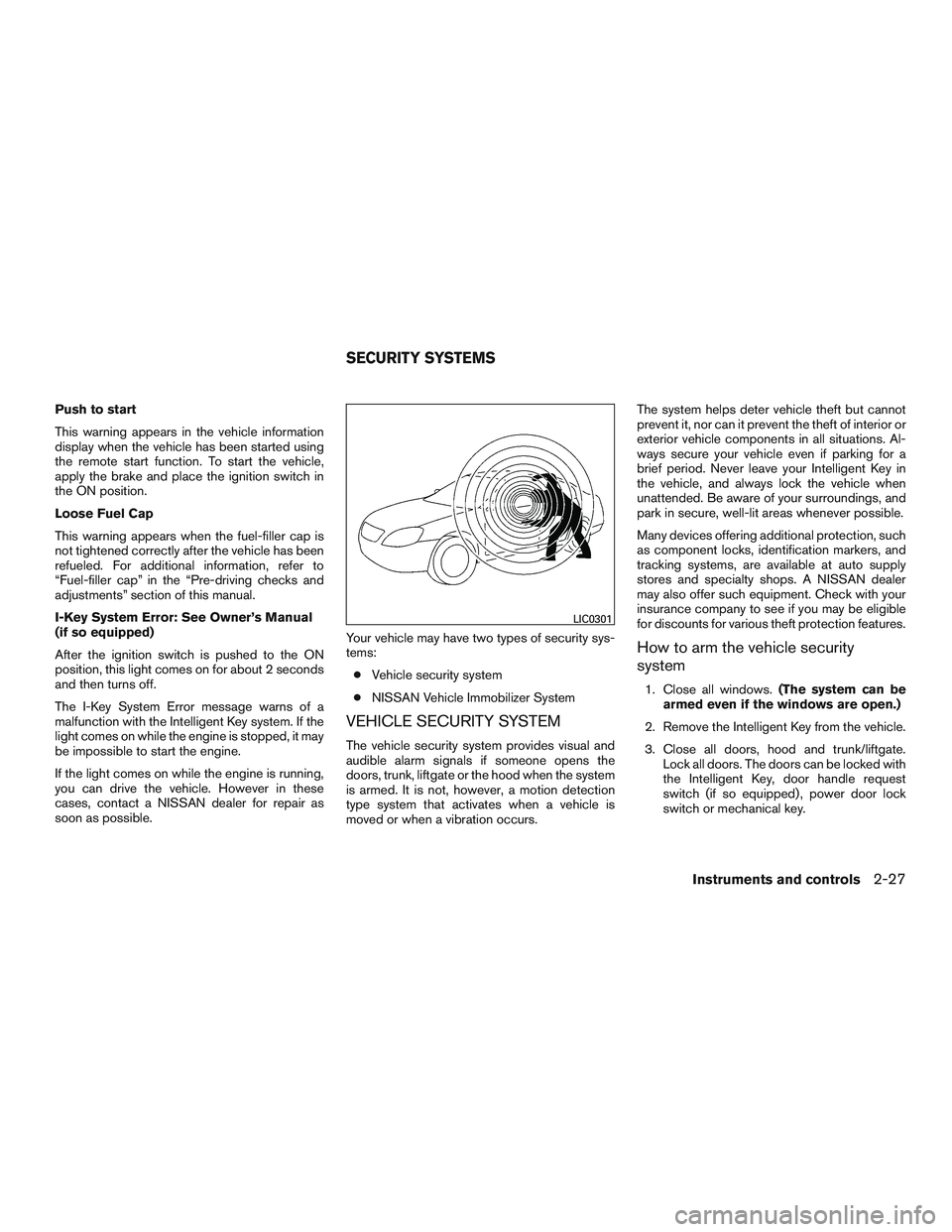
Push to start
This warning appears in the vehicle information
display when the vehicle has been started using
the remote start function. To start the vehicle,
apply the brake and place the ignition switch in
the ON position.
Loose Fuel Cap
This warning appears when the fuel-filler cap is
not tightened correctly after the vehicle has been
refueled. For additional information, refer to
“Fuel-filler cap” in the “Pre-driving checks and
adjustments” section of this manual.
I-Key System Error: See Owner’s Manual
(if so equipped)
After the ignition switch is pushed to the ON
position, this light comes on for about 2 seconds
and then turns off.
The I-Key System Error message warns of a
malfunction with the Intelligent Key system. If the
light comes on while the engine is stopped, it may
be impossible to start the engine.
If the light comes on while the engine is running,
you can drive the vehicle. However in these
cases, contact a NISSAN dealer for repair as
soon as possible.Your vehicle may have two types of security sys-
tems:
● Vehicle security system
● NISSAN Vehicle Immobilizer System
VEHICLE SECURITY SYSTEM
The vehicle security system provides visual and
audible alarm signals if someone opens the
doors, trunk, liftgate or the hood when the system
is armed. It is not, however, a motion detection
type system that activates when a vehicle is
moved or when a vibration occurs. The system helps deter vehicle theft but cannot
prevent it, nor can it prevent the theft of interior or
exterior vehicle components in all situations. Al-
ways secure your vehicle even if parking for a
brief period. Never leave your Intelligent Key in
the vehicle, and always lock the vehicle when
unattended. Be aware of your surroundings, and
park in secure, well-lit areas whenever possible.
Many devices offering additional protection, such
as component locks, identification markers, and
tracking systems, are available at auto supply
stores and specialty shops. A NISSAN dealer
may also offer such equipment. Check with your
insurance company to see if you may be eligible
for discounts for various theft protection features.
How to arm the vehicle security
system
1. Close all windows.
(The system can be
armed even if the windows are open.)
2. Remove the Intelligent Key from the vehicle.
3. Close all doors, hood and trunk/liftgate. Lock all doors. The doors can be locked with
the Intelligent Key, door handle request
switch (if so equipped) , power door lock
switch or mechanical key.
LIC0301
SECURITY SYSTEMS
Instruments and controls2-27
Page 110 of 441
4. Confirm that the security indicator lightcomes on. The security light stays on for
about 30 seconds. The vehicle security sys-
tem is now pre-armed. After about 30 sec-
onds the vehicle security system automati-
cally shifts into the armed phase. The
security light begins to flash once every
3 seconds. If, during the 30-second pre-arm
time period, the driver’s door is unlocked by
the key or the key fob, or the ignition switch
is placed in the ACC or ON position, the
system will not arm.
● Even when the driver and/or passen-
gers are in the vehicle, the system will
activate with all the doors, hood and
trunk lid locked with the ignition switch
placed in the LOCK position. When
placing the ignition switch in the ACC
or ON position, the system will be re-
leased.
Vehicle security system activation
The vehicle security system will give the following
alarm:
● The headlights blink and the horn sounds
intermittently. ●
The alarm automatically turns off after a pe-
riod of time. However, the alarm reactivates if
the vehicle is tampered with again. The alarm
can be shut off by unlocking the driver’s door
or trunk lid with the key, or by pressing
the
button on the Intelligent Key.
The alarm is activated by:
● opening the door or trunk lid without using
the key or Intelligent Key (even if the door is
unlocked by releasing the door inside lock
switch) .
How to stop an activated alarm
The alarm stops only by unlocking the driver’s
door or the trunk lid with the key, pressing
the
button on the Intelligent Key, or press-
ing the request switch (if so equipped) on the
driver’s or passenger’s door with the Intelligent
Key in range of the door handle.
NISSAN VEHICLE IMMOBILIZER
SYSTEM
The NISSAN Vehicle Immobilizer System will not
allow the engine to start without the use of a
registered key.
If the engine fails to start using a registered key
(for example, when interference is caused by
another registered key, an automated toll road device or automatic payment device on the key
ring) , restart the engine using the following pro-
cedures:
1. Leave the ignition switch placed in the ON position for approximately 5 seconds.
2. Place the ignition switch in the OFF or LOCK position, and wait approximately
10 seconds.
3. Repeat Steps 1 and 2.
4. Restart the engine while holding the device (which may have caused the interference)
separate from the registered key.
If the no start condition re-occurs, NISSAN rec-
ommends placing the registered key on a sepa-
rate key ring to avoid interference from other
devices.
FCC Notice:
For USA:
This device complies with part 15 of the
FCC Rules. Operation is subject to the fol-
lowing two conditions: (1) This device may
not cause harmful interference, and (2) this
device must accept any interference re-
ceived, including interference that may
cause undesired operation.
2-28Instruments and controls