2015 MITSUBISHI OUTLANDER SPORT display
[x] Cancel search: displayPage 164 of 384
Multi-information display
Features and controls 5-101
5
The distance and speed units are also changed in the following combinations to match theselected fuel consumption unit.
N00557200115
The temperature display unit can be switched.
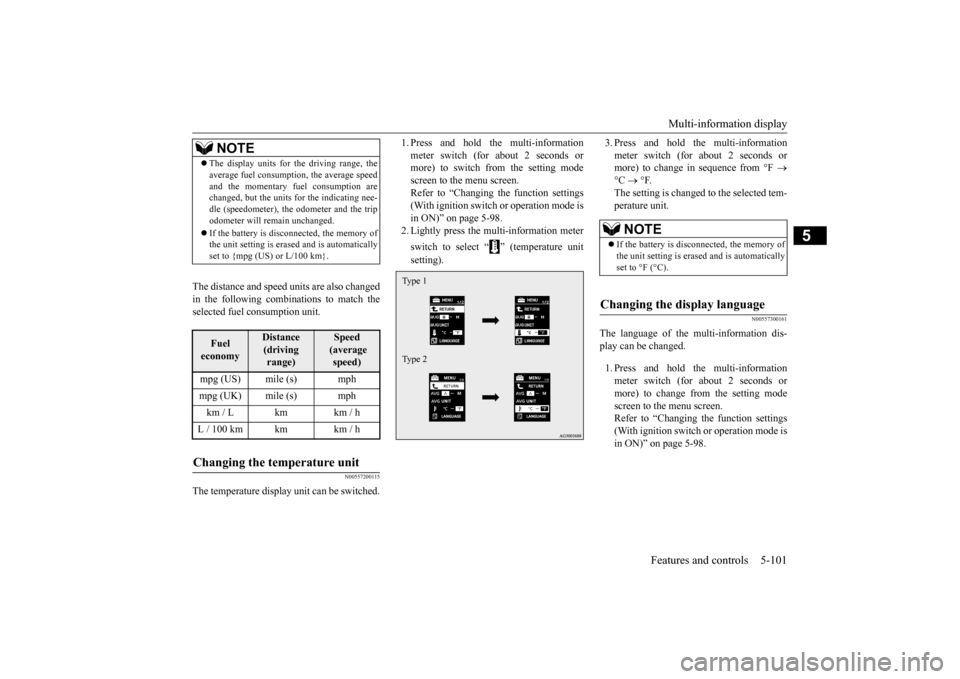
1. Press and hold the multi-information meter switch (for about 2 seconds or more) to switch from the setting mode screen to the menu screen.Refer to “Changing the function settings (With ignition switch or operation mode is in ON)” on page 5-98.2. Lightly press the multi-information meter switch to select “ ” (temperature unit setting).
3. Press and hold the multi-information meter switch (for about 2 seconds or more) to change in sequence from °F
°C
°F.
The setting is changed to the selected tem- perature unit.
N00557300161
The language of the multi-information dis- play can be changed. 1. Press and hold the multi-information meter switch (for about 2 seconds or more) to change from the setting modescreen to the menu screen. Refer to “Changing the function settings (With ignition switch or operation mode isin ON)” on page 5-98.
NOTE
The display units for the driving range, the average fuel consumption, the average speed and the momentary fuel consumption are changed, but the units for the indicating nee- dle (speedometer), the odometer and the tripodometer will remain unchanged. If the battery is disconnected, the memory of the unit setting is erased and is automatically set to {mpg (US) or L/100 km}.Fuel economy
Distance (driving range)
Speed (average speed)
mpg (US) mile (s) mphmpg (UK) mile (s) mphkm / L km km / hL / 100 km km km / hChanging the temperature unit
Type 1 Type 2
NOTE
If the battery is disconnected, the memory of the unit setting is erased and is automatically set to °F (°C).
Changing the display language
BK0206700US.book
101 ページ 2014年3月25日 火曜日 午後4時42分
Page 165 of 384
Multi-information display 5-102 Features and controls
5
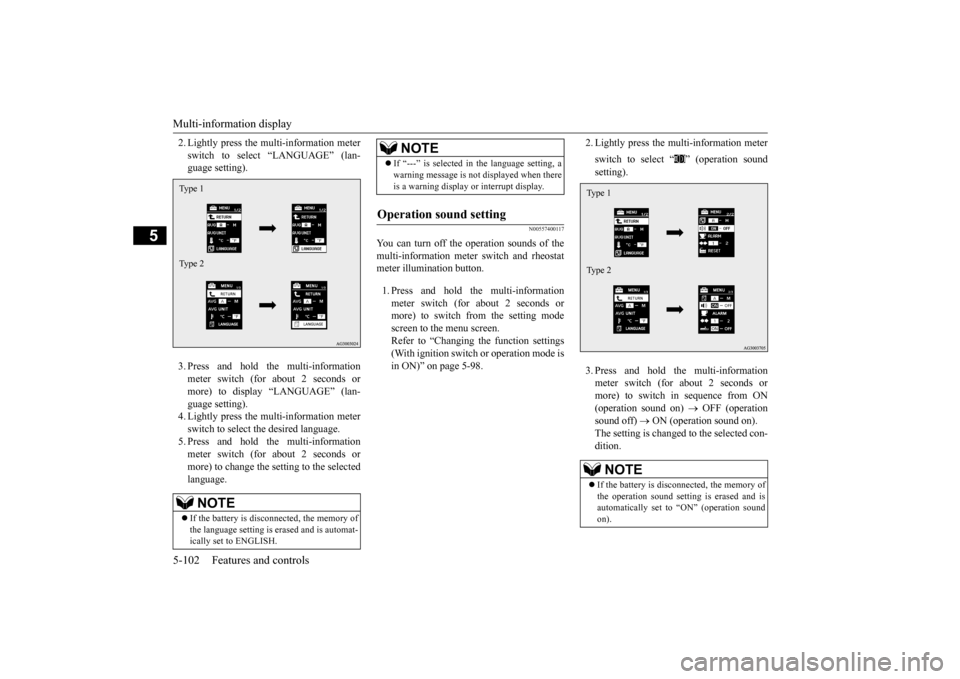
2. Lightly press the multi-information meter switch to select “LANGUAGE” (lan- guage setting). 3. Press and hold the multi-information meter switch (for about 2 seconds or more) to display “LANGUAGE” (lan-guage setting). 4. Lightly press the multi-information meter switch to select the desired language.5. Press and hold the multi-information meter switch (for about 2 seconds or more) to change the setting to the selectedlanguage.
N00557400117
You can turn off the operation sounds of themulti-information meter switch and rheostatmeter illumination button. 1. Press and hold the multi-information meter switch (for about 2 seconds or more) to switch from the setting mode screen to the menu screen.Refer to “Changing the function settings (With ignition switch or operation mode is in ON)” on page 5-98.
2. Lightly press the multi-information meter switch to select “ ” (operation sound setting). 3. Press and hold the multi-information meter switch (for about 2 seconds or more) to switch in sequence from ON(operation sound on)
OFF (operation
sound off)
ON (operation sound on).
The setting is changed to the selected con- dition.
NOTE
If the battery is disconnected, the memory of the language setting is erased and is automat-ically set to ENGLISH.Type 1 Type 2
If “---” is selected in the language setting, a warning message is not displayed when there is a warning display or interrupt display.
Operation sound setting
NOTE
NOTE
If the battery is disconnected, the memory of the operation sound setting is erased and isautomatically set to “ON” (operation sound on).Type 1 Type 2
BK0206700US.book
102 ページ 2014年3月25日 火曜日 午後4時42分
Page 166 of 384
Multi-information display
Features and controls 5-103
5
N00557500134
The time until the display appears can be changed. 1. Press and hold the multi-information meter switch (for about 2 seconds ormore) to switch from the setting mode screen to the menu screen. Refer to “Changing the function settings(With ignition switch or operation mode is in ON)” on page 5-98.
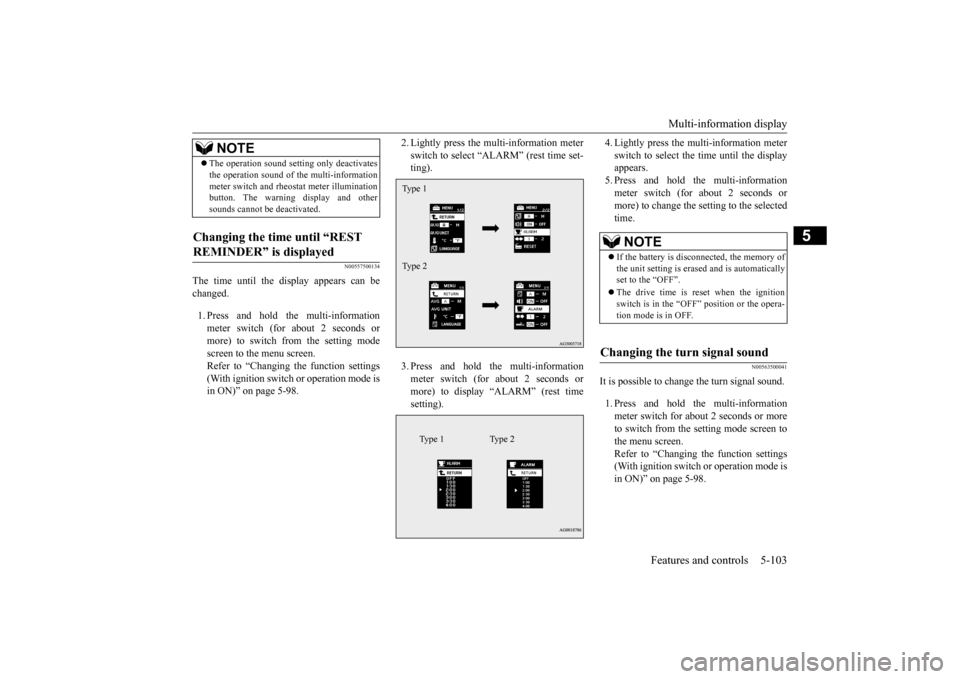
2. Lightly press the multi-information meter switch to select “ALARM” (rest time set- ting). 3. Press and hold the multi-information meter switch (for about 2 seconds or more) to display “ALARM” (rest timesetting).
4. Lightly press the multi-information meter switch to select the time until the display appears. 5. Press and hold the multi-informationmeter switch (for about 2 seconds or more) to change the setting to the selected time.
N00563500041
It is possible to change the turn signal sound. 1. Press and hold the multi-information meter switch for about 2 seconds or more to switch from the setting mode screen to the menu screen.Refer to “Changing the function settings (With ignition switch or operation mode is in ON)” on page 5-98.
The operation sound setting only deactivates the operation sound of the multi-information meter switch and rheostat meter illumination button. The warning display and other sounds cannot be deactivated.
Changing the time until “REST REMINDER” is displayed
NOTE
Type 1 Type 2
Type 1 Type 2
NOTE
If the battery is disconnected, the memory of the unit setting is erased and is automatically set to the “OFF”. The drive time is reset when the ignition switch is in the “OFF” position or the opera- tion mode is in OFF.
Changing the turn signal sound
BK0206700US.book
103 ページ 2014年3月25日 火曜日 午後4時42分
Page 167 of 384
Multi-information display 5-104 Features and controls
5
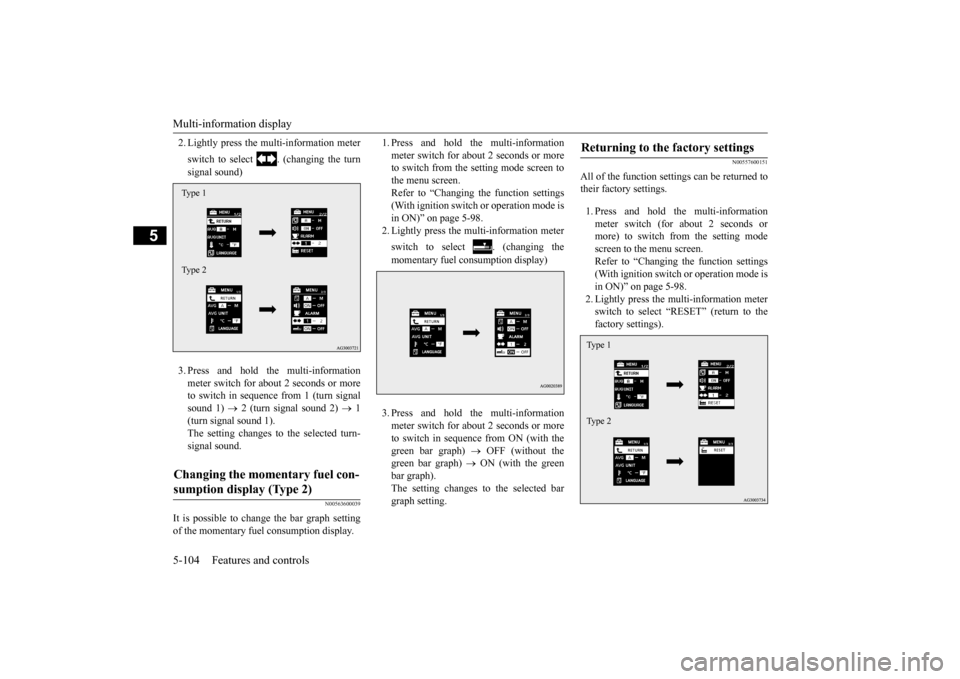
2. Lightly press the multi-information meter switch to select . (changing the turn signal sound) 3. Press and hold the multi-information meter switch for about 2 seconds or more to switch in sequence from 1 (turn signal sound 1)
2 (turn signal sound 2)
1
(turn signal sound 1). The setting changes to the selected turn- signal sound.
N00563600039
It is possible to change the bar graph setting of the momentary fuel consumption display.
1. Press and hold the multi-information meter switch for about 2 seconds or more to switch from the setting mode screen to the menu screen.Refer to “Changing the function settings (With ignition switch or operation mode is in ON)” on page 5-98.2. Lightly press the multi-information meter switch to select . (changing the momentary fuel consumption display) 3. Press and hold the multi-information meter switch for about 2 seconds or more to switch in sequence from ON (with thegreen bar graph)
OFF (without the
green bar graph)
ON (with the green
bar graph).The setting changes to the selected bargraph setting.
N00557600151
All of the function settings can be returned totheir factory settings. 1. Press and hold the multi-information meter switch (for about 2 seconds or more) to switch from the setting mode screen to the menu screen.Refer to “Changing the function settings (With ignition switch or operation mode is in ON)” on page 5-98.2. Lightly press the multi-information meterswitch to select “RESET” (return to the factory settings).
Changing the momentary fuel con- sumption display (Type 2) Type 1 Type 2
Returning to the factory settings Type 1 Type 2
BK0206700US.book
104 ページ 2014年3月25日 火曜日 午後4時42分
Page 168 of 384
Indicator light, warning light, an
d information screen display list Features and controls 5-105
5
3. Press and hold the multi-information meter switch (for about 5 seconds or more), the buzzer sounds and all of the function settings are returned to the fac-tory settings.
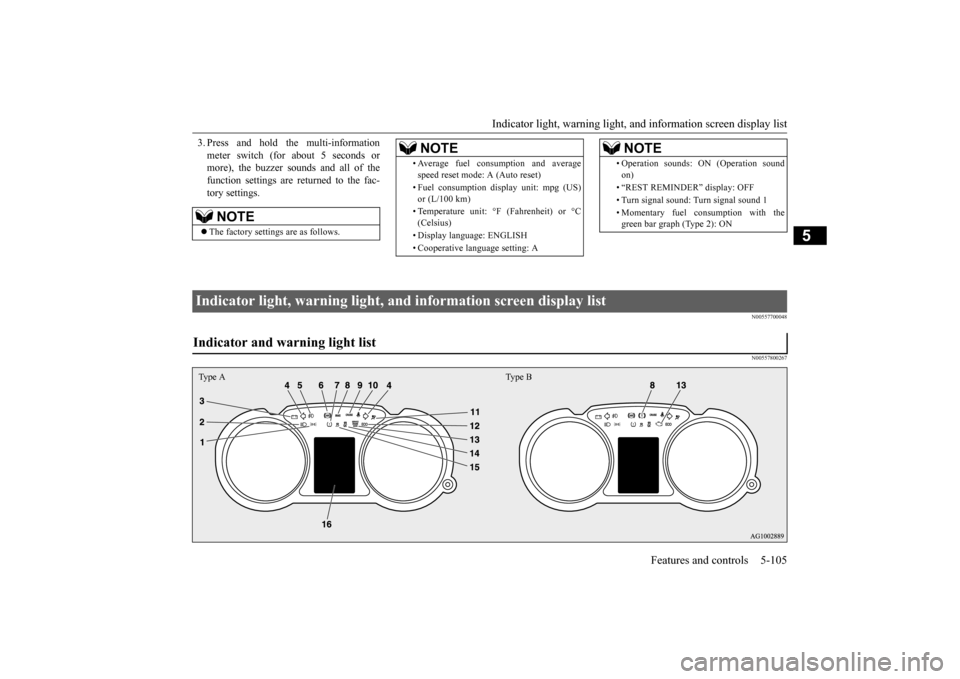
N00557700048 N00557800267
NOTE
The factory settings are as follows.
• Average fuel consumption and average speed reset mode: A (Auto reset) • Fuel consumption display unit: mpg (US) or (L/100 km) • Temperature unit: °F (Fahrenheit) or °C (Celsius) • Display language: ENGLISH • Cooperative language setting: ANOTE
• Operation sounds: ON (Operation sound on) • “REST REMINDER” display: OFF • Turn signal sound: Turn signal sound 1 • Momentary fuel consumption with the green bar graph (Type 2): ONNOTE
Indicator light, warning light, and information screen display list Indicator and warning light list Type A Type B
BK0206700US.book
105 ページ 2014年3月25日 火曜日 午後4時42分
Page 169 of 384
Indicator light, warning light, an
d information screen display list
5-106 Features and controls
5
N00557900082
When there is information to be announced,
such as light reminder, the tone sounds an
d the screen switches to the displays show
n below. Refer to
the appropriate page and take the necessary measures. When the cause of the warning display is eliminated, the warning display goes out automatically.Refer to “Warning display list (With ignition switch or operation mode is in OFF)” on page 5-107. Refer to “Warning display list (With ignition switch or operation mode is in ON)” on page 5-109. Refer to “Other interrupt displays” on page 5-115. 1- Position indicator
P.5-118
2- High beam indicator
P.5-118
3- Charging system warning light
P. 5 - 1 1 9
4- Turn signal indicator/hazard warning
light
P.5-117
5- Front fog light indicator (if so
equipped)
P.5-118
6- Anti-lock braking system warning light
P.5-65
7- Tire pressure monitoring system warn-
ing light
P.5-76
8- Brake warning light
P. 5 - 1 1 8
9- Cruise control indicator (if so
equipped)
P.5-72
10- Seat belt reminder/warning light
P. 4 - 1 5
11- Supplemental Restraint System (SRS)
warning light P.4-32
12- ECO mode indicator (if so equipped)
P.5-118
13- Engine malfunction indicator (“SER-
VICE ENGINE SOON” or “Checkengine light”)
P.5-118
14- Active stability control (ASC) OFF
indicator (if so equipped)
P.5-69
15- Active stability control (ASC) indicator
P.5-69
16- Information screen display list
P.5-106
Information screen display list
NOTE
In the following cases, a warning may be displayed on the inform
ation screen and the buzzer may
sound for a few seconds, at tim
es.
This is caused by the system picking up interference such as stro
ng electromagnetic waves or nois
e, and is not a functional pro
blem.
• An extremely strong electromagnetic wave is received from a source
such as an illegal radio set,
a spark from a wire, or a rad
ar station.
• Abnormal voltage or a static electricity discharge is genera
ted by the operation of your vehicle’s electronics (including afte
r-market parts).
BK0206700US.book
106 ページ 2014年3月25日 火曜日 午後4時42分
Page 170 of 384
Indicator light, warning light, an
d information screen display list Features and controls 5-107
5
N00558000224
If the warning display has occurred a number of times, take your ve
hicle to an authorized Mitsubishi Motors dealer or a repair
facility of your choice and
have the system checked.
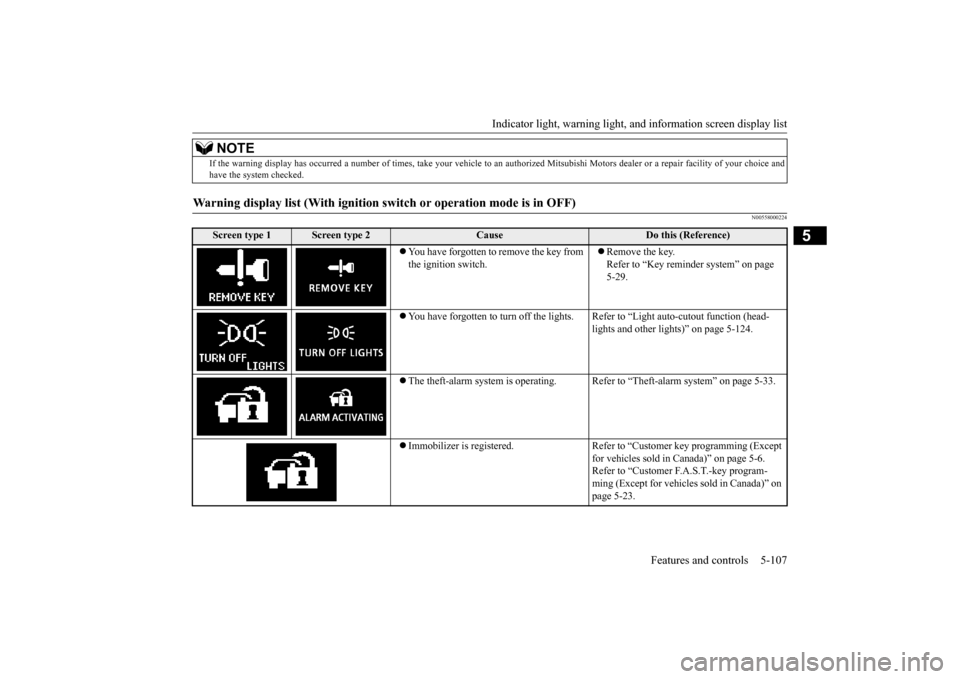
Warning display list (With ignition swit
ch or operation mode is in OFF)
Screen type 1
Screen type 2
Cause
Do this (Reference)
You have forgotten to remove the key from the ignition switch.
Remove the key. Refer to “Key reminder system” on page 5-29.
You have forgotten to turn off the lights.
Refer to “Light auto-cutout function (head- lights and other lights)” on page 5-124.
The theft-alarm system is operating. Refer to “Theft-alarm system” on page 5-33. Immobilizer is registered. Refer to “Customer key programming (Except
for vehicles sold in Canada)” on page 5-6. Refer to “Customer F.A.S.T.-key program- ming (Except for vehicles sold in Canada)” on page 5-23.
NOTE
BK0206700US.book
107 ページ 2014年3月25日 火曜日 午後4時42分
Page 171 of 384
Indicator light, warning light, an
d information screen display list
5-108 Features and controls
5
—
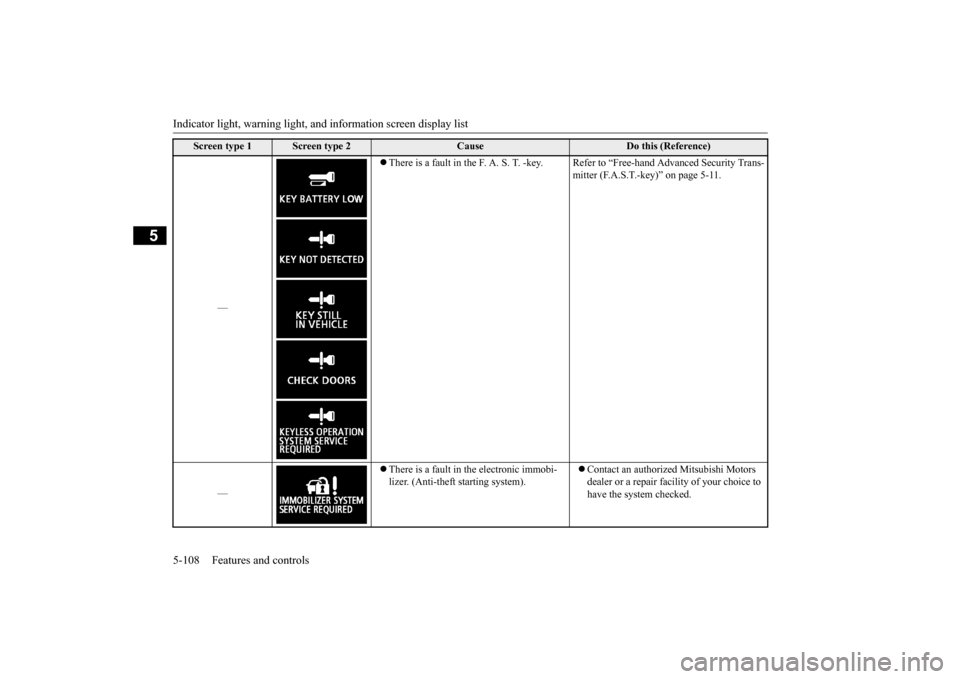
There is a fault in the F. A. S. T. -key. R
efer to “Free-hand Advanced Security Trans- mitter (F.A.S.T.-key)” on page 5-11.
—
There is a fault in the electronic immobi- lizer. (Anti-theft starting system).
Contact an authorized Mitsubishi Motors dealer or a repair facility of your choice to have the system checked.
Screen type 1
Screen type 2
Cause
Do this (Reference)
BK0206700US.book
108 ページ 2014年3月25日 火曜日 午後4時42分