2015 MITSUBISHI LANCER EVOLUTION change time
[x] Cancel search: change timePage 156 of 338
Multi-information display
Features and controls 5-95
5
N00555800162
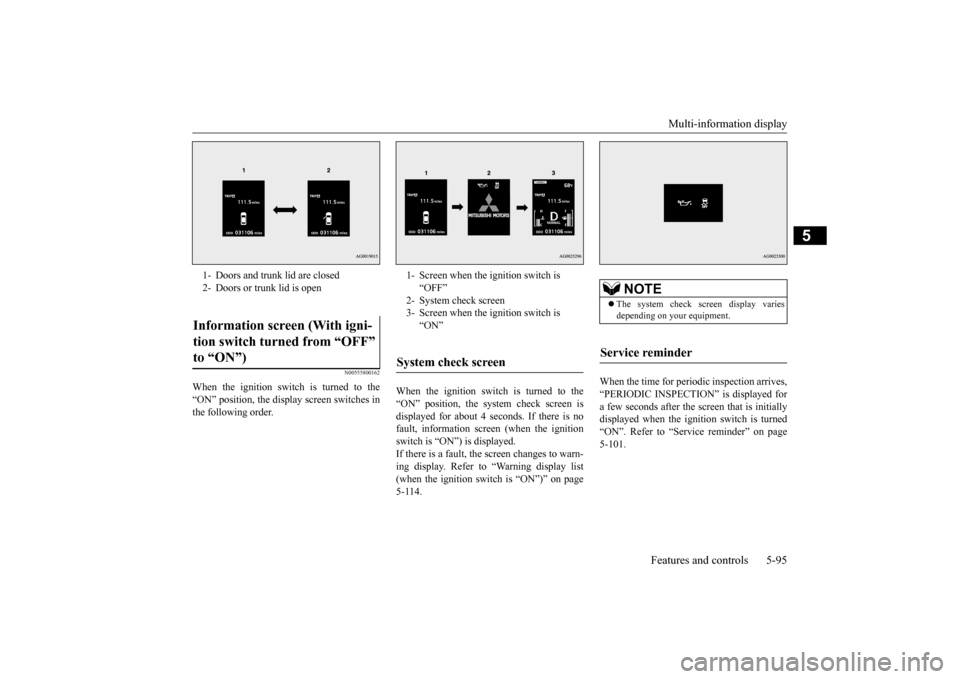
When the ignition switch is turned to the “ON” position, the display screen switches inthe following order.
When the ignition switch is turned to the “ON” position, the system check screen is displayed for about 4 seconds. If there is no fault, information screen (when the ignitionswitch is “ON”) is displayed. If there is a fault, the screen changes to warn- ing display. Refer to “Warning display list(when the ignition switch is “ON”)” on page 5-114.
When the time for periodic inspection arrives, “PERIODIC INSPECTION” is displayed for a few seconds after the screen that is initiallydisplayed when the ignition switch is turned “ON”. Refer to “Service reminder” on page 5-101.
1- Doors and trunk lid are closed 2- Doors or trunk lid is openInformation screen (With igni- tion switch turned from “OFF” to “ON”)
1- Screen when the ignition switch is
“OFF”
2- System check screen 3- Screen when the ignition switch is
“ON”
System check screen
NOTE
The system check screen display varies depending on your equipment.
Service reminder
BK0210800US.bo
ok 95 ページ 2014年4月8日 火曜日 午前11時28分
Page 161 of 338

Multi-information display 5-100 Features and controls
5
that was displayed before the warning dis- play. If you press the multi-information meter switch, the display screen switches to the screen display from before the warning andthe “!” warning (A) is displayed.
When the “!” warning is displayed, if you lightly press the multi-information meter switch a few times, the warning displayscreen you switched from is redisplayed. The operation status of each system is dis- played on the information screen.For further details, refer to the appropriate page in the warning display list. Refer to “Other interrupt displays (With igni-tion switch in the “ON” position)” on page 5-119.
N00545800042
Shows the position of the gearshift lever. Refer to “Gearshift lever operation” on page 5-58.
N00556500081
Shows the temperature outside the vehicle.
N00545100016
The operation status of the Twin Clutch SST control mode is displayed. Refer to “Twin Clutch SST control mode” on page 5-62.
N00556600109
Shows the amount of fuel remaining.
NOTE
Warning display screens with a “ ” or “ ” mark displayed in the upper right of the screen can be switched. If you want to switch the display, press the multi-information meter switch as follows. “ ”: Press lightly. “ ”: Press for about 2 seconds or more.
Redisplay of a warning display screen Other interrupt displays Gearshift lever position display screen
(if so equipped)
Outside temperature display screen
NOTE
The display setting can be changed to the preferred units (°F or °C).Refer to “Changing the function settings (With ignition switch in the “ON” position)” on page 5-103. Depending on factors such as the driving conditions, the displayed temperature mayvary from the actual outside temperature.
Twin Clutch SST control mode display screen Fuel remaining display screen
BK0210800US.book
100 ページ 2014年4月8日 火曜日 午前11時28分
Page 164 of 338

Multi-information display
Features and controls 5-103
5
N00555700116
If any of the doors or the trunk lid is not com- pletely closed, this displays the open door or trunk lid.If the speed increases to about 5 mph (8 km/h) or higher with a door ajar, a buzzer will sound 4 times to inform you that a door isajar.
N00556801166
1. Park your vehicle in a safe place. Firmly apply the parking brake and put the gearshift lever into the “N” (Neutral)position (manual transaxle) or the gear- shift lever into the “P” (PARK) position (Twin Clutch SST).2. When you lightly press the multi-informa-tion meter switch, the information screen switches to the function setting screen. Refer to “Information screen (With igni-tion switch in the “ON” position)” on page 5-96.
3. Press and hold the multi-information meter switch (for about 2 seconds or more) to switch from the setting mode screen to the menu screen. 4. Select the item to change on the menu screen and change to the desired setting.For further details on the operation meth- ods, refer to the following sections.
Door ajar warning display screen (With ignition switch in the “ON” position)
CAUTION Always make sure that the warning display goes out before beginning to drive.
Changing the function settings (With ignition switch in the “ON” position)
CAUTION For safety, stop the vehicle before operating. While driving, even if you operate the multi-information meter switch, the function set- ting screen is not displayed.
NOTE
To return the menu screen to the function set- ting screen, press and hold the multi-infor- mation meter switch (for about 2 seconds or more). If no operations are made within about 15 seconds of the menu screen being displayed,the display returns to the function setting screen.
BK0210800US.book
103 ページ 2014年4月8日 火曜日 午前11時28分
Page 165 of 338

Multi-information display 5-104 Features and controls
5
Refer to “Changing the reset mode for average fuel consum
ption and average
speed” on page 5-104. Refer to “Changing the fuel consumptiondisplay unit” on page 5-105. Refer to “Changing the temperature unit” on page 5-106.Refer to “Changing the display language” on page 5-106. Refer to “Operation sound setting” onpage 5-106.Refer to “Changing the time until “REST REMINDER” is displayed” on page 5-107.Refer to “Changing the turn signal sound” on page 5-107. Refer to “Changing the momentary fuelconsumption display” on page 5-108. Refer to “Returning to the factory set- tings” on page 5-108.
N00557000214
You can change the mode condition for theaverage fuel consumption and average speed display to “Auto reset” or “Manual reset.”
1. Press and hold the multi-information meter switch (for about 2 seconds or more) to switch from the setting mode screen to the menu screen.Refer to “Changing the function settings (With ignition switch in the “ON” posi- tion)” on page 5-103.2. Lightly press the multi-information meter switch to select “AVG” (average fuel con- sumption and average speed setting). 3. Press and hold the multi-information meter switch (for about 2 seconds or more) to switch in sequence from A or 1(Auto reset)
M, 2 or P (Manual reset)
A or 1 (Auto reset). The setting is changed to the selectedreset condition.
If you press and hold the multi-informa- tion meter switch when the average fuel consumption and average speed are dis- played, these calculations will be reset tozero. When the ignition switch is turned to the “ON” position from the “ACC” or“LOCK” position, the mode setting changes automatically from manual to auto.Switching to auto occurs automatically. Ifswitching to manual mode is done, how- ever, the data from the last reset is dis- played. When the average fuel consumption and average speed are being displayed, if you hold down the multi-information meter switch, these calculations will be reset tozero. When the ignition switch has been set to the “ACC” or “LOCK” position for about4 hours or more, the average fuel con- sumption display and the average speed display will automatically reset.
Changing the reset mode for aver- age fuel consumption and average speed
Manual reset mode Auto reset mode
BK0210800US.book
104 ページ 2014年4月8日 火曜日 午前11時28分
Page 168 of 338

Multi-information display
Features and controls 5-107
5
2. Lightly press the multi-information meter switch to select “ ” (operation sound setting). 3. Press and hold the multi-information meter switch (for about 2 seconds or more) to switch in sequence from ON (operation sound on)
OFF (operation
sound off)
ON (operation sound on).
The setting is changed to the selected con- dition.
N00557500091
The time until the display appears can be changed. 1. Press and hold the multi-information meter switch (for about 2 seconds ormore) to switch from the setting mode screen to the menu screen. Refer to “Changing the function settings(With ignition switch in the “ON” posi-tion)” on page 5-103. 2. Lightly press the multi-information meter switch to select “ALARM” (rest time set-ting). 3. Press and hold the multi-information meter switch (for about 2 seconds or more) to display “ALARM” (rest time setting).
4. Lightly press the multi-information meter switch to select the time until the display appears.5. Press and hold the multi-information meter switch (for about 2 seconds or more) to change the setting to the selectedtime.
N00563500067
It is possible to change the turn signal sound.
NOTE
If the battery is disconnected, the memory of the operation sound setting is erased and is automatically set to “ON” (operation sound on). The operation sound setting only deactivates the operation sound of the multi-informationmeter switch and rheostat meter illumination button. The warning display and other sounds cannot be deactivated.
Changing the time until “REST REMINDER” is displayed
NOTE
If the battery is disconnected, the memory of the unit setting is erased and is automaticallyset to the “OFF”. The drive time is reset when the ignition switch is in the “OFF” position.
Changing the turn signal sound
BK0210800US.book
107 ページ 2014年4月8日 火曜日 午前11時28分
Page 190 of 338

Turn signal lever
Features and controls 5-129
5
4. The headlights will come on in the low beam setting for about 30 seconds. Afterthe headlights go off, the headlights can be turned on again in the low beam setting for about 30 seconds by pulling the turnsignal lever toward you within 60 seconds of turning the ignition switch to the “LOCK” position. To turn on the head-lights again after 60 seconds of turningthe ignition switch to the “LOCK” posi- tion, repeat the process from step 1.
N00542800038
The direction of the headlight beam (the direction which the light shines in) altersaccording to the number of people and the load in the vehicle. Lower the headlight angle if it is too high due to the number of peopleand/or the load in the vehicle so that the head- lights’ glare does not distract the drivers of approaching vehicles. First set the light switch to the “ ” position, then turn the headlight leveling switch knob to lower the beam. The greater the number on the head- light leveling switch knob, the lower thebeam will point. Set the switch to the appropriate position so that the headlight beam is level with the road.
N00522601558
When changing lanes, or to making a gradualturn, hold the lever in
the “lane change” posi-
NOTE
While the coming home light function is operating, perform one of the following operations to cancel the function. • Pull the turn signal lever toward you. • Turn the combination headlights and dim- mer switch to the “ ” or “ ” position. • Turn the ignition switch to the “ON” posi- tion.
It is possible to modify functions as follows: • The time that the headlights remain on can be changed. • The coming home light function can be deactivated. For details, consult a Mitsubishi Motors dealer.
Headlights leveling switch
(if so
equipped)
NOTE
WA R N I N G To avoid distraction while driving, always perform headlight adjustments before vehicle operation.NOTE
Start adjusting when
the knob is at the “0”
position (when the beam is at its highest). Keep the knob in the “0” position except when using the knob to lower the headlight beam angle. Always return the knob to the “0” position when the load is removed and the peoplehave left the vehicle.
Turn signal lever
BK0210800US.book
129 ページ 2014年4月8日 火曜日 午前11時28分
Page 191 of 338

Hazard warning flasher switch 5-130 Features and controls
5
tion (1). It will return to the neutral position when you let go. Use the full position (2) when making a normal turn. The lever will return to the neutral position when the turn iscomplete. There may be times when the lever does not return to the neutral position. This usually happens when the steering wheel isturned only slightly. You can easily return the lever by hand. Also, when you move the lever to (1) slightlythen release it, the turn signal lights and theindicator light in the instrument cluster will flash three times.
N00522700288
If you press the flasher switch, the front and rear turn signals will flash intermittently, and so will the hazard warn
ing lights. This is an
emergency warning system and should not beused when the vehicle is in motion, except for emergencies.
If you need to leave your vehicle, the flashers will keep working after the ignition switch is turned off.
N00522800351
The front fog lights illuminate only when the headlights are on low beam. Turning the knob in the direction of the “ON” position turns on the front fog lights as wellas the indicator in the instrument cluster. To turn them off, turn the knob in the direction of the “OFF” position.
NOTE
A light in the instrument panel flashes to show when the front and rear turn signal lights are working properly. If this light flashes faster than usual, check for a burned out turn signal light bulb or mal-functioning connection in the signal. If the panel light does not come on when the lever is moved, check for a blown fuse or aburned out bulb in the panel. Have the system inspected by your autho- rized Mitsubishi Motors dealer or a repairfacility of your choice. It is possible to modify functions as follows: • Deactivate the turn signal light 3-flash function for lane changes. • Adjust the time required to operate the lever for the 3-flash function. For further information, please contact your authorized Mitsubishi Motors dealer.
Hazard warning flasher switch
NOTE
If the flashers are used for several hours, the battery will run down. This could make it difficult or impossible to restart your vehicle.
Front fog light switch
BK0210800US.book
130 ページ 2014年4月8日 火曜日 午前11時28分
Page 195 of 338

Wiper and washer switch 5-134 Features and controls
5
Move the lever in the direction of the arrow and release, to operate the wipers once. Use this function when you are driving in mist or drizzle. The wipers will operate once if the lever is raised to the “MIST” position and releasedwhen the ignition switch is in the “ON” or
“ACC” position. The wipers will continue to operate while the lever is held in the “MIST” position. The wipers will operate once if the lever is moved to the “AUTO” position and the knob (D) is turned in the “+”direction when the ignition switch is “ON” position.
N00504601338
To turn on the windshield washer, pull thelever toward you with
the ignition switch in
either the “ON” or “ACC” position. The washer fluid will be sprayed onto the windshield by pulling the lever toward you.When the wipers are not in operation or in intermittent operation, by pulling the lever toward you, the wipers will operate severaltimes while the washer fluid is being sprayed.Also, by releasing the lever soon after pulling it toward you, the washer fluid will be sprayed several times while the wipers areoperating several times. (Intelligent washer) Intelligent washer will stop operating with any operation of the lever.
“+”- Higher sensitivity to rain “-”- Lower sensitivity to rain
NOTE
Automatic operation (rain droplet sensitive) can be changed to intermittent operation (vehicle-speed sensitive, or at adjustableintervals). For further information, please contact your authorized Mitsubishi Motors dealer or arepair facility of your choice.
Misting function
C
D
Windshield washer
NOTE
It is possible to modify functions as follows:
BK0210800US.book
134 ページ 2014年4月8日 火曜日 午前11時28分