2015 MITSUBISHI ASX engine control unit
[x] Cancel search: engine control unitPage 107 of 452
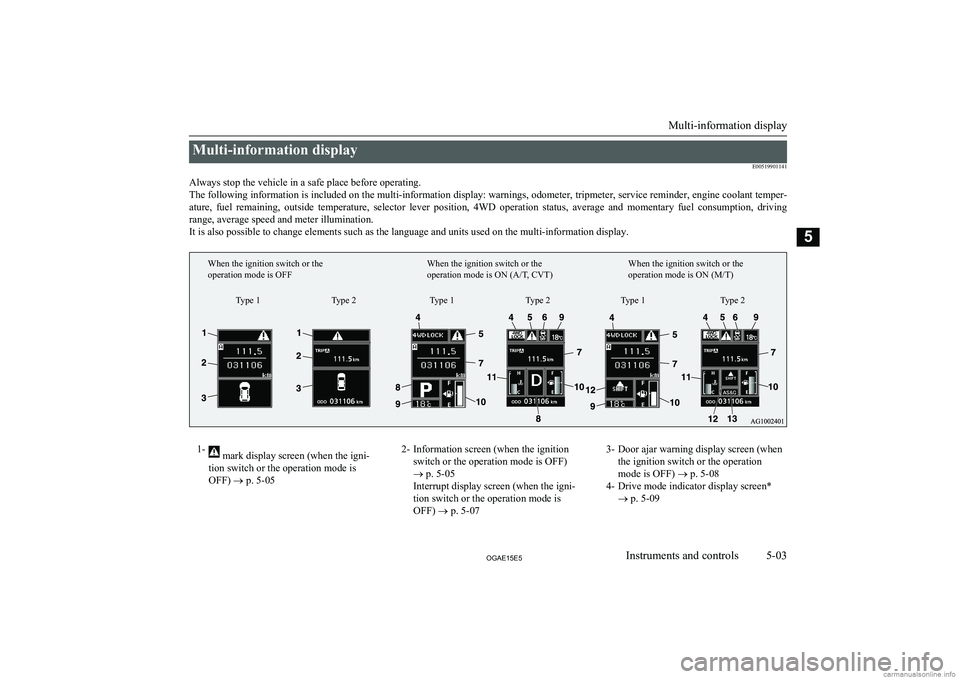
Multi-information displayE00519901141
Always stop the vehicle in a safe place before operating. The following information is included on the multi-information display: warnings, odometer, tripmeter, service reminder, engine coolant temper- ature, fuel remaining, outside temperature, selector lever position, 4WD operation status, average and momentary fuel consumption, driving
range, average speed and meter illumination. It is also possible to change elements such as the language and units used on the multi-information display.1- mark display screen (when the igni-
tion switch or the operation mode is
OFF) ® p. 5-052- Information screen (when the ignition
switch or the operation mode is OFF)
® p. 5-05
Interrupt display screen (when the igni-
tion switch or the operation mode is OFF) ® p. 5-073- Door ajar warning display screen (when
the ignition switch or the operation
mode is OFF) ® p. 5-08
4- Drive mode indicator display screen* ® p. 5-09
Multi-information display
5-03OGAE15E5Instruments and controls5Type 1
When the ignition switch or the
operation mode is OFF
When the ignition switch or the
operation mode is ON (A/T, CVT)When the ignition switch or the
operation mode is ON (M/T)
Type 2 Type 1 Type 2 Type 1 Type 2
Page 108 of 452

5- mark display screen (when the igni-
tion switch or the operation mode is ON)
® p. 5-09
6- Active Stability Control (ASC) OFF dis- play screen* ® p. 5-09
7- Information screen (when the ignition switch or the operation mode is ON)
® p. 5-10
Interrupt display screen (when the igni-
tion switch or the operation mode is ON)
® p. 5-148- Selector lever position display screen*
® p. 5-15
Gearshift indicator display screen* ® p. 6-29
9- Outside temperature display screen ® p. 5-15
10- Fuel remaining display screen ® p. 5-15
11- Engine coolant temperature display* ® p. 5-1112- Gearshift indicator display screen*
® p. 6-23
13- Auto Stop & Go (AS&G) display screen* ® p. 6-19
Auto Stop & Go (AS&G) OFF display
screen* ® p. 6-22NOTEl The fuel units, temperature units, display language, and other settings can be changed.
Refer to “Changing the function settings (when the ignition switch or the operation mode is ON)” on page 5-19.
l The display screen is different depending on whether the ignition switch or the operation mode is OFF or ON.
Refer to “Information screen (when the ignition switch or the operation mode is OFF)” on page 5-05.
Refer to “Warning display list (when the ignition switch or the operation mode is OFF)” on page 5-28.
Refer to “Information screen (when the ignition switch is turned from the “LOCK” position to the “ON” position or the operation mode is changed from OFF to ON)” on page 5-08.
Refer to “Information screen (when the ignition switch or the operation mode is ON)” on page 5-10.
Refer to “Warning display list (when the ignition switch or the operation mode is ON)” on page 5-32.
Multi-information display
5-04OGAE15E5Instruments and controls5
Page 109 of 452

Multi-information meterswitch
E00520000608
Each time the multi-information meter switch
is operated, a sound is emitted and the multi-
information display changes between infor- mation such as warnings, odometer (Type 1),
tripmeter, service reminder, engine coolant temperature (Type 1), average and momenta-
ry fuel consumption, driving range, and aver-
age speed.
It is also possible to change elements such as the language and units used on the multi-in-formation display by operating the multi-in-
formation meter switch.
mark display screen (when
the ignition switch or the oper- ation mode is OFF)
E00520100553
If you press the multi-infor-
mation meter switch and re-turn from the warning dis-
play screen to the previous screen, the
mark is dis-
played.
Refer to “To return to the screen displayed before the warning display” on page 5-07.
This mark is also displayed if there is another
warning other than the one displayed. When
the cause of the warning display is elimina- ted, the
mark goes out automatically.
NOTEl When the mark is displayed, the warning
display screen can be redisplayed on the in- formation screen.
Refer to “Information screen (when the igni-
tion switch or the operation mode is OFF)” on page 5-05.
Refer to “Information screen (when the igni- tion switch or the operation mode is ON)”
on page 5-10.Information screen (when the
ignition switch or the operation mode is OFF)
E00520200570
Each time you lightly press the multi-infor-
mation meter switch, the display screenswitches in the following order.
Type 1Type 2When there is no
warning displayWhen there is a
warning displayWhen there is no
warning displayWhen there is a
warning display
1- Odometer (Type 1)/Tripmeter
2- Odometer (Type 1)/Tripmeter
Multi-information display
5-05OGAE15E5Instruments and controls5
Page 116 of 452

NOTElThe display setting can be changed to the
preferred units (km or miles).
Refer to “Changing the function settings (when the ignition switch or the operationmode is ON)” on page 5-19.
.Average speed display
E00568600048
This displays the average speed from the last
reset to the present time.
There are the following 2 mode settings.
For the method for changing the average speed display setting, refer to “Changing the
function settings (when the ignition switch or
the operation mode is ON)” on page 5-19.
Manual reset mode
l When the average speed is being dis-
played, if you hold down the multi-infor-
mation meter switch, the average speed
displayed at that time is reset.
l When the following operation is per-
formed, the mode setting is automatical-
ly switched from manual to auto.
[Except for vehicles equipped with key-
less operation system]
Turn the ignition switch from the
“ACC” or “LOCK” position to the “ON” position.
[For vehicles equipped with keyless op-
eration system]
Change the operation mode from ACC or OFF to ON.
Switching to auto occurs automatically.
If switching to manual mode is done,
however, the data from the last reset is
displayed.
Auto reset mode l When the average speed is being dis-
played, if you hold down the multi-infor-
mation meter switch, the average speed displayed at that time is reset.l When the engine switch or the operation
mode is in the following conditions, the
average speed display is automatically
reset.
[Except for vehicles equipped with key-
less operation system]
The ignition switch is in the “ACC” or “LOCK” position for about 4 hours or
longer.NOTEl The average speed display and the average
fuel consumption display can be reset indi-vidually for the auto reset mode and manual
reset mode.
l “---” is displayed when the average speed
cannot be measured.
l The initial (default) setting is “Auto reset
mode”.
l The display setting can be changed to the
preferred units (km/h or mph).
Refer to “Changing the function settings (when the ignition switch is “ON”)” on page
5-19.
l The memory of the auto reset mode or man-
ual reset mode for the average speed display is erased if the battery is disconnected.Average fuel consumption dis-
play
E00568700049
This displays the average fuel consumption from the last reset to the present time.
Multi-information display
5-12OGAE15E5Instruments and controls5 Type 1 Type 2
Page 125 of 452

lWhen the engine switch or the operation
mode is in the following conditions, the
average fuel consumption display and
average speed display are automatically
reset.
[Except vehicles equipped with keyless
operation system]
The ignition switch is in the “ACC” or “LOCK” position for about 4 hours or
longer.
[For vehicles equipped with keyless op- eration system]
The operation mode is in ACC or OFF
for about 4 hours or longer.NOTEl The average fuel consumption display and
average speed display can be reset individu- ally for the auto reset mode and manual reset
mode.
l The memory of the auto reset mode or man-
ual reset mode for the average fuel con-sumption display and average speed display
is erased if the battery is disconnected.
l The initial (default) setting is “Auto reset
mode”.Changing the fuel consumption
display unit
E00523000579
The display unit for fuel consumption can be
switched. The distance, speed, and amount units are also switched to match the selected
fuel consumption unit. 1. Press and hold the multi-information
meter switch for about 2 seconds or more to switch from the setting mode
screen to the menu screen.
Refer to “Changing the function settings (when the ignition switch or the opera-
tion mode is ON)” on page 5-19.
2. Lightly press the multi-information me-
ter switch to select “AVG UNIT” (fuelconsumption display setting).
Type 1Type 23. Press and hold the multi-information
meter switch for about 2 seconds or more to display “AVG UNIT” (fuel con-
sumption display unit setting).
4. Lightly press the multi-information me-
ter switch to switch in sequence from
km/L → L/100 km → mpg (US) → mpg
(UK) → RETURN → km/L.Type 1Type 2
5. Press and hold the multi-information
meter switch for about 2 seconds or more to change the setting to the selec-
ted unit.
Multi-information display
5-21OGAE15E5Instruments and controls5
Page 381 of 452

No.Sym-bolElectrical sys- temCa-
paci- ties4Windscreen wipers30 A5Option10 A6Door locks20 A7Radio15 A8Control unit re- lay7.5 A9Interior lamps
(Room lamps)15 A10Hazard warning flasher15 A11Rear windowwiper15 A12Instruments7.5 A13
Cigarette lighter/Accessory sock- et
15 A14Ignition switch10 A15Sunroof20 A*: Fusible link
No.Sym-
bolElectrical sys- temCa-
paci- ties16Outside rear-view mirrors10 A174-wheel drive system10 A18Reversing lamps(Backup lamps)7.5 A19Accessory sock- et15 A20Electric windowcontrol30 A *21Rear window
demister30 A *22Heated door
mirror7.5 A23Passenger’spower seat25 (20) A24Driver’s power seat25 (20) A25Heated seat30 A*: Fusible link
l Some fuses may not be installed on your
vehicle, depending on the vehicle model
or specifications.
l The table above shows the main equip-
ment corresponding to each fuse.
Engine compartment fuse loca-
tion tableEngine compartment fuse locationBehind of the fuse block cover
No.Sym- bolElectrical sys- temCa-
paci- ties1Front fog lamps15 A* : Fusible link
Fuses
10-23OGAE15E5Maintenance10