2015 MITSUBISHI ASX service
[x] Cancel search: servicePage 98 of 452

WARNINGlDo not attach accessories to, or put them
in front of, the windscreen. These objects
could restrict the airbag inflation, or strike and injure an occupant if the air-
bags inflate.
l Do not attach additional keys or accesso-
ries (hard, pointed or heavy objects) tothe ignition key. Such objects could pre-
vent the driver’s knee airbag from inflat-
ing normally or could be propelled and
cause serious injury if the airbag inflates.
l Do not attach accessories to the lower
portion of the driver’s side instrument panel. Such objects could prevent the
driver’s knee airbag from inflating nor-
mally or could be propelled and cause se- rious injury if the airbag inflates.WARNINGl Do not put packages, pets or other objects
between the airbags and the driver orfront passenger. It could affect airbagperformance, or could cause injury when the airbag inflates.
l Right after the airbag inflation, several
airbag system components will be hot. Do
not touch these components. There is a danger of being burnt.
l The airbag system is designed to work on-
ly once. Once the airbags have deployed, they will not work again. They must
promptly be replaced, and we recommend you to have the entire airbag system in-
spected by a MITSUBISHI MOTORS
Authorized Service Point.Side airbag system*
E00407600303
The side airbags (A) are contained in the
driver and front passenger seatbacks.
The side airbag is designed to inflate only on
the side of the vehicle that is impacted, evenwith no passenger in the front seat.
The label shown here is attached to the seat- backs with a side airbag.
Supplemental restraint system (SRS) - airbag
4-32OGAE15E5Seat and seat belts4
Page 101 of 452

WARNINGlDo not allow any rear seat occupant to
hold onto the seatback of either front seat,
in order to reduce risk of injury from the
deploying side airbags. Special care
should be taken with children.
l Do not place any objects near or in front
of the seatback of either front seat. They could interfere with proper side airbag in-
flation, and also could cause injury if thrown free by side airbag deployment.
l Do not place stickers, labels or additional
trim on the seatback of either front seat.
They could interfere with proper side air- bag inflation.
l Do not install seat covers on seats with
side airbags. Do not re-cover seats that have side airbags. This could interfere
with proper side airbag inflation.
l Do not attach a microphone (A) or any
other device or object around the part where the curtain airbags (B) activate
such as on the windscreen, side door glass, front and rear pillars and roof side or as- sist grips. When the curtain airbags in-
flate, the microphone or other device or
object will be hurled with great force or the curtain airbags may not activate cor-
rectly, resulting in death or serious injury.WARNINGl Do not put a hanger or any heavy or poin-
ted object on the coat hook. If the curtain
airbag was activated, any such item could
be propelled away with great force and could prevent the curtain airbag from in-
flating correctly. Hang clothes directly on the coat hook (without using a hanger).
Make sure there are no heavy or sharp objects in the pockets of clothes that you
hang on the coat hook.
l Never install a rearward facing child re-
straint in the front passenger seat. A for-
ward facing child restraint should be used
in the rear seat whenever possible. If a forward facing child restraint must be used in the front passenger seat, adjust
the seat to the most rearward position,
and ensure that the child stays in the child
restraint and away from the door.WARNINGl Do not allow a child to lean against or
close to the front door even if the child is seated in a child restraint system.
The child’s head should also not be leaned
against or be close to the area where the
side airbags and curtain airbags are loca- ted. It is dangerous if the side airbags andcurtain airbags inflate.
Failure to follow all of these instructions
could lead to serious or fatal injury to the
child.
l We recommend work around and on the
side airbags and curtain airbags system to
be done by a MITSUBISHI MOTORS
Authorized Service Point.
Supplemental restraint system (SRS) - airbag
4-35OGAE15E5Seat and seat belts4
Page 102 of 452

SRS warning lamp/display
E00407802790
Warning lampWarning display type 1Warning display type 2
The system checks itself every time the igni-
tion switch is turned to the “ON” position or the operation mode is put in ON. The SRSwarning lamp will come on for several sec-
onds and then go out. This is normal and
means the system is working properly.
If there is a problem involving one or more of
the SRS components, the warning lamp will come on and stay on. At the same time, thewarning display will appear on the informa-
tion screen in the multi-information display.
The SRS warning lamp/display is shared by
the SRS airbag and the seat belt pretensioner system.WARNINGl If any of the following conditions occur,
there may be a problem with the SRS air- bags and/or seat belt pretensioners, and they may not function properly in a colli-
sion or may suddenly activate without a
collision:
• Even when the ignition switch or the
operation mode is in ON, the SRS
warning lamp does not come on or it
remains on.
• The SRS warning lamp and/or the
warning display comes on while driv-ing.
The SRS airbags and seat belt pretension-
ers are designed to help reduce the risk of serious injury or death in certain colli-sions. If either of the above conditions oc-
curs, immediately have your vehicle
checked by a MITSUBISHI MOTORS
Authorized Service Point.SRS servicing
E00407901521
WARNINGl We recommend any maintenance per-
formed on or near the components of the
SRS to be performed by a MITSUBISHI
MOTORS Authorized Service Point.
Improper work on the SRS components or wiring could result in inadvertent de-
ployment of the airbags, or could render
the SRS inoperative; either situation could result in serious injury.
l Do not modify your steering wheel, seat
belt retractor or any other SRS compo-
nents. For example, replacement of the
steering wheel, or modifications to the
front bumper or body structure can ad- versely affect SRS performance and lead
to possible injury.
l If your vehicle has sustained any damage,
we recommend you to have the SRS in- spected to ensure it is in proper workingorder.
Supplemental restraint system (SRS) - airbag
4-36OGAE15E5Seat and seat belts4
Page 103 of 452

WARNINGlOn vehicles with the side airbags, do not
modify your front seats, centre pillar and centre console.
It can adversely affect SRS performance and lead to possible injury.
If you found any tear, scratch, crack or
damage to the seat fabric near the side
airbag, the portion of the front and rear pillars and roof side rail, you should havethe SRS inspected by a MITSUBISHI
MOTORS Authorized Service Point.NOTEl When you transfer ownership of the vehicle
to some other person, we urge you to alert
the new owner that it is equipped with the SRS and refer the new owner to the applica- ble section in this owner’s manual.
l If your vehicle has to be scrapped, do this in
line with local legislation and contact a MITSUBISHI MOTORS Authorized Serv-
ice Point to safely dismantle the airbag sys-
tem.
Supplemental restraint system (SRS) - airbag
4-37OGAE15E5Seat and seat belts4
Page 107 of 452
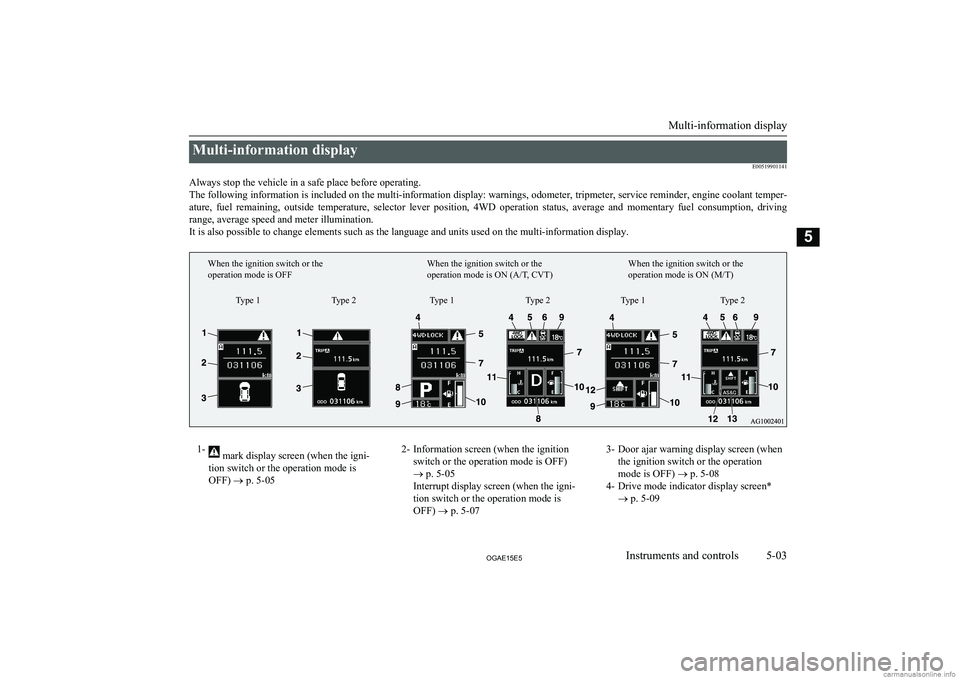
Multi-information displayE00519901141
Always stop the vehicle in a safe place before operating. The following information is included on the multi-information display: warnings, odometer, tripmeter, service reminder, engine coolant temper- ature, fuel remaining, outside temperature, selector lever position, 4WD operation status, average and momentary fuel consumption, driving
range, average speed and meter illumination. It is also possible to change elements such as the language and units used on the multi-information display.1- mark display screen (when the igni-
tion switch or the operation mode is
OFF) ® p. 5-052- Information screen (when the ignition
switch or the operation mode is OFF)
® p. 5-05
Interrupt display screen (when the igni-
tion switch or the operation mode is OFF) ® p. 5-073- Door ajar warning display screen (when
the ignition switch or the operation
mode is OFF) ® p. 5-08
4- Drive mode indicator display screen* ® p. 5-09
Multi-information display
5-03OGAE15E5Instruments and controls5Type 1
When the ignition switch or the
operation mode is OFF
When the ignition switch or the
operation mode is ON (A/T, CVT)When the ignition switch or the
operation mode is ON (M/T)
Type 2 Type 1 Type 2 Type 1 Type 2
Page 109 of 452

Multi-information meterswitch
E00520000608
Each time the multi-information meter switch
is operated, a sound is emitted and the multi-
information display changes between infor- mation such as warnings, odometer (Type 1),
tripmeter, service reminder, engine coolant temperature (Type 1), average and momenta-
ry fuel consumption, driving range, and aver-
age speed.
It is also possible to change elements such as the language and units used on the multi-in-formation display by operating the multi-in-
formation meter switch.
mark display screen (when
the ignition switch or the oper- ation mode is OFF)
E00520100553
If you press the multi-infor-
mation meter switch and re-turn from the warning dis-
play screen to the previous screen, the
mark is dis-
played.
Refer to “To return to the screen displayed before the warning display” on page 5-07.
This mark is also displayed if there is another
warning other than the one displayed. When
the cause of the warning display is elimina- ted, the
mark goes out automatically.
NOTEl When the mark is displayed, the warning
display screen can be redisplayed on the in- formation screen.
Refer to “Information screen (when the igni-
tion switch or the operation mode is OFF)” on page 5-05.
Refer to “Information screen (when the igni- tion switch or the operation mode is ON)”
on page 5-10.Information screen (when the
ignition switch or the operation mode is OFF)
E00520200570
Each time you lightly press the multi-infor-
mation meter switch, the display screenswitches in the following order.
Type 1Type 2When there is no
warning displayWhen there is a
warning displayWhen there is no
warning displayWhen there is a
warning display
1- Odometer (Type 1)/Tripmeter
2- Odometer (Type 1)/Tripmeter
Multi-information display
5-05OGAE15E5Instruments and controls5
Page 110 of 452

3- Service reminder
4- Redisplay of a warning display screenOdometer/Tripmeter
E00521201516
Each time you lightly press the multi-infor- mation meter switch, the display screenswitches.
Odometer/Tripmeter
→ Odometer/Trip-
meter
→ Service reminder → Redisplay
of a warning display screen → Odometer/ Tripmeter
Odometer
The odometer indicates the distance travel-led.
Tripmeter
The tripmeter indicates the distance travelled
between two points.
Example usage of tripmeter
and tripmeter
It is possible to measure two currently
travelled distances, from home using
tripmeter
and from a particular point
on the way using tripmeter
.
To reset the tripmeter
To return the display to 0, hold down the
multi-information meter switch for about 2
seconds or more. Only the currently dis-
played value will be reset.
Example
If tripmeter
is displayed, only tripmeter
will be reset.
Type 1Type 2
NOTEl If there is no warning display, the switching
sequence is: Odometer/Tripmeter →
Odometer/Tripmeter
→ Service remind-
er → Odometer/Tripmeter
.
l Both tripmeters
and can count up to
9999.9 km (9999.9 miles).
When a tripmeter goes past 9999.9 km
(9999.9 miles), it returns to 0.0 km (0.0 miles).
l When disconnecting the battery terminal, the
memories of tripmeter display
and dis-
play
are erased, and their displays return
to 0.0 km (0.0 miles).
Service reminder
E00521301126
This displays the distance
and number of months until
the next periodic inspection. Refer to “Service reminder” on page 5-16.
Multi-information display
5-06OGAE15E5Instruments and controls5 Type 1Type 2
Page 113 of 452

Service reminder
When the time for periodic inspection ar-rives, the warning display is displayed for a
few seconds after the ignition switch or the operation mode ON screen. Refer to “Service
reminder” on page 5-16.
Type 1
Type 2
Drive mode indicator display
screen*
E00520800303
This displays the 4WD sta-
tus.
If you select “4WD LOCK” mode with the drive mode
selector, “4WD LOCK” is
displayed; if you select
“4WD AUTO” mode, “4WD” is displayed.
Nothing is displayed when
2WD mode is selected. Refer
to “Drive mode selector” on page 6-39.
mark display screen (when
the ignition switch or the oper- ation mode is ON)
E00520900333
This is displayed when you press the multi-information
meter switch and switch the
warning display screen. This mark is also displayed
if there is another warning
other than the one displayed.
When the cause of the warning display is eliminated, the
mark goes out automatical-
ly.
NOTEl When the mark is displayed, the warning
display screen can be redisplayed on the in- formation screen.
Refer to “Information screen (when the igni-
tion switch or the operation mode is OFF)” on page 5-05.
Refer to “Information screen (when the igni- tion switch or the operation mode is ON)”
on page 5-10.Active Stability Control (ASC)
OFF display screen*
E00521000373
This is displayed when the Active Stability Control(ASC) is turned off with the
ASC OFF switch.
If there is a fault with the ASC, the ASC OFF display
is shown.
Refer to ““ASC OFF” switch” on page 6-52.
Multi-information display
5-09OGAE15E5Instruments and controls5 Type 1Type 2