2015 MINI Hardtop 2 Door warning lights
[x] Cancel search: warning lightsPage 99 of 251

The DSC system is switched off.
Activating DSC Press button.
DSC OFF and the DSC OFF indicator
lamp go out.
Indicator/warning lights
When DSC is deactivated, DSC OFF is displayed
in the instrument cluster.
The indicator lamp lights up: DSC is de‐
activated.
Automatic activation When DSC is deactivated, automatic activation
occurs in the following situations:▷The vehicle has a flat tire.▷When activating cruise control in TRACTION
or DSC OFF mode.
DTC Dynamic Traction
Control
The concept
The DTC system is a version of the DSC where
forward momentum is optimized.
The system ensures maximum headway on
special road conditions or loose road surfaces,
e.g., unplowed snowy roads, but with some‐
what limited driving stability.
Activating the Dynamic Traction Control DTC
provides maximum traction. Driving stability is
limited during acceleration and when driving in
curves.
Therefore drive with appropriate caution.
You may find it useful to briefly activate DTC
under the following special circumstances:
▷When driving in slush or on uncleared,
snow-covered roads.▷When freeing vehicle from deep snow or
driving off from loose grounds.▷When driving with snow chains.
Deactivating/activating DTC Dynamic
Traction Control
Activating DTC Press button.
TRACTION is displayed in the instru‐
ment cluster and the indicator lamp for DSC
OFF lights up.
Deactivating DTC Press button again.
TRACTION and the DSC OFF indicator
lamp go out.
Performance Control
Performance Control enhances the agility of the
vehicle.
To increase maneuverability, with a corre‐
spondingly sporty driving style, wheels are
braked individually.
Dynamic Damping Con‐
trol
The concept
The tuning of the suspension can be changed
with the system.
Programs
The system offers several different programs.
Select the programs via the Driving Dynamics
Control, refer to page 96.
Seite 95Driving stability control systemsCONTROLS95
Online Edition for Part no. 01 40 2 961 140 - II/15
Page 105 of 251

lected distance is briefly displayed in the info
display.
In the following cases, the stored speed value is
deleted and cannot be called up again:▷When the system is switched off.▷When the ignition is switched off.
Changing between cruise control with/
without distance control
Traffic ahead
The cruise control does not react to traffic
driving ahead of you, but instead maintains the
stored speed. Take this factor into account – you yourself must react; otherwise, there is the
risk of an accident. ◀
To reel over to cruise control: Press and hold this button, or
Press and hold this button.
The indicator lamp in the instrument
cluster comes on and check-control
message is displayed as soon as the reel
is made to cruise control.
To reel back to the camera-based cruise con‐
trol, press one of the buttons.
Displays in the instrument cluster
Desired speed In addition to the indicator lamp, the
desired speed is displayed in the central
information display.
▷The indicator lights up green: the system is
active.▷The indicator lights up orange: the system
has been interrupted.▷No display: system is switched off.Brief status display
Selected desired speed.
If --- appears briefly on the display for Check
Control messages, it is possible that the system
requirements are currently not ready for opera‐
tions.
Distance to vehicle ahead of you Selected distance from the vehicle driving
ahead is briefly displayed in the left hand por‐
tion of the info display.Distance displayDistance 1Distance 2Distance 3Distance 4
This value is set after the system is
switched on.
Indicator/warning lights
Personal responsibility
The indicator and warning lights do not
relieve the driver of the responsibility to adapt
his or her desired driving speed and style to the
traffic conditions. ◀
The vehicle symbol lights up orange:
A vehicle has been detected ahead of
you.
The vehicle symbol flashes orange:
The conditions are not adequate for the
system to work.
The system was deactivated but applies the
brakes until you actively resume control by
Seite 101Driving comfortCONTROLS101
Online Edition for Part no. 01 40 2 961 140 - II/15
Page 111 of 251

Switching on/off manuallyPress button.▷On: the LED lights up.▷Off: the LED goes out.
Display
Signal tones
When approaching an object, an intermittent
sound indicates the position of the object. E. g.
if an object is detected to the left rear of the ve‐
hicle, a signal tone sounds from the left rear
speaker.
The shorter the distance to the object, the
shorter the intervals.
If the distance to a detected object is less than
approx. 10 in/25 cm, a continuous tone is
sounded.
If objects are located both in front of and to the
rear of the vehicle, an alternating continuous
signal is sounded.
The signal tone is switched off, when selector
lever position P is engaged on vehicles with
Steptronic transmission.
Volume
The volume of the PDC signal tone can be ad‐
justed similar to the sound and volume settings
of the radio.
Settings are stored for the profile currently in
use.
System limits
Limits of ultrasonic measurement
Ultrasonic measuring might not function under
the following circumstances:
▷For small children and animals.▷For persons with certain clothing, e.g.
coats.▷With external interference of the ultra‐
sound, e.g. from passing vehicles or loud
machines.▷When sensors are dirty, iced over, damaged
or out of position.▷Under certain weather conditions such as
high relative humidity, rain, snowfall, ex‐
treme heat or strong wind.▷With tow bars and trailer couplings of other
vehicles.▷With thin or wedge-shaped objects.▷With moving objects.▷With elevated, protruding objects such as
ledges or cargo.▷With objects with corners and sharp edges.▷With objects with a fine surface structure
such as fences.▷For objects with porous surfaces.
Low objects already displayed, e.g., curbs, can
move into the blind area of the sensors before
or after a continuous tone sounds.
False warnings
PDC may issue a warning under the following
conditions even though there is no obstacle
within the detection range:
▷In heavy rain.▷When sensors are very dirty or covered with
ice.▷When sensors are covered in snow.▷On rough road surfaces.▷On uneven surfaces, such as speed bumps.▷In large buildings with right angles and
smooth walls, e.g., in underground garages.▷In automatic car washes.▷Through heavy pollution.▷Due to other ultrasound sources, e.g.,
sweeping machines, high pressure steam
cleaners or neon lights.Seite 107Driving comfortCONTROLS107
Online Edition for Part no. 01 40 2 961 140 - II/15
Page 195 of 251
Never reach into the engine compart‐
ment
Never reach into spaces or gaps in the engine
compartment; otherwise, there is a risk of in‐
jury, e.g., from rotating or hot parts. ◀
Fold down wiper arm
Before opening the hood, ensure that the
wiper arms are against the windshield, or this
may result in damage. ◀
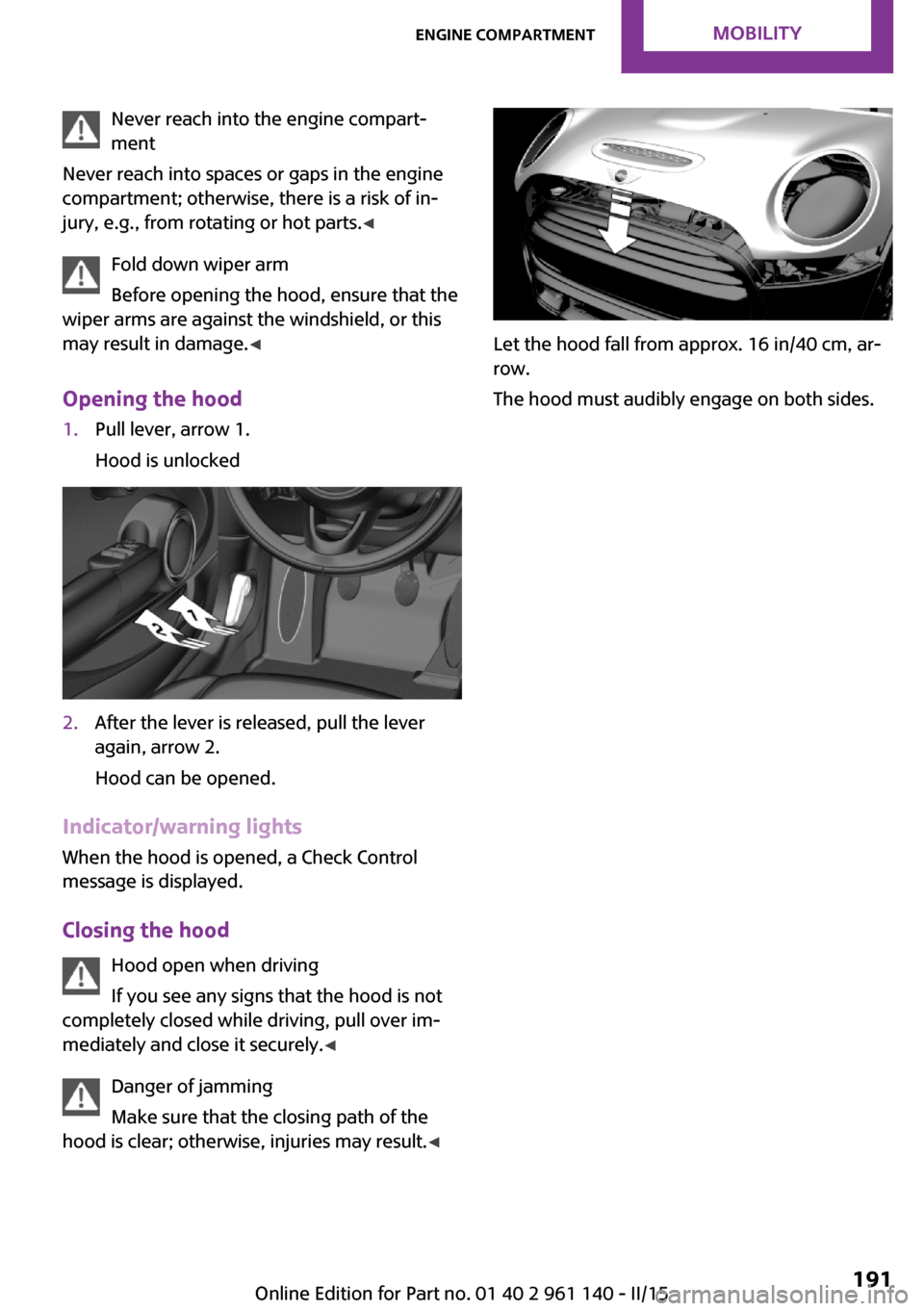
Opening the hood1.Pull lever, arrow 1.
Hood is unlocked2.After the lever is released, pull the lever
again, arrow 2.
Hood can be opened.
Indicator/warning lights
When the hood is opened, a Check Control
message is displayed.
Closing the hood Hood open when driving
If you see any signs that the hood is not
completely closed while driving, pull over im‐
mediately and close it securely. ◀
Danger of jamming
Make sure that the closing path of the
hood is clear; otherwise, injuries may result. ◀
Let the hood fall from approx. 16 in/40 cm, ar‐
row.
The hood must audibly engage on both sides.
Seite 191Engine compartmentMOBILITY191
Online Edition for Part no. 01 40 2 961 140 - II/15
Page 202 of 251
Socket for OBD Onboard
Diagnosis
Note Socket for Onboard Diagnosis
The socket for onboard diagnostics may
only be used by the service center or a work‐
shop that operates in accordance with the
specifications of the vehicle manufacturer with
correspondingly trained personnel and other
authorized persons. Otherwise, use may result
in operating problems for the vehicle. ◀
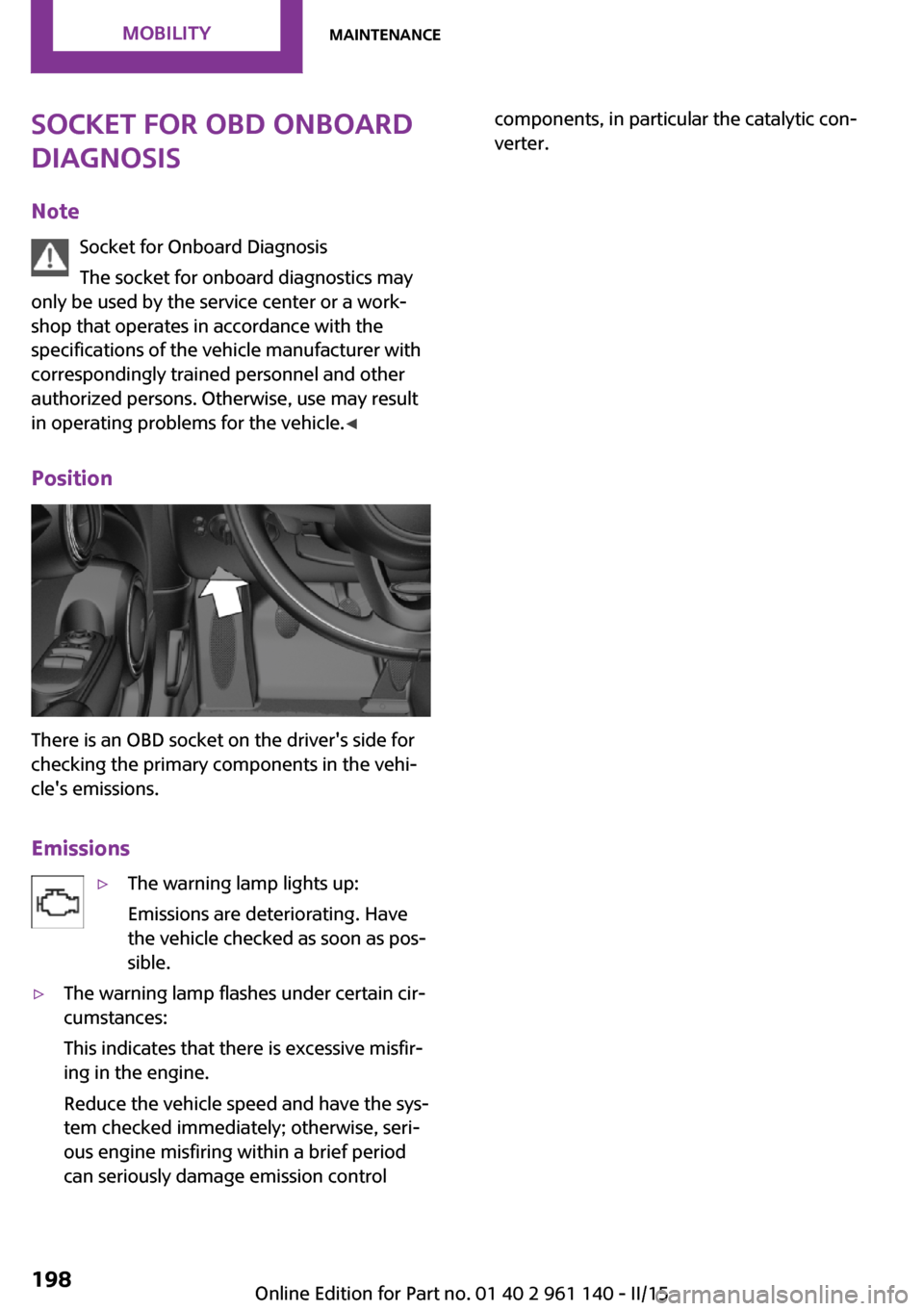
Position
There is an OBD socket on the driver's side for
checking the primary components in the vehi‐
cle's emissions.
Emissions
▷The warning lamp lights up:
Emissions are deteriorating. Have
the vehicle checked as soon as pos‐
sible.▷The warning lamp flashes under certain cir‐
cumstances:
This indicates that there is excessive misfir‐
ing in the engine.
Reduce the vehicle speed and have the sys‐
tem checked immediately; otherwise, seri‐
ous engine misfiring within a brief period
can seriously damage emission controlcomponents, in particular the catalytic con‐
verter.Seite 198MOBILITYMaintenance198
Online Edition for Part no. 01 40 2 961 140 - II/15
Page 242 of 251

Everything from A to ZIndexA
ABS, Antilock Brake Sys‐ tem 94
ACC, Active Cruise Control 98
Acceleration Assistant, refer to Launch Control 58
Activated-charcoal filter 117
Active Cruise Control, ACC 98
Additives, oil 193
Adjustments, seats/head re‐ straints 35
Adjustments, steering wheel 42
After washing vehicle 217
Airbags 78
Airbags, indicator/warning light 79
Air circulation, refer to Recir‐ culated-air mode 113, 117
Air conditioner 112
Air, dehumidifying, refer to Cooling function 113, 116
Air distribution, manual 113, 116
Air flow, air conditioner 113
Air flow, automatic climate control 116
Air pressure, tires 176
Air vents, refer to Ventila‐ tion 118
Alarm system 30
Alarm triggering 30
Alarm, unintentional 31
All around the center con‐ sole 16
All around the roofliner 17
All around the steering wheel 14
All-season tires, refer to Win‐ ter tires 184 Alternating-code hand-held
transmitter 120
Alternative oil types 194
Antifreeze, washer fluid 54
Antilock Brake System, ABS 94
Anti-slip control, refer to DSC 94
Apple iPod/iPhone 155
Approved axle load 223
Approved engine oils, see Suitable engine oil
types 194
Ash tray 123
Assistance when driving off 97
Assist system, refer to Intelli‐ gent Safety 86
AUTO intensity 116
Automatic car wash 216
Automatic climate con‐ trol 115
Automatic Curb Monitor 41
Automatic deactivation, front- seat passenger airbags 80
Automatic headlight con‐ trol 74
Automatic locking 29
Automatic recirculated-air control 117
Automatic transmission with Steptronic 55
AUTO program, automatic cli‐ mate control 116
AUTO program, intensity 116
Auto Start/Stop function 49
AUX-IN port 154
Average fuel consumption 68
Average speed 68
Axle loads, weights 223 B
Backrest curvature, refer to Lumbar support 36
Balance 148
Band-aids, refer to First aid kit 211
Bar for tow-starting/ towing 214
Bass 148
Battery replacement, vehicle battery 209
Battery, vehicle 209
Belts, safety belts 37
Beverage holder, cu‐ pholder 128
Bluetooth, refer to Hands-free system 162
Bonus range, GREEN mode 143
Bottle holder, refer to Cu‐ pholder 128
Brake assistant 94
Brake discs, break-in 134
Brake pads, break-in 134
Braking, hints 135
Breakdown assistance 211
Break-in 134
Bug light 201
Bulb replacement 200
Bulb replacement, front 201
Bulb replacement, rear 203
Bulb replacement, side 206
Bulbs and lights 200
Button, RES 100
Button, Start/Stop 47
Bypassing, refer to Jump- starting 211 Seite 238REFERENCEEverything from A to Z238
Online Edition for Part no. 01 40 2 961 140 - II/15
Page 243 of 251

C
California Proposition 65 Warning 7
Camera-based cruise control, ACC 98
Camera lenses, care 219
Can holder, refer to Cu‐ pholder 128
Car battery 209
Car care products 217
Care, displays 219
Care, vehicle 217
Cargo area 124
Cargo area, adapting size 129
Cargo area, enlarging 125
Cargo area lid 27
Cargo area, storage compart‐ ments 129
Cargo cover 124
Cargo, securing 138
Cargo straps, securing cargo 138
Car key, refer to Remote con‐ trol 22
Carpet, care 219
Car wash 216
Catalytic converter, refer to Hot exhaust system 135
CBS Condition Based Serv‐ ice 197
Center armrest 128
Center console 16
Central instrument cluster, LED ring 70
Central locking system 26
Changes, technical, refer to Safety 7
Changing parts 199
Changing the station 150
Changing wheels 206
Changing wheels/tires 183
Chassis number, see vehicle identification number 9
Check Control 60 Checking the oil level elec‐
tronically 192
Children, seating position 43
Children, transporting safely 43
Child restraint fixing sys‐ tem 43
Child restraint fixing system LATCH 44
Child restraint fixing systems, mounting 43
Child safety locks 46
Child seat, mounting 43
Child seats 43
Chrome parts, care 218
Chrono package, cockpit 70
Cigarette lighter 123
Cleaning, displays 219
Climate control 112, 115
Clock 64
Closing/opening via door lock 26
Closing/opening with remote control 24
Clothes hooks 129
Coasting 144
Coasting with engine decou‐ pled, coasting 144
Coasting with idling en‐ gine 144
Combination reel, refer to Turn signals 52
Combination reel, refer to Wiper system 52
Comfort Access 27
Compartments in the doors 128
Compass 121
Compressor 185
Computer, refer to On-board computer 67
Condensation on win‐ dows 117
Condensation under the vehi‐ cle 136 Condition Based Service
CBS 197
Confirmation signal 29
Control systems, driving stabil‐ ity 94
Convenient opening 24
Coolant 195
Cooling function 113, 116
Cooling, maximum 116
Cooling system 195
Cornering lamp 75
Corrosion on brake discs 136
Cosmetic mirror 123
Courtesy lamps during unlock‐ ing 24
Courtesy lamps with the vehi‐ cle locked 25
Cruise control 104
Cruise control, active 98
Cruising range 64
Cupholder 128
Current fuel consumption 65
D
Damage, tires 182
Damping control, dynamic 95
Data, technical 222
Date 64
Date, radio 69
Date, setting on radio 69
Daytime running lights 74
Defrosting, refer to defrosting the windows 113
Defrosting, refer to Windows, defrosting 117
Defrosting the windows 113
Dehumidifying, air 113, 116
Digital clock 64
Digital compass 121
Digital radio 151
Dimensions 222
Dimmable exterior mirrors 41
Dimmable interior rearview mirror 42 Seite 239Everything from A to ZREFERENCE239
Online Edition for Part no. 01 40 2 961 140 - II/15
Page 245 of 251
Formats, setting 69
Front airbags 78
Front-end collision warning with City Braking func‐
tion 87
Front fog lights 76
front-seat passenger airbags, automatic deactivation 80
Front-seat passenger airbags, indicator lamp 80
FTM Flat Tire Monitor 84
Fuel 174
Fuel consumption, current 65
Fuel consumption, refer to Average fuel consump‐
tion 68
Fuel filler flap 172
Fuel gauge 64
Fuel lid 172
Fuel quality 174
Fuel recommendation 174
Fuel, tank capacity 226
Fuse 210
G Garage door opener, refer to Universal Integrated Remote
Control 119
Gasoline 174
Gear change, Steptronic trans‐ mission 56
Gear shift indicator 65
General driving notes 134
Glare shield 123
Glass sunroof, refer to Panor‐ amic glass sunroof 32
Glove compartment 127
Gong, volume equaliza‐ tion 148
GREEN mode 142
GREEN mode, bonus range 143
GREEN mode indicator 142
GREEN - program, driving dy‐ namics 96 GREEN tip 144
Gross vehicle weight, ap‐ proved 223
Ground clearance 136
H
Halogen headlights 201
Handbrake, refer to parking brake 51
Hand-held transmitter, alter‐ nating code 120
Hands-free system 162
Hazard warning flashers 211
HD Radio 151
Head airbags 78
Headlight control, auto‐ matic 74
Headlight courtesy delay fea‐ ture 74
Headlight flasher 52
Headlight glass 200
Headlights, care 217
Head restraints 35
Head restraints, front 38
Head restraints, rear 39
Heavy cargo, stowing 138
High-beam Assistant 75
High beams 52
High beams/low beams, refer to High-beam Assistant 75
Hills 136
Hill start assistant, refer to Drive-off assistant 97
Hints 6
Holder for beverages 128
Homepage 6
Hood 190
Horn 14
Hot exhaust system 135
Hydroplaning 135
I Ice warning, see External tem‐ perature warning 64 Icy roads, see External tem‐
perature warning 64
Identification marks, tires 180
Identification number, see ve‐ hicle identification number 9
Ignition key, refer to Remote control 22
Ignition off 47
Ignition on 47
Illuminated ring, central in‐ strument cluster 70
Indication of a flat tire 82, 85
Indicator lamp, see Check Control 60
Individual air distribu‐ tion 113, 116
Individual settings, refer to Personal Profile 23
Inflation pressure, tires 176
Inflation pressure warning, tires 84
Info display, refer to On-Board computer 67
Initialize, Tire Pressure Moni‐ tor TPM 82
Initializing, Flat Tire Monitor FTM 85
Instrument cluster 59
Instrument cluster, electronic displays 60
Instrument lighting 76
Integrated key 22
Intelligent Safety 86
Intensity, AUTO program 116
Interior equipment 119
Interior lights 76
Interior lights during unlock‐ ing 24
Interior lights with the vehicle locked 25
Interior motion sensor 31
Interior rearview mirror, auto‐ matic dimming feature 42
Interior rearview mirror, com‐ pass 121 Seite 241Everything from A to ZREFERENCE241
Online Edition for Part no. 01 40 2 961 140 - II/15