2015 MERCEDES-BENZ S-Class lane assist
[x] Cancel search: lane assistPage 312 of 502
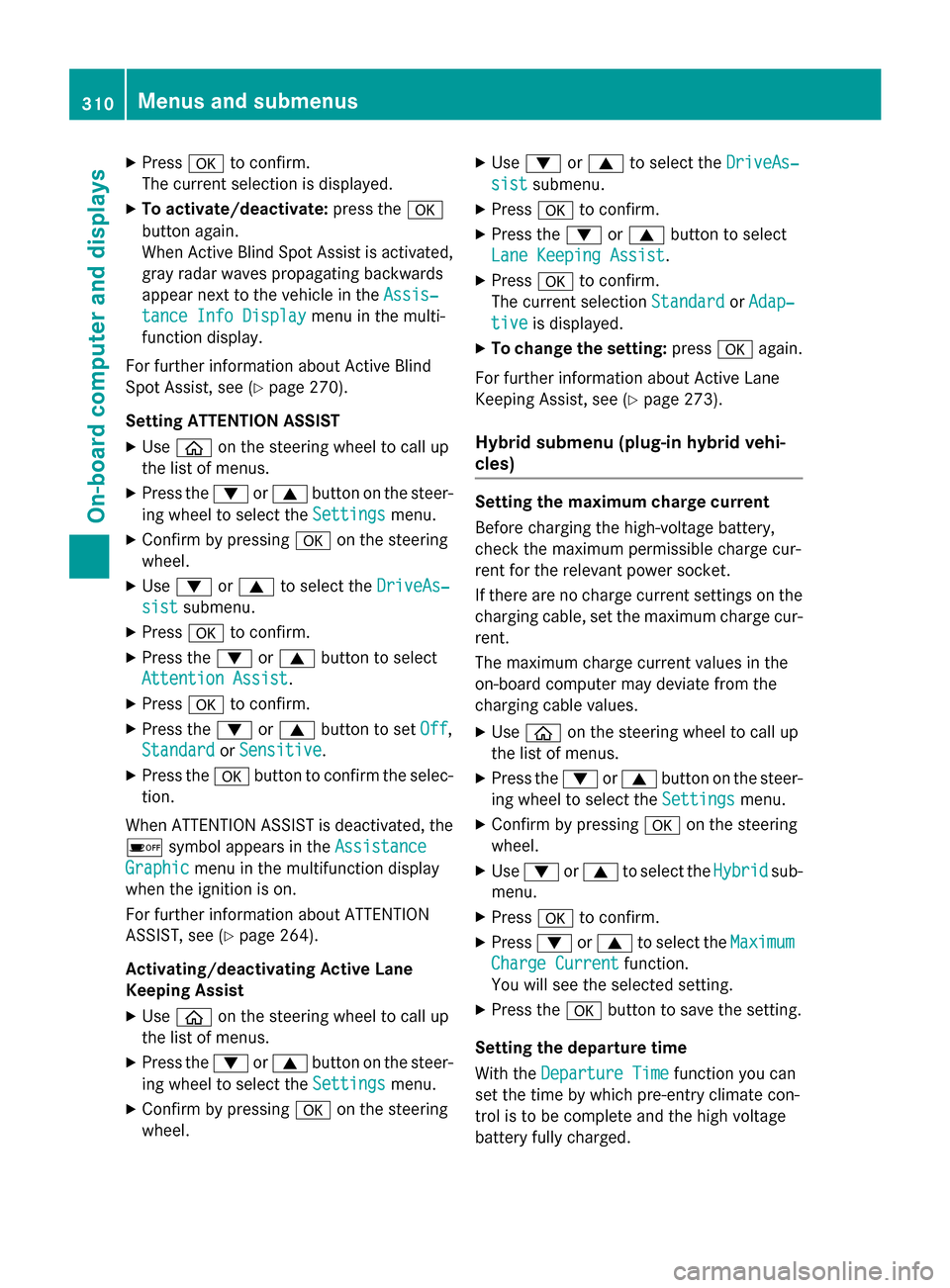
X
Press ato confirm.
The current selection is displayed.
X To activate/deactivate: press thea
button again.
When Active Blind Spot Assist is activated, gray radar waves propagating backwards
appear next to the vehicle in the Assis‐
Assis‐
tance Info Display tance Info Display menu in the multi-
function display.
For further information about Active Blind
Spot Assist, see (Y page 270).
Setting ATTENTION ASSIST X Use ò on the steering wheel to call up
the list of menus.
X Press the :or9 button on the steer-
ing wheel to select the Settings Settingsmenu.
X Confirm by pressing aon the steering
wheel.
X Use : or9 to select the DriveAs‐
DriveAs‐
sist
sist submenu.
X Press ato confirm.
X Press the :or9 button to select
Attention Assist
Attention Assist.
X Press ato confirm.
X Press the :or9 button to set Off
Off,
Standard
Standard orSensitive
Sensitive .
X Press the abutton to confirm the selec-
tion.
When ATTENTION ASSIST is deactivated, the é symbol appears in the Assistance
Assistance
Graphic
Graphic menu in the multifunction display
when the ignition is on.
For further information about ATTENTION
ASSIST, see (Y page 264).
Activating/deactivating Active Lane
Keeping Assist X Use ò on the steering wheel to call up
the list of menus.
X Press the :or9 button on the steer-
ing wheel to select the Settings Settingsmenu.
X Confirm by pressing aon the steering
wheel. X
Use : or9 to select the DriveAs‐
DriveAs‐
sist
sist submenu.
X Press ato confirm.
X Press the :or9 button to select
Lane Keeping Assist
Lane Keeping Assist.
X Press ato confirm.
The current selection Standard
StandardorAdap‐
Adap‐
tive
tive is displayed.
X To change the setting: pressaagain.
For further information about Active Lane
Keeping Assist, see (Y page 273).
Hybrid submenu (plug-in hybrid vehi-
cles) Setting the maximum charge current
Before charging the high-voltage battery,
check the maximum permissible charge cur-
rent for the relevant power socket.
If there are no charge current settings on the charging cable, set the maximum charge cur-
rent.
The maximum charge current values in the
on-board computer may deviate from the
charging cable values.
X Use ò on the steering wheel to call up
the list of menus.
X Press the :or9 button on the steer-
ing wheel to select the Settings
Settings menu.
X Confirm by pressing aon the steering
wheel.
X Use : or9 to select the Hybrid Hybridsub-
menu.
X Press ato confirm.
X Press :or9 to select the Maximum
Maximum
Charge Current
Charge Current function.
You will see the selected setting.
X Press the abutton to save the setting.
Setting the departure time
With the Departure Time Departure Time function you can
set the time by which pre-entry climate con-
trol is to be complete and the high voltage
battery fully charged. 310
Menus and submenusOn-board computer and displays
Page 319 of 502

Safety systems
Display messages
Possible causes/consequences and
M
MSolutions !÷
Currently Unavail‐ Currently Unavail‐
able See Opera‐ able See Opera‐
tor's Manual tor's Manual ABS (Anti-lock Brake System), ESP
®
(Electronic Stability Program),
BAS (Brake Assist), PRE‑ SAFE®
, the HOLD function, Hill Start
Assist, Crosswind Assist, STEER CONTROL, Active Lane Keeping
Assist and Active Blind Spot Assist are temporarily unavailable.
BAS PLUS with Cross-Traffic Assist, PRE‑ SAFE®
Brake, PRE‑ SAFE®
PLUS and COLLISION PREVENTION ASSIST PLUS may also have
failed.
In addition, the ÷and! warning lamps light up in the
instrument cluster.
ATTENTION ASSIST is deactivated.
For example, the on-board voltage may be insufficient.
G WARNING
The brake system continues to function normally, but without the functions listed above. The wheels could therefore lock if you
brake hard, for example.
The steerability and braking characteristics may be severely affec-ted. The braking distance in an emergency braking situation can
increase.
If ESP ®
is not operational, ESP ®
is unable to stabilize the vehicle.
There is an increased risk of skidding and an accident.
X Drive on carefully.
Carefully drive a suitable distance, making slight steering move-
ments at a speed above 12 mph (20 km/h).
If the display message disappears, the functions mentioned
above are available again.
If the display message continues to be displayed: X Drive on carefully.
X Visit a qualified specialist workshop. !÷
Inoperative See Inoperative See
Operator's Manual Operator's Manual ABS, ESP
®
, BAS, PRE‑SAFE ®
, the HOLD function, Hill Start Assist,
Crosswind Assist, STEER CONTROL, Active Lane Keeping Assist
and Active Blind Spot are unavailable due to a malfunction.
BAS PLUS with Cross-Traffic Assist, PRE‑SAFE ®
Brake, PRE‑SAFE ®
PLUS and COLLISION PREVENTION ASSIST PLUS may also have
failed.
The $ (USA only)/J (Canada only),÷and! warning
lamps in the instrument cluster may also light up.
ATTENTION ASSIST is deactivated.
G WARNING Display messages
317On-board computer and displays Z
Page 320 of 502

Display messages
Possible causes/consequences and
M
MSolutions The brake system continues to function normally, but without the
functions listed above. The wheels could therefore lock if you
brake hard, for example.
The steerability and braking characteristics may be severely affec- ted. The braking distance in an emergency braking situation can
increase.
If ESP ®
is not operational, ESP ®
is unable to stabilize the vehicle.
There is an increased risk of skidding and an accident.
X Drive on carefully.
X Visit a qualified specialist workshop immediately. ÷
Inoperative See Inoperative See
Operator's Manual Operator's Manual ESP
®
, BAS, PRE ‑SAFE®
, the HOLD function, Hill Start Assist,
Crosswind Assist, STEER CONTROL, Active Lane Keeping Assist
and Active Blind Spot are unavailable due to a malfunction.
BAS PLUS with Cross-Traffic Assist, PRE ‑SAFE®
Brake, PRE ‑SAFE®
PLUS and COLLISION PREVENTION ASSIST PLUS may also have
failed.
The ÷ warning lamp also lights up in the instrument cluster.
ATTENTION ASSIST is deactivated.
G WARNING
The brake system continues to function normally, but without the functions listed above.
The braking distance in an emergency braking situation can thus
increase.
If ESP ®
is not operational, ESP ®
is unable to stabilize the vehicle.
There is an increased risk of skidding and an accident.
X Drive on carefully.
X Visit a qualified specialist workshop. 318
Display
messagesOn-board computer and displays
Page 321 of 502

Display messages
Possible causes/consequences and
M
MSolutions ÷
Currently Unavail‐ Currently Unavail‐
able See Opera‐ able See Opera‐
tor's Manual tor's Manual ESP
®
, BAS, PRE ‑SAFE®
, the HOLD function, Hill Start Assist,
Crosswind Assist, STEER CONTROL, Active Lane Keeping Assist
and Active Blind Spot are unavailable due to a malfunction.
BAS PLUS with Cross-Traffic Assist, PRE ‑SAFE®
Brake, PRE ‑SAFE®
PLUS and COLLISION PREVENTION ASSIST PLUS may also have
failed.
The ÷ warning lamp also lights up in the instrument cluster.
The self-diagnosis function might not be complete, for example.
ATTENTION ASSIST is deactivated.
G WARNING
The brake system continues to function normally, but without the functions listed above. The wheels could therefore lock if you
brake hard, for example.
The braking distance in an emergency braking situation can thus
increase.
If ESP ®
is not operational, ESP ®
is unable to stabilize the vehicle.
There is an increased risk of skidding and an accident.
X Carefully drive a suitable distance, making slight steering move-
ments at a speed above 12 mph (20 km/h).
If the display message disappears, the functions mentioned
above are available again.
If the display message continues to be displayed:
X Drive on carefully.
X Visit a qualified specialist workshop. Display
messages
319On-board computer and displays Z
Page 322 of 502

Display messages
Possible causes/consequences and
M
MSolutions T!
÷
Inoperative See Inoperative See
Operator's Manual Operator's Manual EBD (electronic brake force distribution), ABS, ESP
®
, BAS,
PRE ‑SAFE ®
, the HOLD function, Hill Start Assist, Crosswind Assist,
STEER CONTROL, Active Lane Keeping Assist and Active Blind
Spot Assist are unavailable due to a malfunction.
BAS PLUS with Cross-Traffic Assist, PRE‑ SAFE®
Brake, PRE ‑SAFE®
PLUS and COLLISION PREVENTION ASSIST PLUS may also have
failed.
In addition, the ÷and! warning lamps light up in the
instrument cluster and a warning tone sounds.
G WARNING
The brake system continues to function normally, but without the functions listed above. The front and rear wheels could therefore
lock if you brake hard, for example.
The steerability and braking characteristics may be severely affec-ted. The braking distance in an emergency braking situation can
increase.
If ESP ®
is not operational, ESP ®
is unable to stabilize the vehicle.
There is an increased risk of skidding and an accident.
X Drive on carefully.
X Visit a qualified specialist workshop immediately. F(USA
only)!
(Canada
only)
Please Release Please Release
Parking Brake Parking Brake The red
F(USA only)/! (Canada only) indicator lamp
flashes and a warning tone sounds. A condition for automatic
release of the electric parking brake is not fulfilled (Y page 222).
You are driving with the electric parking brake applied.
X Release the electric parking brake manually. The red
F(USA only)/! (Canada only) indicator lamp
flashes and a warning tone sounds.
You are using the electric parking brake for emergency braking
(Y page 222). F(USA
only)!
(Canada
only)
Parking Brake See Parking Brake See
Operator's Manual Operator's Manual The yellow
!warning lamp lights up.
The electric parking brake is malfunctioning.
To apply:
X Switch the ignition off.
X Press the electric parking brake handle for at least ten seconds.
X Shift the transmission to P.
X Consult a qualified specialist workshop. 320
Display
messagesOn-board computer and displays
Page 328 of 502

Display messages
Possible causes/consequences and
M
MSolutions Radar Sensors
Radar Sensors
Dirty See Opera‐ Dirty See Opera‐
tor's Manual tor's Manual At least one of the following driving systems or driving safety sys-
tems is temporarily restricted or inoperative:
R PRE-SAFE ®
PLUS
R PRE-SAFE ®
Brake
R COLLISION PREVENTION ASSIST PLUS
R Active Lane Keeping Assist
R Active Blind Spot Assist
R DISTRONIC PLUS with Steering Assist and Stop&Go Pilot
Possible causes are:
R the sensors in the radiator trim and/or in the bumpers are dirty.
R the function of the driving system and/or driving safety system
is impaired due to heavy rain or snow.
A warning tone also sounds.
When the causes stated above no longer apply, the display mes-
sage disappears. All driving systems/driving safety systems are
operative again.
If the display message does not disappear:
X Pull over and stop the vehicle safely as soon as possible, paying
attention to road and traffic conditions.
X Secure the vehicle against rolling away (Y page 220).
X Switch off the engine.
X Clean the sensors in the following locations (Y page 415):
R in the radiator trim
R in the front bumper
R in the rear bumper, particularly in the middle of the rear
bumper
X Restart the engine.
The display message disappears. 326
Display
messagesOn-board computer and displays
Page 345 of 502
Display messages
Possible causes/consequences and
M
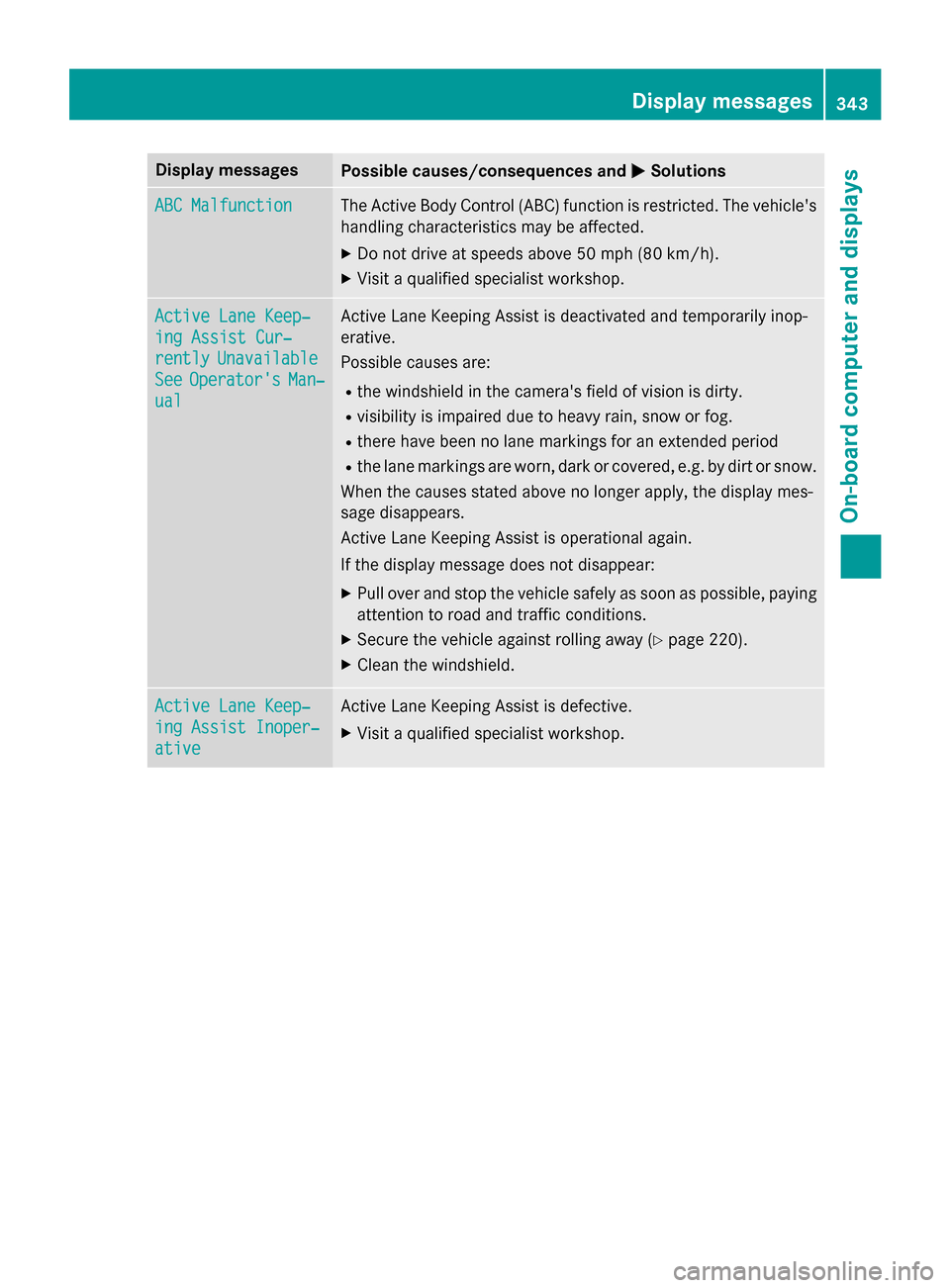
MSolutions ABC Malfunction
ABC Malfunction The Active Body Control (ABC) function is restricted. The vehicle's
handling characteristics may be affected.
X Do not drive at speeds above 50 mph (80 km/h).
X Visit a qualified specialist workshop. Active Lane Keep‐
Active Lane Keep‐
ing Assist Cur‐ ing Assist Cur‐
rently rently
Unavailable
Unavailable
See
See Operator's
Operator's Man‐
Man‐
ual
ual Active Lane Keeping Assist is deactivated and temporarily inop-
erative.
Possible causes are:
R the windshield in the camera's field of vision is dirty.
R visibility is impaired due to heavy rain, snow or fog.
R there have been no lane markings for an extended period
R the lane markings are worn, dark or covered, e.g. by dirt or snow.
When the causes stated above no longer apply, the display mes-
sage disappears.
Active Lane Keeping Assist is operational again.
If the display message does not disappear:
X Pull over and stop the vehicle safely as soon as possible, paying
attention to road and traffic conditions.
X Secure the vehicle against rolling away (Y page 220).
X Clean the windshield. Active Lane Keep‐ Active Lane Keep‐
ing Assist Inoper‐ ing Assist Inoper‐
ative ative Active Lane Keeping Assist is defective.
X Visit a qualified specialist workshop. Display
messages
343On-board computer and displays Z
Page 349 of 502

Display messages
Possible causes/consequences and
M
MSolutions DISTRONIC
DISTRONIC
PLUS
PLUSSus‐
Sus‐
pended
pended You have depressed the accelerator pedal. DISTRONIC PLUS is no
longer controlling the speed of the vehicle.
X Remove your foot from the accelerator pedal. DISTRONIC PLUS
DISTRONIC PLUS
- - - mph - - - mph An activation condition for DISTRONIC PLUS is not fulfilled.
X Check the activation conditions for DISTRONIC PLUS
(Y page 231). DTR+: Steering
DTR+: Steering
Assist. Currently Assist. Currently
Unavailable See Unavailable See
Operator's Manual Operator's Manual Steering Assist and Stop&Go Pilot are temporarily inoperative.
Possible causes are:
R the windshield in the camera's field of vision is dirty.
R visibility is impaired due to heavy rain, snow or fog.
R there are no lane markings for a longer period.
R the lane markings are worn, dark or covered, e.g. by dirt or snow.
When the causes stated above no longer apply, the display mes-
sage disappears.
Steering Assist and Stop&Go Pilot are operative again.
If the display message does not disappear:
X Pull over and stop the vehicle safely as soon as possible, paying
attention to road and traffic conditions.
X Secure the vehicle against rolling away (Y page 220).
X Clean the windshield. DTR+: Steering DTR+: Steering
Assist. Inopera‐ Assist. Inopera‐
tive tive Steering Assist and Stop&Go Pilot are faulty.
However, the DISTRONIC PLUS functions are still available.
A warning tone also sounds.
X Visit a qualified specialist workshop. Cruise Control Cruise Control
Inoperative Inoperative Cruise control is defective.
A warning tone also sounds.
X Visit a qualified specialist workshop. Cruise Control Cruise Control
- - - mph - - - mph A condition for activating cruise control has not been fulfilled.
You have tried to store a speed below 20 mph
(30 km/h), for
example.
X If conditions permit, drive faster than 20 mph (30 km/ h)and
store the speed.
X Check the activation conditions for cruise control (Y page 229). Display messages
347On-board computer and displays Z