2015 MERCEDES-BENZ S-Class lock
[x] Cancel search: lockPage 209 of 502
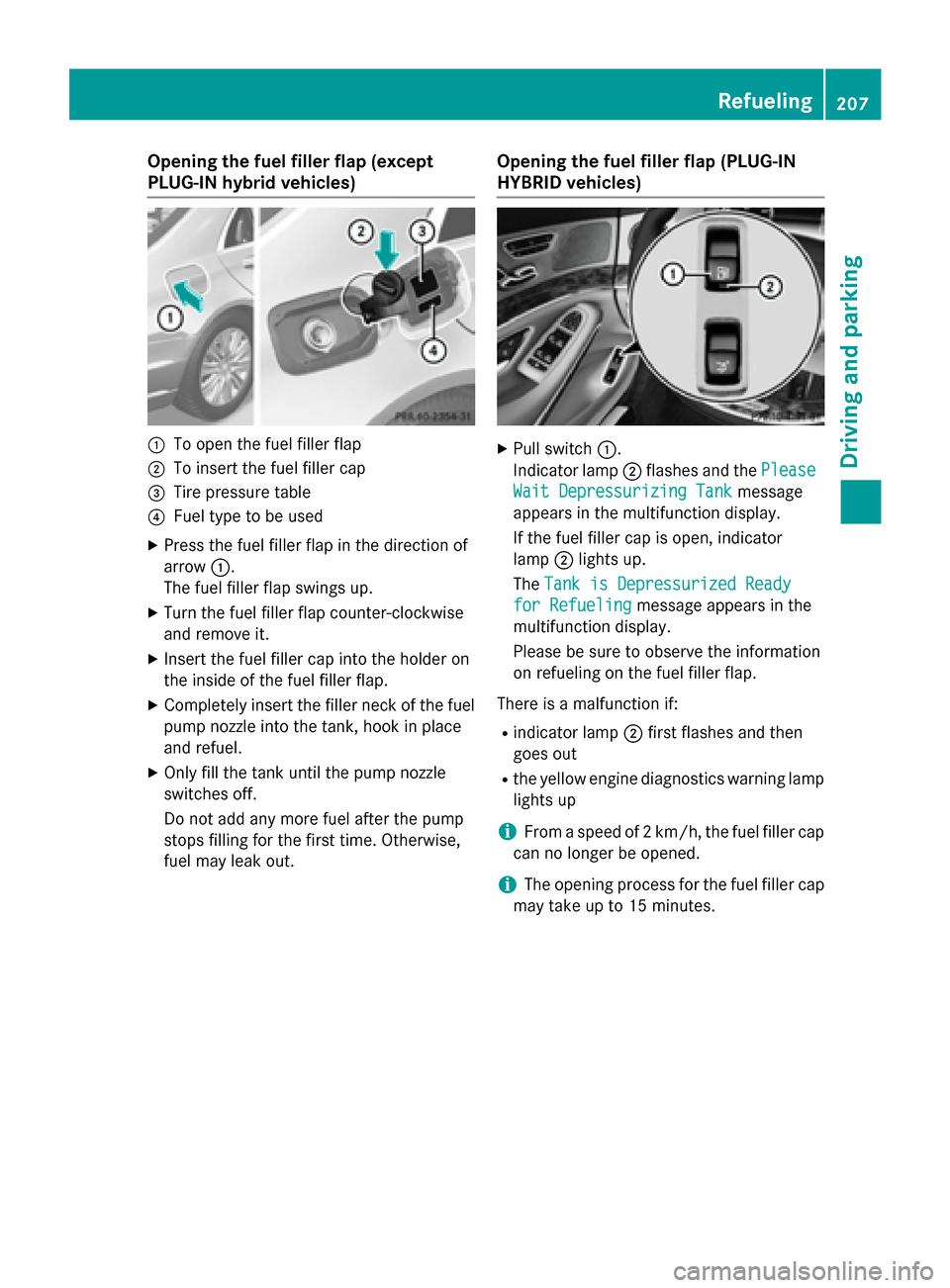
Opening the fuel filler flap (except
PLUG-IN hybrid vehicles)
:
To open the fuel filler flap
; To insert the fuel filler cap
= Tire pressure table
? Fuel type to be used
X Press the fuel filler flap in the direction of
arrow :.
The fuel filler flap swings up.
X Turn the fuel filler flap counter-clockwise
and remove it.
X Insert the fuel filler cap into the holder on
the inside of the fuel filler flap.
X Completely insert the filler neck of the fuel
pump nozzle into the tank, hook in place
and refuel.
X Only fill the tank until the pump nozzle
switches off.
Do not add any more fuel after the pump
stops filling for the first time. Otherwise,
fuel may leak out. Opening the fuel filler flap (PLUG-IN
HYBRID vehicles) X
Pull switch :.
Indicator lamp ;flashes and the Please Please
Wait Depressurizing Tank
Wait Depressurizing Tank message
appears in the multifunction display.
If the fuel filler cap is open, indicator
lamp ;lights up.
The Tank is Depressurized Ready Tank is Depressurized Ready
for Refueling
for Refueling message appears in the
multifunction display.
Please be sure to observe the information
on refueling on the fuel filler flap.
There is a malfunction if: R indicator lamp ;first flashes and then
goes out
R the yellow engine diagnostics warning lamp
lights up
i From a speed of 2 km/h, the fuel filler cap
can no longer be opened.
i The opening process for the fuel filler cap
may take up to 15 minutes. Refueling
207Driving and parking Z
Page 210 of 502

:
To insert the fuel filler cap
; Tire pressure table
= Fuel type to be used
X Turn the fuel filler flap counter-clockwise
and remove it.
X Insert the fuel filler cap into the holder on
the inside of the fuel filler flap.
X Completely insert the filler neck of the fuel
pump nozzle into the tank, hook in place
and refuel.
X Only fill the tank until the pump nozzle
switches off.
Do not add any more fuel after the pump
stops filling for the first time. Otherwise,
fuel may leak out.
Closing the fuel filler flap X
Replace the cap on the filler neck and turn
clockwise until it engages audibly.
X Close the fuel filler flap.
If you drive at speeds above 2 km/hw ith the
fuel filler flap open, the Tankklappe
Tankklappe offen offen
(Fuel filler flap open)
(Fuel filler flap open) message is
shown in the multifunction display.
i Close the fuel filler flap before locking the
vehicle.
i For further information on warning and
indicator lamps in the instrument cluster,
see (Y page 363).
i If you are driving with the fuel filler cap
open, the 8reserve fuel warning lamp
flashes. A message appears in the multi-
function display (Y page 339). In addition, the
;Check Engine warning
lamp may light up (Y page 363).
For further information on warning and indi- cator lamps in the instrument cluster, see
(Y page 363). 208
RefuelingDriving and parking
Page 211 of 502

Problems with fuel and the fuel tank
Problem
Possible causes/consequences and
M
MSolutions Fuel is leaking from the
vehicle. G
WARNING
The fuel line or the fuel tank is faulty.
Risk of explosion or fire. X Apply the electric parking brake.
X Switch off the engine.
X Open the driver's door.
The on-board electronics now have status 0. This is the same as
the SmartKey having been removed.
or, if the SmartKey is inserted in the ignition lock:
X Remove the SmartKey from the ignition lock.
X Do not restart the engine under any circumstances.
X Consult a qualified specialist workshop. The fuel filler flap can-
not be opened. The fuel filler flap is not unlocked.
or
The SmartKey battery is discharged.
X Unlock the vehicle (Y page 91).
or X Unlock the vehicle using the mechanical key (Y page 93).The fuel filler flap is unlocked, but the opening mechanism is jam-
med.
X Consult a qualified specialist workshop. Charging the high-voltage battery
(plug-in hybrid vehicles) Important safety notes
G
DANGER
The vehicle's high voltage electrical system is under high voltage. If you modify components
in the vehicle's high-voltage electrical system or touch damaged components, you may be
electrocuted. The components in the vehi-
cle's high-voltage electrical system may be
damaged in an accident, although the damage
is not visible. There is a risk of fatal injury.
Following an accident, do not touch any high- voltage components and never modify the vehicle's high-voltage electrical system. Have
the vehicle towed away after an accident and
the vehicle's high-voltage electrical system
checked by a qualified specialist workshop. G
WARNING
In the event of a vehicle fire, the internal pres- sure of the high-voltage battery can exceed a
critical value. In this case flammable gas
escapes through a ventilation valve on the
underbody. The gas can ignite. There is a risk of injury.
Leave the danger zone immediately. Secure
the danger area at a suitable distance, whilst
observing legal requirements. Charging the high-voltage battery (plug-in hybrid vehicles)
209Driving and parking Z
Page 214 of 502

The charging cable and connector will only
heat up within the permissible limiting values,
provided that:
R the power supply and the charging cable
are not damaged
R the instructions for handling the charging
cable and controls on the charging cable
are observed
If the charging cable or plug get too hot, have the mains power supply checked.
Protection device against overvoltage !
Overvoltage in the mains supply may
damage the vehicle. For this reason, the
vehicle is equipped with a protection device
against overvoltage in the mains supply.
This device may be triggered during severe thunderstorms, for example, and may lead
to the building's fuse being tripped and an
interruption in the power supply. These
functions protect the vehicle. After the
building fuse is switched on again, the
charging process resumes automatically.
Following an interruption in the power sup-
ply or tripping of the building's fuse, it may take up to 10 minutes for charging to
resume automatically.
Switch on the building's fuse again after it has
been triggered. Otherwise, the charging proc-
ess cannot be continued.
General information about the charging
procedure Pay attention to the important safety notes
(Y
page 209).
If you unlock/lock the vehicle from the out-
side, the charge socket flap also unlocks/
locks.
The charge socket flap is behind the bumper
on the right-hand side below the rear lamp
cluster. Charging the high-voltage battery via
the electrical outlet
Charging cable for mains sockets Important safety notes
! Only use the charging cable to charge the
high-voltage battery. Do not use the charg-
ing cable for other purposes. It may other-
wise be damaged.
A charging cable for connection to the mains
socket is included with the vehicle. Only use
the charging cable included with the vehicle
or charging cables that have been approved
for the vehicle.
i If you use the supplied 12 A charging
cable to charge a high-voltage battery:
R the charge time increases considerably
R electrical consumption increases consid-
erably
Where possible, charge the high-voltage
battery at a charging station (Y page 216).
Only then can certified electrical energy
consumption levels be reached.
i The charging process can vary depending
on the power supply. Therefore, always
observe the local information.
i For short charge times (charging with
16A), connect the fast-charging cable to
the wallbox/charging station. You can also
use the optionally available charging cable
with the CE plug.
Information about charging from a wallbox
can be found at (Y page 215).
Information about charging at a charging sta-
tion can be found at (Y page 216).
Stowing the charging cable
The charging cable can be stowed in the bag
supplied in the trunk of the vehicle and held in place with the Velcro fastener. 212
Charging the high-voltage battery (plug-in hybrid vehicles)Driving and parking
Page 216 of 502
Before charging the high-voltage battery,
check the maximum permissible charge cur-
rent for the relevant power socket.
X To adjust the setting: press button?
repeatedly until the desired setting is selec-
ted in display =.
R Two LEDs are flashing: minimum setting
R All LEDs are flashing: maximum setting
If, after the charging process, the charging
cable is:
R left connected to the power socket, the
currently selected values will be used for
the next charging process.
R removed from the power socket, the values
will be reset to the minimum setting for the next charging process. You may then need
to reset the values of the maximum charge current.
i If the vehicle requires more time than
usual when charging, check the maximum
charge current settings using the controls
on the charging cable or in the on-board
computer's menu.
Indicator lamp on the vehicle socket
When the indicator lamp on the vehicle
socket lights up, this means the following: Indicator
lamp
Ý Ý Flashes
slowly in
orange The connection between
the vehicle and the current
source is being established
before charging begins.
Flashes
slowly in
green The high-voltage battery is
being charged.
Flashes rap-
idly in red A malfunction has occurred
while charging. Indicator
lamp
Ý Ý Lights up
orange A charging break for the
high-voltage battery is tak-
ing place.
Lights up
green The high-voltage battery is
fully charged.
i
If the indicator lamp is off, lock or unlock
the vehicle with the SmartKey. The indica-
tor lamp will then display the current status
of the charging process.
i You can view the condition of charge of
the high-voltage battery in the multifunc-
tion display (see "Charging the high-voltage battery when stationary" in the "Energy
flow display" section (Y page 281)).
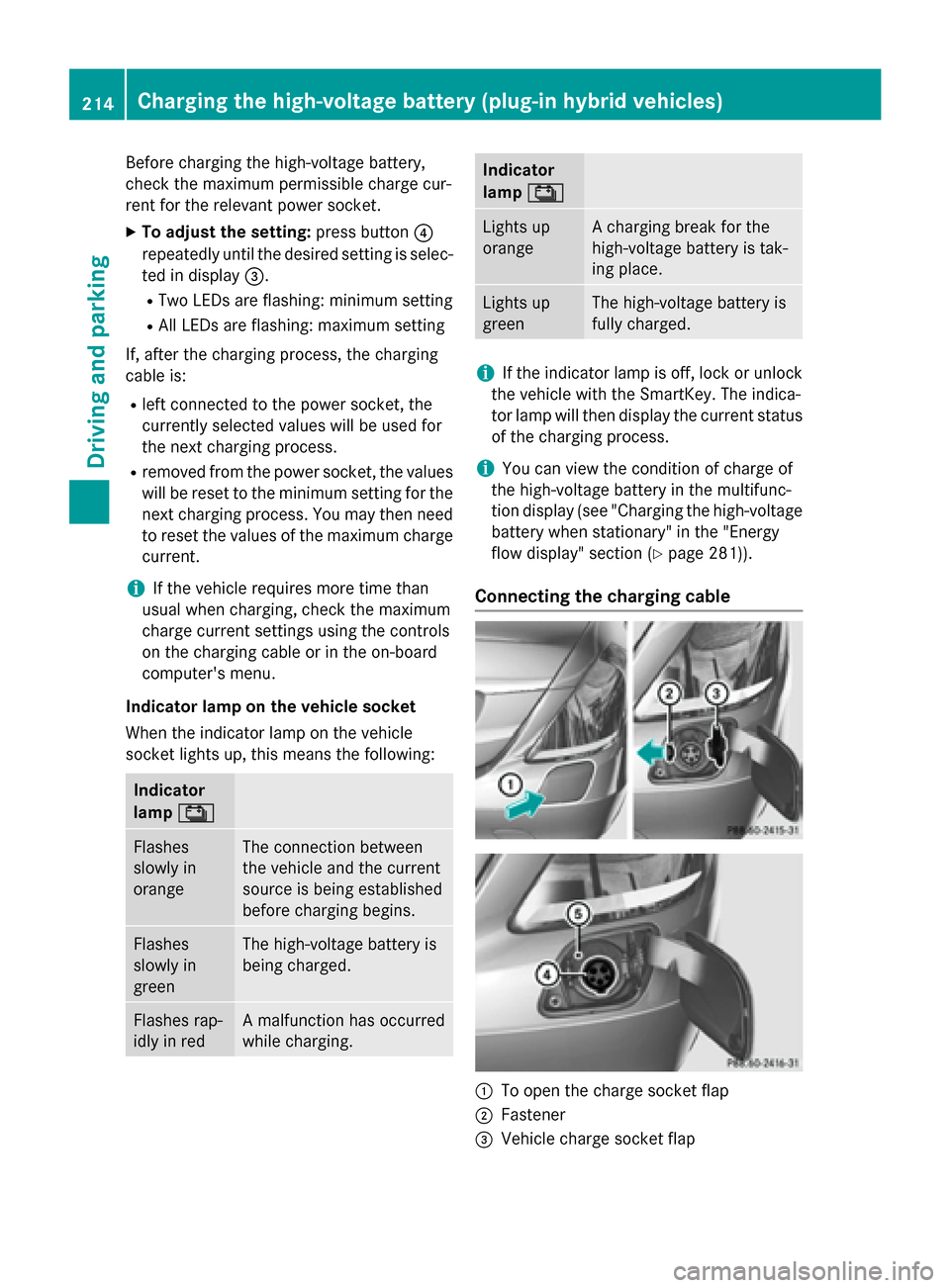
Connecting the charging cable :
To open the charge socket flap
; Fastener
= Vehicle charge socket flap 214
Charging the high-voltage battery (plug-in hybrid vehicles)Driving and parking
Page 217 of 502

?
Vehicle socket
A Indicator lamp Ý
X Use the DIRECT SELECT lever to shift the
automatic transmission to P.
X Switch the ignition off.
X Press the charge socket flap in the direc-
tion of arrow :.
The charge socket flap swings up.
X Slide fastener ;to the right.
Vehicle socket flap =is open.
X Insert the power supply plug into the elec-
trical outlet to the stop.
X Insert the charging cable connector into
vehicle socket ?to the stop.
The high-voltage battery is being charged.
Ý indicator lamp Aon vehicle
socket ?flashes slowly green.
i The vehicle must not be moved during
charging or when the charging cable is con- nected.
i Depending on the temperature, the fan
and battery cooling system may audibly
switch on during the charging process.
Removing the charging cable When the charge level display reaches 100%
in the multifunction display, the battery is
fully charged (Y page 281).
i After the charging cable has been discon-
nected, the indicator lamp in the vehicle
socket remains lit for some time before
switching off. When the battery is fully charged:
X Unlock the vehicle.
Ý indicator lamp Aon vehicle
socket ?lights up green.
X Press and hold button Bon the charging
cable connector and remove the charging
cable from the vehicle socket.
X Close vehicle socket flap =.
X Close charge socket flap :.
X Remove the charging cable from the elec-
trical outlet.
X Stow the charging cable safely in the vehi-
cle (Y page 212). Charging the high-voltage battery
from the wallbox
General notes It is recommended that you charge your vehi-
cle using a wallbox or at a charging station.
Use the optional quick charging cable when
charging at a wallbox. The charging cable is
stored in a bag in the trunk.
Only use charging cables that have been tes- ted and approved by the manufacturer for
charging the high-voltage battery in an elec-
tric vehicle.
Pay attention to the "Important safety notes"
(Y page 209). Charging the high-voltage battery (plug-in hybrid vehicles)
215Driving and parking Z
Page 218 of 502

Connecting the charging cable
:
To open the charge socket flap
; Fastener
= Vehicle charge socket flap
? Vehicle socket
A Indicator lamp Ý
X Use the DIRECT SELECT lever to shift the
automatic transmission to P.
X Switch the ignition off.
X Press the charge socket flap in the direc-
tion of arrow :.
The charge socket flap swings up.
X Slide fastener ;to the right.
Vehicle socket flap =is open.
X Insert the charging cable connector into
vehicle socket ?to the stop.
The high-voltage battery is being charged.
Ý indicator lamp Aon vehicle
socket ?flashes slowly green.
i The vehicle must not be moved during
charging or when the charging cable is con- nected. i
Depending on the temperature, the fan
and battery cooling system may audibly
switch on during the charging process.
Removing the charging cable When the charge level display reaches 100%
in the multifunction display, the battery is
fully charged (Y page 281).
i After the charging cable has been discon-
nected, the indicator lamp in the vehicle
socket remains lit for some time before
switching off. When the battery is fully charged:
X Unlock the vehicle.
Ý indicator lamp Aon vehicle
socket ?lights up green.
X Press and hold button Bon the charging
cable connector and remove the charging
cable from the vehicle socket.
X Close vehicle socket flap =.
X Close charge socket flap :. Charging the high-voltage battery at
the charging station
The connection for the vehicle at a charging
station is identical to the connection on a
wallbox. Read the "Charging a high-voltage
battery at a wallbox" section (Y page 215).
Before beginning the charging process at a
charging station without communication
capabilities, you must first activate the sta-
tion. You can do this by using an RFID card or 216
Charging the high-voltage battery (plug-in hybrid vehicles)Driving and parking
Page 220 of 502
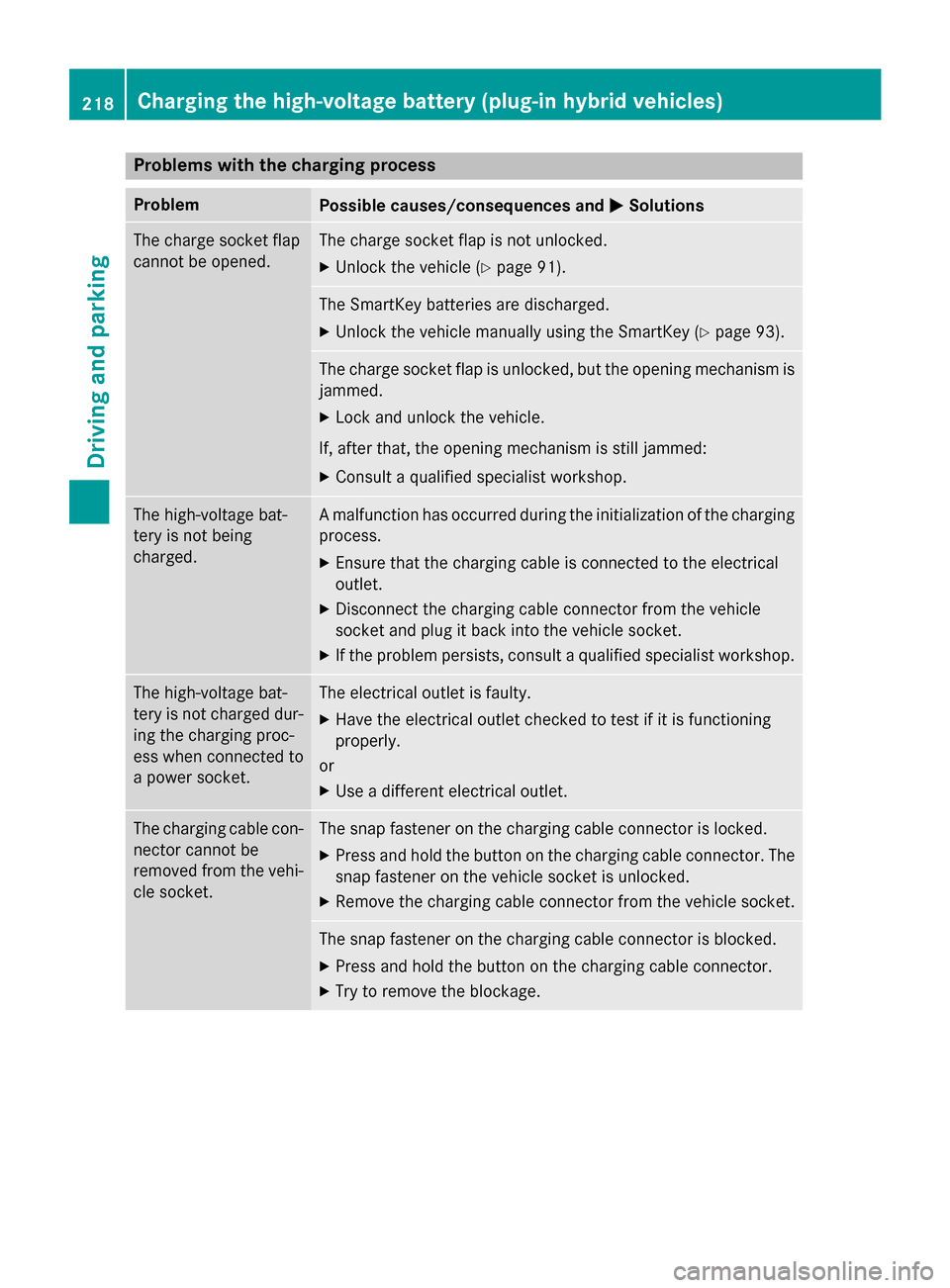
Problems with the charging process
Problem
Possible causes/consequences and
M
MSolutions The charge socket flap
cannot be opened. The charge socket flap is not unlocked.
X Unlock the vehicle (Y page 91). The SmartKey batteries are discharged.
X Unlock the vehicle manually using the SmartKey (Y page 93).The charge socket flap is unlocked, but the opening mechanism is
jammed.
X Lock and unlock the vehicle.
If, after that, the opening mechanism is still jammed:
X Consult a qualified specialist workshop. The high-voltage bat-
tery is not being
charged. A malfunction has occurred during the initialization of the charging
process.
X Ensure that the charging cable is connected to the electrical
outlet.
X Disconnect the charging cable connector from the vehicle
socket and plug it back into the vehicle socket.
X If the problem persists, consult a qualified specialist workshop. The high-voltage bat-
tery is not charged dur-
ing the charging proc-
ess when connected to
a power socket. The electrical outlet is faulty.
X Have the electrical outlet checked to test if it is functioning
properly.
or
X Use a different electrical outlet. The charging cable con-
nector cannot be
removed from the vehi- cle socket. The snap fastener on the charging cable connector is locked.
X Press and hold the button on the charging cable connector. The
snap fastener on the vehicle socket is unlocked.
X Remove the charging cable connector from the vehicle socket. The snap fastener on the charging cable connector is blocked.
X Press and hold the button on the charging cable connector.
X Try to remove the blockage. 218
Charging the high-voltage battery (plug-in hybrid vehicles)Driving and parking