2015 MERCEDES-BENZ M-Class Folding mirrors
[x] Cancel search: Folding mirrorsPage 13 of 466

Engine
Check Engine warning lamp .......... .327
Display message ............................ 300
ECO start/stop function ................ 162
Engine number ............................... 447
Irregular running ............................ 167
Jump-starting ................................. 391
Starting problems .......................... 167
Starting the engine with the
SmartKey ....................................... 160
Starting with KEYLESS-GO ............. 160
Switching off .................................. 183
Tow-starting (vehicle) ..................... 396
Engine electronics
Problem (malfunction) ................... 167
Engine jump starting
see Jump starting (engine)
Engine oil
Adding .......................................... .368
Additives ........................................ 453
Checking the oil level ..................... 367
Checking the oil level using the
dipstick .......................................... 367
Display message ............................ 302
Filling capacity ............................... 452
Notes about oil grades ................... 452
Notes on oil level/consumption .... 367
Temperature (on-board com-
puter) ............................................. 281
Viscosity ........................................ 453
ESP ®
(Electronic Stability Pro-
gram) AMG menu (on-board computer) ... 281
Characteristics ................................. 73
Deactivating/activating ................... 73
Display message ............................ 285
ETS/4ETS ........................................ 72
Function/notes ................................ 72
General notes .................................. 72
Important safety information ........... 73
Trailer stabilization ........................... 74
Warning lamp ................................. 323
ETS/4ETS (Electronic Traction Sys-
tem) ...................................................... 72
Exhaust check ................................... 186
Exhaust pipe (cleaning instruc-
tions) ................................................. .376 Exterior lighting
see Lights
Exterior mirrors
Adjusting ....................................... 114
Dipping (automatic) ....................... 115
Folding in/out (automatically) ....... 115
Folding in/out (electrically) ........... 115
Folding in when locking (on-board computer) ...................................... 280
Out of position (troubleshooting) ... 115
Setting ........................................... 115
Storing settings (memory func-
tion) ............................................... 116
Storing the parking position .......... 116
Eyeglasses compartment ................. 336 F
Filler cap see Fuel filler flap
Flat tire
MOExtended tire s.......................... 383
Preparing the vehicle ..................... 383
TIREFIT kit ...................................... 384
see Emergency spare wheel
Floormats ........................................... 364
Folding the rear bench seat for-
wards/back ....................................... 337
Fording Off-road ......................................... 190
On flooded roads ........................... 190
Fuel
Additives ........................................ 449
Consumption statistics .................. 269
Displaying the current consump-
tion ................................................ 270
Displaying the range ...................... 270
Driving tips .................................... 186
Flexible fuel vehicles ...................... 450
Fuel gaug e....................................... 35
Grade (gasoline )............................ 448
Important safety notes .................. 448
Low outside temperature s............. 450
Premium-grade unleaded gaso-
line ................................................. 448
Problem (malfunction) ................... 180
Quality (diesel )............................... 449 Index
11
Page 117 of 466

Folding the exterior mirrors in or out
electrically X
Turn the SmartKey to position 1or 2in the
ignition lock (Y page 157).
X Briefly press button 0043.
Both exterior mirrors fold in or out.
i Make sure that the exterior mirrors are
always folded out fully while driving. They
could otherwise vibrate.
i If you are driving faster than 30 mph
(47 km/h), you can no longer fold in the
exterior mirrors.
Setting the exterior mirrors If the battery has been disconnected or com-
pletely discharged, the exterior mirrors must
be reset. The exterior mirrors will otherwise
not fold in when you select the "Fold in mir-
rors when locking" function in the on-board
computer (Y page 280).
X Turn the SmartKey to position 1in the igni-
tion lock (Y page 157).
X Briefly press button 0043.
Folding the exterior mirrors in or out
automatically If the "Fold in mirrors when locking" function
is activated in the on-board computer:
(Y page 280) R
the exterior mirrors fold in automatically as
soon as you lock the vehicle from the out-
side.
R the exterior mirrors fold out again automat-
ically as soon as you unlock the vehicle and
then open the driver's or front-passenger
door.
Exterior mirror pushed out of position If an exterior mirror has been pushed out of
position, proceed as follows:
X Vehicles without electrically folding
exterior mirrors: move the exterior mirror
into the correct position manually.
X Vehicles with electrically folding exte-
rior mirrors: press and hold button for
folding the mirrors 0043(Ypage 115) until
you hear a click and then the mirror engage
in position.
The mirror housing is engaged again and
you can adjust the exterior mirrors as usual
(Y page 114). Automatic anti-glare mirrors
The rear-view mirror and the exterior mirror
on the driver's side automatically go into anti- glare mode if the following conditions are met simultaneously:
R the ignition is switched on and
R incident light from headlamps strikes the
sensor in the rear-view mirror.
i The mirrors do not go into anti-glare mode
if reverse gear is engaged or if the interior
lighting is switched on. Mirrors
115Seats, steering wheel and mirrors Z
Page 282 of 466
occupants – particularly children – could
become trapped. There is a risk of injury.
While the EASY-ENTRY/EXIT feature is mak-
ing adjustments, make sure that no one has
any body parts in the sweep of the steering
wheel.
If somebody becomes trapped:
R press one of the memory function position
buttons, or
R move the switch for steering wheel adjust-
ment in the opposite direction to that in
which the steering wheel is moving.
The adjustment process is stopped.
X Press the 0059or0065 button on the steer-
ing wheel to select the Sett
Sett menu.
X Press the 0064or0063 button to select the
Convenience
Convenience submenu.
X Press 0076to confirm.
X Press the 0064or0063 button to select the
Easy Entry/Exit: Easy Entry/Exit: function.
If the Easy Entry/Exit
Easy Entry/Exit function is activa-
ted, the vehicle steering wheel is displayed
in orange in the multifunction display.
X Press the 0076button to save the setting.
Further information on the EASY-ENTRY/EXIT feature (Y page 113).
Switching the belt adjustment on/off X Press the 0059or0065 button on the steer-
ing wheel to select the Sett.
Sett. menu.
X Press the 0064or0063 button to select the
Convenience
Convenience submenu.
X Press 0076to confirm.
X Press the 0064or0063 button to select the
Belt Adjustment
Belt Adjustment function.
If the Belt Adjustment
Belt Adjustment function is activa-
ted, the vehicle seat belt is shown in orange
in the multifunction display.
X Press the 0076button to save the setting.
For further information on belt adjustment,
see (Y page 49). Switching the fold-in mirrors when lock-
ing feature on/off
This function is only available on vehicles with
the memory function (Y page 116).
When you activate the Auto. Auto.Mirror
Mirror Fold‐
Fold‐
ing
ing function, the exterior mirrors are folded
in when the vehicle is locked. If you unlock the vehicle and then open a door, the exterior
mirrors fold out again.
X Press the 0059or0065 button on the steer-
ing wheel to select the Sett. Sett.menu.
X Press the 0064or0063 button to select the
Convenience
Convenience submenu.
X Press 0076to confirm.
X Press 0064or0063 to select the Auto.
Auto.
Mirror Folding
Mirror Folding function.
If the Auto. Mirror Folding
Auto. Mirror Folding function is
activated, the vehicle's exterior mirror is
displayed in orange in the multifunction
display.
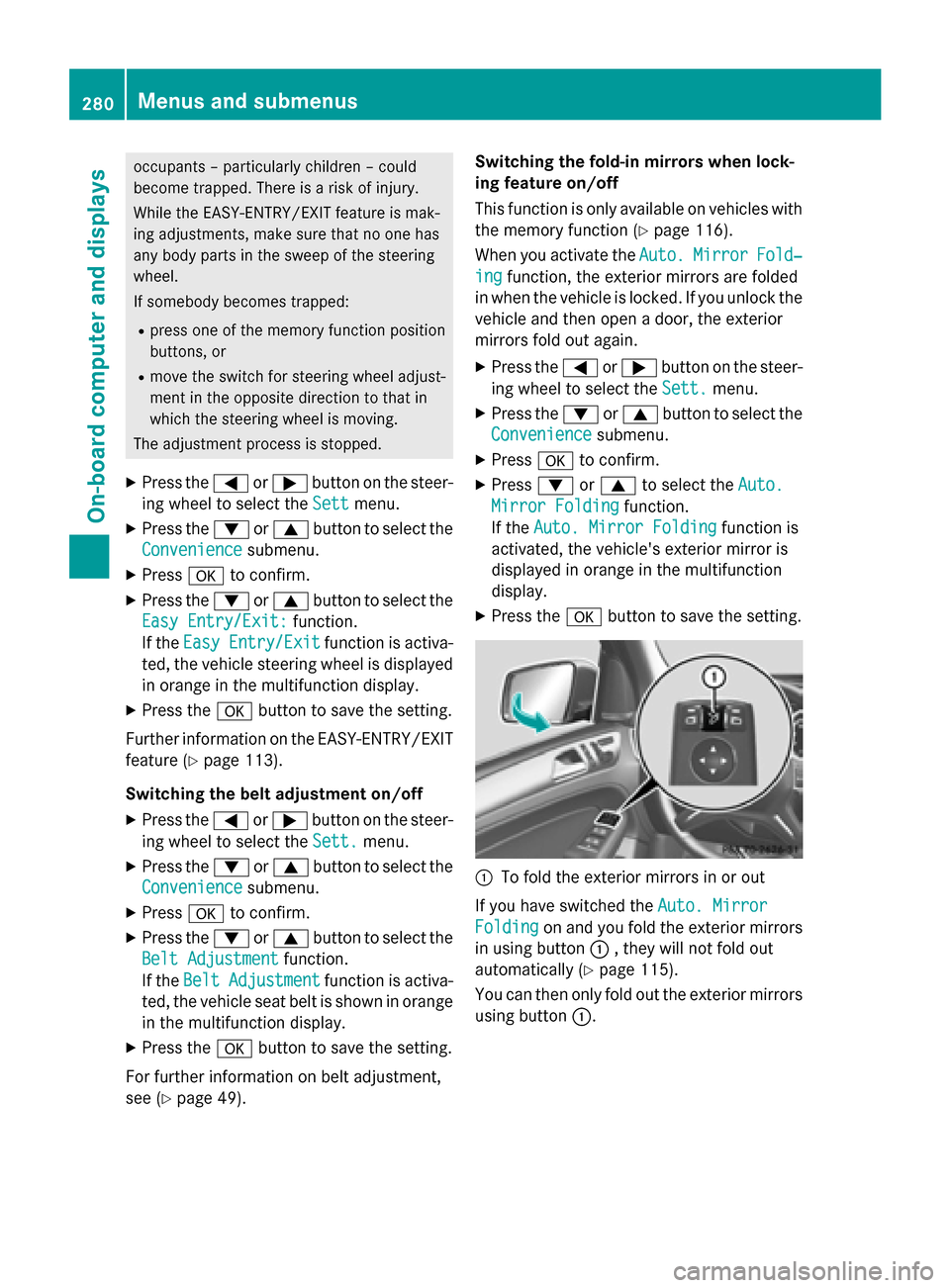
X Press the 0076button to save the setting. 0043
To fold the exterior mirrors in or out
If you have switched the Auto. Mirror Auto. Mirror
Folding
Folding on and you fold the exterior mirrors
in using button 0043, they will not fold out
automatically (Y page 115).
You can then only fold out the exterior mirrors
using button 0043.280
Menus and submenusOn-board computer and displays