2015 MERCEDES-BENZ GLA-Class warning
[x] Cancel search: warningPage 78 of 374

Useful information
i This Operator's Manual describes all
models and all standard and optional equip- ment of your vehicle available at the time of
publication of the Operator's Manual.
Country-specific differences are possible.
Please note that your vehicle may not be
equipped with all features described. This
also applies to safety-related systems and
functions.
i Read the information on qualified special-
ist workshops (Y page 28). SmartKey
Important safety notes
G
WARNING
If children are left unsupervised in the vehicle, they could:
R open the doors, thus endangering other
people or road users.
R get out and disrupt traffic.
R operate the vehicle's equipment.
Additionally, children could set the vehicle in
motion if, for example, they:
R release the parking brake.
R shifting the automatic transmission out of
park position P
R Start the engine.
There is a risk of an accident and injury.
When leaving the vehicle, always take the
SmartKey with you and lock the vehicle. Never
leave children or animals unattended in the
vehicle. Always keep the SmartKey out of
reach of children. G
WARNING
If you attach heavy or large objects to the
SmartKey, the SmartKey could be uninten-
tionally turned in the ignition lock. This could
cause the engine to be switched off. There is a risk of an accident. Do not attach any heavy or large objects to the
SmartKey. Remove any bulky key rings before
inserting the SmartKey into the ignition lock.
! Keep the SmartKey away from strong
magnetic fields. Otherwise, the remote
control function could be affected.
Strong magnetic fields can occur in the
vicinity of powerful electrical installations.
Do not keep the SmartKey: R with electronic devices, e.g. a mobile
phone or another SmartKey
R with metallic objects, e.g. coins or metal
foil
R inside metallic objects, e.g. a metal case SmartKey functions
0043
0037 To lock the vehicle
0044 0054 To open the tailgate
0087 0036 To unlock the vehicle
X To unlock centrally: press button0087.
If you do not open the vehicle within approx-
imately 40 seconds of unlocking: R the vehicle is locked again.
R protection against theft is reactivated.
X To lock centrally: press button0043.
The SmartKey centrally locks/unlocks: R the doors
R the tailgate
R the fuel filler flap 76
SmartKeyOpening and closing
Page 80 of 374

Inserting the mechanical key
X
Push mechanical key 0044completely into
the SmartKey until it engages, and release
catch 0043is back in its basic position. SmartKey battery
Important safety notes G
WARNING
Batteries contain toxic and corrosive substan- ces. If batteries are swallowed, it can result in
severe health problems. There is a risk of fatal injury.
Keep batteries out of the reach of children. If
a battery is swallowed, seek medical attention immediately.
The SmartKey batteries contain perchlorate
material, which may require special handling
and regard for the environment. National
guidelines must be observed during disposal.
In California, see www.dtsc.ca.gov/
HazardousWaste/Perchlorate/
index.cfm .
Mercedes-Benz recommends that you have
the batteries replaced at a qualified specialist workshop.
Checking the battery X
Press the 0037or0036 button.
The battery is working properly if battery
check lamp 0043lights up briefly. The battery is discharged if battery check
lamp 0043does not light up briefly.
X Change the battery (Y page 78).
i If the SmartKey battery is checked within
the signal reception range of the vehicle,
pressing the 0037or0036 button:
R locks or
R unlocks the vehicle
i You can get a battery at any qualified spe-
cialist workshop.
Replacing the battery You require a CR 2025 3 V cell battery.
X Take the mechanical key out of the Smart-
Key (Y page 77). X
Press mechanical key 0044into the opening
in the SmartKey in the direction of the
arrow until battery tray cover 0043opens.
When doing so, do not hold cover 0043shut.
X Remove battery tray cover 0043.78
SmartKeyOpening and closing
Page 83 of 374

Problem
Possible causes/consequences and
0050
0050Solutions The engine cannot be
started using the
SmartKey. The on-board voltage is too low.
X Switch off non-essential consumers, e.g. seat heating or interior
lighting, and try to start the engine again.
If this does not work:
X Check the starter battery and charge it if necessary
(Y page 311).
or
X Jump-start the vehicle (Y page 315).
or
X Consult a qualified specialist workshop. The engine cannot be
started using the
SmartKey. The steering lock is mechanically blocked.
X Remove the SmartKey and reinsert it into the ignition lock. While
doing this, turn the steering wheel in both directions. Doors
Important safety notes
G
WARNING
If children are left unsupervised in the vehicle, they could:
R open the doors, thus endangering other
people or road users.
R get out and disrupt traffic.
R operate the vehicle's equipment.
Additionally, children could set the vehicle in
motion if, for example, they:
R release the parking brake.
R shifting the automatic transmission out of
park position P
R Start the engine.
There is a risk of an accident and injury.
When leaving the vehicle, always take the
SmartKey with you and lock the vehicle. Never
leave children or animals unattended in the
vehicle. Always keep the SmartKey out of
reach of children. You should preferably place luggage or loads
in the cargo compartment. Observe the load-
ing guidelines (Y page 266). Unlocking and opening doors from
the inside
X
To unlock and open a front door: pull
door handle 0044.
If the door is locked, locking knob 0043pops
up. The door is unlocked and opens.
X To unlock a rear door: pull up locking
knob 0043.
The door is unlocked and can be opened.
X To open a rear door: pull door handle0044. Doors
81Opening and closing Z
Page 85 of 374

Unlocking the driver's door (mechan-
ical key)
If the vehicle can no longer be unlocked with
the SmartKey, use the mechanical key.
If you use the mechanical key to unlock and
open the driver's door, the anti-theft alarm
system will be triggered (Y page 73).
X Take the mechanical key out of the Smart-
Key (Y page 77).
X Insert the mechanical key into the lock of
the driver's door as far as it will go. X
Turn the mechanical key counter-clockwise
as far as it will go to position 0047.
The door is unlocked.
X Turn the mechanical key back and remove
it.
X Insert the mechanical key into the Smart-
Key (Y page 77). Locking the vehicle (mechanical key)
If the vehicle can no longer be locked with the
SmartKey, use the mechanical key.
X Open the driver's door.
X Close the front-passenger door, the rear
doors and the tailgate.
X Press the locking button (Y page 82).
X Check whether the locking knobs on the
front-passenger door and the rear doors
are still visible. Press down the locking
knobs by hand, if necessary.
X Close the driver's door. X
Take the mechanical key out of the Smart-
Key (Y page 77).
X Insert the mechanical key into the lock of
the driver's door as far as it will go. X
Turn the mechanical key clockwise as far as
it will go to position 0047.
X Turn the mechanical key back and remove
it.
X Make sure that the doors and the tailgate
are locked.
X Insert mechanical key into the SmartKey
(Y page 77).
i If you lock the vehicle as described above,
the fuel filler flap is not locked. The anti-
theft alarm system is not armed. Cargo compartment
Important safety notes
G
WARNING
Combustion engines emit poisonous exhaust
gases such as carbon monoxide. If the tailgate is open when the engine is running, particu-
larly if the vehicle is moving, exhaust fumes
could enter the passenger compartment.
There is a risk of poisoning.
Turn off the engine before opening the tail-
gate. Never drive with the tailgate open.
! The tailgate swings upwards and to the
rear when opened. Therefore, make sure
that there is sufficient clearance above and behind the tailgate. Cargo compartment
83Opening and closing Z
Page 86 of 374

i
The opening dimensions of the tailgate
can be found in the "Vehicle data" section
(Y page 368).
You should preferably place luggage or loads
in the cargo compartment. Observe the load-
ing guidelines (Y page 266).
Do not leave the SmartKey in the cargo com-
partment. You could otherwise lock yourself
out.
The tailgate can be:
R opened and closed manually from outside
R opened/closed automatically from outside
R opened/closed automatically from inside
R unlocked from inside with the mechanical
key Tailgate obstruction detection with
reversing feature
On vehicles with tailgate remote closing fea-
ture, the tailgate is equipped with automatic
obstacle recognition with a reversing feature. If a solid object blocks or restricts the tailgate
when automatically opening or closing, this
procedure is stopped. If the tailgate is stop-
ped during the closing process, the tailgate
automatically opens again slightly. The auto-
matic obstacle recognition with reversing
function is only an aid. It is not a substitute for your attentiveness when opening and closingthe tailgate. G
WARNING
The reversing feature does not react:
R to soft, light and thin objects, e.g. small fin-
gers
R over the last 1/3 in (8 mm) of the closing
movement
This means that the reversing feature cannot
prevent someone being trapped in these sit-
uations. There is a risk of injury.
Make sure that no body parts are in close
proximity during the closing procedure. If somebody becomes trapped:
R press the 0054button on the SmartKey, or
R press the remote operating switch on the
driver’s door, or
R press the closing button/STOP button on
the trunk lid or
R pull on the trunk lid handle Opening/closing from outside
Opening X
Press the 0036button on the SmartKey. X
Pull handle 0043.
X Raise the tailgate.
Closing X
Pull the tailgate down using handle 0043.
X Allow the tailgate to drop into the lock.
X If necessary, lock the vehicle with the 0037
button on the SmartKey. 84
Cargo compartmentOpening and closing
Page 87 of 374

Opening/closing automatically from
outside
Important safety notes G
WARNING
Parts of the body could become trapped dur-
ing automatic closing of the tailgate. More-
over, people, e.g. children, may be standing in the closing area or may enter the closing area
during the closing process. There is a risk of
injury.
Make sure that nobody is in the vicinity of the closing area during the closing process.
Use one of the following options to stop the
closing process:
R press the 0054button on the SmartKey.
R press the remote operating switch on the
driver’s door.
R press the close button or STOP button on
the tailgate.
R pull the handle on the tailgate. G
WARNING
Combustion engines emit poisonous exhaust
gases such as carbon monoxide. If the tailgate is open when the engine is running, particu-
larly if the vehicle is moving, exhaust fumes
could enter the passenger compartment.
There is a risk of poisoning.
Turn off the engine before opening the tail-
gate. Never drive with the tailgate open.
! The tailgate swings upwards and to the
rear when opened. Therefore, make sure
that there is sufficient clearance above and behind the tailgate.
i The opening dimensions of the tailgate
can be found in the "Vehicle data" section
(Y page 368).
Opening the tailgate automatically You can open the tailgate automatically with
the SmartKey or the handle in the tailgate. X
Press the 0054button on the SmartKey
until the tailgate opens.
or X If the tailgate is unlocked, pull the handle
and let it go again immediately.
Closing the tailgate automatically X
To close: press closing button 0044on the
tailgate.
X To stop the closing process: press STOP
button 0043on the tailgate.
or
X Pull the handle in the tailgate.
or
X Press the 0054button on the SmartKey
until the tailgate opens again.
or X Press the remote operating switch in the
driver's door. Opening/closing automatically from
inside
Important safety notes G
WARNING
Combustion engines emit poisonous exhaust
gases such as carbon monoxide. If the tailgate is open when the engine is running, particu-
larly if the vehicle is moving, exhaust fumes
could enter the passenger compartment.
There is a risk of poisoning. Cargo compartment
85Opening and closing
Z
Page 88 of 374

Turn off the engine before opening the tail-
gate. Never drive with the tailgate open.
! The tailgate swings upwards and to the
rear when opened. Therefore, make sure
that there is sufficient clearance above and behind the tailgate.
i The opening dimensions of the tailgate
can be found in the "Vehicle data" section
(Y page 368).
Opening and closing You can open and close the tailgate from the
driver's seat when the vehicle is stationary
and unlocked.
X To open: pull remote operating switch 0043
for the tailgate until the tailgate opens.
X To close: turn the SmartKey to position 1
or 2in the ignition lock.
X Press remote operating switch 0043for the
tailgate until the tailgate is completely
closed.
You will hear a warning tone during the
closing process. Limiting the opening angle of the tail-
gate
Important safety notes You can limit the opening angle of the tail-
gate. This is possible in the top half of its
opening range. This could be useful, for example, if there is
insufficient space above the tailgate.
! Make sure there is sufficient clearance to
open the tailgate fully when setting the
opening angle. The tailgate could otherwise be damaged. Ideally, set the opening angleoutside.
Activating X
To open the tailgate: pull the handle on
the tailgate.
X To stop the opening procedure at the
desired position: press the closing button
(Y page 85) in the tailgate or pull the handle
on the outside of the tailgate again.
X To store the position: press and hold the
closing button in the tailgate until you hear a short tone.
The opening angle limiter is activated. The
tailgate will now stop in the stored positionwhen opening.
i To open the tailgate fully, pull the handle
on the outside of the tailgate again after it
has stopped automatically. This does not
delete the stored position.
Deactivating X
Press and hold the closing button
(Y page 85) in the tailgate until you hear
two short tones. Tailgate emergency release
If the tailgate can no longer be opened from
outside the vehicle, use the emergency
release on the inside of the tailgate.
! The tailgate swings upwards and to the
rear when opened. Therefore, make sure
that there is sufficient clearance above and
behind the tailgate.
i The opening dimensions of the tailgate
can be found in the "Vehicle data" section
(Y page 368). 86
Cargo compartmentOpening and closing
Page 89 of 374
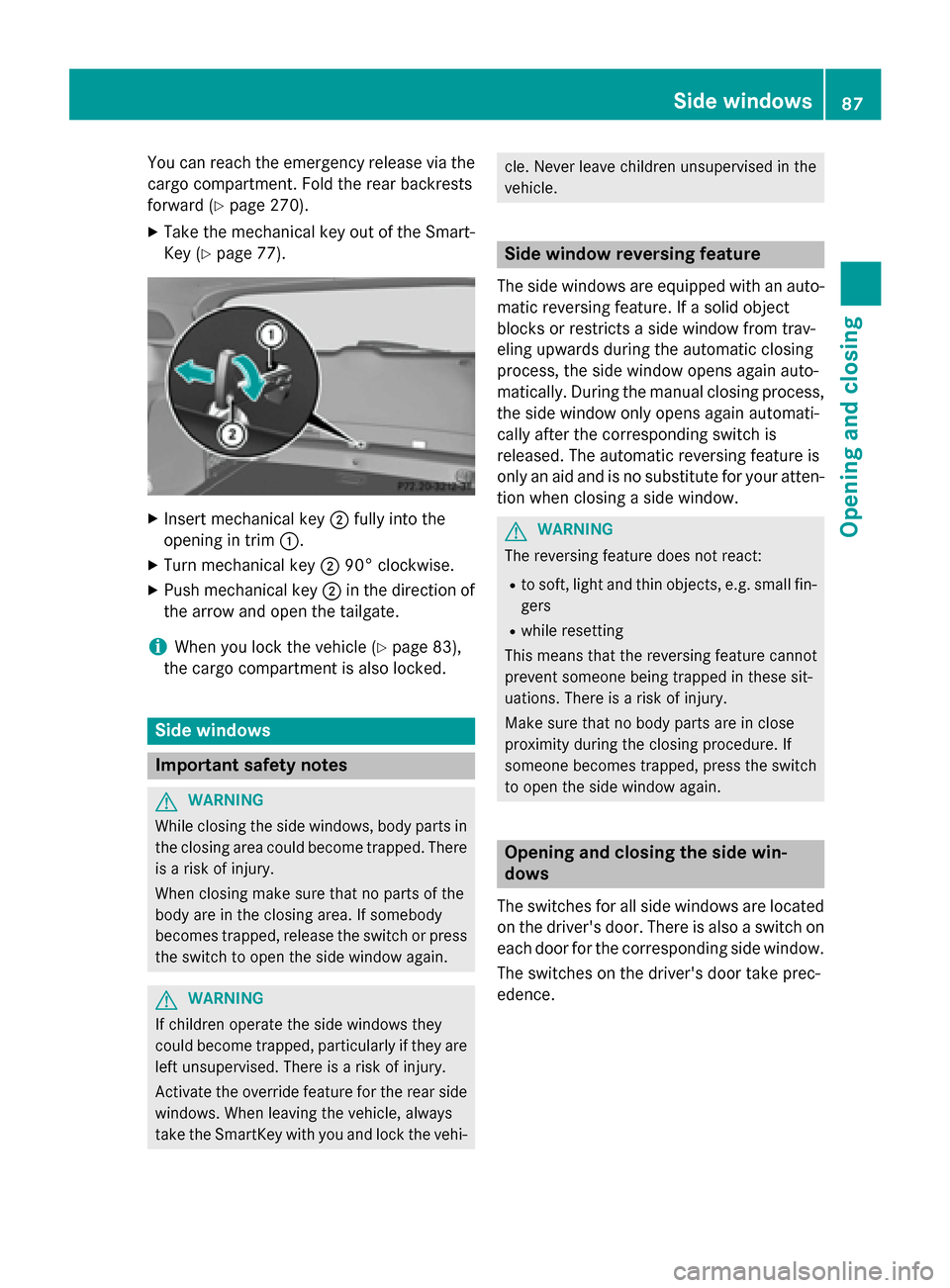
You can reach the emergency release via the
cargo compartment. Fold the rear backrests
forward (Y page 270).
X Take the mechanical key out of the Smart-
Key (Y page 77). X
Insert mechanical key 0044fully into the
opening in trim 0043.
X Turn mechanical key 004490° clockwise.
X Push mechanical key 0044in the direction of
the arrow and open the tailgate.
i When you lock the vehicle (Y
page 83),
the cargo compartment is also locked. Side windows
Important safety notes
G
WARNING
While closing the side windows, body parts in the closing area could become trapped. There is a risk of injury.
When closing make sure that no parts of the
body are in the closing area. If somebody
becomes trapped, release the switch or press
the switch to open the side window again. G
WARNING
If children operate the side windows they
could become trapped, particularly if they are left unsupervised. There is a risk of injury.
Activate the override feature for the rear side
windows. When leaving the vehicle, always
take the SmartKey with you and lock the vehi- cle. Never leave children unsupervised in the
vehicle.
Side window reversing feature
The side windows are equipped with an auto- matic reversing feature. If a solid object
blocks or restricts a side window from trav-
eling upwards during the automatic closing
process, the side window opens again auto-
matically. During the manual closing process,
the side window only opens again automati-
cally after the corresponding switch is
released. The automatic reversing feature is
only an aid and is no substitute for your atten- tion when closing a side window. G
WARNING
The reversing feature does not react:
R to soft, light and thin objects, e.g. small fin-
gers
R while resetting
This means that the reversing feature cannot
prevent someone being trapped in these sit-
uations. There is a risk of injury.
Make sure that no body parts are in close
proximity during the closing procedure. If
someone becomes trapped, press the switch
to open the side window again. Opening and closing the side win-
dows
The switches for all side windows are located on the driver's door. There is also a switch on
each door for the corresponding side window.
The switches on the driver's door take prec-
edence. Side windows
87Opening and closing Z