2015 MERCEDES-BENZ E-Class SEDAN Adaptive highbeam
[x] Cancel search: Adaptive highbeamPage 6 of 426
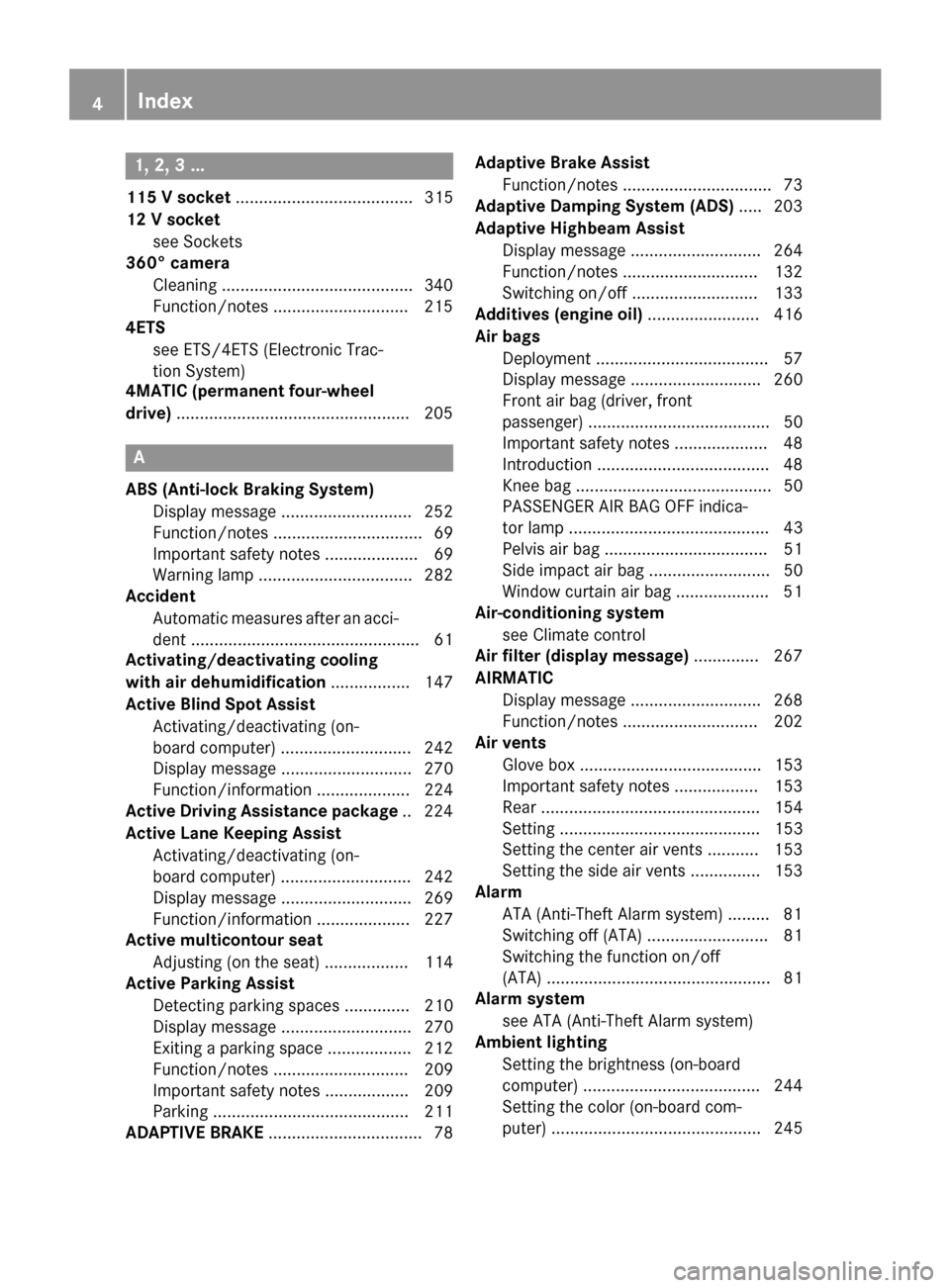
1, 2, 3 ...
115 V socket ...................................... 315
12 V socket see Sockets
360° camera
Cleaning .........................................3 40
Function/notes ............................ .215
4ETS
see ETS/4ETS (Electronic Trac-
tion System)
4MATIC (permanent four-wheel
drive) ................................................. .205 A
ABS (Anti-lock Braking System) Display message ............................ 252
Function/notes ................................ 69
Important safety notes .................... 69
Warning lamp ................................. 282
Accident
Automatic measures after an acci-
dent ................................................. 61
Activating/deactivating cooling
with air dehumidification ................. 147
Active Blind Spot Assist Activating/deactivating (on-
board computer) ............................ 242
Display message ............................ 270
Function/informatio n.................... 224
Active Driving Assistance package .. 224
Active Lane Keeping Assist Activating/deactivating (on-
board computer) ............................ 242
Display message ............................ 269
Function/information .................... 227
Active multicontour seat
Adjusting (on the seat) .................. 114
Active Parking Assist
Detecting parking spaces .............. 210
Display message ............................ 270
Exiting a parking space .................. 212
Function/note s............................. 209
Important safety notes .................. 209
Parking .......................................... 211
ADAPTIVE BRAKE ................................. 78 Adaptive Brake Assist
Function/note s................................ 73
Adaptive Damping System (ADS) ..... 203
Adaptive Highbeam Assist Display message ............................ 264
Function/note s............................. 132
Switching on/of f........................... 133
Additives (engine oil) ........................ 416
Air bags Deployment ..................................... 57
Display message ............................ 260
Front air bag (driver, front
passenger) ....................................... 50
Important safety notes .................... 48
Introduction ..................................... 48
Knee bag .......................................... 50
PASSENGER AIR BAG OFF indica-
tor lamp ........................................... 43
Pelvis air ba g................................... 51
Side impact air bag .......................... 50
Window curtain air bag .................... 51
Air-conditioning system
see Climate control
Air filter (display message) .............. 267
AIRMATIC Display message ............................ 268
Function/note s............................. 202
Air vents
Glove box ....................................... 153
Important safety notes .................. 153
Rear ............................................... 154
Setting ........................................... 153
Setting the center air vents ........... 153
Setting the side air vents ............... 153
Alarm
ATA (Anti-Theft Alarm system )......... 81
Switching off (ATA) .......................... 81
Switching the function on/off
(ATA) ................................................ 81
Alarm system
see ATA (Anti-Theft Alarm system)
Ambient lighting
Setting the brightness (on-board
computer) ...................................... 244
Setting the color (on-board com-
puter) ............................................. 245 4
Index
Page 14 of 426

Head restraints
Adjusting ....................................... 112
Adjusting (angle) ............................ 113
Adjusting (electrically) ................... 113
Adjusting (rear) .............................. 113
Installing/removing (rear) .............. 114
Luxury ............................................ 113
see NECK-PRO head restraints
see NECK-PRO luxury head restraints
Heating
see Climate control
High-beam headlamps
Adaptive Highbeam Assist ............. 132
Changing bulbs .............................. 135
Display message ............................ 262
Switching on/off ........................... 130
Hill start assist .................................. 161
HOLD function Activating ....................................... 200
Deactivating ................................... 200
Display message ............................ 269
Function/notes ............................. 200
Hood
Closing ........................................... 331
Display message ............................ 277
Important safety notes .................. 330
Opening ........................................ .330
Horn ...................................................... 32
Hydroplaning ..................................... 185 I
Ignition lock see Key positions
Immobilizer .......................................... 80
Indicator and warning lamps COLLISION PREVENTION ASSIST
PLUS .............................................. 289
Indicator lamps
see Warning and indicator lamps
Indicators
see Turn signals
Insect protection on the radiator .... 331
Instrument cluster Overview .......................................... 33
Settings ......................................... 243
Warning and indicator lamps ........... 34 Instrument cluster lighting
.............. 244
Interior lighting Automatic control .......................... 134
Delayed switch-off (on-board
computer) ...................................... 245
Emergency lighting ........................ 134
Manual control ............................... 134
Overview ........................................ 133
Reading lamp ................................. 133
Setting the brightness of the
ambient lighting (on-board com-
puter) ............................................. 244
Setting the brightness of the dis-
play/switch (on-board computer) .. 244
Setting the color of the ambient
lighting (on-board computer) ......... 245 J
Jack Storage location ............................ 344
Using ............................................. 386
Jump starting (engine) ......................353 K
KEYLESS-GO Convenience closing feature .......... 101
Display message ............................ 278
Locking ............................................ 85
Removing the Start/Stop button ... 159
Start/Stop button .......................... 158
Starting the engine ........................ 160
Unlocking ......................................... 85
Key positions
KEYLESS-GO .................................. 158
SmartKey ....................................... 157
Kickdown
Driving tips ................................... .169
Manual drive program .................... 172
Knee bag .............................................. 50 12
Index
Page 15 of 426

L
Lamps see Warning and indicator lamps
Lane Keeping Assist
Activating/deactivating ................ .242
Display message ............................ 269
Function/informatio n.................... 222
Lane Tracking package ..................... 220
Lap time (RACETIMER) ...................... 248
LATCH-type (ISOFIX) child seat
anchors ................................................ 64
License plate lamp (display mes-
sage) ................................................... 262
Light function, active Display message ............................ 263
Lights
Activating/deactivating the inte-
rior lighting delayed switch-off ....... 245
Adaptive Highbeam Assist ............. 132
Automatic headlamp mod e............ 129
Cornering light function ................. 131
Driving abroad ............................... 128
Hazard warning lamps ................... 131
High beam flashe r.......................... 131
High-beam headlamp s................... 130
Light switch ................................... 128
Low-beam headlamp s.................... 129
Parking lamps ................................ 130
Rear fog lamp ................................ 130
Setting the brightness of the
ambient lighting (on-board com-
puter) ............................................. 244
Setting the brightness of the dis-
play/switch (on-board computer) .. 244
Setting the color of the ambient
lighting (on-board computer) ......... 245
Standing lamps .............................. 130
Switching the daytime running
lamps on/off (on-board com-
puter) ............................................. 244
Switching the exterior lighting
delayed switch-off on/off (on-
board computer) ............................ 245 Switching the surround lighting
on/off (on-board computer) .......... 245
Turn signals ................................... 130
see Interior lighting
see Replacing bulbs
Light sensor (display message) ....... 263
Loading guidelines ............................ 292
Locking see Central locking
Locking (doors)
Automatic ........................................ 90
Emergency locking ........................... 91
From inside (central locking but-
ton) .................................................. 90
Locking centrally
see Central locking
Locking verification signal (on-
board computer) ............................... 246
Low-beam headlamps Display message ............................ 261
Setting for driving abroad (sym-
metrical) ........................................ 128
Switching on/of f........................... 129
Luggage holder (EASY-PACK load-
securing kit) ....................................... 305
Lumbar support Adjusting the 4-way lumbar sup-
port ................................................ 115
Luxury head restraints ..................... 113 M
M+S tires ............................................ 364
Malfunction message see Display messages
Matte finish (cleaning instruc-
tions) .................................................. 338
mbrace Call priority .................................... 320
Display message ............................ 255
Downloading destinations
(COMAND) ..................................... 320
Downloading routes ....................... 323
Emergency call .............................. 317
General notes ................................ 316
Geo fencing ................................... 324
Locating a stolen vehicle ............... 322 Index
13
Page 133 of 426

i
Vehicles with Adaptive Highbeam Assist:
when Adaptive Highbeam Assist is active, it controls activation of the high-beam head-
lamps (Y page 132).
High-beam flasher X
To switch on: turn the SmartKey in the
ignition lock to position 1or 2, or start the
engine.
X Pull the combination switch in the direction
of arrow 0087. Hazard warning lamps
X
To switch on the hazard warning lamps:
press button 0043.
All turn signals flash. If you now switch on a turn signal using the combination switch,
only the turn signal lamp on the corre-
sponding side of the vehicle will flash.
X To switch off the hazard warning lamps:
press button 0043.
The hazard warning lamps automatically
switch on if:
R an air bag is deployed or
R the vehicle decelerates rapidly from a
speed of above 45 mph (70 km/h) and
comes to a standstill
The hazard warning lamps switch off auto-
matically if the vehicle reaches a speed of
above 6 mph (10 km/h) again after a full
brake application. i
The hazard warning lamps still operate if
the ignition is switched off. Cornering light function
The cornering light function improves the illu-
mination of the road over a wide angle in the direction you are turning, enabling better vis-
ibility in tight bends, for example. It can only
be activated when the low-beam headlamps
are switched on.
Active:
R if you are driving at speeds below 25 mph
(40 km/h) and switch on the turn signal or
turn the steering wheel
R if you are driving at speeds between
25 mph (40 km/h) and 45 mph (70 km/h)
and turn the steering wheel
The cornering lamp may remain lit for a short
time, but is automatically switched off after
no more than three minutes. Exterior lighting
131Lights and windshield wipers Z
Page 134 of 426

Adaptive Highbeam Assist
General notes You can use this function to set the head-
lamps to change between low beam and high
beam automatically. The system recognizes
vehicles with their lights on, either approach-
ing from the opposite direction or traveling in front of your vehicle, and consequently
switches the headlamps from high beam to
low beam.
The system automatically adapts the low-
beam headlamp range depending on the dis-
tance to the other vehicle. Once the system
no longer detects any other vehicles, it reac-
tivates the high-beam headlamps.
The system's optical sensor is located behind
the windshield near the overhead control
panel. Important safety notes G
WARNING
Adaptive Highbeam Assist does not recognize road users:
R who have no lights, e.g. pedestrians
R who have poor lighting, e.g. cyclists
R whose lighting is blocked, e.g. by a barrier
In very rare cases, Adaptive Highbeam Assist
may fail to recognize other road users that
have lights, or may recognize them too late. In this or similar situations, the automatic high-
beam headlamps will not be deactivated or
activated regardless. There is a risk of an acci-
dent.
Always carefully observe the traffic conditions and switch off the high-beam headlamps in
good time.
Adaptive Highbeam Assist cannot take into
account road, weather or traffic conditions.
Adaptive Highbeam Assist is only an aid. You are responsible for adjusting the vehicle's
lighting to the prevailing light, visibility and
traffic conditions.
In particular, the detection of obstacles can
be restricted if there is:
R poor visibility, e.g. due to fog, heavy rain or
snow
R dirt on the sensors or the sensors are
obscured 132
Exterior lightingLights and windshield wipers
Page 135 of 426

Switching Adaptive Highbeam Assist
on/off 0043
High-beam headlamps
0044 Turn signal, right
0087 High-beam flasher
0085 Turn signal, left
X To switch on: turn the light switch to 0058.
X Press the combination switch beyond the
pressure point in the direction of arrow 0043.
The 00CE indicator lamp in the multifunc-
tion display lights up when it is dark and the light sensor activates the low-beam head-
lamps.
If you are driving at speeds above approx-
imately 16 mph (25 km/h):
The headlamp range is set automatically
depending on the distance between the
vehicle and other road users.
If you are driving at speeds above approx-
imately 19 mph (30 km/h) and no other
road users have been detected:
The high-beam headlamps are switched on
automatically. The 0057indicator lamp in
the instrument cluster also lights up.
If you are driving at speeds below approx-
imately 16 mph (25 km/h) or other road
users have been detected or the roads are adequately lit:
The high-beam headlamps are switched off
automatically. The 0057indicator lamp in
the instrument cluster goes out. The 00CEindicator lamp in the multifunction display
remains lit.
X To switch off: move the combination
switch back to its normal position or move
the light switch to another position.
The 00CE indicator lamp in the instrument
cluster goes out. Headlamps fogged up on the inside
Certain climatic and physical conditions may
cause moisture to form in the headlamp. This moisture does not affect the functionality of
the headlamp. Interior lighting
Overview of interior lighting
Front overhead control panel
0043
0042 To switch the rear interior lighting
on/off
0044 0033 To switch the automatic interior
lighting control on/off
0087 003D To switch the right-hand front read-
ing lamp on/off
0085 004A To switch the front interior lighting
on/off
0083 003D To switch the left-hand front reading
lamp on/off Interior lighting
133Lights and windshield wipers Z
Page 237 of 426

Text field
0043shows the selected menu or
submenu as well as display messages.
The following messages may appear in the
multifunction display:
0097 Gearshift recommendation when
shifting manually (Y page 171)
0095005D0096 Active Parking Assist (Y page 209)
CRUISE
CRUISE Cruise control (Y
page 187)
00CE Adaptive Highbeam Assist
(Ypage 133)
00A7 ECO start/stop function
(Ypage 161)
00D9 HOLD function (Y page 200) Menus and submenus
Menu overview
Press the 0059or0065 button on the steer-
ing wheel to call up the menu bar and select a
menu.
Operating the on-board computer
(Y page 233).
Depending on the equipment installed in the
vehicle, you can call up the following menus:
R Trip Trip menu (Y page 235)
R Navi
Navi menu (navigation instructions)
(Y page 237)
R Audio
Audio menu (Y page 238)
R Tel
Tel menu (telephone) (Y page 239)
R DriveAssist
DriveAssist menu (assistance)
(Y page 240)
R Serv
Serv menu (Y page 243)
R Sett
Sett menu (settings) (Y page 243)
R AMG
AMG menu in AMG vehicles (Y page 247) Trip menu
Standard display X
Press and hold the 0038button on the
steering wheel until the Trip
Tripmenu with
trip odometer 0043and odometer 0044is
shown.
Trip computer "From Start" or "From
Reset" 0043
Distance
0044 Time
0087 Average speed
0085 Average fuel consumption
X Press the 0059or0065 button on the steer-
ing wheel to select the Trip Tripmenu.
X Press the 0063or0064 button to select
From Start
From Start orFrom Reset
From Reset.
The values in the From Start
From Startsubmenu are
calculated from the start of a journey whilst
the values in the From Reset From Resetsubmenu are
calculated from the last time the submenu
was reset (Y page 236).
The From Start From Start trip computer is automati-
cally reset if:
R the ignition has been switched off for more
than four hours.
R 999 hours have been exceeded.
R 9,999 miles have been exceeded. Menus and submenus
235On-board computer and displays Z
Page 266 of 426

Display messages
Possible causes/consequences and
0050
0050Solutions Adaptive Highbeam
Adaptive Highbeam
Assist Currently Assist Currently
Unavailable See Unavailable See
Operator's Manual Operator's Manual Adaptive Highbeam Assist is deactivated and temporarily inoper-
ative. Possible causes are:
R the windshield in the camera's field of vision is dirty.
R visibility is impaired due to heavy rain, snow or fog.
X Clean the windshield.
If the system detects that the camera is fully operational again, the
Adaptive Highbeam Assist Now Available
Adaptive Highbeam Assist Now Available message is dis-
played.
Adaptive Highbeam Assist is operational again. Adaptive Highbeam Adaptive Highbeam
Assist Inoperative Assist Inoperative Adaptive Highbeam Assist is faulty.
X
Visit a qualified specialist workshop. Engine
Display messages
Possible causes/consequences and
0050 0050Solutions 00BD
Check Coolant Check Coolant
Level See Opera‐ Level See Opera‐
tor's Manual tor's Manual The coolant level is too low.
! Avoid making long journeys with too little coolant in the engine
cooling system. The engine will otherwise be damaged.
X Add coolant, observing the warning notes before doing so
(Y page 333).
X If coolant needs to be added more often than usual, have the
engine coolant system checked at a qualified specialist work-
shop. 00AC The fan motor is faulty.
X At coolant temperatures below 248 ‡ (120 †), drive to the
nearest qualified specialist workshop.
X Avoid subjecting the engine to heavy loads, e.g. driving in moun-
tainous terrain, and stop-and-go traffic. 264
Display
messagesOn-board computer and displays