2015 MERCEDES-BENZ E-CLASS SALOON display
[x] Cancel search: displayPage 192 of 497
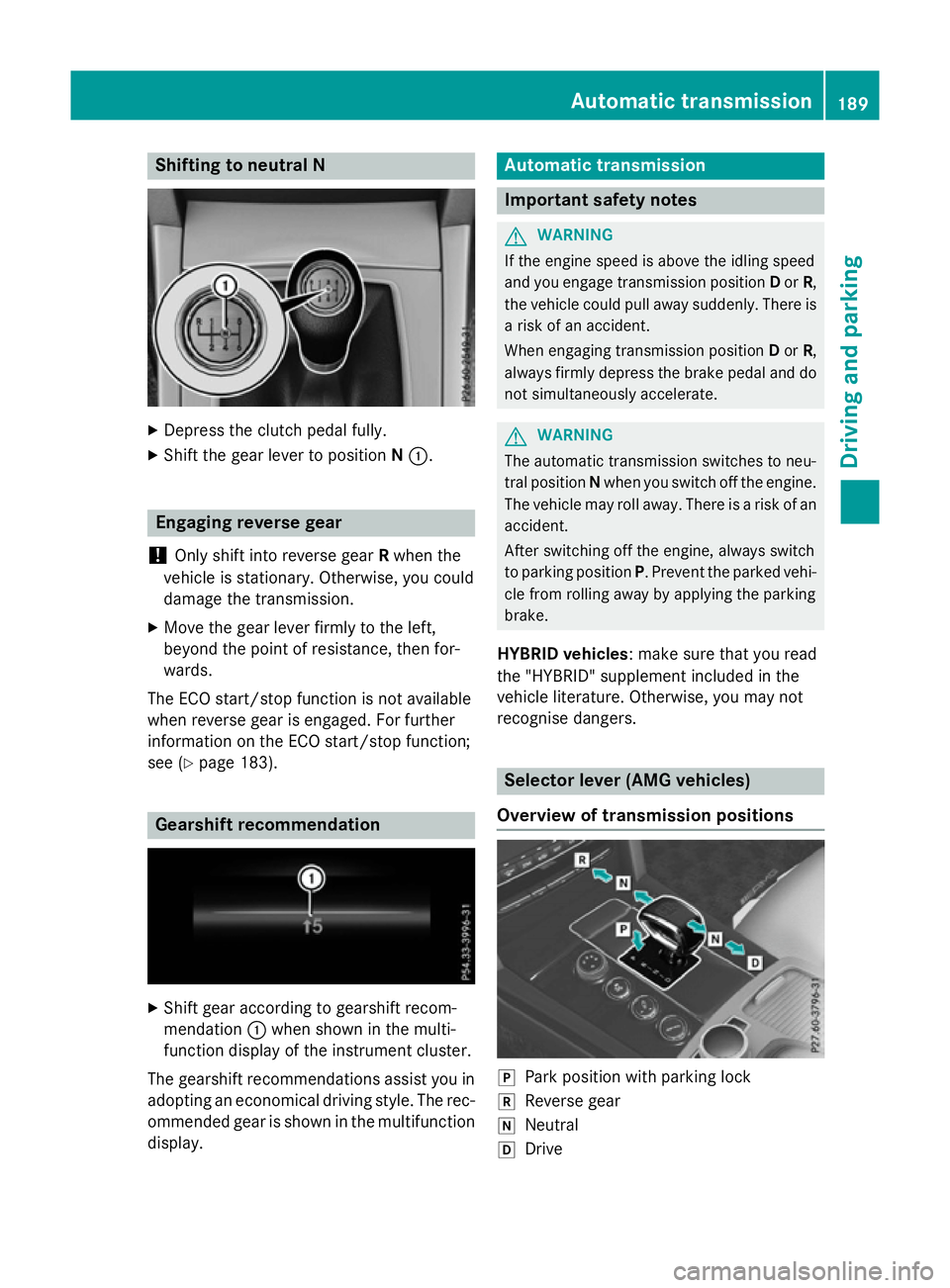
Shifting to neutralN
X
Depress the clutch pedal fully.
X Shift the gear lever to position N:. Engaging reverse gear
! Only shift into reverse gear
Rwhen the
vehicle is stationary. Otherwise, you could
damage the transmission.
X Move the gear lever firmly to the left,
beyond the point of resistance, then for-
wards.
The ECO start/stop function is not available
when reverse gear is engaged. For further
information on the ECO start/stop function;
see (Y page 183). Gearshift recommendation
X
Shift gear according to gearshift recom-
mendation :when shown in the multi-
function display of the instrumen tcluster.
The gearshift recommendations assist you in adopting an economical driving style. The rec- ommended gear is shown in the multifunctiondisplay. Automatic transmission
Important safety notes
G
WARNING
If the engine speed is above the idling speed
and you engage transmission position Dor R,
the vehicle could pull away suddenly. There is ar isk of an accident.
When engaging transmission position Dor R,
always firmly depress the brake pedal and do not simultaneously accelerate. G
WARNING
The automatic transmission switches to neu-
tral position Nwhen you switch off the engine.
The vehicle may roll away.T here isarisk of an
accident.
After switching off the engine, always switch
to parking position P.Prevent the parked vehi-
cle from rolling away by applying the parking
brake.
HYBRID vehicles :make sure that you read
the "HYBRID" supplement included in the
vehicle literature. Otherwise, you may not
recognise dangers. Selector lever (AMG vehicles)
Overview of transmission positions j
Park position with parking lock
k Reverse gear
i Neutral
h Drive Automatic transmission
189Driving and parking Z
Page 193 of 497
Transmission position and driv
epro-
gram display !
If the transmission positio
ndisplay in the
multifunctio ndisplay is not working ,you
shoul dpulla wa ycarefull ytocheck whether
the desired transmission positio nis
engaged .Ideally ,you shoul dselect trans-
mission position Dand automatic drive pro-
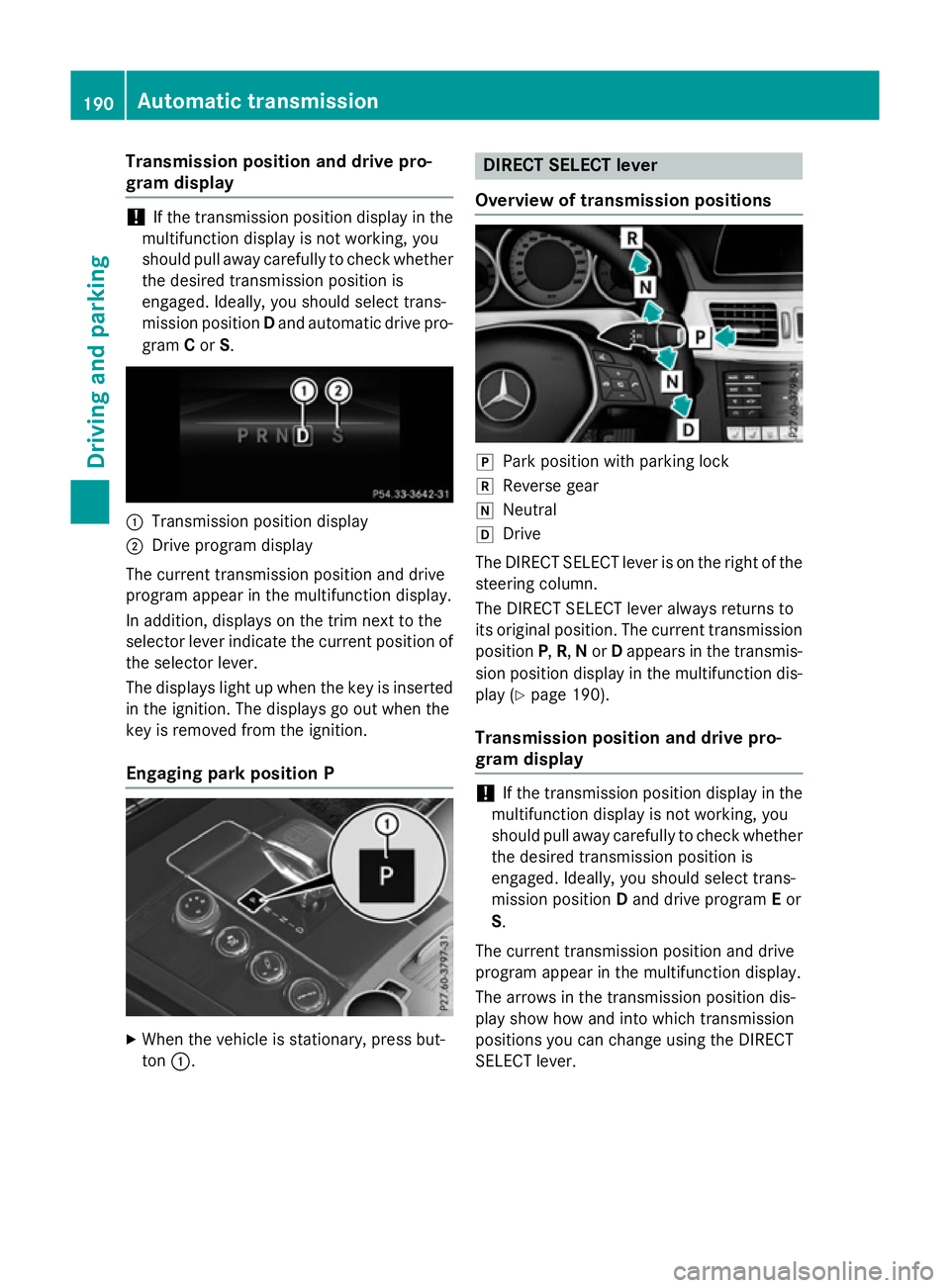
gram Cor S. :
Transmission positio ndisplay
; Driv eprogra mdisplay
The current transmission positio nand drive
progra mappea rinthe multifunctio ndisplay.
In addition, displays on the trim next to the
selecto rlev er indicate the current positio nof
the selecto rlev er.
The displays light up when the key is inserted in the ignition. The displays go ou twhent he
key is remove dfromt he ignition.
Engagin gpark position P X
When the vehicl eisstationary, press but-
ton :. DIREC
TSELECT lever
Overvie woftransmission positions j
Park positio nwithp arking lock
k Reverse gear
i Neutral
h Drive
The DIRECT SELEC Tlev er is on the right of the
steering column.
The DIRECT SELEC Tlever always returns to
its original position. The current transmission position P,R,N or Dappear sinthe transmis-
sion positio ndisplay in the multifunctio ndis-
play (Y page 190).
Transmission position and driv epro-
gram display !
If the transmission positio
ndisplay in the
multifunctio ndisplay is not working ,you
shoul dpulla wa ycarefull ytocheck whether
the desired transmission positio nis
engaged .Ideally ,you shoul dselect trans-
mission position Dand drive program Eor
S.
The current transmission positio nand drive
progra mappea rinthe multifunctio ndisplay.
The arrow sinthe transmission positio ndis-
play sho whow and into which transmission
positions yo ucan change using the DIRECT
SELEC Tlever. 190
Automati
ctransmissionDriving an dparking
Page 194 of 497
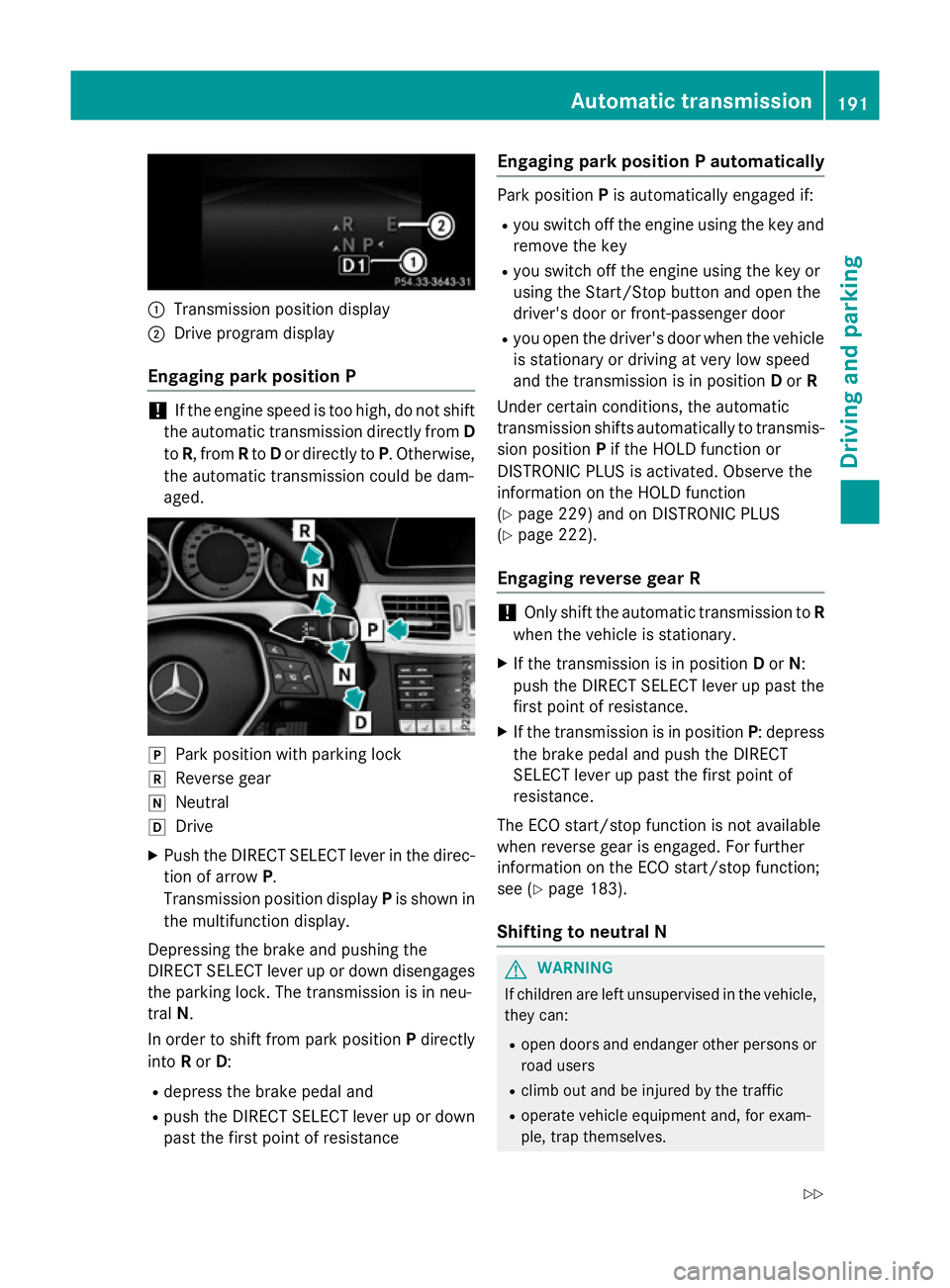
:
Transmission position display
; Drive program display
Engaging parkp osition P !
If the engine speed is too high, do not shift
the automatic transmission directly from D
to R,f rom Rto Dor directly to P.Otherwise,
the automatic transmission could be dam-
aged. j
Park position with parking lock
k Reverse gear
i Neutral
h Drive
X Push the DIRECT SELECT lever in the direc-
tion of arrow P.
Transmission position display Pis shown in
the multifunction display.
Depressin gthe brake and pushing the
DIRECT SELECT lever up or down disengages the parking lock. The transmission is in neu-
tral N.
In order to shift from park position Pdirectly
into Ror D:
R depress the brake pedal and
R push the DIRECT SELECT lever up or down
past the first point of resistance Engaging parkp
ositionPautomatically Park position
Pis automatically engaged if:
R you switch off the engine using the key and
remove the key
R you switch off the engine using the key or
using the Start/Stop button and open the
driver's door or front-passenger door
R you open the driver's door when the vehicle
is stationary or driving at very low speed
and the transmission is in position Dor R
Under certain conditions, the automatic
transmission shifts automatically to transmis-
sion position Pif the HOLD function or
DISTRONIC PLUS is activated. Observe the
information on the HOLD function
(Y page 229) and on DISTRONIC PLUS
(Y page 222).
Engaging reverse gear R !
Only shift the automatic transmission to
R
when the vehicle is stationary.
X If the transmission is in position Dor N:
push the DIRECT SELECT lever up past the first point of resistance.
X If the transmission is in position P:depress
the brake pedal and push the DIRECT
SELECT lever up past the first point of
resistance.
The ECO start/stop function is not available
when reverse gear is engaged. For further
information on the ECO start/stop function;
see (Y page 183).
Shifting to neutral N G
WARNING
If children are left unsupervised in the vehicle, they can:
R open doors and endanger other persons or
road users
R climb out and be injured by the traffic
R operate vehicle equipment and, for exam-
ple, trap themselves. Automatic transmission
191Driving and parking
Z
Page 197 of 497
AMG vehicles
When shifting down
,the double-clutch func-
tion is active regardless of th ecurrentl yselec-
te dd rivep rogram .The double-clutch function
reduce sload chang ereaction sand is condu-
civ etoas portydriving style. The soun dgen-
erated by th edouble-clutch function depends
on th edrivep rogram selected.
Kickdown Use kickdown for maximum acceleration:
X Depress th eaccelerato rpedal beyon dthe
pressur epoint.
The transmission shifts to alower gear
depending on th eengines peed.
X Eas eoff th eaccelerato rpedal once the
desired spee disreached.
The automatic transmission shifts bac kup.
Towing atrailer Towin
gatrailer is no tpossible wit hall mod-
els. Fo rfurther information ,see
(Y page 267).
X Drive in th emiddle of th eengines peed
range on uphill gradients.
X Manua ldrive program: depending on the
uphill or downhill gradient, shif tint oag ear
(Y page 197) in whic hthe engin ewill run in
th em iddle of th eengines pee drange. This
also applie sifcruise control ,DISTR ONIC
PLU SorS PEEDTR ONICare activated. Program selector button
Genera lnotes The program selector butto
nallows you to
choos ebetween differen tdriving character-
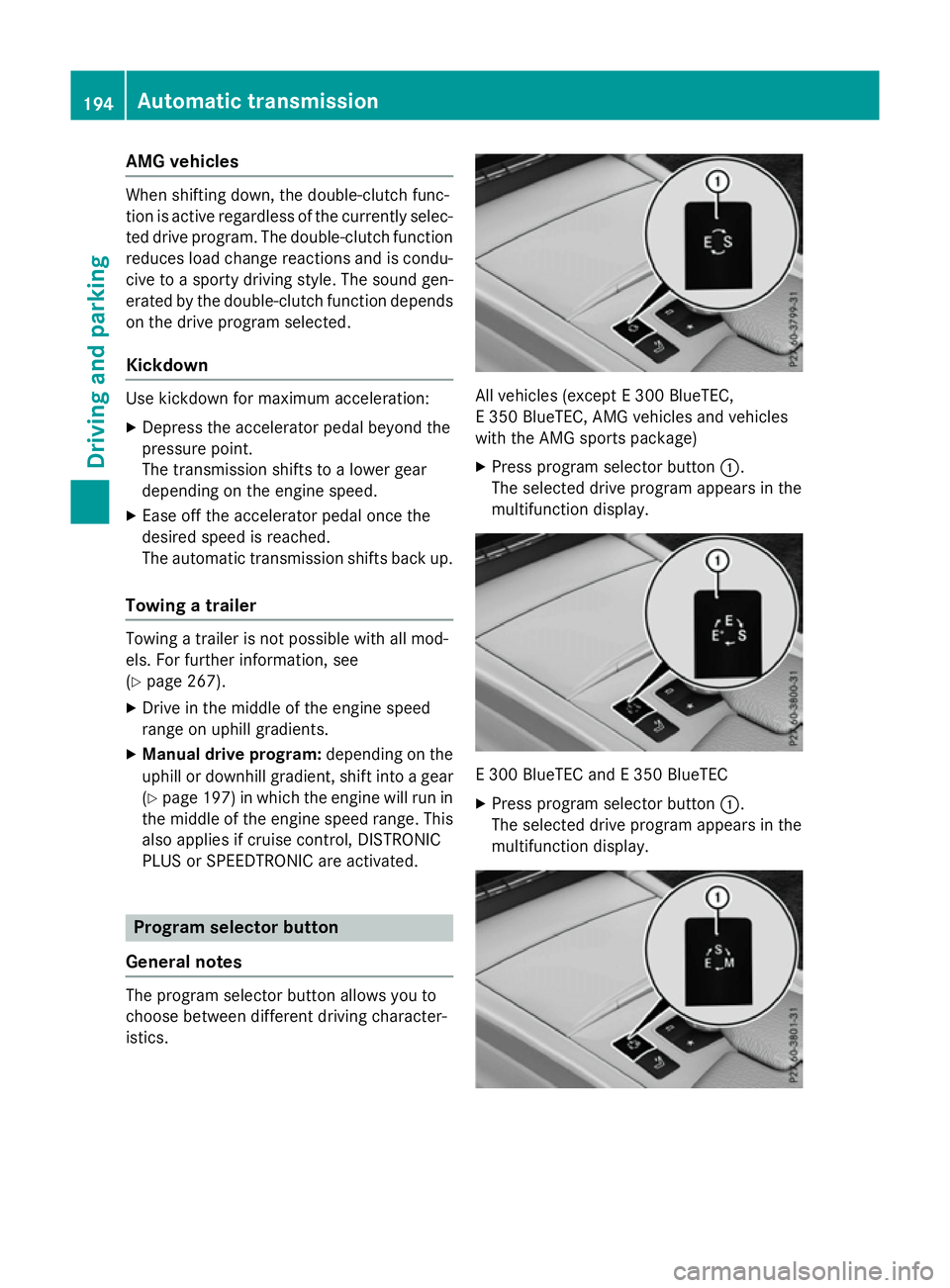
istics. All vehicles (except
E300 BlueTEC,
E3 50 BlueTEC, AM Gvehicles and vehicles
wit hthe AM Gsport spackage)
X Press program selector button :.
The selected driv eprogram appear sinthe
multifunction display. E3
00 BlueTE CandE3 50 BlueTEC
X Press program selector button :.
The selected driv eprogram appear sinthe
multifunction display. 194
Automatic trans
missionDriving andparking
Page 198 of 497
Vehicles with the AMG sports package
X Press program selector button :.
The selected drive program appears in the
multifunction display.
i Further information aboutp
ermanent
drive program M(Y page 198).
As well as this permanent drive program M,
you can also activate temporary drive pro-
gram M(Y page 197). E
Economy Comfortable,e
conomical
driving E+
Economy
Plus Comfortable,p
articularly
economical driving S
Sport Sporty driving style
M
Manual Manualg
earshifting i
Further information on the automatic
drive program (Y page 196).
i The automatic transmission switches to
automatic drive program Eeach time the
engine is started.
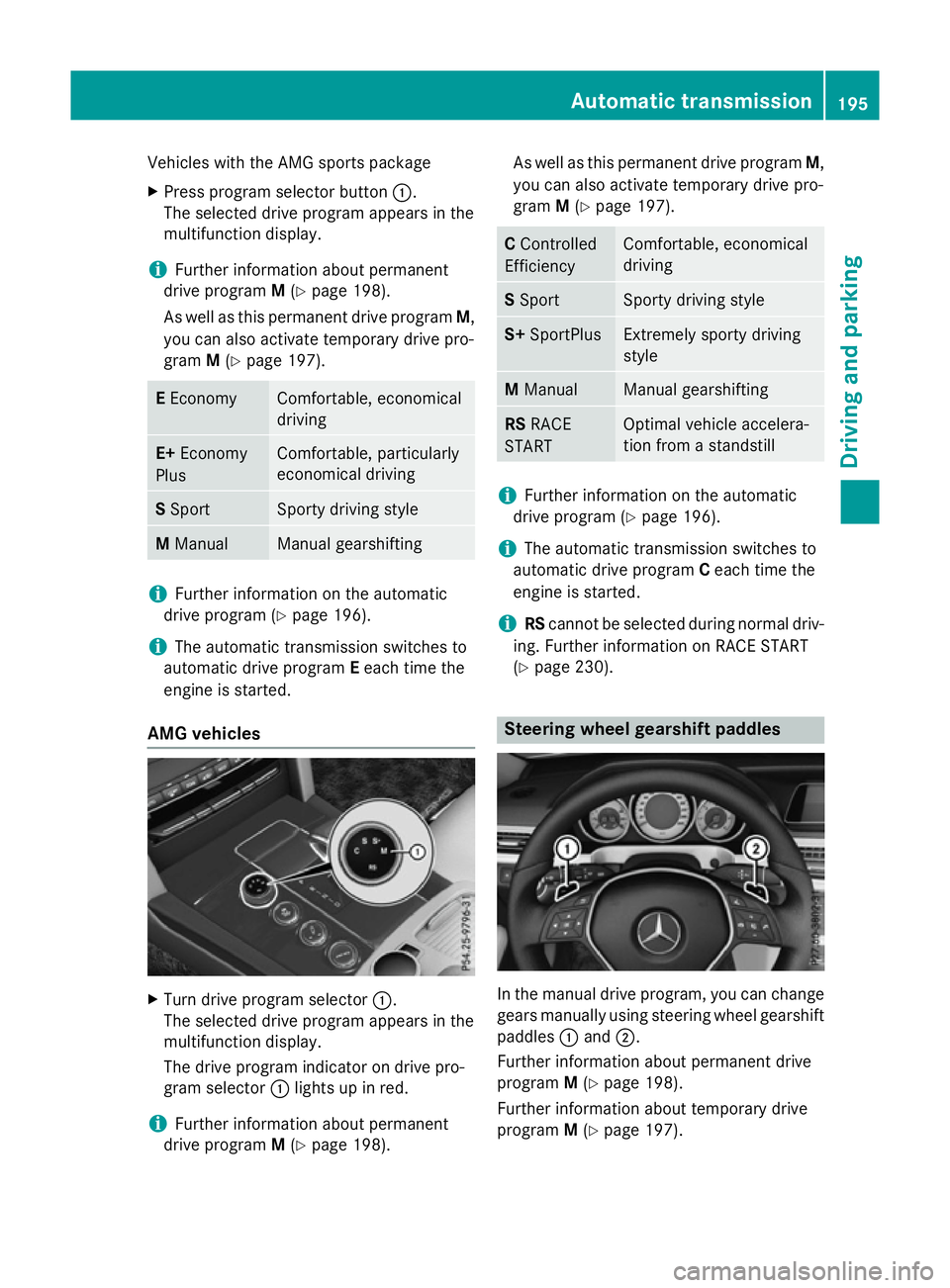
AMG vehicles X
Turn drive program selector :.
The selected drive program appears in the
multifunction display.
The drive program indicator on drive pro-
gram selector :lights up in red.
i Further information aboutp
ermanent
drive program M(Y page 198). As well as this permanent drive program
M,
you can also activate temporary drive pro-
gram M(Y page 197). C
Controlled
Efficiency Comfortable,e
conomical
driving S
Sport Sporty driving style
S+
SportPlus Extremely sporty driving
style
M
Manual Manualg
earshifting RS
RACE
START Optimal vehicle accelera-
tion from
astandstill i
Further information on the automatic
drive program (Y page 196).
i The automatic transmission switches to
automatic drive program Ceach time the
engine is started.
i RS
cannot be selected during normal driv-
ing. Further information on RACE START
(Y page 230). Steering wheelg
earshift paddles In the manual drive program, you can change
gears manually using steering wheel gearshift
paddles :and ;.
Further information aboutp ermanent drive
program M(Y page 198).
Further information aboutt emporary drive
program M(Y page 197). Automatic transmission
195Drivingand parking Z
Page 200 of 497
Manual drive program M
General notes
In this drive program, you can briefly change
geary
ourself by using the steering wheel
gearshift paddles. The transmission must be
in position D.
You can activate manua ldrive program Min
the E,E+ (E 300 BlueTEC and E350 BlueTEC)
and Sautomatic drive programs.
i As wellast
emporary drive program M,
you can alsoa ctivate permanent drive pro-
gram M(Y page1 94).
Further information about permanent drive program M(Y page1 98).
Activating
X Shift the transmission to position D.
X Pullt he left-hand or right-hand steering
whee lgearshift paddle (Y page195).
Manual drive program Mis temporarily acti-
vated. The selected geara ndMappear in
the multifunction display.
Shiftin ggears
If you pullont he left or right-hand steering
whee lgearshift paddle,t he automatic trans-
mission switches to manua ldrive program M
for alimited amount of time. Depending on
which gearshift paddle is pulled,t he auto-
matic transmission immediatel yshifts into
the next gearupord own, if permitted.
X To shift up: pullthe right-hand steering
whee lgearshift paddle (Y page195).
The automatic transmission shifts up to the
next gear.
i If the maximu
mengine spee donthe cur-
rently engaged gearisr eachedand you
continue to accelerate, the automatic
transmission automatically shifts up in
order to prevent engine damage.
X To shift down: pullonthe left-hand steer-
ing whee lgearshift paddle (Y page195).
The automatic transmission shifts downto
the next gear. i
If the engine exceeds the maximum
engine spee dwhen shifting down, the auto-
matic transmission protects against engine
damage by not shifting down.
i Automatic downshifting occurs when
coasting.
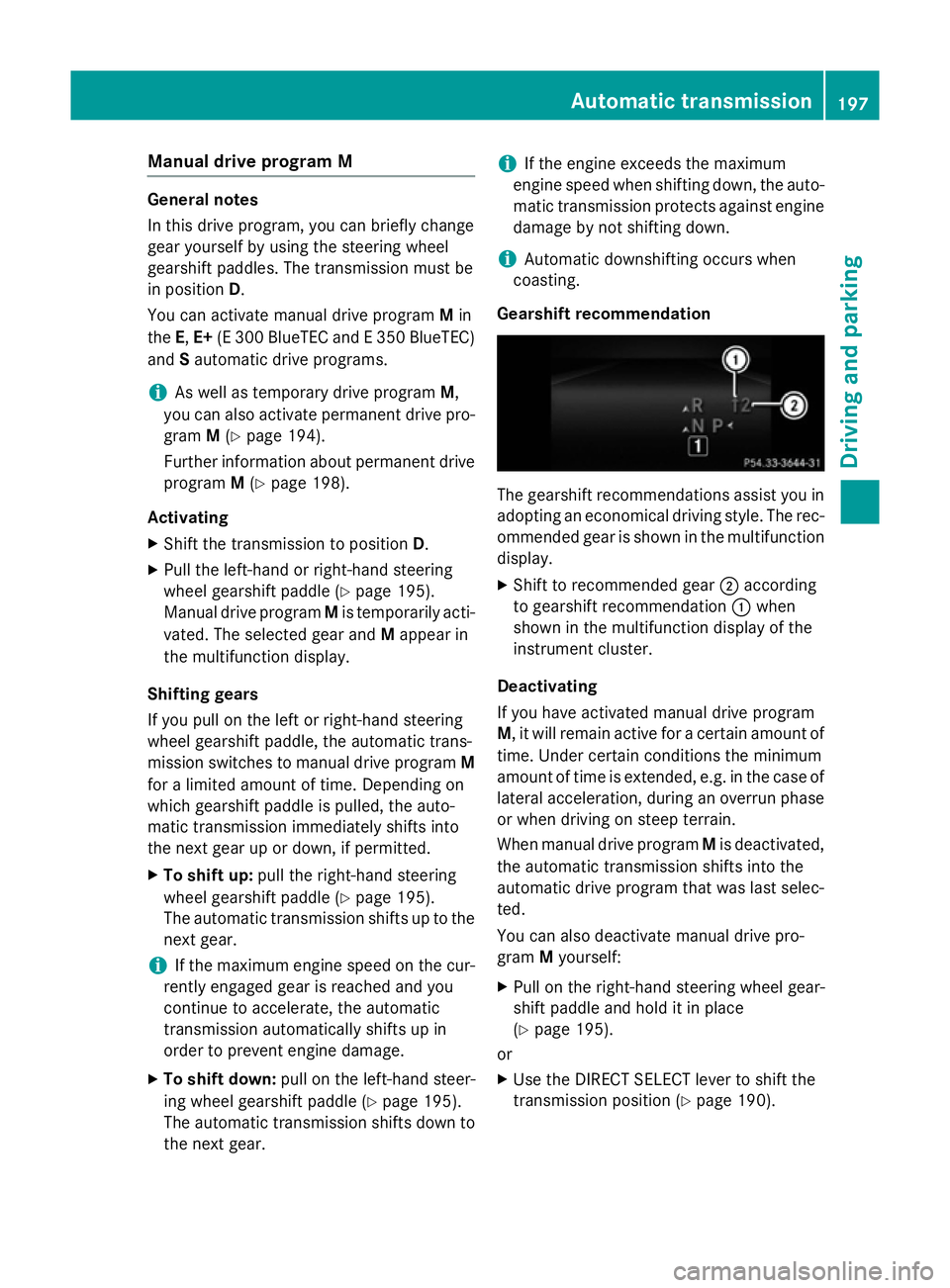
Gearshift recommendation The gearshift recommendations assist you in
adopting an economica ldriving style .The rec-
ommended geariss hownint he multifunction
display.
X Shift to recommende dgear ;according
to gearshift recommendation :when
show ninthe multifunction display of the
instrument cluster.
Deactivating
If you have activated manua ldrive program
M,i twillr emai nactive for acertain amount of
time. Under certain conditions the minimum
amount of time is extended, e.g. in the case of latera lacceleration, during an overru nphase
or when driving on steep terrain.
When manua ldrive program Mis deactivated,
the automatic transmission shifts into the
automatic drive progra mthat wasl asts elec-
ted.
You can alsod eactivate manua ldrive pro-
gram Myourself:
X Pullont he right-hand steering whee lgear-
shift paddle and hold it in place
(Y page1 95).
or
X Use the DIRECT SELECT leve rtoshift the
transmission position (Y page190). Automatic transmission
197Driving and parking Z
Page 201 of 497
or
X Use the program selector button to change
the drive program (Y page 194).
Manual drive program Mis deactivated.
The automatic transmission switches into
the automatic drive program that was last
selected. Manuald
rive program (AMG vehicles
and vehicles with the AMG sports
package)
General notes In this drive program, you can permanently
change gear yourself by using the steering
wheel gearshift paddles. The transmission
must be in position D.
i As well as this permanent drive program
M,y ou can also activate temporary drive
program M(Y page 197).
Activating the manual drive program X
Press the program selector button
(Y page 194) repeatedly until Mappears in
the multifunction display.
X AMG vehicles: turn the drive program
selector (Y page 195) until Mappears in the
multifunction display.
The indicator Mon the drive program selec-
tor lights up in red.
Manual drive program Mcan be selected
using the program selector button or the drive
program selector. In manual drive program M,
you can change gear yourself using the steer-
ing wheel gearshift paddles if the transmis-
sion is in position D.
Upshifting X
Pull the right-hand steerin gwheel gearshift
paddle.
The automatic transmission shifts up to the next gear. AMG vehicles !
In manual gearshift program
M,the auto-
matic transmission does not shift up auto-
matically even when the engine limiting
speed for the current gear is reached.
When the engine limiting speed is reached, the fuel supply is cut to prevent the engine
from overrevving. You must make sure that the engine speed does not reach the red
area of the rev counter. Otherwise, there is
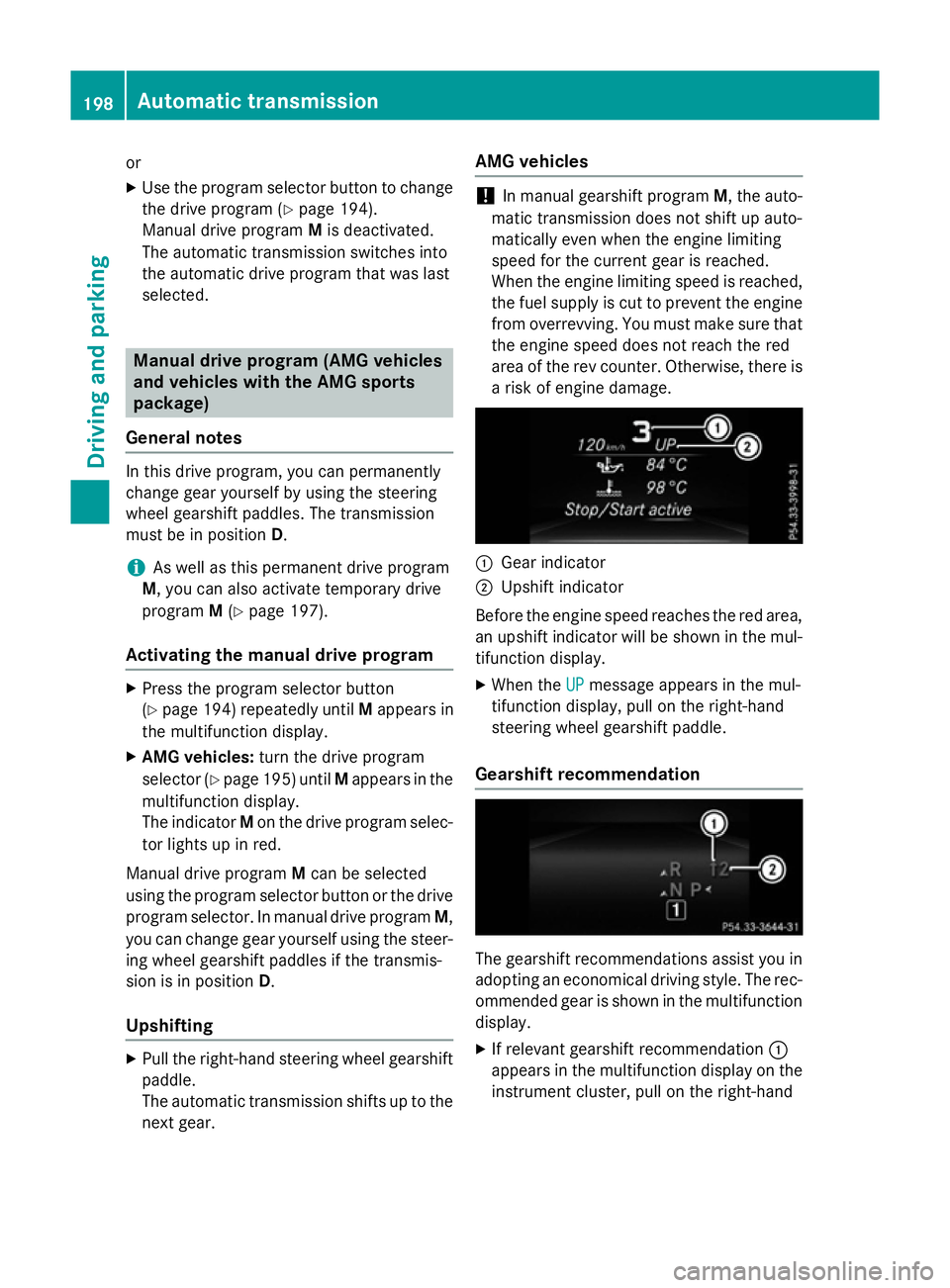
ar isk of engine damage. :
Gear indicator
; Upshift indicator
Before the engine speed reaches the red area, an upshift indicator will be shown in the mul-
tifunction display.
X When the UP UPmessage appears in the mul-
tifunction display ,pull on the right-hand
steerin gwheel gearshift paddle.
Gearshift recommendation The gearshift recommendations assist you in
adopting an economical driving style. The rec- ommended gear is shown in the multifunction
display.
X If relevant gearshift recommendation :
appears in the multifunction display on the instrument cluster, pull on the right-hand 198
Automatic transmissionDriving and parking
Page 211 of 497
boostin
geffect. You will require considerably
more effor ttosteer and brake. There is arisk
of an accident.
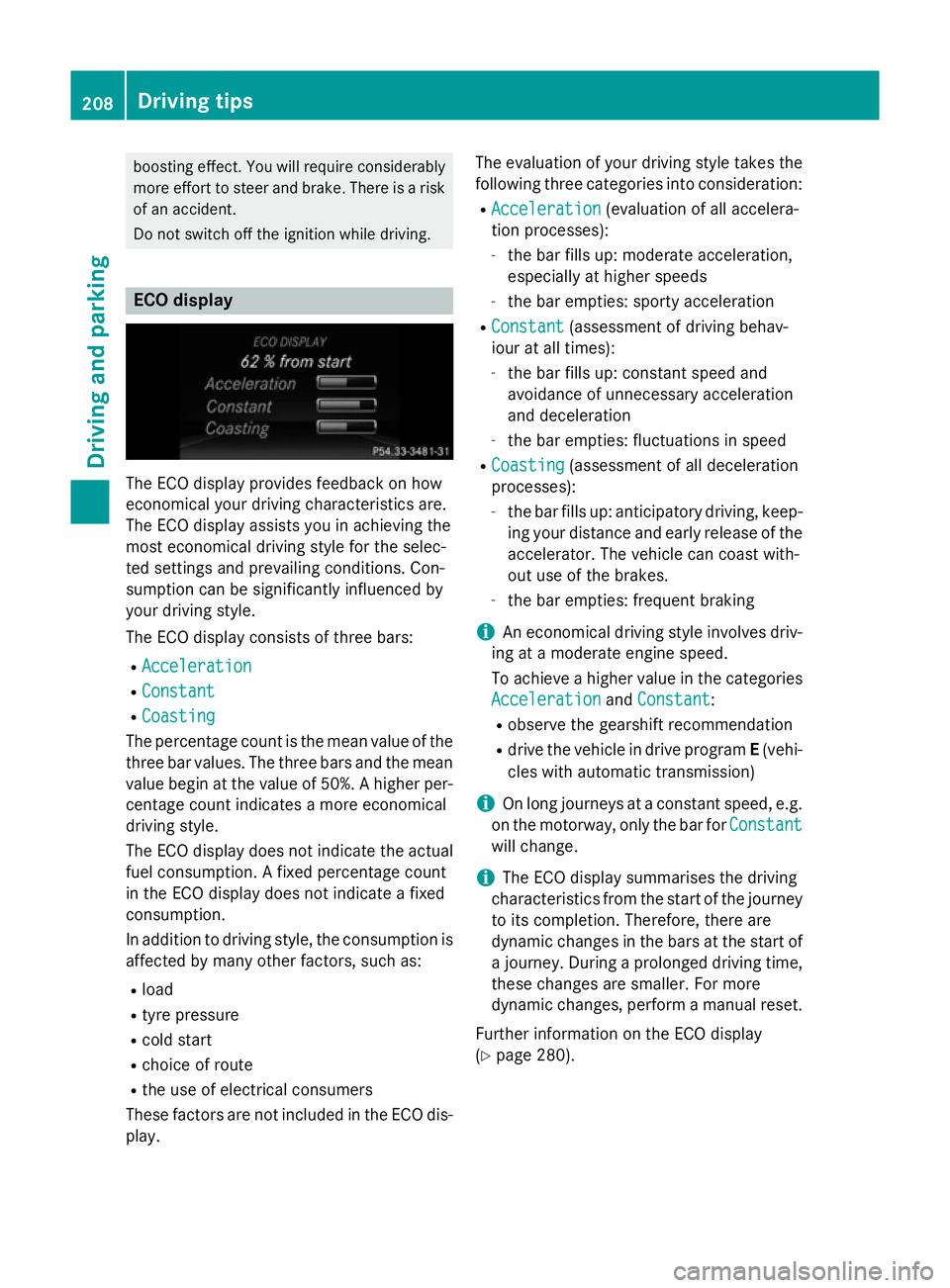
Do not switch off the ignition while driving. ECO display
The ECO display provides feedback on how
economical your driving characteristic sare.
The ECO display assists you in achievin gthe
most economical driving style for the selec-
ted settings and prevailing conditions. Con-
sumption can be significantly influenced by
your driving style.
The ECO display consists of three bars:
R Acceleration
Acceleration
R Constant Constant
R Coasting
Coasting
The percentage count is the mean value of the three bar values. The three bars and the mean
value begin at the value of 50%. Ahigher per-
centage count indicates amore economical
driving style.
The ECO display does not indicat ethe actual
fuel consumption .Afixed percentage count
in the ECO display does not indicat eafixed
consumption.
In addition to driving style, the consumption is
affected by many other factors, such as:
R load
R tyre pressure
R cold start
R choic eofroute
R the use of electrical consumers
These factors are not included in the ECO dis-
play. The evaluation of your driving style take
sthe
following three categories int oconsideration:
R Acceleration Acceleration (evaluation of all accelera-
tion processes):
- the bar fills up: moderat eacceleration,
especially at higher speeds
- the bar empties: sport yacceleration
R Constant
Constant (assessmen tofdriving behav-
iour at all times):
- the bar fills up: constan tspeed and
avoidance of unnecessary acceleration
and deceleration
- the bar empties: fluctuations in speed
R Coasting Coasting (assessmen tofall deceleration
processes):
- the bar fills up: anticipatory driving ,keep-
ing your distanc eand early release of the
accelerator. The vehicle can coast with-
out use of the brakes.
- the bar empties: frequent braking
i An economical driving style involves driv-
ing at amoderat eengin espeed.
To achieve ahigher value in the categories
Acceleration
Acceleration andConstant
Constant:
R observe the gearshift recommendation
R drive the vehicle in drive program E(vehi-
cles with automatic transmission)
i On long journeys at
aconstan tspeed, e.g.
on the motorway, only the bar for Constant
Constant
will change.
i The ECO display summarises the driving
characteristic sfrom the start of the journey
to its completion. Therefore, ther eare
dynamic changes in the bars at the start of aj ourney. Durin gaprolonge ddriving time,
these changes are smaller. For more
dynamic changes, perfor mamanual reset.
Further information on the ECO display
(Y page 280). 208
Driving tipsDriving and parking