2015 MERCEDES-BENZ E-CLASS SALOON heating
[x] Cancel search: heatingPage 162 of 497
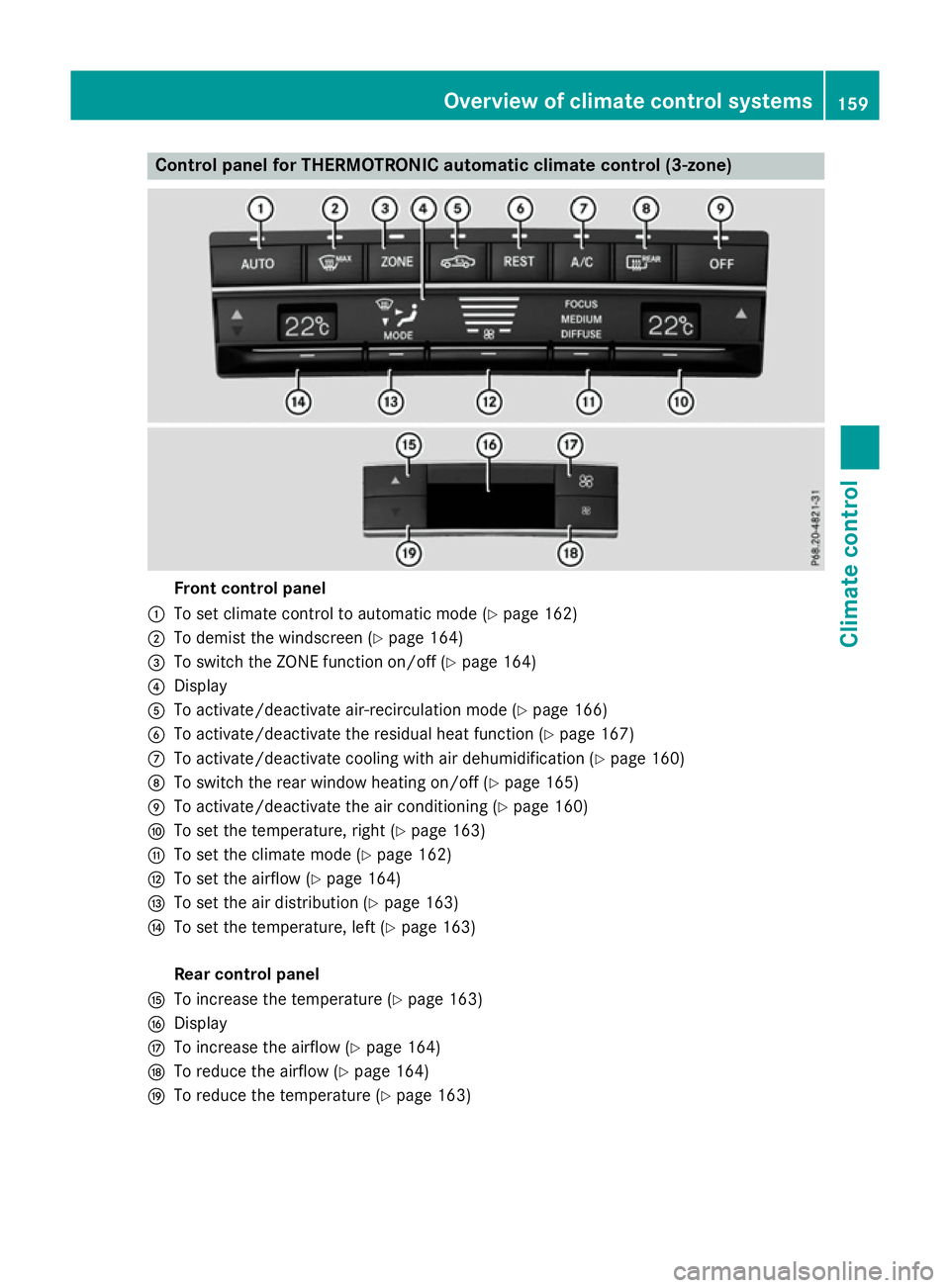
Control panel for THERMOTRONIC automatic climat
econtrol (3-zone) Fron
tcontrol panel
: To set climate control to automatic mod e(Ypage 162)
; To demist th ewindscree n(Ypage 164)
= To switch th eZONE function on/of f(Y page 164)
? Display
A To activate/deactivat eair-recirculation mod e(Ypage 166)
B To activate/deactivat ethe residual heat function (Y page 167)
C To activate/deactivat ecoolingw itha ir dehumidification (Y page 160)
D To switch th erear window heating on/of f(Ypage 165)
E To activate/deactivat ethe air conditionin g(Ypage 160)
F To set th etem perature, righ t(Ypage 163)
G To set th eclimate mod e(Ypage 162)
H To set th eairflow (Y page 164)
I To set th eair distribution (Y page 163)
J To set th etem perature, left (Y page 163)
Rea rcontrol panel
K To increas ethe temperatur e(Ypage 163)
L Display
M To increas ethe airflow (Y page 164)
N To reduc ethe airflow (Y page 164)
O To reduc ethe temperatur e(Ypage 163) Overview of climat
econtrol systems
159Climate control
Page 164 of 497
deactivate the "Cooling with air-dehumidifi-
cation "function only briefly.
The "Cooling with air dehumidification" func-
tion is only available when the engin eisrun-
ning. The air inside the vehicle is cooled and
dehumidified according to the temperature
selected.
Condensation may drip from the underside of the vehicle when coolin gmode is active. This
is normal and not asign that ther eisamal-
function.
Switching on/off X
To activate: press the¿button.
The indicator lamp above the ¿button
lights up.
i In vehicles with auxiliary heating, one of
the indicator lamps on the auxiliary heating
button lights up when the "Cooling with air dehumidification" function is activated.
X To deactivate: press the¿button.
The indicator lamp above the ¿button
goes out. The coolin gwith air dehumidifi-
cation function has adelayed switch-off
feature. Operating thec
limatecontrol system
161Climatecontrol
Page 169 of 497
Problems with the rear window heating
Problem
Possible causes/consequences and
M
MSolutions The rear window heat-
ing has switched off
prematurely or cannot
be activated. The battery has not been sufficiently charged.
X Switch off any consumers that are not required, e.g. reading
lamps, interior lighting or the seat heating.
When the battery is sufficiently charged, the rear window heat- ing can be activated again. Switching air-recirculation mode
on/off
General notes You can deactivate the flow of fresh air if
unpleasant odours are enteringt he vehicle
from outside. The air already inside the vehi-
cle will then be recirculated.
If you activate air-recirculation mode, the win-
dows can mist up more quickly, in particular
at low temperatures. Only use air-recircula-
tion mode briefly to prevent the windows
misting up.
Activating/deactivating X
Turn the key to position 2in the ignition
lock (Y page 179).
X To activate: press thegbutton.
The indicator lamp above the gbutton
lights up.
i THERMATIC automatic climate control:
air-recirculation mode is activated auto-
matically at high outside temperatures.
THERMOTRONIC automatic climate con-
trol: air-recirculation mode is automatically
activated at high levels of pollution or at
high outside temperatures.
When air-recirculation mode is activated
automatically, the indicator lamp above the g button does not light up. Outside air is
added after about 30 minutes.
X To deactivate: press thegbutton.
The indicator lamp above the gbutton
goes out. i
Air-recirculation mode is deactivated
automatically:
R after approximately five minutes at out-
side temperatures below approximately
5†
R after approximately five minutes if cool-
ing with air dehumidification is deactiva-
ted
R after approximately 30 minutes at out-
side temperatures above approximately
5† if the cooling with air dehumidifica-
tion function is activated Convenience opening or closing using
the air-recirculation button G
WARNING
When the convenience closing feature is oper- ating, parts of the body could become trapped
in the closing area of the side window and the
sliding sunroof. There is arisk of injury.
Observe the complete closing procedure
when the convenience closing feature is oper-
ating. When closing make sure that no parts of the body are in the closing area. G
WARNING
During convenience opening parts of the body could be drawn in or become trapped
between the side window and window frame.
There is arisk of injury.
When opening, make sure that nobody is
touching the side window. If someone
becomes trapped, press the Wswitch 166
Operating the climate control systemClimatec
ontrol
Page 171 of 497
Auxiliary heating
Important safety notes G
DANGER
If th eexhaust pipe is blocke dorsufficient
ventilation is no tpossible, toxic exhaust
fumes can ente rthe vehicle, especially car-
bon monoxide. This is th ecase, e.g. in
enclosed spaces, or if th evehicl eiss tuck in
snow. There is ariskoff atal injuries.
You should switch off th eauxiliary heating in
enclosed spaces whic hdonothav eane xtrac-
tion system, e.g. agarage. If th evehicl eis
stuck in snow and you mus tleav ethe auxiliary
heating running, keep th eexhaust pipe and
th ea rea around th evehicl eclear of snow. To
guarantee asufficien tsupply of fresh air, open
aw indow on th eside of th evehicl eaway from
th ew ind. G
WARNING
When th eauxiliary heating is switched on,
part soft hevehicl ecan become ver yhot.
Flammabl ematerials suc hasleaves, gras sor
twigs may ignit eiftheyc om eintoc ontact
with:
R hot part softheexhaust system
R thee xhaust gas itself
There is ariskoff ire.
When th eauxiliary heating is switched on,
mak esuret hat:
R no flammabl ematerials come int ocontact
wit hh ot vehicl ecom ponents
R thee xhaust gas can escape from the
exhaust pipe unhindered
R thee xhaust gas does no tcom eintoc ontact
wit hflammabl ematerials.
The auxiliary heating and th eexhaust gas dis-
charge location can be foun dinfrontof the
right-hand fron twheel.
! Operating th
eauxiliary heating/ventila-
tion draws on th evehicl ebattery. Afte ryou
hav eheated or ventilated th evehicl ea maximum of two times
,drivef or alonger
distance.
i Switc
hthe auxiliary heating on regularly
once amonth for about te nminutes.
The auxiliary heating heat sthe air in th evehi-
cle interior to th eset temperature. This
occur swithout usin gthe heat of th erunning
engine. The auxiliary heating is operated
directly usin gthe vehicle's fuel .For this rea-
son ,the tan kcontent mustbeatl east at
reserv efuel level to ensur ethatthe auxiliary
heating functions.
The auxiliary heating/ventilation automati-
call yadjust stoc hanges in temperature and
weather conditions. Fo rthisr eason ,the aux-
iliar yheating could switch from ventilation
mod etoh eating mod eorfromh eating mode
to ventilation mode.
The auxiliary heating switches off automati-
call yafter 50 minutes. This time limi tcan be
altered. To do this, visit aqualified specialist
workshop.
You canno tuse th eauxiliary ventilation to
cool th evehicl einterior to atem perature
lower than th eoutside temperature.
Before switchin gon X
Turn th ekeyto position 2in th eignition
loc k(Ypage 179).
X Se tthe desired temperature.
Auxiliar yheating or auxiliary ventilation can
also be switched on if th emanually set cli-
mat econtro lisactivated. Optimum comfort
is attained by setting th esystem to automatic
mode. Se tthe temperature to 22 †.
The auxiliary heating or auxiliary ventilation
can be switched on/off usin gthe butto non
th ec entre console or th eremot econtrol.
The on-board computer can be used to spec-
ify up to three departur etimes,o ne of which
may be preselected (Y page 293).168
Operating th
eclimat econtro lsystemClimat econt rol
Page 172 of 497
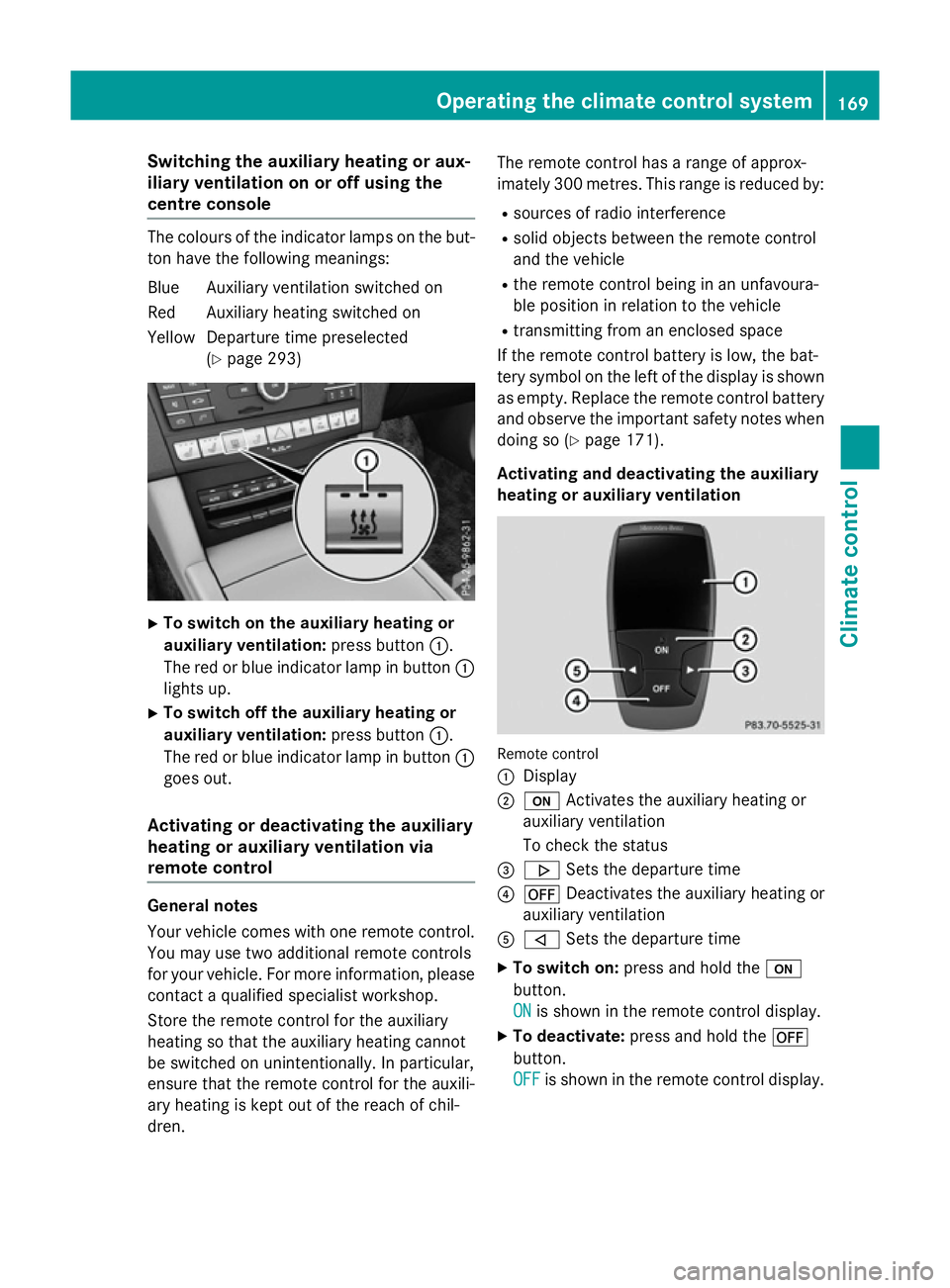
Switching the auxiliary heating or aux-
iliary ventilation on or off using the
centre console The colours of the indicator lamps on the but-
ton have the following meanings:
Blue Auxiliary ventilation switched on
Red Auxiliary heating switched on
Yellow Departure time preselected (Ypage 293) X
To switch on the auxiliary heating or
auxiliary ventilation: press button:.
The red or blue indicator lamp in button :
lights up.
X To switch off the auxiliary heating or
auxiliary ventilation: press button:.
The red or blue indicator lamp in button :
goes out.
Activating or deactivating the auxiliary
heating or auxiliary ventilation via
remote control General notes
Your vehicle comes with one remote control.
You may use two additional remote controls
for your vehicle. For more information ,please
contact aqualified specialist workshop.
Storet he remote control for the auxiliary
heating so that the auxiliary heating cannot
be switched on unintentionally. In particular,
ensure that the remote control for the auxili-
ary heating is kept out of the reach of chil-
dren. The remote control has
arange of approx-
imately 300 metres. This range is reduced by:
R sources of radio interference
R solid objectsb etween the remote control
and the vehicle
R the remote control being in an unfavoura-
ble position in relation to the vehicle
R transmittingf rom an enclosed space
If the remote control battery is low, the bat-
tery symbol on the left of the display is shown as empty. Replace the remote control battery
and observe the important safety notes when doing so (Y page 171).
Activating and deactivating the auxiliary
heating or auxiliary ventilation Remote control
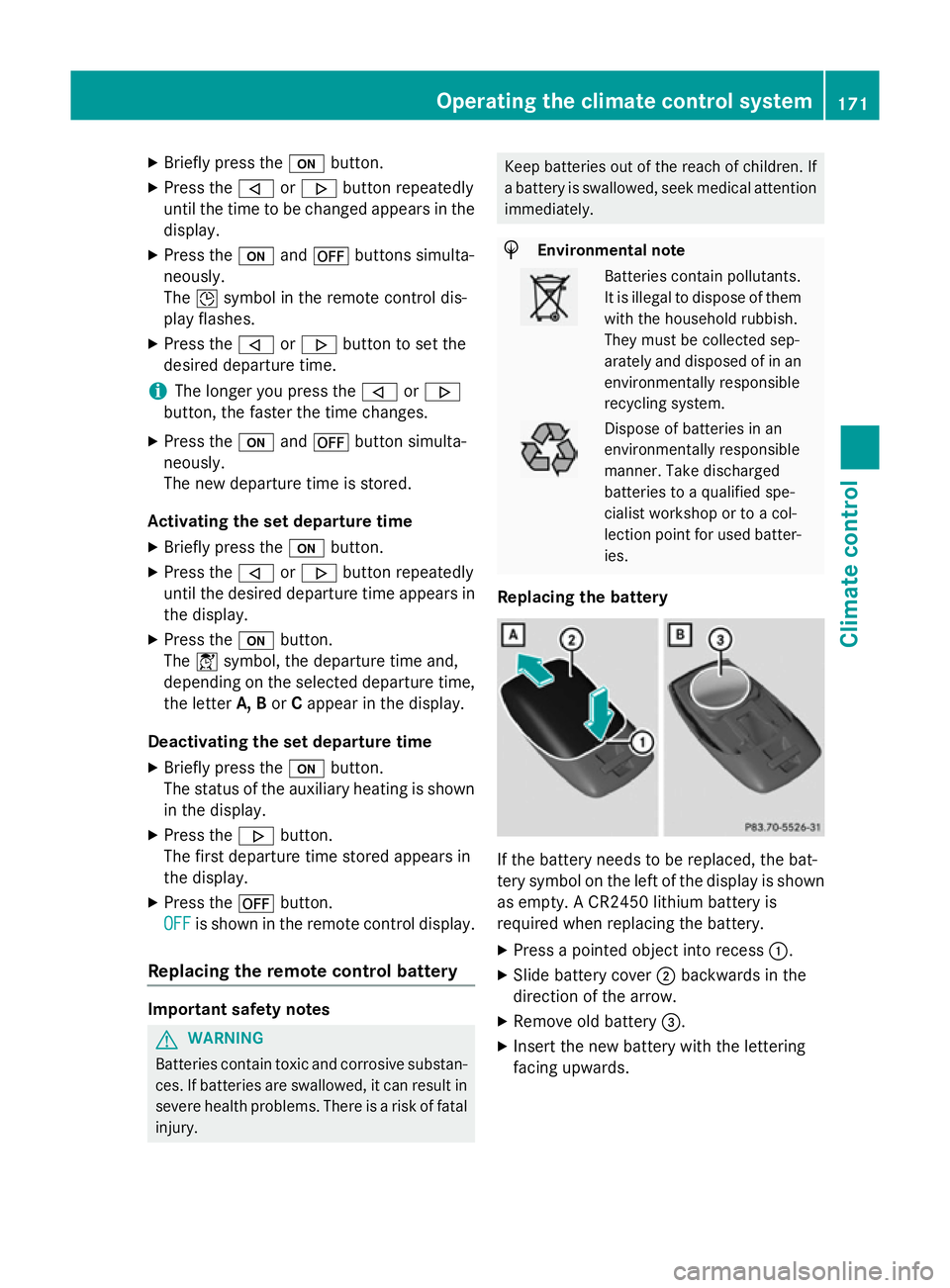
:
Display
; u Activates the auxiliary heating or
auxiliary ventilation
To check the status
= . Sets the departure time
? ^ Deactivates the auxiliary heating or
auxiliary ventilation
A , Sets the departure time
X To switch on: press and hold the u
button.
ON ON is shown in the remote control display.
X To deactivate: press and hold the ^
button.
OFF OFF is shown in the remote control display. Operating the climate control system
169Climatecontrol Z
Page 173 of 497

Checking th
estatus of theauxiliary heat-
ing or auxiliary ventilation
X Briefly pres sthe u button.
The followin gmessages may appear in the
display: Display Meaning
The auxiliar
yheating or
auxiliar yventilatio nis
deactivated. The auxiliar
yventilation
is switched on .The num-
ber in th edisplay shows
th er emainin gtime( in
minutes )for th eauxiliary
ventilation. The auxiliar
yheating is
switched on .The number
in th edisplay show sthe
remainin gtime( in
minutes )for th eauxiliary
heating. Ad
epartur etimeh as
been activated. The
departur etimea ppears
in th edisplay. Ad
epartur etimeh as
been activated. The aux-
iliary ventilatio niscur-
rently activated. The
number in th edisplay
show sthe remaining
tim e(in minutes )for the
auxiliar yventilation. If
th ev ehicle is no tstarted
after this time, th erun-
nin gtimeisi ncreased by
fiv em inutes. Ad
epartur etimeh as
been activated. The aux-
iliary heating is currently
activated. The number in
th ed isplay show sthe
remainin gtime( in
minutes )for th eauxiliary
heating .Ifthevehicle is
no tstarted after this
time, th erunnin gtimeis
increased by five
minutes. If th
eengine has no tyet reached operating
temperatur ewhen it is started, th eauxiliary
heating runnin gtimeisi ncreased. The auxili-
ary heating continues to run until th eoperat-
ing temperatur eisreached. If this is th ecase,
the y symbo lappear sintheremot econ-
trol display and th erunnin gtimeisz ero
minutes.
Settin gthe departure time
Mak esure that th etimes et in th evehicle is
correc tbefore settin gthe departur etim e(see
th es eparate operatin ginstructions). Other-
wise, th eauxiliar yheating may switch on at
th ew rongtimea nd at an unsuitable location.
When settin gthe departur etime, also
observ ethe important safety notes
(Y page 168). 170
Operating th
eclimate control systemClimate control
Page 174 of 497
X
Briefly press the ubutton.
X Press the ,or. button repeatedly
unti lthe time to be changed appears in the
display.
X Press the uand^ buttons simulta-
neously.
The Îsymbo linthe remote control dis-
play flashes.
X Press the ,or. button to set the
desire ddeparture time.
i The longer yo
upress the ,or.
button, the faster the time changes.
X Press the uand^ button simulta-
neously.
The new departure time is stored.
Activating the se tdeparture time
X Briefly press the ubutton.
X Press the ,or. button repeatedly
unti lthe desire ddeparture time appears in
the display.
X Press the ubutton.
The Ísymbol, the departure time and,
depending on the selected departure time, the letter A, BorCappea rinthe display.
Deactivatin gthe se tdeparture time
X Briefly press the ubutton.
The statu softhe auxiliary heating is shown
in the display.
X Press the .button.
The firs tdeparture time store dappears in
the display.
X Press the ^button.
OFF
OFF is shown in the remote control display.
Replacing the remote control battery Important safety notes
G
WARNING
Batterie scontai ntoxic and corrosiv esubstan-
ces. If batterie sare swallowed, it can result in
severe health problems. There is ariskoff atal
injury. Kee
pbatterie soutof the reach of children. If
ab attery is swallowed, see kmedica lattention
immediately. H
Environmental note Batterie
scontai npollutants.
It is illega ltodispose of them
with the household rubbish.
The ym ustb ec ollected sep-
arately and disposed of in an environmentally responsible
recycling system. Dispose of batterie
sinan
environmentally responsible
manner. Take discharged
batterie stoaqualified spe-
cialist worksho portoacol-
lection point for used batter-
ies.
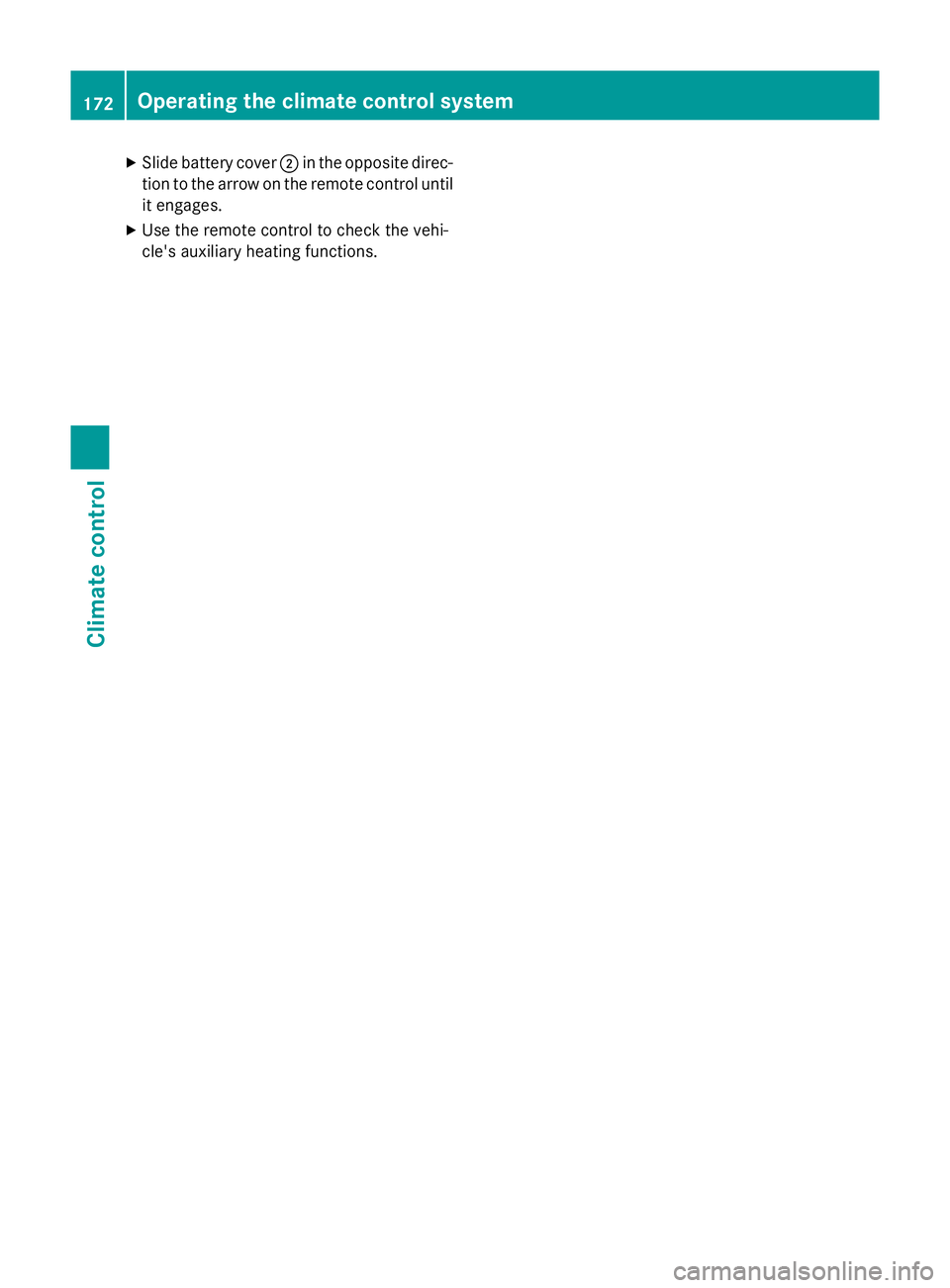
Replacing the battery If the battery need
stobereplaced, the bat-
tery symbo lonthe left of the display is shown
as empty. ACR2450 lithiu mbattery is
required whe nreplacing the battery.
X Press apointed object into recess :.
X Slide battery cover ;backwards in the
direction of the arrow.
X Remove old battery =.
X Inser tthe new battery with the lettering
facing upwards. Operating the climate control system
171Climate control Z
Page 175 of 497
X
Slide battery cover ;in the opposite direc-
tion to the arrow on the remote control until it engages.
X Use the remote control to check the vehi-
cle's auxiliary heating functions. 172
Operating the climate control systemClimate control