2015 MERCEDES-BENZ E-CLASS SALOON trailer
[x] Cancel search: trailerPage 89 of 497
R
engin etorque is restricted to alimited
degree and the drive wheels are able to spin
The spinning of the wheels results in acut-
tinga ction for better traction on loose sur-
faces.
R ESP ®
still provides support when you brake
firmly
Characteristics when ESP ®
is deactivated
If ESP ®
is deactivated and one or more wheels
start to spin, the ÷ESP®
warning lamp in
the instrument cluster does not flash. In such
situations, ESP ®
will not stabilise the vehicle.
If you deactivat eESP®
:
R ESP ®
no longer improves driving stability
R engin etorque is restricted to alimited
degree and the drive wheels are able to spin
The spinning of the wheels results in acut-
tinga ction for better traction on loose sur-
faces.
R traction control is still activated
R PRE-SAFE ®
is no longer available; it is also
not activated if you brake firmly with assis-
tanc efrom ESP ®
R PRE-SAFE ®
Brak eisnol onger available; it
is also not activated if you brake firmly with
assistanc efrom ESP ®
R ESP ®
still provides support when you brake
firmly
ESP ®
trailer stabilisation General notes
If your vehicle/trailer combination begins to
lurch, ESP
®
assists you in this situation .ESP ®
slows the vehicle down by brakin gand limit-
ing the engin eoutput until the vehicle/trailer
combination has stabilised.
Important safet ynotes G
WARNING
If road and weather conditions are poor,
trailer stabilisation will not be able to prevent the vehicle/trailer combination from swerv- ing. Trailers with
ahigh centre of gravity can
tip over before ESP ®
can detec tthis. There is
ar isk of an accident.
Always adapt your driving style to the prevail- ing road and weather conditions.
If your vehicle/trailer combination begins to
lurch, you can only stabilise the vehicle/
trailer combination by depressing the brake
firmly.
ESP ®
trailer stabilisation is activ eabove
speeds of about 65 km/h.
ESP ®
trailer stabilisation does not work if
ESP ®
is deactivated or disabled because of a
malfunction. EBD (electronic brak
eforce distribu-
tion)
General notes EBDm
onitors and controls the brake pres-
sure on the rear wheels to improve driving
stability while braking.
Important safet ynotes i
Observe the "Important safety notes" sec-
tion for driving safety systems (Y page 77). G
WARNING
If EBDism alfunctioning, the rear wheels can
lock, e.g. under full braking. This increases the risk of skidding and an accident.
You should therefore adapt your driving style
to the differen thandling characteristics. Have
the brake system checked at aqualified spe-
cialist workshop.
Observe information regarding indicator and
warning lamps (Y page 332) as well as dis-
play messages (Y page 302). ADAPTIVE BRAKE
i Observe the "Important safety notes" sec-
tion (Y page 77). 86
Driving safet
ysystemsSafety
Page 131 of 497
Adjusting th
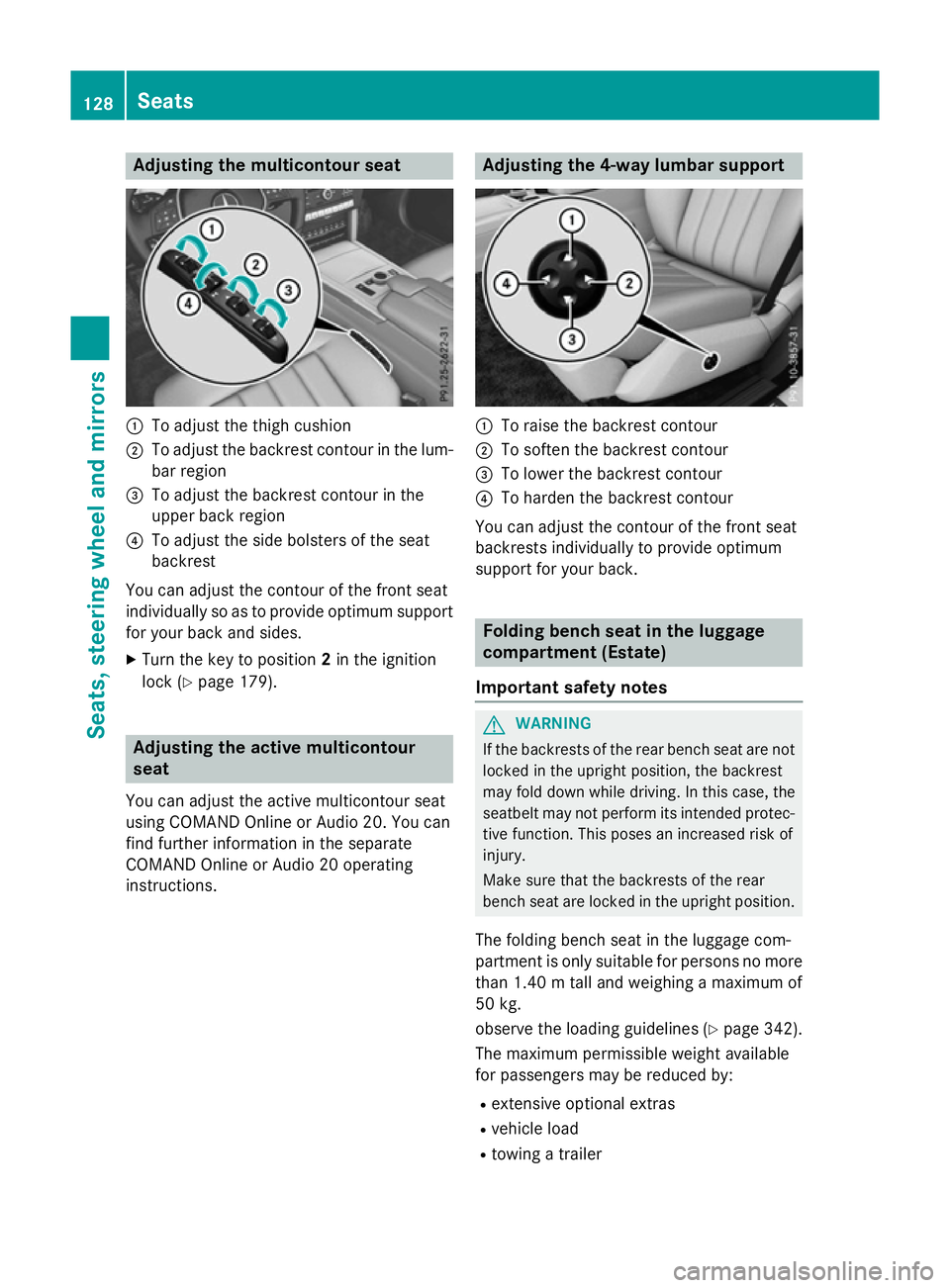
emulticontour seat :
To adjust th ethigh cushion
; To adjust th ebackrest contour in th elum-
bar region
= To adjust th ebackrest contour in the
upper bac kregion
? To adjust th eside bolsters of th eseat
backrest
You can adjust th econtou rofthefron tseat
individually so as to provide optimum support
for your bac kand sides.
X Turn th ekeyto position 2in th eignition
loc k(Ypage 179). Adjusting th
eactive multicontour
seat
You can adjust th eactive multicontour seat
usin gCOMAND Onlin eorAudio 20 .You can
fin df urther information in th eseparate
COMAND Onlin eorAudio 20 operating
instructions. Adjusting th
e4-wa ylumbar support :
To rais ethe backrest contour
; To softe nthe backrest contour
= To lower th ebackrest contour
? To harden th ebackrest contour
You can adjust th econtou rofthefron tseat
backrest sindividually to provide optimum
support for your back. Folding bench sea
tintheluggage
compartmen t(Estate)
Important safety notes G
WARNING
If th ebackrest softherear bench seat are not
locke dintheupright position ,the backrest
may fol ddown while driving. In this case, the
seatbelt may no tperfor mitsintended protec-
tive function .This poses an increased ris kof
injury.
Mak esuret hatthe backrest softherear
bench seat are locke dintheupright position.
The foldin gbench seat in th eluggag ecom-
partmen tisonlys uitable for person snomore
than 1.40 mtalla nd weighing amaximum of
50 kg.
observ ethe loadin gguidelines (Y page 342).
The maximum permissible weigh tavailable
for passenger smay be reduce dby:
R extensive optional extras
R vehicl eload
R towin gatrailer 128
SeatsSeats
,steering wheel and mirrors
Page 180 of 497
Useful information
............................178
Running-in notes ............................... 178
Driving ............................................... 178
Manual transmission ........................188
Automatic transmission ...................189
Refuelling ........................................... 200
Parking ............................................... 205
Driving tips ........................................ 207
Driving systems ................................ 211
Towing atrailer ................................. 266 177Driving and parking
Page 191 of 497

Problem
Possible causes/consequences and
M
MSolutions Vehicles with
apetrol
engine:
The engine is not run-
ning smoothly and is
misfiring. There is
amalfunction in the engine electronics or in amechanical
componentoft he engine management system.
X Only depress the accelerator pedal slightly.
Otherwise, non-combusted fuel may get into the catalytic con-
verter and damage it.
X Have the cause rectified immediately at aqualified specialist
workshop. The coolant tempera-
ture display is showing
more than 120 †. The
coolant warning lamp
may also be on and a
warning tone may
sound. The coolant level is too low. The coolant is too hot and the engine
is no longer being cooled sufficiently.
X Stop as soon as possible and allow the engine and the coolant to
cool down.
X Check the coolant level (Y page 382). Observe the warning
notes as you do so and top up the coolant if necessary. If the coolant level is correct,t
he engine radiator fan may be faulty.
The coolant is too hot and the engine is no longer being cooled
sufficiently.
X If the coolant temperature is below 120 †, you can continue
driving to the nearest qualified specialist workshop.
X Avoid heavy loads on the engine as you do so, e.g. driving in
mountainous terrain and stop-start traffic. Manual transmission
Gear lever
! Only engage gear when the clutch pedal is
depressed.
! When shifting between
5thand 6thgear,
you should always push the gear lever all
the way to the right. Otherwise, you could
shift unintentionally into 3rdor4th gear
and damage the transmission.
If you shift down at too high aspeed (trans-
mission braking), this can cause the engine to overrev, leading to engine damage.
Do not use the clutch bite point to keep the
vehicle stationary on uphill gradients.
There is otherwise arisk of damaging the
clutch.
! On long and steep downhill gradients,
especially if the vehicle is laden or towing a trailer, you must shift into gear
1, 2or3in
good time. This uses the engine's braking
effect.T his relieves the load on the brake
system and preventst he brakes from over-
heating and wearing too quickly. k
Reverse gear
1 -6
Forward gears 188
Manual transmissionDriving and parking
Page 197 of 497
AMG vehicles
When shifting down
,the double-clutch func-
tion is active regardless of th ecurrentl yselec-
te dd rivep rogram .The double-clutch function
reduce sload chang ereaction sand is condu-
civ etoas portydriving style. The soun dgen-
erated by th edouble-clutch function depends
on th edrivep rogram selected.
Kickdown Use kickdown for maximum acceleration:
X Depress th eaccelerato rpedal beyon dthe
pressur epoint.
The transmission shifts to alower gear
depending on th eengines peed.
X Eas eoff th eaccelerato rpedal once the
desired spee disreached.
The automatic transmission shifts bac kup.
Towing atrailer Towin
gatrailer is no tpossible wit hall mod-
els. Fo rfurther information ,see
(Y page 267).
X Drive in th emiddle of th eengines peed
range on uphill gradients.
X Manua ldrive program: depending on the
uphill or downhill gradient, shif tint oag ear
(Y page 197) in whic hthe engin ewill run in
th em iddle of th eengines pee drange. This
also applie sifcruise control ,DISTR ONIC
PLU SorS PEEDTR ONICare activated. Program selector button
Genera lnotes The program selector butto
nallows you to
choos ebetween differen tdriving character-
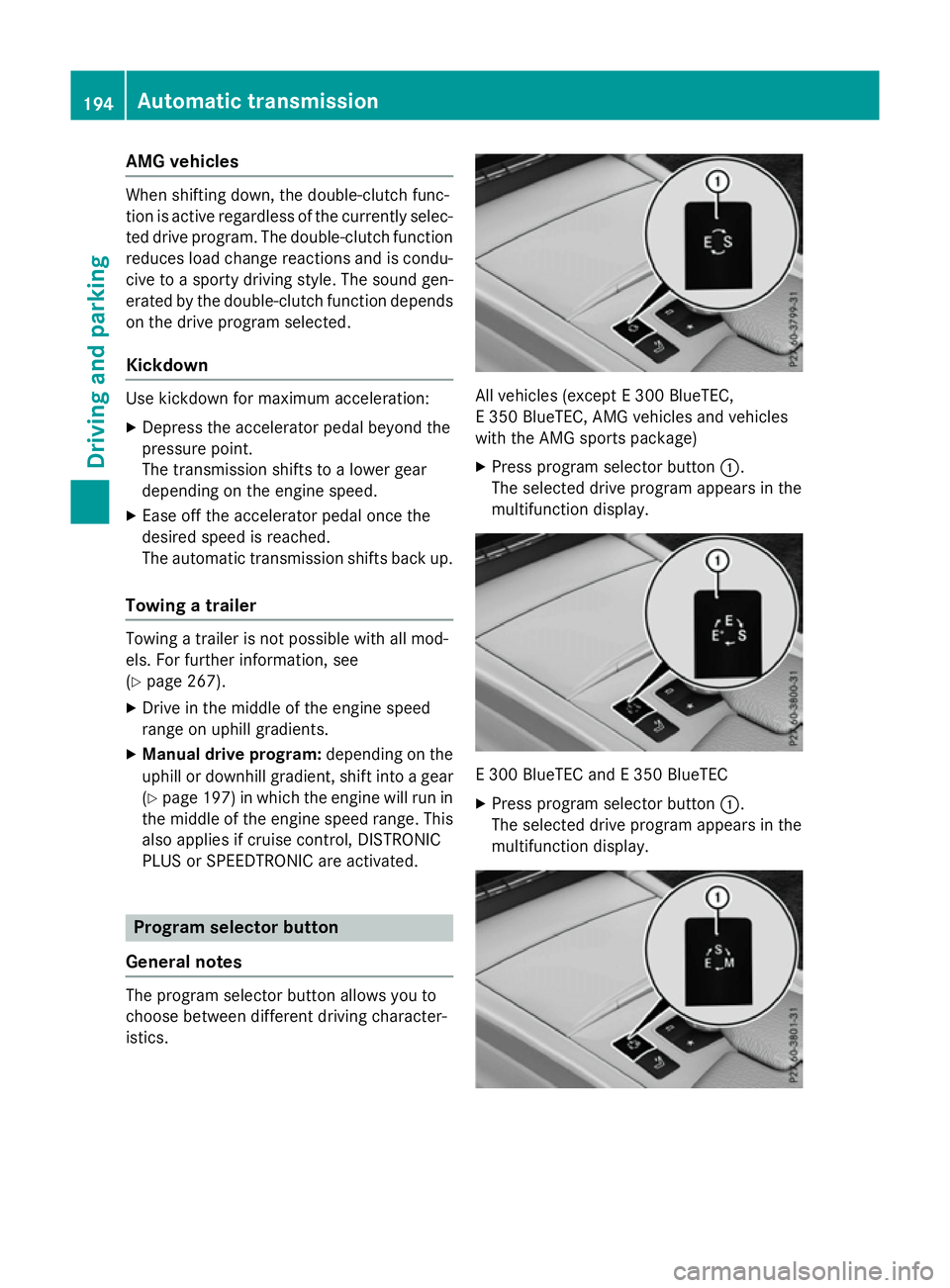
istics. All vehicles (except
E300 BlueTEC,
E3 50 BlueTEC, AM Gvehicles and vehicles
wit hthe AM Gsport spackage)
X Press program selector button :.
The selected driv eprogram appear sinthe
multifunction display. E3
00 BlueTE CandE3 50 BlueTEC
X Press program selector button :.
The selected driv eprogram appear sinthe
multifunction display. 194
Automatic trans
missionDriving andparking
Page 212 of 497
Brakes
Important safety notes G
WARNING
If yo ushift down on aslipper yroads urface in
an attempt to increas ethe engine's braking
effect, the drive wheels could lose thei rgrip.
Thi sincreases the ris kofskidding and having
an accident.
Do not shift down for additional engine brak-
ing on aslipper yroads urface.
Downhil lgradients Do not depress the brake peda
lcontinuously
whil ethe vehicl eisinmotion, e.g .never
cause the brakes to ru bbyconstantly apply-
ing light pressure to the pedal. Thi sresults in
excessive and premature wear to the brake
pads.
Chang einto alower gearing oodtime on long
and stee pdownhil lgradients.
Take particula rnote of thi swhend riving a
lade nvehicl eand when towing atrailer.
i Thi
salsoa pplies if youhavea ctivated
cruis econtrol, SPEEDTRONIC or
DISTRONIC PLUS.
Thi sw illu se the braking effect of the engine,
so less braking will be required to maintain
vehicl espeed .Thisr elieves the load on the
brake system and prevents the brakes from
overheating and wearing too quickly.
Heavy and light loads G
WARNING
The braking system can overheat if yo ulea ve
your foo tonthe brake peda lwhile driving.
Thi sincreases the braking distance and could
eve ncause the braking system to fail. There is
ar iskofana ccident.
Never us ethe brake peda lasafootrest. Do
not simultaneousl ydepress both the brake
peda land the accelerato rpedal whiledriving. !
Depressing the brake peda
lconstantly
results in excessive and premature wear to
the brake pads.
If the brakes have been subjected to aheavy
load ,don ot stop the vehicl eimmediately, but
drive on for ashort while. Thi sallow sthe air-
flo wtoc ool the brakes more quickly.
If the brakes have been used onl ymoderately,
yo us houl doccasionall ytest thei reffective-
ness .Todot his, brake more firmly from a
highe rspeed whil epayin gattentio ntothe
traffic conditions. Thi simprove sthe gri pof
the brakes.
Wet road surfaces If yo
uhaved riven for alon gtime in heavy rain
withou tbraking ,ther em aybe adelayed reac-
tio nfrom the brakes when braking for the first
time .Thism ayalso occu rafte rac ar wash or
afte rdriving throug hdeepw ater.
Yo uw illh av etod epress the brake peda lmore
firmly .Maintain agreate rdistance to the vehi-
cle in front.
After driving on awetroa dorh aving the vehi-
cle washed, brake firmly whil epayin gatten-
tio ntot he traffic conditions. Thi swillw armup
the brake discs, thereb ydrying them more
quickl yand protecting them against corro-
sion.
Limite dbraking performanc eonsalt-
treate droads If yo
udrive on salt-treate droads, alayer of
salt ma yform on the brake discs and pads.
Thi scan increas ethe braking distance con-
siderably.
R In order to prevent any salt build-up, apply
the brakes occasionall ywhile paying atten-
tio ntot he traffic conditions.
R Carefull ydepress the brake peda latthe
end of the journey and when starting the
next journey.
R Maintain amuchg reate rdistance to the
vehicl einfront. Driving tips
209Driving andparking Z
Page 215 of 497
vehicl
eoccupants and that of other road
users.
Further information on driving safety systems (Y page7 7). Cruise control
General notes Cruise control maintains
aconstant road
spee dfor you.Itb rakes automatically in order
to avoi dexceeding the set speed. You must
select alow gearing ood time on long and
steep downhill gradients, especially if the
vehicl eisladen or towing atrailer. By doing
so, you willm ake use of the braking effect of
the engine. This relieves the loadont he brake
system and prevents the brakes from over-
heating and wearing too quickly.
Use cruise control only if road and traffic con- ditions are appropriate for maintaining a
stead yspee dfor ap rolonged period. You can
store any road spee dabove 30 km/h.
Important safety notes If you fail to adapt yourd
riving style,cruise
control can neither reduce the risk of an acci-
dent nor overrid ethe lawsofp hysics. Cruise
control cannot take into account road,
weather or traffic conditions. Cruise control is only an aid.Y ou are responsibl efor the dis-
tance to the vehicl einfront, for vehicl espeed,
for braking in good time, and for staying in the lane.
Do not use cruise control:
R in road and traffic conditions which do not
allow you to maintai naconstant speed
(e.g. in heavy traffic or on winding roads)
R on smooth or slippery roads. Braking or
accelerating can caus ethe drive wheels to
lose traction and the vehicl ecouldt hen
skid
R when there is poor visibility, e.g. due to fog,
heavy rain or snow If there is
achange of drivers, advise the new
drive rofthe spee dstored.
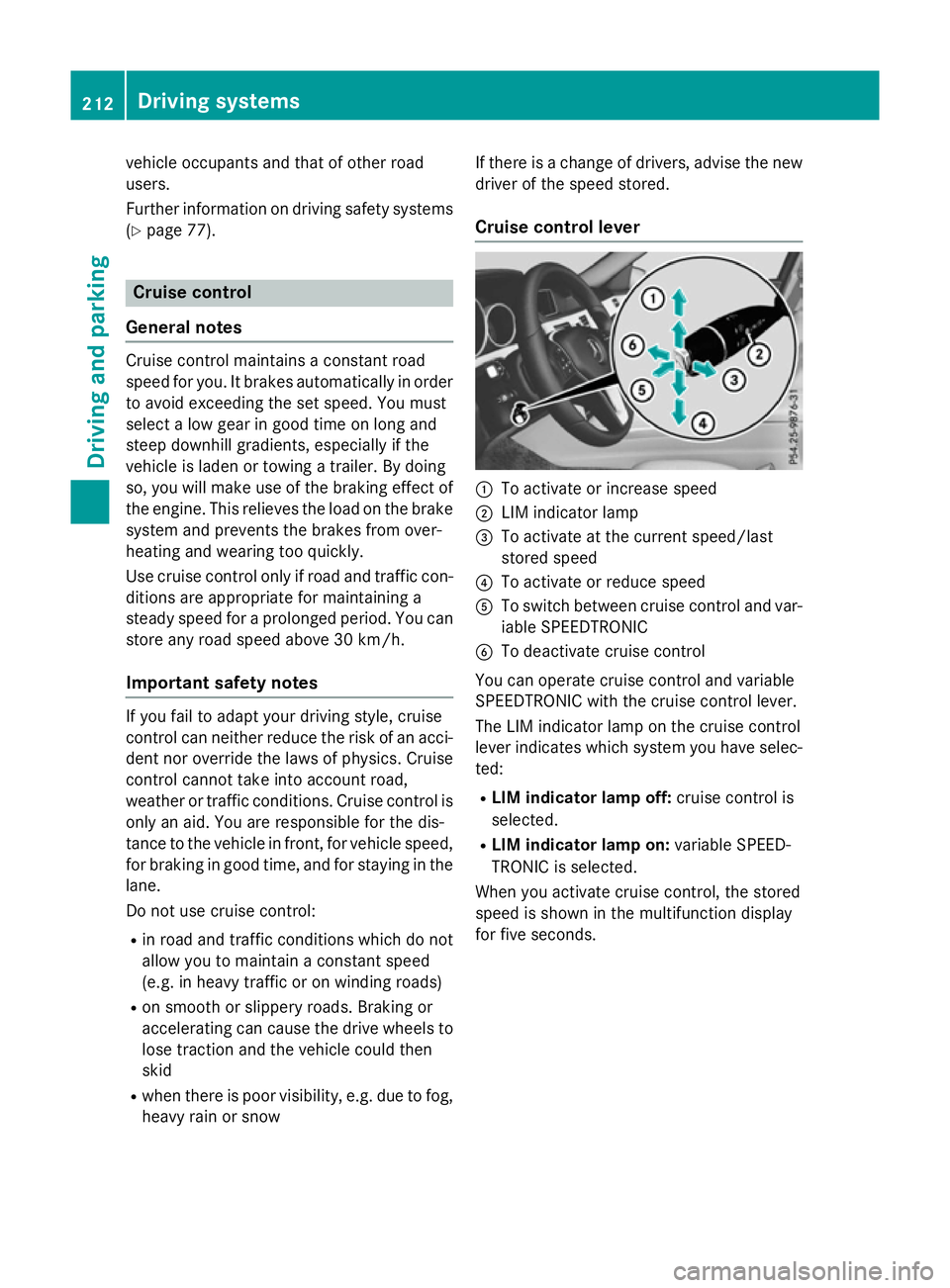
Cruise control lever :
To activate or increase speed
; LIM indicator lamp
= To activate at the current speed/last
stored speed
? To activate or reduce speed
A To switch between cruise control and var-
iable SPEEDTRONIC
B To deactivate cruise control
You can operate cruise control and variable
SPEEDTRONIC with the cruise control lever.
The LIM indicator lamp on the cruise control
leve rindicates which system you have selec-
ted:
R LIMi ndicator lamp off: cruise control is
selected.
R LIMi ndicator lamp on: variable SPEED-
TRONIC is selected.
When you activate cruise control, the stored
spee diss hownint he multifunction display
for five seconds. 212
Driving systemsDriving and parking
Page 231 of 497
DISTRONI
CPLUSS teering Assist does not
provide assistance:
R on ver ysharp corners
R when towing atrailer
R al ossoft yrep ressure or adefective tyre
ha sb eend etecte dand displayed
Pa ya ttentio nalsotot he important safety
note sfor DISTRONI CPLUS(Ypage 218).
Th es teering interventions ar ecarried out
with alimit ed steering moment. Th esystem
requires the driver to kee phishands on the
steering whee land to steer himself.
If yo udon ot steer yourself or if yo utake your
hands off the steering whee lfor ap rolonged
period of time, the syste mwillf irst alert you
with avisual warning. Asteering whee lsym-
bo lappears in the multifunctio ndisplay .Ifyou
have still not started to steer and have not
take nholdoft he steering whee lafter five
second satthe latest, awarning tone also
sounds to remind yo utotake contro lofthe
vehicle. Steering Assist and Stop&G oPilot
switch to passive mode. DISTRONI CPLUS
remains active.
Activatin gSteering Assist and Stop&Go
Pilot
X Activate the DISTRONI CPLUSw ithS teer-
ing Assist and Stop&G oPilot functio nusing
the on-board compute r(Ypage 288).
The DTR+:
DTR+: steering steering assistant
assistant On
Onmes-
sage appear sinthe multifunctio ndisplay.
Steering Assist and Stop&G oPilot are
active.
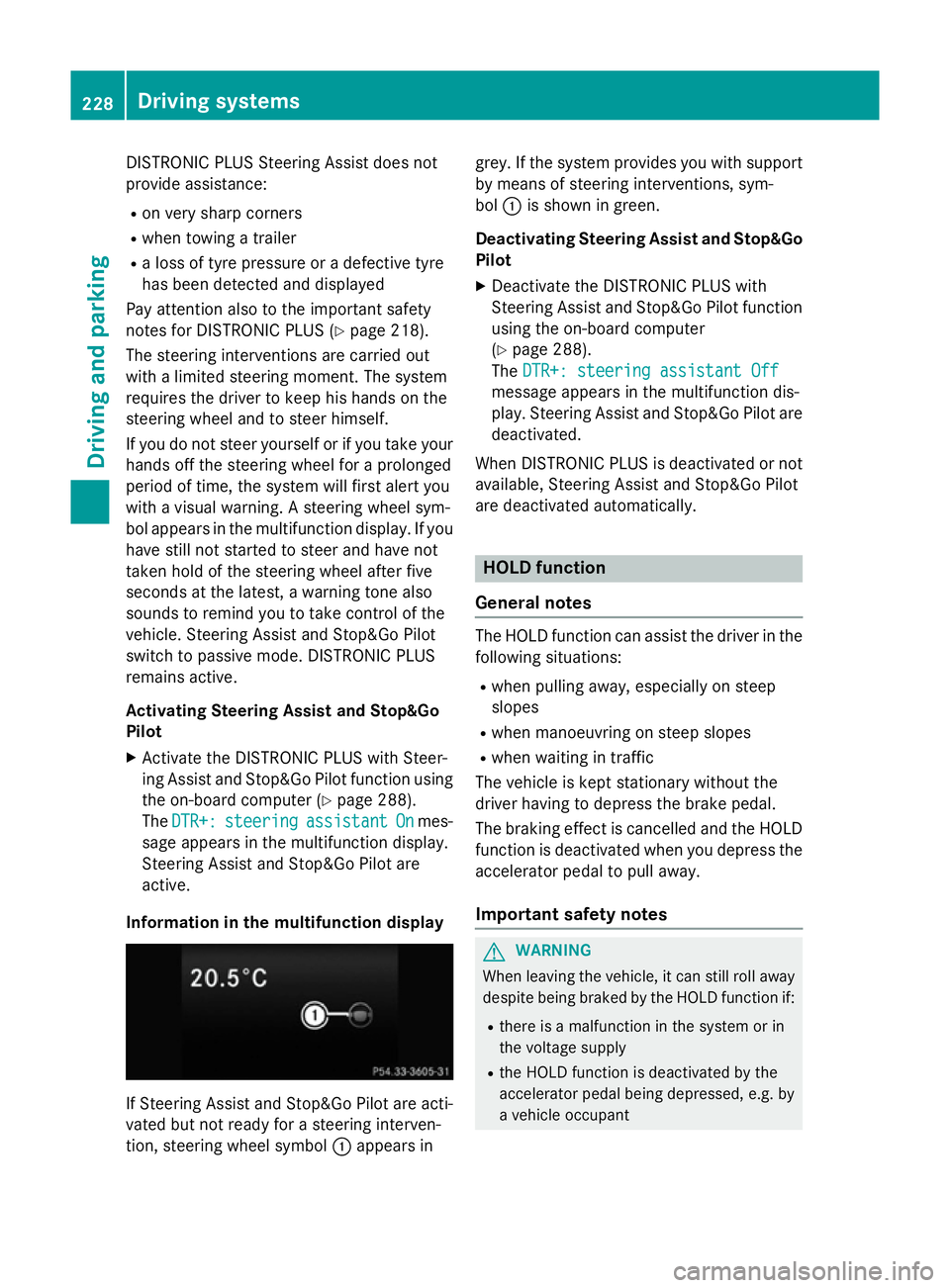
Informatio ninthe multifunction display If Steering Assist and Stop&G
oPilot area cti-
vated bu tnot ready for asteering interven-
tion, steering whee lsym bol :appear sin grey. If the syste
mprovide syou with support
by means of steering interventions, sym-
bol :is shown in green.
Deactivatin gSteering Assist and Stop&Go
Pilot
X Deactivate the DISTRONI CPLUSw ith
Steering Assist and Stop&G oPilot function
using the on-board computer
(Y page 288).
The DTR+: steering assistant Off DTR+: steering assistant Off
message appear sinthe multifunctio ndis-
play .Steering Assist and Stop&G oPilot are
deactivated.
When DISTRONI CPLUSisd eactivated or not
available, Steering Assist and Stop&G oPilot
ar ed eactivated automatically. HOL
Dfunction
General notes Th
eH OLD functio ncan assist the driver in the
following situations:
R when pulling away ,especially on steep
slopes
R when manoeuvring on steep slopes
R when waiting in traffic
Th ev ehicl eisk epts tationar ywithout the
driver having to depress the brake pedal.
Th eb raking effect is cancelle dand the HOLD
functio nisd eactivated when yo udepress the
accelerator peda ltopulla way.
Important safety notes G
WARNING
When leaving the vehicle, it can still rol laway
despite being braked by the HOLD functio nif:
R there is amalfunctio ninthe syste morin
the voltag esupply
R the HOLD functio nisd eactivated by the
accelerator peda lbeing depressed, e.g .by
av ehicl eoccupant 228
Driving systemsDriving an
dparking