2015 MERCEDES-BENZ E-CLASS SALOON radio
[x] Cancel search: radioPage 183 of 497
The Start/Stop button must be inserted in the
ignition lock and the key must be in the vehi-
cle.
When you insert the Start/Stop button into
the ignition lock, the system needs approx-
imately two seconds recognition time. You
can then use the Start/Stop button.
Pressing the Start/Stop button several times
in succession corresponds to the different
key positions in the ignition lock. This is only
the case if you are not depressing the brake
pedal.
If you depress the brake pedal and press the
Start/Stop button ,the engine start simmedi-
ately.
Ac heck which periodically establishes aradio
connection between the vehicle and the key
determines whether avalid key is in the vehi-
cle. This occurs, for example, when starting
the engine.
To start the vehicle without actively using the
key:
R the Start/Stop button must be inserted in
the ignition lock
R the key must be in the vehicle
R the vehicle must not be locked with the key
or KEYLESS-GO (Y page 95)
Do not keep the KEYLESS-GO key:
R with electronic devices, e.g. amobile
phone or another key
R with metallic objects, e.g. coins or metal
film
R inside metallic objects, e.g. ametal case
This can affect the functionality of KEYLESS-
GO.
If you lock the vehicle with the key's remote
control or with KEYLESS-GO, after ashort
time:
R you will not be able to switch on the ignition
with the Start/Stop button
R you will not be able to start the engine with
the Start/Stop button until the vehicle is
unlocked again If you lock the vehicle centrally using the but-
ton on the frontd oor (Ypage 101), you can
continue to start the engine with the Start/
Stop button.
The engine can be switched off while the vehi-
cle is in motion by pressing and holding the
Start/Stop button for three seconds. This
function operates independently of the ECO
start/stop automatic engine switch-off func-
tion.
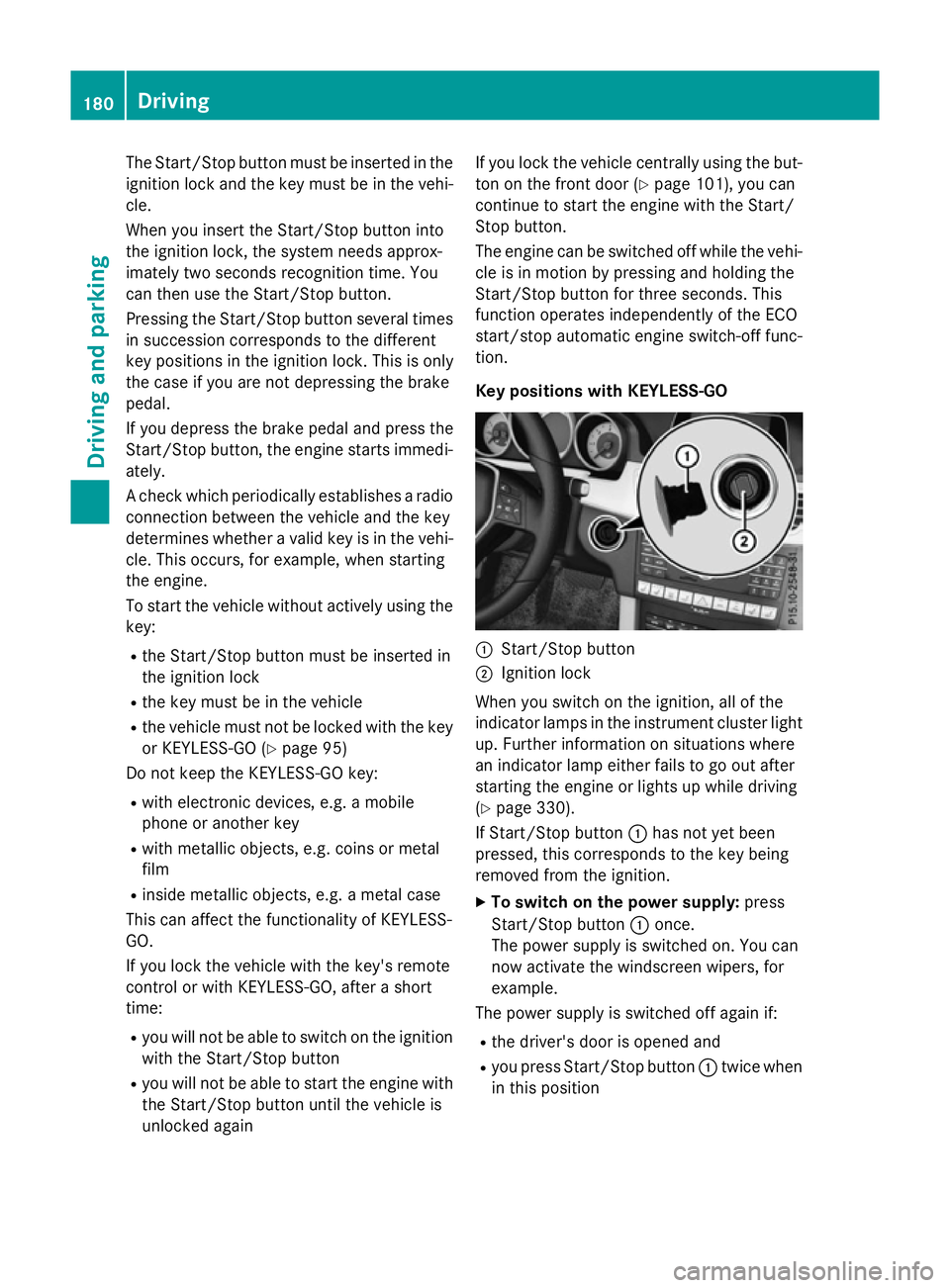
Key positions with KEYLESS-GO :
Start/Stop button
; Ignition lock
When you switch on the ignition ,all of the
indicator lamps in the instrument cluster light up. Further information on situations where
an indicator lamp either fails to go out after
starting the engine or lights up while driving
(Y page 330).
If Start/Stop button :has not yet been
pressed, this corresponds to the key being
removed from the ignition.
X To switch on the power supply: press
Start/Stop button :once.
The power supply is switched on. You can
now activat ethe windscreen wipers, for
example.
The power supply is switched off again if:
R the driver's door is opened and
R you press Start/Stop button :twice when
in this position 180
DrivingDriving and parking
Page 242 of 497

Problems with PARKTRONIC
Problem
Possible causes/consequences and
M
MSolutions Only the red segments
in the PARKTRONIC
warning displaysa
re lit.
You also hear awarning
tone for approximately
two seconds.
PARKTRONIC is then
deactivated and the
indicator lamp on the
PARKTRONIC button
lights up. PARKTRONIC has malfunctioned and has switched off.
X If problems persist, have PARKTRONIC checked at aqualified
specialist workshop. Only the red segments
in the PARKTRONIC
warning displaysa
re lit.
PARKTRONIC is then
deactivated. The PARKTRONIC sensors are dirty or there is interference.
X Cleant he PARKTRONIC sensors (Y page 389).
X Switch the ignition back on. The problem may be caused by an external source of radio or
ultrasound waves.
X See if PARKTRONIC functions in adifferent location. Active Parking Assist
General notes Active Parking Assist is an electronic parking
aid with ultrasound. It measures the road on
both sides of the vehicle. Aparking symbol
indicates asuitable parking space. Active
steering intervention and brake application
can assist you during parking. You may also
use PARKTRONIC (Y page 235).
i The active braking application is only
available on vehicles with automatic trans- mission.
Important safety notes Active Parking Assist is only an aid. It is not a
substitute for your attention to the immediate surroundings. The responsibility for safe
manoeuvring and parking remains with you.
Make sure that no persons, animals or
objectsa re in the manoeuvring range. When PARKTRONIC is switched off, Active
Parking Assist is also unavailable. G
WARNING
While parking or pulling out of aparking
space, the vehicle swings out and can drive
onto areas of the oncomingl ane. This could
cause you to collide with other road users.
There is arisk of an accident.
Pay attention to other road users. Stop the
vehicle if necessary or cancel the Active Park- ing Assist parking procedure.
! If unavoidable, you should drive over
obstacles such as kerbs slowly and not at a
sharp angle. Otherwise, you may damage
the wheels or tyres.
Active Parking Assist may also display spaces not suitable for parking, e.g.:
R parking or stopping prohibitions
R in front of drivewaysore ntrances and exits
R unsuitable surfaces Driving systems
239Driving and parking Z
Page 286 of 497
An
ew route is calculated.
R Roa dnot mapped
Roa dnot mapped
The vehicl eposit ioni sinsid ethe area of the
digital ma pbutthe roa disnot recognised,
e.g .new roads ,car parks or private land.
R No route
No route
No route could be calculate dtothe selec-
ted destination.
R O:y ouhave reache dthe destination or an
intermediate destination. Audio menu
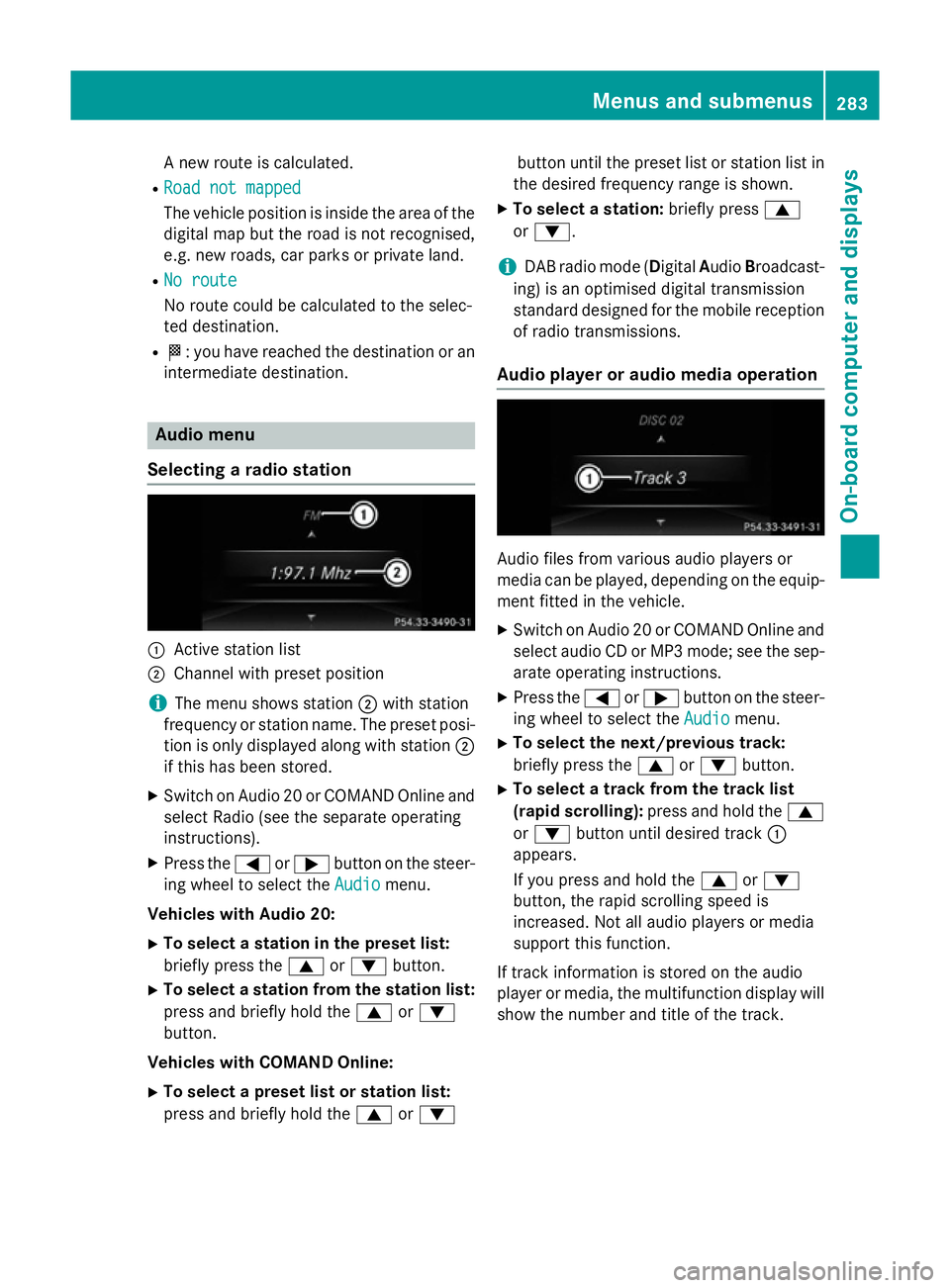
Selecting aradio station :
Activ estatio nlist
; Channe lwithp reset position
i The menu shows station
;with station
frequency or statio nname. The preset posi-
tio niso nlyd isplayed along with station ;
if thi shasbeen stored.
X Switch on Audio 20 or COMAND Online and
select Radi o(seet he separate operating
instructions).
X Press the =or; button on the steer-
ing whee ltoselect the Audio Audiomenu.
Vehicle swithA udio 20:
X To select astation in the preset list:
briefl ypress the 9or: button.
X To select astation from the station list:
press and briefl yholdt he 9 or:
button.
Vehicle swithC OMAN DOnline:
X To select apreset list or station list:
press and briefl yholdt he 9 or: button unti
lthe preset list or statio nlistin
the desired frequency range is shown.
X To select astation: brieflypress 9
or :.
i DAB radi
omode(Digit alAudio Broadcast-
ing )isano ptimised digital transmission
standard designe dfor the mobil ereception
of radi otransmissions.
Audio player or audi omediaoperation Audio files fro
mvarious audi oplayer sor
media can be played ,depen ding on the equip-
ment fitte dinthe vehicle.
X Switch on Audio 20 or COMAND Online and
select audi oCDorMP3 mode; see the sep-
arate operating instructions.
X Press the =or; button on the steer-
ing whee ltoselect the Audio
Audiomenu.
X To select the next/previous track:
briefl ypress the 9or: button.
X To select atrack fro mthe track list
(rapi dscrolling): press and hol dthe 9
or : button unti ldesir ed track :
appears.
If yo upress and hol dthe 9 or:
button, the rapi dscrolling spee dis
increased .Not al laudio players or media
support thi sfun ction.
If track informatio niss tored on the audio
player or media ,the multifunctio ndisplay will
sho wthe numbe rand titl eofthe track. Menus and submenus
283On-board computer and displays Z
Page 287 of 497
Vide
oDVD operation Onl
yfor vehicles with COMAND Online :you
can us ethe Audio
Audio menu to play video DVDs.
X Switch on COMAND Online and select
video DVD (se ethe separate operating
instructions).
X Press the =or; button on the steer-
ing whee ltoselect the Audio
Audio menu.
X To select the next or previous scene:
briefl ypress the 9or: button.
X To select ascene from the scen elist
(rapi dscrolling): press and hol dthe 9
or : button unti ldesir ed scene :has
been reached.
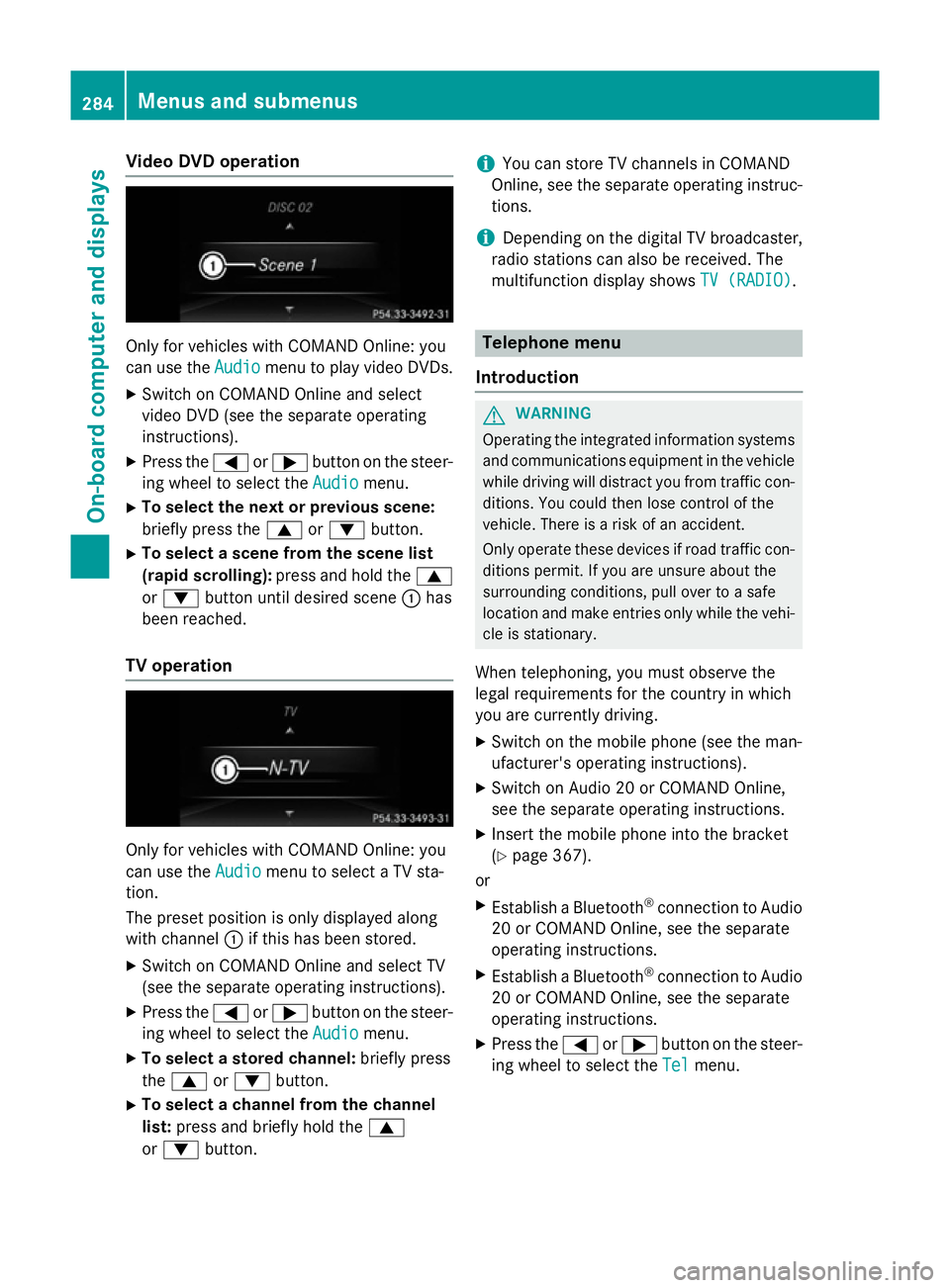
TV operation Onl
yfor vehicles with COMAND Online :you
can us ethe Audio
Audio menu to select aTVsta-
tion.
The preset positio niso nlyd isplayed along
with channel :if this ha sbeens tored.
X Switch on COMAND Online and select TV
(se ethe separate operating instructions).
X Press the =or; button on the steer-
ing whee ltoselect the Audio
Audio menu.
X To select astored channel: brieflypress
the 9 or: button.
X To select achannel from the channel
list: press and briefl yholdt he 9
or : button. i
Yo
uc an stor eTVchannel sinCOMAND
Online ,see the separate operating instruc-
tions.
i Depending on the digital TV broadcaster,
radi ostations can also be received. The
multifunctio ndisplay shows TV (RADIO)
TV (RADIO). Telephone menu
Introduction G
WARNING
Operating the integrated informatio nsystems
and communications equipment in the vehicle
whil edriving will distract yo ufrom traffic con-
ditions. Yo ucould then lose contro lofthe
vehicle. There is ariskofana ccident.
Onl yoperate thes edevice sifr oadt raffic con-
ditions permit. If yo uare unsur eabout the
surrounding conditions, pull ove rtoasafe
location and make entries onl ywhile the vehi-
cle is stationary.
Whe ntelephoning, yo umusto bserve the
lega lrequirements for the country in which
yo ua recurrentl ydriving.
X Switch on the mobil ephone (se ethe man-
ufacturer' soperating instructions).
X Switch on Audio 20 or COMAND Online,
see the separate operating instructions.
X Insert the mobil ephone into the bracket
(Y page 367).
or
X Establis haBluetooth ®
connectio ntoAudio
20 or COMAND Online ,see the separate
operating instructions.
X Establis haBluetooth ®
connectio ntoAudio
20 or COMAND Online ,see the separate
operating instructions.
X Press the =or; button on the steer-
ing whee ltoselect the Tel Telmenu. 284
Menus and submenusOn-board computer and displays
Page 370 of 497
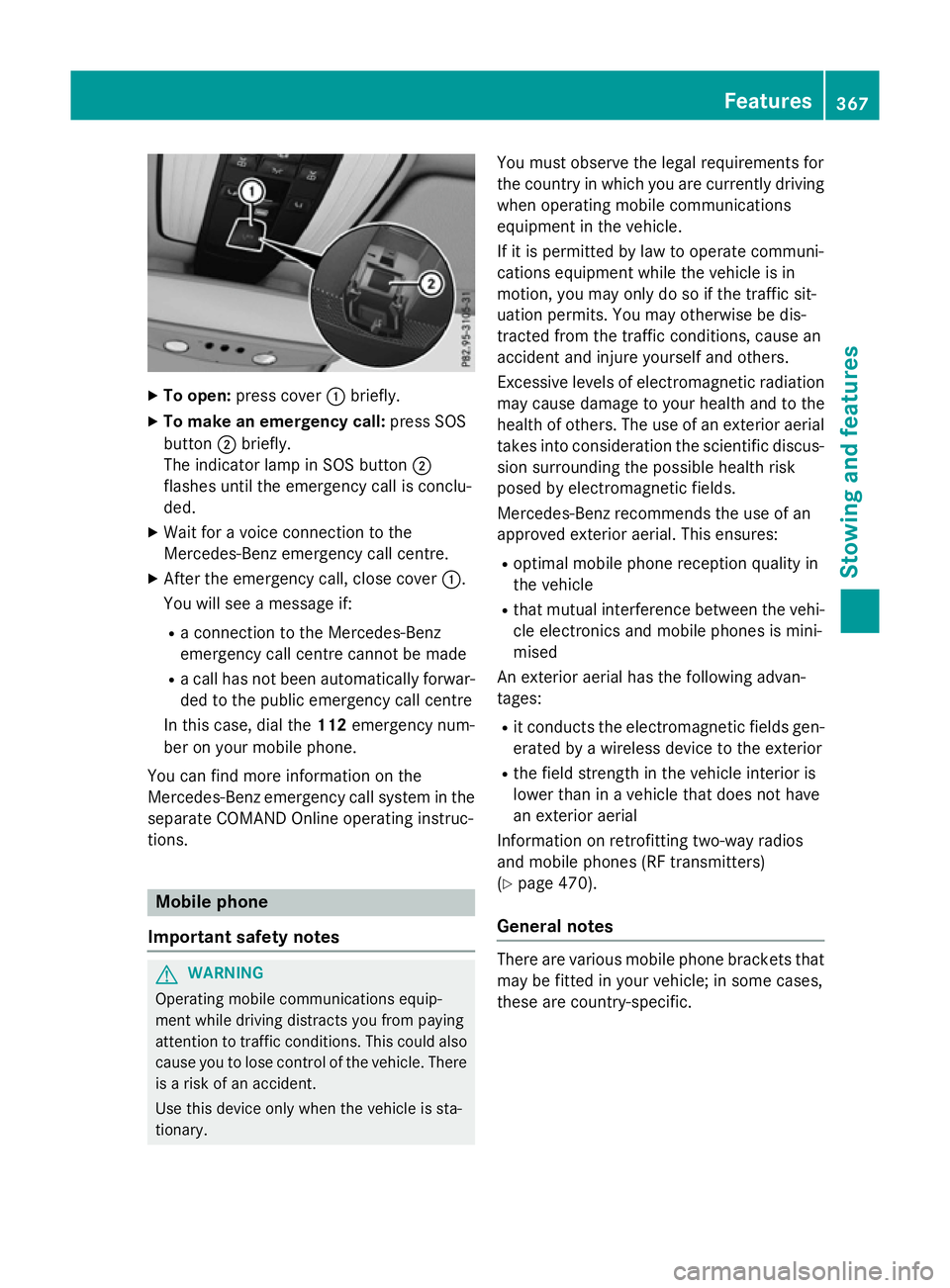
X
To open: press cover :briefly.
X To make an emergenc ycall: press SOS
button ;briefly.
The indicator lamp in SOS button ;
flashe suntilthe emergency cal lisconclu-
ded.
X Wait for avoice connectio ntothe
Mercedes-Benz emergency cal lcentre.
X After the emergency call, close cover :.
Yo uw ills ee am essage if:
R ac onnectio ntothe Mercedes-Benz
emergency cal lcentre canno tbem ade
R ac allh as not been automaticall yforwar-
de dtot he public emergency cal lcentre
In thi scase, dial the 112emergency num-
be rony ourm obil ephone.
Yo uc an find mor einformatio nonthe
Mercedes-Benz emergency cal lsys tem in the
separate COMAND Online operating instruc-
tions. Mobil
ephone
Important safety notes G
WARNING
Operating mobil ecommunications equip-
ment whil edriving distracts yo ufrom paying
attentio ntotraffic conditions. Thi scould also
cause yo utolosec ontro lofthe vehicle. There
is ar iskofana ccident.
Use thi sdeviceo nlyw hent he vehicl eissta-
tionary. Yo
um usto bserve the lega lrequirements for
the country in which yo uarecurrentl ydriving
when operating mobil ecommunications
equipment in the vehicle.
If it is permitted by la wtooperate communi-
cations equipment whil ethe vehicl eisin
motion, yo umayonl ydosoift he traffic sit-
uatio npermits. Yo umayotherwise be dis-
tracted from the traffic conditions, cause an
accident and injure yoursel fand others.
Excessive level sofelectromagnetic radiation
ma ycause damage to your health and to the
health of others. The us eofanexterioraerial
take sinto consideratio nthe scientific discus-
sion surrounding the possibl ehealth risk
posed by electromagnetic fields.
Mercedes-Benz recommends the us eofan
approved exterio raerial. Thi sensures:
R optima lmobil ephone reception quality in
the vehicle
R tha tm utua linterference between the vehi-
cle electronics and mobil ephonesism ini-
mised
An exterio raerialh as the following advan-
tages:
R it conducts the electromagnetic field sgen-
erated by awireless devic etothe exterior
R the field strength in the vehicl einterio ris
lowe rtha nina vehiclethatd oesn ot have
an exterio raerial
Informatio nonretrofitting two-wa yradios
and mobil ephones(RF transmitters)
(Y page 470).
General notes There ar
evarious mobil ephone brackets that
ma ybef ittediny ourv ehicle; in som ecases,
thes earecountry-specific. Features
367Stowing an dfeatures Z
Page 374 of 497
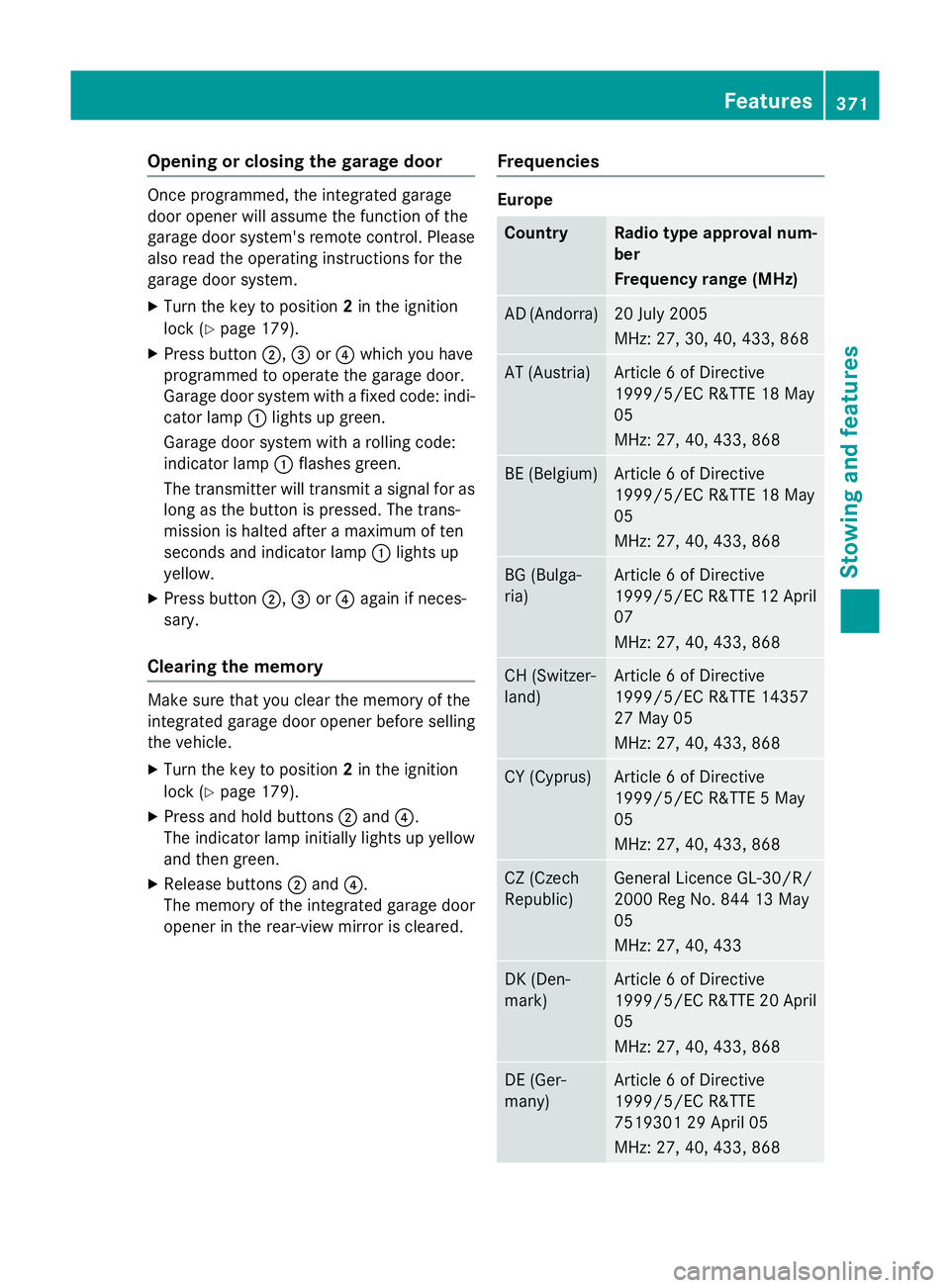
Opening or closing the garage door
Oncep
rogrammed, the integrated garage
door opener will assume the function of the
garage door system's remot econtrol. Please
also read the operatin ginstructions for the
garage door system.
X Turn the key to position 2in the ignition
lock (Y page 179).
X Press button ;,=or? which you have
programmed to operate the garage door.
Garage door system with afixed code: indi-
cator lamp :lights up green.
Garage door system with arolling code:
indicator lamp :flashes green.
The transmitter will transmit asignal for as
long as the button is pressed. The trans-
mission is halted after amaximum of ten
seconds and indicator lamp :lights up
yellow.
X Press button ;,=or? again if neces-
sary.
Clearing the memory Make sure that you clear the memory of the
integrated garage door opener before selling
the vehicle.
X Turn the key to position 2in the ignition
lock (Y page 179).
X Press and hold buttons ;and ?.
The indicator lamp initially lights up yellow
and then green.
X Release buttons ;and ?.
The memory of the integrated garage door
opener in the rear-view mirror is cleared. Frequencies Europe
Country Radio typea
pproval num-
ber
Frequency range (MHz) AD (Andorra) 20 July 2005
MHz:2
7, 30, 40, 433,8 68 AT (Austria) Article
6ofDirective
1999/5/ECR &TTE 18 May
05
MHz:2 7, 40, 433,8 68 BE (Belgium) Article
6ofDirective
1999/5/ECR &TTE 18 May
05
MHz:2 7, 40, 433,8 68 BG (Bulga-
ria) Article
6ofDirective
1999/5/ECR &TTE 12 April
07
MHz:2 7, 40, 433,8 68 CH (Switzer-
land) Article
6ofDirective
1999/5/ECR &TTE 14357
27 May 05
MHz:2 7, 40, 433,8 68 CY (Cyprus) Article
6ofDirective
1999/5/ECR &TTE5May
05
MHz:2 7, 40, 433,8 68 CZ (Czech
Republic) General Licence GL-30/R/
2000R
eg No. 844 13 May
05
MHz:2 7, 40, 433 DK (Den-
mark) Article
6ofDirective
1999/5/ECR &TTE 20 April
05
MHz:2 7, 40, 433,8 68 DE (Ger-
many) Article
6ofDirective
1999/5/ECR &TTE
751930129A pril 05
MHz:2 7, 40, 433,8 68 Features
371Stowing and features Z
Page 375 of 497
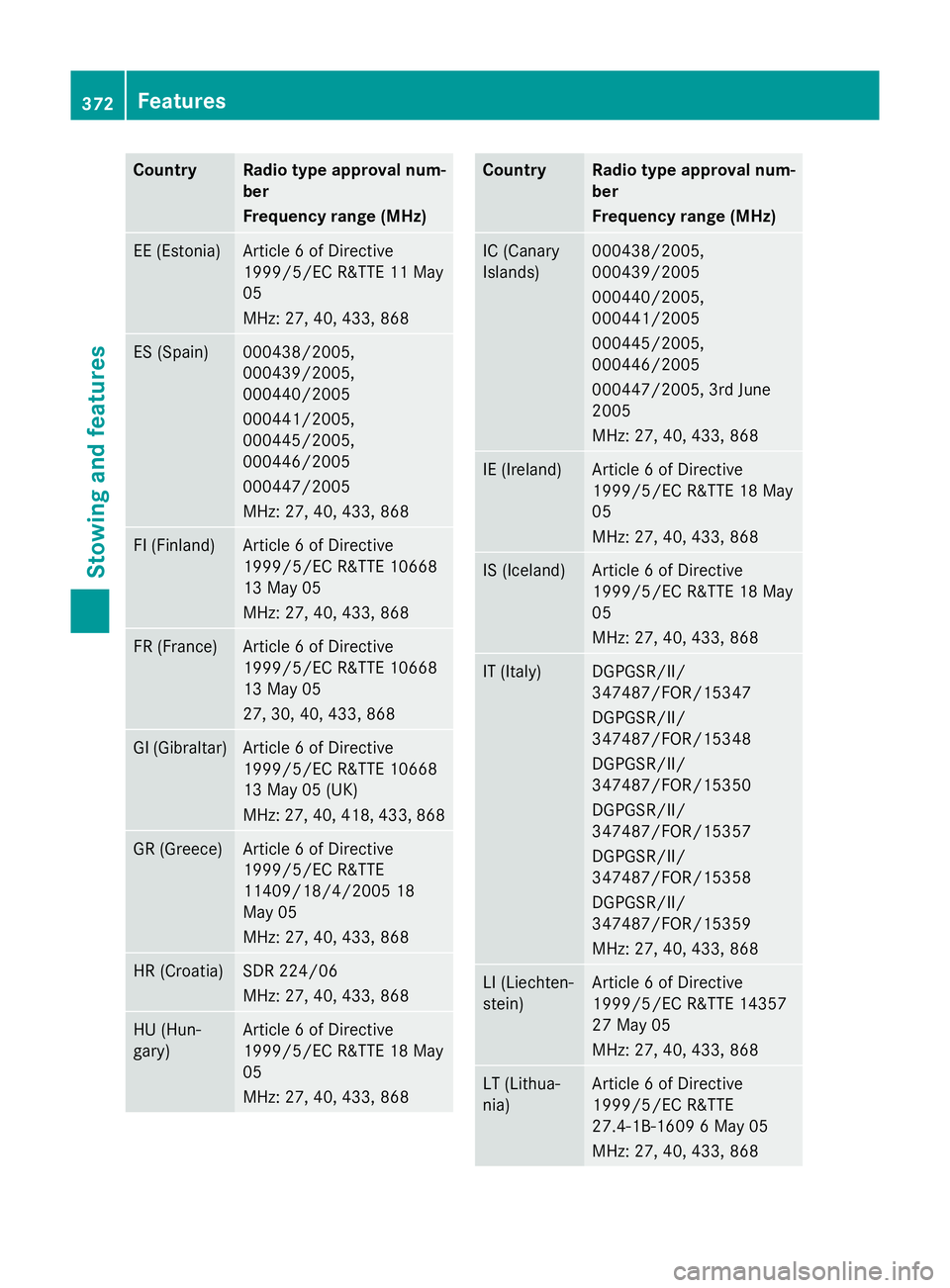
Country Radio type approval num-
ber
Frequency range (MHz)
EE (Estonia) Article
6ofDirective
1999/5/E CR&TT E11M ay
05
MHz :27,40 ,433 ,868 ES (Spain) 000438/2005,
000439/2005,
000440/2005
000441/2005,
000445/2005,
000446/2005
000447/2005
MHz :27,40 ,433 ,868 FI (Finland) Article
6ofDirective
1999/5/E CR&TT E10668
13 May 05
MHz :27,40 ,433 ,868 FR (France) Article
6ofDirective
1999/5/E CR&TT E10668
13 May 05
27 ,30,40 ,433 ,868 GI (Gibraltar) Article
6ofDirective
1999/5/E CR&TT E10668
13 May 05 (UK)
MHz :27,40 ,418 ,433 ,868 GR (Greece) Article
6ofDirective
1999/5/E CR&TTE
11409/18/4/200 518
May 05
MHz :27,40 ,433 ,868 HR (Croatia) SD
R2 24/06
MHz :27,40 ,433 ,868 HU (Hun-
gary) Article
6ofDirective
1999/5/E CR&TT E18M ay
05
MHz :27,40 ,433 ,868 Country Radio type approval num-
ber
Frequency range (MHz)
IC (Canary
Islands) 000438/2005,
000439/2005
000440/2005,
000441/2005
000445/2005,
000446/2005
000447/2005, 3r
dJune
2005
MHz :27,40 ,433 ,868 IE (Ireland) Article
6ofDirective
1999/5/E CR&TT E18M ay
05
MHz :27,40 ,433 ,868 IS (Iceland) Article
6ofDirective
1999/5/E CR&TT E18M ay
05
MHz :27,40 ,433 ,868 IT (Italy) DGPGSR/II/
347487/FOR/15347
DGPGSR/II/
347487/FOR/15348
DGPGSR/II/
347487/FOR/15350
DGPGSR/II/
347487/FOR/15357
DGPGSR/II/
347487/FOR/15358
DGPGSR/II/
347487/FOR/15359
MHz :27,40 ,433 ,868 LI (Liechten-
stein) Article
6ofDirective
1999/5/E CR&TT E14357
27 May 05
MHz :27,40 ,433 ,868 LT (Lithua-
nia) Article
6ofDirective
1999/5/E CR&TTE
27.4-1B-1609 6May 05
MHz :27,40 ,433 ,868 372
FeaturesStowing and features
Page 376 of 497
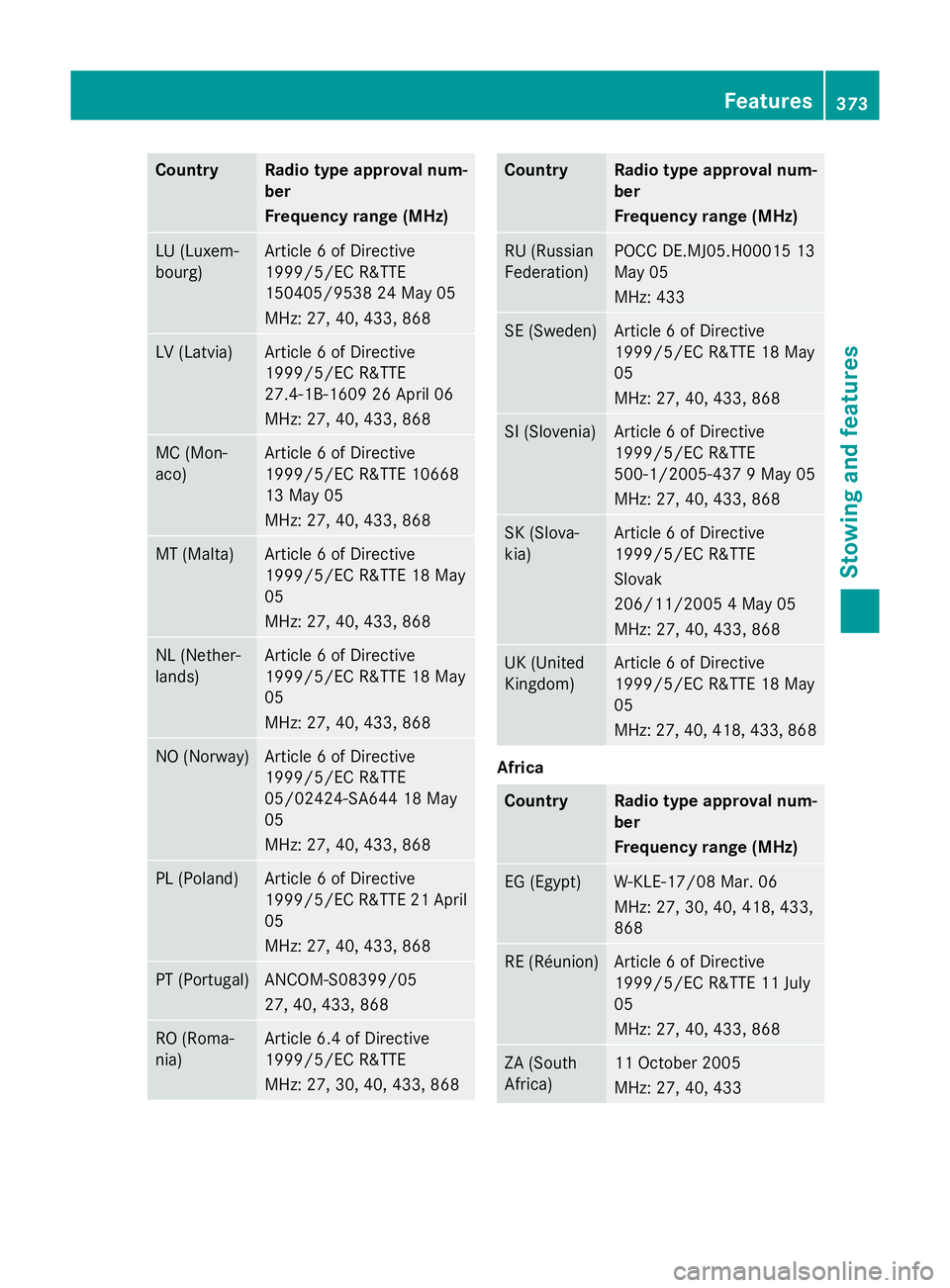
Country Radio type approval num-
ber
Frequency range (MHz)
LU (Luxem-
bourg) Article
6ofDirective
1999/5/E CR&TTE
150405/953 824May 05
MHz :27,40 ,433 ,868 LV (Latvia) Article
6ofDirective
1999/5/E CR&TTE
27.4-1B-1609 26 April 06
MHz :27,40 ,433 ,868 MC (Mon-
aco) Article
6ofDirective
1999/5/E CR&TT E10668
13 May 05
MHz :27,40 ,433 ,868 MT (Malta) Article
6ofDirective
1999/5/E CR&TT E18M ay
05
MHz :27,40 ,433 ,868 NL (Nether-
lands) Article
6ofDirective
1999/5/E CR&TT E18M ay
05
MHz :27,40 ,433 ,868 NO (Norway) Article
6ofDirective
1999/5/E CR&TTE
05/02424-SA644 18 May
05
MHz :27,40 ,433 ,868 PL (Poland) Article
6ofDirective
1999/5/E CR&TT E21A pril
05
MHz :27,40 ,433 ,868 PT (Portugal) ANCOM-S08399/05
27
,40,433, 868 RO (Roma-
nia) Article 6.
4ofDirective
1999/5/E CR&TTE
MHz :27,30 ,40,433, 868 Country Radio type approval num-
ber
Frequency range (MHz)
RU (Russian
Federation) POCC DE.MJ05.H0001
513
May 05
MHz :433 SE (Sweden) Article
6ofDirective
1999/5/E CR&TT E18M ay
05
MHz :27,40 ,433 ,868 SI (Slovenia) Article
6ofDirective
1999/5/E CR&TTE
500-1/2005-437 9May 05
MHz :27,40 ,433 ,868 SK (Slova-
kia) Article
6ofDirective
1999/5/E CR&TTE
Slovak
206/11/200 54May 05
MHz :27,40 ,433 ,868 UK (United
Kingdom) Article
6ofDirective
1999/5/E CR&TT E18M ay
05
MHz :27,40 ,418 ,433 ,868 Africa
Country Radio type approval num-
ber
Frequency range (MHz)
EG (Egypt) W-KLE-17/08 Mar. 06
MHz
:27,30 ,40,418, 433,
868 RE (Réunion) Article
6ofDirective
1999/5/E CR&TT E11J uly
05
MHz :27,40 ,433 ,868 ZA (South
Africa) 11 October 2005
MHz
:27,40 ,433 Features
373Stowing and features Z