2015 MERCEDES-BENZ E-CLASS SALOON AUX
[x] Cancel search: AUXPage 172 of 497
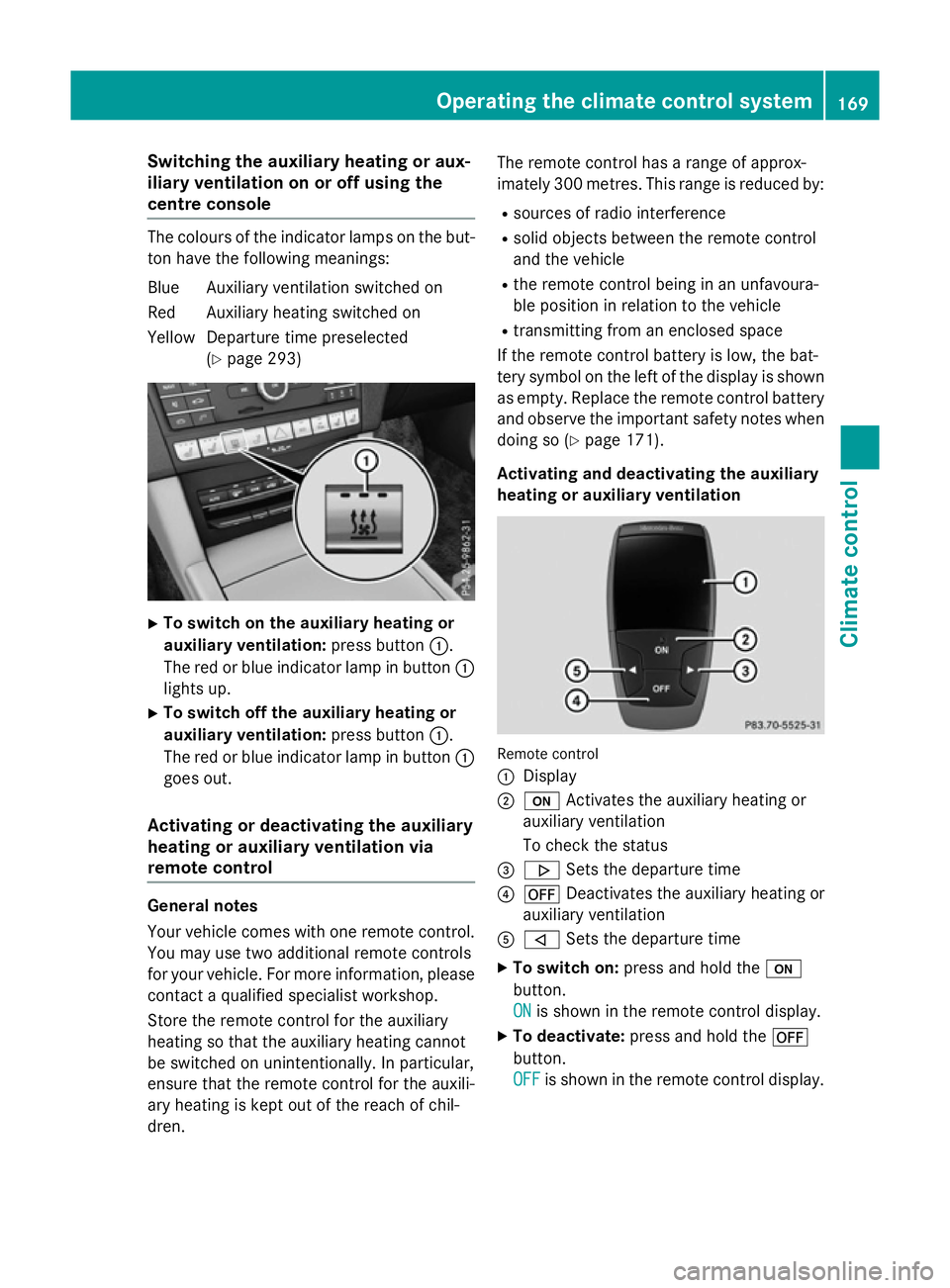
Switching the auxiliary heating or aux-
iliary ventilation on or off using the
centre console The colours of the indicator lamps on the but-
ton have the following meanings:
Blue Auxiliary ventilation switched on
Red Auxiliary heating switched on
Yellow Departure time preselected (Ypage 293) X
To switch on the auxiliary heating or
auxiliary ventilation: press button:.
The red or blue indicator lamp in button :
lights up.
X To switch off the auxiliary heating or
auxiliary ventilation: press button:.
The red or blue indicator lamp in button :
goes out.
Activating or deactivating the auxiliary
heating or auxiliary ventilation via
remote control General notes
Your vehicle comes with one remote control.
You may use two additional remote controls
for your vehicle. For more information ,please
contact aqualified specialist workshop.
Storet he remote control for the auxiliary
heating so that the auxiliary heating cannot
be switched on unintentionally. In particular,
ensure that the remote control for the auxili-
ary heating is kept out of the reach of chil-
dren. The remote control has
arange of approx-
imately 300 metres. This range is reduced by:
R sources of radio interference
R solid objectsb etween the remote control
and the vehicle
R the remote control being in an unfavoura-
ble position in relation to the vehicle
R transmittingf rom an enclosed space
If the remote control battery is low, the bat-
tery symbol on the left of the display is shown as empty. Replace the remote control battery
and observe the important safety notes when doing so (Y page 171).
Activating and deactivating the auxiliary
heating or auxiliary ventilation Remote control
:
Display
; u Activates the auxiliary heating or
auxiliary ventilation
To check the status
= . Sets the departure time
? ^ Deactivates the auxiliary heating or
auxiliary ventilation
A , Sets the departure time
X To switch on: press and hold the u
button.
ON ON is shown in the remote control display.
X To deactivate: press and hold the ^
button.
OFF OFF is shown in the remote control display. Operating the climate control system
169Climatecontrol Z
Page 173 of 497

Checking th
estatus of theauxiliary heat-
ing or auxiliary ventilation
X Briefly pres sthe u button.
The followin gmessages may appear in the
display: Display Meaning
The auxiliar
yheating or
auxiliar yventilatio nis
deactivated. The auxiliar
yventilation
is switched on .The num-
ber in th edisplay shows
th er emainin gtime( in
minutes )for th eauxiliary
ventilation. The auxiliar
yheating is
switched on .The number
in th edisplay show sthe
remainin gtime( in
minutes )for th eauxiliary
heating. Ad
epartur etimeh as
been activated. The
departur etimea ppears
in th edisplay. Ad
epartur etimeh as
been activated. The aux-
iliary ventilatio niscur-
rently activated. The
number in th edisplay
show sthe remaining
tim e(in minutes )for the
auxiliar yventilation. If
th ev ehicle is no tstarted
after this time, th erun-
nin gtimeisi ncreased by
fiv em inutes. Ad
epartur etimeh as
been activated. The aux-
iliary heating is currently
activated. The number in
th ed isplay show sthe
remainin gtime( in
minutes )for th eauxiliary
heating .Ifthevehicle is
no tstarted after this
time, th erunnin gtimeis
increased by five
minutes. If th
eengine has no tyet reached operating
temperatur ewhen it is started, th eauxiliary
heating runnin gtimeisi ncreased. The auxili-
ary heating continues to run until th eoperat-
ing temperatur eisreached. If this is th ecase,
the y symbo lappear sintheremot econ-
trol display and th erunnin gtimeisz ero
minutes.
Settin gthe departure time
Mak esure that th etimes et in th evehicle is
correc tbefore settin gthe departur etim e(see
th es eparate operatin ginstructions). Other-
wise, th eauxiliar yheating may switch on at
th ew rongtimea nd at an unsuitable location.
When settin gthe departur etime, also
observ ethe important safety notes
(Y page 168). 170
Operating th
eclimate control systemClimate control
Page 174 of 497
X
Briefly press the ubutton.
X Press the ,or. button repeatedly
unti lthe time to be changed appears in the
display.
X Press the uand^ buttons simulta-
neously.
The Îsymbo linthe remote control dis-
play flashes.
X Press the ,or. button to set the
desire ddeparture time.
i The longer yo
upress the ,or.
button, the faster the time changes.
X Press the uand^ button simulta-
neously.
The new departure time is stored.
Activating the se tdeparture time
X Briefly press the ubutton.
X Press the ,or. button repeatedly
unti lthe desire ddeparture time appears in
the display.
X Press the ubutton.
The Ísymbol, the departure time and,
depending on the selected departure time, the letter A, BorCappea rinthe display.
Deactivatin gthe se tdeparture time
X Briefly press the ubutton.
The statu softhe auxiliary heating is shown
in the display.
X Press the .button.
The firs tdeparture time store dappears in
the display.
X Press the ^button.
OFF
OFF is shown in the remote control display.
Replacing the remote control battery Important safety notes
G
WARNING
Batterie scontai ntoxic and corrosiv esubstan-
ces. If batterie sare swallowed, it can result in
severe health problems. There is ariskoff atal
injury. Kee
pbatterie soutof the reach of children. If
ab attery is swallowed, see kmedica lattention
immediately. H
Environmental note Batterie
scontai npollutants.
It is illega ltodispose of them
with the household rubbish.
The ym ustb ec ollected sep-
arately and disposed of in an environmentally responsible
recycling system. Dispose of batterie
sinan
environmentally responsible
manner. Take discharged
batterie stoaqualified spe-
cialist worksho portoacol-
lection point for used batter-
ies.
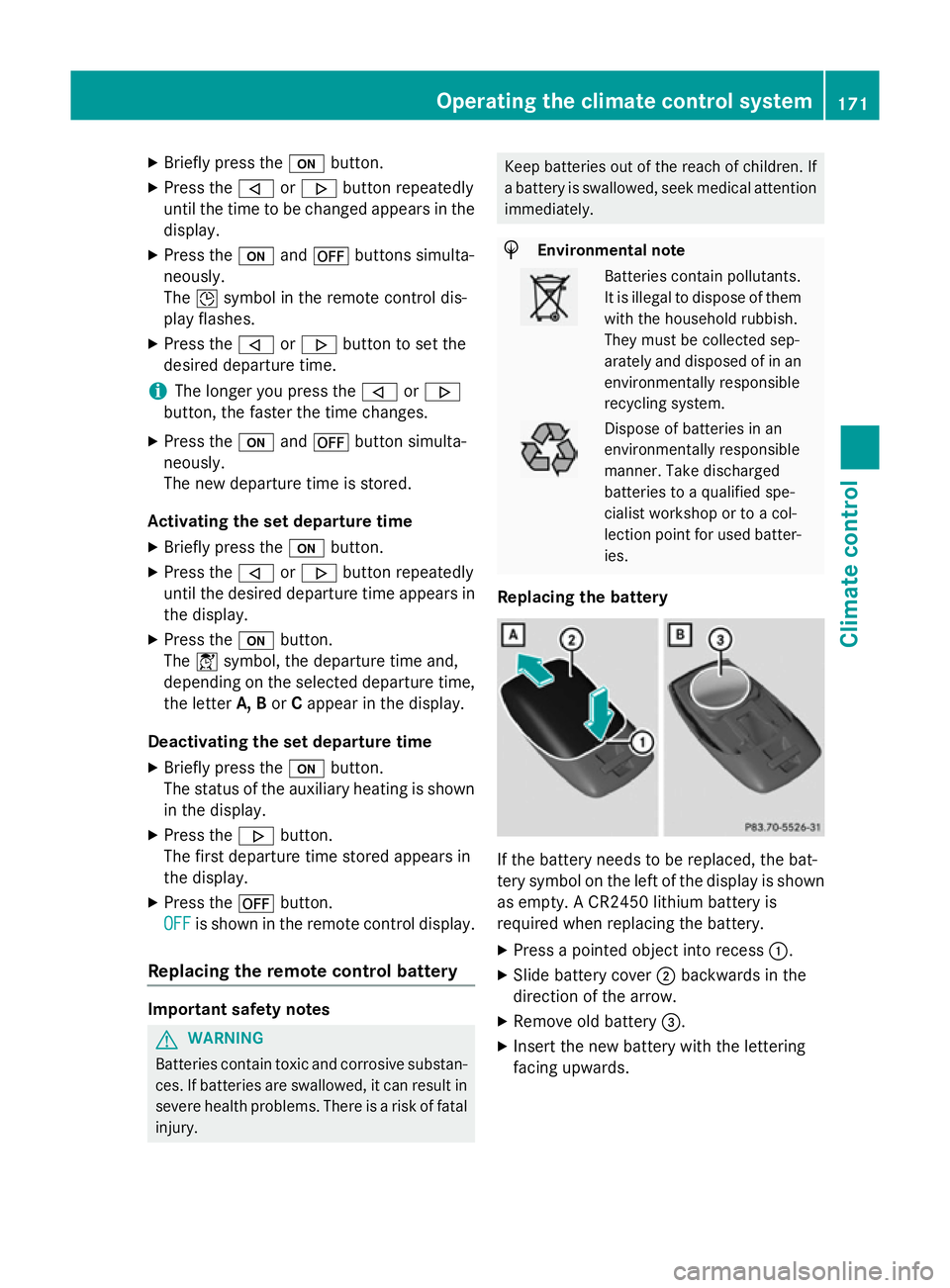
Replacing the battery If the battery need
stobereplaced, the bat-
tery symbo lonthe left of the display is shown
as empty. ACR2450 lithiu mbattery is
required whe nreplacing the battery.
X Press apointed object into recess :.
X Slide battery cover ;backwards in the
direction of the arrow.
X Remove old battery =.
X Inser tthe new battery with the lettering
facing upwards. Operating the climate control system
171Climate control Z
Page 175 of 497
X
Slide battery cover ;in the opposite direc-
tion to the arrow on the remote control until it engages.
X Use the remote control to check the vehi-
cle's auxiliary heating functions. 172
Operating the climate control systemClimate control
Page 176 of 497
Problems with the auxiliary heating or auxiliary ventilation
Display messages
Possible causes/consequences and
M
MSolutions FAIL¨ The signal transmission between the transmitter and the vehicle is
faulty.
X Change your position in relation to the vehicle, moving closer if
necessary.
X Make another attempt to switch the auxiliary heating on or off
using the remote control. FAIL The auxiliary heating cannot be switched on or has switched itself
off.
The starter battery is not sufficiently charged.
X Charge the starter battery.
X Make another attempt to switch on the auxiliary heating using
the remote control. The auxiliary heating cannot be switched on or has switched itself
off.
The fuel tank content is below the reserve fuel level.
X Refuel at the nearest filling station.
X Make another attempt to switch on the auxiliary heating using
the remote control. The auxiliary heating or auxiliary ventilation cannot be switched on
or has switched itself off.
The auxiliary heating or auxiliary ventilation is faulty.
X Have the auxiliary heating or auxiliary ventilation checked at a
qualified specialist workshop. Adjusting the air vents
Important safety notes
G
WARNING
Very hot or very cold air can flow from the air vents. This could result in burns or frostbit ein
the immediate vicinity of the air vents. There
is ar isk of injury.
Make sure that all vehicle occupants always
maintain asufficient distance to the air out-
lets. If necessary, redirect the airflow to
another area of the vehicle interior. In order to ensure the direct flow of fresh air
through the air ventsi
nto the vehicle interior,
please observe the following notes:
R keep the air inlet between the windscreen
and the bonnet free of blockages, such as
ice, snow or leaves.
R never cover the ventsorv entilation grilles
in the vehicle interior. Adjusting the air vents
173Climatecontrol Z
Page 203 of 497

Problems with the transmission
Problem
Possible causes/consequences and
M
MSolutions The transmission has
problems shifting gear. The transmission is losing oil.
X Have the transmission checked at aqualified specialist work-
shop immediately. 7G-TRONIC:
The acceleration ability
is deteriorating.
The transmission no
longer changes gear.
The transmission is in emergency mode.
It is only possible to shift into
secondgear and reverse gear.
X Stop.
X Shift the transmission to position P.
X Switch off the engine.
X Wait at least ten seconds before restarting the engine.
X Shift the transmission to position Dor R.
If D is selected, the transmission shifts into secondgear; ifRis
selected, the transmission shifts into reverse gear.
X Have the transmission checked at aqualified specialist work-
shop immediately. 9G-TRONIC:
The acceleration ability
is deteriorating.
The transmission no
longer changes gear.
The transmission is in emergency mode.
It is only partly possible to engage the gears or the transmission is
in position N.
X Stop.
X Shift the transmission to position P.
X Switch off the engine.
X Wait at least ten seconds before restarting the engine.
X Shift the transmission to position Dor R.
X Have the transmission checked at aqualified specialist work-
shop immediately. Refuelling
Important safety notes
G
WARNING
Fuel is highly flammable. If you handle fuel
incorrectly, there is arisk of fire and explo-
sion.
You must avoid fire, naked flames, creating
sparks and smoking. Switch off the engine
and, if applicable, the auxiliary heating before refuelling. G
WARNING
Fuels are poisonous and hazardous to health. There is adanger of injury.
Do not swallow fuel or let it come into contact
with skin, eyes or clothing. Do not inhale fuel
vapours. Keep fuels out of the reach of chil-
dren. 200
RefuellingDriving and parking
Page 214 of 497
If you must drive on stretches of road on
which water has collected, please bear in
mind that:
R in the case of standing water, the water
level must be no highert han the loweredge
of the vehicle body
R you shouldd rive no faster than walking
pace Winter driving
G
WARNING
If you shift down on aslippery road surface in
an attempt to increase the engine's braking
effect, the drive wheels could lose their grip.
This increases the risk of skidding and having
an accident.
Do not shift down for additional engine brak-
ing on aslippery road surface. G
DANGER
If the exhaust pipe is blocked or adequate
ventilation is not possible, poisonous gases
such as carbon monoxide (CO) may enter the vehicle .This is the case, e.g. if the vehicle
becomes trapped in snow. There is arisk of
fatal injury.
If you leave the engine or the auxiliary heating
running, make sure the exhaust pipe and area
around the vehicle are clear of snow. To
ensure an adequate supply of fresh air, open a window on the side of the vehicle that is not
facing into the wind.
Have yourv ehicle winterproofe dataqualified
specialist workshop at the onset of winter.
You shouldd rive particularly carefully on slip-
pery road surfaces .Avoid sudden accelera-
tion, steering and braking manoeuvres. If the vehicle threatens to skid or cannot be
stopped when moving at low speed:
X Vehicles with manual transmission:
shift to neutral.
X Vehicles with automatic transmission:
shift the transmission to position N.
X Try to bring the vehicle under control by
using corrective steering.
The outsid etemperature indicator is not
designed to serve as an ice-warning device
and is therefore unsuitable for that purpose.
Changes in the outsid etemperature are dis-
played after ashort delay.
Indicated temperature sjust above the freez-
ing point do not guarantee that the road sur-
face is free of ice. The road may still be icy,
especially in wooded areasoronb ridges. The
vehicle could skid if you fail to adapt your
driving style. Alwaysa dapt yourdriving style
and drive at aspeed to suit the prevailing
weather conditions.
You shouldp ay specialattention to road con-
ditions when temperature sare around freez-
ing point.
Further information on driving with snow
chains (Y page 419).
Further information on driving with summer
tyres (Y page 418).
Observe the notes in the "Winter operation"
section (Y page 418). Driving systems
Mercedes-Benz Intelligent Drive
Mercedes-Benz Intelligent Drive stands for
innovative driver assistance and safety sys-
tems which enhance comfort and support the driver in critical situations. With these intelli-
gent co-ordinated systems Mercedes-Benz
has set amilestone on the path towards
autonomou sdriving.
Mercedes-Benz Intelligent Drive embraces all
elements of active and passive safety in one
wellt hought-out system –for the safety of the Driving systems
211Driving and parking Z
Page 296 of 497
ting switches permanent SPEEDTRONIC
off.
X Press the abutton to store the entry.
Observe the additional information on per-
manent SPEEDTRONIC (Y page 217).
Activating/deactivating the automatic
lockin gfeature
X Press the =or; button on the steer-
ing whee ltoselect theSettings Settings menu.
X Press the :or9 button to select the
Vehicle
Vehicle submenu.
X Press ato confirm.
X Press the :or9 button to select the
Auto. doo rlocks
Auto. doo rlocks function.
When the Auto. doo rlocks
Auto. doo rlocks functio nis
switched on, the vehicl edoors ar edis-
played in orange in the multifunctio ndis-
play.
X Press the abutton to save the setting.
If yo uactivate the Auto. doorlocks
Auto. doo rlocks func-
tion, the vehicl eiscentrally locked above a
spee dofa round 15 km/h.
Furthe rinformation on the automatic locking
featur e(Ypage 102).
Activating/deactivating the acoustic
lockin gconfirmation
If yo uswitch on the Acoustic
Acoustic Lock Lockfunction,
an acoustic signa lsou nd sw heny ou lock the
vehicle.
X Press the =or; button on the steer-
ing whee ltoselect theSettings
Settings menu.
X Press the :or9 button to select the
Vehicle
Vehicle submenu.
X Press ato confirm.
X Press the :or9 button to select the
Acoustic Lock
Acoustic Lock function.
If the Acoustic
Acoustic Lock
Lockfunctio nisa ctivated,
the & symbo linthe multifunctio ndis-
play lights up orange.
X Press the abutton to save the setting. Heating Auxiliary heating departure time
G
DANGER
If the exhaust pipe is blocke dorsufficient
ventilation is not possible, toxi cexhaust
fumes can ente rthe vehicle, especiall ycar-
bo nm onoxide. This is the case, e.g .in
enclose dspaces, or if the vehicl eisstuck in
snow. There is ariskoff atal injuries.
Yo us houl dswitch off the auxiliary heating in
enclose dspacesw hich do not have an extrac-
tio ns ystem, e.g .agarage. If the vehicl eis
stuck in sno wand yo umustleave the auxiliary
heating running ,kee pt he exhaust pipe and
the area around the vehicl eclear of snow. To
guarante easufficient supply of fresh air, open
aw indo wont he side of the vehicl eawayfrom
the wind. G
WARNING
When the auxiliary heating is switched on,
parts of the vehicl ecan becom everyh ot.
Flammabl ematerial ssuchasl eaves, grass or
twigs ma yign ite if the ycom einto contact
with:
R ho tp arts of the exhaust system
R the exhaust ga sitself
There is ariskoff ire.
When the auxiliary heating is switched on,
make sure that:
R no flammabl ematerial scom einto contact
with ho tvehicl ecomponents
R the exhaust ga scan escap efromt he
exhaust pipe unhindered
R the exhaust ga sdoesn ot com einto contact
with flammabl ematerials.
! Operating the auxiliary heating/ventila-
tio nd raws on the vehicl ebattery .After you
have heate dorventilated the vehicl ea
maximum of two times ,drive for alon ger
distance.
Onl yvehicles with auxiliary heating have this
function. Menus and submenus
293On-board computer and displays Z