2015 MERCEDES-BENZ E-CLASS SALOON light
[x] Cancel search: lightPage 210 of 497
X
Releas ethe brak epedal.
X Releas ethe parkin gbrake.
X Switc hoff th eignition and leav ethe keyin
th ei gnition lock.
The engin ecan be switched off while th evehi-
cle is in motion by pressing and holdin gthe
Start/Sto pbutto nfor about three seconds.
This function operate sind ependentl yofthe
ECO start/sto pautomatic engin eswitch-off
function. Parking brake
G
WARNING
If you mus tbrak ethe vehicl ewitht he parking
brake, th ebrakin gdistanc eisconsid erably
longer and th ewheels could lock. This increa-
ses th eriskofs kiddin gand an accident.
Only use th eparkin gbrak etob rakethe vehi-
cle when th eservic ebrak eisf aulty. Do not
apply th eparkin gbrak etoo firmly. If the
wheels lock, release th eparkin gbrak euntil
th ew heels begi nturning again. G
WARNING
If you leav echildren unattended in th evehi-
cle ,the ym ay be able to set th evehicl ein
motion if, for example, they:
R release th eparkin gbrake
R shift th eautomati ctransmission out of park
position Por shift manual transmission into
neutral
R start th eengine
In addition ,the ym ay operate vehicl eequip-
men tand become trapped .There is ariskof
an acciden tand injury.
Whe nleavin gthe vehicle, always tak ethe key
wit hyou and loc kthe vehicle. Never leave
children unattended in th evehicle. The brak
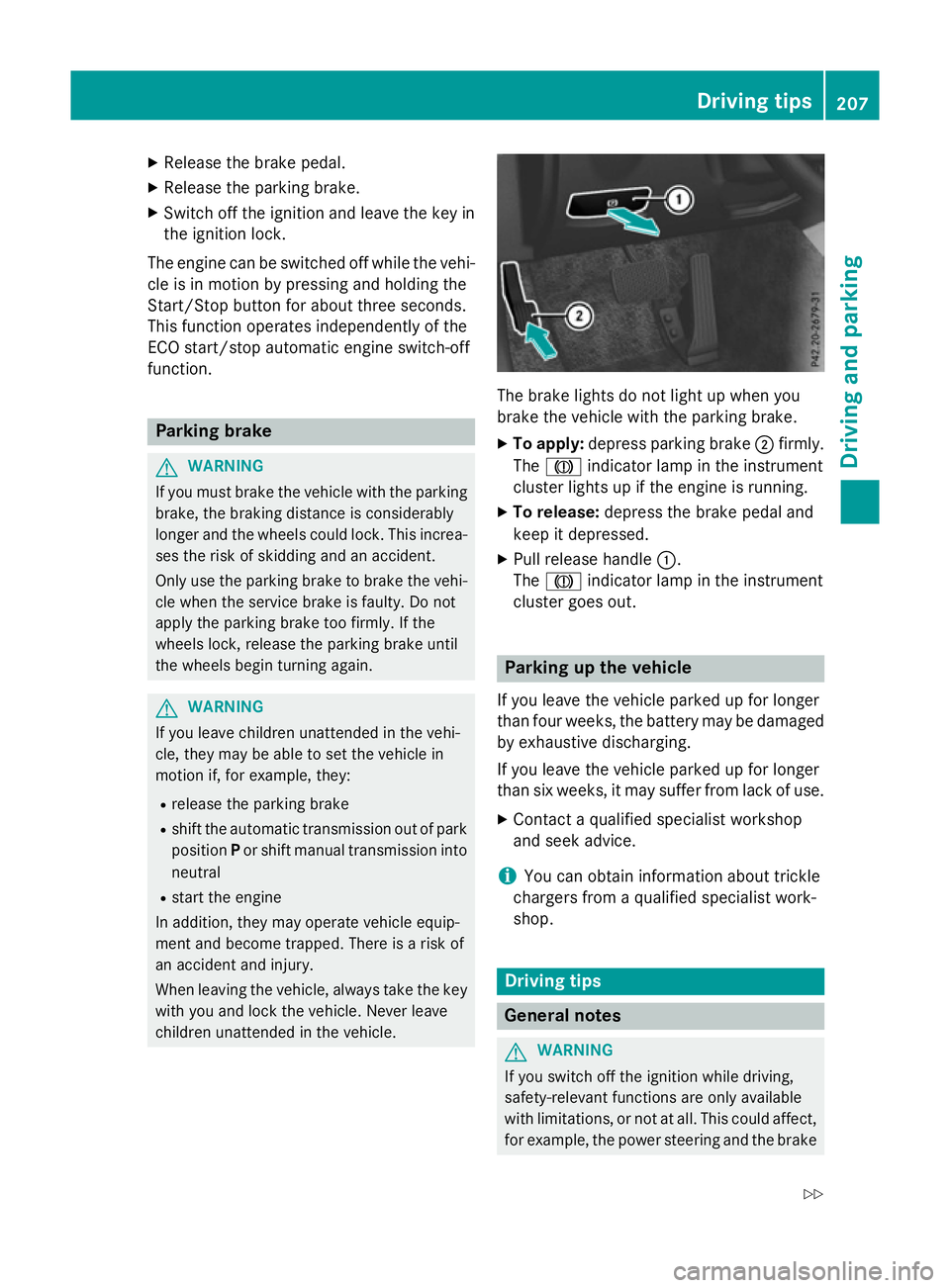
elights do no tligh tupw hen you
brak ethe vehicl ewitht he parkin gbrake.
X To apply: depress parkin gbrake ;firmly.
The J indicato rlamp in th einstrument
cluste rlights up if th eengineisr unning.
X To release: depress thebrak epedal and
keep it depressed.
X Pull release handle :.
The J indicato rlamp in th einstrument
cluste rgoeso ut. Parking up th
evehicle
If you leav ethe vehicl eparked up for longer
than fou rweeks, th ebattery may be damaged
by exhaustive discharging.
If you leav ethe vehicl eparked up for longer
than six weeks, it may suffer from lack of use.
X Contac taqualified specialist workshop
and see kadvice.
i You can obtain information about trickle
chargers from aqualified specialist work-
shop. Driving tips
Genera
lnotes G
WARNING
If you switch off th eignition while driving,
safety-relevant function sare only available
wit hlimitations, or no tatall. This could affect,
for example, th epowe rsteerin gand th ebrake Driving tips
207Driving and pa rking
Z
Page 212 of 497
Brakes
Important safety notes G
WARNING
If yo ushift down on aslipper yroads urface in
an attempt to increas ethe engine's braking
effect, the drive wheels could lose thei rgrip.
Thi sincreases the ris kofskidding and having
an accident.
Do not shift down for additional engine brak-
ing on aslipper yroads urface.
Downhil lgradients Do not depress the brake peda
lcontinuously
whil ethe vehicl eisinmotion, e.g .never
cause the brakes to ru bbyconstantly apply-
ing light pressure to the pedal. Thi sresults in
excessive and premature wear to the brake
pads.
Chang einto alower gearing oodtime on long
and stee pdownhil lgradients.
Take particula rnote of thi swhend riving a
lade nvehicl eand when towing atrailer.
i Thi
salsoa pplies if youhavea ctivated
cruis econtrol, SPEEDTRONIC or
DISTRONIC PLUS.
Thi sw illu se the braking effect of the engine,
so less braking will be required to maintain
vehicl espeed .Thisr elieves the load on the
brake system and prevents the brakes from
overheating and wearing too quickly.
Heavy and light loads G
WARNING
The braking system can overheat if yo ulea ve
your foo tonthe brake peda lwhile driving.
Thi sincreases the braking distance and could
eve ncause the braking system to fail. There is
ar iskofana ccident.
Never us ethe brake peda lasafootrest. Do
not simultaneousl ydepress both the brake
peda land the accelerato rpedal whiledriving. !
Depressing the brake peda
lconstantly
results in excessive and premature wear to
the brake pads.
If the brakes have been subjected to aheavy
load ,don ot stop the vehicl eimmediately, but
drive on for ashort while. Thi sallow sthe air-
flo wtoc ool the brakes more quickly.
If the brakes have been used onl ymoderately,
yo us houl doccasionall ytest thei reffective-
ness .Todot his, brake more firmly from a
highe rspeed whil epayin gattentio ntothe
traffic conditions. Thi simprove sthe gri pof
the brakes.
Wet road surfaces If yo
uhaved riven for alon gtime in heavy rain
withou tbraking ,ther em aybe adelayed reac-
tio nfrom the brakes when braking for the first
time .Thism ayalso occu rafte rac ar wash or
afte rdriving throug hdeepw ater.
Yo uw illh av etod epress the brake peda lmore
firmly .Maintain agreate rdistance to the vehi-
cle in front.
After driving on awetroa dorh aving the vehi-
cle washed, brake firmly whil epayin gatten-
tio ntot he traffic conditions. Thi swillw armup
the brake discs, thereb ydrying them more
quickl yand protecting them against corro-
sion.
Limite dbraking performanc eonsalt-
treate droads If yo
udrive on salt-treate droads, alayer of
salt ma yform on the brake discs and pads.
Thi scan increas ethe braking distance con-
siderably.
R In order to prevent any salt build-up, apply
the brakes occasionall ywhile paying atten-
tio ntot he traffic conditions.
R Carefull ydepress the brake peda latthe
end of the journey and when starting the
next journey.
R Maintain amuchg reate rdistance to the
vehicl einfront. Driving tips
209Driving andparking Z
Page 217 of 497
X
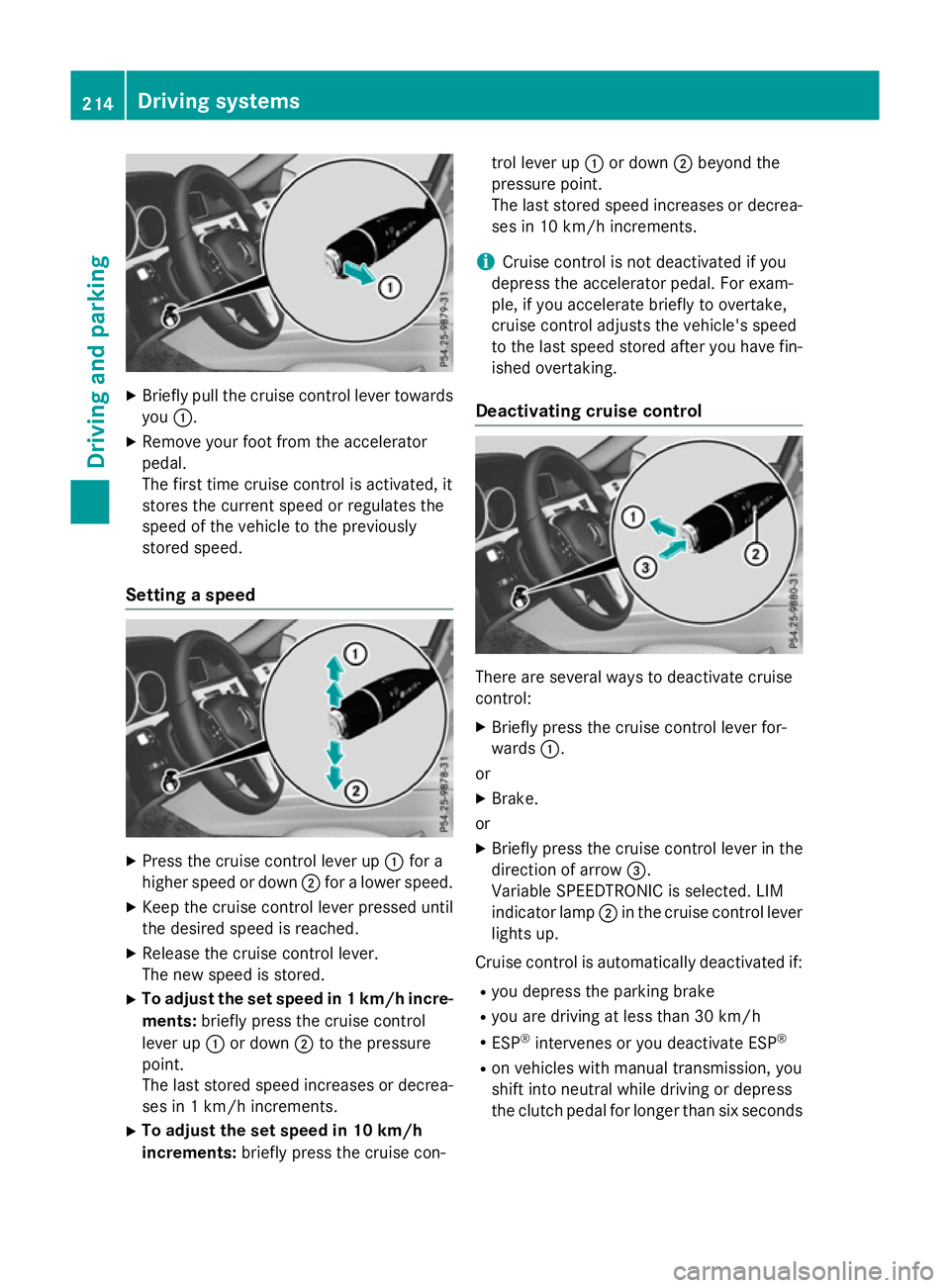
Briefly pull the cruise control lever towards
you :.
X Remove your foot from the accelerator
pedal.
The firs ttime cruise control is activated, it
store sthe current speed or regulates the
speed of the vehicle to the previously
store dspeed.
Setting aspeed X
Press the cruise control lever up :for a
higher speed or down ;for alower speed.
X Kee pthe cruise control lever presse duntil
the desire dspeed is reached.
X Releas ethe cruise control lever.
The new speed is stored.
X To adjust the se tspeed in 1km/h incre-
ments: brieflypress the cruise control
lever up :or down ;to the pressure
point.
The last store dspeed increases or decrea-
ses in 1km/h increments.
X To adjust the se tspeed in 10 km/h
increments: brieflypress the cruise con- trol lever up
:or down ;beyond the
pressure point.
The last store dspeed increases or decrea-
ses in 10 km/h increments.
i Cruise control is not deactivated if you
depress the accelerato rpedal .For exam-
ple, if yo uaccelerate briefl ytoovertake,
cruise control adjusts the vehicle's speed
to the last speed store dafteryou have fin-
ished overtaking.
Deactivatin gcruise control There are several ways to deactivate cruise
control:
X Briefly press the cruise control lever for-
wards :.
or
X Brake.
or X Briefly press the cruise control lever in the
direction of arrow =.
Variabl eSPEEDTRONIC is selected .LIM
indicator lamp ;in the cruise control lever
lights up.
Cruise control is automaticall ydeactivated if:
R yo ud epress the parking brake
R yo ua re driving at less than 30 km/h
R ESP ®
intervenes or yo udeactivate ESP ®
R on vehicle swithm anual transmission, you
shift into neutral while driving or depress
the clutch pedal for longer than six seconds 214
Drivin
gsystemsDrivin gand parking
Page 218 of 497
R
on vehicles with manual transmission, you
shift to agear that is too high, and as a
result the engine speed is too low
R on vehicles with automatic transmission,
you shift to position Nwhile driving
If cruise control is deactivated, you will hear a warning tone. You will see the Cruise con‐
Cruise con‐
trol off
trol off message in the multifunction dis-
play for approximately five seconds.
i The last speed stored is cleared when you
switch off the engine. SPEEDTRONIC
Important safety notes SPEEDTRONIC brakes automatically so that
you do not exceed the set speed. Change into
al ower gear in good time on long and steep
downhill gradients. Take particular noteof
this when driving aladen vehicle. By doing so,
you will make use of the braking effect of the engine. This relieves the load on the brake
system and prevent sthe brakes from over-
heating and wearing too quickly. If you need
additional braking, depress the brake pedal
repeatedly rather than continuously.
If you fail to adapt your driving style, SPEED-
TRONIC can neither reduce the risk of an
accident nor override the laws of physics.
SPEEDTRONIC cannot take into account
road, weather or traffic conditions. SPEED-
TRONIC is only an aid. You are responsible for
the distance to the vehicle in front,f or vehicle
speed, for braking in good time, and for stay- ing in lane.
If there is achange of drivers, advise the new
driver of the speed stored.
You can set avariable or permanent limit
speed:
R variable for speed limits, e.g. in built-up
areas
R permanent for long-term speed restric-
tions, e.g. when driving with winter tyres
fitted i
The speed indicated in the speedometer
may differ slightly from the limit speed
stored.
Variable SPEEDTRONIC General notes
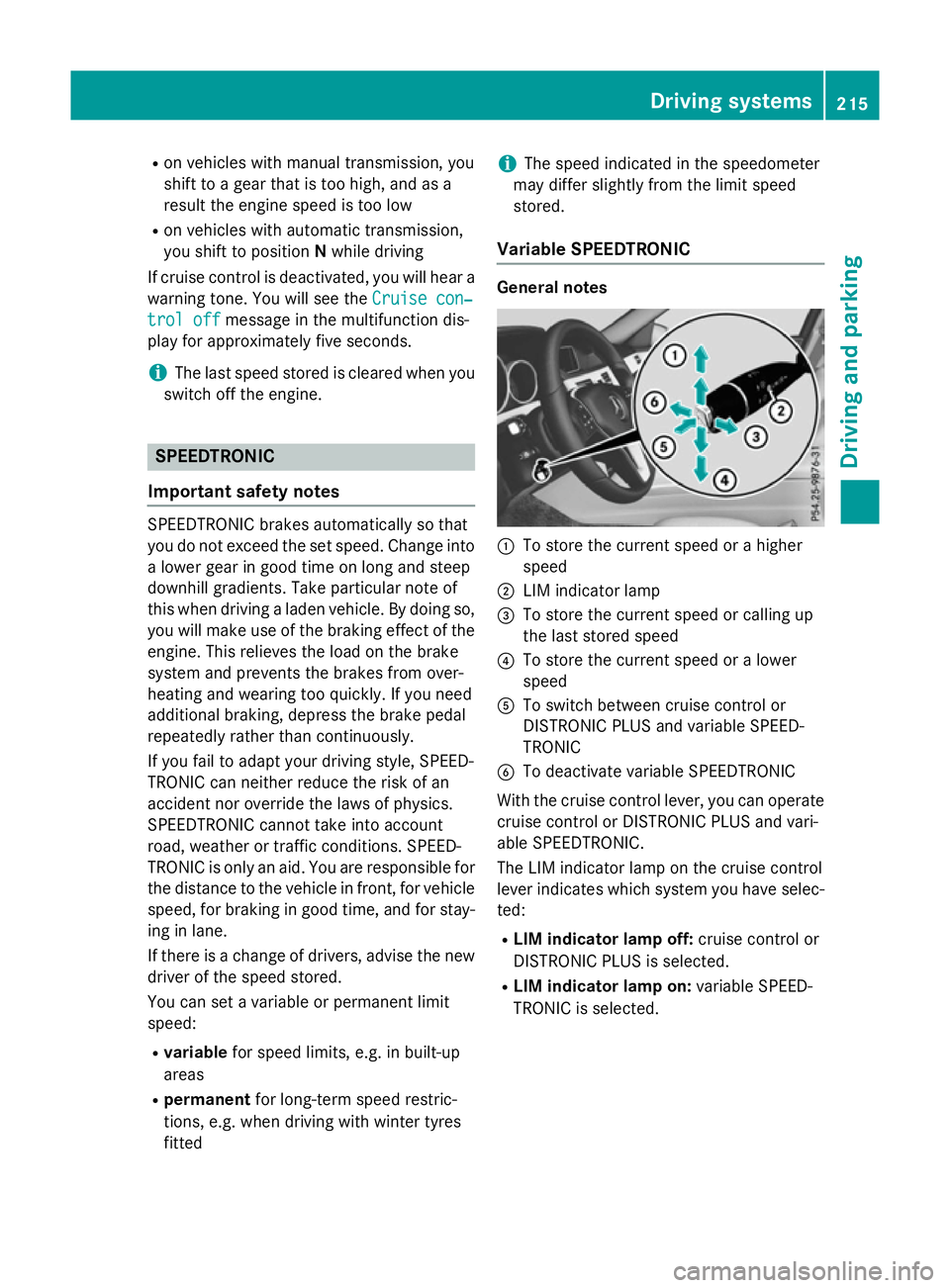
:
To store the current speed or ahigher
speed
; LIM indicator lamp
= To store the current speed or calling up
the last stored speed
? To store the current speed or alower
speed
A To switch between cruise control or
DISTRONIC PLUS and variable SPEED-
TRONIC
B To deactivate variable SPEEDTRONIC
With the cruise control lever, you can operate
cruise control or DISTRONIC PLUS and vari-
able SPEEDTRONIC.
The LIM indicator lamp on the cruise control
lever indicates which system you have selec- ted:
R LIM indicator lamp off: cruise control or
DISTRONIC PLUS is selected.
R LIM indicator lamp on: variable SPEED-
TRONIC is selected. Driving systems
215Driving and parking Z
Page 219 of 497

Selecting variable SPEEDTRONIC
If there is
achange of drivers, advise the new
driver of the limit speed stored.
X Check whether LIM indicator lamp :is on.
If it is on, variable SPEEDTRONIC is already
selected.
If it is not, press the cruise control lever in
the direction of arrow ;.
LIM indicator lamp :in the cruise control
lever lights up. Variable SPEEDTRONIC is
selected.
Storing the current speed X
Briefly press the cruise control lever up :
or down ;.
The current speed is stored and shown in
the multifunction display.
The segments in the multifunction display
light up from the start of the scale up to the
stored speed.
You can use the cruise control lever to limit
the speed to any speed above 30 km/hw hile
the engine is running. Storing the current speed or calling up the
last stored speed G
WARNING
If you call up the stored speed and it is lower
than the current speed, the vehicle deceler-
ates. If you do not know the stored speed, the vehicle could decelerate unexpectedly. There
is ar isk of an accident.
Pay attention to the road and traffic condi-
tions before calling up the stored speed. If you do not know the stored speed, store the
desired speed again. X
Briefly pull the cruise control lever towards
you :.
Setting aspeed X
To adjust the set speed in 10 km/h
increments: briefly press the cruise con-
trol lever up :beyond the pressure point
for ahigher speed, or down ;for alower
speed.
or X Keep the cruise control lever pressed
beyond the pressure point until the desired 216
Driving systemsDriving and parking
Page 227 of 497
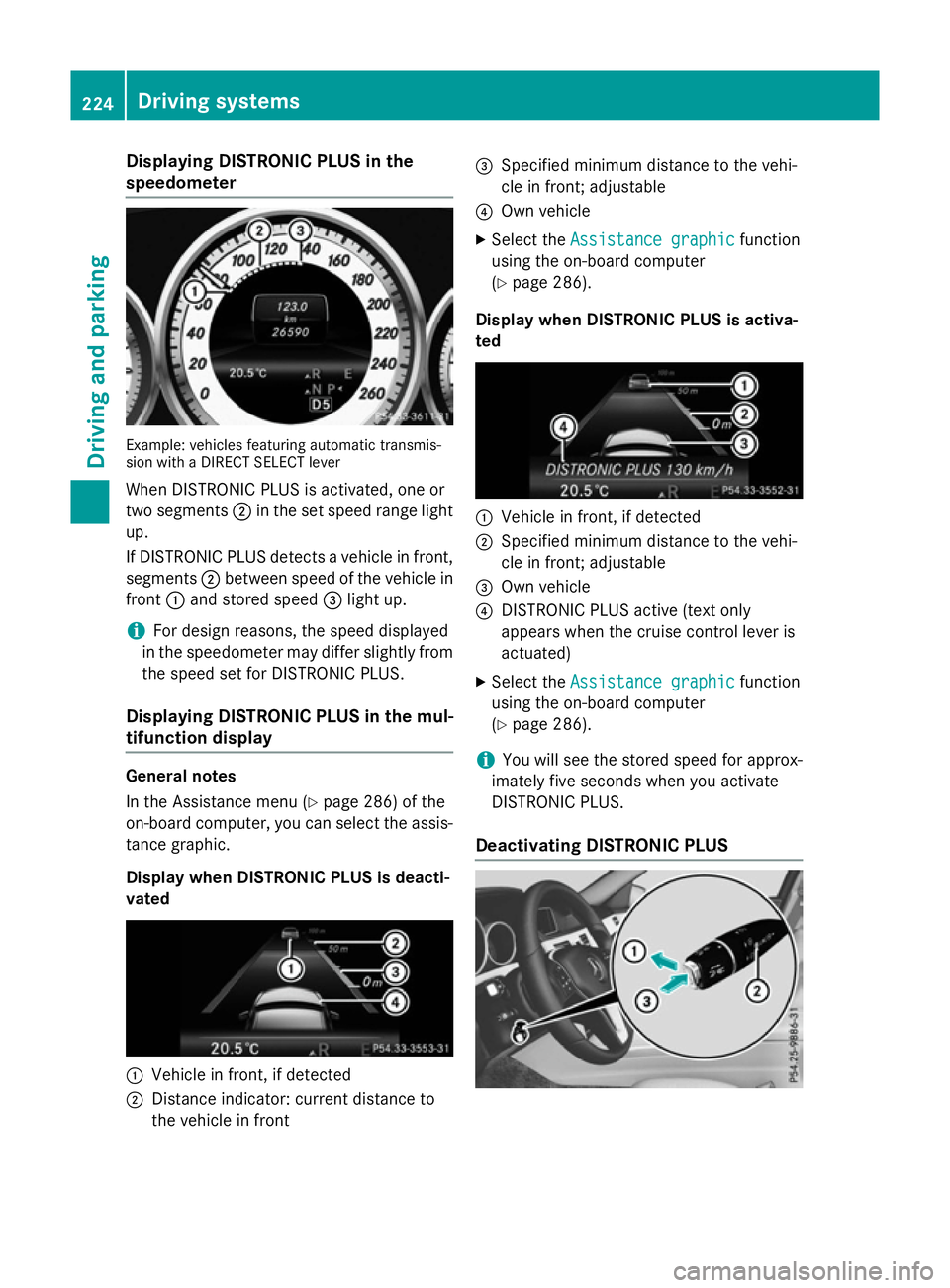
Displaying DISTRONI
CPLUS in the
speedometer Example: vehicles featurin
gautomatic transmis-
sio nw ithaD IREC TS ELEC Tlever
Whe nDISTR ONIC PLU Sisactivated, on eor
tw os egments ;in th eset speed range light
up.
If DISTRONIC PLU Sdetects avehicle in front,
segments ;between speed of th evehicle in
front :and stored speed =ligh tup.
i Fo
rd esign reasons, th espeed displayed
in th espeedometer may diffe rslightly from
th es peed set fo rDISTR ONIC PLUS.
Displaying DISTRONI CPLUS in th emul-
tifunction display General notes
In th
eAssistanc emenu( Ypage 286) of the
on-boar dcom puter, you can selec tthe assis-
tanc egraphic.
Display when DISTRONI CPLUS is deacti-
vated :
Vehicle in front, if detected
; Distanc eind icator :curren tdistanc eto
th ev ehicle in front =
Specified minimum distanc etot he vehi-
cl einf ront;adjustable
? Own vehicle
X Selec tthe Assistanc egraphic
Assistanc egraphic function
usin gthe on-boar dcom puter
(Y page 286).
Display when DISTRONI CPLUS is activa-
ted :
Vehicle in front, if detected
; Specified minimum distanc etot he vehi-
cl einf ront;adjustable
= Own vehicle
? DISTRONIC PLU Sactive (tex tonly
appears when th ecruise contro llever is
actuated)
X Selec tthe Assistanc egraphic
Assistanc egraphic function
usin gthe on-boar dcom puter
(Y page 286).
i You will see th
estore dspeed fo rapprox-
imately fiv eseconds when you activate
DISTRONIC PLUS.
Deactivating DISTRONI CPLUS 224
Driving syste
msDriving andparking
Page 228 of 497
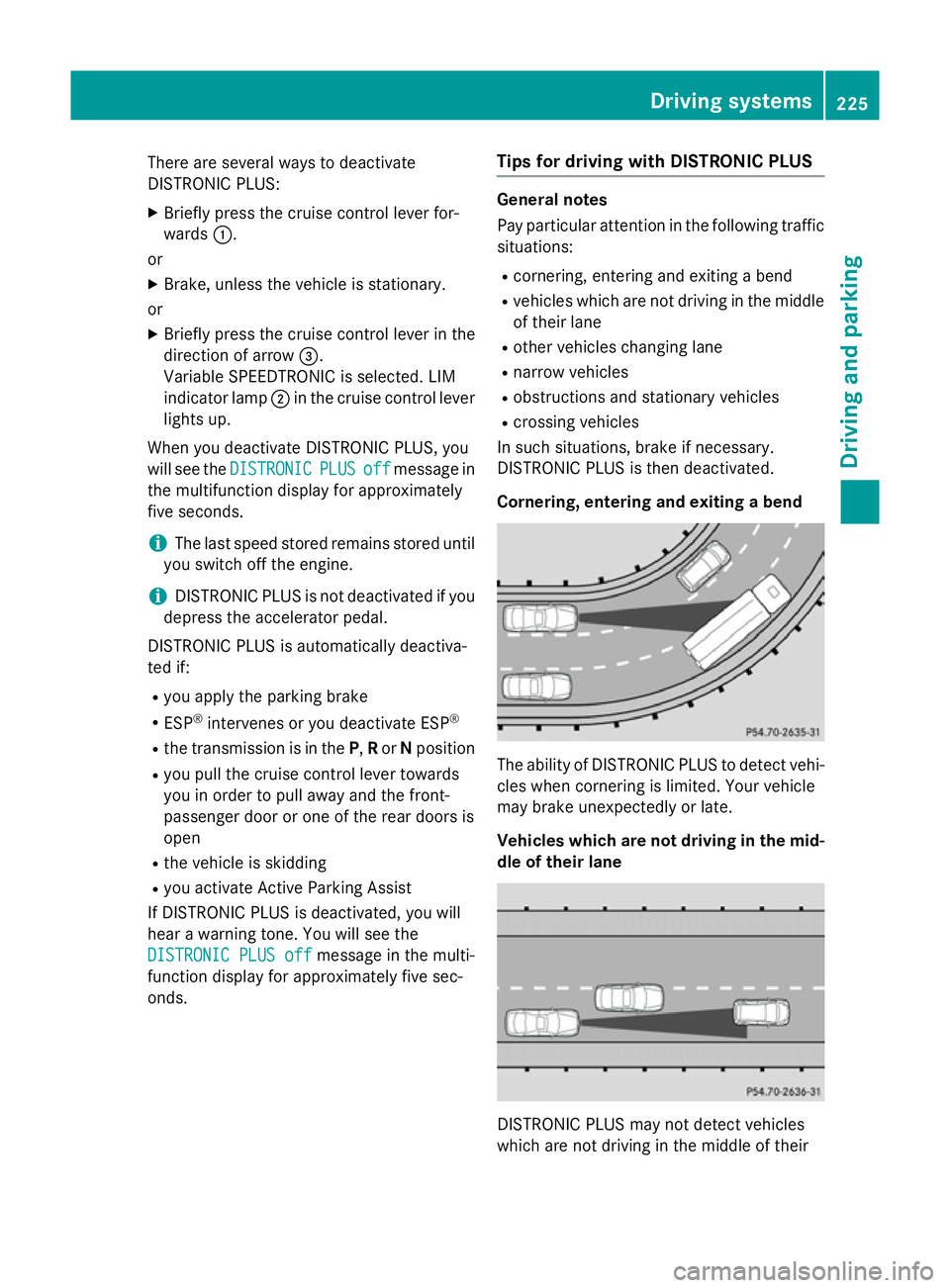
There are several ways to deactivate
DISTRONIC PLUS:
X Briefly press the cruise control lever for-
wards :.
or
X Brake, unless the vehicle is stationary.
or X Briefly press the cruise control lever in the
direction of arrow =.
Variable SPEEDTRONIC is selected. LIM
indicator lamp ;in the cruise control lever
lights up.
When you deactivate DISTRONIC PLUS, you
will see the DISTRONIC
DISTRONIC PLUS PLUSoff
offmessage in
the multifunction display for approximately
five seconds.
i The last speed stored remains stored until
you switch off the engine.
i DISTRONIC PLUS is not deactivated if you
depress the accelerator pedal.
DISTRONIC PLUS is automatically deactiva-
ted if: R you apply the parking brake
R ESP ®
intervenes or you deactivate ESP ®
R the transmission is in the P,Ror Nposition
R you pull the cruise control lever towards
you in order to pull away and the front-
passenger door or one of the rear doors is
open
R the vehicle is skidding
R you activat eActive Parking Assist
If DISTRONIC PLUS is deactivated, you will
hear awarning tone. You will see the
DISTRONIC PLUS off DISTRONIC PLUS off message in the multi-
function display for approximately five sec-
onds. Tips for driving with DISTRONIC PLUS General notes
Pay particular attention in the following traffic
situations:
R cornering, entering and exitin gabend
R vehicles which are not driving in the middle
of their lane
R other vehicles changin glane
R narrow vehicles
R obstructions and stationary vehicles
R crossin gvehicles
In such situations, brake if necessary.
DISTRONIC PLUS is then deactivated.
Cornering, entering and exiting abend The ability of DISTRONIC PLUS to detect vehi-
cles when cornering is limited. Your vehicle
may brake unexpectedly or late.
Vehicles which are not driving in the mid- dle of their lane DISTRONIC PLUS may not detect vehicles
which are not driving in the middle of their Driving systems
225Driving and parking Z
Page 229 of 497
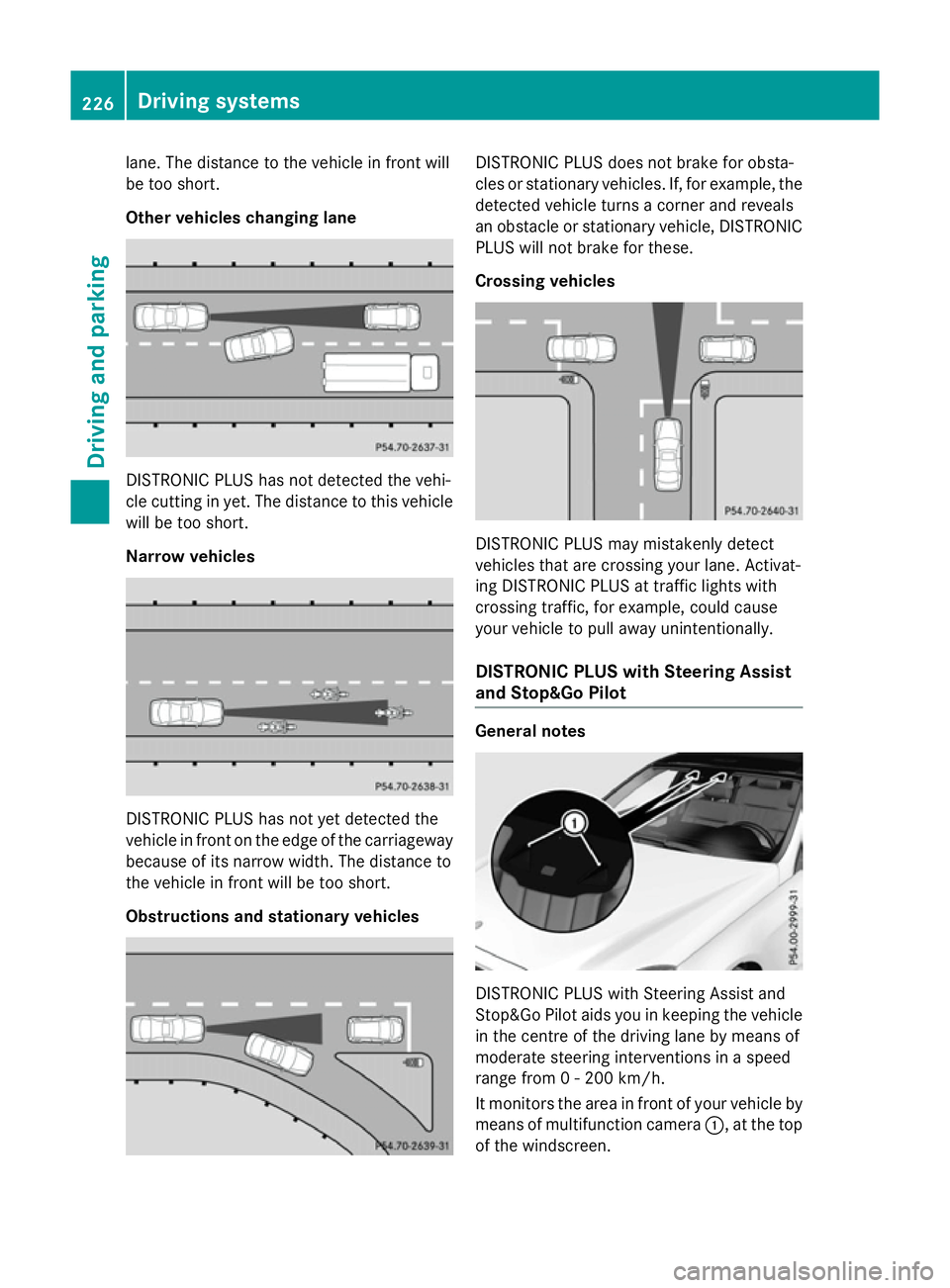
lane. The distanc
etothe vehicle in front will
be too short.
Other vehicles changing lane DISTRONIC PLUS has not detected the vehi-
cle cuttin ginyet. The distanc etothis vehicle
will be too short.
Narrow vehicles DISTRONIC PLUS has not yet detected the
vehicle in front on the edge of the carriageway
because of its narrow width .The distanc eto
the vehicle in front will be too short.
Obstructions and stationary vehicles DISTRONIC PLUS does not brak
efor obsta-
cles or stationary vehicles. If, for example, the
detected vehicle turns acorner and reveals
an obstacle or stationary vehicle, DISTRONIC PLUS will not brak efor these.
Crossin gvehicles DISTRONIC PLUS may mistakenly detect
vehicles that are crossin
gyour lane. Activat-
ing DISTRONIC PLUS at traffic light swith
crossin gtraffic ,for example, could cause
your vehicle to pull away unintentionally.
DISTRONIC PLUS with Steering Assist
and Stop&Go Pilot General notes
DISTRONIC PLUS with Steerin
gAssist and
Stop&Go Pilot aids you in keeping the vehicle in the centr eofthe drivin glane by mean sof
moderate steerin ginterventions in aspeed
rang efrom0-2 00 km/h.
It monitor sthe area in front of your vehicle by
mean sofm ultifunction camera :,atthe top
of the windscreen. 226
Driving systemsDriving and parking