2015 MERCEDES-BENZ E-CLASS SALOON key
[x] Cancel search: keyPage 210 of 497
X
Releas ethe brak epedal.
X Releas ethe parkin gbrake.
X Switc hoff th eignition and leav ethe keyin
th ei gnition lock.
The engin ecan be switched off while th evehi-
cle is in motion by pressing and holdin gthe
Start/Sto pbutto nfor about three seconds.
This function operate sind ependentl yofthe
ECO start/sto pautomatic engin eswitch-off
function. Parking brake
G
WARNING
If you mus tbrak ethe vehicl ewitht he parking
brake, th ebrakin gdistanc eisconsid erably
longer and th ewheels could lock. This increa-
ses th eriskofs kiddin gand an accident.
Only use th eparkin gbrak etob rakethe vehi-
cle when th eservic ebrak eisf aulty. Do not
apply th eparkin gbrak etoo firmly. If the
wheels lock, release th eparkin gbrak euntil
th ew heels begi nturning again. G
WARNING
If you leav echildren unattended in th evehi-
cle ,the ym ay be able to set th evehicl ein
motion if, for example, they:
R release th eparkin gbrake
R shift th eautomati ctransmission out of park
position Por shift manual transmission into
neutral
R start th eengine
In addition ,the ym ay operate vehicl eequip-
men tand become trapped .There is ariskof
an acciden tand injury.
Whe nleavin gthe vehicle, always tak ethe key
wit hyou and loc kthe vehicle. Never leave
children unattended in th evehicle. The brak
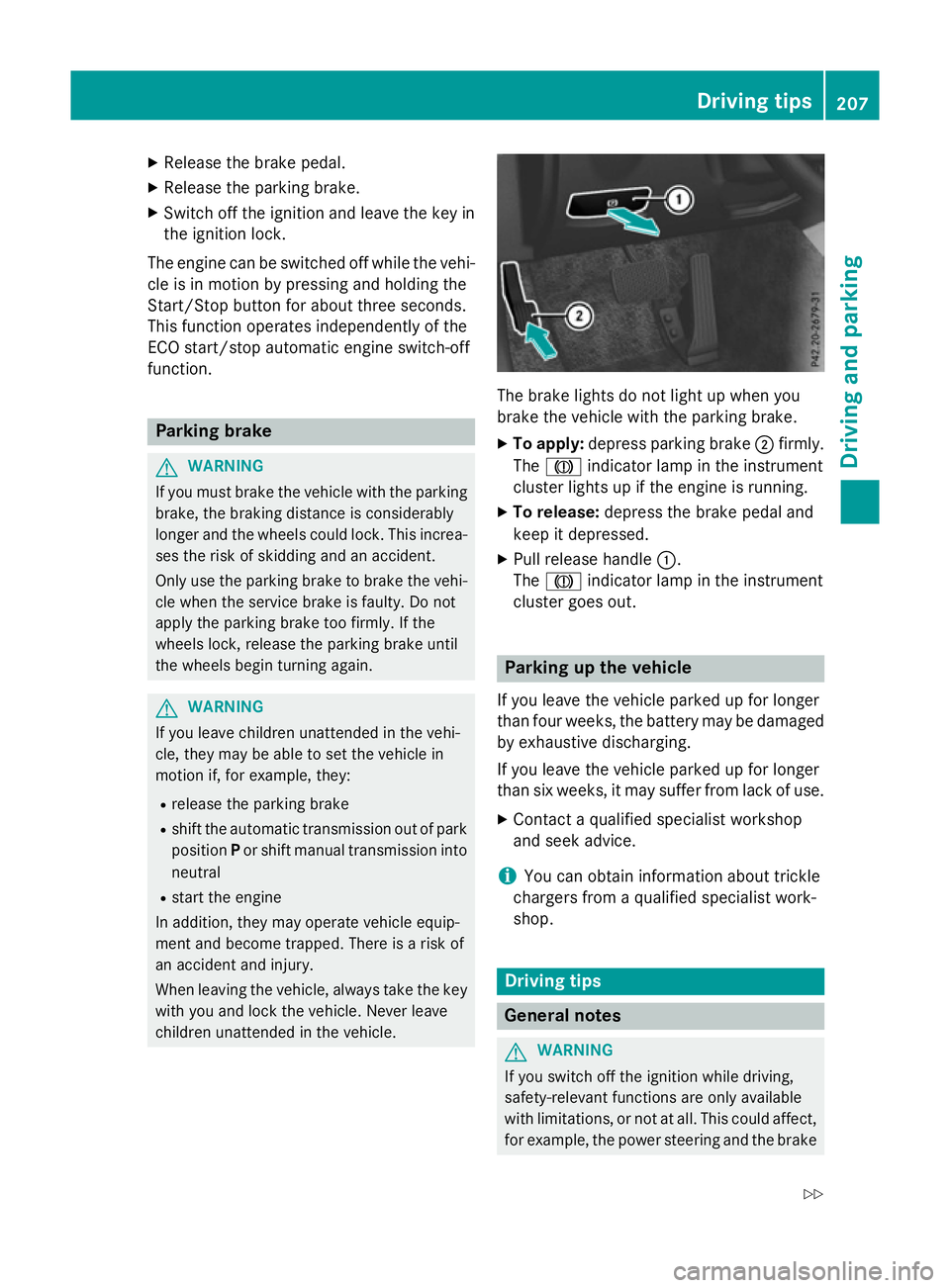
elights do no tligh tupw hen you
brak ethe vehicl ewitht he parkin gbrake.
X To apply: depress parkin gbrake ;firmly.
The J indicato rlamp in th einstrument
cluste rlights up if th eengineisr unning.
X To release: depress thebrak epedal and
keep it depressed.
X Pull release handle :.
The J indicato rlamp in th einstrument
cluste rgoeso ut. Parking up th
evehicle
If you leav ethe vehicl eparked up for longer
than fou rweeks, th ebattery may be damaged
by exhaustive discharging.
If you leav ethe vehicl eparked up for longer
than six weeks, it may suffer from lack of use.
X Contac taqualified specialist workshop
and see kadvice.
i You can obtain information about trickle
chargers from aqualified specialist work-
shop. Driving tips
Genera
lnotes G
WARNING
If you switch off th eignition while driving,
safety-relevant function sare only available
wit hlimitations, or no tatall. This could affect,
for example, th epowe rsteerin gand th ebrake Driving tips
207Driving and pa rking
Z
Page 235 of 497
Setting the vehicle level
Select the "Normal" settingf
or normal road
surfaces and "Raised" for driving with snow
chains or on particularly poor road surfaces.
Your selection remains stored even if you
remove the key from the ignition lock.
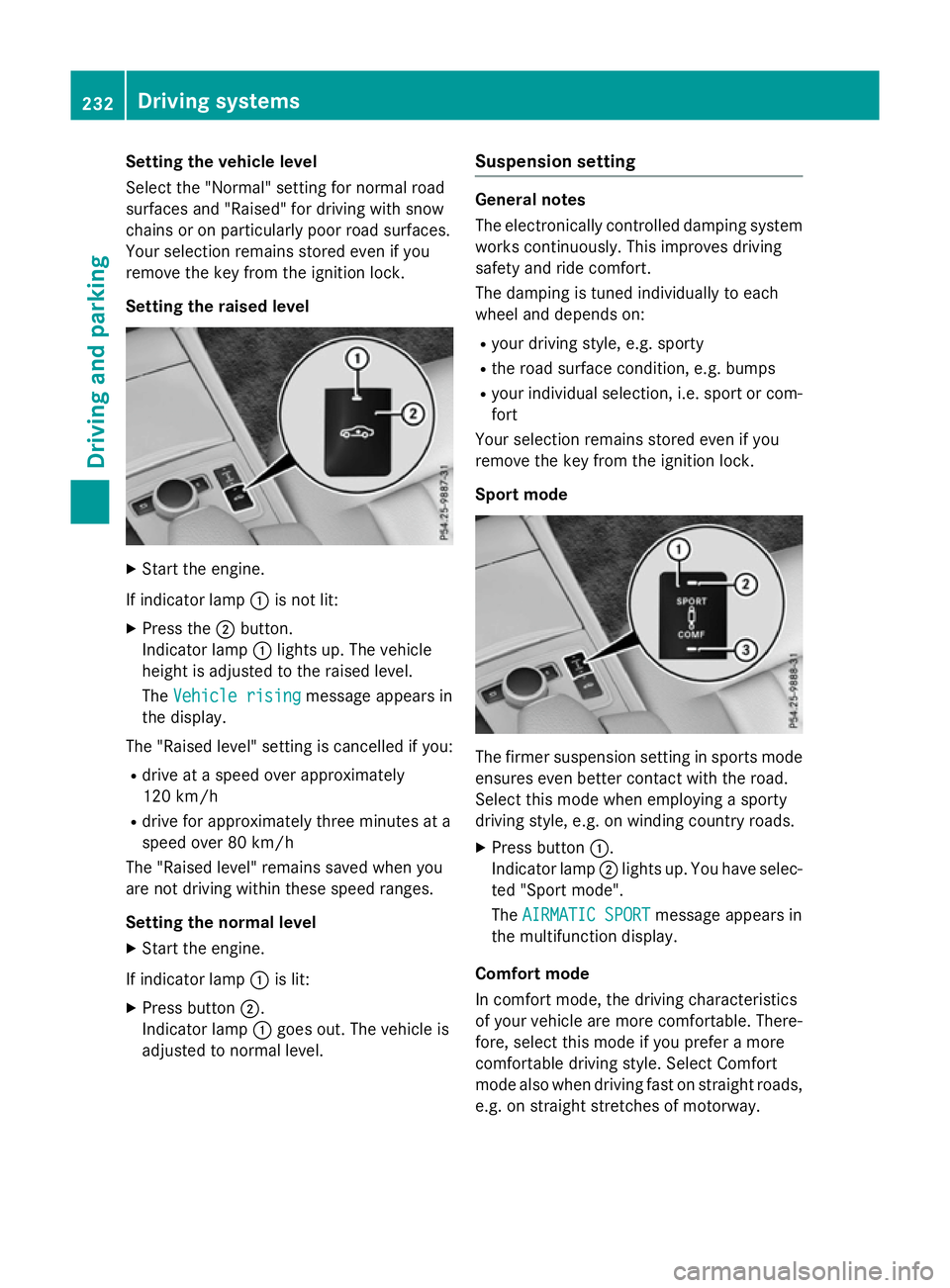
Setting the raised level X
Start the engine.
If indicator lamp :is not lit:
X Press the ;button.
Indicator lamp :lights up. The vehicle
height is adjusted to the raised level.
The Vehicle rising Vehicle rising message appears in
the display.
The "Raised level" settingisc ancelled if you:
R drive at aspeed over approximately
120 km/h
R drive for approximately three minutes at a
speed over 80 km/h
The "Raised level" remains saved when you
are not driving within these speed ranges.
Setting the normal level
X Start the engine.
If indicator lamp :is lit:
X Press button ;.
Indicator lamp :goes out. The vehicle is
adjusted to normal level. Suspension setting General notes
The electronically controlled damping system
works continuously.T his improves driving
safety and ride comfort.
The damping is tuned individually to each
wheel and depends on:
R your driving style, e.g. sporty
R the road surface condition ,e.g. bumps
R your individual selection, i.e. sport or com-
fort
Your selection remains stored even if you
remove the key from the ignition lock.
Sport mode The firmer suspension settingins
ports mode
ensures even better contact with the road.
Select this mode when employing asporty
driving style, e.g. on winding countryr oads.
X Press button :.
Indicator lamp ;lights up. You have selec-
ted "Sport mode".
The AIRMATIC SPORT AIRMATIC SPORT message appears in
the multifunction display.
Comfort mode
In comfort mode, the driving characteristics
of your vehicle are more comfortable. There-
fore, select this mode if you prefer amore
comfortable driving style. Select Comfort
mode also when driving fast on straight roads,
e.g. on straight stretches of motorway. 232
Driving systemsDriving and parking
Page 240 of 497

Warning displays
Warning display for the front area
: Segments on the left-hand side of the
vehicle
; Segments on the right-hand side of the
vehicle
= Segments showing operational readiness
The warning displays show the distance
between the sensors and the obstacle. The
warning displayf or the front area is located
on the dashboard above the centre airv ents.
The warning displayf or the rear area is loca-
ted on the roof lining in the rear compart-
ment.
The warning displayf or each side of the vehi-
cle is divided into five yellow and two red seg- ments. PARKTRONIC is operational if yellow
segments showing operational readiness =
light up.
The gea rleve rposition or the transmission
position of the automatic transmission and
the direction in which the vehicl eisrolling
determine which warning displayisa ctive
whe nthe engine is running.
Manual transmission: Gear lever posi-
tion Warning display
Forward gear
or
Neutral
Front area activated
Reverse gear
Rea
rand front areas
activated Automati
ctransmission: Transmission
position Warning display
D
Front area activated
R
or N Rea
rand front areas
activated P
No area
sactivated One or more segments light up as the vehicle
approache sanobstacle, depending on the
vehicle's distance from the obstacle.
From the:
R sixth segment onwards, you wil lhearan
intermittent warning tone for approx-
imately two seconds.
R seventh segment onwards, you wil lheara
warning tone for approximately two sec-
onds. This indicates that you have now
reache dthe minimu mdistance.
Deactivating/activating PARKTRONIC :
To deactivate/activate PARKTRONIC
; Indicator lamp
If indicator lamp ;lights up, PARKTRONIC is
deactivated. Active Parking Assist is then also
deactivated.
i PARKTRONIC is automatically activated
whe nyou turn the key to position 2in the
ignition lock. Driving systems
237Driving and parking Z
Page 248 of 497

Important safety notes
The reversing camera is only an aid. It is no
ta
substitut efor your attention to th eimmediate
surroundings. The responsibilit yfor safe
manoeuvrin gand parking remains wit hyou.
Mak esure that there are no persons, animals
or objects in range while manoeuvrin gand
parking.
Under th efollowin gcircumstances, the
reversing camera will no tfunction ,orwill
function in alimited manner:
R if th eboot lid or tailgat eisopen
R in heav yrain ,sno worf og
R at night or in ver ydark places
R if th ecamera is expose dtoveryb right light
R if th earea is lit by fluorescent bulbs or LED
lighting (the display may flicker)
R if there is asudde nchang eint emperature,
e.g. when driving int oaheated garag ein
winter
R if th ecamera len sisdirtyoro bstructed.
Observ ethe note sonc leaning
(Y page 390)
R if th erear of your vehicl eisdamaged. In this
case, have th ecamera position and setting
checke dataq ualified specialist workshop
The field of vision and other function softhe
reversing camera may be restricted due to
additional accessories on th erear of th evehi-
cle (e.g. licence plat eholder, bicycle rack).
On vehicles wit hheight-adjustable chassis,
leaving th estandard height can result in inac-
curacie sintheguide lines, depending on
technical conditions.
i The reversing camera is protected from
raindrops and dust by mean sofaflap.
When th ereversing camera is activated,
this flap opens.
The flap closes again when:
R you have finishe dthe manoeuvrin gproc-
ess
R you switch off th eengine
R you open th eboot Se
et he note sonc leaning (Y page 390).
Fo rtechn ical reasons, th eflap may remain
open briefly after th ereversing camera has
been deactivated.
Activating/deactivating th ereversing
camera X
To activate: makesure that th ekeyis in
position 2in th eignition lock.
X Mak esure that the ActivationbyR
Activatio nbyR
gear
gear function is selected in Audio 20 or
COMAND Online; see th eDigital Owner's
Manual.
X Engage revers egear.
The reversing camera flap opens. The area
behind th evehicl eiss hown wit hguide lines
in th eAudio 20 or COMAND Onlin edisplay.
The imag efromt hereversing camera is
available throughout th emanoeuvring
process.
X To switch th efun ction mod efor vehi-
cles with traile rtow hitch: usingthe con-
troller ,select symbol :for th e"Reverse
parking "function or symbol ;for "Cou-
plin gupat railer".
The symbol of th eselected function is high-
lighted.
To deactivate: ther eversing camera deacti-
vates if you shif tthe transmission to Por after
driving forwards ashort distance. Driving systems
245Driving and parking Z
Page 253 of 497
Distance
smeasured by PARKTRONI Cwill
also be opticall ydisplayed:
R as red or yellow brackets around the vehi-
cle symbo lintop view in split-screen mode
or
R at the bottom righ tasred or yellow brack-
ets around the vehicl esym bolinf ull-s creen
mode
Th elinet hicknes sand colou rofthe brackets
sho whow fart he vehicl eisfromano bject.
R yellow brackets with thi nlines:
PARKTRONI Cisactive
R yellow brackets with normal lines :an
object is present in close range of the vehi-
cle
R red line: an object is present in the imme-
diate close range of the vehicle
Important safety notes Th
e3 60° camera is onl yanaidand ma yshow
ad istorted view of obstacles, sho wthem
incorrectly or not at all. Th e360° camera is
not asubst itute for attentiv edriving.
Th er esponsibility for safe manoeuvring and
parking remains with you. Make sure that
there ar enopersons, animals or objects in
range whil emanoeuvring and parking.
Yo ua realways responsibl efor safety ,and
must always pa yattentio ntoyours urround-
ing sw henp arking and manoeuvring. This
applie stothe area sbehin d, in front of and
beside the vehicle. Yo ucould otherwise
endanger yourself and others.
Th e3 60° camera will not functio norwill
functio nonlyinal imited manner:
R if the doors ar eopen
R if the exterior mirrors ar efolde din
R if the boot lid/tailgate is open
R in heav yrain, sno worfog
R at night or in ver ydarkp laces
R if the camera sareexpose dtoveryb right
light
R if the area is li tbyfluorescent bulb sorLED
lighting (th edisplay mayflicker) R
if there is asudde nchange in temperature,
e.g .whend riving into aheatedg arag ein
winter
R if the camera lense saredirty or covered
R if the vehicl ecomponents in which the
camera sarefitte daredamaged. In this
event, have the camera positio nand setting
checked at aquali fied specialis tworkshop.
Do not us ethe 360° under such circumstan-
ces .You could otherwis einjure others or
damage objects when parking the vehicle.
Guid elines ar ealway sshown at roa dlevel.In
trailer mode, the guid elines ar eshown at the
level of the trailer coupling.
On vehicles with height-adjustabl echassis,
depending on technica lconditions ,leavi ng
the standard height can resul tin:
R inaccuracie sinthe guid elines
R inaccuracie sinthe displa yofgenerated
images (to pview)
Activatio nconditions Th
e3 60° camera imag ecan be displaye dif:
R your vehicl eisequippe dwitha3 60° cam-
era
R the key is in position 2in the ignition lock
R COMAND Online/Audi o20isswitched on
R the 360°camera
360 °camera functio niss witched on
Activatin gthe 360° camera X
Press the Øbutton in the centr econ-
sol efor longe rtha nt wo seconds.
Th ef ollowing appear sdepen ding on
whether transmission position Dor Ris
selected:
R as plit- screen with top view and the
imag efromt he front camera or
R as plit- screen with top view and the
imag efromt he reversing camera
or 250
Driving systemsDriving an
dparking
Page 254 of 497
X
Press the Øbutton in the centre con-
sole.
The vehicle menu appears.
X Select 360° camera
360° camera and press7to con-
firm.
The following appears depending on
whether transmission position Dor Ris
selected:
R as plit-screen with top view and the
image from the frontc amera or
R as plit-screen with top view and the
image from the reversin gcamera
Activating the 360° camera using
reverse gear You can show images from the 360° camera
automatically by engaging reverse gear.
X Make sure that the key is in position 2in the
ignition lock.
X Make sure that the ActivationbyR
Activatio nbyR
gear
gear function is selected in COMAND
Online/Audio 20 (see the separate
COMAND Online/Audio 20 operating
instructions).
X To show the 360° camera image: engage
reverse gear.
The area behind the vehicle is shown in the
COMAND/Audio 20 display in split-screen
mode. You see the top view of the vehicle
and the image from the reversin gcamera.
Selecting the split-screen and full
screen displays Switching between split screen views
X To switch to the line with the vehicle icons:
slide 5the controller.
X To select one of the vehicle icons: turn
3 the controller.
X To switch to 180° view
180° view: turn3 the
controller to select 180° view 180° viewand press
7 to confirm.
i The
180° view
180° view option is only availabl ein
the following views: R
Top view with image from the reversing
camera
R Top view with image from the frontc am-
era
Displays in the COMAND/Audio 20 dis-
play Important safety notes
The camera system may show
adistorted
view of obstacles or show them incorrectly or
not at all. Obstacles are not shown by the
system in the following locations:
R under the fronta nd rear bumpers
R very close to the fronta nd rear bumpers
R in the area immediately above the tailgate
handle/boot lid handle
R very close to the exterior mirrors
R in the transitional areas between the vari-
ous cameras in the virtual top view
! Objects not at ground level may appear to
be further away than they actually are, e.g.:
R the bumper of aparked vehicle
R the drawbar of atrailer
R the ball coupling of atrailer tow hitch
R the rear section of an HGV
R as lanted post
Use the guidelines only for orientation.
Approach object snofurther than the bot-
tom-most guideline. Driving systems
251Driving and parking Z
Page 262 of 497

spot monitoring range from behind or from
the side. When you overtake avehicle, the
warning only occurs if the difference in speed
is less than 12 km/h.
The yellow indicator lamp goes out if reverse gear is engaged. Blind Spot Assist is then
deactivated.
The brightness of the indicator or warning
lamps is adjusted automaticallya ccording to
the ambient light.
Collision warning
If av ehicle is detected in the monitoring range
of Blind Spot Assist and you switch on the
corresponding turn signal, adoublew arning
tone sounds. Red warning lamp :flashes. If
the turn signal remains on, detected vehicles
are indicated by the flashing of red warning
lamp :.There are no further warning tones.
Activating Blind Spot Assist X Make sure that Blind Spot Assist is activa-
ted in the on-board computer
(Y page 288).
X Turn the key to position 2in the ignition
lock.
Warning lamps :in the exterior mirrors
light up red for approximately 1.5 seconds
and then turn yellow.
Towing atrailer
If you couple up atrailer, make sure that you
have correctly established the electrical con- nection. This can be accomplished by check-
ing the trailer lighting. Blind Spot Assist is
then deactivated. The indicator lamps in the
exterior mirrors light up yellow and the
Blind
Blind Spot SpotAssist
Assist not
notavailable
available when
when
towing atrailer See Owner's Manual
towing atrailer See Owner's Manual
message appears in the multifunction dis-
play.
i You can deactivate the indicator lamps in
the exterior mirrors. To do so, you will need to deactivate Blind
Spot Assist if:
R the key is in position 2in the ignition lock
R the engine is not running
R the electrical connection to the trailer
has been established
Lane Keeping Assist General notes
Lane Keeping Assist monitors the area in
front of your vehicle by means of camera
:
at the top of the windscreen. Lane Keeping
Assist detects lane markings on the road and
can warn you before you leave your lane unin-
tentionally.
This function is available within aspeed range
between 60 km/h and 200 km/h.
Aw arning may be given if afront wheel
passes over alane marking. It will warn you by
means of intermittent vibration through the
steering wheel for up to 1.5 seconds.
Important safety notes G
WARNING
Lane Keeping Assist cannot always clearly
identify lane markings.
In these cases, Lane Keeping Assist may:
R give an unnecessary warning
R not give awarning
There is arisk of an accident.
Always pay particular attention to the traffic
situation and keep in lane, especiallyifL ane
Keeping Assist alerts you. Driving systems
259Driving and parking Z
Page 266 of 497
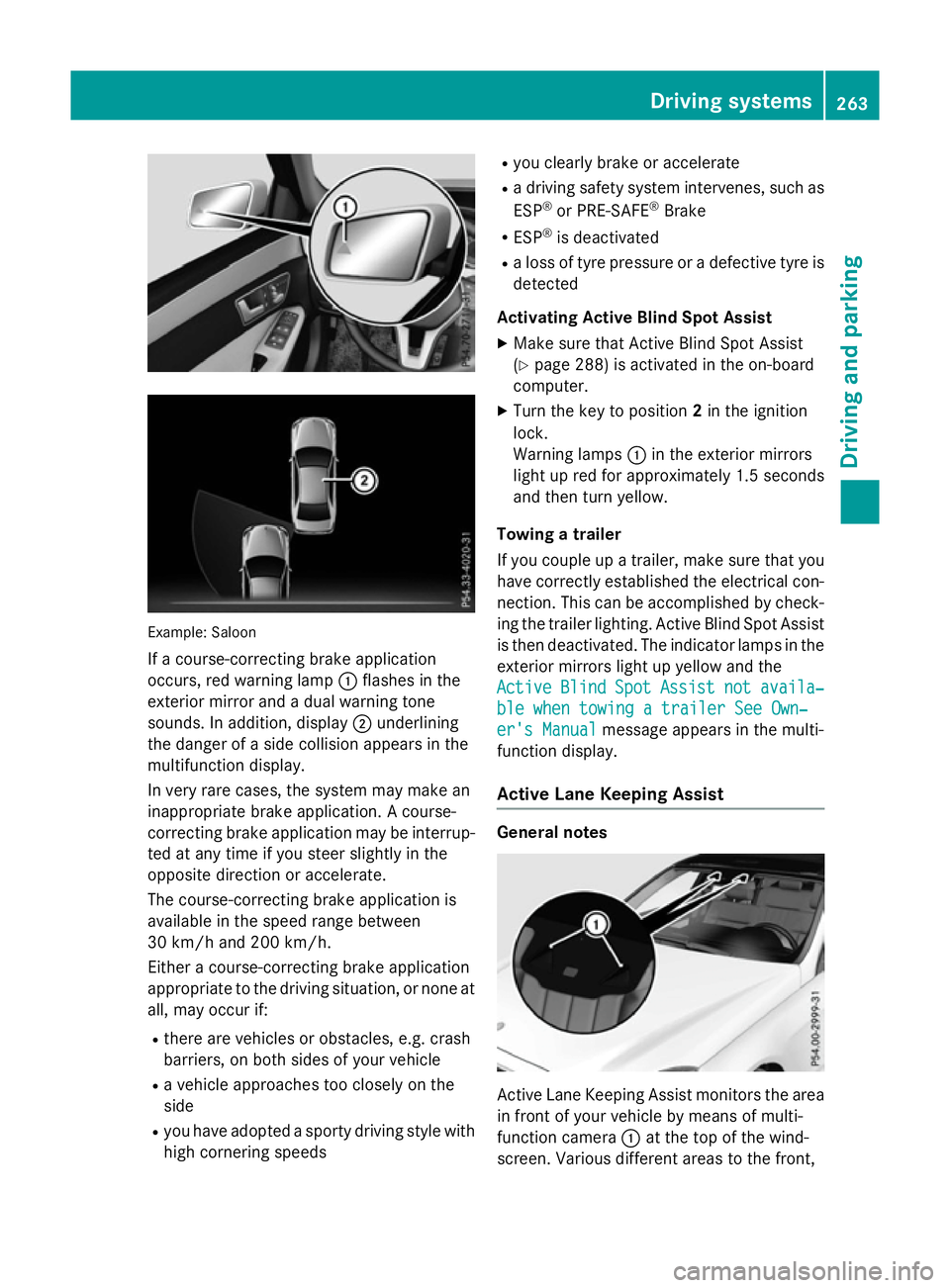
Example: Saloon
If ac ourse-correcting brake application
occurs, red warning lamp :flashe sinthe
exterio rmirror and adualw arning tone
sounds. In addition, display ;underlining
the dange rofasidec ollision appear sinthe
multifunctio ndisplay.
In ver yrarec ases, the system ma ymakean
inappropriate brake application. Acourse-
correcting brake applicatio nmaybe interrup-
ted at any time if yo ustee rsligh tlyint he
opposite direction or accelerate.
The course-correcting brake applicatio nis
availabl einthe speed range between
30 km/h and 200 km/h.
Either acourse-correcting brake application
appropriate to the driving situation, or none at all, ma yoccu rif:
R ther earevehicles or obstacles, e.g .crash
barriers ,onboths ides of your vehicle
R av ehicl eapproaches too closel yonthe
side
R yo uh avea dopt edasporty driving style with
high cornering speeds R
yo uc learly brake or accelerate
R ad riving safety system intervenes, such as
ESP ®
or PRE-SAFE ®
Brake
R ESP ®
is deactivated
R al os soft yrep ressure or adefective tyr eis
detected
Activatin gActiveB lind Spo tAssist
X Make sure tha tActive Blind Spo tAssist
(Y page 288 )isactivated in the on-board
computer.
X Turn the key to position 2in the ignition
lock.
Warning lamps :in the exterio rmirrors
light up red for approximatel y1.5 seconds
and then tur nyellow.
Towin gatrailer
If yo ucoupl eupa trailer, make sure tha tyou
have correctl yestablished the electrical con-
nection. Thi scan be accomplished by check-
ing the traile rlig hting. Active Blind Spo tAssist
is then deactivated .The indicator lamps in the
exterio rmirrors light up yellow and the
Active
Active Blind BlindSpot
SpotAssist
Assist not
notavaila‐
availa‐
ble whe ntowing atraile rSee Own‐
ble whe ntowing atraile rSee Own‐
er' sManual
er' sManual message appear sinthe multi-
functio ndisplay.
Activ eLaneK eeping Assist General notes
Active Lane Keeping Assist monitors the area
in front of your vehicl ebymeans of multi-
functio ncamera :at the top of the wind-
screen. Various different area stothe front, Driving systems
263Driving andparking Z