2015 MERCEDES-BENZ E-CLASS SALOON ignition
[x] Cancel search: ignitionPage 275 of 497
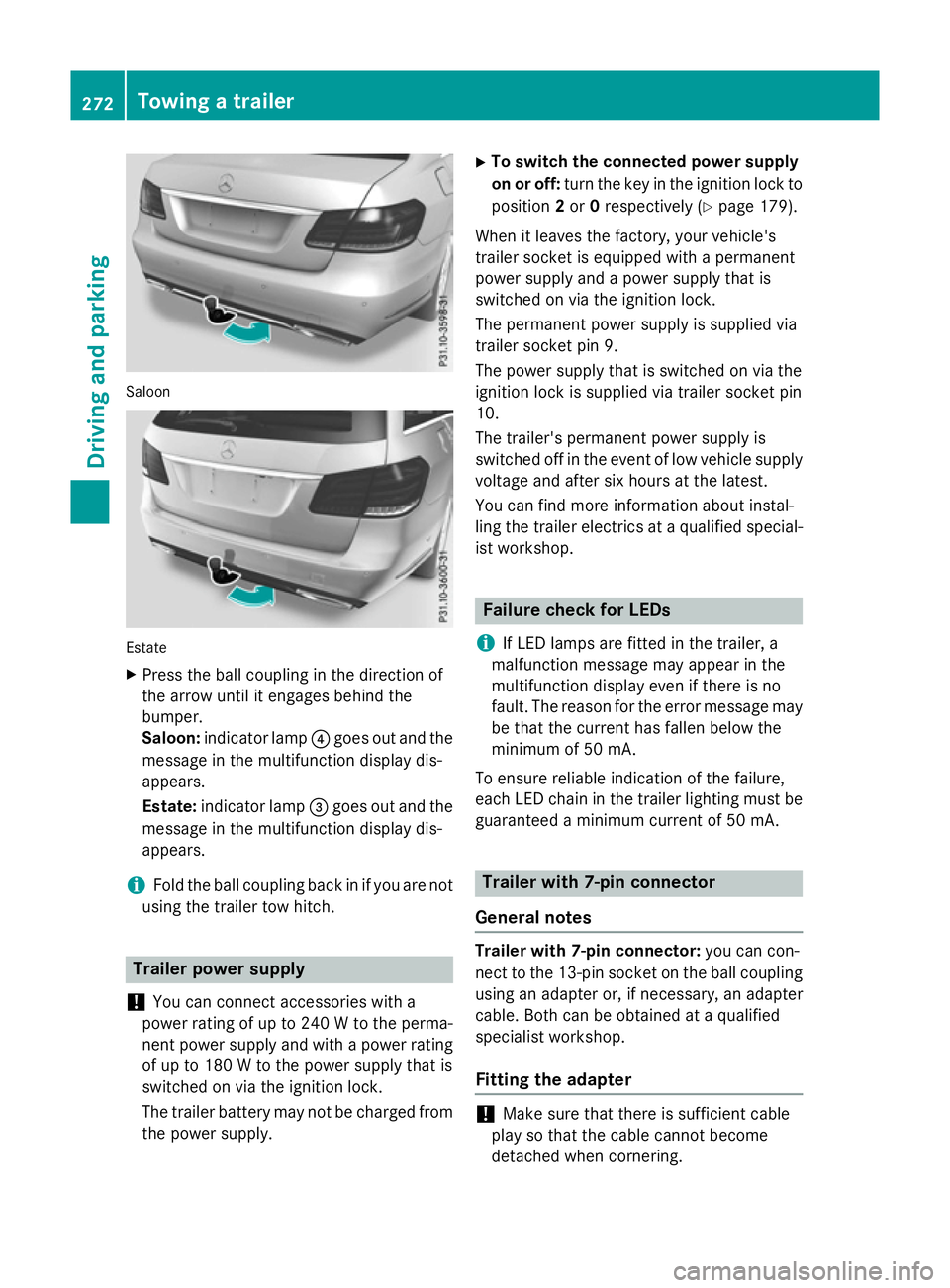
Saloon
Estate
X Press the ball coupling in the direction of
the arrow unti litengages behind the
bumper.
Saloon: indicator lamp ?goe soutand the
messag einthe multifunction display dis-
appears.
Estate: indicator lamp =goe soutand the
messag einthe multifunction display dis-
appears.
i Fol
dthe ball coupling back in if yo uare not
using the traile rtow hitch. Traile
rpower supply
! You can connect accessorie
switha
power rating of up to 240 Wtothe perma-
nent power suppl yand with apower rating
of up to 180 Wtothe power suppl ythat is
switched on via the ignition lock.
The traile rbattery may not be charge dfrom
the power supply. X
To switc hthe connecte dpower supply
on or off: turn the key in the ignition lock to
position 2or 0respectivel y(Ypage 179).
Whe nitleavest he factory, your vehicle's
traile rsocke tise quipped with apermanent
power suppl yand apower suppl ythat is
switched on via the ignition lock.
The permanent power suppl yissupplie dvia
traile rsocke tpin9.
The power suppl ythat is switched on via the
ignition lock is supplie dvia traile rsocke tpin
10.
The trailer's permanent power suppl yis
switched off in the event of low vehicle supply
voltage and afte rsix hours at the latest.
You can find more information abou tinstal-
ling the traile relectrics at aquali fied special-
ist workshop. Failure check for LEDs
i If LED lamps are fitted in the trailer, a
malfunction messag emay appea rinthe
multifunction display eve nifthere is no
fault. The reason for the erro rmessag emay
be that the current ha sfalle nbelow the
minimum of 50 mA.
To ensure reliabl eindication of the failure,
each LED chain in the traile rlighting mus tbe
guaranteed aminimum current of 50 mA. Traile
rwith7 -pinc onnector
General notes Traile
rwith7 -pinc onnector: youc an con-
nect to the 13-pi nsocke tont he ball coupling
using an adapter or, if necessary, an adapter
cable .Both can be obtained at aquali fied
specialist workshop.
Fitting the adapter !
Make sure that there is sufficient cable
play so that the cable cannot become
detached when cornering. 272
Towin
gatrailerDrivin gand parking
Page 280 of 497
Outsid
etemperature display
You should pay special attention to road con-
ditions when temperatures are around the
freezing point.
Bear in mind that the outside temperature
display indicates the temperature measured
and does not recor dthe road temperature.
The outside temperature display is in the mul- tifunction display (Y page 279).
Changes in the outside temperature are dis-
played after ashort delay. Speedometer with segments
The segments in the speedometer indicate
which speed range is available.
R Cruise control activated (Y page 212):
The segments light up from the stored
speed to the maximum speed.
R Variable SPEEDTRONIC activated
(Y page 215):
The segments light up from the start of the
scale to the selected limit speed.
R DISTRONIC PLUS activated (Y page 217):
One or two segments in the set speed
range light up.
R DISTRONIC PLUS detects avehicle in front:
The segments between the speed of the
vehicle in fron tand the stored speed light
up. Operating the on-board computer
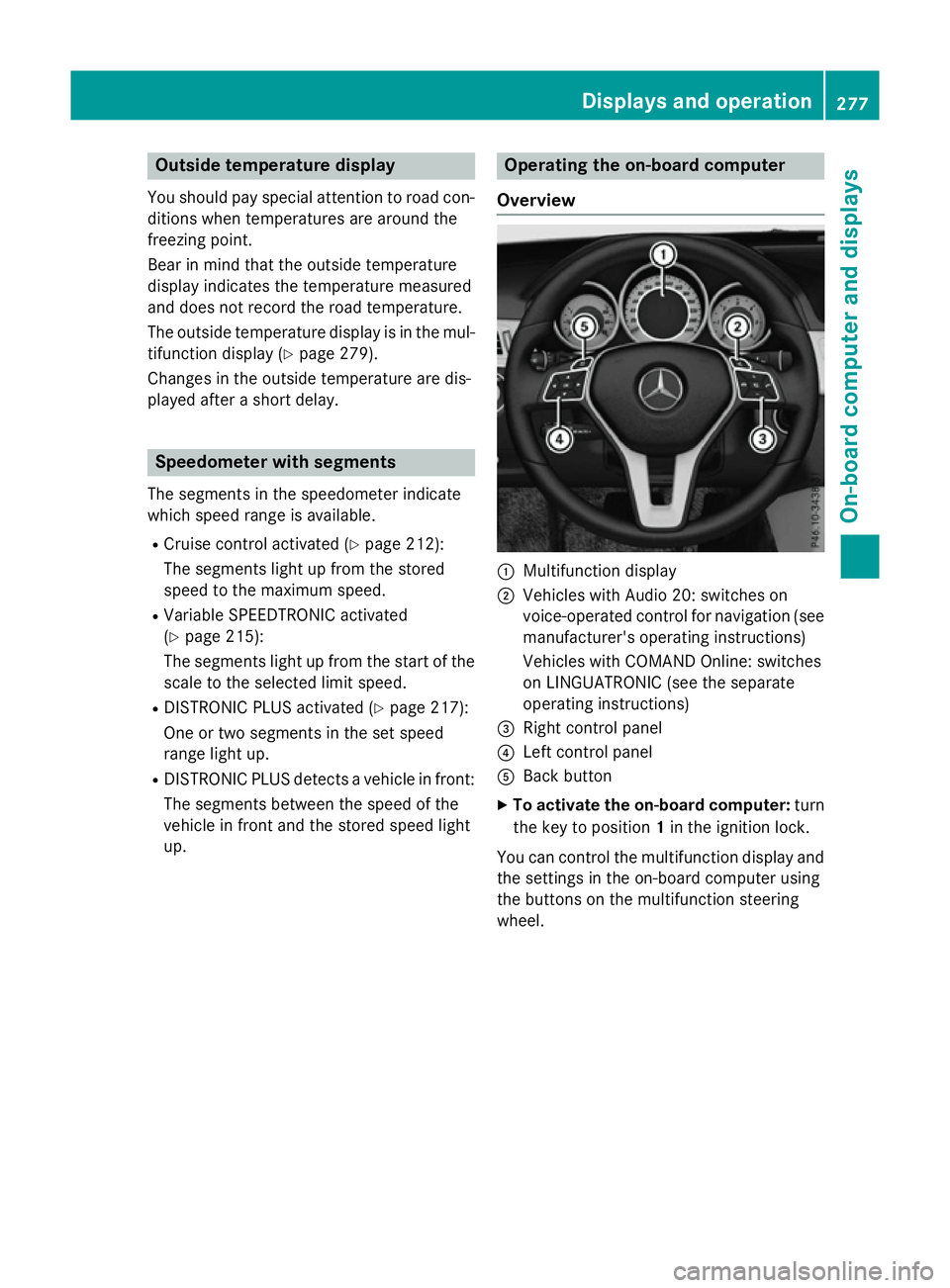
Overview :
Multifunction display
; Vehicles with Audio 20: switches on
voice-operated control for navigation (see
manufacturer's operatin ginstructions)
Vehicles with COMAND Online: switches
on LINGUATRONIC (see the separate
operatin ginstructions)
= Right control panel
? Left control panel
A Back button
X To activate the on-board computer: turn
the key to position 1in the ignition lock.
You can control the multifunction display and
the settings in the on-board computer using
the button sonthe multifunction steering
wheel. Displays and operation
277On-boardcomputer and displays Z
Page 283 of 497
Depending on the equipment fitte
dinthe
vehicle, yo ucan cal lupthe following menus:
R Trip
Trip menu (Y page 280)
R Navi
Navi menu (navigatio ninstructions)
(Y page 281)
R Audio
Audio menu (Y page 283)
R Tel
Tel menu (telephone )(Ypage 284)
R Assist.
Assist. menu (assistance) (Y page 286)
R Serv.
Serv. menu (Y page 288)
R Settings
Settings menu (settings )(Y page 289)
R AMG
AMG menu in AMG vehicles (Y page 296)
The Audio
Audio, Navi
NaviandTel
Tel menu sdiffe rs ligh tly
in vehicles with Audio 20 and in vehicles with
COMAND Online .The examples given in this
Owner' sManualapply to vehicles equipped
with COMAND Online. Trip menu
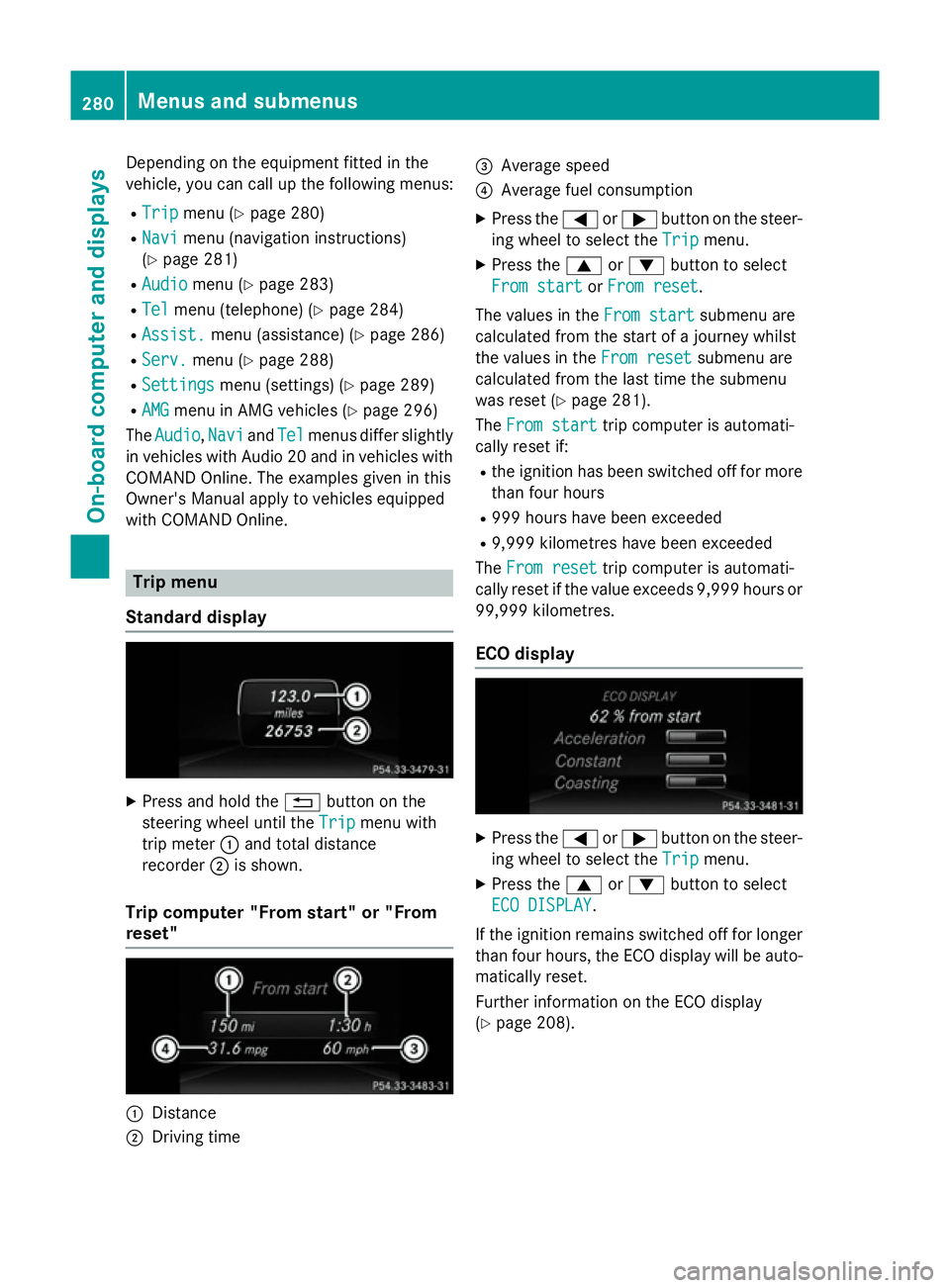
Standard display X
Press and hold the %button on the
steering whee lunti lthe Trip Trip menu with
tri pm eter :and tota ldistance
recorder ;is shown.
Trip compute r"From start" or "From
reset" :
Distance
; Driving time =
Averag espeed
? Averag efuelconsumption
X Press the =or; button on the steer-
ing whee ltoselect theTrip Trip menu.
X Press the 9or: button to select
Fro mstart
Fro mstart orFro mreset
Fro mreset.
Th ev alues in the Fromstart
Fro mstart submenu are
calculate dfromt he start of ajourney whilst
the values in the Fromreset
Fro mreset submenu are
calculate dfromt he last tim ethe submenu
wa sreset (Y page 281).
The Fromstart
Fro mstart tripc ompute risautomati-
cally reset if:
R the ignition ha sbeens witched off for more
tha nfourh ours
R 999 hour shaveb eene xceeded
R 9,999 kilometres have been exceeded
The Fromreset
Fro mreset tripc ompute risautomati-
cally reset if the valu eexceed s9,999 hour sor
99,999 kilometres.
EC Od isplay X
Press the =or; button on the steer-
ing whee ltoselect theTrip Trip menu.
X Press the 9or: button to select
ECO DISPLAY
ECO DISPLAY.
If the ignition remains switched off for longer
tha nfourh ours, the ECO displa ywillbea uto-
maticall yreset.
Furthe rinformation on the ECO display
(Y page 208). 280
Menus and submenusOn-board computer and displays
Page 295 of 497
X
Press the :or9 button to set the
colour to SOLAR SOLAR,NEUTRAL NEUTRAL orPOLAR
POLAR.
X Press the aor% button to save the
setting.
Activating/deactivating the surround
lighting and exterior lighting delayed
switch-off
X Press the =or; button on the steer-
ing wheel to select the Settings
Settings menu.
X Press the :or9 button to select the
Light Light submenu.
X Press ato confirm.
X Press the :or9 button to select the
Surround lighting
Surround lighting function.
If the Surround
Surround lighting
lightingfunction is acti-
vated, the light cone and the area around
the vehicle are displayed in orange in the
multifunction display.
X Press the abutton to save the setting.
Deactivating delayed switch-off of the exte-
rior lighting temporarily:
X Before leaving the vehicle, turn the key to
position 0in the ignition lock.
X Turn the key to position 2in the ignition
lock.
The exterior lighting delayed switch-off is
deactivated.
Delayed switch-off of the exterior lighting is
reactivated the next time you start the
engine.
If you have activated the Surround light‐
Surround light‐
ing
ing function and the light switch is set to
Ã,t he following functions are activated
when it is dark:
R surround lighting: the exterior lighting
remains lit for 40 seconds after unlocking
with the key. If you start the engine, the
surround lighting is switched off and auto-
matic headlamp mode is activated
(Y page 143).
R exterior lighting delayed switch-off: the
exterior lighting remains lit for 60 seconds
after the engine is switched off. If you close all the doors and the boot lid/tailgate, the
exterior lighting goes off after 15 seconds.
i Dependin
gonyour vehicle's equipment,
when the surround lighting and delayed
switch-off exterior lighting are on, the fol-
lowing light up:
R Side lamps
R Surround lighting in the exterior mirrors
Activating/deactivating the interior light-
ing delayed switch-off
If you activat ethe Light. delay Switch Light. delay Switch
off
off function, the interior lighting remains on
for 20 seconds after you remove the key from the ignition lock.
X Press the =or; button on the steer-
ing wheel to select the Settings
Settings menu.
X Press the :or9 button to select the
Light
Light submenu.
X Press ato confirm.
X Press the :or9 button to select the
Light. delay
Light. delay function.
If the Light. delay
Light. delay function has been
switched on, the vehicle interior is dis-
played in orange in the multifunction dis-
play.
X Press the abutton to save the setting.
Vehicle Setting permanent SPEEDTRONIC
X Press the =or; button on the steer-
ing wheel to select the Settings Settingsmenu.
X Press the :or9 button to select the
Vehicle
Vehicle submenu.
X Press ato confirm.
X Press :or9 to select the Limit
Limit
speed (winter tyres):
speed (winter tyres): function.
You will see the curren tsetting.
X Press ato confirm.
X Press the :or9 button to adjust
permanen tSPEEDTRONIC in increment sof
ten (240 km/h 240 km/h to160 km/h
160 km/h). The Off
Offset- 292
Menus and submenusOn-board computer and displays
Page 298 of 497
Further information on the EASY-ENTRY/EXIT
feature (Y page 135).
Switchin gbelta djustmen ton/off
X Pres sthe = or; button on the steer-
ing wheel to select the Settings
Settingsmenu.
X Pres sthe : or9 button to select the
Convenience
Convenience submenu.
X Press ato confirm.
X Pres sthe : or9 button to select the
Belt adjustment
Belt adjustment function.
If the Belt adjustment
Belt adjustment function is activa-
ted, the vehicle sea tbeltiss hown in orange
in the multifunction display.
X Pres sthe a button to sav ethe setting.
For further information on bel tadjustment,
see (Y page 49).
Switchin gthe fold-in mirrors whe nlock-
ing functio non/off
Thi sfunction is only available whe nthe vehi-
cle is equipped with the electrica lfold-in func-
tion.
Whe nyou switch on the Auto.fold in
Auto .fold in
function, the exterior mirrors are folded in
whe nthe vehicle is locked. If yo uunlock the
vehicle and then ope nthe driver' sorfront-
passenger door, the exterior mirrors fol dout
again.
X Pres sthe = or; button on the steer-
ing wheel to select the Settings Settingsmenu.
X Pres sthe : or9 button to select the
Convenience
Convenience submenu.
X Press ato confirm.
X Pres sthe : or9 button to select the
Auto .fold in
Auto .fold in function.
If the Auto.
Auto. fold
foldin
infunction is switched
on, the multifunction display shows the
vehicle' sexterior mirror in orange.
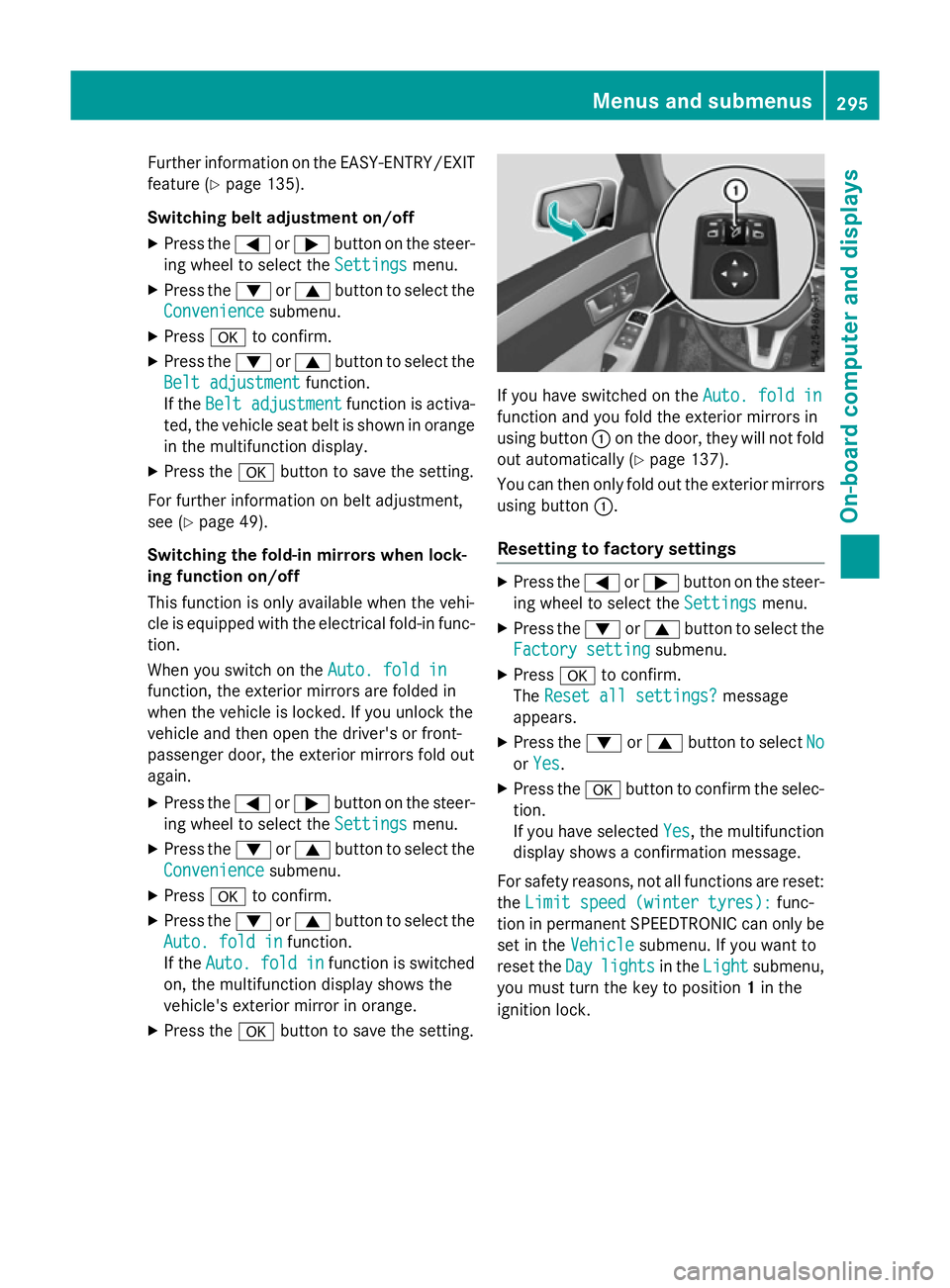
X Pres sthe a button to sav ethe setting. If yo
uhaves witched on the Auto.fold in
Auto .fold in
function and yo ufoldt he exterior mirrors in
using button :on the door, they will not fold
ou ta utomaticall y(Ypage 137).
You can then only fol doutthe exterior mirrors
using button :.
Resettin gtofactory settings X
Pres sthe = or; button on the steer-
ing wheel to select the Settings Settingsmenu.
X Pres sthe : or9 button to select the
Factory setting
Factory setting submenu.
X Press ato confirm.
The Rese tall settings?
Rese tall settings? message
appears.
X Pres sthe : or9 button to select No
No
or Yes
Yes.
X Pres sthe a button to confir mthe selec-
tion.
If yo uhaves elected Yes Yes,the multifunction
display shows aconfirmation message.
For safety reasons, not al lfunctions are reset:
the Limi tspee d(winter tyres):
Limi tspee d(winter tyres): func-
tion in permanent SPEEDTRONIC can only be
set in the Vehicle
Vehiclesubmenu. If yo uwantto
rese tthe Day
Day lights
lights in theLight
Light submenu,
yo um ustturn the key to position 1in the
ignition lock. Menus and submenus
295On-board computer and displays Z
Page 300 of 497
You can star
tthe RACETIME Rwhen the
engin eisrunning or if the key is in position 2
in the ignition lock.
X Press the =or; button on the steer-
ing wheel to selec tthe AMG
AMG menu.
X Press the 9button repeatedly until the
RACETIME Risshown.
X To start: press the abutton to star tthe
RACETIMER.
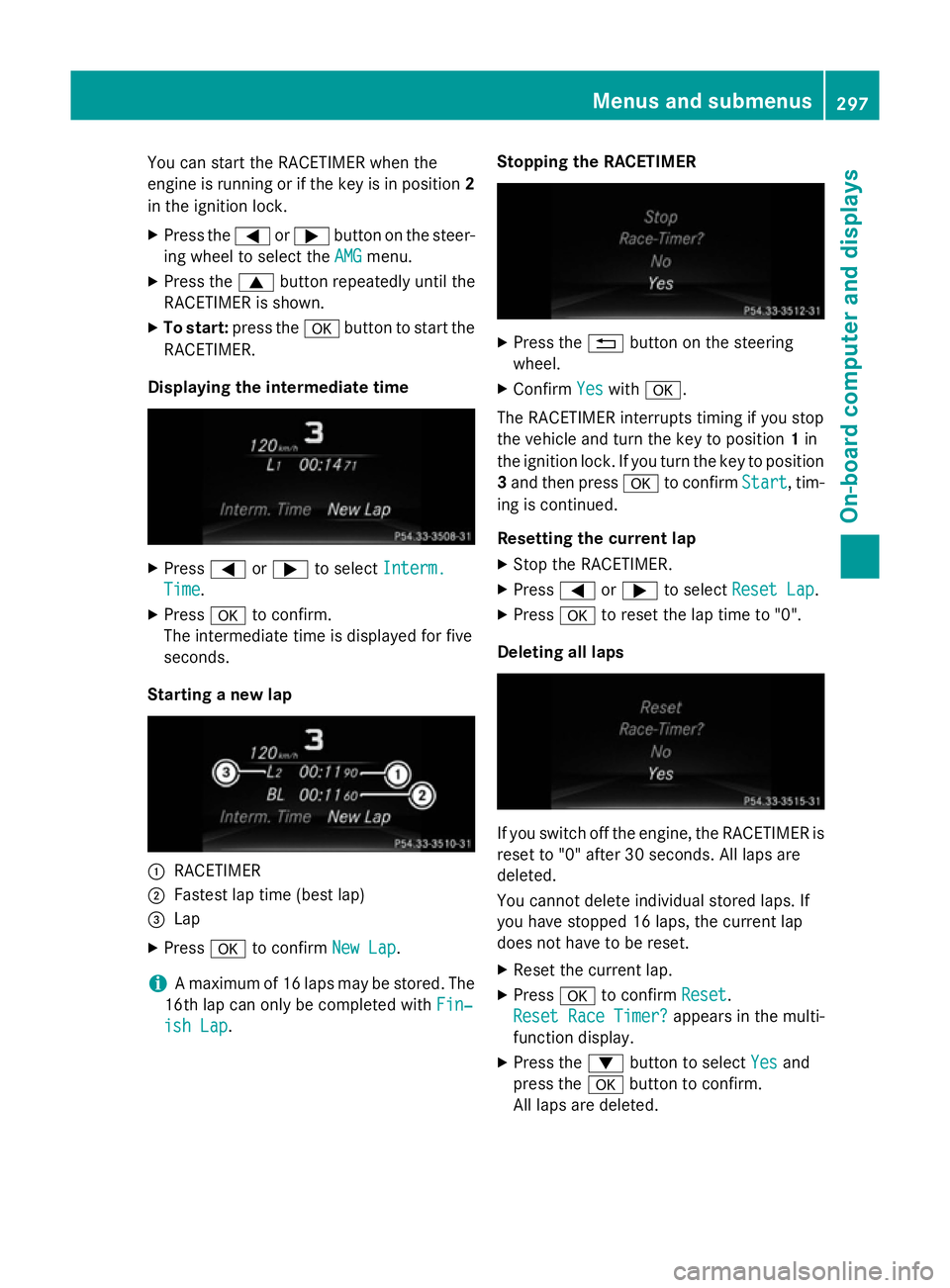
Displaying th eintermediat etime X
Press =or; to select Interm.
Interm.
Time
Time .
X Press ato confirm.
The intermediate tim eisdisplayed for five
seconds.
Starting anew lap :
RACETIMER
; Fastest lap tim e(best lap)
= Lap
X Press ato confirm New Lap
New Lap.
i Am
aximum of 16 laps may be stored. The
16t hlap can only be complete dwithFin‐
Fin‐
ish Lap
ish Lap. Stopping th
eRACETIMER X
Press the %button on the steering
wheel.
X Confirm Yes
Yeswith a.
The RACETIME Rinterrupt stiming if you stop
the vehicle and turn the key to position 1in
the ignition lock .Ifyou turn the key to position
3 and the npress a to confirm Start
Start,tim-
ing is continued.
Resetting th ecurrent lap
X Stop the RACETIMER.
X Press =or; to select ResetLap
Rese tLap.
X Press ato reset the lap tim eto"0".
Deleting all laps If you switc
hoff the engine, the RACETIME Ris
reset to "0" after 30 seconds .All laps are
deleted.
You cannot delet eindividual stored laps. If
you have stopped 16 laps, the current lap
does not have to be reset.
X Reset the current lap.
X Press ato confirm Reset
Reset.
Rese tRace Timer?
Rese tRace Timer? appears in the multi-
function display.
X Press the :button to select Yes Yesand
press the abutton to confirm.
All laps are deleted. Menus and submenus
297On-board computer and displays Z
Page 302 of 497
Display messages
Introduction
General notes Display message
sappear in th emultifunction display.
Display message swithg raphi csymbols are simplified in th eOwner' sManual and may differ
from th esymbols in th emultifunction display.
Please respon dinaccordance wit hthe display message sand follow th eadditional note sinthis
Owner' sManual.
Certain display message sare accompanied by an audible warnin gtoneora continuous tone.
Whe nthe ignition is switched off, all display message sare delete dapar tfroms omehigh-
priorit ydisplay messages. Once th ecauses of th ehigh-priorit ydisplay message shaveb een
rectified, th ecorre spondin gdisplay message sare also deleted.
Whe nyou stop and par kthe vehicle, pleas eobserv ethe note son:
R HOLD function (Y page 228)
R Parking (Y page 205)
Hiding display messages X
Press the aor% buttonont hesteerin gwhee ltoh ide th edisplay message.
The display message is cleared.
The multifunction display shows high-priorit ydisplay message sinred.S om ehigh-priorit ydis-
play message scanno tbeh idden.
The multifunction display shows these message scontinu ously until th ecauses fo rthe mes-
sage shaveb een remedied.
Message memory The on-boar
dcom pute rsaves certain display message sinthemessage memory .You can call
up th edisplay messages:
X Press the =or; buttonont hesteerin gwhee ltos elec tthe Serv.
Serv. menu.
If there are display messages, th emultifunction display shows 2messages
2m essages,f orexample.
X Press the 9or: buttontos electthe entry, e.g. 2messages
2m essages.
X Press ato confirm.
X Press the 9or: buttontos crollthrou gh th edisplay messages. Display
messages
299On-boardcomputer an ddisplays Z
Page 331 of 497
Display messages
Possible causes/consequences and
M
MSolutions Telephone No ser‐
Telephone No ser‐
vice vice Your vehicl
eisoutside th enetwo rk provider' stransmitter/
receiver range.
X Wait until th emobile phone operational readiness symbol
appears in th emultifunction display. ¥
Top Top
up
upwasher
washer fluid
fluid The washer flui
dlevel in th ewasher flui dreservoir has dropped
belo wthe minimum.
X Top up th ewasher flui d(Ypage 383). Key
Display messages
Possible causes/consequences and
M
MSolutions Â
Key doe
snot
Key doe snot
belong to vehicle belong to vehicle You hav
eput th ewrong ke yint he ignition lock.
X Use th ecorrect key. Â
Replac
ekey
Replac ekey The ke
yneeds to be replaced.
X Visit aqualified specialist workshop. Â
Change key batter‐ Change key batter‐
ies ies The battery of th
eKEYLESS-GO ke yisdischarged.
X Replac ethe batterie s(Ypage 97). Â
Key not detected Key not detected
(re
dd isplay message) The KEYLESS-GO ke
yisnotin th evehicle.
Aw arnin gtonea lso sounds.
If th eengineiss witched off, you can no longer loc kthe vehicle
centrall yorstart th eengine.
X Pull ove rand stop th evehicl esafely as soo naspossible, paying
attention to roa dand traffic conditions.
X Safeguar dthe vehicl eagainst rollin gaway (Y page 205).
X Locate th eKEYLESS-GO key. As
tron gs ource of radi owave sisc ausin ginterfe rence, this means
that th eKEYLESS-GO ke yisnotrecognised when th eengineis
running.
Aw arnin gtonea lso sounds.
X Pull ove rand stop th evehicl esafely as soo naspossible, paying
attention to roa dand traffic conditions.
X Safeguar dthe vehicl eagainst rollin gaway (Y page 205).
X Inser tthe keyintot he ignition loc kand bring into ke ymode. 328
Display
messagesOn-boardcomputer an ddisplays