2015 MERCEDES-BENZ E-CLASS COUPE boot
[x] Cancel search: bootPage 8 of 345
B
Back button ....................................... 257
Bag hook ............................................ 269
Ball coupling
Folding in ....................................... 203
Folding in/out ................................ 203
Folding out ..................................... 203
BAS (Brake Assist System) ................. 62
BAS PLUS (Brake Assist System
PLUS) with Cross-Traffic Assist
Function/note s................................ 62
BAS PLUS with Cross-Traffic Assist
(Brake Assist PLUS with Cross-
Traffic Assist)
Important safety notes .................... 63
Battery (key)
Checking .......................................... 77
Important safety notes .................... 77
Replacing ......................................... 77
Battery (vehicle)
Charging ........................................ 304
Display message ............................ 232
Important safety notes .................. 302
Jump starting ................................. 305
Belt
see Seat belts
Belt tensioner
Activation ......................................... 44
Blind Spot Assist
Activating/deactivating (on-
board computer) ............................ 215
Display message ............................ 235
Notes/function .............................. 193
Trailer towing ................................. 195
see Active Blind Spot Assist
BlueTEC (AdBlue ®
) ............................. 332
Bluetooth ®
Connecting another mobile
phone ............................................ 260
Searching for a mobile phone ........ 259
See also Digital Owner's Manua l... 256
Telephony ...................................... 259
Bonnet
Active bonnet (pedestrian protec-tion) ............................................... 283
Closing ........................................... 285
Display message ............................ 243 Important safety notes .................. 283
Opening ......................................... 284
Boot
Emergency release .......................... 84
Important safety notes .................... 82
Locking separately ........................... 83
Opening (automatically from
inside) .............................................. 83
Opening/closing (manually from
outside) ............................................ 83
Boot lid
Display message ............................ 243
Opening dimensions ...................... 335
Boot load (maximum) ........................ 335
Brake Assist
see BAS (Brake Assist System)
Brake fluid
Display message ............................ 225
Notes ............................................. 333
Brake force distribution
see EBD (electronic brake force
distribution)
Brake lamps
Adaptive ........................................... 66
Display message ............................ 229
Brakes
ABS .................................................. 62
Adaptive Brake Assist ...................... 66
BAS .................................................. 62
BAS PLUS with Cross-Traffic
Assist ............................................... 62
Brake fluid (notes) ......................... 333
Display message ............................ 223
Driving tips .................................... 153
HOLD function ............................... 170
Important safety notes .................. 153
Parking brake ................................ 152
Warning lamp ................................. 248
Breakdown
Where will I find...? ........................ 296
see Flat tyre
Brightness control (instrument
cluster lighting) ................................... 30
Bulbs
see Replacing bulbs Index
5
Page 14 of 345

Tank content/reserve fuel .............3
30
Fuel filler flap
Opening ......................................... 148
Fuel filter (white display message) .. 233
Fuel level
Calling up the range (on-board
computer) ...................................... 209
Gauge .............................................. 30
Fuel reserve
see Fuel
Fuel tank
Capacity ........................................ 330
Problem (malfunction) ................... 150
Fuse allocation chart (vehicle tool
kit) ...................................................... 297
Fuses
Allocation chart ............................ .311
Before changing ............................ .311
Dashboard fuse box ....................... 311
Fuse box in the boot ..................... .312
Fuse box in the engine compart-
ment .............................................. 311
Important safety notes .................. 310 G
Garage door opener Clearing the memory ..................... 278
Frequencies ................................... 279
General notes ................................ 276
Important safety notes .................. 277
Opening/closing the garage door .. 278
Problems when programming ....... .278
Programming (button in the rear-
view mirror) ................................... 277
Synchronising the rolling code ....... 278
Genuine Mercedes-Benz parts ........... 23
Glove compartment .......................... 266
Google™ Local Search
See also Digital Owner's Manual ... 256 H
Hazard warning lamps ......................108
Head restraints
Adjusting ......................................... 95
Adjusting (electrically) ..................... 96
Adjusting (manually) ........................ 95 see NECK-PRO head restraints
Headbag
Display message ............................ 229
Headlamp flasher .............................. 108
Headlamps
Misting up ...................................... 110
see Automatic headlamp mode
Heating
see Climate control
High-pressure cleaners .................... 291
Hill start assist .................................. 135
HOLD function
Activating ....................................... 171
Deactivating ................................... 171
Display message ............................ 234
Function/notes ............................ .170
Home address
See also Digital Owner's Manual ... 256
Horn ...................................................... 28 I
Ignition lock see Key positions
Immobiliser .......................................... 71
Indicator and warning lamp
Restraint system ............................ 251
Indicator and warning lamps
COLLISION PREVENTION ASSIST
PLUS .............................................. 254
Coolant .......................................... 252
Engine diagnostics ......................... 252
Indicator lamps
Display message ............................ 229
see Warning and indicator lamps
Indicators
see Turn signals
Insect protection on the radiator .... 285
Instrument cluster
Overview .......................................... 30
Settings ......................................... 216
Warning and indicator lamps ........... 30
Instrument cluster lighting .............. 216
Intelligent Light System
Activating/deactivating ................. 217
Display message ............................ 229
Overview ........................................ 108 Index
11
Page 20 of 345

Seat
Adjusting the multicontour seat .......97
Seat backrest display message ..... 243
Seat belt
Automatic comfort-fit feature .......... 40
Correct usage .................................. 39
Switching belt adjustment on/off
(on-board computer) ...................... 220
Seat belts
Adjusting the driver's and front-
passenger seat belt ......................... 40
Cleaning ......................................... 295
Display message ............................ 227
Fastening ......................................... 39
Important safety guidelines ............. 38
Introduction ..................................... 37
Rear seat belt status indicator ......... 41
Releasing ......................................... 40
Warning lamp ................................. 247
Warning lamp (function) ................... 41
Seats
Adjusting (electrically) ..................... 95
Adjusting (manually and electri-
cally) ................................................ 94
Adjusting the 4-way lumbar sup-
port .................................................. 97
Adjusting the head restraint ............ 95
Cleaning the cover ......................... 295
Correct driver's seat position ........... 93
Folding the backrests forward/
back ................................................. 96
Important safety notes .................... 93
Overview .......................................... 93
Seat heating .................................... 97
Seat heating problem ...................... 99
Storing settings (memory func-
tion) ............................................... 104
Switching seat heating on/of f......... 97
Switching the seat ventilation on/
off .................................................... 98
Section
Boot ................................................. 82
Securing a load
see Stowage space
Securing luggage ............................... 269
Selector lever
Cleaning ......................................... 295
Sensors (cleaning instructions) ....... 293Service
see ASSYST PLUS
Service Centre
see Qualified specialist workshop
Service menu (on-board com-
puter) .................................................. 215
Service message
see ASSYST PLUS
Service products
AdBlue ®
special additive s.............. 332
Brake fluid ..................................... 333
Coolant (engine) ............................ 334
Engine oil ....................................... 332
Fuel ................................................ 330
Important safety notes .................. 329
Washer fluid ................................... 334
Setting the air distribution ............... 120
Setting the airflow ............................ 121
Setting the date/time format
See also Digital Owner's Manua l... 256
Setting the language
See also Digital Owner's Manua l... 256
Setting the time
See also Digital Owner's Manua l... 256
Settings
Factory (on-board computer) ......... 221
On-board compute r....................... 216
Side lamps
Switching on/of f........................... 107
Side windows
Convenience closing ........................ 86
Convenience opening ...................... 86
Important safety notes .................... 84
Opening/closing .............................. 85
Problem (malfunction) ..................... 88
Resetting ......................................... 87
Reversing feature ............................. 85
Sidebag ................................................ 43
Sliding sunroof
see Panorama sliding sunroof
SMS
See also Digital Owner's Manua l... 256
Snow chains ...................................... 316
Sockets
General notes ................................ 274
Rear compartment ......................... 275 Index
17
Page 21 of 345

Sound
Switching on/off ........................... 257
Specialist workshop ............................26
Speed, controlling
see Cruise control
Speedometer
Activating/deactivating the addi-
tional speedometer ........................ 216
Digital ............................................ 209
In the Instrument cluster ................. 30
Segments ...................................... 206
Selecting a display unit .................. 216
SPEEDTRONIC
Deactivating variable ..................... 160
Display message ............................2 37
Function/notes ............................ .158
Important safety notes .................. 158
LIM indicator lamp ......................... 159
Permanent ..................................... 161
Selecting ........................................ 159
Storing the current spee d.............. 159
Variabl e......................................... 159
Start/stop function
see ECO start/stop function
Starting (engine) ................................ 133
STEER CONTROL .................................. 71
Steering
Display message ............................ 245
Steering Assist and Stop&Go Pilot
(DISTRONIC PLUS)
Activating/deactivating ................. 215
Display message ............................ 238
Steering assistant STEER CON-
TROL
see STEER CONTROL
Steering wheel
Adjusting (electrically) ................... 100
Adjusting (manually) ........................ 99
Button overview ............................... 31
Buttons (on-board computer) ......... 207
Cleaning ......................................... 295
Gearshift paddle s........................... 144
Important safety notes .................... 99
Steering wheel heating .................. 100
Storing settings (memory func-
tion) ............................................... 104
Steering wheel gearshift paddles .... 144Steering wheel heating
Problem (malfunction) ................... 101
Switching on/of f........................... 100
Stowage areas ................................... 265
Stowage compartments
Armrest (under) ............................. 267
Centre console .............................. 266
Cup holde r..................................... 270
Glove compartment ....................... 266
Important safety information ......... 265
Under driver's seat/front-
passenger sea t.............................. 267
Stowage net ....................................... 267
Stowage space
Stowage net ................................... 267
Stowage well beneath the boot
floor .................................................... 269
Summer tyres .................................... 315
Sun visor ............................................ 272
Surround lighting (on-board com-
puter) .................................................. 218
Switching on media mode
Via the device list .......................... 263 T
Tail lamps Display message ............................ 229
Tank
see Fuel tank
Technical data
Capacities ...................................... 329
Emergency spare wheel ................. 326
Information .................................... 327
Trailer load s................................... 336
Tyres/wheels ................................. 325
Vehicle data ................................... 335
Telephone
Accepting a call (multifunction
steering wheel) .............................. 212
Authorising a mobile phone (con-
necting) ......................................... 259
Connecting a Mobile phone (gen-
eral information) ............................ 259
Display message ............................ 244
Menu (on-board computer) ............ 212
Number from the phone book ........ 213
Redialling ....................................... 213 18
Index
Page 38 of 345
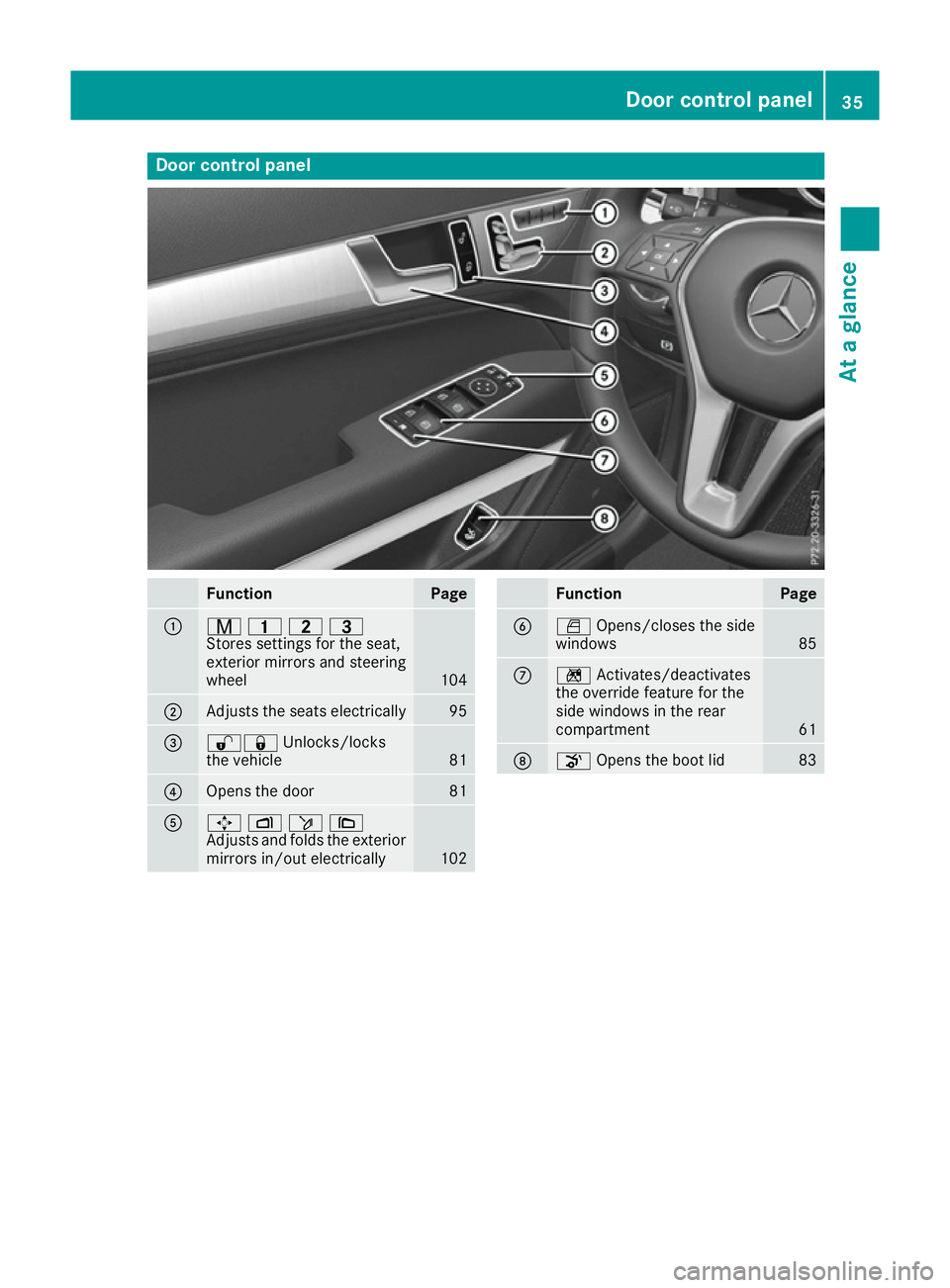
Door control panel
Function Page
:
r
45=
Stores settings for the seat,
exterior mirrors and steering
wheel 104
;
Adjusts the seats electrically 95
=
%&
Unlocks/locks
the vehicle 81
?
Opens the door 81
A
7
Zö\
Adjusts and folds the exterior
mirrors in/out electrically 102 Function Page
B
W
Opens/closes the side
windows 85
C
n
Activates/deactivates
the override feature for the
side windows in the rear
compartment 61
D
o
Opens the boot lid 83Door control panel
35At a glance
Page 75 of 345

A visual and audible alarm is triggered if the
alarm system is primed and you open:
R a door
R the vehicle with the emergency key element
R the boot lid
R the bonnet
X To stop the alarm with the key: press the
% or& button on the key.
The alarm stops.
or X Remove the Start/Stop button from the igni-
tion lock.
X Insert the key into the ignition lock.
The alarm stops.
X To stop the alarm using KEYLESS-GO:
grasp the outside door handle. The key must
be outside the vehicle.
The alarm stops.
or X Press the Start/Stop button on the dash-
board. The key must be inside the vehicle.
The alarm stops.
The alarm does not switch off, even if you close the open door that has triggered it, for example. Tow-away protection
Function An audible and visual alarm is triggered if your
vehicle's angle of inclination is altered while
tow-away protection is primed. This can occur if the vehicle is jacked up on one side, for exam-
ple.
Priming X
Make sure that:
R the doors are closed
R the boot lid is closed
Only then is tow-away protection primed.
X Lock the vehicle with the key or KEYLESS-GO.
Tow-away protection is primed after approx-
imately 30 seconds. Switching off X
Unlock the vehicle with the key or KEYLESS-
GO.
or X Insert the key into the ignition lock.
Tow-away protection is switched off automat-
ically.
Deactivating X
Remove the key from the ignition lock.
X Press button :.
Indicator lamp ;lights up briefly.
X Lock the vehicle with the key or KEYLESS-GO.
Tow-away protection is deactivated.
Tow-away protection remains deactivated until:
R the vehicle is unlocked again and
R a door is opened and closed again and
R the vehicle is locked again
To prevent a false alarm, deactivate tow-away
protection if you lock your vehicle and it:
R is being transported
R is being loaded onto a ferry or car transporter,
for example
R is parked on a movable surface, e.g. in a split-
level garage Interior motion sensor
Function When the interior motion sensor is primed, a
visual and audible alarm is triggered if move-
ment is detected in the vehicle interior. This can
occur if someone reaches into the vehicle inte-
rior, for example. 72
Protection against theftSafety
Page 76 of 345

Priming
X
Make sure that:
R the side windows are closed
R the panorama sliding sunroof is closed
This will prevent false alarms.
X Make sure that:
R the doors are closed
R the boot lid is closed
Only then is the interior motion sensor
primed.
X Lock the vehicle with the key or KEYLESS-GO.
The interior motion sensor is primed after
approximately 30 seconds.
Switching off X
Unlock the vehicle with the key or KEYLESS-
GO.
or X Insert the key into the ignition lock.
The interior motion sensor is automatically
switched off.
Deactivating X
Remove the key from the ignition lock.
X Press button :.
Indicator lamp ;flashes several times in
rapid succession.
X Lock the vehicle with the key or KEYLESS-GO.
The interior motion sensor is deactivated.
The interior motion sensor remains deactivated until:
R the vehicle is unlocked again and
R a door is opened and closed again and
R the vehicle is locked again To prevent a false alarm, deactivate the interior
motion sensor if you lock your vehicle and:
R people or animals remain in the vehicle
R the panorama sliding sunroof remains open
R the side windows remain open
i UK only:
your vehicle is equipped with a
double-lock function. The doors cannot be
opened from the inside if the vehicle has been
locked with the key or with KEYLESS-GO
(Y page 81). Deactivate the interior motion
sensor before you lock the vehicle. The doors
can then be opened from the inside after the
vehicle has been locked from the outside.
Observe the "Important safety notes"
(Y page 80). Protection against theft
73Safety Z
Page 77 of 345

Key
Important safety notes
United Kingdom only: G
WARNING
When the double locks are activated, the
doors can no longer be opened from the
inside. People in the vehicle can no longer get out, e.g. in hazardous situations. There is a
risk of injury.
Therefore, do not leave any people unsuper-
vised in the vehicle, particularly children, eld-
erly people or people in need of special assis-
tance. Do not activate the double lock when
people are in the vehicle.
If the vehicle has been locked from the outside, the double lock function is activated as stand-
ard. It is then not possible to open the doors
from inside the vehicle. You can deactivate the
double lock function by deactivating the interior
motion sensor (Y page 73). The doors can then
be opened from the inside after the vehicle has
been locked from the outside. The anti-theft
alarm system is triggered if the door is opened
from the inside. Switch off the alarm
(Y page 71).
All countries: G
WARNING
If children are left unsupervised in the vehicle, they could:
R open doors, thereby endangering other per-
sons or road users
R get out and be struck by oncoming traffic
R operate vehicle equipment and become
trapped, for example
In addition, the children could also set the
vehicle in motion, for example, if they:
R release the parking brake
R shift the automatic transmission out of park
position P or shift manual transmission into
neutral
R start the engine
There is a risk of an accident and injury. When leaving the vehicle, always take the key
with you and lock the vehicle. Never leave
children and animals unattended in the vehi-
cle. Keep the keys out of the reach of children. G
WARNING
If you attach heavy or large objects to the key, the key could be unintentionally turned in the
ignition lock. This could cause the engine to
be switched off. There is a risk of an accident.
Do not attach any heavy or large objects to the
key. Remove any bulky keyrings before insert-
ing the key into the ignition lock.
! Keep the key away from strong magnetic
fields. Otherwise, the remote control function could be affected.
Strong magnetic fields can occur in the vicin-
ity of powerful electrical installations.
Do not keep the key: R with electronic devices, e.g. a mobile phone
or another key
R with metallic objects, e.g. coins or metal film
R inside metallic objects, e.g. a metal case
This can affect the key's functionality. Key functions
:
& Locks the vehicle
; F Unlocks the boot lid
= % Unlocks the vehicle
X To unlock centrally: press the%button.
If you do not open the vehicle within approx-
imately 40 seconds of unlocking:
R the vehicle locks again
R protection against theft is reactivated 74
KeyOpening and closing