2015 MERCEDES-BENZ CLS-Class ignition
[x] Cancel search: ignitionPage 93 of 398

X
To unlock a front door: pull door han-
dle ;.
Locking knob :pops up.
The door is unlocked and can be opened.
X To open a front door: pull door handle;.
X To unlock a rear door: pull up locking
knob :.
The door is unlocked and can be opened.
X To open a rear door: pull door handle;. Centrally locking and unlocking the
vehicle from the inside
You can centrally lock or unlock the vehicle
from the inside. X
To unlock: press button :.
X To lock: press button ;.
If all the doors are closed, the vehicle locks.
Meanwhile, the fuel filler flap will not be
locked or unlocked. If the vehicle has been locked from the out-
side, it cannot be centrally unlocked from the
inside.
You can open a door from inside the vehicle
even if it has been locked.
You can only open the rear doors from inside
the vehicle if they are not secured by the
child-proof locks (Y page 69).
If a locked door is opened from the inside, the previous unlock status of the vehicle will be
taken into consideration if:
R the vehicle was locked using the locking
button for the central locking, or
R if the vehicle was locked automatically
The vehicle will be fully unlocked if it had pre- viously been fully unlocked. If only the driver's
door had been previously unlocked, only the
door which has been opened from the inside
is unlocked. Automatic locking feature
X
To deactivate: press and hold button :
for about five seconds until a tone sounds.
X To activate: press and hold button ;for
about five seconds until a tone sounds.
i If you press one of the two buttons and do
not hear a tone, the relevant setting has
already been selected.
The vehicle is locked automatically when the
ignition is switched on and the wheels are
turning. Doors
91Opening and closing Z
Page 100 of 398

X
Turn the SmartKey to position 1or 2in the
ignition lock.
X To open manually: press and hold the cor-
responding switch.
X To open fully: press the switch beyond the
point of resistance and release it.
Automatic operation is started.
X To close manually: pull and hold the cor-
responding switch.
X To close fully: pull the corresponding
switch beyond the pressure point.
Automatic operation is started.
X To interrupt automatic operation:
press/pull the corresponding switch again.
i If you press/pull the switch beyond the
point of resistance, automatic operation is
started in the corresponding direction. You
can stop automatic operation by pressing/ pulling the switch again.
i You can continue to operate the side win-
dows after you switch off the engine or
remove the SmartKey. This function is
available for up to five minutes or until the
driver's or front-passenger door is opened.
i When the override feature for the side
windows is activated (Y page 69), the side
windows cannot be operated from the rear. Convenience opening
General notes You can ventilate the vehicle before you start
driving. To do this, the SmartKey is used to
carry out the following functions simultane-
ously:
R unlock the vehicle
R open the side windows
R open the sliding sunroof
R switch on the seat ventilation for the driv-
er's seat
i The convenience opening feature can
only be operated using the SmartKey. The SmartKey must be in close proximity to the
vehicle.
i The "convenience opening" feature is also
available on unlocked vehicles.
Convenience opening X
Press and hold the %button until the
side windows and the sliding sunroof are in
the desired position.
X To interrupt convenience opening:
release the %button. Convenience closing feature
Important safety notes Information on the side window reversing fea-
ture (Y page 97). G
WARNING
When the convenience closing feature is oper- ating, parts of the body could become trapped
in the closing area of the side window and the
sliding sunroof. There is a risk of injury.
Observe the complete closing procedure
when the convenience closing feature is oper-
ating. Make sure that no body parts are in
close proximity during the closing procedure.
Proceed as follows if someone is trapped:
With the SmartKey:
X Release the &button.
X Press and hold the %button until the
side windows and the sliding sunroof or the panorama roof with power tilt/sliding
panel open again.
Using KEYLESS-GO: X Release the sensor surface on the door
handle.
X Pull the door handle immediately and hold
it.
The side windows and the sliding sunroof or
the panorama roof with power tilt/sliding
panel open. 98
Side windowsOpening and closing
Page 101 of 398

General notes
When you lock the vehicle, you can simulta-
neously:
R close the side windows
R close the sliding sunroof
Using the SmartKey X
Vehicles without KEYLESS-GO: point the
tip of the SmartKey at the door handle on
the driver's door.
X Vehicles with KEYLESS-GO: the Smart-
Key must be in close proximity to the vehi- cle.
X Press and hold the &button until the
side windows and the sliding sunroof are
fully closed.
X Press and hold the &button until the
side windows are fully closed.
X Make sure that all the side windows and the
sliding sunroof are closed.
X Make sure that all the side windows are
closed.
X To interrupt convenience closing:
release the &button.
Using KEYLESS-GO The driver's door and the door at which the
handle is used, must both be closed. The
SmartKey must be outside the vehicle. The
gap between the SmartKey and the corre-
sponding door handle should not be greater
than 3 ft (1 m). X
Touch recessed sensor surface :on the
door handle until the side windows and the sliding sunroof are fully closed.
X Touch recessed sensor surface :on the
door handle until the side windows are fully
closed.
i Make sure you only touch recessed sen-
sor surface :.
X Make sure that all the side windows and the
sliding sunroof are closed.
X Make sure that all the side windows are
closed.
X To interrupt convenience closing:
release recessed sensor surface :on the
door handle. Resetting the side windows
If a side window can no longer be closed fully, you must reset it.
X Close all the doors.
X Turn the SmartKey to position 1or 2in the
ignition lock.
X Pull the corresponding switch on the door
control panel until the side window is com- pletely closed (Y page 97).
X Hold the switch for an additional second.
If the side window opens again slightly:
X Immediately pull the corresponding switch
on the door control panel until the side win-
dow is completely closed (Y page 97).
X Hold the switch for an additional second.
X If the corresponding side window remains
closed after the button has been released,
the side window has been reset correctly. If
this is not the case, repeat the steps aboveagain. Side windows
99Opening and closing Z
Page 103 of 398

Do not allow anything to protrude from the
sliding sunroof. Otherwise, the seals could
be damaged.
! The weather can change abruptly. It could
start to rain or snow. Make sure that the
sliding sunroof is closed when you leave the
vehicle. The vehicle electronics can be
damaged if water enters the vehicle inte-
rior.
i Resonance noises can occur in addition to
the usual airflow noises when the sliding
sunroof is open. They are caused by minor
pressure fluctuations in the vehicle interior.
Change the position of the sliding sunroof
or open a side window slightly to reduce or
eliminate these noises. Sliding sunroof reversing feature
The sliding sunroof is equipped with an auto-
matic reversing feature. If a solid object
blocks or restricts the sliding sunroof during
the closing process, the sliding sunroof opens again automatically. However, the automatic
reversing feature is only an aid and does not
relieve you of the responsibility of paying
attention when closing the sliding sunroof. G
WARNING
The reversing feature does not react:
R to soft, light and thin objects, e.g. small fin-
gers
R over the last 1/6 in (4 mm) of the closing
movement
R during resetting
R when closing the sliding sunroof again man-
ually immediately after automatic reversing
This means that the reversing feature cannot
prevent someone being trapped in these sit-
uations. There is a risk of injury.
Make sure that no body parts are in close
proximity during the closing procedure. If somebody becomes trapped:
R release the switch immediately, or
R press the switch in any direction during the
automatic closing process
The closing process is stopped. Operating the sliding sunroof
Opening and closing Overhead control panel
:
To raise
; To open
= To close/lower
X Turn the SmartKey to position 1or 2in the
ignition lock.
X Press or pull the 3switch in the corre-
sponding direction.
i If you press the
3switch beyond the
point of resistance, an automatic opening/ closing process is started in the corre-
sponding direction. You can stop automatic
operation by pressing/pulling the switch
again.
i The automatic opening and raising fea-
ture is available only when the sliding sun-
roof is closed.
The sun protection cover automatically opens
along with the sliding sunroof. You can open
or close the sun protection cover manually
when the sliding sunroof is raised or closed.
i You can continue to operate the sliding
sunroof after switching off the engine or Sliding sunroof
101Opening and closing Z
Page 104 of 398

removing the SmartKey from the ignition
lock. This function remains active for five
minutes or until you open a front door.
Resetting !
If the sliding sunroof still cannot be
opened or closed fully after resetting, con- tact a qualified specialist workshop.
Reset the sliding sunroof if it does not move
smoothly. X Turn the SmartKey to position 2in the igni-
tion lock.
X Raise the sliding sunroof fully at the rear
(Y page 101).
X Keep the 3switch pressed for another
second.
X Make sure that the sliding sunroof can be
fully opened and closed again
(Y page 101).
X If this is not the case, repeat the steps
above again. 102
Sliding sunroofOpening and closing
Page 109 of 398

The seat belt should:
R fit snugly across your body
R be routed across the middle of your shoul-
der
R be routed in your pelvic area across the hip
joints
X Before starting off, adjust the rear-view mir-
ror and the exterior mirrors in such a way
that you have a good view of road and traf- fic conditions (Y page 116).
X Vehicles with a memory function: save
the seat, steering wheel and exterior mirror settings with the memory function
(Y page 119). Seats
Important safety notes
G
WARNING
Children could become trapped if they adjust the seats, particularly when unattended.
There is a risk of injury.
When leaving the vehicle, always take the
SmartKey with you and lock the vehicle. Never leave children unsupervised in the vehicle.
The seats can still be adjusted when there is
no SmartKey in the ignition lock. G
WARNING
If the head restraints are not installed or not
adjusted correctly, they cannot provide pro-
tection as intended. There is an increased risk
of injury in the head and neck area, e.g. in the event of an accident or when braking.
Always drive with the head restraints instal-
led. Before driving off, make sure for every
vehicle occupant that the center of the head
restraint supports the back of the head at
about eye level.
Observe the safety notes on "Air bags"
(Y page 50) and "Children in the Vehicle"
(Y page 64). G
WARNING
You could lose control of your vehicle if you do the following while driving:
R adjust the driver's seat, head restraint,
steering wheel or mirrors
R fasten the seat belt
There is a risk of an accident.
Adjust the driver's seat, head restraint, steer-
ing wheel and mirror and fasten your seat belt before starting the engine. G
WARNING
If you adjust the seat height carelessly, you or other vehicle occupants could be trapped andthereby injured. Children in particular could
accidentally press the electrical seat adjust-
ment buttons and become trapped. There is a
risk of injury.
While moving the seats, make sure that your
hands or other body parts do not get under the
lever assembly of the seat adjustment sys-
tem. G
WARNING
When you adjust a seat, you or other vehicle
occupants could become trapped, e.g. on the seat guide rail. There is a risk of injury.
Make sure when adjusting a seat that no one
has any body parts in the sweep of the seat.
! To avoid damage to the seats and the seat
heating, observe the following information:
R keep liquids from spilling on the seats. If
liquid is spilled on the seats, dry them as
soon as possible.
R if the seat covers are damp or wet, do not
switch on the seat heating. The seat
heating should also not be used to dry
the seats.
R clean the seat covers as recommended;
see "Interior care".
R do not transport heavy loads on the
seats. Do not place sharp objects on the
seat cushions, e.g. knives, nails or tools. Seats
107Seats, steering wheel and mirrors Z
Page 113 of 398
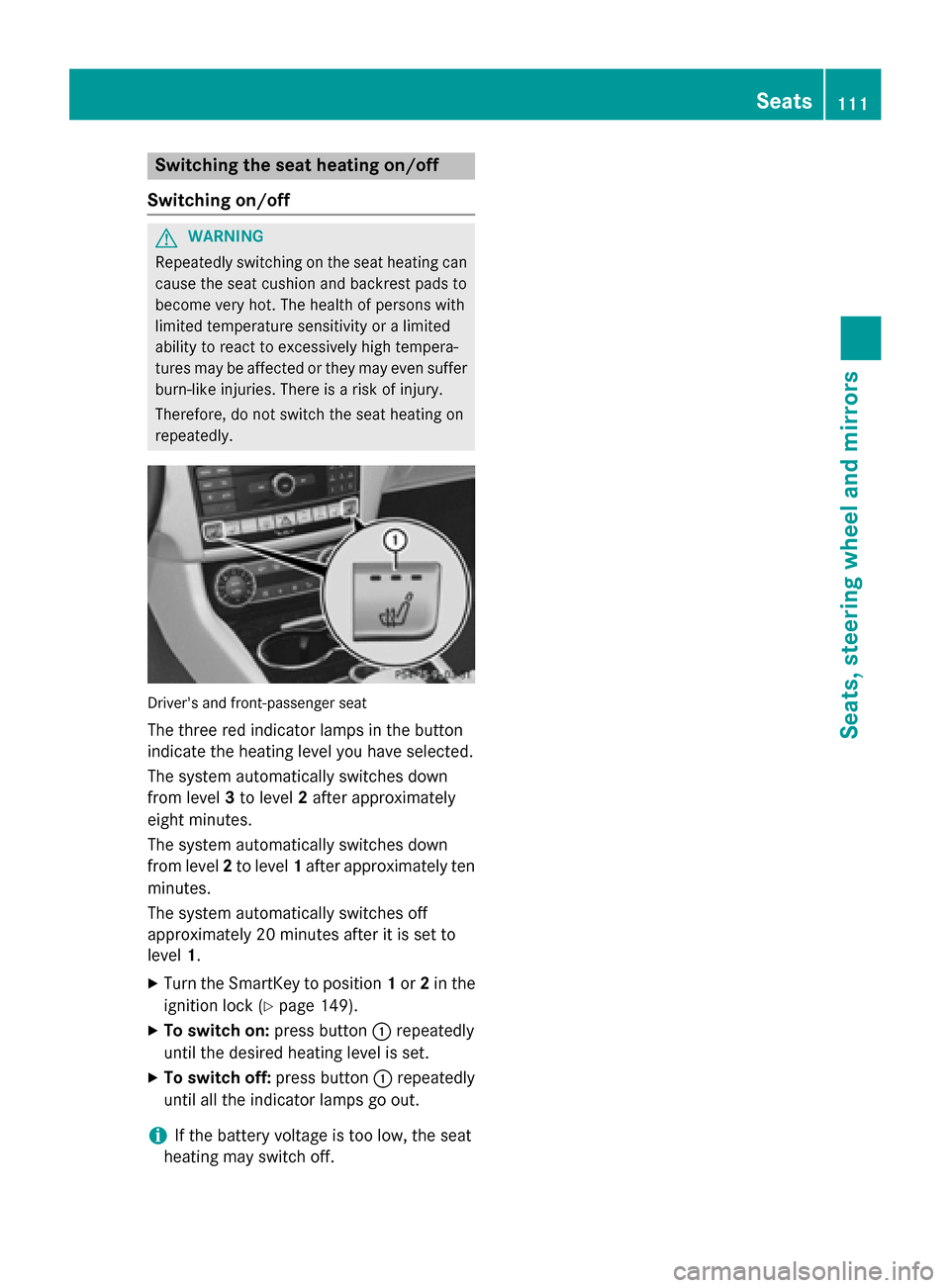
Switching the seat heating on/off
Switching on/off G
WARNING
Repeatedly switching on the seat heating can
cause the seat cushion and backrest pads to
become very hot. The health of persons with
limited temperature sensitivity or a limited
ability to react to excessively high tempera-
tures may be affected or they may even suffer burn-like injuries. There is a risk of injury.
Therefore, do not switch the seat heating on
repeatedly. Driver's and front-passenger seat
The three red indicator lamps in the button
indicate the heating level you have selected.
The system automatically switches down
from level 3to level 2after approximately
eight minutes.
The system automatically switches down
from level 2to level 1after approximately ten
minutes.
The system automatically switches off
approximately 20 minutes after it is set to
level 1.
X Turn the SmartKey to position 1or 2in the
ignition lock (Y page 149).
X To switch on: press button:repeatedly
until the desired heating level is set.
X To switch off: press button:repeatedly
until all the indicator lamps go out.
i If the battery voltage is too low, the seat
heating may switch off. Seats
111Seats, steering wheel and mirrors Z
Page 114 of 398

Problems with the seat heating
Problem
Possible causes/consequences and
M
MSolutions The seat heating has
switched off prema-
turely or cannot be
switched on. The on-board voltage is too low because too many electrical con-
sumers are switched on.
X Switch off electrical consumers that you do not need, such as
the rear window defroster or interior lighting.
Once the battery is sufficiently charged, the seat heating will
switch back on automatically. Switching the seat ventilation on/off
Switching on/off Driver's and front-passenger seat
The three blue indicator lamps in the buttons
indicate the ventilation level you have selec-
ted.
X Turn the SmartKey to position 1or 2in the
ignition lock (Y page 149).
X To switch on: press button:repeatedly
until the desired ventilation level is set.
X To switch off: press button:repeatedly
until all the indicator lamps go out.
i If the battery voltage is too low, the seat
ventilation may switch off.
i You can open the side windows and the
sliding sunroof using the "Convenience
opening" feature (Y page 98). The seat ven-
tilation of the driver's seat automatically
switches to the highest level. 112
SeatsSeats, steering wheel and mirrors